
A program design guide for incident response leads who must align cloud operations with NIST SP 800-61r3. It draws on the NIST profile, CSF 2.0 and AWS, Microsoft and Google documentation reviewed in October 2026, and gives priority counts, a Function-to-evidence matrix, provider mapping checks and an update order.
At a glance
Key findings
- SP 800-61r3, published April 3, 2025, replaces Revision 2's four-phase incident handling guide with a CSF 2.0 Community Profile that rates each CSF outcome High, Medium or Low for incident response. [1][2]
- The profile has a row for each of CSF 2.0's 6 Functions, 22 Categories and 106 Subcategories; all 32 Detect, Respond and Recover Subcategories are High, while no Govern Subcategory is. [1][3]
- Revision 3 asks that provider responsibilities, including authority to act and restrictions, be defined in contracts, and it puts external service provider activity inside the Detect scope. [1]
- AWS and Microsoft incident response documents still describe Revision 2 phases, and the Microsoft cloud security benchmark v2 lists CSF 1.1 identifiers under a NIST CSF v2.0 label. [5][7][8][9][4]
- Default windows of 90 days for CloudTrail event history and the Azure Activity log, and Data Access logs that Google leaves disabled by default, decide whether the evidence rows can be met. [11][13][14]
What Revision 3 replaced
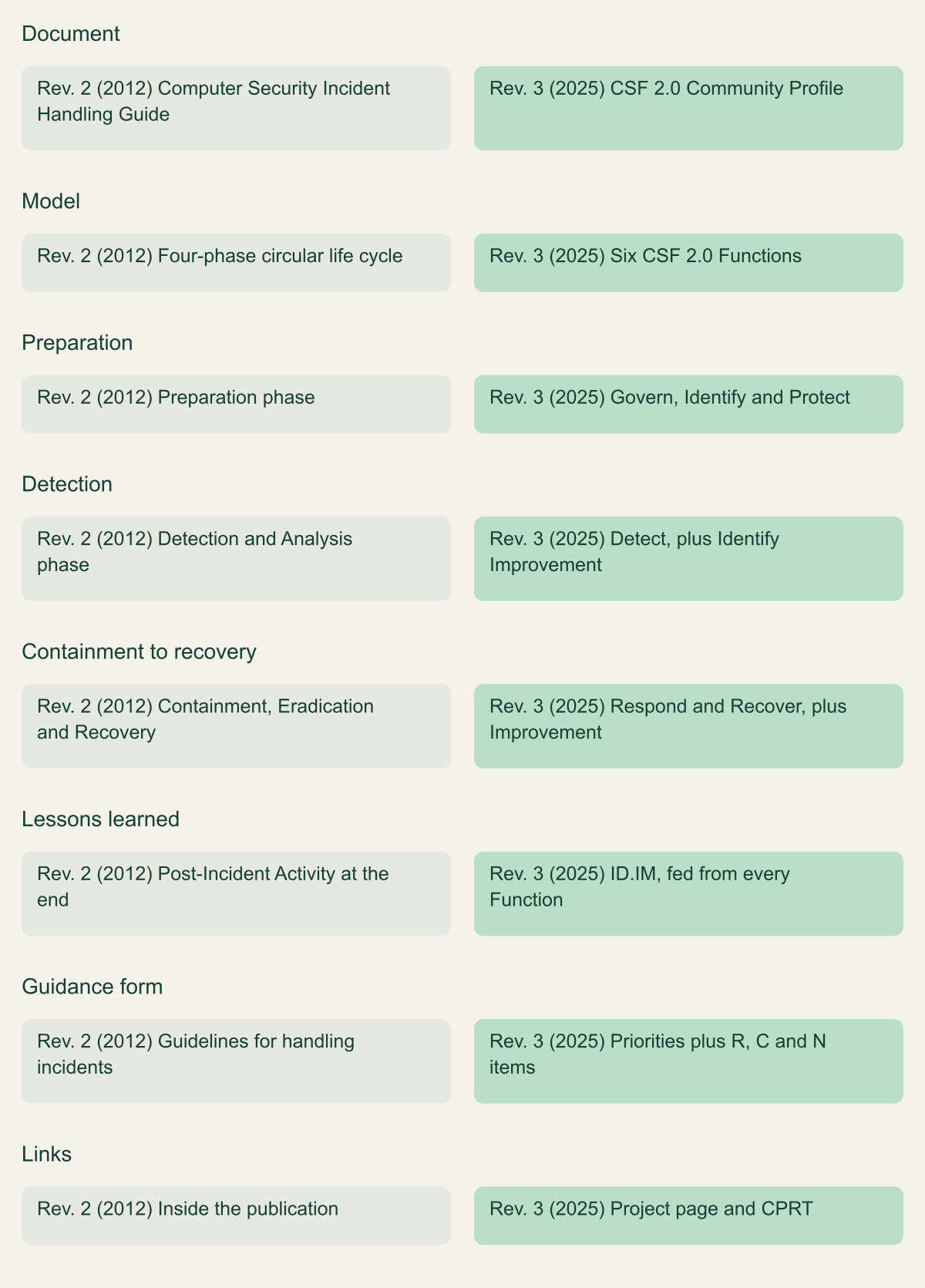
NIST published SP 800-61 Revision 3 on April 3, 2025, and it supersedes Revision 2, the Computer Security Incident Handling Guide from August 2012. [1][2] The new title states the change: Incident Response Recommendations and Considerations for Cybersecurity Risk Management, subtitled A CSF 2.0 Community Profile. Revision 2 told a team how to handle an incident through a four-phase loop. Revision 3 does not. It lists the CSF 2.0 outcomes that matter for incident response, rates each one High, Medium or Low, and attaches recommendations, considerations and notes to many of them. [1]
For a cloud incident program, the practical answer is to stop treating the plan as a phase-by-phase runbook and organize it around CSF identifiers that a provider contract, a log source and a playbook can each point to. NIST gives its reason for dropping the loop: when Revision 2 was written, incidents were relatively rare, narrow in scope and usually handled within a day or two, while today recovery often takes weeks or months and lessons should be shared as soon as they are found rather than after recovery ends. [1] Cloud incidents fit that description because a provider, an identity system and several accounts, subscriptions or projects are usually involved at once.
Three parts of Revision 3 need direct attention from cloud teams. The roles section writes in the shared responsibility model: responsibilities transferred to a cloud or internet service provider should be defined in a contract, including information flows, coordination, authority to act and restrictions on what the provider may do. [1] The Detect Function asks for monitoring of external service provider activity, including deviations by cloud-based services. [1] And NIST dropped detailed procedures, moved most hyperlinks to its Incident Response project page and points readers to mappings in the Cybersecurity and Privacy Reference Tool (CPRT), so the document names few technologies and no provider services. [1][2] The cloud specifics are left to the reader, and the rest of this guide supplies them.
Revision 3 also says that organizations should use whichever life cycle model fits them. [1] Nothing obliges a team to discard a working Revision 2 plan. What changes is the reference system. Auditors, customers and providers can now cite profile rows such as RS.MA-02 or GV.OC-03.R1, and a plan that cannot answer in those terms is harder to compare, test or hand to a new responder.
From a handling loop to a risk management profile
Revision 3 keeps the work but reorganizes it under six CSF 2.0 Functions. [1]

Source. NIST SP 800-61r3, Section 1.1, Section 2.1 (Table 1), Section 3 and Appendix C. [1]
Method. Rows transcribed and condensed from the cited sections. Table 1 of Revision 3 supplies the phase to Function mapping.
Accessible table and figure data
| Aspect | Rev. 2 (2012) | Rev. 3 (2025) |
|---|---|---|
| Document | Computer Security Incident Handling Guide | CSF 2.0 Community Profile |
| Model | Four-phase circular life cycle | Six CSF 2.0 Functions |
| Preparation | Preparation phase | Govern, Identify and Protect |
| Detection | Detection and Analysis phase | Detect, plus Identify Improvement |
| Containment to recovery | Containment, Eradication and Recovery | Respond and Recover, plus Improvement |
| Lessons learned | Post-Incident Activity at the end | ID.IM, fed from every Function |
| Guidance form | Guidelines for handling incidents | Priorities plus R, C and N items |
| Links | Inside the publication | Project page and CPRT |
| Aspect | Rev. 2 (2012) | Rev. 3 (2025) |
|---|---|---|
| Document | Computer Security Incident Handling Guide | CSF 2.0 Community Profile |
| Model | Four-phase circular life cycle | Six CSF 2.0 Functions |
| Preparation | Preparation phase | Govern, Identify and Protect |
| Detection | Detection and Analysis phase | Detect, plus Identify Improvement |
| Containment to recovery | Containment, Eradication and Recovery | Respond and Recover, plus Improvement |
| Lessons learned | Post-Incident Activity at the end | ID.IM, fed from every Function |
| Guidance form | Guidelines for handling incidents | Priorities plus R, C and N items |
| Links | Inside the publication | Project page and CPRT |
How the CSF 2.0 profile is organized
Section 3 of Revision 3 is the profile, split into two tables. Table 2 covers Preparation (Govern, Identify and Protect) and Lessons Learned (the Improvement Category, ID.IM). Table 3 covers Incident Response (Detect, Respond and Recover). Every CSF 2.0 Function, Category and Subcategory has its own row. [1] Counting the Core in Appendix A of the CSF 2.0 publication gives 6 Functions, 22 Categories and 106 Subcategories. [3] The profile tables carry exactly the same 106 Subcategory identifiers, so the profile has 134 rows. Gaps in the numbering, such as the absent ID.AM-06, are deliberate; CSF 2.0 says they mark CSF 1.1 Subcategories that were relocated. [3]
Each row carries a priority. High means the outcome functions as a core incident response activity for most organizations, Medium means it directly supports incident response, and Low means it supports incident response indirectly. [1] The last column holds items labeled R (a recommendation the organization should follow), C (a consideration) and N (a note). Appending an item to its row identifier gives a unique reference, so GV.OC-03.R1 is the first recommendation for GV.OC-03, and items written at Function or Category level apply to everything beneath them. [1]
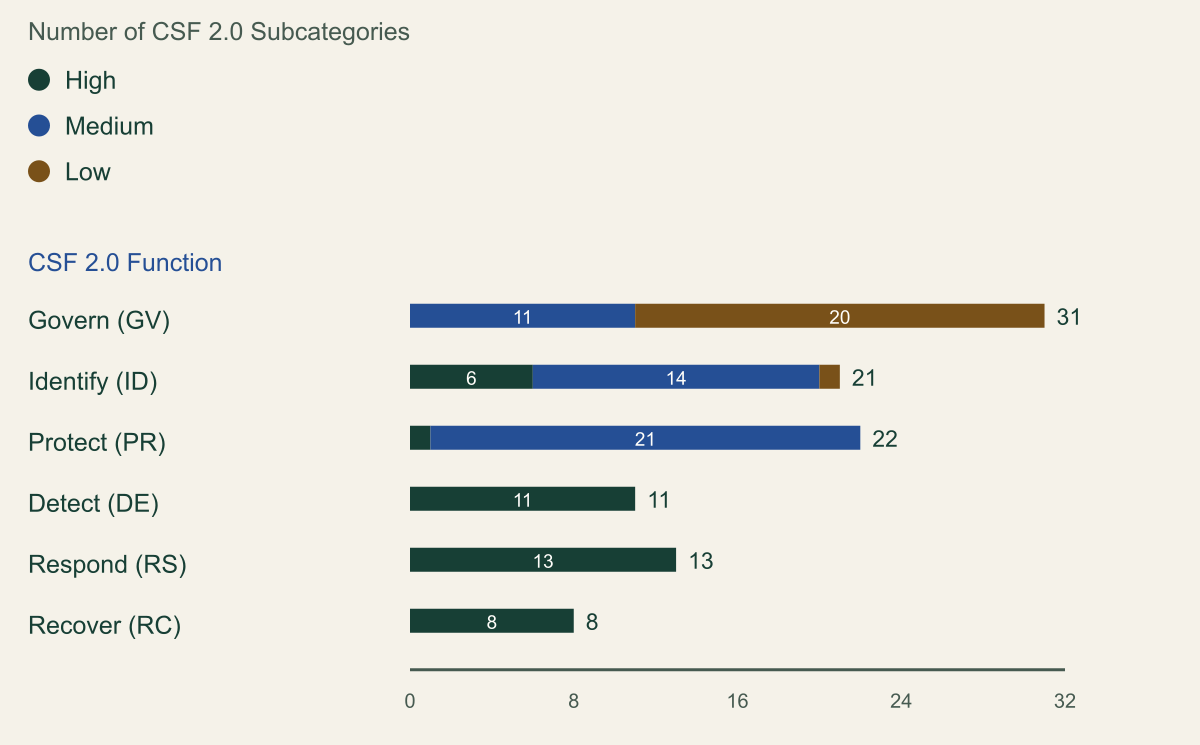
The priorities are uneven in a way that shapes planning. At Subcategory level, all 32 rows in Detect, Respond and Recover are High. Govern has no High Subcategory at all: 11 are Medium and 20 are Low, although the Policy Category itself, GV.PO, is rated High with a single recommendation that cybersecurity policy include an incident response policy. [1] Identify has six High Subcategories, three in risk assessment and three in Improvement, and Protect has one, backups under PR.DS-11. [1] NIST adds that a low rating does not make an outcome unnecessary; it means the outcome sits outside the direct scope of responding to incidents. [1]
Two cautions keep these counts honest. The ratings are NIST's starting point, and the profile explicitly invites organizations to change them to fit their own priorities. [1] And identifiers changed between framework versions. CSF 1.1 had Categories such as Response Planning (RS.RP) and Improvements (RS.IM) [4] that do not exist in the CSF 2.0 Core. [3] Any mapping written before 2024 needs to be rechecked against CSWP 29 rather than copied forward.
Revision 3 rates every response Subcategory High
All 32 Detect, Respond and Recover Subcategories are High; Govern has none. [1][3]

Source. Subcategory priorities counted from NIST SP 800-61r3 Tables 2 and 3; Category and Subcategory totals counted from NIST CSWP 29 Appendix A. [1][3]
Method. Each Subcategory row in Tables 2 and 3 was counted once by its priority column. Function and Category rows are excluded from the bars; Category counts appear in the table only. Per-Function totals (31, 21, 22, 11, 13, 8) and the overall total of 106 match the Subcategories in CSWP 29 Appendix A.
Accessible table and figure data
| Function | Categories | High | Medium | Low |
|---|---|---|---|---|
| Govern (GV) | 6 | 0 | 11 | 20 |
| Identify (ID) | 3 | 6 | 14 | 1 |
| Protect (PR) | 5 | 1 | 21 | 0 |
| Detect (DE) | 2 | 11 | 0 | 0 |
| Respond (RS) | 4 | 13 | 0 | 0 |
| Recover (RC) | 2 | 8 | 0 | 0 |
| Function | Categories | High | Medium | Low |
|---|---|---|---|---|
| Govern (GV) | 6 | 0 | 11 | 20 |
| Identify (ID) | 3 | 6 | 14 | 1 |
| Protect (PR) | 5 | 1 | 21 | 0 |
| Detect (DE) | 2 | 11 | 0 | 0 |
| Respond (RS) | 4 | 13 | 0 | 0 |
| Recover (RC) | 2 | 8 | 0 | 0 |
Govern: decide who may act in which account
The Govern rows that touch incident response deal with obligations and authority, and in cloud environments both cross a contract boundary. GV.OC-03.R1 says cybersecurity requirements should include every requirement related to incident notification, data breach reporting and other parts of incident response. [1] GV.OC-05.N1 names cloud-based hosting providers and managed service providers as dependencies whose understanding helps prioritize response and recovery. [1] Together these two rows become a register that a cloud program can keep current.
GV.RR-02 asks that all incident response roles be documented in policy (R1) and that every person or party hold the authority its responsibilities require (R2). [1] Section 2.2 extends this to providers: the incident response team should know the division of responsibilities, including authority to act for the organization and restrictions such as whether the provider may immediately deactivate services to contain an incident. [1] AWS Security Incident Response is a concrete case. When pre-authorized, its engineers run containment on the customer's behalf through runbooks for Amazon S3 buckets, Amazon EC2 instances and IAM principals; without pre-authorization they give manual guidance. [5] Whether to grant that authority, for which accounts and with what notice to the account owner, is a Govern decision to make and record before an incident, not during one.
The same service shows why the division of labor has to be written down. AWS lists activities outside its scope, among them forensic disk or endpoint analysis (its engineers perform log-based investigation only), legal and regulatory guidance on breach notification, recovery and remediation execution, threat hunting and attribution. [5] It also lists customer responsibilities, including keeping a security contact current and enabling AWS CloudTrail, Amazon VPC Flow Logs and other relevant logging. [5] A plan that names a provider service as its incident response partner without naming who covers those gaps meets only half of GV.RR-02.
Supplier rows complete the Govern work. GV.SC-05.R1 says supply chain requirements should include incident disclosure and information sharing, and GV.SC-08 asks that relevant suppliers take part in incident planning, response and recovery. [1] GV.RM-06.N2 notes that a standardized risk method can set the criteria for escalating or elevating incident response, [1] which is where severity rules belong, rather than scattered across individual playbooks.
- Each provider and SaaS dependency, with the accounts, subscriptions or projects it touches.
- The notification terms in each contract and the reporting obligations they feed.
- Every pre-authorization granted to provider responders and the actions it covers.
- The security contact registered with each provider and the team that watches it.
Identify and Protect as preparation
Revision 3 places Govern, Identify and Protect at the bottom of its model as preparation: broad risk management work that supports incident response without being part of it. [1] Most of those rows are Medium or Low. The High rows in risk assessment are receiving cyber threat intelligence (ID.RA-02), using threats, vulnerabilities, likelihoods and impacts to understand inherent risk (ID.RA-05) and choosing, tracking and communicating risk responses (ID.RA-06). [1] The remaining exceptions show where preparation pays off directly during a cloud incident.
Inventories come first. ID.AM-01, ID.AM-02 and ID.AM-04 each recommend current, automatically updated inventories of hardware, software, services, systems and supplier services, used for finding vulnerabilities, detecting adverse events and identifying shadow IT. [1] ID.AM-07.R1 asks for data inventories with classifications, owners and logical and physical locations, because they tell responders what data may have been involved. [1] In cloud terms the inventory that matters most is the list of accounts, subscriptions and projects, who owns each one and what each holds. Microsoft's Azure guidance makes a related recommendation: tag resources with criticality levels and use them in automated severity scoring so incidents touching regulated data or critical systems escalate on their own. [8]
Improvement is the hinge of the model. In Revision 3's life cycle figure, lessons from every Function flow into ID.IM and back out to all of them, replacing the single post-incident phase at the end of the old loop. [1] Three Improvement Subcategories are High: improvements identified from tests and exercises (ID.IM-02), from executing operational processes including incident response (ID.IM-03), and the upkeep of incident response and related plans (ID.IM-04). [1] ID.IM-04 carries four recommendations, among them synchronizing business continuity plans with incident response plans and reviewing plans periodically or whenever a significant improvement is needed. [1] Microsoft recommends quarterly tabletop exercises with scenarios such as ransomware, data exfiltration and insider threats; [8] NIST sets no frequency.
Protect has one High row, PR.DS-11: backups created, protected, maintained and tested, with a note that backups matter for recovery when data integrity or availability is affected. [1] The log row, PR.PS-04, is Medium, though its note calls logs particularly important for recording and preserving information vital to detection, response and recovery. [1] That Medium rating understates the cloud case, where the control plane log may be the only record of what an attacker did with stolen credentials. A team whose incidents are mostly identity and API driven has good reason to raise PR.PS-04 to High in its own target profile, which is the kind of customization the profile invites. [1]
Detect: provider activity is in scope
The Detect Function covers the monitoring and analysis that find potentially adverse events and, from them, incidents. [1] Its Category-level recommendation for continuous monitoring lists the assets to watch at all times, and the list ends with external service provider activities. [1] DE.CM-06.R1 makes this specific: monitor remote and on-site administration that providers perform on organizational systems, and deviations from expected behavior by cloud-based services, internet service providers and other providers. [1]
In cloud, DE.CM-06 has two halves. One is what the provider does inside your environment, which appears in your own control plane logs when provider staff or provider-run automation act through a role you granted. The other is what the provider tells you. Google Cloud sends data incident notifications through Essential Contacts and asks customers to configure an incident response group address for the Security or All category; notices typically name the affected services and projects, describe the issue and give the time it was detected. [10] Microsoft asks customers to configure security contacts in Microsoft Defender for Cloud so it can reach them during incidents that need collaboration. [8] AWS Security Incident Response notifies configured stakeholders automatically when it opens a proactive case. [5] Each is a detection input that lands in a mailbox unless someone routes it into the same queue as other alerts, which is what DE.AE-06.R3 suggests when it recommends automatically creating and assigning tickets for certain alerts. [1]
The analysis rows read like a SIEM design brief. DE.AE-02 recommends tools such as SIEM and SOAR to monitor log events continuously, plus manual review for technologies automation cannot cover; DE.AE-03.R1 recommends constantly transferring log data to a relatively small number of log servers; DE.AE-07 asks for threat intelligence and asset context inside the analysis. [1] Microsoft's guidance follows the same pattern: Defender XDR correlates alerts from endpoints, identities, email and cloud apps into incidents, and Microsoft Sentinel provides SIEM and SOAR with analytics rules that create incidents automatically. [8] On AWS, Security Incident Response generates no findings of its own. It ingests findings from Amazon GuardDuty and from third-party tools integrated through AWS Security Hub CSPM, triages them, and reports that fewer than 1 percent of ingested findings across all customers become customer-facing escalations. [5] That figure is AWS's aggregate and predicts nothing about a particular environment.
The last Detect row is the easiest to leave vague. DE.AE-08 says incidents are declared when adverse events meet defined incident criteria, and its recommendation is to apply those criteria to the known and assumed characteristics of the activity while accounting for known false positives. [1] Write criteria per incident type. A hypothetical rule might declare an incident when an access key is used from a network the organization never uses and the same key then calls CreateAccessKey or PutUserPolicy. Declaration should be a recorded decision with a timestamp, because the Respond rows start from it: RS.MA-01 is worded as executing the plan once an incident is declared. [1]
Respond: triage, contain, analyze, report
Respond is where Revision 3 is most specific. Its incident management Category recommends against handling incidents first come, first served, and says triage, prioritization, escalation, elevation and the decision to start recovery should rest on a set of risk evaluation factors such as asset criticality, functional and data impact, stage of observed activity, threat actor characterization and recoverability. [1] It also asks that each incident's status be tracked with a summary, indicators of compromise, assigned actions with expected time frames, and next steps. [1]
Several Subcategories split incident management into distinct decisions. RS.MA-02 covers triage and validation: confirm that an incident occurred, estimate severity and urgency, and keep a channel open for third parties to report incidents that involve you. [1] RS.MA-03 covers categorization by type, such as data breach, ransomware, account takeover or denial of service, and choosing a strategy that balances quick recovery against observing the attacker or investigating further. [1] RS.MA-04 distinguishes escalation (more resources or time) from elevation (a higher level of management). [1] RS.MA-01 suggests designating an incident lead and, where appropriate, contacting the organization's incident response service provider. [1] For an AWS Security Incident Response customer that contact is a reactive case, and AWS-supported reactive cases carry a 15-minute service level objective for initial engagement. [5]
Containment criteria are where provider documentation and NIST line up most closely. Revision 3's Incident Mitigation note suggests criteria that consider the incident type, giving a cloud-based services compromise and an endpoint ransomware infection as examples, and the duration of the measure: an emergency workaround removed within hours, a temporary one removed within two weeks, or a permanent solution. [1] AWS's containment guidance lists comparable criteria, including evidence preservation, service unavailability, reversibility and duration framed as emergency, temporary or permanent. [6] Its three automated actions are reversible: AWSSupport-ContainEC2Instance replaces an instance's security groups with a restrictive containment group, AWSSupport-ContainIAMPrincipal attaches a deny-all policy and AWSSupport-ContainS3Resource changes access policies to deny external access. [6] AWS notes that changing security groups does not shut down existing tracked connections, so only future traffic is blocked. [6] That detail belongs in the written criteria, since an active session can outlive the first action.
RS.MI-01.C2 and RS.MI-02.C2 suggest authorizing internet and cloud service providers to contain or eradicate certain incident types automatically on the organization's behalf, while R1 and R2 keep manual selection of actions open to incident handlers. [1] On Azure, Microsoft describes Sentinel playbooks that disable accounts, terminate sessions, revoke privileges, change network security group rules to isolate VMs and quarantine devices through Defender for Endpoint, with approval workflows for high-impact actions. [8] Both patterns fit the profile: pre-approved automation for common cases and a human decision for anything that destroys evidence or stops a service.
Incident Analysis is the evidence Category. RS.AN-03 asks for the sequence of events, the assets involved and the root causes; RS.AN-06 asks that actions taken during the investigation be recorded with their integrity and provenance preserved; RS.AN-07 does the same for incident data and metadata and notes that collected data counts as evidence even when no prosecution is expected; RS.AN-08 warns that skipping the search for compromise on other potential targets can let an incident continue unnoticed. [1] In cloud, RS.AN-08 means checking every account, subscription and project that trusts the compromised identity, not only the one where the alert fired.
Revision 3 sorts reporting and communication into four activities: coordination among parties with response roles, formal notification of affected parties, public communication and voluntary information sharing. [1] RS.CO-02 asks for notifications that comply with the laws and regulations for the organization's sectors and locations and warns that notification law changes frequently. [1] That work stays with the customer: AWS lists breach notification and regulatory guidance as outside the scope of its incident response service. [5]
Recover: verify before you restore
Every Recover row in the profile is High. The Function note lists restoring from clean backups, rebuilding systems, replacing compromised files, installing patches, changing passwords and tightening controls, and says that against a highly sophisticated actor it may be necessary to replace the hardware of every compromised system. [1] In infrastructure as a service the hardware is not the customer's to replace. The nearest equivalent is redeploying to new instances, and sometimes to new accounts or subscriptions, from source-controlled templates; that is an inference from the profile's wording rather than a NIST statement.
Integrity checks bracket the restore. RC.RP-03 requires verifying the integrity of backups and other restoration assets before use, with a recommendation to check them for indicators of compromise and corruption. [1] RC.RP-05 asks that restored assets be checked for indicators of compromise and that root causes be fixed before production use. [1] In cloud, restoration assets include machine images, container images, infrastructure templates and the pipeline credentials that deploy them. Restoring a clean snapshot through a compromised pipeline does not meet RC.RP-03.
The division of labor matters again here. AWS Security Incident Response gives recovery recommendations, but running recovery or remediation actions on customer resources is outside its scope. [5] RC.RP-01.R2 asks that everyone with recovery responsibilities know the plans and the authorizations each part requires, [1] so each production account needs a named recovery owner in the plan rather than one inferred during the incident. RC.RP-06 closes recovery with an after-action report covering the incident, the actions taken and the lessons learned, [1] and those lessons go to ID.IM-03 instead of waiting for an annual review.
Recovery communication continues the RS.CO work. [1] RC.CO-03 recommends regular recovery updates to senior leadership, following contract rules for sharing incident information with suppliers and coordinating crisis communication with critical suppliers. RC.CO-04 covers public updates, including an explanation of the steps taken to prevent recurrence. [1]
Cloud evidence the profile assumes but does not name
Revision 3 asks for evidence with integrity and provenance (RS.AN-06, RS.AN-07), for logs made available for monitoring (PR.PS-04) and for correlation across sources (DE.AE-03). [1] It never says how long a provider keeps logs by default, which logs start disabled, or how to show that a log file was not altered. Those details decide whether the Respond rows can be met at all, and they differ by provider.
AWS CloudTrail event history is an immutable record of the past 90 days of management events in a Region; it does not show data events, Insights events or network activity events, and each search covers one account and one Region. [11] Azure keeps Activity log events for 90 days and then deletes them, and the Activity log is the only place that records who created a resource. [13] Azure resource logs, which capture data plane operations such as reading a Key Vault secret, are not collected until a diagnostic setting exists. [13] In Google Cloud, Admin Activity and System Event audit logs are always written and stored in the _Required bucket, while Data Access audit logs are disabled by default except for BigQuery and go to the _Default bucket when enabled. [14] _Required keeps logs for 400 days, which cannot be changed; _Default keeps them for 30 days unless a project sets a custom period between 1 and 3,650 days; folder and organization _Default buckets stay at 30 days unless their logs are routed to a project bucket. [15]
Integrity is a separate question from retention. CloudTrail log file integrity validation hashes each delivered log file with SHA-256, delivers an hourly digest file signed with SHA-256 with RSA, and includes in each digest the signature of the one before it, so tampering with or deleting log or digest files can be detected. [12] Enabling validation only produces the digests; someone still has to run the check and keep the result. [12] Microsoft's Azure guidance recommends exporting evidence to storage with immutability policies and legal hold, and keeping chain of custody with cryptographic hashing and access logging. [8] These are the mechanisms behind the phrase integrity and provenance are preserved in RS.AN-07.
One more provider detail affects evidence planning. AWS Security Incident Response reads control plane logs only during an active investigation, does not hand log data to customers and shares summaries and conclusions through case notes. [5] A provider's responders can help, but their notes do not replace your own retained logs when a regulator, insurer or court asks what happened.
| Evidence source | Provider default | Change to make before an incident |
|---|---|---|
| AWS CloudTrail event history | 90 days of management events, per Region | Create a trail or event data store for longer history and other event types |
| Azure Activity log | 90 days, then deleted | Add a diagnostic setting to a workspace or storage account |
| Azure resource logs | Not collected | Add diagnostic settings for the resources you would need to investigate |
| Google Admin Activity audit logs | Always written, 400 days in _Required | Nothing to enable; route copies if you need more than 400 days |
| Google Data Access audit logs | Disabled except BigQuery; 30 days in _Default | Enable for the services that hold sensitive data and set retention |
What each Function needs from the cloud estate
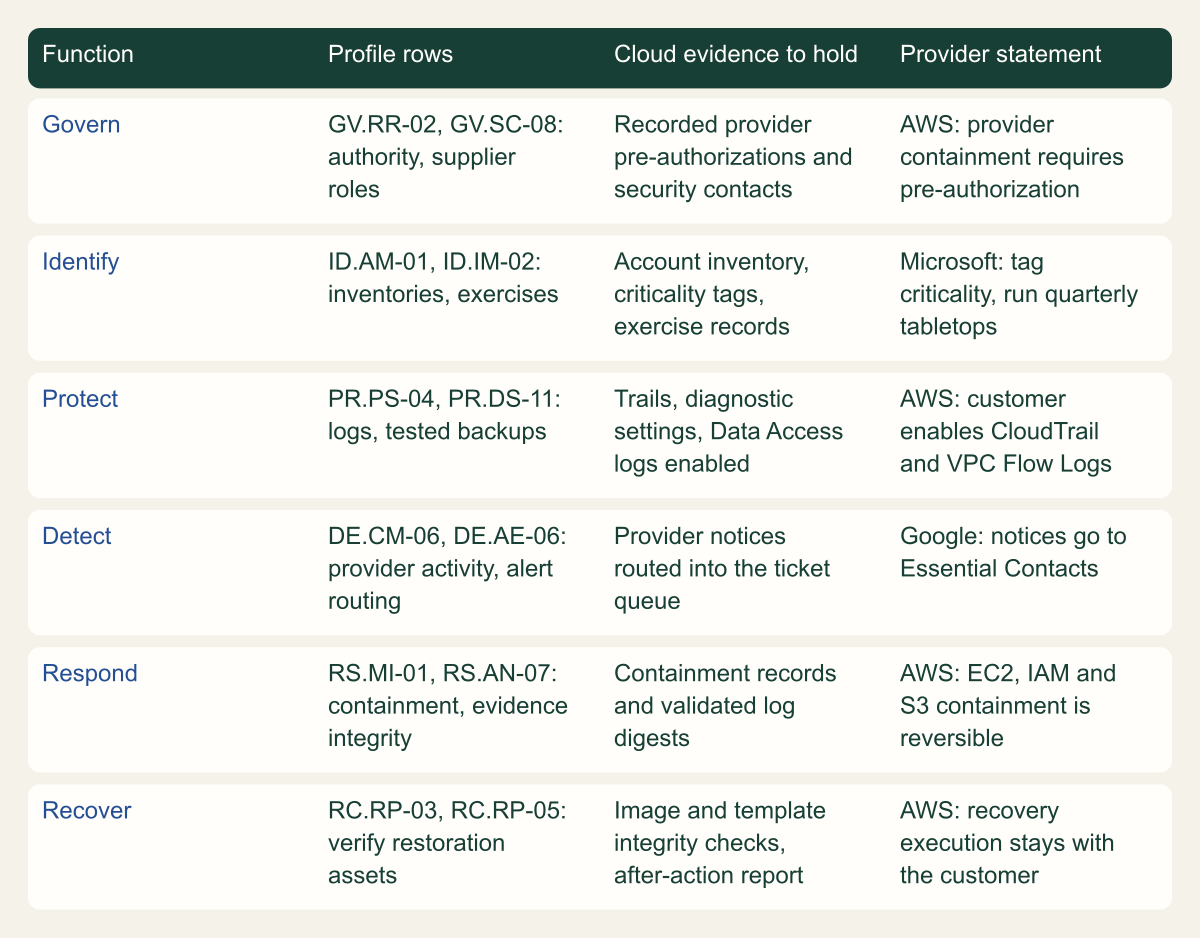
Each Function maps to evidence or authority that must exist before an incident starts.

Source. Conceptual mapping by the editors. Profile rows from NIST SP 800-61r3; provider statements from AWS, Microsoft and Google documentation. [1][5][6][8][10]
Method. Conceptual: one or two representative profile rows per Function, chosen editorially. The provider column paraphrases only statements found in the cited provider documentation; it is not a provider endorsement of the mapping.
Accessible table and figure data
| Function | Profile rows | Cloud evidence to hold | Provider statement |
|---|---|---|---|
| Govern | GV.RR-02, GV.SC-08: authority, supplier roles | Recorded provider pre-authorizations and security contacts | AWS: provider containment requires pre-authorization |
| Identify | ID.AM-01, ID.IM-02: inventories, exercises | Account inventory, criticality tags, exercise records | Microsoft: tag criticality, run quarterly tabletops |
| Protect | PR.PS-04, PR.DS-11: logs, tested backups | Trails, diagnostic settings, Data Access logs enabled | AWS: customer enables CloudTrail and VPC Flow Logs |
| Detect | DE.CM-06, DE.AE-06: provider activity, alert routing | Provider notices routed into the ticket queue | Google: notices go to Essential Contacts |
| Respond | RS.MI-01, RS.AN-07: containment, evidence integrity | Containment records and validated log digests | AWS: EC2, IAM and S3 containment is reversible |
| Recover | RC.RP-03, RC.RP-05: verify restoration assets | Image and template integrity checks, after-action report | AWS: recovery execution stays with the customer |
| Function | Profile rows | Cloud evidence to hold | Provider statement |
|---|---|---|---|
| Govern | GV.RR-02, GV.SC-08: authority, supplier roles | Recorded provider pre-authorizations and security contacts | AWS: provider containment requires pre-authorization |
| Identify | ID.AM-01, ID.IM-02: inventories, exercises | Account inventory, criticality tags, exercise records | Microsoft: tag criticality, run quarterly tabletops |
| Protect | PR.PS-04, PR.DS-11: logs, tested backups | Trails, diagnostic settings, Data Access logs enabled | AWS: customer enables CloudTrail and VPC Flow Logs |
| Detect | DE.CM-06, DE.AE-06: provider activity, alert routing | Provider notices routed into the ticket queue | Google: notices go to Essential Contacts |
| Respond | RS.MI-01, RS.AN-07: containment, evidence integrity | Containment records and validated log digests | AWS: EC2, IAM and S3 containment is reversible |
| Recover | RC.RP-03, RC.RP-05: verify restoration assets | Image and template integrity checks, after-action report | AWS: recovery execution stays with the customer |
Provider documents still use Revision 2 phases
None of the provider documents reviewed for this guide maps its incident response material to the Revision 3 profile. AWS describes Security Incident Response as aligned with the NIST 800-61 Computer Security Incident Handling Guide, which is Revision 2's title. [5][1] The AWS Well-Architected security pillar organizes cloud incident response into Preparation, Operations and Post-incident activity, with Operations following NIST's phases of detect, analyze, contain, eradicate and recover. [7] Microsoft's Azure incident response overview, last updated in July 2026, says it aligns with SP 800-61 phases of preparation, detection and analysis, containment and recovery, and post-incident activities, and its link points to the Revision 2 page. [8] Google's data incident response document describes Google's own process for incidents affecting customer data on systems Google manages and does not mention NIST. [10]
Phase-based provider material is still usable. Revision 3's Table 1 maps the old phases to CSF Functions, and that table is the translation key. Preparation corresponds to Govern, all of Identify and Protect; Detection and Analysis to Detect plus Improvement; Containment, Eradication and Recovery to Respond, Recover and Improvement; Post-Incident Activity to Improvement alone. [1] A provider control labeled detection and analysis therefore belongs in your Detect rows, with whatever lessons it produces recorded under ID.IM.
Translating by identifier needs more care. The Microsoft cloud security benchmark v2 Incident Response controls, IR-1 to IR-7, are named after Revision 2 phases and list mappings labeled NIST CSF v2.0. [9] The identifiers in those mappings follow CSF 1.1 numbering. Of 22 distinct identifiers listed across the seven controls, 14 do not exist in the CSF 2.0 Core, including PR.IP-9, RS.RP-1 and RS.IM-1, all of which are CSF 1.1 Subcategories. [9][3][4] The other eight share a number with a CSF 2.0 Subcategory, but a shared number is not a shared meaning: RS.AN-3 in CSF 1.1 reads forensics are performed, [4] while RS.AN-03 in CSF 2.0 is analysis to establish what took place during an incident and its root cause. [3]
The working rule is to map provider controls to your profile by reading the outcome text, then record the CSF 2.0 identifier you chose. Do not import identifiers from a provider or tool mapping without checking each one against Appendix A of CSWP 29. [3]
| Benchmark control | Identifiers listed as NIST CSF v2.0 | Present in CSF 2.0 Core |
|---|---|---|
| IR-1 Preparation: response plan | PR.IP-9, PR.IP-10, RS.CO-1 | None |
| IR-2 Preparation: notification | RS.CO-1, RS.CO-2, RS.CO-3, RS.CO-4 | RS.CO-2, RS.CO-3 |
| IR-3 Detection and analysis: alerts | DE.CM-1, DE.CM-4, DE.CM-7, DE.AE-1, DE.AE-2 | DE.CM-1, DE.AE-2 |
| IR-4 Detection and analysis: investigate | DE.AE-2, DE.AE-3, RS.AN-1, RS.AN-2, RS.AN-3 | DE.AE-2, DE.AE-3, RS.AN-3 |
| IR-5 Detection and analysis: prioritize | DE.AE-1, RS.AN-1, RS.AN-5 | None |
| IR-6 Containment, eradication and recovery | RS.RP-1, RS.MI-1, RS.MI-2, RS.MI-3 | RS.MI-1, RS.MI-2 |
| IR-7 Post-incident activity | RS.RP-1, RS.IM-1, RS.IM-2 | None |
Updating the plan
Revision 3 does not demand a rewrite, and a full rewrite is rarely the efficient path. The CSF 2.0 publication describes Organizational Profiles: a Current Profile of the outcomes an organization is achieving and a Target Profile of the outcomes it wants, with a Community Profile usable as the basis for the target. [3] Use SP 800-61r3 as that basis, scope it to the cloud estate, and record a gap wherever the current state falls short of a row you keep. [1][3] The order below puts first the rows whose failure is hardest to repair after the fact.
Keep the profile row identifiers in the plan itself. A target-profile entry can be as small as the fragment below, which records NIST's priority, the local priority, the evidence that shows the outcome is met and the provider dependency. Teams that track controls in a governance tool can store the same fields there. What matters is that every statement in the plan points to exactly one CSF 2.0 row.
If only one decision rule survives from this guide, use this one: fix first what cannot be recovered later. A missing escalation contact can be found during an incident; a log that was never enabled, or that aged out of a 30-day or 90-day default window, cannot be brought back. [11][13][15] So the order is evidence and authority first (PR.PS-04, RS.AN-07, GV.RR-02), declaration and containment criteria second (DE.AE-08, RS.MI), and the documentation of everything else third.
- Register providers, contract notification terms and security contacts under
GV.OC-03,GV.OC-05andGV.SC-08, and decide any provider pre-authorizations underGV.RR-02. - Fix evidence defaults: extend Activity log and CloudTrail retention, enable the Data Access and resource logs you would need, and turn on log file validation (
PR.PS-04,RS.AN-07). - Write declaration criteria per incident type (
DE.AE-08) and route provider notices into the same ticket queue as other alerts (DE.AE-06). - Write containment criteria with duration and reversibility for each cloud incident type (
RS.MI), including what each automated action leaves running. - Name the recovery owner for each account, subscription and project, and the integrity checks for images, templates and pipelines (
RC.RP-01,RC.RP-03). - Exercise the plan with the provider's escalation path included and feed the results into
ID.IM-02andID.IM-04.
{
  "profile": "cloud-ir-target-2027",
  "basis": "NIST SP 800-61r3",
  "csfId": "RS.AN-07",
  "nistPriority": "High",
  "localPriority": "High",
  "items": [
    "RS.AN-07.R1"
  ],
  "scope": [
    "aws:111122223333",
    "azure:example-subscription",
    "gcp:example-project"
  ],
  "evidence": [
    {
      "source": "CloudTrail organization trail",
      "retentionDays": 400,
      "integrity": "log file validation enabled; validate-logs output stored with the case"
    },
    {
      "source": "Azure Activity log diagnostic setting to storage",
      "retentionDays": 400,
      "integrity": "immutability policy on the container"
    },
    {
      "source": "Cloud Audit Logs, Data Access for Cloud Storage",
      "retentionDays": 400,
      "integrity": "locked log bucket; custom retention set before locking"
    }
  ],
  "providerDependency": "Provider responders share case notes, not raw logs",
  "owner": "cloud-security-lead",
  "gap": "Data Access audit logs not enabled in example-project",
  "reviewAfter": "2027-04-07"
}
Method and provenance
Source-led analysis of NIST SP 800-61r3, NIST CSWP 29 and CSF 1.1, and AWS, Microsoft and Google incident response and logging documentation, with profile priorities and identifiers counted directly from the NIST PDFs. Sources were reviewed on October 7, 2026.
No live cloud account, contract or incident was examined. Provider statements, defaults and scope are bounded to the cited documentation as of the review date and can change; the cloud mapping is editorial interpretation of the NIST profile, not NIST or provider guidance.
AI assistance. AI assisted research synthesis, counting, drafting, diagram planning and visual production, with deterministic editorial checks. No personal incident response experience, independent human review or live test is claimed.
Published under the Cloud Security Desk organizational byline. Read the practitioner guide policy.
References
- NIST Revises SP 800-61: Incident Response Recommendations and Considerations for Cybersecurity Risk Management NIST. Published . Accessed .
- The NIST Cybersecurity Framework (CSF) 2.0 (NIST CSWP 29) NIST. Published . Accessed .
- Framework for Improving Critical Infrastructure Cybersecurity, Version 1.1 NIST. Published . Accessed .
- What is AWS Security Incident Response? Amazon Web Services. Accessed .
- Contain (AWS Security Incident Response User Guide) Amazon Web Services. Accessed .
- Aspects of AWS incident response (AWS Well-Architected Framework, Security Pillar) Amazon Web Services. Accessed .
- Incident response overview for Azure Microsoft. Accessed .
- Microsoft cloud security benchmark v2: Incident Response Microsoft. Accessed .
- Data incident response process Google Cloud. Accessed .
- Working with CloudTrail event history Amazon Web Services. Accessed .
- Validating CloudTrail log file integrity Amazon Web Services. Accessed .
- Activity log in Azure Monitor Microsoft. Accessed .
- Cloud Audit Logs overview Google Cloud. Accessed .
- Cloud Logging quotas and limits: logs retention periods Google Cloud. Accessed .