A Google Cloud audit search can fail because the event was never enabled, an inherited exemption applied, retention expired or the investigator lacks access. This analysis follows those boundaries and compares documented bucket retention defaults without treating them as evidence of a customer's actual collection.
At a glance
Key findings
- Admin Activity collection and Data Access collection have different defaults. An empty query cannot establish that the relevant event was ever recorded. [1]
- Effective Data Access settings can include inherited configuration and exemptions that are not visible in a project's local policy alone. [2]
- Google's documented retention defaults range from 30 days to 400 days across the bucket cases shown; these defaults do not prove actual event availability. [3]
Ask whether the event exists before searching it
A query returning no audit records can be technically correct and operationally misleading. The requested event may not have been collected, may have been excluded by configuration, may have expired or may be hidden from the investigator's current access. Repeating the query with a wider time range does not distinguish those explanations.
Start with one expected operation against one resource. Record the API method or activity, the identity type, the project and the investigation period. Ask which audit category should contain the event and what configuration was required at the time. This creates a testable collection question before the team debates a search expression.
The review record should have four states: expected to be generated, configured for collection, retained in a known destination and readable by the investigator. Keep a separate evidence item for each state. A settings screenshot may help establish configuration, while a retrieved example record provides a different kind of evidence about the path.
Map the method to an audit category
Google distinguishes Admin Activity, Data Access, System Event and Policy Denied audit logs. Admin Activity logging is always enabled, while Data Access logging is generally disabled by default, with documented exceptions such as BigQuery. Google also describes limits involving publicly accessible resources. A generic statement that “audit logging is on” omits the category needed for many investigation questions. [1]
Map the actual service method to its documented audit behavior. A configuration change and a data read may involve the same resource but different evidence requirements. Do not assume that a product-level exception means every related API or operation is covered. Keep the method-specific reference with the collection decision so the next reviewer does not have to infer it from the service name.
When designing a validation exercise, choose an operation that is harmless and representative of the desired evidence. Record the method, resource and expected category before running it. If the record is absent, preserve that result and examine collection configuration before changing the query until some unrelated event appears.
Preserve the configuration snapshot used for the exercise. A later search conducted after a policy change should not be presented as evidence that the earlier configuration collected the same category.
Read the inherited configuration
Data Access audit configuration can be inherited through the organization, folder and project hierarchy. Google documents the combination of configurations and exemptions across that hierarchy; a project's own IAM policy does not reveal every inherited audit setting. Descendant configuration also cannot simply remove an exemption inherited from an ancestor. [2]
Build an effective-configuration worksheet that identifies the applicable ancestors, the relevant service configuration and any exempted principal. Distinguish the policy that was read directly from the effective behavior inferred from the hierarchy. If the reviewer lacks access to an ancestor's configuration, record the missing evidence and obtain confirmation from its owner.
Changes need a hierarchy-aware review as well. A local adjustment that appears to enable more logging may leave an inherited exemption in place. Conversely, an ancestor change can affect projects whose owners did not edit their own policy. Name the owners who approve these changes and include inherited settings in the investigation record for the period being examined.
Compare the documented retention defaults
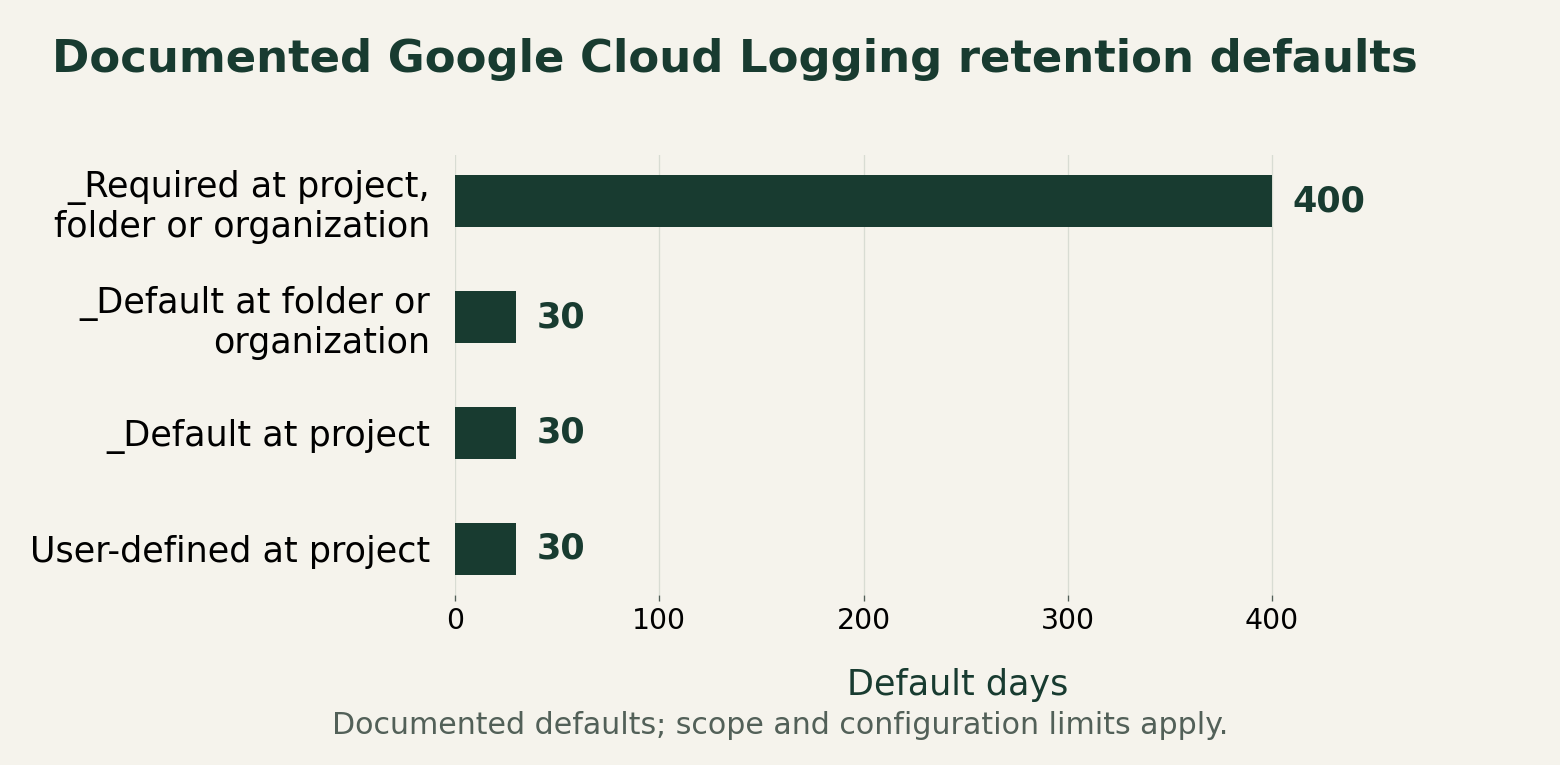
Google documents 400 days for _Required buckets and 30 days for _Default buckets at folder or organization scope, with those retention periods fixed. Project _Default and user-defined project buckets have a 30-day default that can be configured. The chart transcribes those documented defaults; it does not show any customer's measured retention. [3]
Cloud Logging's storage guidance explains bucket configuration and retention choices. A bucket's retention period describes how long entries stored there are kept under that configuration. It does not establish that a particular event category was routed into the bucket or that collection was enabled before the event occurred. [5]
Use the chart to identify which configuration must be inspected, not to select a retention target automatically. The appropriate evidence window depends on the organization's investigation needs and approved storage policy. Record the actual bucket, its scope, its configured retention and the earliest retrievable relevant record. A default value in documentation cannot replace those observations.
Keep the difference between a missing historical record and a newly corrected setting visible. Extending retention now cannot create an event that was never collected. A future-oriented remediation can be complete while an earlier investigation still has an unrecoverable evidence gap.
Documented Google Cloud Logging retention defaults
Documented retention defaults describe buckets, not a guarantee that an expected audit event exists or is readable.

Source. Primary documentation [3] [5]. Accessed August 28, 2026.
Method. Retention defaults transcribed from the Cloud Logging quotas table accessed August 28, 2026, with a zero baseline. The values are published defaults, not observed settings, costs or recommended retention periods.
Accessible table and figure data
Verify the investigator's view
Google's access-control guidance distinguishes ordinary log viewing from access to private logs, including Data Access logs in the _Default bucket. Roles such as Private Logs Viewer and permissions on log views or exported destinations affect what an investigator can retrieve. A successful query by a logging administrator does not establish the same access for the response team. [4]
Test retrieval using the role that will actually perform the investigation. Keep the test scope narrow and approved, and avoid granting broader access merely to make a diagnostic search succeed. If the event exists but the investigator cannot read it, record the permission boundary and the authorized route for obtaining the evidence.
Document the destination as well as the role. A record routed to a different project, bucket or external system may require another access review. The operator responsible for generating the log and the person responsible for granting investigative access can be different. The evidence contract needs both owners.
Write a recoverable evidence contract
Bring the category, effective configuration, destination, retention and reader access into one record for the chosen operation. Include the configuration date and the period the evidence can support. Mark unknowns explicitly, especially inherited exemptions and historical settings that were not preserved.
An acceptance exercise should retrieve a known test event through the investigator's authorized path and retain its identifying context safely. Keep that result separate from a retention review; observing today's event does not prove that the same event will remain available throughout the intended investigation window. Assign a later retrieval check if the operational requirement depends on continued availability.
When a real search is empty, this record gives the responder an ordered investigation: confirm the method and category, inspect effective settings, locate the destination, check the retained window and verify access. The first established break should guide remediation, while the final incident report keeps any historical gap that remediation cannot repair.
Method and provenance
Documentation review and original operational analysis using the cited primary sources, checked on August 28, 2026. The editorial date places the article in the retrospective series; publication and source review occurred in August 2026.
No customer logging settings, volumes or retained events were measured. Published defaults do not guarantee collection or access and are not legal-retention recommendations. The source snapshot supports August 2026 publication, not every prior month. No empirical tests were performed for this article.
AI assistance. Researched, drafted and checked against cited sources with AI assistance. No independent human editorial review or original empirical testing is claimed.
Published under the Cloud Security Desk organizational byline. Read the series policy.
References
- Cloud Audit Logs overview Google Cloud. Accessed .
- Enable Data Access audit logs Google Cloud. Accessed .
- Cloud Logging quotas and limits Google Cloud. Accessed .
- Access control with IAM for Cloud Logging Google Cloud. Accessed .
- Store log entries Google Cloud. Accessed .