
Uses a real observed log to build a filter and joins event match, notification delivery, incident behavior and reversible testing.
At a glance
Key findings
Choose the change that deserves an alert
A useful first Google Cloud security alert is a notification when a project's IAM allow policy changes. Build it from a real Admin Activity audit entry, filter for the relevant project and operation, attach a monitored notification channel, and test the complete route. The purpose is to bring an access change to someone's attention. It is not to decide automatically that every change is malicious. [1][4]
This guide uses a hypothetical application project and a small operations team. The team wants to know when someone changes project access outside its normal review process. It does not need a separate page for every read request or a complicated detection platform before it can start. A log-based alert can match an individual incoming log entry, while a metric-based policy addresses different questions about counts, rates, or measurements. [1][2]
Define who should receive the alert and what they should do. A notification sent to an unmonitored personal inbox adds little value. The recipient should be able to find the change request, identify the affected policy, and contact the resource owner. If the organization already routes incidents through an on-call system, use that process rather than creating a second informal channel.
Also define what is outside this first alert. A project IAM policy change does not cover every permission change in every service, every group membership update, or every service account action. Those operations can have different services and methods. Keeping the initial scope explicit makes it possible to test the filter and explain its blind spots without promising comprehensive access-change detection.
Find the real audit record
Open Logs Explorer in the project whose access changes matter. Locate a known recent administrative IAM change that the team can explain. Inspect the structured entry, including the service name, method name, resource name, timestamp, principal information, and status. Resource Manager documents the audit methods associated with its administrative operations. Match the method present in the current entry rather than guessing its spelling from a console button. [7]
Admin Activity audit logs record administrative modifications, but an audit record must still be interpreted in context. Read any status information and distinguish a successful policy modification from a failed attempt. A principal email, when present, helps identify the initiating identity, while delegation information may explain service account use. Do not flatten an impersonated request into a claim that the service account acted independently. [4]
Choose a harmless event for the initial filter test. In a test project, an authorized administrator could add and later remove a narrowly scoped binding for an approved test identity. If the team cannot safely make such a change, use an existing documented event to develop the query and schedule a controlled end-to-end test separately. Query development and live notification validation are distinct steps.
Record the fields that make the event relevant. A method filter alone may match access changes on resources other than the intended project if the query scope is broad. The resource and service fields keep the rule tied to its purpose. Save a sanitized example of the entry shape, with no credentials or unnecessary personal data, so the next editor understands why each condition exists.
Build a precise query
Start with the observed event and reduce the query to the conditions required for the decision. A first filter commonly selects Admin Activity records, the Resource Manager service, the observed policy-setting method, and the intended resource. Logging's query language supports comparisons on structured fields and Boolean expressions. Field names and string matching rules matter, so validate the complete expression in Logs Explorer before using it in an alert. [3]
Use explicit parentheses when combining alternatives. A query that means one of two methods within the intended service should not accidentally mean the first method anywhere, or the second method only in that service. Read the expression aloud in ordinary language and compare it with the original scope statement. This is a simple way to catch precedence errors without turning the first alert into a programming exercise.
Check both matching and nonmatching examples. The expected policy change should appear. A routine unrelated administrative event should not. If the test environment contains a failed policy change, decide whether that should match the same rule or a separate rule. There is no universal answer: a small team may want both, while an established operation may route them differently. Document the decision instead of inheriting it accidentally from the query.
Keep the query free of personal details that are unnecessary for matching. Filtering to a single administrator's email can make a test convenient but leave the eventual alert blind to everyone else. Conversely, excluding every automation identity can hide changes made through a compromised pipeline. Begin with the operation and resource, then introduce identity exceptions only when the team can explain and review them.
Create the log alert
Create a log-based alert from the validated query using the current console workflow. Give it a name that explains the resource and action. Add a description telling the recipient how to locate the change request and inspect the event. The alert should carry enough context to start investigation without putting the full policy or sensitive application content into an email. [1]
Select a notification channel that the team actually monitors. Google Cloud Monitoring supports several channel types, each with its own setup and delivery requirements. For a group email destination, Google specifically advises configuring the group to accept messages from the Monitoring sender. A channel listed in the console does not prove that the mail system, incident service, or subscription will accept a notification. [5]
Choose labels carefully if the policy extracts values from logs. Extracted labels can separate incident timelines, which changes how notifications behave. High-cardinality values such as an arbitrary request identifier can create an operational pattern very different from one policy monitoring one type of project change. The initial alert should use only the distinctions the responder needs. [2]
Record the policy's location and permissions. The person maintaining a detection rule may need different access from the person responding to an alert. Avoid granting broad project administration just so someone can adjust the notification destination. Use the documented roles for the relevant Logging and Monitoring operations, and keep policy edits subject to the team's normal review process.
Understand incident and notification timing
A matching log entry, an open incident, and a delivered notification are different events. The log-based alert documentation describes a minimum interval of five minutes between repeated notifications for an open incident. That setting does not promise that every log entry creates a separate message, nor does it establish a guaranteed end-to-end delivery time. [2]
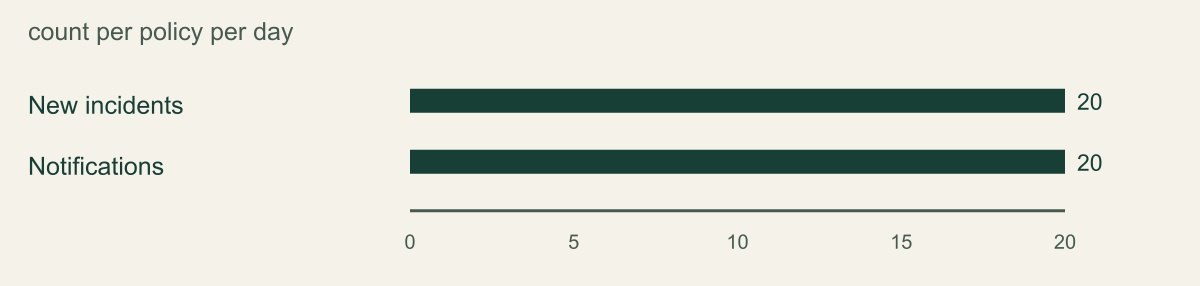
The documented limits also include twenty new incidents per day and twenty notifications per day for a log-based alerting policy. These are service limits, not a measured performance result for the example project. A busy policy can therefore stop being a useful one-message-per-change mechanism. If the reader needs an exhaustive change ledger, retain and query the audit logs; do not reconstruct that ledger from alert emails. [2]
The figure compares those two daily counts because they share a unit and scope. It does not compare detection quality, incident severity, or provider performance. Other limits, such as new incidents per minute and repeated notification intervals, use different units and should not be mixed into one bar chart. Keep the current quota documentation beside the policy design when expected traffic changes. [8]
A log-based incident can close according to its configured auto-close behavior even while the IAM change remains in place. Closing the incident does not reverse an IAM binding. The responder needs an operational record that connects the incident to the investigation and, if necessary, a separately approved permission change. [6]
Documented daily limits for a log-based alert policy
Cloud Monitoring published limits for a log-based alerting policy as reviewed September 12 2026. Separate counters with the same daily unit; not detection throughput or an SLA.

Source. Google Cloud documentation [2][8]. Reviewed September 12, 2026.
Method. Direct transcription of the documented configuration or limit values. No measured customer data, inferred performance, interpolation, or normalization.
Accessible table and figure data
| Limit | Count per policy per day |
|---|---|
| New incidents | 20 |
| Notifications | 20 |
| Limit | Count per policy per day |
|---|---|
| New incidents | 20 |
| Notifications | 20 |
Run a safe end to end test
Schedule a controlled change in a test project with the person who owns the notification destination. Record the start time and the expected administrative event. Apply only the harmless binding change already approved for the test. Avoid a production Owner grant or a real employee offboarding event merely to generate a signal.
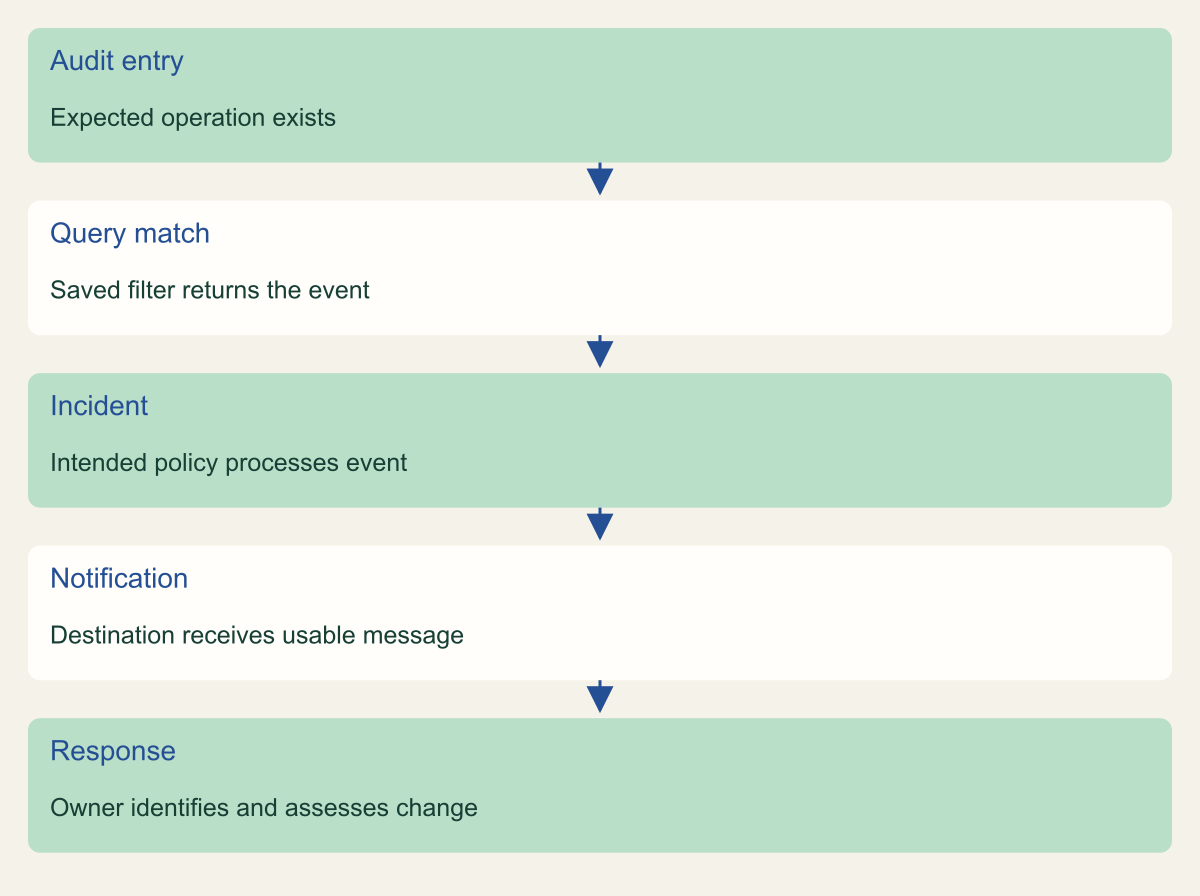
Follow the event through the chain. First confirm that the audit entry exists and matches the saved query. Then confirm that the intended alerting policy processes the event, the incident is visible, and the destination receives a usable notification. Finally, ask the assigned recipient to open the event and identify the changed resource. This last check tests whether the message supports a real response rather than merely reaching a mailbox.
If the message does not arrive, investigate the missing stage. An absent log points to event generation or scope. A present nonmatching log points to the query. A matching event with no expected incident points to policy state or service behavior. A visible incident with no delivered notification points to channel configuration, rate limits, or the destination. Avoid editing every part at once, because doing so erases the evidence of the original failure.
Reverse the test binding and verify the project returns to its approved state. The reversal may itself generate an alert, which is useful if the filter is intended to catch both grant and removal changes. Mark the resulting records as planned tests through the normal incident process. Do not suppress future detection broadly just to make the test notifications disappear.
Check every step from audit entry to response
Conceptual operational sequence. A matching log does not establish delivery or response.

Source. Google Cloud documentation [1][3][5][6]. Reviewed September 12, 2026.
Method. Original conceptual synthesis of the cited documentation. Rows describe responsibilities, decisions, or hypothetical states, not measured results.
Accessible table and figure data
| Step | Evidence |
|---|---|
| Audit entry | Expected operation exists |
| Query match | Saved filter returns the event |
| Incident | Intended policy processes event |
| Notification | Destination receives usable message |
| Response | Owner identifies and assesses change |
| Step | Evidence |
|---|---|
| Audit entry | Expected operation exists |
| Query match | Saved filter returns the event |
| Incident | Intended policy processes event |
| Notification | Destination receives usable message |
| Response | Owner identifies and assesses change |
Respond with enough context
When a real alert arrives, establish what changed before assigning severity. Find the affected resource and compare the current policy with the approved change. Determine whether a role was granted, removed, or conditioned differently, and which principal is involved. If the event was generated by automation, identify the initiating workflow and whether the action matches its purpose.
An unfamiliar principal deserves investigation, but an unfamiliar email address alone is not proof of an attacker. It could be a service account, an external collaborator, or a legitimate managed identity. Conversely, a familiar pipeline identity does not make every change acceptable. Evaluate the granted authority, resource sensitivity, business approval, and surrounding events together.
If the change is unauthorized, preserve the relevant record and follow the organization's containment process. Reversing the IAM binding may be necessary, but access already exercised or credentials already obtained can require additional action. A project access alert is an entry point into investigation. It is not a complete account containment or forensic workflow.
Close with an evidence-based disposition. The record might say approved change confirmed, policy reverted and follow-up investigation assigned, or false match caused by an overly broad method condition. Include the reason and owner. If the filter needs adjustment, keep the change small and repeat the relevant positive and negative tests before relying on the revised policy.
Keep the alert useful
Review the first few real notifications with the responder. Determine whether each contained the right project and action context, reached the right owner, and led to a decision. Use those notifications to identify specific delivery or response problems before reporting a success rate. The useful question is whether the workflow exposed a concrete issue such as an unmonitored channel, a confusing label, or an overbroad query.
Maintain the policy when projects move, administrative workflows change, or a notification destination is replaced. A copied project may need its own scope, while a central logging arrangement may require a different source query. Do not assume that a sink or a broad log view automatically extends the scope of every alert. Revalidate the actual configuration used by the policy. [1][3]
Preserve the audit retention design separately. A notification is a pointer to evidence, and that evidence needs to remain available for the investigation window. The existing Google audit coverage guide addresses which logs are collected and retained. This procedure adds the operational path from a selected event to a person who can act on it.
The smallest maintainable result is one clearly scoped alert, one monitored destination, one harmless test procedure, and one assigned response owner. Expand to service-specific permission changes only after the first policy is understood. Each additional rule should answer a new operational question and earn its place through the same matching, delivery, and response checks.
Separate an expected change from a useful exception
A small team may initially receive notifications for every planned access change. That can be acceptable when changes are infrequent and a responder can quickly match each event to an approved request. Before adding exclusions, identify the exact source of unnecessary work. A clear alert description or a linked change record may solve the problem without reducing detection coverage.
Suppose a hypothetical deployment process updates a project binding during each release. Excluding its service account entirely would also exclude an unexpected role grant made through that same identity. A safer review asks which method, target, and policy change the workflow is supposed to perform. The alert can remain broad while the response process recognizes the approved change, or the team can build a more specific rule after proving that the required fields are consistently available. Neither choice should be based only on the account having a familiar name.
Keep exceptions small enough to explain. Record the excluded operation, the business reason, the owner, the expiration or review trigger, and the compensating way the change remains observable. If the query cannot express the desired distinction reliably, say so. A manual review may be more appropriate than a complicated filter whose Boolean logic nobody can maintain.
When changing an exception, replay representative log examples through the query. Include the approved automation event, an unexpected grant by the same identity, a different resource, and a failed operation if it is in scope. This is a query test using known records, not a claim of live attack detection. Follow it with a safe end-to-end event when the change affects the operational delivery path. The distinction keeps the evidence honest and the policy understandable.
Method and provenance
Source-based technical guidance using current Google Cloud documentation reviewed September 12, 2026. The procedures and decision frameworks are original editorial synthesis. Examples are explicitly hypothetical.
No customer project was configured and no cloud command, restoration, or workload experiment was executed for this article. Documented settings and limits are not measured service performance; actual configuration and supported product behavior must be checked before use.
AI assistance. AI assisted with research organization, drafting, and editing. Original illustrations were generated with ChatGPT and reviewed alongside source-based diagrams; visual and release verification is recorded separately.
Published under the Cloud Security Desk organizational byline. Read the practitioner guide policy.
References
- Configure log-based alerting policies Google Cloud. Accessed .
- Monitor your logs Google Cloud. Accessed .
- Logging query language Google Cloud. Accessed .
- Cloud Audit Logs overview Google Cloud. Accessed .
- Create and manage notification channels Google Cloud. Accessed .
- Manage incidents for log-based alerting policies Google Cloud. Accessed .
- Resource Manager audit logging Google Cloud. Accessed .
- Cloud Monitoring quotas and limits Google Cloud. Accessed .