
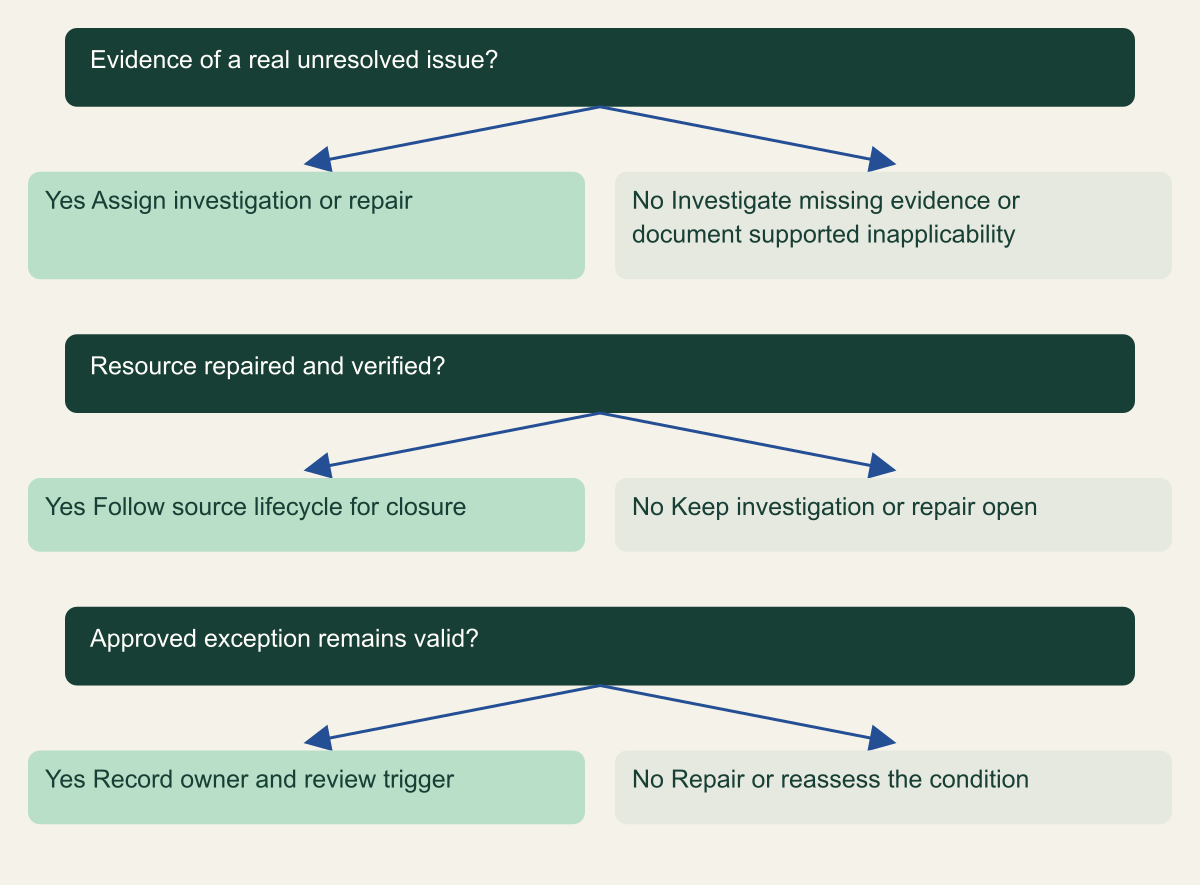
A decision tree distinguishes current exposure, historical threat evidence, accepted exception and false positive without equating mute with repair.
At a glance
Key findings
Read the finding before changing state
When Security Command Center reports a finding, start by identifying the affected resource, detection source, finding category, event time, and current evidence. Assign an owner, decide whether the issue is still present, and choose an action supported by those facts. Do not mute or mark the finding inactive merely to reduce the visible count. Muting and active state are independent properties, and neither is a substitute for repairing the resource. [1][4]
This guide is for an administrator receiving an unfamiliar finding in an existing Google Cloud environment. It does not require buying a different service tier or enabling every detector. The available sources and features depend on the organization's configuration and service tier. Read the source named in the finding rather than assuming that every organization receives the same detection coverage. [8]
Treat the finding as a structured observation that starts an investigation. A misconfiguration finding may identify a current setting, while a threat finding may describe an event that occurred earlier. Those cases need different evidence. A presently private bucket does not by itself establish that a previous public exposure was harmless, just as an old event does not automatically mean the underlying access path remains open.
Save the finding identifier and relevant details in the team's normal work record. Preserve links to the resource and source evidence. Avoid pasting unnecessary sensitive log content into a broadly visible ticket. The aim is that another responder can reconstruct why the team acted, what it changed, and which questions remained unresolved.
Find the affected resource and owner
Confirm the full resource name, project, and environment. Similar names across development and production can mislead a rushed reviewer. Open the resource through the authorized console or service interface and check that it still exists. If it has been replaced, identify whether the finding refers to the old resource or the current one before deciding that the issue has disappeared.
Find the team accountable for the workload and the person authorized to change the implicated setting. A security responder may be able to edit a finding without having permission to alter the resource. That is a useful separation of duties, but it requires a clear handoff. Assign the repair to the resource owner while retaining responsibility for verifying the security result.
Read the finding's explanation and recommended remediation in its documented scope. Determine which configuration or behavior triggered it and which detector produced it. Google documents multiple sources with different capabilities, and the same-looking severity label does not erase those differences. A source may evaluate configuration, vulnerability information, or threat telemetry. [8]
Ask the owner for the business purpose of the current configuration. A public content bucket and a private customer export bucket can have very different exposure requirements. The question is not whether the owner likes the existing setting. It is whether the resource has an approved use case, whether the observed access matches that use case, and whether the remaining risk has an accountable decision maker.
Decide what needs attention first
Use the finding's severity as an input, then consider exposure, resource sensitivity, known activity, and operational impact. A reachable resource holding sensitive information can require urgent action even when the repair is simple. A development resource with no relevant data may need a planned fix rather than an incident bridge. Document the reason for priority so the next reviewer does not see only a changed label.
Distinguish evidence of an active threat from a configuration that could permit one. If the source reports suspicious behavior, preserve the event details and investigate the surrounding identity and resource activity. If the source reports a setting, verify the current setting and its effective access. Do not describe an exposed port as a confirmed intrusion without supporting evidence.
Use the team's existing incident criteria. A finding that indicates possible compromise should enter the incident process, where containment, evidence handling, communication, and recovery have defined owners. An ordinary configuration correction can remain a change request when the evidence supports that classification. The aim is a proportionate response, not making every finding urgent or treating every finding as routine maintenance.
Write a short first assessment containing what is known, what is uncertain, and the next check. For example, a hypothetical record might state that a storage policy allows public access, the owner says the bucket should be private, and the team is checking whether the objects were actually reachable. That is more useful than a premature verdict of breached or safe.
Investigate without destroying evidence
Before changing a resource involved in suspicious activity, consider which evidence the change might remove. Stopping a VM, rotating credentials, replacing an instance, or deleting an object can affect the information available to a responder. Follow the incident process when volatile or historical evidence matters. Security Command Center provides evidence and context, while the team remains responsible for the investigation and remediation choice. [2]
For a configuration issue without evidence of compromise, capture the relevant before state through the normal change record. The record should contain the exact setting, resource, time, and authorized owner. It does not need a full export of unrelated cloud configuration. A focused record makes the repair auditable without collecting more sensitive operational information than the task requires.
Correlate the finding with appropriate audit and application records. An IAM change log may explain who altered access, while application logs may establish whether a suspicious request reached a business operation. Be careful with absence claims. Missing data can result from collection, retention, or query scope limitations. State which records were available and which question each can answer.
Avoid treating the finding timestamp as a universal sensor heartbeat. Google documents source-specific lifecycle behavior and notes that event times are not necessarily updated on every scan. Some lifecycle updates can refresh timestamps for operational reasons. A recent timestamp therefore needs interpretation alongside the source and the resource state, rather than being presented as proof of a fresh complete scan. [6]
Choose repair exception or false positive
There are several legitimate outcomes, and they should remain distinct. A confirmed issue can be repaired. A finding can be a false positive because its evidence or interpretation does not match the actual condition. A real condition can be accepted as a documented exception. An unresolved finding can remain assigned while further investigation proceeds. These outcomes require different reasons and review triggers.
For a repair, choose the smallest change that addresses the confirmed cause. If a bucket should be private, review the effective access path and application dependency before adjusting access. If a vulnerable component requires an update, identify the affected workload and its supported maintenance process. A broad resource deletion may remove the finding while creating an unnecessary service outage.
For an exception, name the owner who accepts the condition, the business reason, the scope, and the next review date. Explain any compensating control and how it is checked. A comment saying accepted risk is insufficient if nobody can determine which resource configuration was accepted or whether it has changed since approval.
For a false positive, preserve the evidence that makes the finding inapplicable. Google recommends considering mute for a false-positive threat finding while leaving its active state unchanged. This keeps the distinction between visibility management and remediation. The chosen disposition should follow the detector's documented lifecycle and the organization's process, rather than a habit of marking every inconvenient item inactive. [2][4]
Choose a supported finding disposition
Original decision framework. Branches guide separate review questions; no numerical risk score.

Source. Google Cloud documentation [1][2][3][4]. Reviewed September 12, 2026.
Method. Original conceptual synthesis of the cited documentation. Rows describe responsibilities, decisions, or hypothetical states, not measured results.
Accessible table and figure data
| Question | Yes | No |
|---|---|---|
| Evidence of a real unresolved issue? | Assign investigation or repair | Investigate missing evidence or document supported inapplicability |
| Resource repaired and verified? | Follow source lifecycle for closure | Keep investigation or repair open |
| Approved exception remains valid? | Record owner and review trigger | Repair or reassess the condition |
| Question | Yes | No |
|---|---|---|
| Evidence of a real unresolved issue? | Assign investigation or repair | Investigate missing evidence or document supported inapplicability |
| Resource repaired and verified? | Follow source lifecycle for closure | Keep investigation or repair open |
| Approved exception remains valid? | Record owner and review trigger | Repair or reassess the condition |
Prove the result
After a repair, verify the actual resource. A successful update operation shows that the API accepted a change; it does not show that the intended access or application behavior now holds. Check the effective configuration and perform a safe test of the relevant action. Where appropriate, test both the intended allowed path and the previously unintended path.
Then inspect the finding's behavior according to its source. Google documents that some vulnerability and misconfiguration sources automatically change findings to inactive after detecting remediation, while threat findings may require manual state management. Do not impose one universal expectation on all findings. A still-active threat finding after containment can require a documented manual disposition, not repeated infrastructure changes. [3]
If the finding remains active unexpectedly, check for scan timing, resource identity changes, and incomplete remediation. The repaired resource may differ from the one named in the finding, or another inherited configuration may recreate the condition. Keep the work record open until the cause is understood. Hiding the finding at this point would erase a useful signal that the verification is incomplete.
Record what was verified separately from the console state. A strong closure note identifies the repair, resource test, finding lifecycle result, and any follow-up work. If the resource is repaired but historical activity still needs investigation, those are separate work items. The visible findings page should not become the only place where the organization's unresolved incident obligations are tracked.
Manage mute rules carefully
Muting controls how a finding appears in ordinary review. It does not change whether the underlying condition exists. Google documents that statically muting an active finding leaves its state active and can override applicable dynamic mute behavior. A broad mute rule can therefore hide more than the single item a reviewer originally intended to suppress. [4]
Prefer an individual, documented decision before creating a rule for recurring cases. When a rule is justified, make its filter specific to the accepted condition and scope. Review sample matches before relying on it. Include the owner and review trigger in the accompanying record, especially if the rule applies to future resources or findings that do not yet exist.
Inspect muted findings periodically. The default console view can hide them, so a routine review that uses only that view can overlook active exceptions. Use the documented filter for muted findings and examine whether the original rationale still applies. A business exception can expire, a resource can change purpose, or a detection source can improve. [4][5]
Check exports and notifications independently. Muted findings can still be exported when they match a notification filter. To exclude them, the export configuration must express that condition. Conversely, an organization may deliberately export muted findings for oversight. Neither behavior should be assumed from what disappears in the console. Review the intended downstream audience and test a representative finding update. [4][7]
Active state and mute status answer different questions
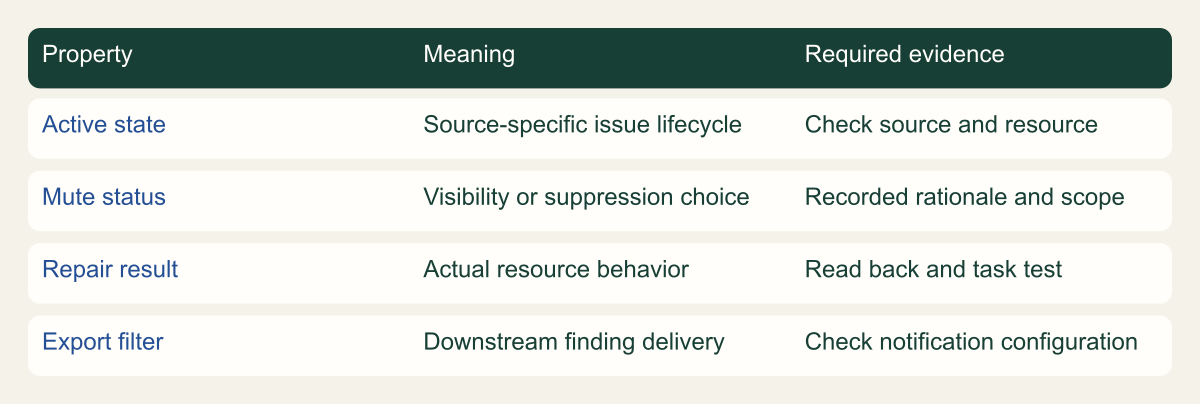
Conceptual framework separating resource condition from console visibility and downstream delivery.

Source. Google Cloud documentation [3][4][7]. Reviewed September 12, 2026.
Method. Original conceptual synthesis of the cited documentation. Rows describe responsibilities, decisions, or hypothetical states, not measured results.
Accessible table and figure data
| Property | Meaning | Required evidence |
|---|---|---|
| Active state | Source-specific issue lifecycle | Check source and resource |
| Mute status | Visibility or suppression choice | Recorded rationale and scope |
| Repair result | Actual resource behavior | Read back and task test |
| Export filter | Downstream finding delivery | Check notification configuration |
| Property | Meaning | Required evidence |
|---|---|---|
| Active state | Source-specific issue lifecycle | Check source and resource |
| Mute status | Visibility or suppression choice | Recorded rationale and scope |
| Repair result | Actual resource behavior | Read back and task test |
| Export filter | Downstream finding delivery | Check notification configuration |
Build a small recurring review
Begin with a manageable review queue organized by owner and action. Each item should have a current assessment, next step, and due date appropriate to its risk. A large spreadsheet of findings with no accountable resource owners is difficult to maintain. The service already stores finding details; the operational record should focus on the decisions and work that the service cannot make for the team.
Review unresolved high-impact items, newly detected issues, exceptions nearing their review date, and repairs whose verification is incomplete. Include a sample of muted findings. These are different queues because they answer different questions. A team does not need a complex dashboard to distinguish a new observation from a repair awaiting validation.
Watch for repeated causes. If several findings arise from the same deployment template, repairing each resource separately may leave the next deployment vulnerable to the same mistake. Correct the source configuration through the normal development process and verify the resulting resources. Keep this broader work tied to the concrete findings that justified it.
The useful measure of progress is an explained result: a resource repaired and checked, a supported false-positive decision, a time-bounded exception, or an active investigation with an owner. A lower visible finding count can occur simply because items were muted. Preserve that distinction in reports so the organization can understand whether exposure changed or only the view changed.
Revisit an exception when the resource changes
Consider a hypothetical bucket used for public product documentation. A finding about public access may be expected because the content is deliberately public. The owner records that purpose, confirms that the bucket contains only approved public material, and adopts a narrow exception. The decision is about that resource and use case. It does not authorize every future file or every other bucket in the project to become public.
If a later workflow starts uploading internal exports to the same bucket, the exception is no longer a sufficient explanation. A review trigger tied to the resource's purpose or deployment configuration should bring the item back for assessment. This illustrates why a mute rule based only on a project name can be dangerous administratively: it may remain matched while the business facts change.
Use the exception record to ask a concrete question during review. Does the resource still contain the approved content type? Does the public delivery path still work as designed? Has ownership changed? Does a separate access control now make the old exception unnecessary? Answer those questions with current configuration and owner evidence instead of automatically extending the date.
When an exception ends, remove the associated suppression through the documented workflow and confirm that the finding is visible in the intended queue or has been remediated. Check any downstream export filter affected by the change. The end of a mute rule should be as understandable as its creation, so a future reviewer can tell whether the issue was repaired, reclassified, or simply returned to active review.
Before sharing a queue report, include active muted items in a separate reviewed view and explain their disposition. This avoids presenting suppression as exposure reduction. Keep the report's counts tied to its exact filter and date, and use actual query results if numbers are included. The meaningful comparison is the documented resource condition and the evidence supporting each action.
Method and provenance
Source-based technical guidance using current Google Cloud documentation reviewed September 12, 2026. The procedures and decision frameworks are original editorial synthesis. Examples are explicitly hypothetical.
No customer project was configured and no cloud command, restoration, or workload experiment was executed for this article. Documented settings and limits are not measured service performance; actual configuration and supported product behavior must be checked before use.
AI assistance. AI assisted with research organization, drafting, and editing. Original illustrations were generated with ChatGPT and reviewed alongside source-based diagrams; visual and release verification is recorded separately.
Published under the Cloud Security Desk organizational byline. Read the practitioner guide policy.
References
- Review and manage findings Google Cloud. Accessed .
- Investigate and respond to threats Google Cloud. Accessed .
- Finding states Google Cloud. Accessed .
- Mute individual findings Google Cloud. Accessed .
- Mute findings in Security Command Center Google Cloud. Accessed .
- Overview of the finding lifecycle Google Cloud. Accessed .
- Overview of exporting Security Command Center data Google Cloud. Accessed .
- Choose the services to enable Google Cloud. Accessed .