
A practical access matrix checks anonymous users, named application identities, inherited grants, signed links and cached copies.
At a glance
Key findings
Define private for this bucket
For a Cloud Storage bucket that should never grant public access, enable public access prevention and use uniform bucket-level access when the application supports IAM-based permissions. Then verify the effective IAM grants and test the intended callers. Public access prevention blocks access through the public principals allUsers and allAuthenticatedUsers. Uniform bucket-level access removes the separate ACL permission system. The settings solve different parts of the access problem. [1][2]
Private does not mean nobody can download an object. A named application identity may still read it, an inherited IAM grant may still authorize a person, and a signed URL may still give its holder temporary access. Decide which of those paths the application needs. A bucket can correctly block anonymous requests while still having an overly broad grant to an authenticated group. [1][5][6]
This guide uses a hypothetical bucket containing internal report exports. The application writes reports, a limited support team reads selected results, and the objects are not intended for anonymous website visitors. If the bucket deliberately hosts public assets, first separate that use case from private data. Turning on public access prevention for a public website bucket can break the delivery path. [1]
Write a short access statement before changing the settings. Name the writers, readers, administrator, and any temporary sharing mechanism. Identify which paths must fail. That statement becomes the basis for the test, making the change review more useful than a screenshot showing two enabled controls.
Understand the two settings
Cloud Storage supports IAM and access control lists, or ACLs. Without uniform bucket-level access, the systems work in parallel: an applicable grant from either can authorize access. Reviewing only the bucket IAM policy can therefore miss an object ACL. Uniform bucket-level access disables ACL authorization and administration, leaving IAM as the permission model. [2]
Public access prevention addresses public principals rather than all forms of access. It overrides existing grants to allUsers and allAuthenticatedUsers and prevents new public grants of those kinds. Existing public bindings are not necessarily removed. If prevention later stops applying, retained public policies or ACLs can become effective again. A cleanup should therefore inspect the underlying grants as well as the protective setting. [1]
The bucket-level public access prevention value can be enforced or inherited. Inherited does not mean disabled. An organization policy at the project, folder, or organization may still enforce the restriction. Determine the effective organizational setting before interpreting the bucket's displayed value. Otherwise, a reviewer may incorrectly conclude that a bucket lacks protection or that a local change can override a higher-level policy. [1]
Uniform bucket-level access also has a consequential timing rule. After it has remained enabled for ninety consecutive days, it cannot be disabled. This is a documented configuration boundary, not a reason to postpone sensible IAM adoption indefinitely. It is a reason to verify that applications no longer depend on ACL operations before crossing the irreversible point. [2]
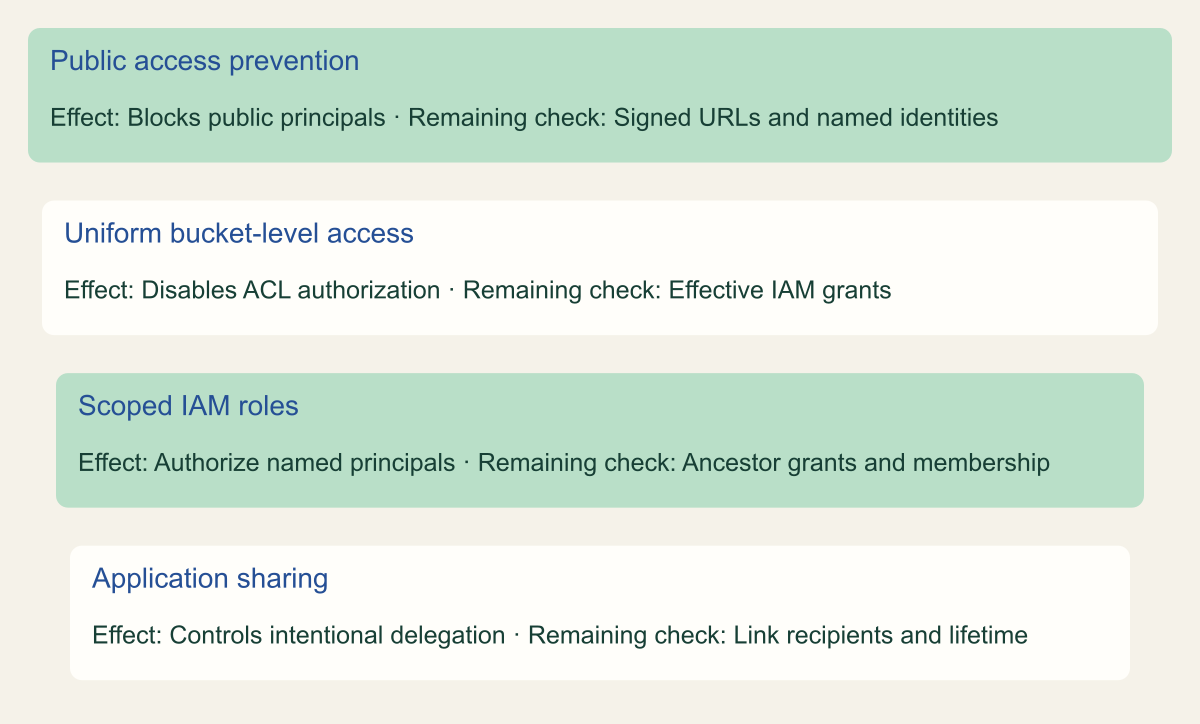
Which Cloud Storage access path each control addresses
Conceptual control mapping. Layers are related checks, not a claim that any one setting makes all access private.

Source. Google Cloud documentation [1][2][5][6]. Reviewed September 12, 2026.
Method. Original conceptual synthesis of the cited documentation. Rows describe responsibilities, decisions, or hypothetical states, not measured results.
Accessible table and figure data
| Control | Effect | Remaining check |
|---|---|---|
| Public access prevention | Blocks public principals | Signed URLs and named identities |
| Uniform bucket-level access | Disables ACL authorization | Effective IAM grants |
| Scoped IAM roles | Authorize named principals | Ancestor grants and membership |
| Application sharing | Controls intentional delegation | Link recipients and lifetime |
| Control | Effect | Remaining check |
|---|---|---|
| Public access prevention | Blocks public principals | Signed URLs and named identities |
| Uniform bucket-level access | Disables ACL authorization | Effective IAM grants |
| Scoped IAM roles | Authorize named principals | Ancestor grants and membership |
| Application sharing | Controls intentional delegation | Link recipients and lifetime |
Inventory dependencies before changing access
List the applications and people that read or write the bucket. Ask whether uploads set object ACLs, whether any script reads or modifies ACL metadata, and whether objects have default public access. An application can fail after uniform access is enabled even if its data permissions are correct, because it still attempts an ACL operation that the service rejects. [2][4]
Inspect the current IAM policy, relevant ancestor grants, and existing object or default ACL use. Google describes metrics that help identify ACL-dependent operations. Use that evidence with application knowledge rather than assuming a quiet metric proves every future path is safe. A rarely run month-end export or an emergency support tool may not appear during a short review window. [2]
Identify public delivery dependencies. Reports might be embedded in a portal, emailed as direct links, or fetched by a third-party system. Determine whether the recipient uses a signed URL, authenticated API call, or truly anonymous object URL. The visible link can look similar while the authorization mechanism differs. Do not infer the mechanism from the filename or from a browser session already signed in to Google.
Save the relevant before state through the normal change process. Include the bucket settings, affected bindings, application dependency, and intended repair if a test fails. Avoid making a full unrelated policy replacement just to enable one setting. The person performing the change should know which configuration is reversible and which organizational restrictions cannot be overridden locally.
Apply a staged change
For a new private bucket, choose the intended access settings at creation and grant only the required application and operator roles. For an existing bucket, migrate ACL-dependent permissions and application behavior before relying on uniform access. Use the current official instructions for applying public access prevention and uniform bucket-level access. The interface or command should target the specific bucket under review. [3][4]
Apply the change first to a representative test bucket when possible. Use the same application code path with harmless report data. A bucket created only for a console demonstration may miss the uploader's ACL behavior or the reader's inherited role. The test should exercise the real software pattern without using customer exports as experimental material.
Do not combine unrelated changes to storage class, lifecycle rules, encryption keys, and access in the same small migration unless there is a documented dependency. If uploads stop working after several settings change at once, determining which control caused the failure becomes harder. A focused access change gives the team a clearer restoration path.
After the update, read the effective settings back and test the application. Public access prevention enforcement can take time to take effect, and already cached objects require separate consideration. Record when the change was made and when each path was tested. The displayed control-plane setting and the observed access result are complementary evidence. [1][7]
Test the paths that still matter
Use a harmless object with content the team is comfortable exposing during a controlled test. Confirm that the intended application identity can upload or read it as required. Then make an anonymous request through the relevant object endpoint from a context without stored credentials. The expected result for the internal report bucket is that the anonymous request does not return the object.
Test a named identity that should lack access. This catches a different problem from anonymous testing. A broad organization, folder, or project grant can authorize an authenticated user even though public access prevention works correctly. Check the effective role path when the result differs from expectation. IAM permissions at parent scopes can apply to bucket access. [5]
Verify the application operation, not just a metadata read. Permission to list objects, retrieve metadata, download object content, upload new content, overwrite an existing name, and delete an object are different capabilities. The Storage role reference identifies the permissions included in predefined roles. Match the role to the task rather than granting Storage Admin because a narrower test failed. [8]
Keep the tests safe. Do not make a sensitive bucket public to prove that prevention will stop you, and do not delete a real report as a negative-permission experiment. Use a test object and an approved method that has a harmless outcome even if the current role is broader than expected. Remove the disposable data when the verification is complete.
Deal with signed links and caches
A signed URL grants access through the signing identity's authority for the request it describes. Public access prevention does not disable signed URLs. This is useful when an application intentionally shares a private object for a limited purpose, but it also means the setting is not a general prohibition on sharing object contents with other people. [1][6]
Review the signing workflow separately. Determine who can produce a signed URL, which object and operation it authorizes, how long it is valid, and where it is delivered. A recipient can use a valid link without becoming a named member of the bucket's reader group. Do not put a signed URL into broadly accessible logs, support tickets, or analytics fields merely because the bucket itself is private.
Previously public content can remain in caches after the bucket's permissions change. Cloud Storage documents how cache behavior depends on object metadata and request conditions. Public access prevention also warns that internet caches can continue serving already cached content for some time. Changing the source permission is not equivalent to recalling every downloaded or cached copy. [1][7]
If the bucket was unintentionally public, investigate that exposure as a separate question. Preserve the relevant configuration and available evidence, determine what data was involved, and follow the organization's response process. A successful anonymous denial after remediation establishes the present test result. It does not prove that nobody retrieved the object before the change or that all external copies have disappeared.
Avoid inherited access surprises
Read the bucket policy alongside its ancestor policies. A project-level storage role may grant broader access than the bucket owner intended, and a folder role can reach several projects. Public access prevention does not remove those named-principal grants. Uniform bucket-level access makes the permission system more consistent, but it does not automatically choose least-privilege IAM bindings for the organization. [2][5]
Use the access statement to review each relevant grant. If an operations group can administer all storage in the project, determine whether that broad authority is intentional. If an application only writes one class of object, inspect whether its role also permits reading or deleting unrelated objects. The exact supported granularity depends on the service feature and resource structure, so use the current documentation when narrowing scope. [8]
Do not attempt to cancel an inherited allow grant by removing a nonexistent local binding. The grant must be addressed at the scope where it is defined, or through an appropriate reviewed policy design. Changes at a parent can affect other resources, so involve the owner of that scope before altering it. A bucket-specific problem should not trigger an unexplained organization-wide access change.
Record any accepted broad administrative role as such. Some teams intentionally maintain a restricted storage operations group with wider authority. The important operational distinction is whether the permission has a known purpose, controlled membership, and review process. A vaguely named group whose inherited grant nobody owns deserves investigation even if every public-access control is enabled.
Leave a maintainable bucket record
Store a concise record with the bucket's owner and operating instructions. Include the purpose, intended readers and writers, effective public access prevention source, uniform-access status, application ACL dependency findings, and the test results. If signed URLs are used, link to that workflow's owner and sharing rules. Keep the document focused on decisions that will matter during the next access change.
Review the record when a new application begins using the bucket, the project moves folders, or the data classification changes. A bucket created for harmless reports can become sensitive when a later export adds customer identifiers. The original setting may remain technically correct while the access list or sharing process no longer matches the content.
If an emergency requires changing public access prevention, inspect retained public bindings before doing so. Google documents that previously overridden public grants can take effect when prevention no longer applies. A rollback must therefore restore the intended business behavior without accidentally reactivating an old public policy. Treat the underlying policy cleanup as part of the access design, not a cosmetic task. [1]
A private-bucket check is complete when the intended identities perform their tasks, unintended paths fail under controlled tests, and the remaining sharing mechanisms have owners. The two settings make that design easier to enforce. The access record explains what the settings are meant to protect and which permissions still deserve attention.
Use a small before and after example
Imagine an internal report uploader that sets a public object ACL after each successful upload. An administrator enables public access prevention, and the uploader begins failing at its ACL step. The correct response is to inspect the application workflow. It may have already stored the object successfully before the later permission operation failed. Repeating the entire upload blindly could create duplicate work or obscure the original event.
The revised workflow should upload using the application's authorized identity and avoid setting an unnecessary public ACL. If recipients need temporary access, use the approved sharing mechanism with a narrow scope. Test that the object exists, that the authorized reader can retrieve it, and that an anonymous request is denied. Then inspect the application's error handling so an access-control failure is reported accurately rather than appearing as an unexplained storage outage.
This example is hypothetical, not a report of a measured customer incident. It illustrates the practical difference between changing a bucket setting and migrating the software that uses the bucket. Keep the successful test payload and the final application configuration in the change record. The team can then repeat the same checks when the uploader library or deployment configuration changes.
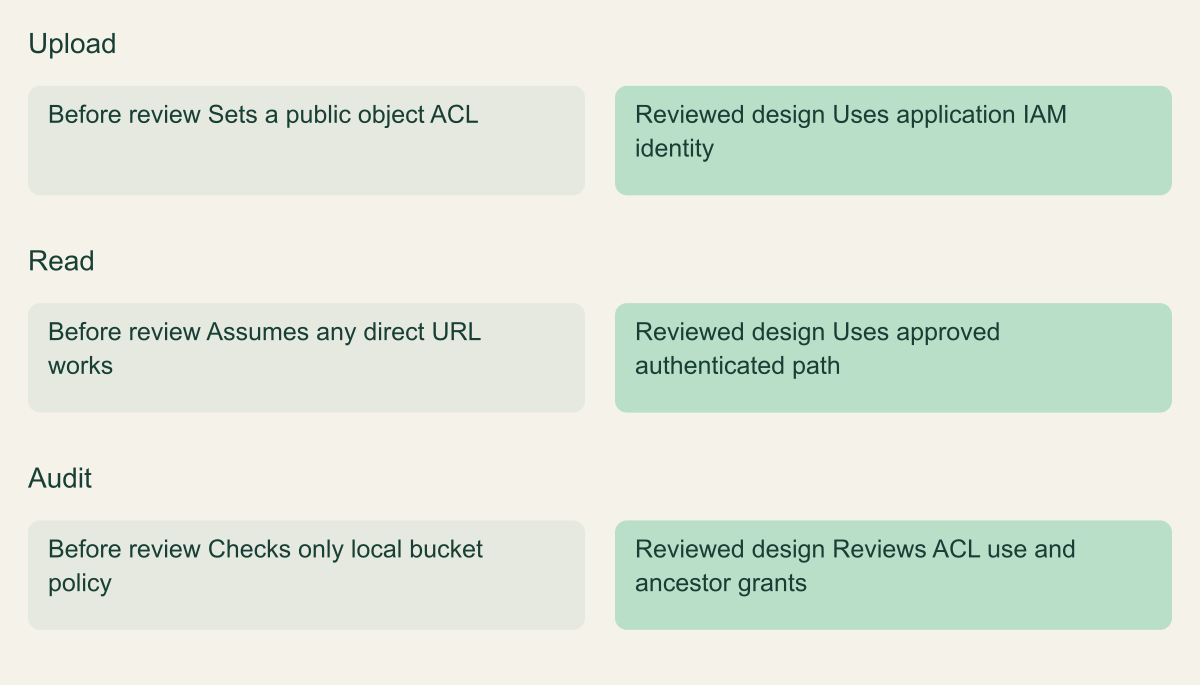
Change the uploader as well as the bucket setting
Hypothetical before-and-after workflow, not a measured deployment outcome.

Source. Google Cloud documentation [1][2][5]. Reviewed September 12, 2026.
Method. Original conceptual synthesis of the cited documentation. Rows describe responsibilities, decisions, or hypothetical states, not measured results.
Accessible table and figure data
| Operation | Before review | Reviewed design |
|---|---|---|
| Upload | Sets a public object ACL | Uses application IAM identity |
| Read | Assumes any direct URL works | Uses approved authenticated path |
| Audit | Checks only local bucket policy | Reviews ACL use and ancestor grants |
| Operation | Before review | Reviewed design |
|---|---|---|
| Upload | Sets a public object ACL | Uses application IAM identity |
| Read | Assumes any direct URL works | Uses approved authenticated path |
| Audit | Checks only local bucket policy | Reviews ACL use and ancestor grants |
Review deletion and administration separately
The private-bucket test should also identify who can change the protection itself. A reader who can download an approved object and an administrator who can edit the bucket's policy hold different authority. Keep that distinction visible in the access record, especially when a small team reuses broad roles for convenience. The Storage role reference helps separate object operations from bucket administration. [8]
Deletion is another independent concern. Public access prevention does not preserve a report that an authorized writer or administrator deletes. If accidental deletion is part of the bucket's risk, review soft delete or the appropriate recovery design separately. Adding a recovery feature should not obscure the current access review or introduce an irreversible retention decision without understanding it.
A bucket can therefore pass its privacy test and still need a recovery test. Give each result its own evidence: the unintended reader is denied, the intended writer succeeds, and a recoverable test object can be restored under the chosen policy. Keeping these outcomes separate produces a clearer operating record than calling the bucket secure based on a single enabled setting.
Method and provenance
Source-based technical guidance using current Google Cloud documentation reviewed September 12, 2026. The procedures and decision frameworks are original editorial synthesis. Examples are explicitly hypothetical.
No customer project was configured and no cloud command, restoration, or workload experiment was executed for this article. Documented settings and limits are not measured service performance; actual configuration and supported product behavior must be checked before use.
AI assistance. AI assisted with research organization, drafting, and editing. Original illustrations were generated with ChatGPT and reviewed alongside source-based diagrams; visual and release verification is recorded separately.
Published under the Cloud Security Desk organizational byline. Read the practitioner guide policy.
References
- Public access prevention Google Cloud. Accessed .
- Uniform bucket-level access Google Cloud. Accessed .
- Use public access prevention Google Cloud. Accessed .
- Use uniform bucket-level access Google Cloud. Accessed .
- Identity and Access Management Google Cloud. Accessed .
- Signed URLs Google Cloud. Accessed .
- Caching with Cloud Storage built-in cache Google Cloud. Accessed .
- IAM roles for Cloud Storage Google Cloud. Accessed .