
A two-service proof distinguishes ingress, ID token audience, receiver invoker grant and application authorization.
At a glance
Key findings
Draw the caller and receiver
To let one Cloud Run service call another privately, give the calling service a dedicated service account, grant that identity permission to invoke the receiving service, and send an ID token intended for the receiver. Keep the receiver's authentication requirement enabled. Then check ingress separately and preserve application-level authorization for the business action. A valid cloud caller is not automatically entitled to every customer's data. [1][2]
Consider a hypothetical report application with two services. A front end accepts requests from authenticated application users. A report worker performs the expensive work. The front end should invoke the worker, while an arbitrary internet client should not. The worker can remain a small ordinary HTTP service; the important design decision is which identity is permitted to reach it.
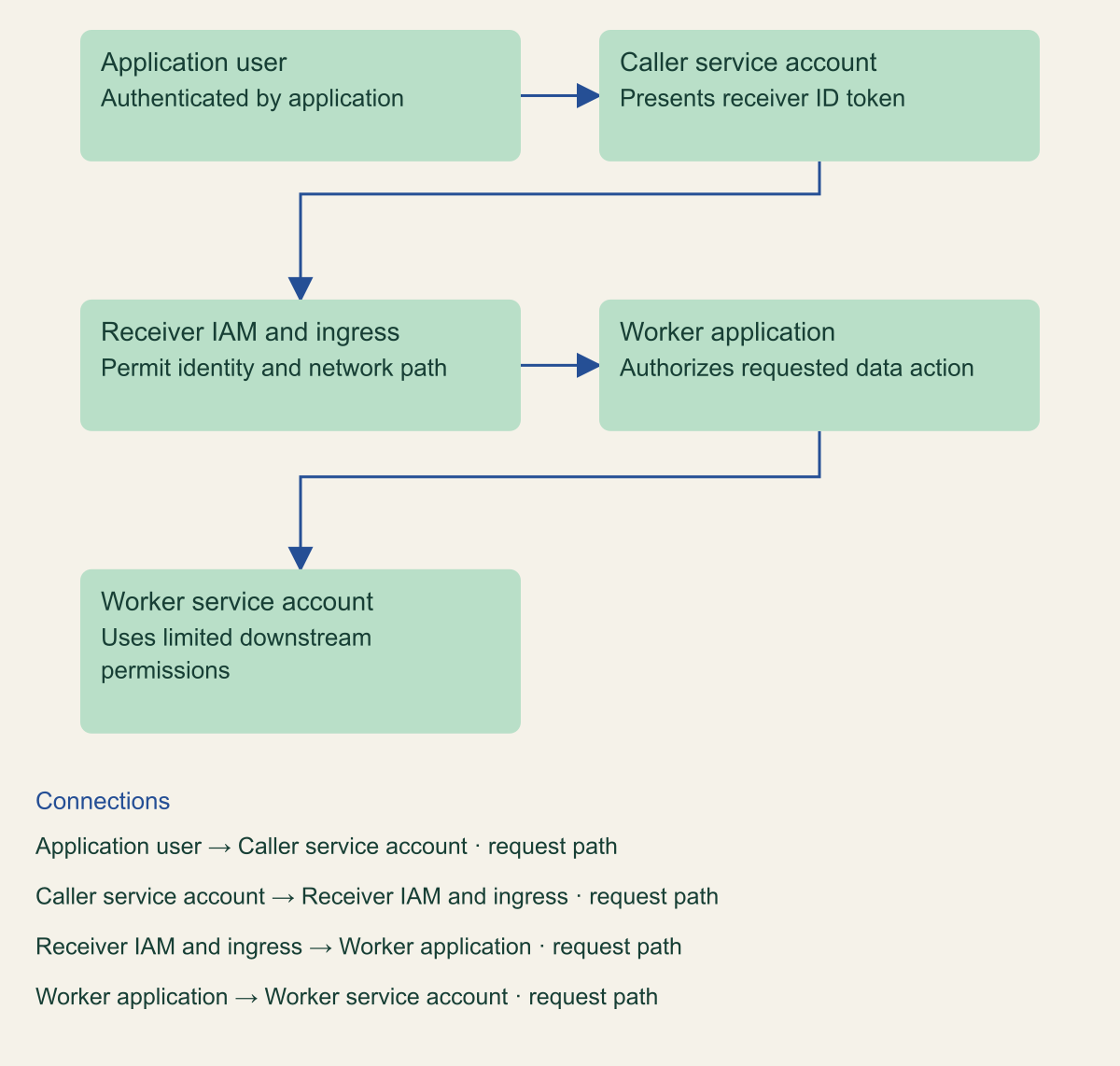
Draw the request before configuring roles. The end user calls the front end, the front end runs as a service account, and that service account invokes the worker. These are distinct identities and authorization decisions. The worker's own runtime identity controls its outbound access to storage or other APIs. Confusing the caller identity with the receiver identity is a common way to grant a role to the wrong account. [3]
This guide covers Cloud Run services using IAM authentication. It does not make a browser application into a trusted service account holder or replace an application login system. A public-facing front end may have a different ingress and authentication design from the private worker. Keep the two entry points explicit so a change intended for the front end does not accidentally open the worker.
The identities in a two-service request
Conceptual two-service architecture. Runtime invocation and business authorization are distinct.

Source. Google Cloud documentation [1][2][3][4]. Reviewed September 12, 2026.
Method. Original conceptual synthesis of the cited documentation. Rows describe responsibilities, decisions, or hypothetical states, not measured results.
Accessible table and figure data
| Component | Responsibility |
|---|---|
| Application user | Authenticated by application |
| Caller service account | Presents receiver ID token |
| Receiver IAM and ingress | Permit identity and network path |
| Worker application | Authorizes requested data action |
| Worker service account | Uses limited downstream permissions |
| Component | Responsibility |
|---|---|
| Application user | Authenticated by application |
| Caller service account | Presents receiver ID token |
| Receiver IAM and ingress | Permit identity and network path |
| Worker application | Authorizes requested data action |
| Worker service account | Uses limited downstream permissions |
Give the caller its own identity
Create or select a user-managed service account for the calling service. Give it a name that identifies the workload and environment. Review its existing roles before reuse. An account shared by unrelated services makes it difficult to distinguish which application is supposed to invoke the worker and increases the effect of a compromised workload. [3]
Attach the service account to the caller through the Cloud Run service identity configuration. This is a deployment action performed by an authorized deployer. The person who can attach an identity and the identity that runs the container are different principals. Google documents the permissions needed to deploy with a service account, including the ability to act as that account. Keep those deployment permissions scoped to the intended workflow. [7]
The application should use the platform's supported authentication libraries to obtain credentials. Do not add a downloaded service account key to the container image merely because a local prototype used one. Cloud Run service identity and Application Default Credentials support runtime access without distributing that user-managed private key. The service identity documentation explicitly warns against setting GOOGLE_APPLICATION_CREDENTIALS when using the attached identity for Google Cloud API access. [3]
Check the deployed revision after the change. A correct account in a deployment script does not prove that the revision receiving traffic uses it. Record the service account associated with the active revision and confirm that the request is originating from the intended caller. This is especially relevant when old revisions still receive traffic or multiple environments have similar service names.
Set the receiver permission
Grant the caller service account the Cloud Run Invoker role on the receiving service. Use the receiver's resource scope so the caller does not gain unnecessary invocation rights elsewhere. The service-to-service documentation identifies this role and the relationship between caller identity and receiver policy. Read the policy back after applying the binding. [2]
Check how the receiver is made public or private in its current configuration. Cloud Run supports disabling the invoker IAM check, and public access can also involve an allUsers binding. Removing one public-looking binding is therefore not a complete review if the IAM check itself has been disabled. Conversely, a saved authentication setting should be checked with the effective policy and a real request. [6]
Keep administration separate from invocation. The caller needs to request the worker's function, not deploy a new worker revision or change its IAM policy. If troubleshooting seems to require a broad administrative role, inspect the failing operation. The error may concern deployment, a downstream API, or the ID token rather than the invocation permission itself.
Use a test worker with a harmless response while establishing the relationship. The first successful request should not send a real customer email, charge an account, or launch a costly batch job. Once the identity path works, test a representative business action through the application controls. Separating those tests makes it easier to tell whether a failure comes from Cloud Run authentication or application behavior.
Use an ID token for the receiver
Cloud Run service-to-service authentication uses an ID token with an audience that identifies the intended receiving service. Use the current authentication library guidance and the receiver's documented audience, usually its service URL unless a supported custom audience is configured. An OAuth access token used for a Google Cloud API is not interchangeable with the ID token expected for this invocation. [2]
Obtain the token through the supported library in the running caller and attach it to the request as documented. Avoid hand-building or editing token claims. The platform must verify the signed credential and its intended audience. A string that looks like a token in a request header is not evidence that it was issued correctly or that the receiver accepts it.
Separate the destination URL from application paths and audience configuration. A request may target a path beneath the service URL, while the token's audience follows the service's authentication contract. Custom domains and traffic-tagged URLs can introduce details that need the current documentation. Do not choose an audience by copying whichever URL happened to work in a browser. [2]
Do not log the token. A troubleshooting record can capture the service name, request time, status, and a safe correlation identifier without storing the authorization header. If the application has its own authorization header, consult the documented Cloud Run header options and preserve the application's intended authentication behavior. Authentication plumbing should not silently overwrite a credential the business application still needs.
Check ingress separately
Ingress controls which network paths can reach a Cloud Run service. IAM authentication controls whether a presented identity may invoke it. A request can have a valid token and still arrive through a disallowed ingress path. A request can also arrive through an allowed network path and lack invocation permission. Keep both controls in the design and in the troubleshooting record. [4]
Choose ingress based on the actual caller and network configuration. Internal ingress has a documented definition; it does not simply mean any resource with the same company name or any caller authenticated to Google Cloud. Service-to-service routing, VPC configuration, load balancers, and project relationships can matter. Review the supported path before tightening ingress on an existing service. [4]
For the hypothetical front end and worker, first establish the authenticated invocation using a documented supported path. Then apply the intended ingress restriction and repeat the same request from the deployed caller. A successful laptop request is not a substitute for this test because the laptop and Cloud Run revision can reach the service differently.
Avoid solving a network failure by disabling authentication. That changes a separate control and can leave the worker callable by unintended clients. Likewise, granting more IAM roles will not repair an unsupported ingress route. Follow the request through destination selection, network admission, token validation, invoker authorization, and application handling in that order, preserving the first observed failure.
Test allowed and denied requests
Run an allowed request from the deployed caller service account and confirm the worker performs the harmless expected action. Record the caller revision, receiver service, request path, time, and result. If the receiver calls another API, distinguish a successful invocation from a later downstream permission failure. An HTTP error returned by the application can occur after Cloud Run has already authenticated the caller.
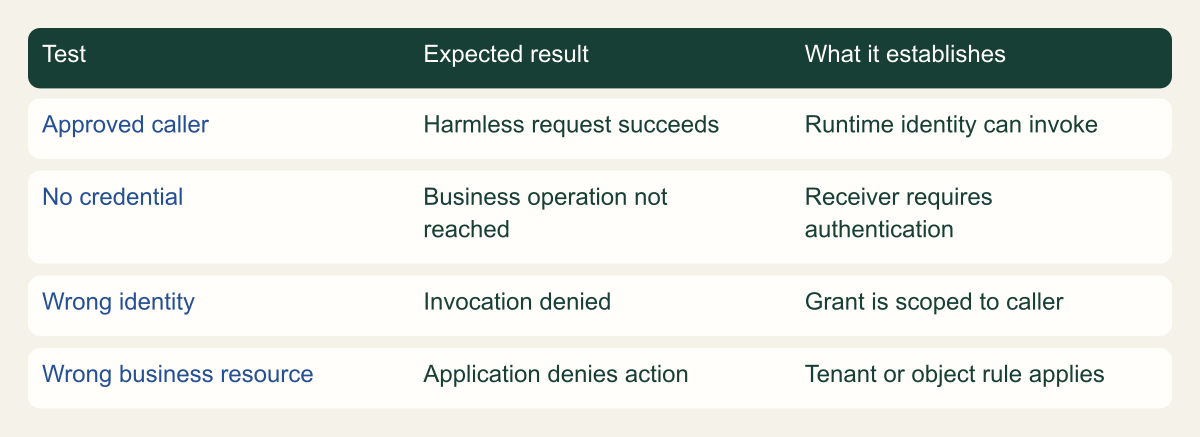
Send an unauthenticated request from an appropriate test context and confirm that it does not reach the protected business operation. Also test an authenticated identity that lacks the receiver's invoker role. These exercise different mistakes: an accidentally public service and an overly broad identity grant. Use the current developer-authentication guidance for controlled manual tests, while remembering that a developer's successful request does not prove the runtime identity is correct. [5]
If practical, include an incorrect-audience case using a supported test method that does not expose tokens. The expected rejection helps verify that the application is not confusing a credential intended for another destination with the worker's invocation credential. Do not modify signed tokens by hand and draw conclusions from a generic parsing error.
Keep side effects disabled during authentication tests. A read-only health-like test endpoint can help, but it must exercise the same protected receiver configuration. An unprotected status endpoint on another service proves little. After the identity tests pass, perform a small application-level test under normal authorization to confirm that the intended report workflow works from beginning to end.
A small authentication test matrix
Original verification framework. Tests describe expected behavior, not observed customer results.

Source. Google Cloud documentation [1][2][5]. Reviewed September 12, 2026.
Method. Original conceptual synthesis of the cited documentation. Rows describe responsibilities, decisions, or hypothetical states, not measured results.
Accessible table and figure data
| Test | Expected result | What it establishes |
|---|---|---|
| Approved caller | Harmless request succeeds | Runtime identity can invoke |
| No credential | Business operation not reached | Receiver requires authentication |
| Wrong identity | Invocation denied | Grant is scoped to caller |
| Wrong business resource | Application denies action | Tenant or object rule applies |
| Test | Expected result | What it establishes |
|---|---|---|
| Approved caller | Harmless request succeeds | Runtime identity can invoke |
| No credential | Business operation not reached | Receiver requires authentication |
| Wrong identity | Invocation denied | Grant is scoped to caller |
| Wrong business resource | Application denies action | Tenant or object rule applies |
Keep business authorization in the application
The worker knows that the caller service account may invoke it. It still needs to decide whether the requested report is appropriate for the application user and tenant. A single front-end identity often represents requests from many people. Cloud Run IAM does not automatically supply the business rule that one customer may read only its own report. [1][2]
Pass only the trusted context the worker requires, and validate it according to the application's design. Do not accept a tenant identifier from a caller-controlled field without tying it to the authenticated application request. The front end should authorize the user's request, and the worker should enforce the relevant resource-level rule before reading or changing data.
Limit the worker's own service identity to its downstream task. If it needs to read one report bucket, it should not receive broad project administration. An authenticated caller could still contain a software defect or be compromised. Constraining the worker's outbound permissions limits which resources that defect can reach, while input validation limits which business operations it can request. [3]
Review retries and idempotency for operations with side effects. An authentication timeout or network interruption can leave the caller uncertain whether the worker performed an action. Repeating a report request should not send duplicate notifications or create uncontrolled jobs. This is an application contract, separate from the proof that the original request carried the correct identity.
Change and recover without opening access
When replacing the caller's service account, grant the new identity its reviewed receiver permission, deploy the caller revision, and verify a request from that revision. Remove the old identity's grant after traffic and dependencies have been checked. A role change alone does not move traffic, and a deployment alone does not remove an old account's authority.
Keep the previous approved revision available through the ordinary release process until the new path is verified. If rollback is required, understand which identity the previous revision uses and whether its permissions still exist. A rollback that restores code but leaves its service account unable to invoke the worker can prolong the outage.
Troubleshoot using the specific error stage. Google provides Cloud Run troubleshooting guidance for permission, ingress, and runtime failures. Preserve status information without exposing credentials. If a temporary test adjustment is required, make it narrow and record it. Do not turn the receiver public as an undocumented emergency measure. [8]
After the change, review both services' active identities, receiver IAM, authentication setting, ingress configuration, and application test. Remove obsolete bindings and test resources. The durable result is a pair of services whose request path another developer can understand, reproduce, and change without carrying a private key or relying on an undocumented public endpoint.
Make the handoff useful to a developer
Keep a short diagram and request note in the application's operating documentation. The diagram should name the user-facing service, caller identity, protected receiver, and downstream resources. The note should identify the expected token type and audience, where invocation permission is granted, and which application authorization remains the developer's responsibility. Avoid placing credentials or decoded live token payloads in the document.
For a hypothetical failure during a release, this record gives the responder a useful first question. Did the new caller revision use the intended service account? If it did, did the receiver retain that account's invoker grant? If both are correct, inspect audience and ingress before changing unrelated storage permissions. Each check resolves one part of the request path.
The record also clarifies what a successful test does not establish. A harmless invocation proves the configured caller can reach the receiver. It does not establish tenant isolation, correctness of generated reports, or the worker's recovery behavior. Those require their own application tests. Keeping the claims separate makes the small authentication guide useful without presenting it as a complete security review.
Review the receiver's downstream authority
The worker's ability to reach another service should be reviewed independently from the caller's ability to invoke the worker. In the report example, a worker that reads a designated report bucket does not automatically need permission to delete every bucket in the project. Inspect the worker's service account roles and remove unnecessary authority through a tested change. The runtime identity documentation describes this outbound use of the service identity. [3]
This check also helps explain a confusing failure. If the front end reaches the worker but the worker cannot read its input, changing the front end's invoker grant will not solve the downstream denial. Record the operation that failed and the identity used for it. The appropriate repair may be a narrowly scoped storage permission on the worker account or an incorrect object reference in application code.
Keep these two relationships in the test record. One proves that the caller can invoke the protected receiver. The other proves that the receiver can perform its approved task on the intended resource. A developer can then extend the application without treating every cloud permission as part of one undifferentiated service account setup.
Method and provenance
Source-based technical guidance using current Google Cloud documentation reviewed September 12, 2026. The procedures and decision frameworks are original editorial synthesis. Examples are explicitly hypothetical.
No customer project was configured and no cloud command, restoration, or workload experiment was executed for this article. Documented settings and limits are not measured service performance; actual configuration and supported product behavior must be checked before use.
AI assistance. AI assisted with research organization, drafting, and editing. Original illustrations were generated with ChatGPT and reviewed alongside source-based diagrams; visual and release verification is recorded separately.
Published under the Cloud Security Desk organizational byline. Read the practitioner guide policy.
References
- Authentication overview Google Cloud. Accessed .
- Authenticating service-to-service Google Cloud. Accessed .
- Introduction to service identity Google Cloud. Accessed .
- Restrict network endpoint ingress for Cloud Run services and instances Google Cloud. Accessed .
- Authenticate developers Google Cloud. Accessed .
- Allowing public (unauthenticated) access Google Cloud. Accessed .
- Configure service identity for services Google Cloud. Accessed .
- Troubleshoot Cloud Run issues Google Cloud. Accessed .