
A small migration checks all attached groups and IPv6, validates a fresh Session Manager or narrow SSH path, and removes only the reviewed rule. Remove internet-wide SSH access after you have tested the administrative route that will replace it.
At a glance
Key findings
- Remove internet-wide SSH access after you have tested the administrative route that will replace it. That route may be Systems Manager Session Manager or a deliberately restricted SSH source. Inspect every security group attached to the instance and both IPv4 and IPv6 rules, then revoke the exact public rule. AWS security groups are allow-based and their permissions are combined, so removing one rule does not help if another attached group still permits the same traffic. [1]
- A small migration checks all attached groups and IPv6, validates a fresh Session Manager or narrow SSH path, and removes only the reviewed rule.
- Use the named resource, approved owner and actual read-back results to complete the operation. No live customer environment is represented here.
Choose the replacement access path first
Remove internet-wide SSH access after you have tested the administrative route that will replace it. That route may be Systems Manager Session Manager or a deliberately restricted SSH source. Inspect every security group attached to the instance and both IPv4 and IPv6 rules, then revoke the exact public rule. AWS security groups are allow-based and their permissions are combined, so removing one rule does not help if another attached group still permits the same traffic. [1]
The common exposure is an inbound TCP 22 rule from 0.0.0.0/0 or ::/0. AWS identifies unrestricted remote administration as an exposure to remediate. The rule permits network access; a successful SSH login still depends on the operating system and its authentication configuration. Those are separate controls. Keeping authentication strong is useful, but it does not make an unnecessarily broad network route an intentional access design. [7]
This guide focuses on one Linux EC2 instance and a planned security-group change. It assumes the operator is authorized to inspect the instance and alter its access rule. It does not propose scanning unrelated hosts or rewriting the whole VPC. A rule can be shared by several instances, so even a single rule removal needs an attachment check before the change is treated as affecting only the instance currently visible in the console.
The success condition is practical: approved administrators can open a fresh session through the intended route, and fresh internet connections no longer have the public SSH allowance. Existing sessions are insufficient evidence because connection tracking can preserve them after a rule changes. Keep the replacement route usable while performing the review so a correct security change does not become an avoidable access-recovery incident. [2]
Find every rule that permits the connection
Start from the instance's network interfaces and list the attached security groups. For each group, inspect inbound protocol, port range, IPv4 source, IPv6 source, and any referenced security group or prefix list. TCP 22 may be allowed by a specific SSH rule, by a broader TCP range, or by an all-traffic rule. Searching only for a console row named SSH can miss a more permissive rule that also allows the connection. [1]
Check all attached groups because their rules are additive. A narrow rule from an administrator's address does not cancel a public rule in another group. Security groups do not provide explicit deny rules that override those allows. Record the exact group and rule identifiers responsible for the unwanted route. That makes the planned mutation narrower and easier to review than a description such as tighten the firewall. [1]
Inspect which resources share the group. A group named for one server may now be attached to several interfaces or maintained by a deployment template. Removing its rule affects the resources that rely on that group, not just the instance that led you to it. If the group is shared, involve the relevant owners or create a reviewed separation through the normal infrastructure process. Do not quietly break another application's administrative path.
Finally, record the current routing assumptions. A public rule is a permission even when the instance has no presently reachable public address. That route may become relevant after a later network change. The immediate connectivity test should reflect the existing topology, while the policy review should still identify unnecessarily broad rules. Avoid claiming that a failed public connection proves the rule was removed; a route, address, or network ACL could be blocking it independently.
Keep a description on the approved remaining administrative rule that identifies its purpose and owner without embedding personal or sensitive details. A clear rule description does not enforce access, but it helps the next reviewer distinguish a deliberate operating route from a temporary exception whose purpose has been forgotten.
aws ec2 describe-security-groups \
  --group-ids "$CSD_SECURITY_GROUP_ID" \
  --region "$CSD_AWS_REGION"
Choose Session Manager or a narrow SSH source
Session Manager allows administrative access to a managed node without opening inbound ports or maintaining a bastion for that purpose. It depends on the Systems Manager agent, appropriate instance and operator permissions, and connectivity to the required service endpoints. That can be an appropriate replacement for direct SSH, but those dependencies need to exist and work before the public rule is removed. The name of the service alone is not a recovery path. [3][4]
If the team retains SSH, restrict the source to the approved administrative network, host, or other supported source arrangement. Use a current address range and document its owner. An administrator's temporary home IP may be useful for an authorized short change, but it is a fragile permanent operating model when addresses change. Do not use an extremely broad network merely because it is smaller than the entire internet.
Keep the authentication and logging differences visible. Session Manager authorizes sessions through IAM and provides configurable logging capabilities, but AWS documents limitations for logging SSH and port-forwarding session content. Do not promise that every command inside an SSH tunnel becomes a readable Session Manager transcript. The chosen session type, operating-system audit configuration, and log destination determine what evidence the team can obtain. [3]
Choose the path the team can actually operate. A private endpoint design can avoid the need for public internet egress to the service, but it introduces endpoint and DNS dependencies that should be reviewed separately. A narrow existing SSH route may be the appropriate first step while Session Manager is prepared. The article's before-and-after comparison presents alternatives, not a requirement to build a new network architecture just to remove one unnecessary public rule.
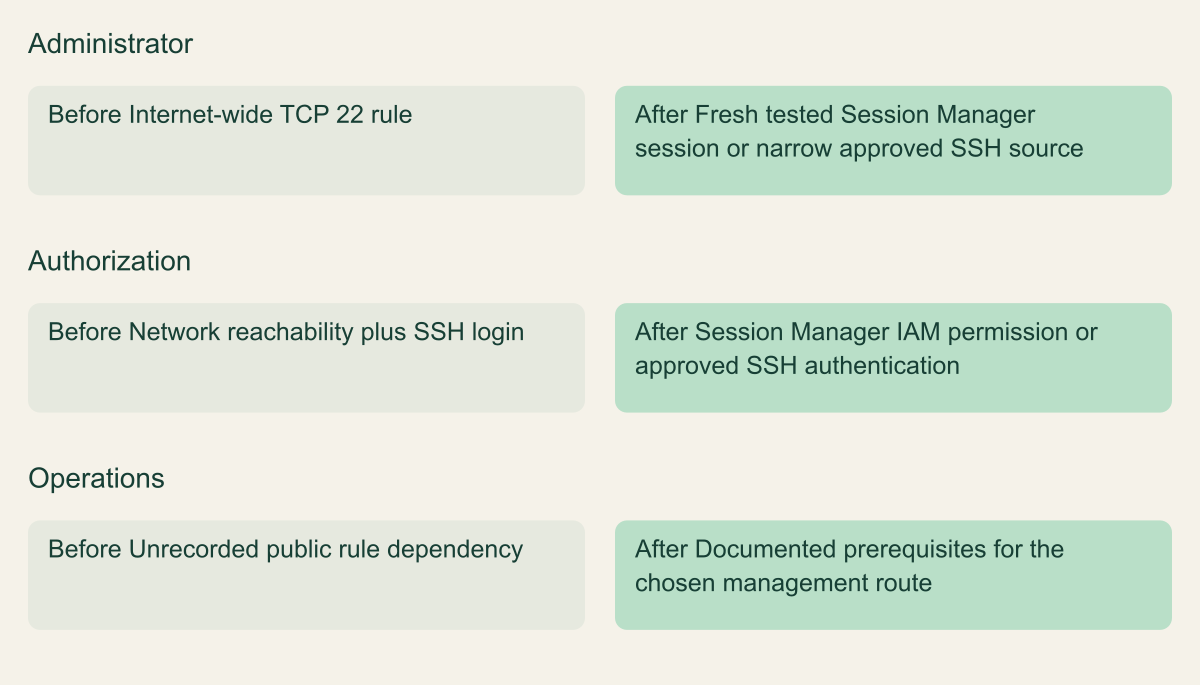
Replace a broad administrative route with approved access
Prepare either Session Manager or a narrow approved SSH route, then verify the selected path before removing unrestricted TCP 22.

Source. Conceptual synthesis of AWS documentation accessed September 12, 2026. [1] [3] [4]
Method. Conceptual editorial synthesis of the cited service behavior; no measured outcomes. Scope: How do you remove internet-wide SSH access without locking out administrators?
Accessible table and figure data
| Route | Before | After |
|---|---|---|
| Administrator | Internet-wide TCP 22 rule | Fresh tested Session Manager session or narrow approved SSH source |
| Authorization | Network reachability plus SSH login | Session Manager IAM permission or approved SSH authentication |
| Operations | Unrecorded public rule dependency | Documented prerequisites for the chosen management route |
| Route | Before | After |
|---|---|---|
| Administrator | Internet-wide TCP 22 rule | Fresh tested Session Manager session or narrow approved SSH source |
| Authorization | Network reachability plus SSH login | Session Manager IAM permission or approved SSH authentication |
| Operations | Unrecorded public rule dependency | Documented prerequisites for the chosen management route |
Prove the new path with a fresh session
For Session Manager, verify that the instance is recognized as a managed node and that its agent version and operating system meet the current prerequisites. Check the instance role and the operator's permission to start the intended session. Avoid granting blanket administrator permissions as a troubleshooting shortcut. The goal is to establish the particular authorized session path the team will depend on after the public rule is gone. [4]
Check outbound connectivity to the documented Systems Manager endpoints. The agent initiates these connections, which is why Session Manager does not require an inbound SSH rule for its normal session path. In a private subnet, review the VPC endpoints or other approved route and the relevant HTTPS permissions. DNS and endpoint configuration matter here. A managed-node status from an earlier period does not establish that the current network route is still healthy. [5]
Open a new session through the proposed route using the intended operator identity. Confirm the target instance and perform a harmless check such as verifying the host identity and current user. Leave production changes out of this validation unless they are separately authorized. If the route uses a narrow SSH source, open a new connection from that source. Do not count an old shell that was established before the configuration changes.
Record the test's scope and keep an approved recovery path available. That might include a second operator who can use the tested Session Manager path or a narrowly scoped emergency access procedure. It should not depend on someone remembering an undocumented firewall rule. If the replacement session fails, resolve its prerequisites before removing the only working administrative route in a routine maintenance window.
Remove the exact public rule
Recheck the rule identifier immediately before revocation, especially if another deployment can modify the group. AWS assigns identifiers to security group rules, and the revoke-security-group-ingress operation supports specifying those IDs. Targeting the reviewed rule reduces the risk of accidentally removing a neighboring application rule or mismatching a complex source definition. Keep the account, Region, security group, and rule ID together in the change record. [1][6]
The CLI operation also supports a dry run that checks permissions without applying the mutation. Its documented successful authorization response is an error named DryRunOperation, so do not confuse that result with a completed rule removal. Dry-run permission evidence and the actual mutation are separate steps. A dry run does not test the application's future connectivity or guarantee that the configuration remains unchanged until execution. [6]
Apply the removal through the console or the reviewed CLI command, then read the inbound rules again. Inspect the entire relevant allowance, including any IPv6 counterpart or broader protocol range identified during inventory. If infrastructure code owns the group, update that source so a later deployment does not recreate the public rule. Avoid unrelated rule edits that make the resulting behavior harder to attribute.
If the rule cannot be removed because the caller lacks permission or another control owns it, stop the dependent change and work through the appropriate infrastructure owner. Do not detach every group or replace the instance's full network policy to get around one denied operation. The intended task remains a narrow removal of unnecessary public SSH access, with the approved application and administrative routes preserved and tested.
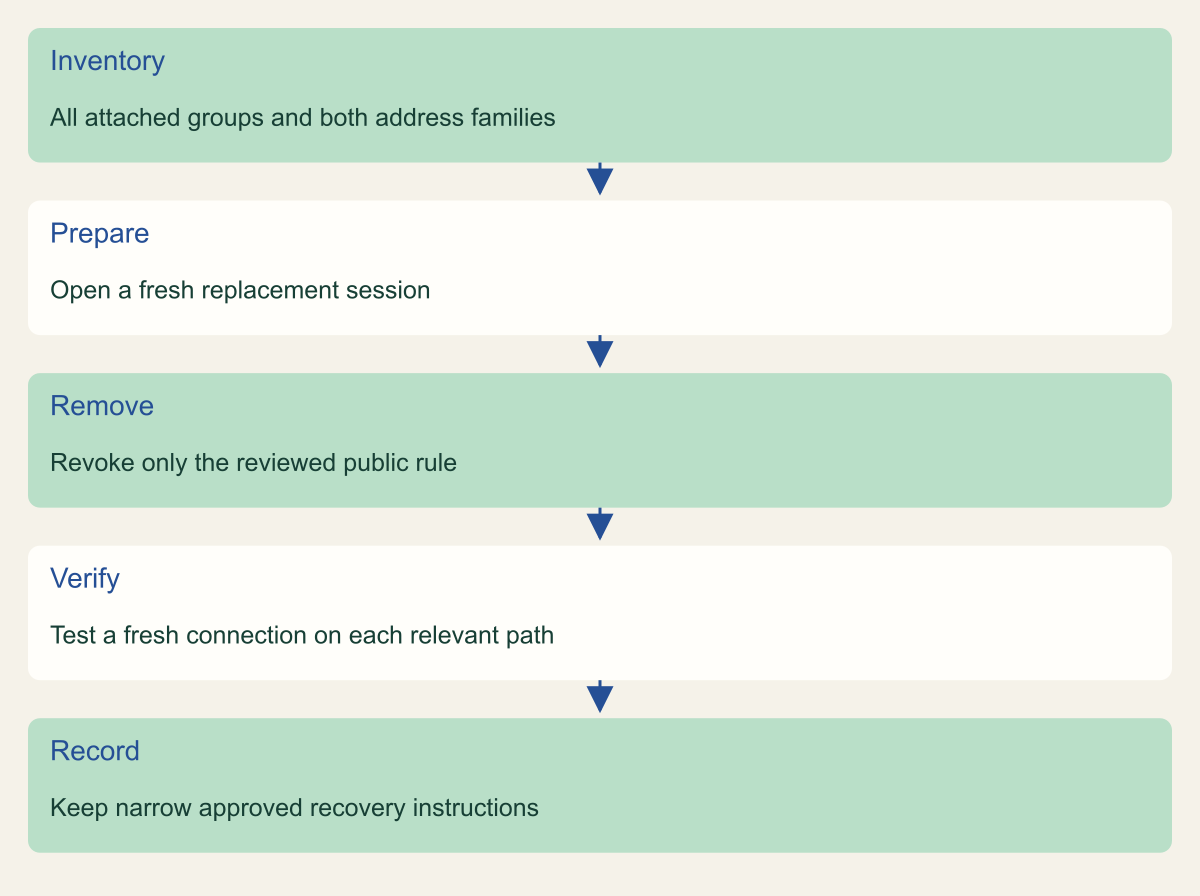
Remove public SSH after a fresh replacement-session test
Review every attached group and relevant address family, remove only the intended rule, and test fresh connections afterward.

Source. Conceptual synthesis of AWS documentation accessed September 12, 2026. [1] [2] [4] [6]
Method. Conceptual editorial synthesis of the cited service behavior; no measured outcomes. Scope: How do you remove internet-wide SSH access without locking out administrators?
Accessible table and figure data
| Step | Check |
|---|---|
| Inventory | All attached groups and both address families |
| Prepare | Open a fresh replacement session |
| Remove | Revoke only the reviewed public rule |
| Verify | Test a fresh connection on each relevant path |
| Record | Keep narrow approved recovery instructions |
| Step | Check |
|---|---|
| Inventory | All attached groups and both address families |
| Prepare | Open a fresh replacement session |
| Remove | Revoke only the reviewed public rule |
| Verify | Test a fresh connection on each relevant path |
| Record | Keep narrow approved recovery instructions |
Test new connections after the change
Read-back inspection should show that the reviewed public allowance is absent from every relevant attached group. Then verify fresh connections. AWS documents that changes to a security group may not immediately interrupt tracked connections. An existing SSH session remaining open is therefore not proof that the public rule persists, and it is not proof that a new administrator will still be able to connect through the replacement path. [2]
Open a new approved session through Session Manager or the restricted SSH source and confirm the intended host. If testing the formerly public route is authorized, perform a targeted fresh connection attempt to that one instance from an appropriate external source. Do not scan address ranges. The negative test should answer the narrow question about the known instance and path, with the result interpreted alongside the rule inventory and current routing.
Check both address families when both are relevant. Removing 0.0.0.0/0 does not remove an independent ::/0 allowance. If the instance has no IPv6 route, record that the IPv6 configuration was inspected and that no live IPv6 connection was tested. A clear distinction between configuration review and connectivity testing is more useful than claiming all network paths were exercised when only an IPv4 session was available. [1][7]
Verify that the application still performs a harmless expected operation after the change. A narrow SSH rule removal should not alter its web or database rules, but the check can expose an accidentally removed range or an unexpected shared-group dependency. Preserve the result and any console or command errors. If a test fails, investigate the specific rule and path rather than immediately restoring every public allowance.
Keep an approved recovery route
A planned rollback should name the narrowest route that restores authorized administration. If the team has just verified Session Manager, use that route to investigate an unexpected SSH issue. If a restricted SSH rule needs adjustment because the approved source address changed, review the current address and restore only that scope. Do not make the entire internet the default recovery option whenever an administrator cannot connect.
Treat suspected compromise differently from routine migration trouble. If the public route was being removed during an active incident, restoring it may reopen the path being contained. Coordinate with the incident owner and use the approved recovery channel. A security group's previous state is useful evidence, but it is not automatically an acceptable state to restore under every circumstance.
Remember that network access and operating-system access are separate. A new Session Manager session may work while an SSH key or local account is broken. Conversely, a correctly configured local account cannot compensate for a missing network route. Keep the diagnostic evidence specific: session type, identity, target, source path, time, and error. That prevents a login problem from becoming an unnecessary series of broad firewall changes.
If a temporary rule is required, give it an owner and removal condition in the change record. Update infrastructure code as appropriate and verify the final state after the exception ends. Temporary access that remains after the maintenance window can recreate the original problem under a different description. The task is complete only when the lasting operating path works and any temporary exposure has been addressed through the approved process.
Record the access path the team now depends on
Leave a concise record of the instance, attached groups, removed rule identifiers, reviewed address families, replacement session type, and successful fresh-session test. Include the operator identity used, the administrative dependencies, and the location of the infrastructure change. Keep private account details in the organization's normal change system. The public article's conceptual figures should not be mistaken for a diagram of an actual customer network.
Document the dependencies that need future maintenance. Session Manager depends on the agent, instance permissions, operator permissions, network access, and endpoint configuration. Restricted SSH depends on the allowed source remaining accurate as well as on SSH authentication. If those dependencies change, repeat the fresh-session check. A configuration that worked at the end of today's maintenance is not a guarantee that an identity or network change next month cannot break it. [3][4][5]
Connect the access change to its audit evidence. Session events, relevant CloudTrail activity, and network observations can support an investigation, each with limits. VPC Flow Logs, for example, should be read according to what they actually record rather than treated as a transcript of the administrative session. Keep the evidence appropriate to the question being answered and avoid collecting command content where the chosen session type does not provide it.
The finished result is a smaller administrative network audience and a tested route for the people who still need access. It is not the removal of administration itself. Recheck the groups when a new interface, instance, address family, or deployment template is introduced, and ensure new administrators can follow the documented path. That keeps the original public rule from becoming an invisible dependency that returns during the next urgent change.
Method and provenance
Primary AWS documentation was retrieved and reviewed on September 12, 2026. The guide synthesizes documented service behavior into a bounded operational procedure; research records and figure data are maintained with the article.
Examples are hypothetical. Code and request shapes are checked locally where applicable, but no customer AWS account, production operation, recovery duration or benchmark was tested. Readers must verify their resource type, Region, permissions and organization controls.
AI assistance. AI assisted research organization, drafting and original visual planning. Sources, technical boundaries and final rendering are reviewed through the publication workflow.
Published under the Cloud Security Desk organizational byline. Read the practitioner guide policy.
References
- Security group rules - Amazon Virtual Private Cloud AWS. Accessed .
- AWS Systems Manager Session Manager - AWS Systems Manager AWS. Accessed .
- Remediating exposures for EC2 instances - AWS Security Hub AWS. Accessed .