
Separates IAP tunnel permission, firewall reachability, OS Login authorization and VM service account implications.
At a glance
Key findings
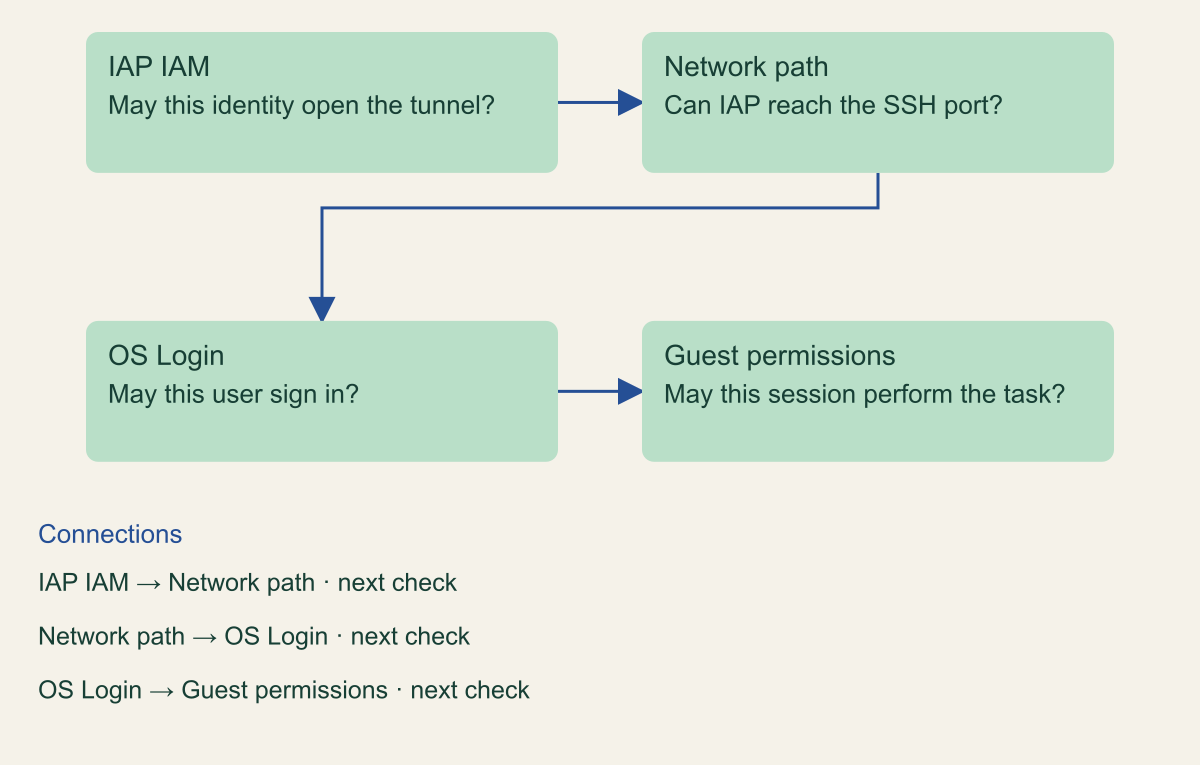
Separate the four access checks
A Linux VM does not need an external IP address for an administrator to reach it with SSH. Identity-Aware Proxy, or IAP, can carry the connection to the VM through a tunnel. OS Login can then decide whether the Google identity is allowed to sign in to the operating system. For a usable configuration, the administrator needs tunnel permission, a permitted network path, operating system access, and a working SSH service. Treat these as four separate checks. [1][2]
This guide uses a hypothetical Compute Engine Linux VM in a test project. It assumes the image supports OS Login and that an authorized administrator can adjust the VM configuration, firewall rules, and IAM grants. It does not assume that removing an external IP is harmless. A VM may depend on that address for outbound access or inbound application traffic, and those dependencies need their own migration plan.
IAP authorizes the tunnel. It does not automatically grant a shell account or make the guest operating system secure. OS Login manages the login relationship, while Linux permissions determine what the session can do after entry. A normal operator and an administrator should not receive the same operating system authority merely because both connect through the same tunnel. Google documents separate OS Login roles for ordinary and administrative access. [3][4]
Write down the expected result before configuration begins: an approved operator can connect to one designated VM through IAP, an unapproved identity cannot, and a former direct SSH path is no longer required. That gives the pilot a concrete end point. The tunnel indicator alone is insufficient because it says nothing about the guest permissions or other routes into the machine.
The four checks before a shell opens
Conceptual request path. IAP tunnel access and operating system authority are separate.

Source. Google Cloud documentation [1][3][4]. Reviewed September 12, 2026.
Method. Original conceptual synthesis of the cited documentation. Rows describe responsibilities, decisions, or hypothetical states, not measured results.
Accessible table and figure data
| Check | Question |
|---|---|
| IAP IAM | May this identity open the tunnel? |
| Network path | Can IAP reach the SSH port? |
| OS Login | May this user sign in? |
| Guest permissions | May this session perform the task? |
| Check | Question |
|---|---|
| IAP IAM | May this identity open the tunnel? |
| Network path | Can IAP reach the SSH port? |
| OS Login | May this user sign in? |
| Guest permissions | May this session perform the task? |
Prepare a narrow pilot
Choose a disposable VM or a low-risk existing instance whose owner can supervise the change. Record the instance name, project, zone, network, current external IP use, service account, and current login method. Check whether the operating system or an installed agent expects metadata SSH keys. Enabling OS Login changes that login mechanism, so an undocumented dependency can turn an otherwise correct IAM change into an outage. [3]
Identify the administrator who can restore the previous configuration if the test fails. This person needs a separately authorized control-plane route and the ability to inspect the VM even when SSH is unavailable. Do not depend on keeping one browser session open indefinitely. An existing shell is useful during a supervised change, but a durable recovery plan must survive that session closing.
Use groups for human operators when that matches the organization's directory process. Review the role required for IAP tunnel access and the OS Login role required for the job. A grant to establish a tunnel is not interchangeable with permission to administer every Compute Engine resource. The IAP setup documentation describes the additional permissions needed by different connection methods, including workflows involving a VM's attached service account. [1]
Inspect that service account before enabling the connection. Code running inside the VM may be able to use the VM's identity. A person with shell access therefore has access to more than the local filesystem if the attached identity has broad cloud permissions. Use an appropriate least-privilege VM service account and avoid treating SSH authorization as an isolated concern. The official SSH guidance discusses this relationship between login access and the workload identity. [6]
Permit the IAP network path
For IPv4 IAP TCP forwarding to Compute Engine, Google documents the source range 35.235.240.0/20. Permit the intended SSH port from that range to the pilot VM using a narrowly targeted firewall rule. The usual SSH port is TCP 22, but verify the guest configuration before assuming it. The rule should identify the intended targets through the team's established network design. [1]
Do not confuse the forwarding range with the IP address of the administrator's laptop. The VM sees a connection coming through Google's IAP infrastructure. A rule that allows only the laptop's public address can therefore fail even though the user has the correct IAM role. Conversely, adding the IAP rule does not remove an existing rule that allows SSH from the whole internet. Review both the new path and the old paths.
Consider all applicable firewall controls. A correct VPC firewall rule can still be affected by higher-level firewall policy or by the guest's own packet filter. Start with the precise source, destination, protocol, and port, then inspect the rules that apply to that traffic. Avoid successively broadening the source range until the tunnel works. That approach can hide the original cause and leave more exposure than the pilot intended.
Keep the firewall change separate from removing the VM's external IP. First prove the tunnel works while the existing configuration is understood. Then assess the dependencies of the old address and plan its removal or restriction. If the VM hosts a public application, removing its address may be the wrong action even though SSH should use IAP. The goal is a controlled administrative route, not an accidental application networking redesign.
Configure OS Login deliberately
Enable OS Login at the chosen instance or project scope using the documented setup process. Instance scope is often easier to reason about for a first pilot. A project-wide change can affect machines owned by other teams. Google documents that enabling OS Login stops accepting SSH keys from project or instance metadata, so inventory the existing login process before making the change. [3]
Grant the operator the appropriate OS Login role. Ordinary login and administrator login have different consequences inside the guest. If the task is to inspect application status without changing system configuration, start by investigating the ordinary role and the local permissions required for that task. Do not grant administrator login merely to bypass an unexplained file permission problem. [4]
Check account and image prerequisites. External organization users may need additional authorization, and operating system support matters. Read the current OS Login setup instructions for the image and identity being used. If the pilot involves a custom image, verify that the required guest components are installed and functioning rather than assuming a setting in metadata is sufficient.
Preserve a change record for the metadata setting and IAM grants. The record should distinguish what was inherited from the project from what was set on the instance. During troubleshooting, a reviewer should be able to determine which value is effective. If rolling back is necessary, reverse the specific pilot change through the control plane and verify the intended former login method. Restoring a setting without checking a fresh connection is only a partial recovery.
Connect and check identity
Use the documented Compute Engine SSH workflow with IAP tunneling selected explicitly. In the Google Cloud CLI, the relevant connection option is --tunnel-through-iap; supply the intended project, zone, and instance instead of relying on an old default configuration. The official connection guide shows the current command shape and the required authentication context. [5]
Run the first connection from the approved operator's identity. After login, inspect the user account and the privileges available to the session. Confirm that the operator reached the intended instance. This sounds elementary, but a valid shell on a similarly named VM is poor evidence for a change on another project. Use nonsensitive host information already approved for operational verification.
Test the intended maintenance action. It might be reading a service status or a designated log file. If the role is meant to be nonadministrative, confirm that a privileged task remains unavailable. Choose a safe test that cannot modify production state if the permission is broader than expected. A failed dangerous command is not an appropriate way to validate least privilege.
Then test an identity that lacks tunnel permission, or lacks the intended OS Login permission, in the controlled environment. Record which layer rejects it. The failures should differ because the controls answer different questions. Keep the result in plain language: tunnel denied, tunnel established but login denied, or login succeeded with limited privileges. This makes the evidence useful to the next person diagnosing a problem.
Diagnose a failed connection
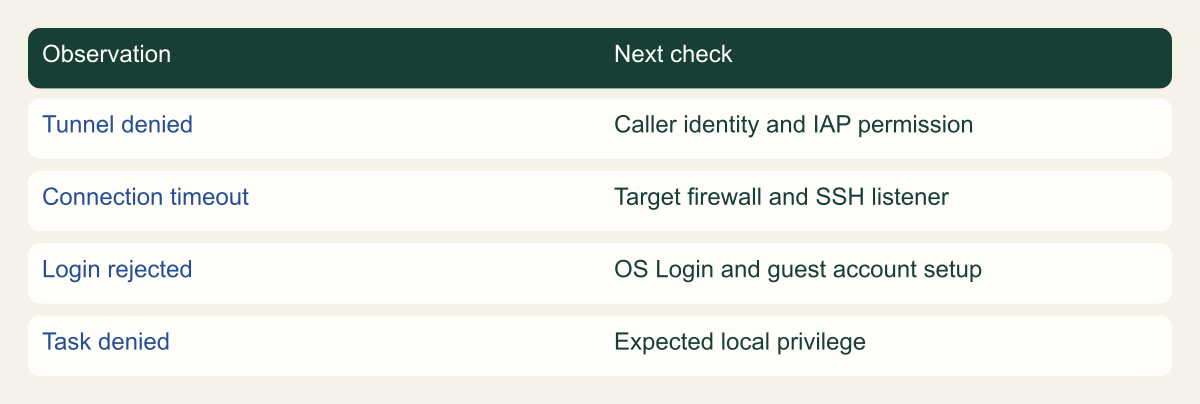
A failed SSH attempt is a symptom, not a diagnosis. If the tunnel cannot be established, inspect the caller's IAP permissions and the target selection. If the tunnel reaches the VM but the guest rejects the login, investigate OS Login, account prerequisites, and guest configuration. If the connection times out, inspect the network path and whether the SSH service is listening. Google's troubleshooting guide separates these classes of problem. [7]
Check the identity actually used by the CLI. A workstation can have multiple authenticated accounts and an active project that differs from the test plan. Confirm the selected account and explicit resource identifiers before changing permissions. Otherwise, the team may grant more authority to the intended user while repeatedly testing as someone else.
Look for an operating system cause after the control-plane and network checks are satisfied. Disk exhaustion, an unhealthy guest agent, an SSH daemon failure, or an image customization can prevent login. A tunnel does not repair those failures. Use the organization's approved VM troubleshooting and recovery tools, and preserve relevant evidence if compromise is suspected. [7]
Avoid adding broad roles as a diagnostic shortcut. A temporary Owner grant may make the connection work while concealing which permission was missing. If a broader temporary diagnostic change is justified in a test environment, record its purpose and remove it immediately afterward. The final verification must run under the intended role set. Otherwise, the test validates the temporary exception rather than the configuration that will remain.
Use the failed step to choose the next check
Independent troubleshooting observations, not a guaranteed sequence or exhaustive diagnostic tree.

Source. Google Cloud documentation [1][3][7]. Reviewed September 12, 2026.
Method. Original conceptual synthesis of the cited documentation. Rows describe responsibilities, decisions, or hypothetical states, not measured results.
Accessible table and figure data
| Observation | Next check |
|---|---|
| Tunnel denied | Caller identity and IAP permission |
| Connection timeout | Target firewall and SSH listener |
| Login rejected | OS Login and guest account setup |
| Task denied | Expected local privilege |
| Observation | Next check |
|---|---|
| Tunnel denied | Caller identity and IAP permission |
| Connection timeout | Target firewall and SSH listener |
| Login rejected | OS Login and guest account setup |
| Task denied | Expected local privilege |
Remove old entry paths
After a fresh IAP and OS Login connection succeeds, review how the VM could previously be reached. That may include a public SSH rule, a VPN route, a bastion host, or metadata-based SSH keys on other machines. Remove or narrow only the paths included in the approved change. The presence of IAP does not force all users to use it when another network and login route remains available. [1][2]
If the VM no longer needs an external IP, remove it through a separate dependency-aware change. Verify outbound requirements such as package repositories, external APIs, and operational agents. A private administrative path does not automatically provide outbound connectivity. The service owner should confirm those application and maintenance dependencies after the address change.
Recheck the effective firewall policy and make a new connection rather than relying on an existing session. Existing sessions are useful for continuity, but they do not demonstrate what a future operator can establish. Test the intended path and an old path that is supposed to be closed using a controlled method that does not expose credentials or scan unrelated infrastructure.
Keep the old-route decision explicit. Some environments deliberately retain a separate recovery route. If so, document who can use it, how it is monitored, and when it is tested. A named, restricted recovery path is different from an overlooked broad SSH rule. The objective is that every remaining administrative entry route has a purpose and an owner.
Maintain a recovery route
Make a small operational checklist for the VM owner. It should identify the access group, IAP grant, OS Login scope, target firewall rule, attached service account, and the documented connection method. Add the date of the last fresh connection test and the person responsible for future changes. Keep the checklist alongside the VM's operating notes rather than in a separate security inventory nobody consults.
Review the design after an image change, a directory migration, a firewall policy update, or a service account replacement. Each can affect a different part of the access chain. A routine patch should not require rebuilding the entire process, but a failed login after a meaningful change should lead back to the four checks rather than to a broad permission grant.
For an operator leaving the team, remove the relevant membership and review other access paths. Group membership propagation is not instantaneous, and an already established shell deserves separate consideration in an urgent incident. Follow the organization's containment process when immediate loss of access is required. Do not equate removal of a console role with termination of every guest session.
A successful pilot leaves more than a working tunnel. It leaves a reproducible connection, a known operating system identity, a limited set of permissions, and an explanation of the remaining recovery options. That evidence lets a small team remove routine public SSH exposure without making the VM dependent on one administrator's laptop or memory.
Keep the pilot evidence small
A useful handoff can fit in one change record. Include the caller identity, target instance, explicit IAP connection option, effective OS Login setting, and expected operating system privilege. Attach the result of a fresh allowed connection and the result of a safe denied test. Identify any old route intentionally retained. The record should allow another operator to reproduce the result without copying a private SSH key or a local credential file.
For a hypothetical maintenance team, the first test could show that an ordinary operator reads a service status while an administrator performs a separately approved maintenance action. The two people may share the IAP path but receive different OS Login roles. The test is useful because it demonstrates the distinction in the actual workflow rather than merely listing role names.
If a result is inconclusive, assign the missing check. A tunnel failure with no guest logs is not evidence that OS Login rejected the user. A shell opened before the change is not evidence that the new configuration accepts fresh sessions. Precise observations shorten the next investigation and make the access design easier to maintain.
Method and provenance
Source-based technical guidance using current Google Cloud documentation reviewed September 12, 2026. The procedures and decision frameworks are original editorial synthesis. Examples are explicitly hypothetical.
No customer project was configured and no cloud command, restoration, or workload experiment was executed for this article. Documented settings and limits are not measured service performance; actual configuration and supported product behavior must be checked before use.
AI assistance. AI assisted with research organization, drafting, and editing. Original illustrations were generated with ChatGPT and reviewed alongside source-based diagrams; visual and release verification is recorded separately.
Published under the Cloud Security Desk organizational byline. Read the practitioner guide policy.
References
- Use IAP for TCP forwarding Google Cloud. Accessed .
- TCP forwarding overview Google Cloud. Accessed .
- Set up OS Login Google Cloud. Accessed .
- About OS Login Google Cloud. Accessed .
- Connect to Linux VMs using Identity-Aware Proxy Google Cloud. Accessed .
- Best practices for securing SSH access to VM instances Google Cloud. Accessed .
- Troubleshooting SSH errors Google Cloud. Accessed .