
An access worksheet connects task, group, role, resource, group ownership, and evidence of removal.
At a glance
Key findings
Start with one real task
Give a team access by granting a suitable IAM role to a Google group at the narrowest resource that supports the work. Put the right people in that group, appoint someone to manage membership, and test the actual task. The group becomes the place where membership changes. The IAM binding remains the place where the group receives permission. Keeping those responsibilities visible makes an ordinary access request easier to review. Google recommends groups for assigning access and limited roles instead of broad basic roles wherever practical. [1]
For a hypothetical small company, consider three people who need to inspect the logs of one application project. Their request is not to administer Google Cloud. It is to investigate application errors. A useful access record names that task, the project, a group such as app-log-readers@example.com, the selected role, the membership owner, and the review date. The address is an example. An actual group must belong to a directory the organization manages.
This guide addresses human team access. A service account used by an application is a different identity with a different lifecycle. A deployment pipeline should not depend on the continued membership of the employee who created it. Likewise, a group is not an emergency access system merely because its name contains the word emergency. Start with one ordinary task and one project so the relationship between membership and permission remains easy to inspect.
The practical outcome is a small access register, a pilot group, and evidence that the intended user can perform the intended action. Equally useful is a rejected action outside that role. Neither a screenshot of a group nor a saved IAM policy proves both results. The rest of the process connects the administrative change to the work it is supposed to authorize.
Understand group and role
A group identifies a collection of principals. A role identifies permissions. A resource identifies where those permissions apply. In an allow policy, a binding connects the role and its members, sometimes with a condition. Those parts answer separate questions: who belongs to the team, what the team may do, and where the team may do it. A group name alone answers none of the last two questions. [2][3]
Google Groups also has membership roles such as owner, manager, and member. These are not Google Cloud IAM roles. Google documents that a person added to a group inherits the IAM roles granted to that group regardless of their Google Groups role. A group owner may therefore control who receives substantial cloud access, even if the owner rarely opens the project console. Treat control of membership as part of the access design. [3]
For the hypothetical log readers, write the task in ordinary language before choosing the role. Then inspect the current predefined role description and permissions. Does the role include the required log access? Does the work include sensitive Data Access logs? Does the reader need to change logging configuration, or only view records? A vague request to see the logs can conceal several different permissions. The appropriate role depends on the answer, not on which role name looks familiar. [6]
Keep the first version understandable. A group for a clearly defined operational responsibility is easier to review than a group named after a temporary ticket. Conversely, a single group called cloud-users tells a reviewer very little about its authority. Names should help someone recognize purpose, while the register carries the complete scope. Do not encode every changing implementation detail in an address that other systems will reference.
Choose resource scope
Google Cloud resources form a hierarchy. Organization and folder policies can grant access that applies to descendants, and project policies can cover resources in that project. Access received from an ancestor does not disappear simply because the project policy has no matching direct binding. This is why reviewing only the visible local grant can produce an incomplete answer about a person's authority. [2]
For a team supporting one application, begin with that application's resource or project. Granting at a folder can be appropriate when every current and future project under that folder needs the same team and responsibility. That convenience also creates a maintenance obligation. Moving a project into the folder may change who can access it. The person making the organizational change needs to understand the permission consequence, even if no group membership changes.
A narrow resource grant is useful when the service supports it and the task is genuinely limited. For example, access to selected storage data need not automatically mean administration of the entire project. Follow the service's supported IAM resource types rather than assuming every permission can be attached at every level. Some tasks span several resources or APIs, and the documented minimum scope may be broader than the object the user sees. [6]
Record both the selected scope and the reason. The reason might be that the team supports all production projects in a named folder, or that a vendor should read one designated resource only. A future reviewer can then ask whether the assumption still holds. Without that explanation, a broad grant may remain indefinitely because nobody knows whether narrowing it would interrupt important work.
Design owned groups
Choose an accountable owner for membership and a separate approver for the cloud permission when the team is large enough to support that separation. A small company may use the same person for both responsibilities. Even then, write down which decision is being made. Approving a new employee for an existing role is different from giving the whole group a new administrative capability.
Restrict who can join the group and who can change its membership. A cloud access group should not behave like a public mailing list. Review whether external members are allowed, whether membership requests require approval, and whether group managers can invite other managers. Use the organization's Google Workspace or Cloud Identity administration process for settings that are controlled there. Console availability and required administrative permissions depend on the directory configuration. [3]
Avoid nested groups for the first pilot unless there is a clear operational reason. Nesting can express a real organization, such as regional support teams under a common operations group. It also makes an individual's effective membership harder to explain during a removal or investigation. Google notes that nested group membership changes can take longer to propagate than direct changes. That is a reason to plan and verify the structure, not a reason to assume a fixed worst-case waiting time. [4]
Document the membership source. If an identity provider synchronizes the group, changing membership locally may be temporary or contrary to the authoritative directory. A joiner, mover, or leaver process should update the source that owns the membership. Keep the operational directory task connected to the cloud access request, so a successful synchronization job is followed by a check of the permission that matters.
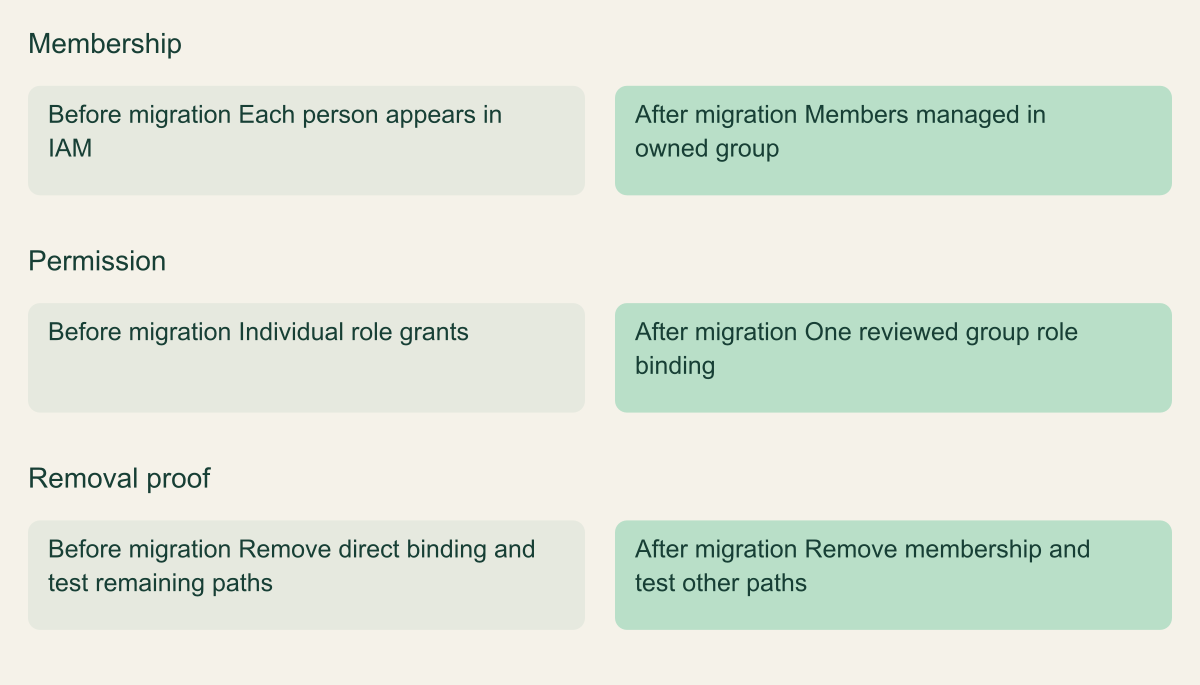
What changes when individual grants become a group
Conceptual comparison of administrative responsibilities. The migration does not automatically narrow inherited access.

Source. Google Cloud documentation [1][3][4]. Reviewed September 12, 2026.
Method. Original conceptual synthesis of the cited documentation. Rows describe responsibilities, decisions, or hypothetical states, not measured results.
Accessible table and figure data
| Decision | Before migration | After migration |
|---|---|---|
| Membership | Each person appears in IAM | Members managed in owned group |
| Permission | Individual role grants | One reviewed group role binding |
| Removal proof | Remove direct binding and test remaining paths | Remove membership and test other paths |
| Decision | Before migration | After migration |
|---|---|---|
| Membership | Each person appears in IAM | Members managed in owned group |
| Permission | Individual role grants | One reviewed group role binding |
| Removal proof | Remove direct binding and test remaining paths | Remove membership and test other paths |
Review current access
Before adding the group, collect the access that the pilot users already have. Look for direct project grants, inherited folder or organization roles, memberships in other groups, and service account impersonation rights. The goal is not a complete enterprise redesign. It is to understand which existing path would make the pilot test pass even if the new group were configured incorrectly.
Use the console's IAM view for the relevant scope and examine the principal and role together. Where the question concerns a specific permission, use Policy Troubleshooter to investigate the relevant principal, resource, and permission. Its result is an explanation of the policy evaluation it can inspect. Any limitations it reports, such as unavailable information about a group, should remain part of the result. An unknown result must not be treated as a denial. [7]
Suppose the pilot employee already has Editor on the project. Adding a narrower log-reader group and opening Logs Explorer does not prove the new group is sufficient. The original broad role may be providing the access. A useful migration test needs an account without the competing grant, or a controlled change that removes the old grant with a documented restoration path. Choose the approach that creates less operational risk in the actual environment.
Save the starting state through the team's normal change process. Include the exact principal, role, resource, any condition, and the reason the grant exists. Do not export unrelated directory data into an informal document. The access register should contain enough information to restore an approved binding if the migration fails, while avoiding a sprawling copy of organizational membership that becomes stale immediately.
Migrate one pilot team
Create the managed group, add the approved pilot members, and grant the reviewed role at the reviewed scope. Use the console or the documented single-binding workflow. Avoid replacing an entire project's policy with a handcrafted minimal file merely to add one group. A whole-policy write can affect unrelated bindings, and concurrent changes require the documented read, modify, write handling. [5]
Make one meaningful change at a time. If the migration simultaneously changes the directory source, group nesting, IAM role, resource scope, and application configuration, a failure will be difficult to diagnose. The first pilot can preserve the selected role and resource while replacing individual memberships with the group. Subsequent work can narrow an overly broad role after the team has a trustworthy record of which tasks require which permissions.
Allow for propagation, then test from the pilot user's context. Google Cloud access changes are eventually consistent. A policy change often propagates sooner than a group membership change, while membership removal can take longer than addition. Google describes estimates rather than a guaranteed completion deadline. Record when the change was made and when the task was tested instead of turning a remembered waiting period into proof. [4]
Keep a short change note that someone else can execute. It should state the original binding, new binding, expected task, test user, expected denied action, and restoration action. It should also state who can perform that restoration. A rollback plan that requires the account whose access was accidentally removed is not a usable plan. Preserve a separately authorized administrative route until the pilot has passed.
Verify allowed and denied work
Test a representative action that the employee actually needs. For the log-reader example, select the correct project, open an appropriate log view, and retrieve a known nonsensitive test event. Merely reaching the cloud console is insufficient. The console may load while the service API denies the operation, or show an empty result because the time range, view, or project is wrong.
Then choose an action the role should not permit. It might be changing the logging configuration or updating a project's IAM policy. The negative test should be safe and deliberate. Prefer a supported permissions check or a harmless attempt whose denial can be observed without creating a real configuration change. Do not test least privilege by trying to delete a production resource. The exact method depends on the service and the team's approved test environment.
Interpret both results in context. A successful read could still come from another group or an ancestor role. A failed write could reflect an unrelated organization policy rather than the absence of the intended permission. Keep the policy review and the runtime test together. Policy Troubleshooter can help explain a particular access path, while the task test establishes whether the user's workflow succeeds under the configuration being reviewed. [7]
Record the result with enough detail to repeat it. Useful fields include the test time, principal, project, resource, action, expected result, observed result, and any unresolved alternative grant. Store evidence where the team already keeps change records. A concise reproducible note is more valuable than many console screenshots that omit the account or project selector.
Handle delayed changes
Treat propagation as an operational condition. A newly added member who cannot yet perform the task should not receive several extra roles while the team waits. Repeatedly widening access can leave an unnecessary grant behind when the original change finally becomes effective. First verify that the group, role, and resource are correct, then retest at a recorded interval appropriate to the task.
Removal needs greater care because the old permission can remain usable while the membership change propagates. Google explicitly warns that recently revoked roles may still work and that group membership changes can take hours or longer. A routine group removal therefore does not establish an immediate revocation boundary. Do not promise a precise completion time that the service documentation does not provide. [4]
For a planned department move, schedule the removal and verify the previous task stops working while the new task remains available. For a suspected compromise, follow the organization's incident process. Investigate account sessions, other group memberships, direct grants, service account access, and any separate application credentials. The response may require identity-provider or application actions beyond removing one Google group membership. Google's revocation guidance treats those other paths as part of the access review. [8]
Keep the language in the ticket precise. Membership removed is an administrative fact. Previous task denied at a particular time is a test result. All access revoked is a much broader assertion that needs broader evidence. This distinction helps the incident responder understand what remains uncertain and prevents a routine directory receipt from being mistaken for a complete containment result.
Troubleshoot inherited access
When an employee retains unexpected access, start with the exact operation and resource. A broad statement such as still has access is difficult to investigate. Ask whether the person can read an object, invoke an API, change configuration, impersonate another identity, or merely see a project name. Those observations lead to different permission checks and different remediation choices.
Trace direct and inherited allow policies, then inspect other relevant groups. If a folder grants a role to a large engineering group, removing a direct project binding from a smaller application group may change nothing. Likewise, a role granted to a service account can remain reachable through an impersonation path. The principal performing the final API operation may differ from the human who initiated it. [2][7]
Do not remove a shared ancestor grant simply to solve one project problem without examining its other consumers. A folder policy may support several teams. Instead, identify why the broad group has that role and whether the project belongs in that access boundary. The repair could be a narrower group, a different resource organization, or a reviewed policy change with a wider test plan.
Document unresolved explanations explicitly. If directory visibility prevents the reviewer from confirming nested membership, involve the directory owner. If a condition depends on attributes that are missing from the test context, reproduce the relevant request conditions. The useful stopping point is an explained path or a clearly assigned investigation task. Repeating the same membership removal without new evidence usually produces little information.
Removing one grant can leave another access route
Removing a group route does not remove an independent inherited grant. The drawing isolates allow-policy routes; deny policies and other applicable restrictions still matter.

Source. Google Cloud documentation [2][4][7]. Reviewed September 12, 2026.
Method. Original conceptual illustration generated with ChatGPT and visually reviewed. The accessible table identifies the metaphor and its limits. It is not a provider screenshot, a complete policy evaluator, or measured service evidence.
Accessible table and figure data
| Visual element | Access concept | What to verify |
|---|---|---|
| Disconnected group bridge | Removed group membership or binding | Confirm the relevant change has propagated |
| Intact parent bridge | An independently inherited allow grant | Review the applicable ancestor policy |
| Shared destination | The same target resource | Evaluate the requested permission and any restrictions |
| Visual element | Access concept | What to verify |
|---|---|---|
| Disconnected group bridge | Removed group membership or binding | Confirm the relevant change has propagated |
| Intact parent bridge | An independently inherited allow grant | Review the applicable ancestor policy |
| Shared destination | The same target resource | Evaluate the requested permission and any restrictions |

Offboard without assumptions
Use group-based access to make ordinary offboarding easier, then verify the result at the service. Remove the person from the authoritative group membership source and review direct grants that could bypass the group. A clean group roster does not reveal a personal API credential, an application session, or a delegated service account permission elsewhere in the project. [8]
Review ownership as well as membership. The departing employee may own the group, approve membership requests, manage a related deployment identity, or receive alert notifications. Transfer those responsibilities deliberately. Otherwise, the team can remove the employee's task access while leaving the next administrator unable to maintain the group, or leave a notification destination that nobody monitors.
For a role change inside the company, verify both sides of the transition. The employee should gain the new approved responsibility and lose the previous one. A common procedural mistake is to add the new group and rely on a later cleanup that has no owner. Put both actions in the same change record, with separate observed results if they become effective at different times.
Close the record only when its claims match the evidence. If the group removal is complete but an application access check is pending, say so. If an urgent incident requires additional containment, keep that work visible rather than presenting the ordinary offboarding workflow as sufficient. Group management is a useful part of access control because it simplifies a repeated administrative task; its value depends on clear ownership and verification.
Keep a usable access register
A small register should be easy enough to maintain during the next access request. For each access group, record its purpose, authoritative membership source, owner, approver, IAM roles, resource scope, conditions, permitted tasks, and review date. Add a link to the normal request process and the last meaningful test. Avoid copying every member into a separate spreadsheet unless that snapshot serves a defined review need.
Review when something material changes. A project moving folders, a team's responsibility expanding, a service adopting a different API, or a directory synchronization change can all alter the original assumptions. A periodic review remains useful, but it should not be the only trigger. Tie the register to ordinary platform changes so that the group does not slowly accumulate privileges that no longer match its name.
Compare the register with the current IAM policy and directory state. If they disagree, determine whether the change was approved and the record was missed, or whether the environment has drifted. Do not automatically overwrite the live policy from an outdated register. The register documents intent; the service and directory show current state. Reconciliation requires understanding both.
Use review questions that produce decisions. Does the group still have a task? Is the owner still accountable? Can the role be narrowed without breaking approved work? Are there direct grants left over from the migration? Can a removed member still perform the old task? These questions produce a smaller and more useful review than asking whether an administrator recognizes every permission in a very broad role.
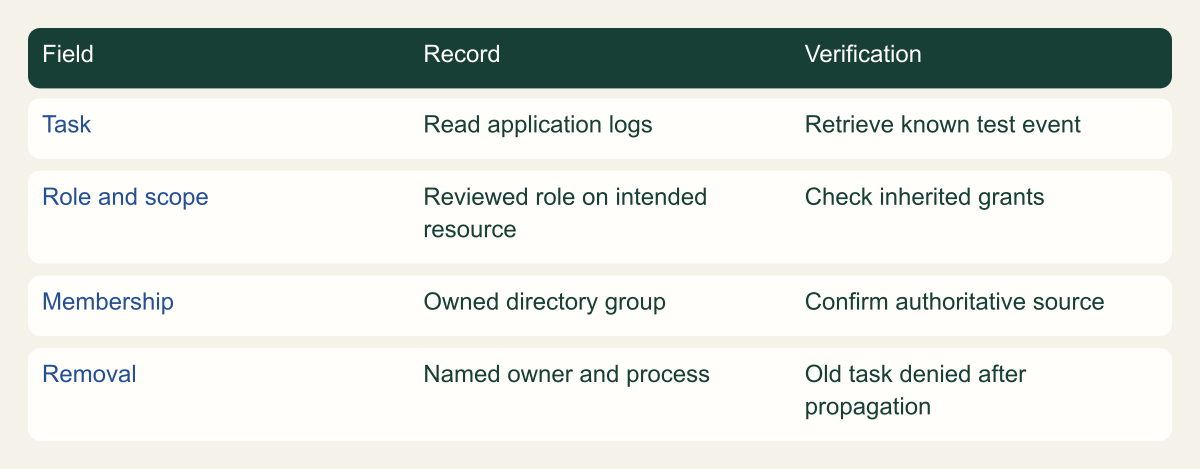
A small access register
Original framework for connecting an access request to repeatable evidence; no scored maturity or measured performance.

Source. Google Cloud documentation [1][2][4][7]. Reviewed September 12, 2026.
Method. Original conceptual synthesis of the cited documentation. Rows describe responsibilities, decisions, or hypothetical states, not measured results.
Accessible table and figure data
| Field | Record | Verification |
|---|---|---|
| Task | Read application logs | Retrieve known test event |
| Role and scope | Reviewed role on intended resource | Check inherited grants |
| Membership | Owned directory group | Confirm authoritative source |
| Removal | Named owner and process | Old task denied after propagation |
| Field | Record | Verification |
|---|---|---|
| Task | Read application logs | Retrieve known test event |
| Role and scope | Reviewed role on intended resource | Check inherited grants |
| Membership | Owned directory group | Confirm authoritative source |
| Removal | Named owner and process | Old task denied after propagation |
Decide when groups are insufficient
Groups work well for stable team responsibilities. They are less suitable when the requirement is a tightly bounded elevation window, immediate revocation, per-request business authorization, or an application identity. A group may participate in those systems, but its membership propagation and administrative model do not by themselves satisfy those requirements. Choose the mechanism around the decision the service must enforce.
For an application, use an appropriate workload identity and review the permissions that identity receives. For a temporary human elevation, evaluate the organization's supported privileged access process and its expiry evidence. For application data access, enforce the business permission in the application as well as authenticating the cloud caller. These are adjacent designs with their own lifecycles, rather than reasons to make the original access group more complicated.
The final pilot record should let another administrator answer four practical questions: who manages membership, which task the role enables, where the role applies, and how the team verified removal. If any answer depends entirely on one person's memory, fix that part before extending the pattern to more projects. A well documented small group is a useful foundation for the next team because its purpose can be inspected and its behavior can be tested.
Work through a second access request
Consider a second hypothetical request after the log-reader pilot succeeds. A contractor needs to upload reports to one storage location for a limited engagement. Reusing the log-reader group would be convenient administratively, but it would join unrelated responsibilities. Start a separate request that names the upload operation, destination, duration, and contractor sponsor. Ask whether the contractor must read existing reports, overwrite files, or only create new ones. Those differences determine which role is appropriate.
Inspect the destination service's role documentation, then choose the supported resource scope. Do not assume that the contractor needs a project role because the project is the first page visible in the console. If the operation can be scoped more narrowly, record that choice. Also check organization restrictions on external principals before promising that the invitation will work. A policy rejection is a signal to resolve the approved identity design, not an invitation to place the contractor in a broader internal group. [1][5][6]
The group sponsor should understand what membership controls. If adding a contractor to this group enables uploads, a membership request is an access request even when it arrives through a directory interface. Define who verifies that the engagement remains active, how an extension is approved, and who removes the membership when the work ends. An end date in a ticket is not automatic enforcement. The operational process must turn it into the appropriate directory or access change.
For verification, upload a harmless sample report into the designated test location and confirm that the application can process it. If reading unrelated reports is outside scope, verify that the same identity cannot do so. Check the resulting object ownership and application behavior under the service's actual access model. Keep the test content free of customer information. Remove it afterward using an authorized owner if the contractor intentionally lacks delete permission.
When the engagement ends, remove membership at the authoritative source and verify that a new upload no longer succeeds after the change has propagated. Then ask a separate question about previously uploaded content. The objects may still be needed by the business, and deleting the contractor's membership does not decide their retention. This example shows why identity lifecycle and data lifecycle belong in connected records but need separate decisions.
The second request should reuse the first pilot's discipline, not its role. A small team can standardize the questions, approval record, and test evidence while allowing the actual permissions to differ. That is the useful form of consistency: each group has a purpose that explains its authority, and each authority is backed by a task the team can repeat.
Method and provenance
Source-based technical guidance using current Google Cloud documentation reviewed September 12, 2026. The procedures and decision frameworks are original editorial synthesis. Examples are explicitly hypothetical.
No customer project was configured and no cloud command, restoration, or workload experiment was executed for this article. Documented settings and limits are not measured service performance; actual configuration and supported product behavior must be checked before use.
AI assistance. AI assisted with research organization, drafting, and editing. Original illustrations were generated with ChatGPT and reviewed alongside source-based diagrams; visual and release verification is recorded separately.
Published under the Cloud Security Desk organizational byline. Read the practitioner guide policy.
References
- Use IAM securely Google Cloud. Accessed .
- Using resource hierarchy for access control Google Cloud. Accessed .
- Create and manage Google groups in the Google Cloud console Google Cloud. Accessed .
- Access change propagation Google Cloud. Accessed .
- Manage access to projects, folders, and organizations Google Cloud. Accessed .
- Find the right predefined roles Google Cloud. Accessed .
- Troubleshoot IAM permissions Google Cloud. Accessed .
- Revoke access to a Google Cloud project Google Cloud. Accessed .