
A practical account custody record joins MFA, mailbox and phone recovery, ordinary administrative access, and the Organizations exception. Protect the AWS root user by keeping it out of ordinary work, securing its sign-in and recovery channels, and documenting who can use it when a task actually requires it.
At a glance
Key findings
- Protect the AWS root user by keeping it out of ordinary work, securing its sign-in and recovery channels, and documenting who can use it when a task actually requires it. For an AWS Organizations member account, first check whether centralized root access has removed the need for persistent root credentials. That exception changes the setup you should expect to see. It does not remove the need to protect the organization management account. [1][5]
- A practical account custody record joins MFA, mailbox and phone recovery, ordinary administrative access, and the Organizations exception.
- Use the named resource, approved owner and actual read-back results to complete the operation. No live customer environment is represented here.
Start with the account you actually own
Protect the AWS root user by keeping it out of ordinary work, securing its sign-in and recovery channels, and documenting who can use it when a task actually requires it. For an AWS Organizations member account, first check whether centralized root access has removed the need for persistent root credentials. That exception changes the setup you should expect to see. It does not remove the need to protect the organization management account. [1][5]
The root user is the identity associated with ownership of an AWS account. It is different from an IAM administrator, an IAM Identity Center user, and the root operating-system user on a Linux server. An administrator permission set can be powerful without being the AWS account root user. Keeping these names separate helps a small team avoid using account ownership credentials merely because someone asked for administrative access. AWS recommends reserving root for tasks that require it. [1][6]
Begin by finding the account type, the organization relationship if one exists, and the person or team responsible for the account. Use a current account record, not a remembered email address from the original signup. A project that began as a personal experiment may now hold shared business resources. That change in ownership should be reflected in the account's contacts and operating procedure before the original creator leaves.
This guide describes a normal account protection review. It assumes the team still has authorized access and there is no evidence of a takeover. If an unfamiliar person changed the root email, registered a device, or created credentials, treat that as an incident. The orderly review below can help locate evidence, but a suspected compromise calls for immediate containment and the official AWS recovery or support process, rather than a leisurely cleanup of old settings. [1][3]
Give everyday work a separate sign-in
Before closing a root session, confirm that the team has an appropriate alternative for ordinary administration. AWS recommends federation and temporary credentials for human users, and IAM roles with temporary credentials for workloads. The objective is straightforward: a developer deploying an application should use an identity assigned to that work. The root password should not become the convenient shared login that everyone reaches for when permissions are confusing. [6]
Test the alternative with an ordinary task that the person is actually expected to perform. Viewing the intended account and a known application resource is a useful initial check. If that identity cannot perform a required administrative operation, review its assigned permissions through the normal access process. Do not solve every denial by signing in as root. A recurring need for root often indicates that the ordinary access model has not been finished.
Keep the test small. A successful console sign-in proves that authentication worked; it does not prove the person can perform every future administrative task. Conversely, an intentionally restricted developer role should not be considered broken because it cannot manage billing or other users. Record the role or permission set, its owner, and the task it was checked against. That makes a later handover more useful than a note saying that administrator access was tested.
There is a recovery dependency to consider here. If ordinary access relies on a corporate identity provider, decide how the account will be operated during an identity-provider outage. Root access may be part of that recovery design, but it should remain controlled and exceptional. Do not place the only root recovery instructions behind the same sign-in service whose failure would make them necessary. This is an operational design choice to validate with the team's actual dependencies.
Write down ownership without writing down secrets
Create a short account custody record. It should identify the account, whether it is standalone or an Organizations account, the business owner, the technical contact, and the approved reason for root use. Add the locations of the password custody procedure, MFA inventory, and recovery instructions. These are pointers to controlled records. Do not put the root password, authenticator seed, recovery link, or secret access key into an ordinary ticket or spreadsheet.
For the root email, record who manages the mailbox and who can change its membership or forwarding rules. AWS recommends a business-managed group email address for root credentials and advises restricting recovery mechanisms. A mailbox that reaches several accountable people can survive one person's absence. A broadly shared distribution list with uncontrolled membership creates a different problem. The group address is useful only when the mail system's own access and recovery are controlled. [1]
Record the primary contact phone number's owner and how the authorized team can reach it. The account contact page is the place to verify the current value and its format. A telephone number in a project wiki does not update the AWS account. Equally, an up-to-date account field does not prove that someone can still answer the phone or receive the necessary recovery communication. Check both the saved contact and the operational ownership. [7]
Use the record to expose unanswered questions. Who covers the owner during leave? Who can approve root use? Who reviews unexpected use? Where is evidence retained? A small organization may assign several responsibilities to the same people, but it should recognize that choice explicitly. The goal is a usable account record with named responsibilities, rather than an elaborate approval document that no one can follow when ordinary sign-in is unavailable.
Include the account alias only as a convenience, alongside the durable account identifier in the private custody record. An alias or project nickname can change, and two teams can use similar names. Record where the organization verifies account ownership and billing responsibility without copying payment information into the checklist. If a contractor created the account, resolve ownership through the approved business process rather than assuming that possession of a root password settles it. That ownership check gives the technical controls a clear accountable owner and prevents a later recovery request from becoming a dispute over which organization is entitled to operate the account.
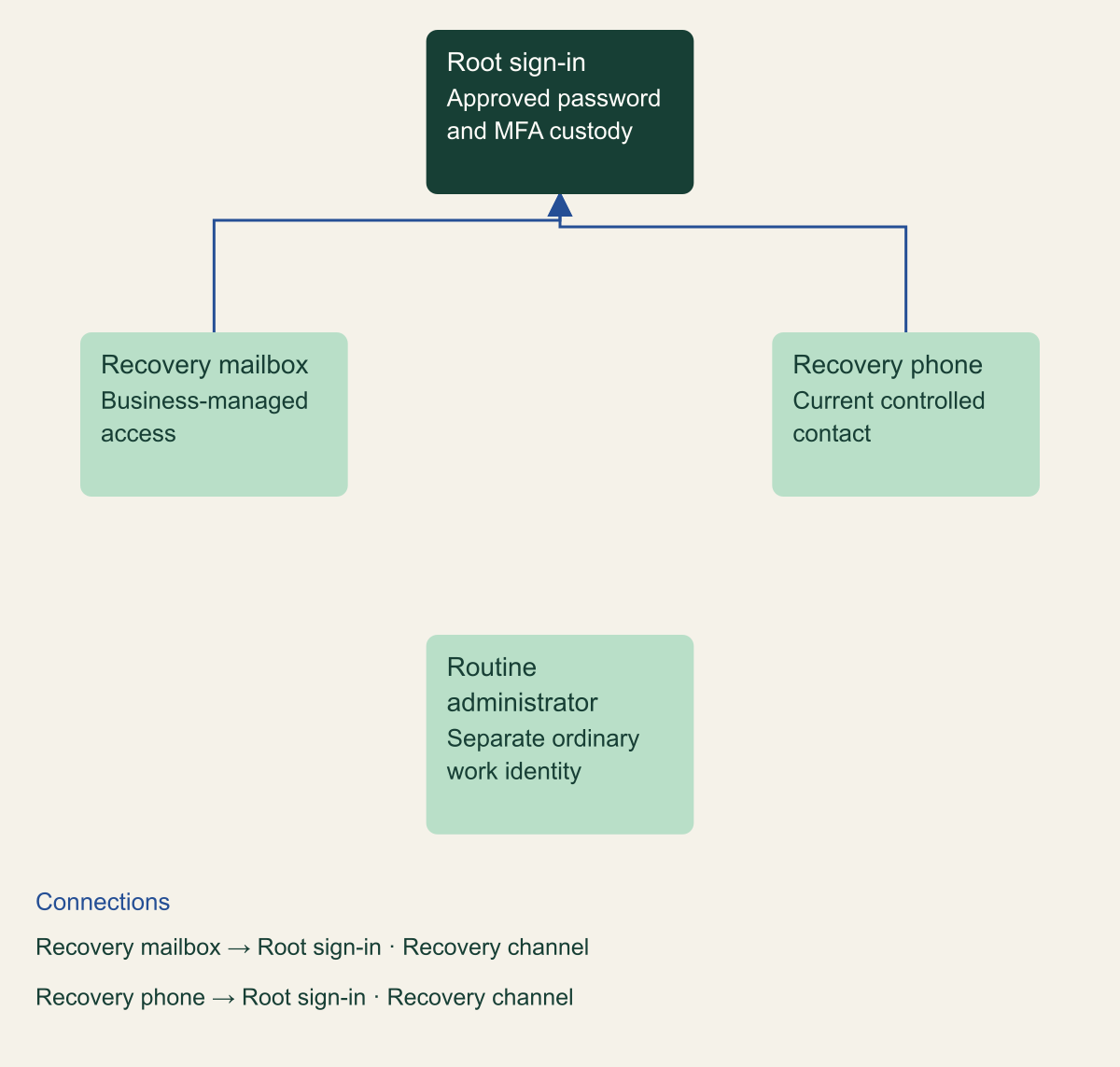
Keep root custody and recovery responsibilities explicit
Root sign-in, recovery channels and ordinary administration need explicit owners and separate checks.

Source. Conceptual synthesis of AWS documentation accessed September 12, 2026. [1] [3] [7]
Method. Conceptual editorial synthesis of the cited service behavior; no measured outcomes. Scope: How can a small team secure AWS root access and still recover the account?
Accessible table and figure data
| Component | Custodian | Check |
|---|---|---|
| Routine administrator | Named operator | Ordinary work avoids root |
| Root sign-in | Approved custodians | Password and MFA controlled |
| Recovery mailbox | Mail owner | Authorized access available |
| Recovery phone | Account contact owner | Current number reachable |
| Component | Custodian | Check |
|---|---|---|
| Routine administrator | Named operator | Ordinary work avoids root |
| Root sign-in | Approved custodians | Password and MFA controlled |
| Recovery mailbox | Mail owner | Authorized access available |
| Recovery phone | Account contact owner | Current number reachable |
Register MFA with a usable spare
Enable root MFA using a currently supported method, and verify that the enrollment belongs to the intended account. AWS documentation now states that root users for standalone, management, and member accounts require MFA, with registration required within 35 days of the first sign-in attempt when MFA is absent. The separate centralized-root arrangement for member accounts can remove the root credentials altogether. Treat that as a different account state, not an excuse to leave active root credentials unprotected. [2]
A spare registered device makes a lost or damaged primary device easier to handle. AWS's recovery instructions begin with using another MFA device already registered to the same identity. Plan custody so the spare is accessible to the authorized team but is not lost in the same event as the primary device. Two devices stored in the same laptop bag provide little operational independence, even though they may both appear in the enrollment list. [3]
Test the spare through a fresh, authorized sign-in while the original method still works. Confirm the account identity after signing in, record the device inventory identifier and check date, and then sign out. This is a proposed validation step, not a claim that a particular device was tested for this article. Avoid screenshots that expose setup QR codes or other authenticator secrets. The useful evidence is that the registered method worked, not the secret used to enroll it.
If the team separates password and MFA custody, rehearse how the custodians coordinate. AWS discusses multi-person control as an option for root access. The procedure needs a real route for contacting the second person and a plan for absence. It also needs to respect the organization's authentication policies. Copying an authenticator seed into a shared note to make coordination easier defeats the purpose of separating the factors and makes later custody review much harder. [1]
Protect the mailbox and phone
Root recovery deserves the same care as the normal login. AWS documents recovery through the account email address and primary contact phone when registered MFA devices are unavailable. It also recommends limiting who can manage these channels and separating their control. A strong root password and a securely held device are only part of the account's protection if an attacker can change the mailbox, redirect recovery messages, or take control of the registered telephone number. [1][3]
Review the email account as an administrative dependency. Check its current authorized membership, sign-in protection, forwarding rules, and recovery owners under the mail system's own procedure. The AWS account review does not prove that mail controls are effective. It should identify the responsible team and obtain the evidence that the recovery mailbox is usable by authorized people. Avoid broadening access merely so everyone can read root notifications; routing and privileged mailbox administration can be separate responsibilities.
For the phone, verify the saved number against the organization's current contact record and establish how the designated custodian receives communications. Do not assume a departed employee's number remains under company control. If it needs changing, use the documented account-management process and confirm the new value afterward. A maintenance check can verify ownership and availability without deliberately locking out the root user or starting a full account recovery. [7]
An actual recovery event needs its own record. Note why ordinary MFA failed, which approved recovery route was used, who authorized the action, and which device or account details changed. Afterwards, inspect the MFA registrations and recovery contacts again. Recovery restores access to an identity; it does not, by itself, establish that no one else used the account while access was uncertain. Unexpected changes or activity should remain part of an incident investigation. [1][3]
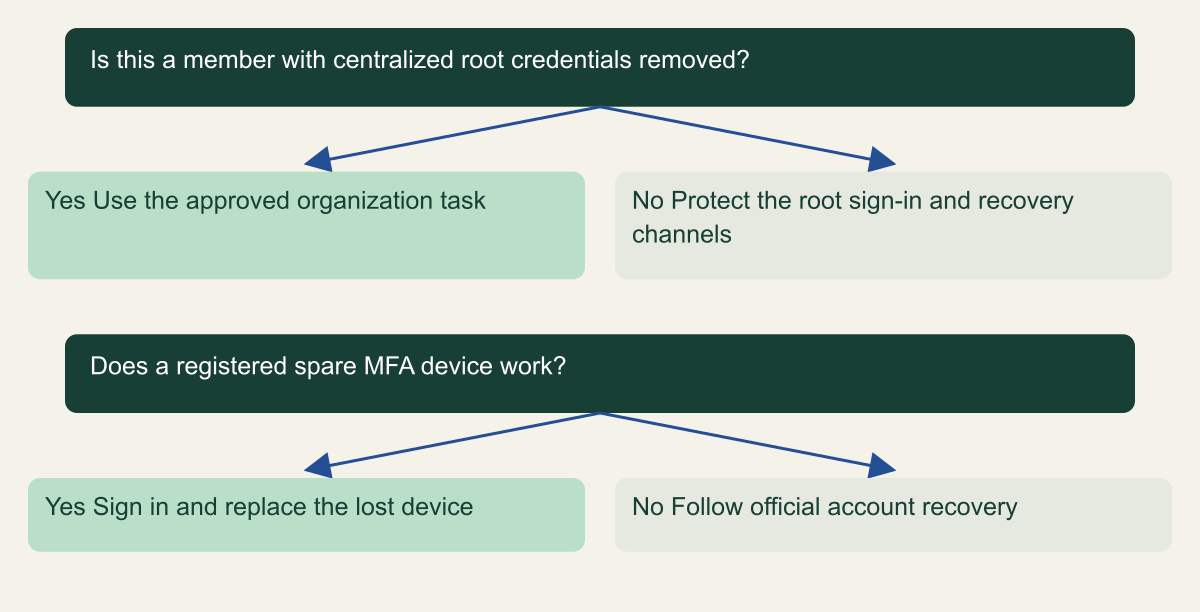
Choose the appropriate root recovery path
The recovery route depends on the account type and whether a registered spare MFA device remains usable.

Source. Conceptual synthesis of AWS documentation accessed September 12, 2026. [1] [2] [3] [5]
Method. Conceptual editorial synthesis of the cited service behavior; no measured outcomes. Scope: How can a small team secure AWS root access and still recover the account?
Accessible table and figure data
| Question | Yes | No |
|---|---|---|
| Is this a member with centralized root credentials removed? | Use the approved organization task | Protect the root sign-in and recovery channels |
| Does a registered spare MFA device work? | Sign in and replace the lost device | Follow official account recovery |
| Question | Yes | No |
|---|---|---|
| Is this a member with centralized root credentials removed? | Use the approved organization task | Protect the root sign-in and recovery channels |
| Does a registered spare MFA device work? | Sign in and replace the lost device | Follow official account recovery |
Remove root access keys deliberately
Check whether root access keys exist. AWS recommends not creating them and using roles for application access. A root key in a deployment script is not made safe by giving the script a harmless name or running it on a trusted machine. It carries root identity authority. The lasting fix is to move the workload to an appropriately scoped identity and remove its dependency on root credentials. [1][6]
If an existing key is tied to a known job, identify the job owner before making a routine change. Record the key identifier and where the dependency is configured, without copying the secret value. Replace that authentication path with the approved workload identity, then test the actual job. The aim is to stop using the root key, not simply to create another credential and assume the application adopted it because a configuration file was edited.
AWS allows a root access key to be deactivated before it is deleted. While inactive, it cannot be used successfully for AWS API requests; deactivation is reversible, whereas deletion is permanent. Use that difference to manage a planned dependency migration. A key believed to be compromised should not be reactivated merely to recover an old job. In that case, follow the incident procedure and restore the workload through a clean identity. [4]
Perform root-key management through the documented root procedure, rather than experimenting with administrator credentials and guessing which identity a command affects. After the migration, verify the key state in the root security credentials view and remove stale secret copies from the approved configuration stores. Retain a nonsecret change record. This article does not recommend searching every employee device or printing configuration contents into a central log; scope discovery to the systems the team is authorized to inspect.
Check whether member root credentials should exist
Organizations member accounts have a different option from standalone accounts. Centralized root access can allow the organization to manage root credentials and privileged tasks without maintaining a normal root sign-in for each member. AWS documents prerequisites and distinct capabilities for root credential management and root sessions. Review the current organization configuration before deciding that every member account needs another stored password and another manually managed device. [5]
When root credentials are removed under the supported centralized model, the member account cannot use an ordinary root sign-in or root password recovery until the relevant capability is deliberately restored. The absence of a member password and MFA device is therefore not equivalent to an exposed, password-only root user. The account record should state which design is in use and which organization administrators can perform the approved member-account tasks. [1][5]
This does not turn the management account into an ordinary member. Protect management-account root credentials and their recovery channels directly. Also distinguish an organization root, which is a container in the Organizations hierarchy, from an AWS account root user. These similar names can make a review ambiguous. Write the exact account and capability being reviewed instead of saying that root has been disabled across the company.
Do not enable centralized root management casually as part of a single-account housekeeping checklist. The change affects how member-account recovery and privileged operations are performed. An organization team should review prerequisites, delegated administration, permitted tasks, audit records, and the procedure for an exceptional recovery. For a small team using one standalone account, record that this option does not apply and complete the direct root protection steps instead of introducing Organizations solely to make the checklist look more advanced.
Make root activity visible
Root use should have a known operational owner. AWS recommends monitoring root access and usage, and IAM integrates with CloudTrail to record relevant identity and API activity. CloudTrail records can help identify the caller and action, including privileged sessions associated with centralized root access. Read the identity fields and event context when reviewing activity; a label in a dashboard is not enough to explain which account and access path were involved. [1][8]
For an approved root session, record the reason, account, time, operator, and intended task. Afterwards, check the available event evidence against that work. Avoid collecting full event payloads into unrestricted chat channels because those records may contain operational details. The incident or audit system should preserve what reviewers need under its normal access controls, with a link from the root-use record rather than a large copied dump.
If notifications are configured, identify where they go and who must respond. Test the notification path using the team's approved procedure, and label the test accurately. A message arriving in a mailbox proves something about routing. It does not prove that every form of root activity is covered, that all Regions are represented, or that the on-call person will act. Those are separate questions for the logging and detection configuration.
Unexpected root activity should have a clear escalation path. Start by checking whether there was an approved operation and whether the account identity matches. If the use cannot be explained, preserve the evidence and follow the incident process. Do not quietly rename the event as maintenance or delete the alert after a successful login. Account protection includes recognizing when the normal custody assumptions no longer hold, not just maintaining a reassuring MFA indicator.
Rehearse an ordinary account check
Consider a hypothetical small team that runs one production AWS account and uses federated roles for daily work. The original account creator still receives root recovery mail, while a colleague holds the spare MFA device. A sensible review begins with ownership: confirm that the organization owns the account and that the business contact information is current. This example illustrates the procedure; it is not a report of a customer environment or a completed audit.
Next, the reviewers use their ordinary roles to confirm the expected administrative tasks remain available. They review the root custody record, inspect the MFA inventory in an authorized root session, and verify the registered spare while the normal method remains usable. They check that the recovery email reaches the right custodians and that the phone number is under current organizational control. No production resource needs to be created, deleted, or interrupted to establish those basic facts.
Suppose the review finds a root access key associated with an old reporting job. The finding does not justify assuming the job is unused. The team identifies its schedule and owner, moves the job to an approved identity, and verifies its output. It then deactivates the root key under a recorded change, checks the next relevant execution, and deletes the key after the dependency has been addressed. The evidence should describe what was observed and over which schedule. [4][6]
The review closes with unresolved items assigned to owners. If the spare device could not be tested because its custodian was absent, that remains an incomplete check. If mail access was verified but the phone number was not, record those results separately. A single green checklist item saying root is secure conceals useful information. A small, accurate list of checked controls and remaining dependencies gives the next operator something they can actually use.
Handle lost devices and unexpected root activity
A lost device and a suspected account takeover are different starting points. If the primary MFA device is damaged and another registered device works, follow the supported path to restore normal device coverage. If all registered methods are unavailable, use AWS's root recovery instructions and the current account contact information. Do not borrow a recovery process written for an IAM user, because IAM-user recovery can involve an account administrator and has different authority. [3]
Before changing recovery settings during an incident, preserve the relevant event details and current configuration where practical. That does not mean delaying urgent containment. It means avoiding unnecessary loss of the information needed to explain what happened. Keep the account identifier, observed changes, timestamps, and the support case reference in the controlled incident record. Avoid putting passwords, one-time codes, or identity-verification material into ordinary collaboration channels.
If ordinary administrator access is still available but root recovery is uncertain, use only the authority appropriate to the incident plan. An IAM administrator cannot simply substitute for every root-only operation. Likewise, removing one suspicious key does not prove all unauthorized access has ended. Review the actions that may have created other identities, changed policies, or altered resources, with the scope determined by the evidence and the authorized response process. [1][4][8]
After access is recovered, complete a fresh custody review. Confirm the root email and phone, inspect registered MFA methods, remove unauthorized credentials through the approved response, and restore the documented ordinary-access path. Record what remains unknown. Successful recovery is evidence that authorized access works again; confidence in the account's state also depends on the investigation of changes made during the incident and on the remediation that follows.
Plan for departure and unavailable staff
Root access often becomes fragile during an ordinary personnel change. A departure can remove access to a mailbox, a password vault, a telephone contract, or the only person who knows which account belongs to which project. Include the AWS account custody record in the handover process. Review the actual AWS contacts and device registrations, not just the departing person's membership in the corporate identity provider. [1][7]
When a custodian changes, arrange overlap where possible. Verify the incoming person's authorized access to the approved custody systems while the outgoing custodian is still available. If device ownership needs to change, register and validate the replacement under the normal root procedure before removing the old method. The exact enrollment and removal steps depend on the MFA type, so use the current AWS instructions for that device rather than treating all authenticators as interchangeable. [2][3]
Review access to the recovery channels as part of the same change. Removing someone from AWS roles does not automatically remove their ability to administer the root mailbox or telephone account. Those systems may have separate owners and offboarding processes. The custody record should connect them so that account ownership is not accidentally left with a person who no longer has a business reason to control it.
Absence planning can stay simple. Name a primary and an alternate contact for the procedure, describe where the controlled instructions are kept, and verify that the necessary people can coordinate during an outage. Choose a review cadence that matches the account's importance, with additional reviews after ownership changes, recovery events, and identity-system changes. A scheduled review is useful only when someone has responsibility for completing it and recording the result.
Keep evidence that the account can be operated
The useful result of this work is a current operating record, not a collection of secret screenshots. It should show the account type, owner, ordinary administrative identity, expected root credential state, registered MFA custody, recovery-channel owners, and the route for reporting unexpected use. For each check, record the date, person, evidence location, and limitation. Keep sensitive verification documents and credentials in their designated systems.
Completion means the team has established the intended controls and checked their practical dependencies. For a standalone account, that includes a protected root sign-in and usable recovery arrangements. For a centrally managed member account, it includes evidence of the intended credential-removal model and a documented organization task path. Do not apply one checklist result to both without explaining which state is expected. [1][2][5]
Leave a short next-action list for anything that could not be verified. A missing phone owner, an untested spare, or an unexplained root key is a concrete issue with a responsible person. It should remain visible until the specific problem is resolved. That is more useful than repeatedly adding stronger adjectives to a security assessment or treating a successful root login as proof of the account's complete security.
The final question for the account owner is practical: can the right people operate the account through ordinary access, and can they reach the exceptional root path without relying on an unavailable person or an uncontrolled recovery channel? Answer that with the account's actual configuration and the evidence from the review. Revisit it when ownership, authentication, recovery, or organizational policy changes, because those changes can invalidate an otherwise sound procedure.
Method and provenance
Primary AWS documentation was retrieved and reviewed on September 12, 2026. The guide synthesizes documented service behavior into a bounded operational procedure; research records and figure data are maintained with the article.
Examples are hypothetical. Code and request shapes are checked locally where applicable, but no customer AWS account, production operation, recovery duration or benchmark was tested. Readers must verify their resource type, Region, permissions and organization controls.
AI assistance. AI assisted research organization, drafting and original visual planning. Sources, technical boundaries and final rendering are reviewed through the publication workflow.
Published under the Cloud Security Desk organizational byline. Read the practitioner guide policy.