
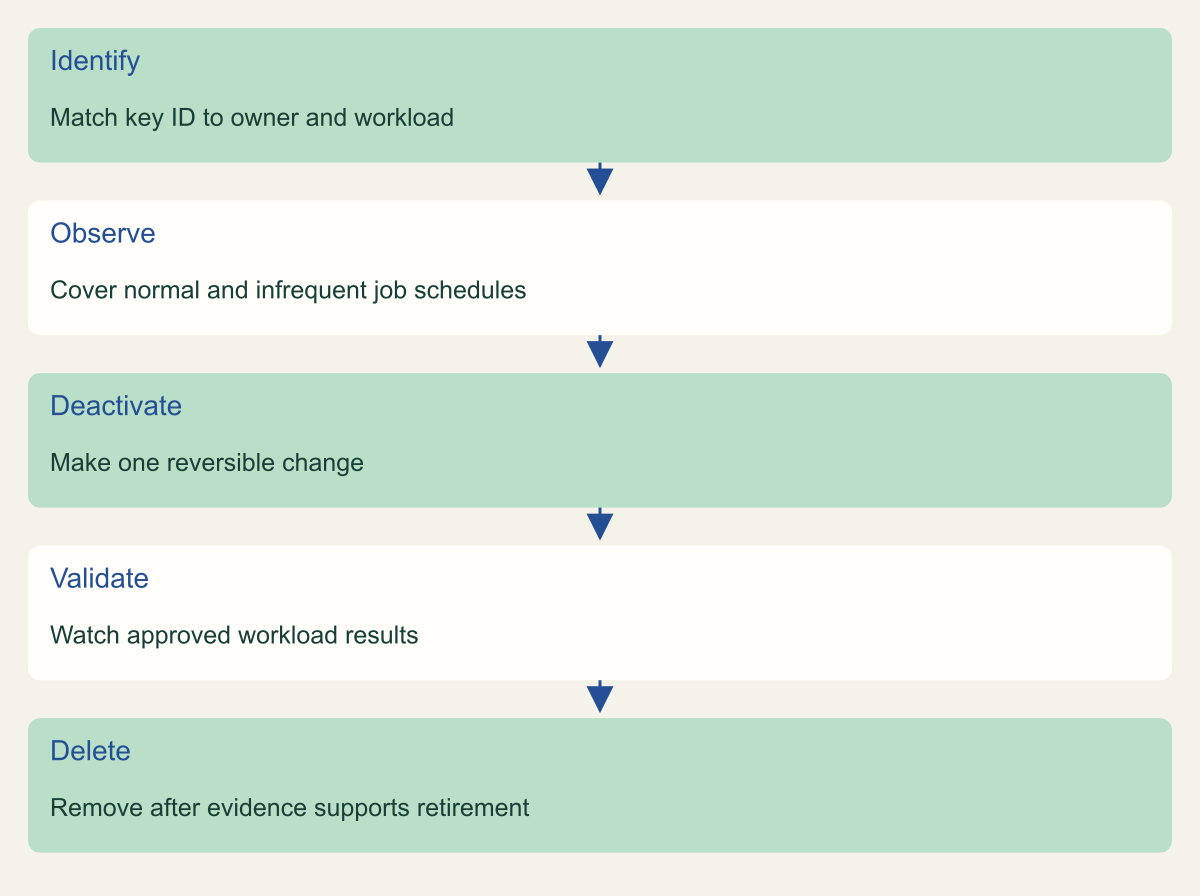
A key retirement sequence separates last-used evidence, rarely scheduled jobs, reversible deactivation and final deletion. Remove an IAM access key after you have identified its owner, checked its expected workload, deactivated it, and observed the relevant work without that key.
At a glance
Key findings
- Remove an IAM access key after you have identified its owner, checked its expected workload, deactivated it, and observed the relevant work without that key. A last-used date is a useful lead. It is not a complete dependency inventory. The safe question is whether anything still needs this specific credential, including work that runs infrequently. AWS provides separate operations for inspecting, deactivating, reactivating, and deleting IAM user access keys. [1]
- A key retirement sequence separates last-used evidence, rarely scheduled jobs, reversible deactivation and final deletion.
- Use the named resource, approved owner and actual read-back results to complete the operation. No live customer environment is represented here.
Treat unused as a decision to verify
Remove an IAM access key after you have identified its owner, checked its expected workload, deactivated it, and observed the relevant work without that key. A last-used date is a useful lead. It is not a complete dependency inventory. The safe question is whether anything still needs this specific credential, including work that runs infrequently. AWS provides separate operations for inspecting, deactivating, reactivating, and deleting IAM user access keys. [1]
This procedure is for a planned retirement of one IAM user's long-term access key. It does not cover emergency containment of a leaked credential or removal of AWS root keys. If the key may have been exposed, follow the incident response process and replace affected access promptly. A routine observation period should not become a reason to leave a known compromised credential active. Reactivating a suspected compromised key is also a different decision from reversing an ordinary maintenance change.
Start with a record containing the IAM user name, key identifier, account, owner, and reason for review. The key identifier is enough to refer to the credential; the secret access key is unnecessary. Do not paste credentials into a ticket, print environment variables, or collect full configuration files just to prove that a key exists. AWS warns that long-term access keys require careful management and recommends temporary credentials where possible. [4][5]
Choose the unit of change deliberately. Removing a key is narrower than deleting the IAM user, changing all of its policies, or replacing an application's entire authentication system. Those other changes may eventually be appropriate, but they make it harder to identify the cause of a failed job. A small retirement can be completed with a clear account of which credential stopped working, which workload checks ran, and why final deletion was justified.
Find the owner and every place the key might run
Use the IAM user's security credentials view or the documented access-key administration operations to list its keys and their status. For a broader starting inventory, an IAM credential report shows credential information for users in the account. It includes the first two access keys per user and their reported usage fields. IAM can generate a fresh report at most once every four hours, so note the report's generation time when interpreting it. [1][2]
Connect the credential to an application owner. The IAM user name may be a clue, but names such as backup, deployment, or automation are not reliable ownership records. Ask the responsible team to identify the approved configuration store and the jobs that consume it. Inspect references within that authorized scope. A key can be copied into a scheduled task, a CI secret, a local maintenance script, or an external service integration. The secret itself need not be revealed during that inventory.
Include scheduling in the record. A job that runs only at month end, during a release, or during recovery can be absent from an ordinary weekday observation. The relevant question is when the dependency is expected to execute and whether an approved test can exercise it now. Do not select a universal observation period just because a dashboard highlights credentials older than a particular number of days. Age can prioritize review without establishing that retirement is safe.
If no owner can be found, record that as an unresolved dependency rather than inventing a purpose from the last-used service name. The organization should have a process for handling unowned credentials. That process may authorize disabling them after appropriate investigation, but the decision belongs in the change record. It should explain the discovery scope, the contacts attempted, the risk of continued access, and who accepts the operational consequence of removing it.
aws iam list-access-keys --user-name "$CSD_IAM_USER"
aws iam get-access-key-last-used --access-key-id "$CSD_ACCESS_KEY_ID"
Read last-used data with its limits
The GetAccessKeyLastUsed API returns information about the most recent recorded use, including the service and Region where available. It helps distinguish a credential that has recent activity from one that deserves further investigation. It does not list every caller, every past operation, or every future dependency. Use it alongside the credential report and the workload schedule, rather than treating one timestamp as a complete audit trail. [2][3]
Keep creation time and last-used time separate. An old key can still be active in a daily job. A newly created key can be unused because its rollout never finished. A missing last-used value also needs the documented interpretation for the field; it is not a universal guarantee that nobody possesses the secret. The credential report describes several special values and historical limits, which matter when a cleanup tool converts them into a simple unused label. [2]
For a concrete hypothetical example, imagine a key whose most recent activity is an S3 call and whose owner operates an archive export. The service name fits the job, but it does not establish which bucket was accessed or whether a second process uses the same key. Review the application configuration and relevant audit evidence within your authorized scope. A matching service is corroborating context, not proof of exclusive ownership by that export.
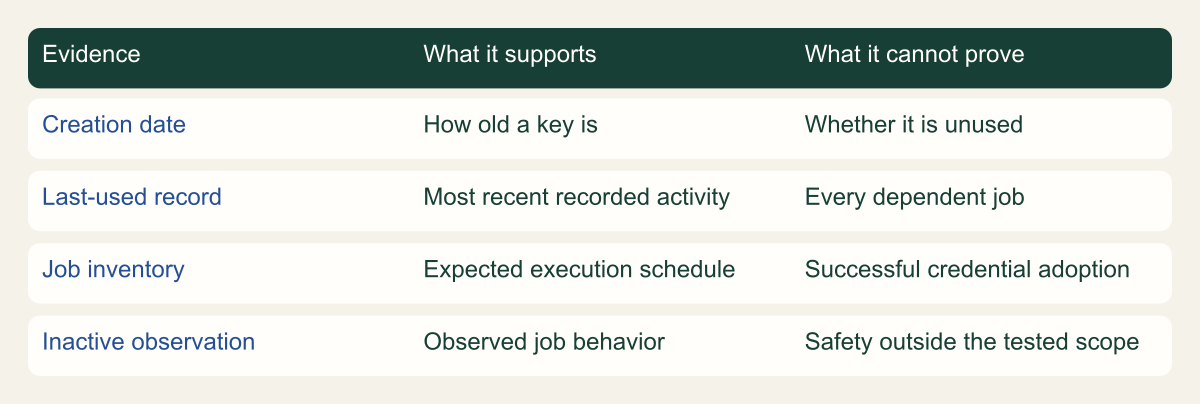
Write down the evidence you actually have. A useful entry might say that the key was identified in one CI secret, the owner listed two scheduled jobs, and both will be exercised during the change. An unhelpful entry says that the credential is safe to delete because it looks old. The evidence matrix in this guide separates what each record supports from what remains unknown, so the retirement decision can be reviewed without guessing how the conclusion was reached.
Read credential evidence at the right scope
A key creation date, a last-used record and an observed job result support different conclusions. None is a complete dependency inventory.

Source. Conceptual synthesis of AWS documentation accessed September 12, 2026. [1] [2] [3]
Method. Conceptual editorial synthesis of the cited service behavior; no measured outcomes. Scope: How do you decide an IAM access key is unused and remove it safely?
Accessible table and figure data
| Evidence | What it supports | What it cannot prove |
|---|---|---|
| Creation date | How old a key is | Whether it is unused |
| Last-used record | Most recent recorded activity | Every dependent job |
| Job inventory | Expected execution schedule | Successful credential adoption |
| Inactive observation | Observed job behavior | Safety outside the tested scope |
| Evidence | What it supports | What it cannot prove |
|---|---|---|
| Creation date | How old a key is | Whether it is unused |
| Last-used record | Most recent recorded activity | Every dependent job |
| Job inventory | Expected execution schedule | Successful credential adoption |
| Inactive observation | Observed job behavior | Safety outside the tested scope |
Choose a replacement only if work still needs access
If the job has been retired, it may need no replacement credential at all. Remove the stale integration through its normal change process and continue with key retirement. If the job still runs, choose the authentication method that fits where it runs. AWS recommends IAM roles and temporary credentials for workloads, and federated temporary access for people. A role migration should preserve the application's required operations while reducing unnecessary authority. [5]
For a person using the AWS CLI through IAM Identity Center, a configured SSO profile can obtain the appropriate temporary credentials. AWS documents the profile setup and sign-in process. That is different from copying an access key into the local credentials file. Verify the assigned account and role before using the profile for real work, and avoid granting a broad permission set merely because it appears in a getting-started example. [8]
For an application, check the credential provider and refresh behavior supported by its runtime. A configuration change is incomplete if a running process continues using a credential loaded before deployment. Test the actual instance, container, or scheduled execution that performs the work. This is where secret rotation and process reload often intersect: the replacement may be correct in storage while the running job still authenticates with the old key.
If a long-term key remains necessary, document that constraint and manage its replacement through the approved rotation process. IAM allows a maximum of two access keys per user, which affects how overlapping rotation is performed. Do not create a second key simply to make the inventory appear newer. The useful result is evidence that the intended consumer uses the approved replacement and that the retired credential no longer serves a legitimate dependency. [4]
Deactivate one key and watch the actual job
Deactivation provides a reversible step before permanent deletion. In IAM, choose the specific user's key and change it to inactive through the documented administration procedure. The CLI's update-access-key operation accepts the user name, access key ID, and status. Read the identifiers carefully and use an administrative session whose credentials are independent of the key being retired. Otherwise, the maintenance operation can disable its own ability to complete the review. [1][6]
Record the change time and verify the key's inactive status after the operation. Then run the approved workload checks or observe the next expected executions. Look for the result the job is supposed to produce, such as a completed export or a successfully deployed artifact, along with its authentication and error evidence. An inactive flag proves the IAM setting changed. A successful job result helps establish that this tested workload no longer depends on that key.
Keep the observation aligned with the inventory. If the key was linked to both a daily export and a release job, checking only the export leaves the release dependency unresolved. A deliberately invoked test may be appropriate for an infrequent job if its side effects are controlled. Do not launch a destructive maintenance operation solely to exercise a credential. The owner can choose a read-only or nonproduction validation where that meaningfully tests the same authentication path.
Avoid broad automated cleanup on the first pass. A loop that deactivates every credential beyond an age threshold can create several failures at once and make attribution difficult. Start with the bounded operation, record its outcome, and only then decide whether the organization has enough inventory and workload evidence to automate the pattern. Automation should encode the reviewed retirement policy and exception handling, not replace ownership discovery with a timestamp comparison.
Retire one key through a reversible check
Deactivate a known key before deleting it, and observe the jobs that depend on that credential through their relevant schedules.

Source. Conceptual synthesis of AWS documentation accessed September 12, 2026. [1] [2] [3] [6] [7]
Method. Conceptual editorial synthesis of the cited service behavior; no measured outcomes. Scope: How do you decide an IAM access key is unused and remove it safely?
Accessible table and figure data
| Step | Decision |
|---|---|
| Identify | Match key ID to owner and workload |
| Observe | Cover normal and infrequent job schedules |
| Deactivate | Make one reversible change |
| Validate | Watch approved workload results |
| Delete | Remove after evidence supports retirement |
| Step | Decision |
|---|---|
| Identify | Match key ID to owner and workload |
| Observe | Cover normal and infrequent job schedules |
| Deactivate | Make one reversible change |
| Validate | Watch approved workload results |
| Delete | Remove after evidence supports retirement |
Respond to a broken dependency
If an expected job fails after deactivation, first verify that the failure is connected to the credential change. Check the execution time, error category, active configuration, and key reference without exposing secrets. A nearby failure could also come from a network issue, a permissions change, or an unrelated deployment. Treat the disabled key as a strong investigative lead, but retain the distinction between sequence in time and established cause.
For a routine retirement of a key that is not suspected of compromise, an authorized operator can reactivate that same key. AWS documents the Active and Inactive states and the operation used to change them. Reactivation can restore the prior authentication path while the owner completes a replacement, but it should be a recorded temporary recovery decision. Set a new action and owner so the unresolved dependency does not disappear from the cleanup queue. [1][6]
For a suspected exposed credential, do not automatically restore the old state. Work with the incident owner to restore the application through an approved replacement and investigate activity associated with the compromised identity. The operational inconvenience of a failed job does not make a known exposed secret trustworthy again. This distinction should be written into any cleanup automation that offers a rollback button.
Use the failure to improve the dependency record. Add the previously unknown job, its schedule, the store it reads, and the runtime refresh behavior that prevented adoption. If a process cached credentials until restart, document that fact for the next change. Keep the explanation specific. Saying that the environment is complicated teaches the next operator little; identifying the actual missed consumer or reload requirement turns the failed attempt into a better retirement procedure.
Delete after the dependency check is complete
Delete the key only after the owner has reviewed the inactive observation and accepted the remaining limitations. AWS's delete-access-key operation removes the key pair associated with the selected IAM user. Specify both the user and key identifier explicitly in a reviewed command or choose the exact key in the console. Deletion is the permanent step; do not assume an old secret can be reactivated after the key pair has been removed. [1][7]
Read back the user's remaining keys and confirm that the intended identifier is gone. Keep the administrative identity separate from the retired credential, and avoid accidentally treating an empty success response as the entire verification. The change record should connect the requested deletion to the resulting inventory. If the API call is interrupted or the outcome is unclear, inspect the current state before retrying or declaring that the key was removed.
Clean up the credential references in the systems that were identified during discovery. Remove the stale CI secret, obsolete configuration entry, or retired integration through the owner's approved process. Do not delete audit records that explain how the credential was used or retired. Those records should retain their normal retention and access controls. Secret cleanup and audit retention serve different purposes, even though both refer to the same key identifier.
Finally, examine why the unused credential remained. A job may have been decommissioned without removing its IAM identity, or a rotation may have left the old key active after the consumer moved. Address that narrow lifecycle gap. A useful improvement could be adding credential retirement to the application's decommissioning checklist or requiring adoption evidence during rotation. It need not become a new platform or a large policy project to prevent the same oversight.
Leave a small retirement record
The final record should identify the account, IAM user, key ID, owner, discovery sources, expected jobs, deactivation time, observed executions, and deletion result. Include whether a replacement was needed and where its adoption was checked. Record any dependency that could not be exercised. This makes the decision understandable to someone who did not participate in the change, without requiring access to the secret value.
A retirement record should distinguish three conclusions. The key is inactive means the credential can no longer authenticate while that state remains. The tested jobs work means the specific observed executions succeeded without it. The key is deleted means the credential has been permanently removed from IAM. Combining those into a vague done label loses the information that helps an operator decide what to do if an infrequent job fails later. [1][6][7]
Keep the procedure proportionate to the workload. A retired experiment with a confirmed owner and no remaining consumers may need a short record. A shared automation identity used by multiple external systems needs a more careful inventory and adoption check. The difference should come from known dependencies and consequences, rather than a universal rule that all keys of the same age deserve the same treatment.
The practical end state is one fewer unnecessary credential and a clearer account of how the remaining work authenticates. Continue periodic credential review, but use age and usage data to identify questions rather than manufacture certainty. A key can be retired confidently when its owner, observed behavior, and final IAM state agree. Where they do not, keep the unresolved dependency visible and give it a concrete next step.
Method and provenance
Primary AWS documentation was retrieved and reviewed on September 12, 2026. The guide synthesizes documented service behavior into a bounded operational procedure; research records and figure data are maintained with the article.
Examples are hypothetical. Code and request shapes are checked locally where applicable, but no customer AWS account, production operation, recovery duration or benchmark was tested. Readers must verify their resource type, Region, permissions and organization controls.
AI assistance. AI assisted research organization, drafting and original visual planning. Sources, technical boundaries and final rendering are reviewed through the publication workflow.
Published under the Cloud Security Desk organizational byline. Read the practitioner guide policy.
References
- GetAccessKeyLastUsed - AWS Identity and Access Management AWS. Accessed .
- update-access-key - AWS CLI 2.36.44 Command Reference AWS. Accessed .
- delete-access-key - AWS CLI 2.36.44 Command Reference AWS. Accessed .