
A single-bucket migration joins the four settings, effective organization/account/bucket controls, intended readers, CloudFront and positive plus negative checks. Keep all four S3 Block Public Access settings enabled for a bucket intended to be private, then grant the application and other approved readers the specific access they need.
At a glance
Key findings
- Keep all four S3 Block Public Access settings enabled for a bucket intended to be private, then grant the application and other approved readers the specific access they need. Check the effective controls above the bucket as well, because account and organization settings can enforce a stricter result. Before changing an existing bucket, identify any workload that currently depends on anonymous access. Otherwise, a useful security change can unexpectedly interrupt a website or integration. [1]
- A single-bucket migration joins the four settings, effective organization/account/bucket controls, intended readers, CloudFront and positive plus negative checks.
- Use the named resource, approved owner and actual read-back results to complete the operation. No live customer environment is represented here.
Start with who should read the bucket
Keep all four S3 Block Public Access settings enabled for a bucket intended to be private, then grant the application and other approved readers the specific access they need. Check the effective controls above the bucket as well, because account and organization settings can enforce a stricter result. Before changing an existing bucket, identify any workload that currently depends on anonymous access. Otherwise, a useful security change can unexpectedly interrupt a website or integration. [1]
Private does not mean nobody can read the objects. It means access follows the intended authorization path instead of being generally available through public grants. An application role can read approved objects. A properly configured CloudFront distribution can serve public website content from a private S3 origin. A person can receive a deliberately scoped presigned request. Each path has its own permission and delivery details, so the bucket's access design should name the readers and routes explicitly. [1][4][5]
This guide addresses an S3 general purpose bucket and a controlled move away from public access. It is not a complete review of every S3 storage type, access product, or organization policy. It also does not treat encryption as a substitute for authorization. An encrypted object can still be shared too broadly when the relevant access and key permissions permit it. The review begins with who should obtain the data and through which application path. [5]
Use a benign test object for the change. Identify an intended application reader and an unauthorized or anonymous request that should fail. Record the account, bucket, Region, access points if used, and any CloudFront distribution involved. Those details let the team verify a useful result: the approved reader still works, and the unwanted route does not. A single console indicator is helpful configuration evidence, but the application's behavior needs its own check.
Inventory the readers before changing permissions
List the known ways objects are read and written. Include the application role, AWS service deliveries, partner accounts, browser downloads, public website endpoints, and CloudFront origins. The bucket policy is one source of information, but it is not a complete inventory of dependencies. The application owner should identify where the bucket URL or object URL appears in deployed configuration and whether a client reads S3 directly or through an application.
Look for old public assumptions. A website may embed direct S3 links even after most traffic moved to CloudFront. A partner may rely on anonymous downloads without a formal integration account. An upload library may still send a public-read ACL by default. These are hypothetical examples of dependencies to check, not claims about a measured customer environment. Their value is that they connect the four Block Public Access controls to actual behaviors the team can test. [1][3]
Use access-analysis tools as supporting evidence. IAM Access Analyzer for S3 can identify public and cross-account access based on supported policies and access controls. Review the finding's scope and the reason access is considered external. An approved partner account is not automatically equivalent to anonymous access, while an apparently harmless wildcard statement may have a broader effect than the author intended. The analyzer helps locate decisions that need review; the application owner still supplies the intended audience. [6]
Record the current settings before changing them. Preserve the bucket's public-access configuration, relevant policy version, ownership mode, and intended reader list in a controlled change record. Avoid copying sensitive object names or whole policy inventories into public issues. The evidence should be sufficient to explain the change and troubleshoot an unexpected denial. It should not become an unrelated collection of private account details merely because those details were visible during inspection.
Understand what the four settings actually block
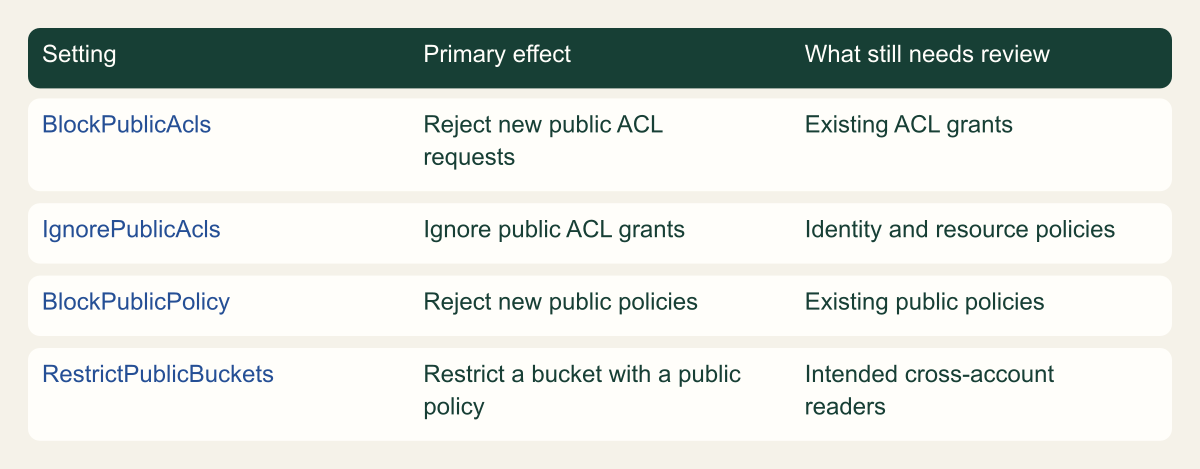
BlockPublicAcls rejects requests that try to create or apply public ACLs in the documented cases. IgnorePublicAcls makes public ACL grants ineffective. These are different effects: one rejects certain new requests, while the other ignores public ACL permissions. If an old uploader still sends a public ACL, turning on the blocking setting can expose that dependency as an upload failure. Review the client and remove the unnecessary ACL rather than assuming all private uploads are incompatible with the control. [1]
BlockPublicPolicy rejects new policies that S3 considers public. It does not rewrite or erase an existing policy. RestrictPublicBuckets limits access when a bucket or access point has a public policy, allowing AWS service principals and authorized users within the owning account while restricting other access as documented. This can affect a partner's explicitly listed access when the same policy is also classified as public. Review the policy as a whole, not just the statement that names the partner. [1]
The four controls therefore complement each other. Enabling only the controls that reject new grants can leave existing public grants relevant. Enabling only a control that restricts an existing public policy does not remove the policy itself. The matrix makes those distinctions visible so an operator understands why AWS recommends all four settings for private storage. It is a conceptual comparison of documented behavior, not a ranking of how secure each setting is. [1]
Block Public Access also does not clean up the saved policies and ACLs. AWS warns that removing a block can make existing public grants effective again. Keep that in mind when considering rollback. A switch that was safe to enable is not necessarily harmless to disable later. Review and remove unnecessary public grants through the normal policy process so a future configuration mistake does not silently reactivate an old sharing arrangement. [1]
The four public-access controls have different effects
The four settings separately reject public ACL or policy changes, ignore public ACLs, and restrict access through public bucket policies.

Source. Conceptual synthesis of AWS documentation accessed September 12, 2026. [1]
Method. Conceptual editorial synthesis of the cited service behavior; no measured outcomes. Scope: How can you block public S3 access while keeping the application working?
Accessible table and figure data
| Setting | Primary effect | What still needs review |
|---|---|---|
| BlockPublicAcls | Reject new public ACL requests | Existing ACL grants |
| IgnorePublicAcls | Ignore public ACL grants | Identity and resource policies |
| BlockPublicPolicy | Reject new public policies | Existing public policies |
| RestrictPublicBuckets | Restrict a bucket with a public policy | Intended cross-account readers |
| Setting | Primary effect | What still needs review |
|---|---|---|
| BlockPublicAcls | Reject new public ACL requests | Existing ACL grants |
| IgnorePublicAcls | Ignore public ACL grants | Identity and resource policies |
| BlockPublicPolicy | Reject new public policies | Existing public policies |
| RestrictPublicBuckets | Restrict a bucket with a public policy | Intended cross-account readers |
Find the controls above the bucket
Inspect account-level controls as well as the bucket's own settings. S3 applies the most restrictive applicable combination across the bucket, effective account settings, and access point when used. Current AWS documentation also describes organization-level Block Public Access policies that enforce account settings for selected member accounts. A bucket-level view alone can therefore be an incomplete explanation of why a request is denied or why a local setting cannot be relaxed. [1][2]
At the organization level, the four settings are applied together through the supported policy rather than selected individually. The account can inherit that enforcement. That means a bucket owner may not be the person authorized to change the effective baseline. Record the controlling organization or account policy owner and escalate a genuine exception through that route. Repeatedly editing the bucket cannot override a more restrictive policy above it. [1]
Account-level settings apply across AWS Regions, and AWS notes that propagation need not occur everywhere immediately or simultaneously. Make the verification scope explicit when a change affects more than one Region. For a single-bucket procedure, start with the bucket's actual request path and read-back state. Do not claim that one successful check establishes an account-wide result for every access point and Region. [1]
A useful effective-control record separates desired state from observed state. It should say which level owns the baseline, which settings the bucket itself reports, and which reader tests were performed. If the operator cannot inspect an organization policy, record that limitation and obtain the relevant evidence from its owner. A missing permission to view the parent control is not evidence that the parent control does not exist.
Keep object ownership separate from public access
S3 Object Ownership and Block Public Access address related but different concerns. With Bucket owner enforced, ACLs are disabled and the bucket owner owns the objects, with access managed through policies. AWS documents this as the default Object Ownership setting and recommends keeping ACLs disabled for most modern use cases. That does not eliminate the need to review public-access settings and policies. It removes one older way of expressing object permissions. [3]
Inspect the existing ownership mode before changing anything. A legacy application may depend on a particular ACL behavior or on cross-account object ownership. If the task is only to enable Block Public Access, avoid silently adding an ownership-mode migration to the same change. The two may belong in the same broader cleanup, but each has different compatibility questions. Keep the approved scope clear so a failed upload can be traced to the specific control that changed.
For a modern uploader, check whether it unnecessarily sends ACL headers. Bucket owner enforced accepts uploads without ACLs and the documented bucket-owner-full-control case, while other ACL choices can fail. If the client was configured years ago to send public-read, removing that obsolete option can be the correct application change. Test a new upload with the intended identity and then read it through the approved path. Existing objects alone may not reveal the writer's behavior. [3]
Do not assume that a private bucket requires setting an ACL separately on every object. That habit can make a simple policy-based design harder to maintain. Describe ownership, access policy, and Block Public Access as separate entries in the change record. The team can then see whether an issue concerns who owns the object, who is authorized to operate on it, or whether a public grant is being blocked.
Give applications explicit access
An application that should read private objects needs an appropriate identity and permission. Prefer the workload's IAM role over a shared long-term key. Scope the operations to the job: listing a bucket and reading an object are different actions and use different resource forms in a policy. The exact policy depends on whether the reader is in the same account, another account, or an AWS service. Use the current S3 policy guidance for that case. [5]
Keep the application's access path visible. If a browser calls the application's API and the API retrieves an object using its role, the browser does not need anonymous S3 access. If the application deliberately creates a presigned request, that request delegates access under the signing identity's authority and other applicable restrictions. The public-access review should confirm which design is intended rather than making the bucket public to solve an unrelated application authorization problem.
For encrypted data, include the key permission in the read test where applicable. S3 authorization and AWS KMS authorization can both matter to retrieving an object. A denial caused by the encryption key should not be fixed by broadening the bucket's public-access settings. AWS's access-denied guidance separates these causes, which is useful when the object remains unreadable even though the expected bucket and identity policies appear correct. [7]
Test the application's real deployment identity. A developer with broad console permissions may be able to download an object even while the production role cannot. Conversely, a role scoped to a specific prefix may correctly fail on a test object placed elsewhere. Put the benign object in the reviewed scope and record the identity used for the test. That turns an ambiguous works-for-me result into evidence about the actual reader.
For a service that writes into the bucket, review the service-specific bucket policy and its documented source restrictions. A logging service and a human application role are different principals with different request context. Copying an example policy from another AWS service can leave a legitimate delivery broken or create broader access than intended. Keep the approved service name, operation, destination prefix, and applicable conditions together in the review, then verify a fresh delivery through that actual service. A manual upload by an administrator does not exercise the service principal.
Also distinguish the CORS configuration from access authorization. A browser error does not automatically mean that the bucket needs a public policy. Check the actual server response and the application route before changing sharing. This guide does not provide a CORS migration procedure; it identifies the boundary so a frontend compatibility problem is routed to the appropriate configuration owner instead of being addressed by reopening public S3 access. [7]
Public access and approved retrieval are separate paths
Blocking a public access path does not remove every permission granted to an approved identity. The request still needs valid authorization.

Source. AWS documentation [1][7]. Reviewed September 12, 2026.
Method. Original conceptual illustration generated with ChatGPT and visually reviewed. The accessible table identifies the metaphor and its limits. It is not a provider screenshot, a complete policy evaluator, or measured service evidence.
Accessible table and figure data
| Visual element | Meaning | Limit |
|---|---|---|
| Closed public entrance | Public principals cannot use the illustrated entrance | The drawing does not model every S3 policy setting |
| Approved retrieval route | A permitted identity can request an object | IAM policy evaluation and other controls still apply |
| Shared archive | Both paths concern the same stored objects | Private storage is not equivalent to network isolation |
| Visual element | Meaning | Limit |
|---|---|---|
| Closed public entrance | Public principals cannot use the illustrated entrance | The drawing does not model every S3 policy setting |
| Approved retrieval route | A permitted identity can request an object | IAM policy evaluation and other controls still apply |
| Shared archive | Both paths concern the same stored objects | Private storage is not equivalent to network isolation |

Serve a public website from a private origin
A public website does not automatically require a public S3 bucket. CloudFront origin access control can allow a distribution to read an S3 origin while direct public bucket access remains blocked. The visitor reaches CloudFront, and CloudFront uses the configured origin access path. This is a delivery architecture with its own bucket policy and distribution configuration, not a claim that enabling CloudFront alone changes S3 permissions. [4]
The endpoint distinction matters. AWS states that an S3 website endpoint must be configured as a custom origin and cannot use OAC or OAI. To use OAC, follow the documented S3 origin arrangement rather than attaching it to the static-website endpoint and expecting the same behavior. An application that relies on website-endpoint behavior may need a reviewed routing change before its bucket can become private. [4]
When migrating, establish and test the CloudFront route before removing the old public route. Review the origin type, distribution identifier, bucket policy, and any KMS requirements. Test a new or uncached benign object through CloudFront and compare that with a direct anonymous S3 request. Cached content can make a distribution appear healthy even when new origin fetches fail, so choose a test that actually exercises the origin access path.
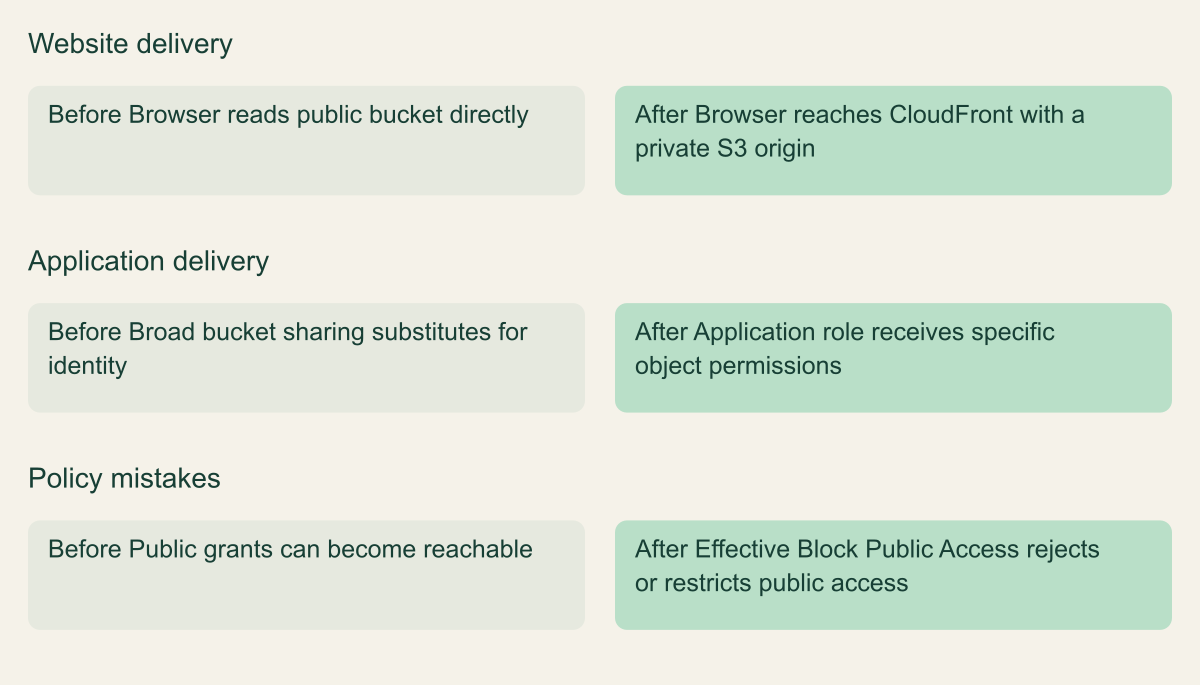
Keep the website's content intent separate from origin privacy. If CloudFront intentionally serves a file to every visitor, making the origin private does not make the file confidential. It constrains the route used to obtain the content. Confidential downloads also require an appropriate viewer-authorization design. The before-and-after figure illustrates the route change, while the website owner remains responsible for deciding which visitors may receive which content.
Preserve approved delivery while removing public origin access
CloudFront origin access control can serve a regular private S3 origin. An S3 website endpoint follows a different access model.

Source. Conceptual synthesis of AWS documentation accessed September 12, 2026. [1] [4] [5]
Method. Conceptual editorial synthesis of the cited service behavior; no measured outcomes. Scope: How can you block public S3 access while keeping the application working?
Accessible table and figure data
| Access path | Before | After |
|---|---|---|
| Website delivery | Browser reads public bucket directly | Browser reaches CloudFront with a private S3 origin |
| Application delivery | Broad bucket sharing substitutes for identity | Application role receives specific object permissions |
| Policy mistakes | Public grants can become reachable | Effective Block Public Access rejects or restricts public access |
| Access path | Before | After |
|---|---|---|
| Website delivery | Browser reads public bucket directly | Browser reaches CloudFront with a private S3 origin |
| Application delivery | Broad bucket sharing substitutes for identity | Application role receives specific object permissions |
| Policy mistakes | Public grants can become reachable | Effective Block Public Access rejects or restricts public access |
Apply the change to one known bucket
Start with read-only inspection. The get-public-access-block CLI operation retrieves the bucket configuration when the caller has permission. Confirm the account and bucket before recording the four booleans. An absent bucket-level configuration should be handled as a specific state, with the account and organization controls still reviewed. It should not be silently converted into a claim that the entire effective public-access baseline is off. [8]
Use the S3 console or the documented put-public-access-block operation to set the four controls for the selected bucket. A command should specify the intended bucket and an explicit reviewed configuration. Avoid a shell loop over every bucket until ownership and compatibility have been established for the wider scope. The service supports the configuration change; the team supplies the decision that the selected bucket should no longer depend on public grants. [2][9]
If infrastructure code owns the bucket, update that source as part of the change. Otherwise, the next deployment may restore the previous state or create a confusing difference between code and production. Preserve the existing policy and reader behavior while making the necessary scoped edits. Do not combine this operation with unrelated lifecycle deletion, encryption-key replacement, or a bucket rename simply because the same resource is already open in the console.
Read back the settings after saving and record the result. Then run the planned application and anonymous-access checks. If a request fails unexpectedly, keep the evidence: identity, operation, target, time, and error category. Do not immediately disable every block to get a successful response. The saved configuration and the failure together usually provide a narrower question that can be investigated without discarding the privacy objective.
aws s3api get-public-access-block \
  --bucket "$CSD_BUCKET_NAME"
Test an intended reader and an anonymous request
A useful verification uses at least two different expectations. The approved application identity should perform its required operation on the benign object. An anonymous request to the direct S3 object route should not obtain content intended to remain private. Record the exact path and whether the request was signed. A browser carrying a presigned URL is not an anonymous test merely because it is open in a private window.
Use fresh requests and safe data. For an application read, verify the content as well as the HTTP outcome so a cached error page or old response does not count as success. For CloudFront, ensure the test exercises an origin fetch when that is the property being checked. For uploads, create a harmless object only within the approved test scope and remove it afterwards if the procedure permits. Existing read success does not establish that new writes still work.
An AccessDenied response is useful evidence for the tested request, but its cause still matters. It can come from identity policy, bucket policy, KMS, an endpoint policy, or another applicable control. A failed request to a nonexistent object also proves little about a known sensitive object. Pair the negative test with the configuration review and use S3's troubleshooting guidance when the result does not fit the intended design. [7]
Record the limits of the test without making the outcome vague. For example, say that the production application role retrieved the test object and a fresh unsigned request to that same object was denied. That is a concrete result. It does not claim that every object, alternate access point, or partner workflow was tested. Extend coverage to those paths when they are part of the approved bucket design, rather than hiding them behind a general private label.
Diagnose access denied without reopening everything
First check the identity and operation. Is the caller using the intended role, and does it need bucket listing, object reading, or object writing? A successful console test by an administrator is not a substitute for the workload role. Review the resource being requested, including its prefix and version if relevant. A denial on the wrong test target can send a team toward unnecessary policy changes. [7]
Next, inspect the relevant S3 policies and effective Block Public Access settings. If a partner's access stopped after RestrictPublicBuckets was enabled, look for a public statement elsewhere in the policy. AWS documents that the restriction can affect cross-account access when the policy is public, even if a separate statement names the partner. The fix may be to remove the unnecessary public grant and retain the specific partner permission. [1]
For an upload failure, review ACL headers and Object Ownership. For a CloudFront failure, inspect the origin type, OAC configuration, bucket policy, and encryption permissions. For an application using a VPC endpoint, inspect its endpoint policy and the request route. These are different causes with different fixes. The S3 access-denied guide is useful because it organizes several authorization layers that are easy to conflate during a rushed change. [3][4][7]
If service restoration requires reversing a change, make that an explicit decision with the owner. Restoring the prior block settings may expose old public grants again, so review the resulting audience before doing it. A narrower temporary route or a corrected policy may restore the approved reader while retaining the protection. Preserve the failed attempt and its cause in the change record, then rerun the relevant checks after the correction.
Handle genuine public exceptions explicitly
Some content is intentionally public. That business requirement should be documented as a reader and delivery decision, not discovered accidentally when someone notices a warning badge. For a website, evaluate whether CloudFront with a private origin meets the need. If direct public S3 access remains a deliberate exception, identify the exact bucket, operations, content classification, owner, and review conditions. Do not treat an exception for public reading as permission for public writing. [1][4][5]
Review the effect of parent controls before promising an exception. An organization policy may intentionally prevent a bucket owner from enabling public access. The owner should use the established exception process rather than trying to bypass the policy through another access route. A policy boundary that cannot be changed locally is a design constraint to discuss with the responsible administrators, not an unexplained error to work around.
Keep private and intentionally public data from drifting into the same informal publishing workflow. If a bucket holds both, the team needs a clear access design and operational safeguards for how new objects are added. A developer should not have to guess whether uploading a file makes it public. The right separation depends on the application, but the rule for a new object should be understandable before the file is written.
An exception should also have an exit condition. If it exists only because an older website still uses a direct endpoint, name the migration task and owner. If it is permanent, define the review trigger when the content or application changes. This is ordinary operational documentation. It helps prevent a temporary public grant from becoming an unexplained permanent dependency that later blocks a straightforward security improvement.
Keep the private bucket private
After the change, preserve a concise evidence record. Include the intended readers, effective control owner, four bucket settings, relevant policy revision, ownership mode, and test results. Link to the application or infrastructure change that removed a public dependency. The record should explain why the bucket is private and how legitimate access continues, rather than merely showing that a checkbox was enabled on one date.
Review the configuration when a new reader, partner, access point, website route, or upload client is introduced. Those changes can alter the assumptions behind the original test. Also inspect policy changes that introduce broad principals or modify the effective parent controls. IAM Access Analyzer for S3 can support this review, but its findings should be interpreted against the approved audience and the documented scope of the analysis. [6]
Keep the test object and temporary permissions tidy. Remove harmless test artifacts through the agreed cleanup process, retain necessary change evidence, and avoid deleting unrelated data. If an approved temporary permission was added to make a migration possible, remove it after the lasting route works. A completed privacy change should not leave behind an unowned troubleshooting grant that quietly broadens the bucket's access later.
The practical result is a bucket whose audience is explicit. Block Public Access limits public grants, while IAM, resource policies, encryption permissions, and delivery configuration support the approved readers. Verify those pieces together. When an application still works and the unwanted route is denied for the right reason, the team has evidence of a useful change and a small procedure it can repeat for the next bucket.
Method and provenance
Primary AWS documentation was retrieved and reviewed on September 12, 2026. The guide synthesizes documented service behavior into a bounded operational procedure; research records and figure data are maintained with the article.
Examples are hypothetical. Code and request shapes are checked locally where applicable, but no customer AWS account, production operation, recovery duration or benchmark was tested. Readers must verify their resource type, Region, permissions and organization controls.
AI assistance. AI assisted research organization, drafting and original visual planning. Sources, technical boundaries and final rendering are reviewed through the publication workflow.
Published under the Cloud Security Desk organizational byline. Read the practitioner guide policy.
References
- Restrict access to an Amazon S3 origin - Amazon CloudFront AWS. Accessed .
- get-public-access-block - AWS CLI 2.36.44 Command Reference AWS. Accessed .
- put-public-access-block - AWS CLI 2.36.44 Command Reference AWS. Accessed .