
Separates deployment authority, caller access, runtime identity, API permission and application user controls in a small hosted prototype.
At a glance
Key findings
Keep the credential in the platform
A Cloud Run application can call Gemini on Vertex AI using its attached service account and Application Default Credentials, commonly called ADC. The application does not need a downloaded service account private key in its image, source repository, or environment. Give the runtime identity the permissions required for the intended Vertex AI operation, then test the call from the deployed service. [1][2][3]
This guide describes a small server-side application, such as a tool that summarizes approved internal text. It is not a browser-only integration. A browser user should authenticate to the application, and the application should decide which requests it will send to Vertex AI. Shipping a service account key to browser or mobile code would give the recipient possession of that credential, regardless of how the interface hides it.
Google Cloud offers several authentication routes for different environments and product entry points. The existence of an API-key quickstart does not mean a hosted workload must distribute a service account key. For this design, keep the project, runtime identity, and Vertex AI permissions explicit and use the attached identity available in Cloud Run. Consult the current Vertex AI authentication guidance for the selected API. [1][7]
The practical outcome is a deployed service whose AI request succeeds under a dedicated runtime account, whose callers are controlled, and whose obsolete prototype credential has been removed deliberately. This is an identity setup guide. It does not claim that an authenticated model request makes the input appropriate, the output correct, or the application safe for every user.
Separate the people and identities
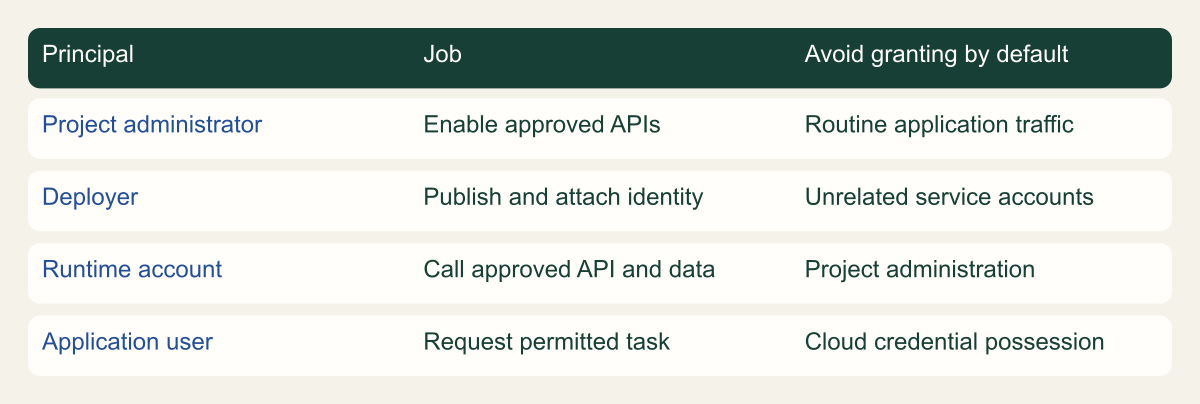
Write down four roles in ordinary language. A project administrator prepares the project and enables required services. A deployer publishes the Cloud Run revision and attaches its runtime identity. The runtime service account calls Vertex AI. An application user submits work to the application. One employee may perform several of these jobs, but the permissions should still be reviewed separately.
API enablement and model invocation are different operations. The quickstart identifies the setup permissions needed to enable APIs, while the access-control guidance explains permissions for generative AI operations. Do not give the application service account broad project setup authority merely because the developer needed it during installation. The application's job is to make the approved request. [2][7]
The deployer may need permission to act as the selected service account when attaching it to a Cloud Run service. That is authority over which identity the workload can use. Review it alongside deployment access, especially in a shared project. An account with broad downstream roles can become reachable through a deployment workflow even when the deployer does not directly hold those roles. [4]
The application user belongs to a separate trust relationship. A user who may open the front end is not automatically entitled to unlimited model calls or every source document. Keep user authentication, resource authorization, and request limits in the application. Cloud IAM authorizes the workload's API call; it does not replace those business rules.
Keep setup and runtime jobs separate
Original responsibility framework, not a complete minimal IAM policy.

Source. Google Cloud documentation [2][3][4][7]. Reviewed September 12, 2026.
Method. Original conceptual synthesis of the cited documentation. Rows describe responsibilities, decisions, or hypothetical states, not measured results.
Accessible table and figure data
| Principal | Job | Avoid granting by default |
|---|---|---|
| Project administrator | Enable approved APIs | Routine application traffic |
| Deployer | Publish and attach identity | Unrelated service accounts |
| Runtime account | Call approved API and data | Project administration |
| Application user | Request permitted task | Cloud credential possession |
| Principal | Job | Avoid granting by default |
|---|---|---|
| Project administrator | Enable approved APIs | Routine application traffic |
| Deployer | Publish and attach identity | Unrelated service accounts |
| Runtime account | Call approved API and data | Project administration |
| Application user | Request permitted task | Cloud credential possession |
Prepare a limited project and runtime account
Use an approved project with billing, API availability, and organizational policies appropriate for the application. Record the model and location the application will use. Availability and quota behavior can vary by model and request mode, so a developer should check the current documentation for the chosen endpoint rather than copying an old model identifier from an unrelated sample. [7][8]
Create a dedicated runtime service account or select an existing one with the same narrow purpose. Inspect its current grants before reuse. A service account shared by unrelated tools makes troubleshooting and access review harder because the same identity represents several workloads. Start with one application and environment where ownership is clear.
Review the required Vertex AI permissions and the available predefined roles. The documented Vertex AI User role is a common starting point, but it contains more than a single application operation. If the organization's role design requires a narrower custom role, validate the exact API permissions against the documented request path. Do not invent a minimal policy by removing unfamiliar permissions until a test happens to pass. [2]
Keep other service permissions separate. The application may need to read approved input from Cloud Storage or write a result to a database. Those grants should match the relevant data resources. Giving Vertex AI permission does not authorize storage access, and giving storage access does not authorize model invocation. A failed request should identify which operation failed before anyone broadens the role set.
Attach the identity and use ADC
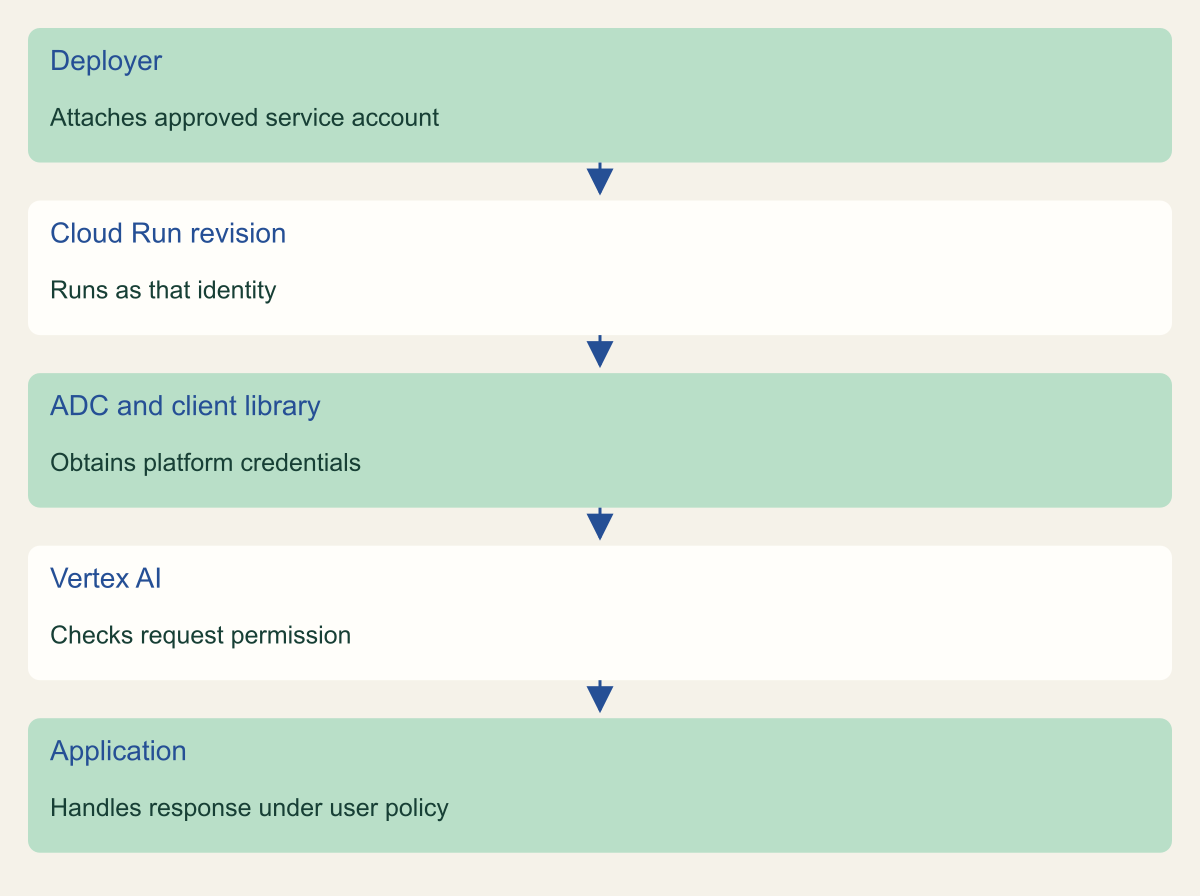
Attach the reviewed service account to the Cloud Run service through the normal deployment configuration. Then use a supported Google authentication or client library with ADC in the application. In the Cloud Run environment, the attached identity provides credentials through the platform. Google advises against setting GOOGLE_APPLICATION_CREDENTIALS when relying on Cloud Run service identity. [3][4]
Understand ADC's credential search order during development. A local credential file or an explicitly configured environment variable can cause an application to use a different identity from the one the developer expects. A successful laptop request may therefore reflect the developer's personal privileges rather than the runtime account's permissions. Google documents the search locations and their order. [5]
Keep local development and hosted execution distinct in the operating notes. A developer can use an approved local authentication workflow without copying its credential file into the container. The deployed revision should rely on its attached identity. Review container build inputs, environment configuration, and mounted files for any credential setting left over from the prototype.
After deployment, make a harmless request from the running service and verify the active revision and configured service account. Do not paste access tokens into logs to prove which identity is in use. Use safe deployment metadata and relevant audit evidence where available. The important result is that the deployed application performs the intended API call under the reviewed runtime configuration.
Use the attached identity for the model request
Conceptual identity sequence. No user-managed service account private key is distributed to the hosted application.

Source. Google Cloud documentation [1][2][3][4][5]. Reviewed September 12, 2026.
Method. Original conceptual synthesis of the cited documentation. Rows describe responsibilities, decisions, or hypothetical states, not measured results.
Accessible table and figure data
| Step | Responsibility |
|---|---|
| Deployer | Attaches approved service account |
| Cloud Run revision | Runs as that identity |
| ADC and client library | Obtains platform credentials |
| Vertex AI | Checks request permission |
| Application | Handles response under user policy |
| Step | Responsibility |
|---|---|
| Deployer | Attaches approved service account |
| Cloud Run revision | Runs as that identity |
| ADC and client library | Obtains platform credentials |
| Vertex AI | Checks request permission |
| Application | Handles response under user policy |
Control who can call the application
Protect the application's entry point according to its audience. An internal utility can use an appropriate authenticated access path. A public product needs an application user system, authorization checks, and abuse controls. The runtime service account's ability to call Vertex AI does not decide whether a particular external request should consume that authority.
Require the application to construct the model request from approved inputs. Do not offer an unrestricted proxy where a caller can choose arbitrary projects, credentials, endpoints, or source objects. Even a simple summarizer should define the allowed task, input types, and result handling. A small interface can have a narrow contract without adding a complicated orchestration system.
Apply request-size, concurrency, and spending controls appropriate to the workload. Vertex AI quotas and model-specific capacity mechanisms are service constraints, not an application-level promise about how much any one user may consume. Review the current model's quota behavior, then set local limits that fit the product's operating budget and response expectations. [8]
Keep sensitive input out of routine error messages. An authentication failure should identify the operation and safe context without returning a credential or a complete private prompt. The same principle applies to request tracing and support tooling. This article's keyless identity pattern removes one credential distribution problem; the surrounding application still owns its data-handling decisions.
Test permission boundaries
Start with an approved harmless input that does not contain personal or confidential data. Confirm that the deployed service can invoke the selected Vertex AI operation and return the expected response shape. Treat the generated text as variable output. The authentication test should not depend on the model producing one exact sentence unless a separate application contract requires it.
Test a request that the application should reject before calling the model. It could be an unauthenticated user, an oversized input, or an unapproved task. Verify the rejection at the application and check that it does not become a background model call. A correct runtime IAM policy does not prove that the application's front door is controlled.
Use a controlled environment to test the effect of missing runtime permission. The application should report an operational failure clearly and avoid falling back to a hidden API key or another broadly privileged identity. Do not remove production permissions solely to create an outage test. A dedicated test service and account can exercise the same failure handling safely.
Review the evidence together. The active revision uses the intended account, the approved call succeeds, an inappropriate caller is rejected, and a missing-permission condition is handled without credential fallback. These observations establish a useful deployment check. They do not establish the model's factual accuracy, the privacy of every possible prompt, or a complete security evaluation of the application.
Remove the prototype key safely
First determine whether a user-managed service account key exists and where it is used. The prototype may have stored it in a local file, a secret store, a build setting, or a deployment environment variable. Do not assume that deleting one repository file removes every usable copy. Google documents the risks and lifecycle responsibilities of user-managed keys. [6]
Switch the hosted application to its attached identity and verify the new revision before disabling a credential that another approved workload still needs. Inventory consumers with the responsible owners. If the key is exposed or compromise is suspected, follow the incident process rather than delaying containment for an ordinary migration. The urgency and evidence requirements differ.
Disable or delete the obsolete key through the authorized IAM workflow once the migration and dependencies are understood. A key removed from source control may still be valid at the service, and removing it from the service does not erase copies from logs or history. Treat credential invalidation and content cleanup as separate actions. Avoid rewriting shared repository history casually as part of a small application change.
Run a fresh request after the old key is unavailable. This verifies that the application actually uses the platform identity and is not silently depending on a mounted file or environment override. Record the credential identifier and disposition in the restricted change record without storing the private key material. The final application documentation should describe the identity path, not contain the credential itself.
Operate the small service
Keep an owner for the runtime account and its role grants. Review the identity when the application gains a new data source, moves projects, or changes model APIs. A new feature should not inherit unrelated permissions merely because the original account already has a convenient broad role. Reassess the task and resource relationship.
Monitor failures in a way that separates authentication, authorization, quota, model availability, and application errors. A permission-denied response needs a different action from a capacity response. Blind retries can create confusing behavior and unnecessary work. Use the current API guidance for retriable conditions and keep the application's own retry budget bounded.
Record the reviewed model and endpoint configuration with the release. Google can update managed services, and model availability changes over time. Schedule a review before a planned model transition so the application team can verify permissions, request syntax, data handling, and output behavior together. This avoids discovering a stale configuration through a production error. [7][8]
A maintainable small deployment has one clear runtime identity, an understandable set of resource permissions, an authenticated or otherwise controlled entry point, and a repeatable test. That is enough to remove the need for a service account key in the hosted application while leaving the remaining application decisions visible to their owners.
Compare a local success with a deployed failure
Imagine a hypothetical developer whose summarizer works on a laptop but receives permission denied after deployment. The local program uses ADC from the developer's account, which has broad project access. The Cloud Run revision uses a dedicated service account with no Vertex AI grant. Both observations can be true without any defect in the authentication library. They concern different principals. [5]
Inspect the configured runtime account and the failing API operation before changing code. If the intended grant is missing, apply the reviewed role at the proper scope and retest after propagation. If the grant exists, verify that the deployed revision uses the expected account and that the request targets the expected project and endpoint. The fix should follow the failed relationship, not a guess that every permission problem requires another credential.
Do not solve this mismatch by uploading the developer's local credential file. That would make the deployed service depend on a personal authentication context and its lifecycle. Keep the local setup useful for development while testing the hosted application under the identity it will actually operate with. The distinction makes later staff changes, credential reviews, and deployment troubleshooting much easier to explain.
Keep model changes inside the same review
Changing the model is often a product decision, but it can affect the request path this identity design depends on. Before deploying a new model identifier or feature, confirm that the endpoint, project, location, and required API operation still match the reviewed configuration. Check the current model documentation and quota behavior. A request that fails after a model change should not automatically trigger a broader IAM grant. [2][8]
Run the harmless hosted request under the same runtime account and inspect the application's error handling. Then repeat the caller rejection test to confirm the new feature did not introduce a public bypass route. If the change adds file input, retrieval, or another data source, review the additional resource permission separately from the model invocation permission.
Keep the previous approved configuration available through the ordinary release process when the product allows it. A rollback should restore a documented model and request configuration, not an old private key hidden in an emergency setting. This makes model experimentation compatible with a stable credential design and gives the next developer a clear explanation of which authority the application uses.
Method and provenance
Source-based technical guidance using current Google Cloud documentation reviewed September 12, 2026. The procedures and decision frameworks are original editorial synthesis. Examples are explicitly hypothetical.
No customer project was configured and no cloud command, restoration, or workload experiment was executed for this article. Documented settings and limits are not measured service performance; actual configuration and supported product behavior must be checked before use.
AI assistance. AI assisted with research organization, drafting, and editing. Original illustrations were generated with ChatGPT and reviewed alongside source-based diagrams; visual and release verification is recorded separately.
Published under the Cloud Security Desk organizational byline. Read the practitioner guide policy.
References
- Configure application default credentials Google Cloud. Accessed .
- Access control Google Cloud. Accessed .
- Introduction to service identity Google Cloud. Accessed .
- Configure service identity for services Google Cloud. Accessed .
- How Application Default Credentials works Google Cloud. Accessed .
- Best practices for managing service account keys Google Cloud. Accessed .
- Get started with Gemini Enterprise Agent Platform Google Cloud. Accessed .
- Generative AI on Agent Platform quotas and system limits Google Cloud. Accessed .