
A field-by-field minimization workflow compares removal, replacement, reversible tokens and human review with explicit failure handling.
At a glance
Key findings
Start with the answer the model needs
Before sending a prompt to Vertex AI, remove fields the model does not need for the task. Then use Sensitive Data Protection, where appropriate, to inspect and transform the remaining text. Treat automatic detection as an additional check with known limitations. A redacted prompt is not automatically anonymous, and a successful API response does not prove that every identifying detail was found. [1][3]
Consider a hypothetical support assistant that summarizes a delivery problem for an agent. It may need the product category, delivery status, and requested resolution. It probably does not need the customer's full name, email address, street address, and account number in every request. Start with that task decision before choosing detectors or asking the model to ignore personal information.
This guide covers request preparation before model invocation. It does not decide who may access the source record, which users may read the generated answer, or how every telemetry system stores prompts. Those are separate controls. The immediate question is concrete: which bytes will this application send to the model, and why is each field necessary?
Use approved test data while designing the workflow. The examples here are hypothetical and do not contain a real customer's record. A small fixture set can include representative field shapes and deliberately labeled sensitive values without copying production conversations into a developer's experiment. Keep the test set under the same review discipline as other application fixtures.
Choose which fields to omit
Begin with structured input if the application already has it. Select the fields needed for the task rather than concatenating the entire customer record and redacting afterward. A field that never enters the prompt does not depend on a detector recognizing its contents. This is an application design recommendation, not a claim that one service can determine the minimum data for every business purpose.
Write a simple field worksheet. For each source field, record its purpose in the task, whether it is needed, its sensitivity, the proposed transformation, and how the application will test usefulness afterward. The worksheet makes disagreement visible. A support owner can explain why a delivery date matters, while an engineer can show that the customer's email is used only to send the final message through a separate system.
Distinguish identifiers from task facts. Replacing a name may preserve enough context for a summary, but removing every date or product detail may make the result useless. Conversely, a rare combination of location, occupation, and event description can remain identifying even after names disappear. Automatic pattern matching cannot settle that contextual privacy question alone. Google explains that infoType detection uses particular patterns and contextual rules with limitations. [3]
Keep an explicit route for tasks that require sensitive data. The right answer may be an approved restricted workflow or a human review step, not increasingly elaborate attempts to make an unsuitable prompt appear harmless. The worksheet should record the decision and owner. It should not imply that changing a few labels changes the organization's obligations for the underlying data.
Retain task facts while removing unnecessary identifiers
Selecting the fields a task needs can reduce unnecessary exposure before automatic detection. Remaining context can still identify someone.

Source. Google Cloud documentation [1][3][4]. Reviewed September 12, 2026.
Method. Original conceptual illustration generated with ChatGPT and visually reviewed. The accessible table identifies the metaphor and its limits. It is not a provider screenshot, a complete policy evaluator, or measured service evidence.
Accessible table and figure data
| Visual element | Preparation step | Limit |
|---|---|---|
| Local tray of identifying shapes | Omit unnecessary direct identifiers | The actual retained record still needs protection |
| Tray of useful task facts | Keep information needed for the requested answer | Useful context can remain identifying |
| Analytic instrument | Send only the approved transformed request | Detection or transformation is not proof of anonymity |
| Visual element | Preparation step | Limit |
|---|---|---|
| Local tray of identifying shapes | Omit unnecessary direct identifiers | The actual retained record still needs protection |
| Tray of useful task facts | Keep information needed for the requested answer | Useful context can remain identifying |
| Analytic instrument | Send only the approved transformed request | Detection or transformation is not proof of anonymity |

Use detection as an additional check
Sensitive Data Protection provides built-in infoTypes for categories of sensitive information and supports custom detectors. Choose the relevant types for the application's inputs and region rather than enabling a long unreviewed list. The reference describes what each detector is intended to recognize. A detector's name is not a promise of complete coverage for every language, formatting convention, or business identifier. [2][3]
Inspect representative text with the proposed configuration. Include common variations such as punctuation, spacing, copied email signatures, and identifiers embedded in sentences. A structured account-number field may be easy to omit directly, while the same number repeated in a free-text note needs a separate check. Use the test results to improve the input design as well as the detector configuration.
Consider custom patterns or dictionaries for organization-specific values when appropriate. Internal customer codes or employee identifiers may not match a built-in detector. Custom detection still needs maintenance and a clear scope. A pattern broad enough to match every long string can remove useful information and create misleading confidence without reliably identifying sensitive content.
Define what the application does with findings. It may transform the content, reject the request, or send it for review. Avoid a workflow that collects findings but forwards the original prompt anyway. Preserve the distinction between the inspected text and the text actually passed to Vertex AI. The program should make it difficult to accidentally select the original variable after preprocessing succeeds.
Build the model request from the transformed value
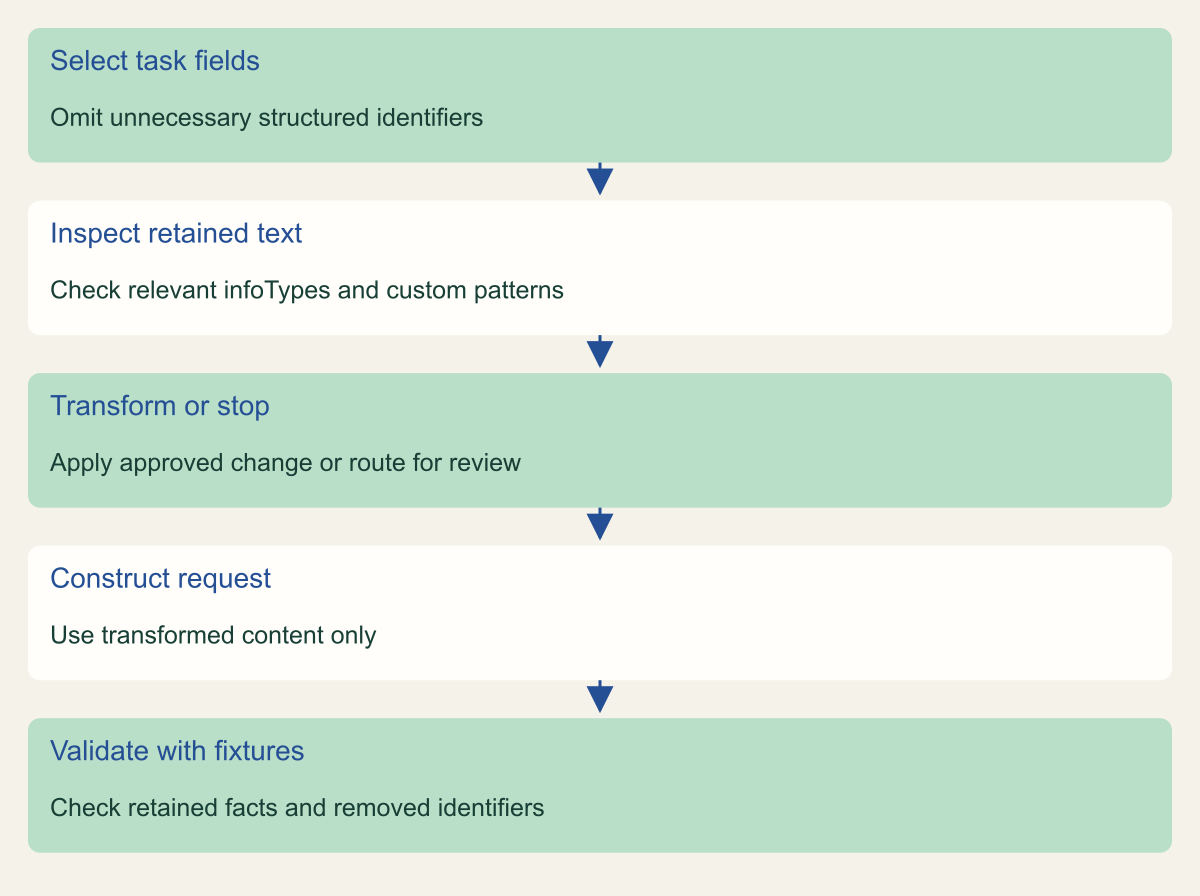
Conceptual preprocessing sequence. Detection can miss sensitive content and does not guarantee anonymity.

Source. Google Cloud documentation [1][2][3][4]. Reviewed September 12, 2026.
Method. Original conceptual synthesis of the cited documentation. Rows describe responsibilities, decisions, or hypothetical states, not measured results.
Accessible table and figure data
| Step | Action |
|---|---|
| Select task fields | Omit unnecessary structured identifiers |
| Inspect retained text | Check relevant infoTypes and custom patterns |
| Transform or stop | Apply approved change or route for review |
| Construct request | Use transformed content only |
| Validate with fixtures | Check retained facts and removed identifiers |
| Step | Action |
|---|---|
| Select task fields | Omit unnecessary structured identifiers |
| Inspect retained text | Check relevant infoTypes and custom patterns |
| Transform or stop | Apply approved change or route for review |
| Construct request | Use transformed content only |
| Validate with fixtures | Check retained facts and removed identifiers |
Pick a transformation deliberately
Redaction removes detected values. Replacement can substitute a label such as a type marker. Masking obscures selected characters. Pseudonymization can preserve a stable relationship through a token or cryptographic transformation. These choices serve different purposes, and the Sensitive Data Protection documentation describes their behavior and configuration. [1][4][5]
For a one-time summary, removing an unnecessary email address may be sufficient. If a conversation contains several people whose roles matter, consistent replacement labels may help the model distinguish them. If the application must later join output back to a source record, keep that linkage in the application's authorized data layer rather than asking the model to carry a raw identifier through its answer.
Reversible tokenization adds another sensitive component: the mechanism and authority used to reverse it. Protect the mapping or cryptographic key and decide who may reidentify the data. A reversible token should not be described as anonymous simply because a human reader cannot recognize the original value. The pseudonymization documentation explains the relevant transformations and their key-management requirements. [5]
Test transformations for collisions and ambiguity in the application's use case. Replacing every person with the same marker can make an exchange impossible to summarize correctly. Preserving stable labels can improve usefulness, but it may also retain relationships that matter for privacy. Record the choice as a tradeoff grounded in the task, not a universal rule that one transformation is safest in all circumstances.
Handle ambiguous and oversized inputs
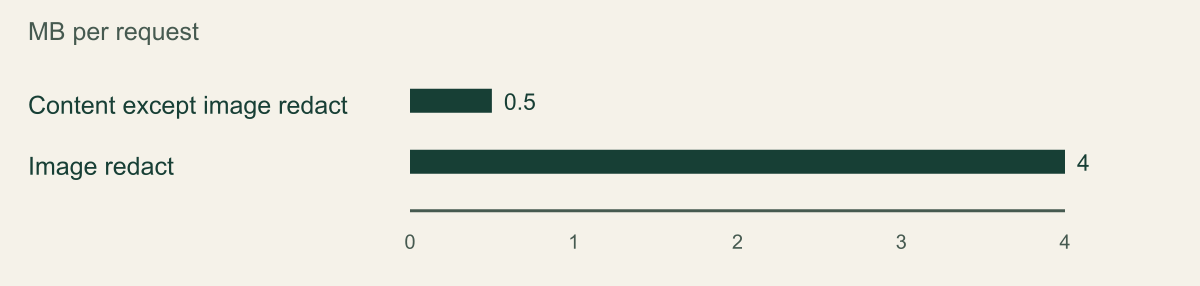
Set a request-size limit before calling the preprocessing API. Google's published limits give a maximum request size of 0.5 MB for content requests except projects.image.redact, whose limit is 4 MB. These values describe API request sizes, not the amount of personal data the service can guarantee to detect. The full request includes configuration and content, so do not fill the entire nominal allowance with raw text. [6]
The figure compares those documented request limits only. The image-redaction method is a different operation, not an alternative way to submit a larger text prompt. If the input exceeds the selected method's limit, reject it, reduce the task input, or use an appropriate supported processing design. Do not silently forward the original uninspected content to keep the user interface responsive.
If splitting text is necessary, consider what the split does to detection and meaning. An email address, identifier, or contextual phrase can cross a chunk boundary. Reassembly can also restore information that was considered separately. Design overlap, field boundaries, and validation for the actual format, then test the reconstructed prompt. Arbitrary byte chopping is not a privacy design.
Treat detector errors, timeouts, and uncertain cases explicitly. An internal low-risk workflow may route the request to a person. Another application may reject it with a clear explanation. The fallback should preserve the agreed data-handling rule. Logging the full rejected prompt for troubleshooting can undo the effort even when nothing reaches Vertex AI.
Documented request-size limits for two different operations
Published API request-size limits as reviewed September 12 2026. The image operation is not a larger-capacity substitute for text preprocessing. Units transcribed as MB without converting to bytes.

Source. Google Cloud documentation [6]. Reviewed September 12, 2026.
Method. Direct transcription of the documented configuration or limit values. No measured customer data, inferred performance, interpolation, or normalization.
Accessible table and figure data
| Sensitive Data Protection operation | Maximum request MB |
|---|---|
| Content except image redact | 0.5 |
| Image redact | 4 |
| Sensitive Data Protection operation | Maximum request MB |
|---|---|
| Content except image redact | 0.5 |
| Image redact | 4 |
Test usefulness and leakage separately
Create a fixture for each meaningful input pattern. For a hypothetical delivery summary, include a straightforward message, a copied signature, a customer code embedded in prose, a misspelled name, and a record with no personal data. Mark the fields the application should omit and the facts the summary still needs. This provides an expected preprocessing result independent of the model's wording.
Compare the constructed prompt with the expected retained facts and removed values. Inspect the exact object or text that the model client receives, using safe test fixtures. A log from the detector alone is insufficient because a later code path can accidentally restore an omitted field. The integration test should cover the transition from source record to final request body.
Then assess whether the output remains useful for the task. A summary that contains no names but omits the customer's requested resolution may fail the product requirement. Do not respond by restoring all fields automatically. Identify the specific missing fact and decide whether it can be included in a less identifying form, such as a relative delivery status instead of a full address.
Keep leakage checks and quality checks separate in the results. A useful answer can still contain an unnecessary identifier. A thoroughly transformed prompt can still produce an inaccurate answer. Neither outcome proves the other. Record observed results from the fixture set without presenting them as a universal accuracy rate or a privacy guarantee for all future production inputs.
Keep prompts out of surrounding systems
Trace the request through the application components around the model call. The original record may be present in a web request, job message, error report, trace, or support capture. Preprocessing the model prompt does not automatically change those copies. This article's scope remains the outgoing request, but the implementation owner should identify the surrounding systems that still receive sensitive data.
Use narrow, safe operational logs. A request identifier, transformation outcome, configuration version, and error category can often support troubleshooting without storing full text. If detailed content inspection is required for an approved investigation, use the organization's restricted process rather than enabling broad prompt logging for every user. Avoid claiming that a harmless test log proves the production telemetry path is free of sensitive content.
Review Vertex AI's current data-governance and retention conditions for the specific features used. Google documents different behaviors and exceptions involving features such as caching and abuse monitoring. Do not simplify those pages into a blanket statement that nothing is ever retained. Likewise, do not confuse a commitment about training use with a complete statement about every storage or logging path. [7][8]
Keep the relevant product configuration in the application record. The model, endpoint, optional features, and any grounding or caching mechanism can affect the data path. A later feature addition should trigger a review of the preprocessing and disclosure assumptions. Sending fewer fields remains useful, but it does not remove the need to understand where the remaining fields go.
Document the remaining data exposure
Write the final request contract in terms a product owner can review. Identify the task, input fields permitted, fields removed, transformations applied, ambiguous-case handling, and output recipients. Link to the current detector configuration and test fixtures. The record should explain what the application sends, not merely state that DLP is enabled.
List the limitations that matter to the workflow. Detection can miss unfamiliar identifiers or contextual clues. A transformation can damage meaning. Stable tokens can preserve relationships. An authorized user can intentionally place sensitive information in an unexpected field. These are reasons to retain application validation and review, not to abandon minimization because it cannot prove perfect anonymity.
Assign an owner for detector and task changes. A new country, language, input channel, or record type can invalidate the old fixture set. Add representative cases before deploying the new path. Version the preprocessing configuration with the application release so a reviewer can reproduce which rules shaped a particular request.
The finished control is modest and inspectable: the application selects necessary facts, checks the remaining text, applies a deliberate transformation, and handles failure without bypassing that decision. A small team can implement and test that process without claiming that a model or detector understands every privacy implication of the source material.
Work through a support note
Take a hypothetical note containing a customer's name, email, street address, order identifier, product category, delivery delay, and requested refund. The summarization task needs the last three facts. The application can omit the contact fields and keep a local reference to the order outside the prompt. That choice removes several identifiers without asking a detector to find them in free text.
The remaining note may still include an email copied into a quoted message. Run the selected inspection and transformation on the retained text, then build the final prompt from that transformed value. A test should verify that the omitted source fields cannot reappear through a generic serialize-the-record helper. This is a concrete integration failure that a detector configuration review alone would miss.
After generation, the application can associate the summary with the original order through its own authorized record reference. The model does not need the customer identifier to perform that association. Keep any reidentification or message delivery operation in the application layer, where the user and resource permissions can be checked.
If the support task changes to arranging a delivery, the required data may change. Reopen the field worksheet rather than silently adding the complete address to every summarization prompt. The example shows how minimization follows the task and how an ordinary product change can require a fresh data decision.
Make failure visible to the person requesting work
An application that rejects a prompt should give a useful explanation without echoing the sensitive content. For example, it can say that the input exceeds the supported size or needs review because the selected transformation could not be completed. Keep the message tied to the operation, and provide an approved way to reduce or review the input.
Avoid a retry button that bypasses inspection or asks the user to paste the same record into an unreviewed external tool. The failure path is part of the data decision. Test it with safe fixtures alongside the successful preprocessing path, so the team knows what the user sees when a detector times out or a request cannot be transformed.
Method and provenance
Source-based technical guidance using current Google Cloud documentation reviewed September 12, 2026. The procedures and decision frameworks are original editorial synthesis. Examples are explicitly hypothetical.
No customer project was configured and no cloud command, restoration, or workload experiment was executed for this article. Documented settings and limits are not measured service performance; actual configuration and supported product behavior must be checked before use.
AI assistance. AI assisted with research organization, drafting, and editing. Original illustrations were generated with ChatGPT and reviewed alongside source-based diagrams; visual and release verification is recorded separately.
Published under the Cloud Security Desk organizational byline. Read the practitioner guide policy.
References
- De-identifying sensitive data Google Cloud. Accessed .
- InfoType detector reference Google Cloud. Accessed .
- InfoTypes and infoType detectors Google Cloud. Accessed .
- Redacting sensitive data from text Google Cloud. Accessed .
- Pseudonymization Google Cloud. Accessed .
- Quotas and limits Google Cloud. Accessed .
- Gemini Enterprise Agent Platform and zero data retention Google Cloud. Accessed .
- Gemini Enterprise Agent Platform and zero data retention Google Cloud. Accessed .