
Scope the operation to traditional S3-connected vector-store Knowledge Bases and join source deletion, sync completion, direct-ingestion caveats and old answer copies. To retire a document from a traditional S3-connected Amazon Bedrock knowledge base, remove the intended source object, synchronize the data source, inspect the ingestion job's result, and verify retrieval.
At a glance
Key findings
- To retire a document from a traditional S3-connected Amazon Bedrock knowledge base, remove the intended source object, synchronize the data source, inspect the ingestion job's result, and verify retrieval. Deleting an S3 file alone does not establish that the vector index has been updated. AWS documents incremental synchronization of added, modified, and deleted source content, with a sync required after source changes. [1][2]
- Scope the operation to traditional S3-connected vector-store Knowledge Bases and join source deletion, sync completion, direct-ingestion caveats and old answer copies.
- Use the named resource, approved owner and actual read-back results to complete the operation. No live customer environment is represented here.
Remove the source and update the index
To retire a document from a traditional S3-connected Amazon Bedrock knowledge base, remove the intended source object, synchronize the data source, inspect the ingestion job's result, and verify retrieval. Deleting an S3 file alone does not establish that the vector index has been updated. AWS documents incremental synchronization of added, modified, and deleted source content, with a sync required after source changes. [1][2]
This guide is specifically about the S3 connector for traditional Knowledge Bases that use a configured vector store. Amazon Bedrock also documents Managed Knowledge Base, with its own managed data-source and synchronization experience. Identify which product path the deployment uses before applying console instructions or API assumptions. Similar names do not make every lifecycle operation interchangeable. The managed documentation is included as a scope check, not as evidence that this procedure covers both products. [9]
Document retirement is also different from revoking one person's permission. Here, the owner wants a document removed from the knowledge base's usable content. A per-user access change requires an authorization design that filters what that user can retrieve; deleting the shared source is usually the wrong substitute. Keep that distinction clear when the request says that someone should no longer see a document that other people still need.
The useful completion record identifies the source key, knowledge base, data source, sync job, result, and retrieval checks. It also identifies older application copies that require separate handling. A chatbot no longer mentioning the document in one answer is weak evidence: it may simply have selected another passage. Inspect the retrieval result and source locations before treating a change in generated wording as proof that retirement finished.
Find the document and every relevant copy
Begin with the exact S3 object key and the knowledge base data source that ingests it. Confirm the account, Region, bucket, inclusion prefix, and associated metadata file if one exists. A title displayed to the user may differ from the storage key. Two versions of the same policy may also have different keys with similar names. Resolve that identity before deleting anything so the operation affects the intended document rather than a neighboring file. [1]
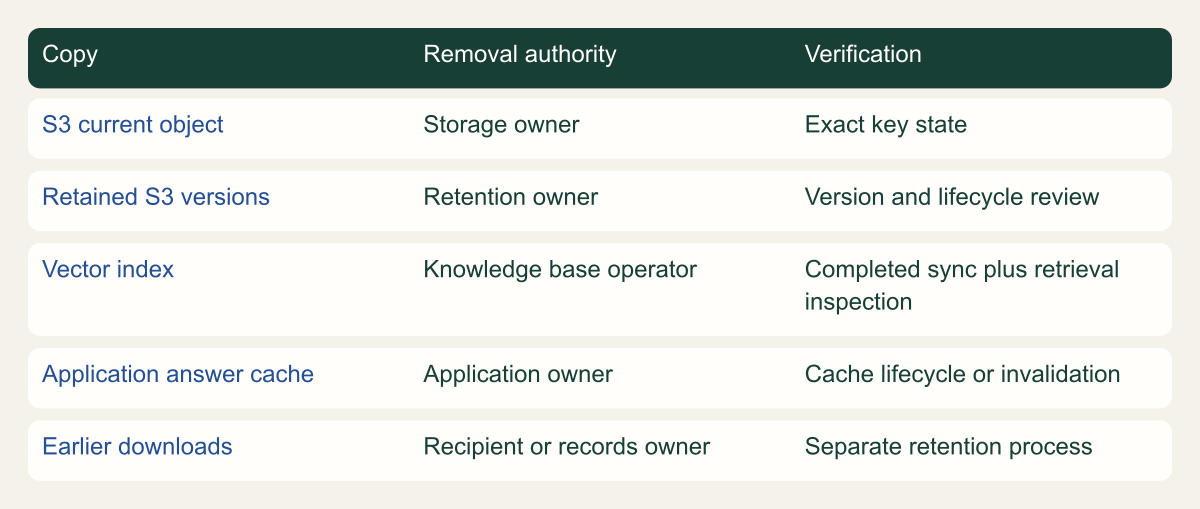
Record where the document can persist. The current S3 object, retained S3 versions, the knowledge base's indexed content, application caches, conversation history, and earlier downloads are different copies or representations. The visual matrix separates their owners. A successful sync updates the knowledge base's content under its connector behavior; it does not reach into a user's previous download or automatically rewrite every answer stored by an application. [1][2][8]
Check the publishing automation. If a scheduled job uploads the same document again, a deletion can be undone at the source before the next sync. Coordinate retirement with the system that owns the file, whether that is a repository export, document workflow, or manual upload process. Do not interpret reappearance as a mysterious model memory problem until the source path and its writers have been inspected.
Choose a safe retrieval marker for validation. A distinctive, nonsecret phrase or known source URI can help identify whether the retired document appears in results. Avoid introducing fabricated text into a live authoritative document merely to test deletion. When possible, practice the workflow with an approved harmless test document in a nonproduction knowledge base, then use the same evidence pattern for the actual retirement without altering its content.
Do not confuse a source document with its extracted chunks. One file can contribute several retrieved passages, and a result may identify a location rather than display the original filename as a title. Record the source URI or supported document identifier used by the connector so the verification follows the source consistently across those representations.
Different document copies need different owners
A source object, its retained versions, the vector index and cached answers have different owners and removal procedures.

Source. Conceptual synthesis of AWS documentation accessed September 12, 2026. [1] [3] [7] [8]
Method. Conceptual editorial synthesis of the cited service behavior; no measured outcomes. Scope: What must be removed so a retired S3 document stops appearing in Bedrock retrieval?
Accessible table and figure data
| Copy | Removal authority | Verification |
|---|---|---|
| S3 current object | Storage owner | Exact key state |
| Retained S3 versions | Retention owner | Version and lifecycle review |
| Vector index | Knowledge base operator | Completed sync plus retrieval inspection |
| Application answer cache | Application owner | Cache lifecycle or invalidation |
| Earlier downloads | Recipient or records owner | Separate retention process |
| Copy | Removal authority | Verification |
|---|---|---|
| S3 current object | Storage owner | Exact key state |
| Retained S3 versions | Retention owner | Version and lifecycle review |
| Vector index | Knowledge base operator | Completed sync plus retrieval inspection |
| Application answer cache | Application owner | Cache lifecycle or invalidation |
| Earlier downloads | Recipient or records owner | Separate retention process |
Remove the intended S3 object
Confirm that retirement is authorized and that the document is not needed under a retention or recovery requirement before making the source change. The purpose may be to remove outdated material from search, rather than permanently erase every stored version. Write that purpose explicitly. A content owner asking to stop using an obsolete instruction has not necessarily asked for an irreversible purge of the organization's historical records.
Remove the exact current object through the approved S3 or source-publishing workflow. Review any associated metadata so an orphaned sidecar does not remain as an unexplained artifact. Avoid broad prefix deletion or a command that removes an entire bucket just because one document needs retirement. The connector supports incremental changes, so a bounded source operation is a reasonable starting point when the rest of the data source should remain intact. [1]
If S3 Versioning is enabled, a normal delete creates a delete marker and retains older object versions. That can stop the current key from returning the source while preserving recoverable history. It is not the same as permanently deleting every version. If permanent removal is required, handle version retention, lifecycle, legal holds, and other copies through the appropriate data-deletion process rather than silently expanding this knowledge-base maintenance task. [8]
Record the source state after the change, including the exact key and relevant version information where applicable. If the operation's outcome is uncertain, inspect the source before retrying. A repeated broad delete is not a substitute for knowing what happened. Also pause or update the authorized publishing process as needed so it does not recreate the retired current object while the knowledge base is being synchronized.
Run one synchronization and read its result
Start synchronization for the specific data source that contains the retired document. In the API workflow, StartIngestionJob identifies the knowledge base and data source and returns an ingestion job. Save the job identifier and time in the change record. The request starts work; it does not by itself establish that every document change was successfully processed or that the index is ready for the verification query. [2][5]
Inspect the job through GetIngestionJob or the corresponding console view. Read the terminal status, failure reasons, and relevant ingestion statistics. A job can report information about documents processed and deleted, but a numeric total is not a list of the exact source identities you intended to retire. Use it together with the bounded source change and retrieval verification. If unrelated content changed during the same interval, the totals may describe more than this one document. [6]
Resolve failures before declaring retirement complete. A source-permission problem, vector-store issue, or ingestion failure may prevent the expected change from taking effect. Preserve the job details and investigate the specific error. Do not repeatedly launch overlapping syncs hoping that one will eventually clear the problem without understanding the current job state. The operating record should connect one intended source change to the job that processed it.
For a small hypothetical policy retirement, the expected evidence is the source key's changed state, a completed sync with no relevant unresolved failure, and retrieval checks that no longer return the retired source. That is an evidence pattern, not a fabricated report of a successful deployment. If one part is missing, state which part remains unverified. A green console status elsewhere in Bedrock cannot replace the result of the actual data-source ingestion job.
aws bedrock-agent get-ingestion-job \
  --knowledge-base-id "$CSD_KNOWLEDGE_BASE_ID" \
  --data-source-id "$CSD_DATA_SOURCE_ID" \
  --ingestion-job-id "$CSD_INGESTION_JOB_ID" \
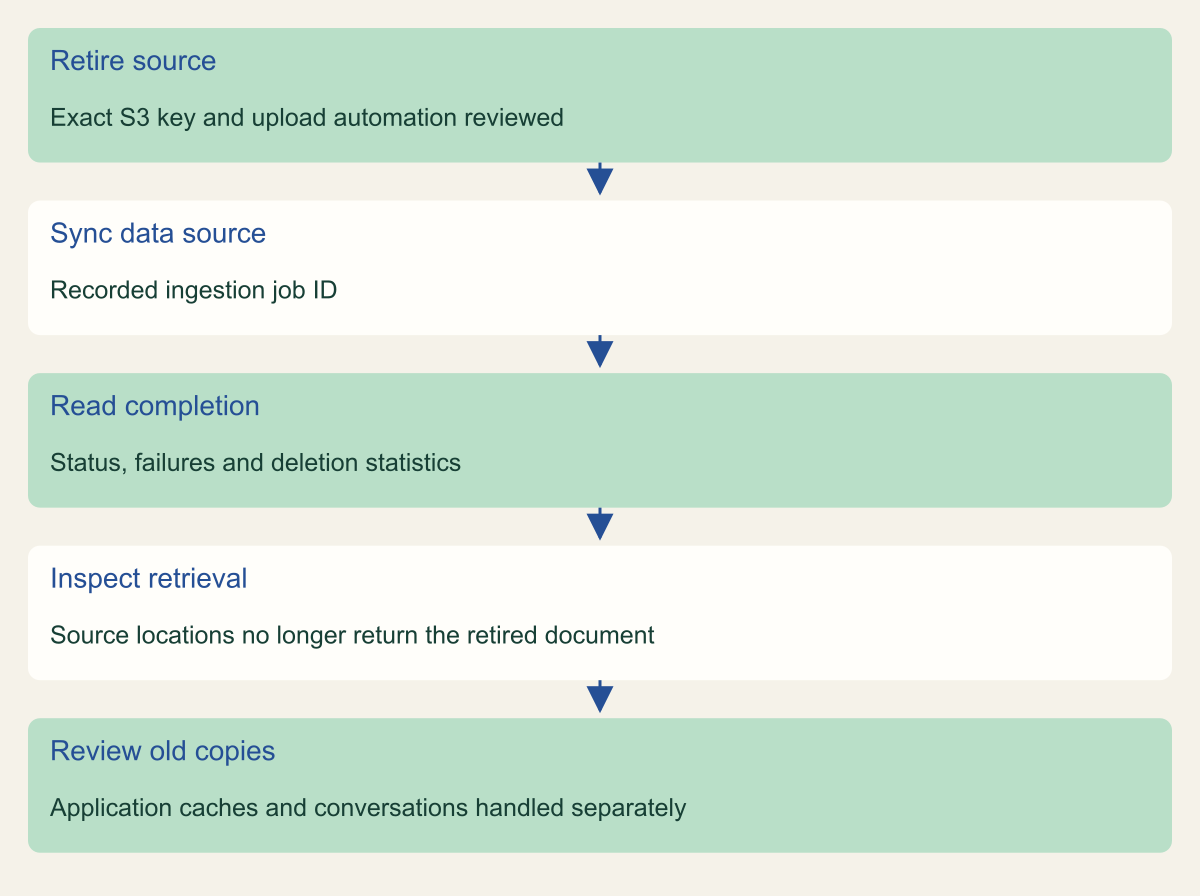
--region "$CSD_AWS_REGION"Follow document retirement from source to retrieval
Source removal, ingestion completion and retrieval checks establish different parts of document retirement. Earlier answers require separate handling.

Source. Conceptual synthesis of AWS documentation accessed September 12, 2026. [1] [2] [5] [6] [7]
Method. Conceptual editorial synthesis of the cited service behavior; no measured outcomes. Scope: What must be removed so a retired S3 document stops appearing in Bedrock retrieval?
Accessible table and figure data
| Step | Evidence |
|---|---|
| Retire source | Exact S3 key and upload automation reviewed |
| Sync data source | Recorded ingestion job ID |
| Read completion | Status, failures and deletion statistics |
| Inspect retrieval | Source locations no longer return the retired document |
| Review old copies | Application caches and conversations handled separately |
| Step | Evidence |
|---|---|
| Retire source | Exact S3 key and upload automation reviewed |
| Sync data source | Recorded ingestion job ID |
| Read completion | Status, failures and deletion statistics |
| Inspect retrieval | Source locations no longer return the retired document |
| Review old copies | Application caches and conversations handled separately |
Understand direct deletion before using it
Bedrock also supports direct document operations for supported S3 and custom data sources. These operations can add, update, or delete indexed documents without following the ordinary source-edit-then-sync sequence. They are useful capabilities, but their relationship to the source must be understood. AWS warns that direct knowledge-base changes for S3 sources are not reflected in S3 and can be overwritten by the next synchronization. [3]
That warning is especially relevant to retirement. If a document is deleted directly from the index but remains in the S3 source, a later sync can restore the source's content to the knowledge base. The apparent deletion was therefore not a durable change to the source of truth. Follow up with the corresponding source change when using the direct route, and verify that the publishing automation agrees with the retirement decision. [3][4]
Use the exact document identifier required by the supported direct-deletion API or console workflow. A display title, an S3 URI, and a custom document identifier are not necessarily interchangeable. Read the current operation's requirements and the existing data-source type before executing it. This guide does not provide a bulk deletion loop because the useful first operation is a reviewed retirement of known content, with the result verified at each boundary. [4]
Do not run ingestion and synchronization operations concurrently where AWS warns against it. The direct-ingestion guide specifically says not to submit IngestKnowledgeBaseDocuments and StartIngestionJob at the same time. Even outside that named combination, serialize a planned retirement workflow so its evidence is understandable. A source change, direct update, and scheduled sync racing each other can make it difficult to determine which content state the application is actually retrieving. [3]
Check retrieval before judging an answer
Use the knowledge base's retrieval path to inspect the results for a query that previously surfaced the document. Retrieve returns structured results with content, metadata, and source locations where applicable. Those fields are more useful for this check than a generated answer's wording alone. Confirm that the request targets the intended knowledge base and that any application filters match the path being retired. [7]
Look for the source identity, not just a remembered sentence. Another document can contain the same phrase, and a model can answer a general question without using the retired source. Conversely, the retired document may be indexed but not rank highly enough to appear in one small result set. A negative query is therefore supporting evidence rather than a universal proof of index absence. Pair it with the source change and ingestion job result.
Use several relevant checks proportionately: a known query, a distinctive safe phrase, and the application's ordinary retrieval route. Inspect the returned source locations and any available document status information. Do not claim that an empty result proves every chunk was erased from every backing store. The completion statement should name the tested knowledge base and source, the completed sync, and the observed retrieval behavior.
Then test the application with a fresh conversation or request that does not include the earlier answer in its context. If the document still appears, examine whether it came from another data source, a cache, prior conversation text, or a different knowledge base. These are different causes. Repeatedly deleting the same S3 object cannot fix an application that is supplying the old passage from its own stored conversation.
Handle answers created before retirement
An answer produced before retirement may already exist in a conversation, an application cache, a report, or a user's download. The knowledge base does not control all those locations. Decide what the retirement means for them. Removing an outdated source from future retrieval may be sufficient for one task, while sensitive-content removal may require a separate process across stored outputs and recipients. Do not silently treat those two objectives as equivalent.
For an application answer cache, identify the cache key and invalidation or expiry behavior. A cached answer can bypass a fresh retrieval entirely. The application owner should decide whether entries connected to the retired document must be invalidated and how that relationship is tracked. If no source-to-answer mapping exists, record the limitation and choose an appropriate bounded response. Avoid inventing a claim that synchronization automatically clears the cache.
For conversation history, consider whether the old answer or retrieved passage is included in the next request. A fresh retrieval may be correct while the model still sees the earlier content supplied by the application. The useful diagnostic is the actual request assembly path, reviewed under appropriate privacy controls. Do not expose full conversations in a public issue while investigating which copy supplied the obsolete text.
For previous downloads and externally distributed reports, involve the records or content owner. The system may be able to publish a correction or invalidate a future link without recalling a copy already downloaded. State the achievable outcome honestly. Document retirement can prevent an identified source from being used in the tested retrieval path; it is not a technical guarantee that every person or system that previously received the information has forgotten it.
Correct a mistaken retirement carefully
If the wrong document was retired, restore the approved source through its normal publishing process or recover an appropriate retained S3 version when available. Confirm the content with the owner before making it current again. Then synchronize the intended data source and repeat the retrieval checks. A recovered file in S3 is only the first part of bringing it back into the knowledge base's usable content. [2][8]
Keep the reversal as a new recorded change. It should identify which source was restored, why the prior retirement was incorrect, which sync processed the restoration, and what retrieval result was observed. Do not erase the original failure from the maintenance record. The sequence can reveal whether the root problem was an ambiguous file name, a wrong inclusion prefix, a race with upload automation, or an incorrect content-owner decision.
Clean up temporary test documents and queries without touching unrelated sources. If a test document was added to a nonproduction data source, remove it through the same source-and-sync lifecycle so the exercise does not leave stale content behind. Preserve the nonsecret evidence needed to explain the test. No customer data or live deletion result is claimed by this article; the diagrams describe the supported workflow and its boundaries.
The lasting improvement is a retirement procedure that follows the document across the source, index, retrieval response, and application copies. It names the owner at each point and distinguishes durable source changes from direct index edits. That lets a team retire one obsolete document with a clear result, while recognizing when the request has expanded into access revocation, historical-record deletion, or a broader application-data lifecycle task.
Method and provenance
Primary AWS documentation was retrieved and reviewed on September 12, 2026. The guide synthesizes documented service behavior into a bounded operational procedure; research records and figure data are maintained with the article.
Examples are hypothetical. Code and request shapes are checked locally where applicable, but no customer AWS account, production operation, recovery duration or benchmark was tested. Readers must verify their resource type, Region, permissions and organization controls.
AI assistance. AI assisted research organization, drafting and original visual planning. Sources, technical boundaries and final rendering are reviewed through the publication workflow.
Published under the Cloud Security Desk organizational byline. Read the practitioner guide policy.
References
- Connect to Amazon S3 for your knowledge base - Amazon Bedrock AWS. Accessed .
- Ingest changes directly into a knowledge base - Amazon Bedrock AWS. Accessed .
- Delete documents from a knowledge base directly - Amazon Bedrock AWS. Accessed .
- StartIngestionJob - Amazon Bedrock AWS. Accessed .
- GetIngestionJob - Amazon Bedrock AWS. Accessed .
- Retrieve - Amazon Bedrock AWS. Accessed .
- Sync a data source - Amazon Bedrock AWS. Accessed .