
A targeted recovery decision distinguishes downloading a version, removing its delete marker and restoring an overwritten key, with a clear stop when data was permanently deleted. If an S3 general purpose bucket had Versioning enabled and the object was deleted without specifying a version ID, a retained data version may still be recoverable behind a delete marker.
At a glance
Key findings
- If an S3 general purpose bucket had Versioning enabled and the object was deleted without specifying a version ID, a retained data version may still be recoverable behind a delete marker. Start by listing the object's versions and inspecting the exact key. You can download a known retained version without changing the current object, or remove the confirmed current delete marker when the goal is to make the previous version visible at the same key. [1][2][3]
- A targeted recovery decision distinguishes downloading a version, removing its delete marker and restoring an overwritten key, with a clear stop when data was permanently deleted.
- Use the named resource, approved owner and actual read-back results to complete the operation. No live customer environment is represented here.
Check whether an older version still exists
If an S3 general purpose bucket had Versioning enabled and the object was deleted without specifying a version ID, a retained data version may still be recoverable behind a delete marker. Start by listing the object's versions and inspecting the exact key. You can download a known retained version without changing the current object, or remove the confirmed current delete marker when the goal is to make the previous version visible at the same key. [1][2][3]
Do not promise recovery before inspecting the versions. Versioning must have preserved the data, and a permanent deletion of a specific version removes that version. A lifecycle rule can also permanently expire noncurrent versions. Enabling Versioning after an object was permanently deleted does not reconstruct its contents. If no readable prior version exists, stop this procedure and look for a separate backup or authorized source copy rather than repeatedly deleting markers. [1][4][5]
This guide covers one known object and a deliberate recovery action. It does not recommend bulk deletion of all delete markers or restoring an entire bucket without reviewing the application impact. A delete marker is part of the object's version history. Removing the wrong one, or deleting a data version instead, can change the visible state or destroy the copy you intended to recover. Resolve the object identity before using a mutation.
The useful result is an identified version whose contents were checked and a clear statement of whether it was downloaded only or made current again. Those are different outcomes. An analyst who needs to inspect a lost file may not need to change the application's live key at all. Choosing the intended recovery outcome first keeps a simple read operation from becoming an unnecessary production change.
Read the versions rather than the empty object list
S3 Versioning keeps multiple complete variants of an object under the same key. Each stored version has a version identifier. When an ordinary delete occurs in a versioning-enabled bucket, S3 places a delete marker as the current version, making an ordinary read behave as though the object were deleted. The previous data version can still exist even though the default object view no longer shows the file as available. [1]
Open the bucket's versions view and locate the exact key. Inspect the current marker, earlier data versions, timestamps, and sizes. A marker is not the file's contents, and a version ID is not a timestamp that you can safely invent. Copy the identifier from the actual object record into the controlled change procedure. Similar filenames in different prefixes should be treated as different objects, even when a browser presents them as folders.
An unversioned, versioning-enabled, and versioning-suspended bucket can behave differently. S3 documents those states and the treatment of versions created before versioning was enabled. If the bucket is suspended, do not apply a simplified enabled-bucket diagram without reviewing its current state and version history. The safe starting point is the actual retained versions, not the assumption that any bucket with a Versioning tab must have preserved every past write. [1]
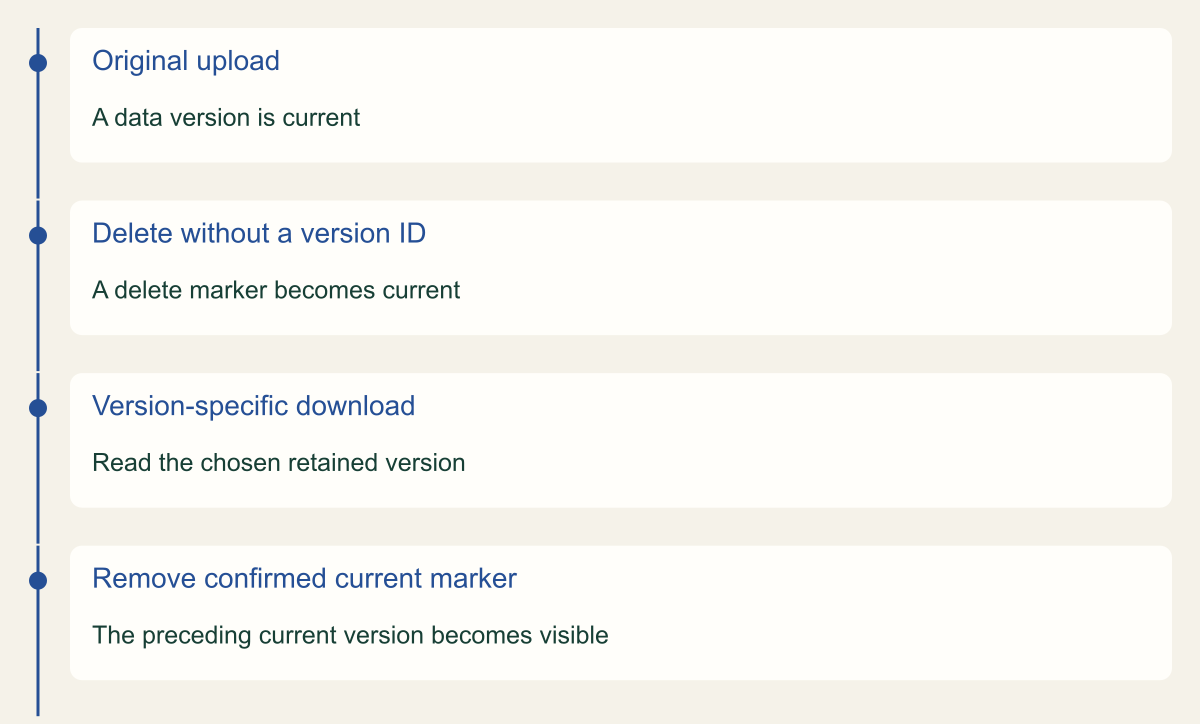
The timeline in this article illustrates a normal enabled-bucket sequence: an upload, a delete marker, a version-specific download, and removal of the confirmed current marker. It contains no measured storage history and no promise that your bucket has those versions. Use it to understand why an apparently missing file can still have a recoverable copy, then verify the actual sequence from the object's version listing.
A delete marker can cover a retained data version
In this versioning-enabled example, a delete marker hides a retained version. A version-specific download and removal of the current marker have different effects.

Source. Conceptual synthesis of AWS documentation accessed September 12, 2026. [1] [2] [3]
Method. Conceptual editorial synthesis of the cited service behavior; no measured outcomes. Scope: How do you recover one deleted S3 object without deleting the remaining version?
Accessible table and figure data
| State | Object behavior |
|---|---|
| Original upload | A data version is current |
| Delete without a version ID | A delete marker becomes current |
| Version-specific download | Read the chosen retained version |
| Remove confirmed current marker | The preceding current version becomes visible |
| State | Object behavior |
|---|---|
| Original upload | A data version is current |
| Delete without a version ID | A delete marker becomes current |
| Version-specific download | Read the chosen retained version |
| Remove confirmed current marker | The preceding current version becomes visible |
Choose the recovery outcome before changing anything
Decide whether the task is to inspect a historical file, restore the application-visible key, or preserve evidence. Downloading a retained version can satisfy the first objective without altering the bucket's current state. Making an older version current changes what ordinary readers may receive. Evidence collection can impose additional requirements about preserving identifiers and avoiding mutation. The same missing-file report can lead to different authorized operations depending on the owner's purpose.
Confirm the object key with the application or content owner. A user may remember a display name while the application stores the file under a generated path. Check the expected content, approximate time, and intended reader. Do not rely solely on file size or a familiar suffix. For an important record, the owner should identify a known attribute or independent source that helps verify the recovered contents.
Review permissions for the selected action. Reading a specified version uses s3:GetObjectVersion, while removing a marker requires the relevant version-deletion authority. Encryption permissions may also be necessary to retrieve the data. A reader who can access the current object is not automatically authorized to read all historical versions or delete them. Use the identity approved for the recovery task rather than escalating every denial to a full administrator role. [2][3][7]
Pause conflicting application activity when the approved recovery procedure requires a stable current key. A writer could create another version while an operator is reviewing the marker list. That does not justify shutting down unrelated services; it means coordinating the particular object change with its owner. Record the version selected for recovery and recheck the current state immediately before any operation that changes what readers receive.
Choose a download or current-object recovery
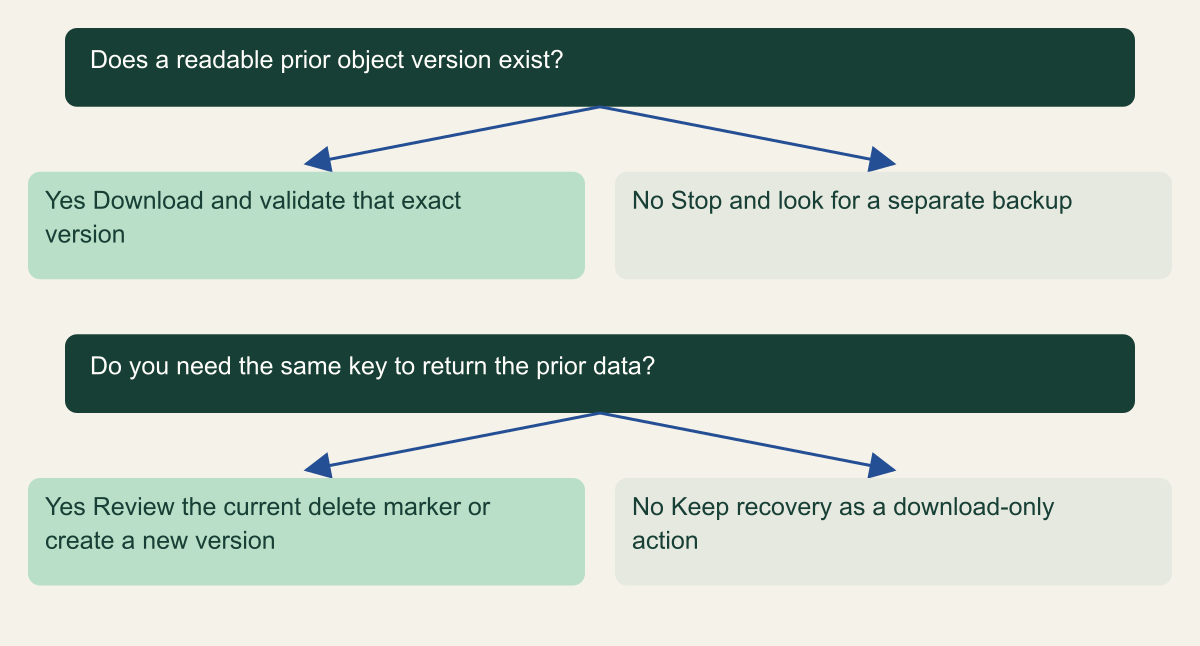
Confirm a readable retained version before choosing between a local recovery download and changing the current object key.

Source. Conceptual synthesis of AWS documentation accessed September 12, 2026. [1] [2] [3] [4]
Method. Conceptual editorial synthesis of the cited service behavior; no measured outcomes. Scope: How do you recover one deleted S3 object without deleting the remaining version?
Accessible table and figure data
| Question | Yes | No |
|---|---|---|
| Does a readable prior object version exist? | Download and validate that exact version | Stop and look for a separate backup |
| Do you need the same key to return the prior data? | Review the current delete marker or create a new version | Keep recovery as a download-only action |
| Question | Yes | No |
|---|---|---|
| Does a readable prior object version exist? | Download and validate that exact version | Stop and look for a separate backup |
| Do you need the same key to return the prior data? | Review the current delete marker or create a new version | Keep recovery as a download-only action |
Download a known version for inspection
A version-specific GetObject request retrieves the chosen version rather than whatever is current. In the CLI, get-object takes the bucket, key, version-id, and a destination filename. Keep the version ID quoted and copied from the inspected record. Use a controlled local destination with appropriate permissions, especially if the recovered file contains sensitive data. The output file is another copy that will need the organization's ordinary handling and retention controls. [3][7]
Inspect the content before changing the live key. Confirm the file type, expected record, and relevant business detail with the owner. A successful download proves that the selected version was readable; it does not prove that it is the correct version to restore. A file can be intact yet obsolete or contain the very error that prompted recovery. The choice should follow the desired data state, not simply the most recent timestamp that precedes the delete marker.
Keep identifiers in the recovery record. Record the bucket, key, selected version ID, observation time, and the content check performed. If a checksum is used, state which algorithm and source of comparison are involved. Do not assume every ETag is a universal MD5 checksum, because object upload and encryption behavior can affect its meaning. The content-validation method should match the object and the evidence available.
A download-only recovery can end here after the owner confirms the file. There is no requirement to remove a delete marker merely because a historical copy was found. Clean up the temporary local copy when it is no longer required under the approved procedure, and retain the nonsecret recovery record. This narrower outcome is often useful for investigating a lost file without changing an application's current behavior.
aws s3api get-object \
  --bucket "$CSD_BUCKET_NAME" \
  --key "$CSD_OBJECT_KEY" \
  --version-id "$CSD_OBJECT_VERSION_ID" \
"$CSD_RECOVERY_FILE"Remove only the confirmed current delete marker
If the goal is to make the preceding version available through the same key, confirm that the current version is the intended delete marker. AWS documents recovery by deleting that marker with its exact version ID. A DeleteObject request without the version ID is a different operation and can add another marker rather than remove the existing one. The identifier is the critical distinction between recovering visibility and repeating a normal delete. [2]
Use the console versions view or the documented version-specific API operation. Before confirming, verify that the selected row is a delete marker and that the object key matches the recovery record. The console's permanent-delete wording can be alarming but accurately describes removal of that marker version. It is essential to distinguish the marker from the retained data version beside it. Deleting the data version instead can destroy the recovery source. [2][4]
Read the object's version state again after the operation. An ordinary GetObject request should now resolve according to the resulting current version, provided another writer has not changed it. Then perform a fresh authorized read through the application's intended route and verify the contents. If the request remains unavailable, inspect the actual current version and access path before removing additional history.
Do not run a bulk marker-removal command merely because the first object recovered successfully. A bucket can contain intentionally deleted records, multiple markers, and keys whose earlier versions should not be republished. Removing markers broadly can make unwanted historical content current again. Treat each approved recovery scope as a decision about which objects should become visible, with the identities and expected results defined before mutation.
A delete marker can hide retained versions
Removing the current delete marker can expose the previous version when that version is still retained. Permanently deleted versions are outside this illustration.

Source. AWS documentation [1][2][4]. Reviewed September 12, 2026.
Method. Original conceptual illustration generated with ChatGPT and visually reviewed. The accessible table identifies the metaphor and its limits. It is not a provider screenshot, a complete policy evaluator, or measured service evidence.
Accessible table and figure data
| Visual element | S3 concept | Recovery implication |
|---|---|---|
| Orange cover | Current delete marker | An ordinary read can return a missing-object result |
| Blue sheets below | Retained noncurrent object versions | Inspect the exact version before changing the current state |
| Lifted cover | Removal of the current marker | Only applies when a usable underlying version remains |
| Visual element | S3 concept | Recovery implication |
|---|---|---|
| Orange cover | Current delete marker | An ordinary read can return a missing-object result |
| Blue sheets below | Retained noncurrent object versions | Inspect the exact version before changing the current state |
| Lifted cover | Removal of the current marker | Only applies when a usable underlying version remains |

Restore an overwritten file with a new version
An overwritten file presents a related but different problem. The current version contains data, but an earlier version is the desired content. AWS documents copying a previous version into the same bucket so that the copy becomes current while existing versions are preserved. That approach can retain the mistaken current version for review, instead of deleting it merely to reveal the version beneath it. [6]
Choose and validate the source version first, as in the download-only procedure. Then use the approved copy or application publishing process to make the desired content current. Review metadata, content type, encryption, and application expectations as part of that operation. A byte-identical file delivered with the wrong metadata can still behave incorrectly for a browser or downstream consumer. The recovery should restore the object behavior the application needs, not just a familiar filename.
Record the new current version ID after copying or publishing. It will not necessarily be the same identifier as the historical source version because a new write creates a new version. Preserve the relationship between the source version and the restored current version in the change record. That makes later investigation possible if someone asks which historical contents were selected and when they were made available again. [1][6]
Coordinate with normal writers and caches. An application may immediately overwrite the restored key, or a delivery cache may continue serving the mistaken object until its own refresh behavior applies. Verify a fresh read at the relevant route and, when required, use the application's approved cache invalidation process. S3 version recovery and the reader's observed content can differ until those separate application behaviors are addressed.
Check lifecycle and retention before relying on versions
Versioning is useful protection against accidental deletes and overwrites, but its history remains subject to authorized deletion and lifecycle configuration. S3's NoncurrentVersionExpiration action can permanently remove older versions. Review the applicable lifecycle rules, including prefix or tag filters, before assuming an object has a fixed recovery window. A setting on another bucket or another prefix does not establish the retention of this object's historical versions. [4][5]
Each retained version is a complete object, not just the difference from the previous version. AWS charges for stored and transferred versions under the applicable service rates. That explains why an active versioned bucket needs an intentional lifecycle decision. Do not turn off protection casually to reduce a bill without first understanding the recovery history the application needs. Conversely, retaining every historical write forever should be a deliberate choice, particularly when objects contain sensitive data. [1]
Object Lock can protect object versions against deletion under its configured retention or legal-hold behavior. It is a separate control from enabling Versioning. Review its mode and permissions before making any claim about immutability or attempting a deletion. The presence of a version history alone does not prove that an administrator cannot remove it, and an Object Lock setting does not by itself demonstrate that the application can successfully recover from a chosen version. [8]
For stronger recovery requirements, consider the need for separately controlled copies and tested restores through the organization's backup design. This guide does not claim that a second bucket or a versioned object automatically supplies isolation from the account running production. The useful question is which failures and unauthorized actions the recovery copy must survive, followed by evidence that the approved reader can still retrieve and use it when needed.
Prove the recovered file works for its reader
Verify the final outcome through the intended reader. For download-only recovery, confirm the selected file's contents and handling. For restoration of the current key, perform a fresh authorized request through the application or delivery path that users depend on. Record the version returned where the interface exposes it and compare the actual content with the approved source. A successful marker deletion alone does not establish that the business task now works.
Check for secondary effects proportionately. A file may be referenced by an application record, an index, a generated report, or a cached page. Restoring S3 data does not automatically restore those external relationships. If the user still cannot locate the file, inspect the application's metadata and permissions rather than repeatedly manipulating S3 versions. Keep the recovery scope clear and obtain the appropriate owner for any separate application repair.
Preserve a short record with the original problem, source version, operation performed, resulting version state, content check, and cleanup. Note whether anything was permanently deleted and whether any temporary local copy remains. Do not erase the failed attempt from the record if the wrong version was initially selected. That history helps improve the object-identification and verification steps for the next recovery.
The lasting lesson is to practice before the only copy is urgently needed. Use a harmless object in an approved test scope to learn the difference between a current object, a delete marker, a retained data version, and a new restored version. Then keep Versioning, lifecycle, and backup decisions aligned with the application's recovery needs. A recoverable version is valuable when the team can identify the right one and restore its useful behavior deliberately.
Method and provenance
Primary AWS documentation was retrieved and reviewed on September 12, 2026. The guide synthesizes documented service behavior into a bounded operational procedure; research records and figure data are maintained with the article.
Examples are hypothetical. Code and request shapes are checked locally where applicable, but no customer AWS account, production operation, recovery duration or benchmark was tested. Readers must verify their resource type, Region, permissions and organization controls.
AI assistance. AI assisted research organization, drafting and original visual planning. Sources, technical boundaries and final rendering are reviewed through the publication workflow.
Published under the Cloud Security Desk organizational byline. Read the practitioner guide policy.
References
- Managing delete markers - Amazon Simple Storage Service AWS. Accessed .
- Lifecycle configuration elements - Amazon Simple Storage Service AWS. Accessed .
- Restoring previous versions - Amazon Simple Storage Service AWS. Accessed .
- get-object - AWS CLI 2.36.44 Command Reference AWS. Accessed .
- Locking objects with Object Lock - Amazon Simple Storage Service AWS. Accessed .