
A recovery receipt joins object generation, deletion time, retained window, restore target, validation and storage cleanup.
At a glance
Key findings
Know what soft delete preserves
Cloud Storage soft delete keeps deleted objects and buckets recoverable for a configured period. On supported new buckets, the documented default is seven days. An enabled policy can retain soft-deleted resources for seven to ninety days; setting the duration to zero disables the feature. Read the actual bucket policy before relying on a default, because project defaults and existing configurations can differ. [1][2]
Soft delete provides time to recover from a deletion that the service accepted. It does not stop every authorized deletion, prevent someone from reading data, or preserve an unlimited history. When the retention period expires, the soft-deleted resource is permanently deleted. Choose the window around how quickly the team can notice a mistake and complete a recovery. [1]
This guide uses a hypothetical application bucket and a harmless test file. The objective is to list a deleted version, restore it deliberately, validate the new live object, and record the result. A console setting alone does not prove that the team has the permissions, identifiers, and application knowledge needed to recover a real file.
Keep object recovery separate from application recovery. Restoring an object may be enough for a static asset. A database-backed application may also need metadata, references, or a job replay. The restored file should be checked in the context that consumes it, especially if an application has already reacted to the deletion.
Choose a window you can use
Estimate the time between an unwanted deletion and its discovery using the team's real process. A report checked every business day has a different discovery pattern from a monthly archive reconciliation. Add the time needed to investigate, obtain approval, restore, and validate the object. The policy needs to preserve the resource while those steps occur, not merely until someone first receives a warning.
Do not invent a precise recovery duration before testing. A small rehearsal can reveal whether the owner knows the object name and generation, has the required permissions, and can distinguish the wanted version. Record measured times only when the team actually performs the exercise. This article describes the procedure and documented limits, not a benchmark for Cloud Storage restoration.
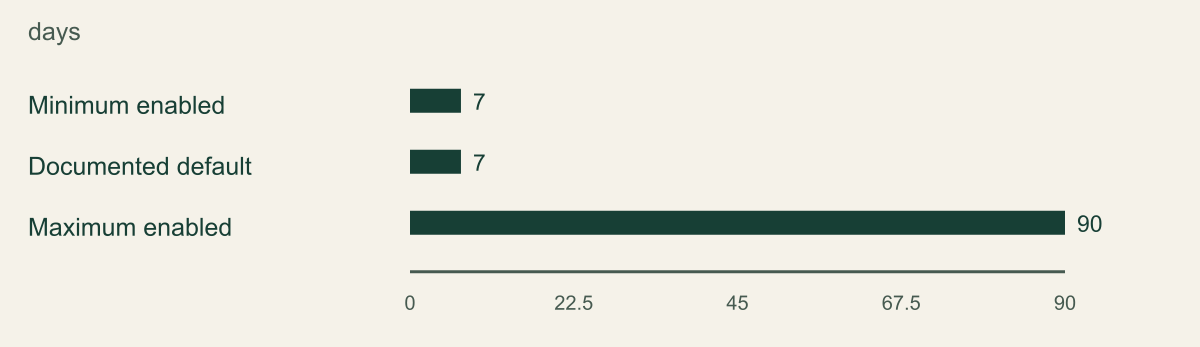
The figure shows the supported minimum, documented default, and maximum enabled retention durations. These are configuration values in days. The minimum and default are both seven days, so their equal bars are intentional. Zero means disabled and is kept outside the enabled-window comparison. A larger value provides a longer recovery opportunity while retaining deleted storage for longer. [1]
Consider the sensitivity and turnover of the data as well as recovery needs. A heavily overwritten working bucket can accumulate retained copies differently from an infrequently changed archive. The right window is a decision about the actual workload, cost, and deletion requirements. Soft delete should not be presented as universally better simply because its duration is set to the maximum.
The supported enabled soft delete window
Cloud Storage enabled soft delete durations as reviewed September 12 2026. Zero disables the feature and is excluded from this enabled-range chart. Actual bucket defaults may differ.

Source. Google Cloud documentation [1]. Reviewed September 12, 2026.
Method. Direct transcription of the documented configuration or limit values. No measured customer data, inferred performance, interpolation, or normalization.
Accessible table and figure data
| Setting | Retention days |
|---|---|
| Minimum enabled | 7 |
| Documented default | 7 |
| Maximum enabled | 90 |
| Setting | Retention days |
|---|---|
| Minimum enabled | 7 |
| Documented default | 7 |
| Maximum enabled | 90 |
Read the bucket policy before testing
Inspect the current soft delete configuration and confirm which policy applies to the bucket. Record the retention duration and the time of any planned change. Google documents that objects keep the retention window that applied when they were deleted. Extending the policy later does not retroactively give an already deleted object the new duration. [1]
For example, if a harmless object is deleted while the bucket has a seven-day policy and the policy later changes to ten days, the earlier object keeps its original window. A different object deleted under the new policy receives the new window. This is documented behavior, not an observed customer experiment. It matters during an incident because changing today's setting may not save yesterday's deleted data. [1]
Check the account that will perform the recovery. Listing and restoring soft-deleted objects require the documented permissions, and console workflows can require additional read permissions. Use an authorized recovery identity and review the scope of its role. Do not assume that an application account that can upload files can also restore deleted generations. [3]
Check other bucket controls before creating the test object. Object versioning, lifecycle rules, retention policies, holds, and storage class can affect the behavior or cost of the exercise. If a retention lock prevents deletion, use a suitable disposable test bucket rather than trying to weaken a production retention control. The goal is to rehearse soft delete within an understood configuration.
Rehearse recovery with a disposable object
Create a small file with clearly labeled test content and a unique name in an approved test location. Record the object name, generation, size, and relevant checksum or application-level content hash. Cloud Storage object metadata includes generation information that distinguishes versions of the same object name. Do not rely only on the filename when multiple versions may exist. [6]
Delete the test object using the authorized workflow, then confirm that it is no longer available as the expected live object. List soft-deleted objects with the documented interface and locate the exact deleted generation. The official guide describes restoring a specific soft-deleted object version, including the generation identifier. [3]
Restore that generation deliberately. Cloud Storage creates a new live copy in the same bucket when a soft-deleted object is restored. The original soft-deleted copy remains subject to its retention lifecycle. A restore is therefore not simply turning the old generation back into the original live object with every identifier unchanged. Record the new live generation as part of the result. [1][3]
Use read-back verification after the operation completes. Retrieve the restored object's metadata and content, compare the expected size or checksum where applicable, and open it through the consuming application. Keep the test harmless even if restoration replaces an existing live name. The next section explains why that name collision deserves an explicit decision.
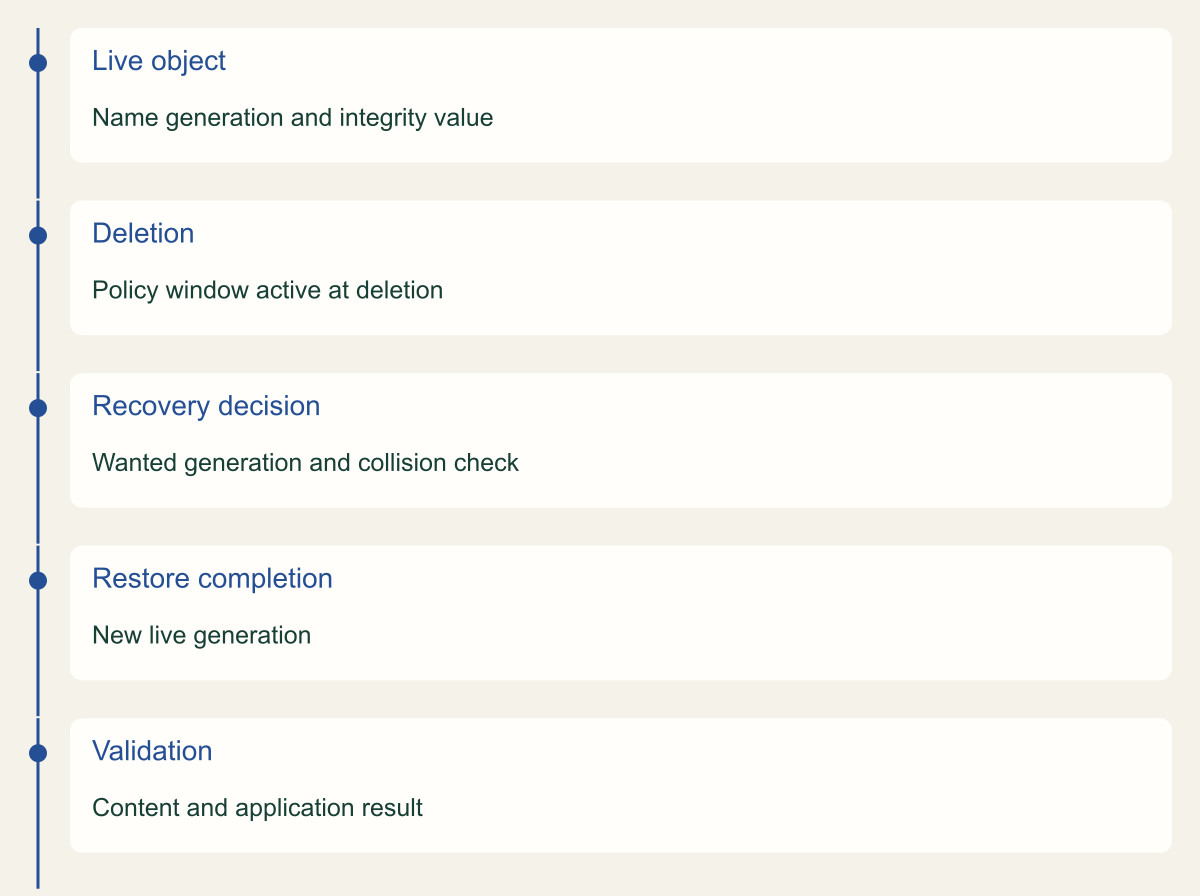
Recover the selected generation before its window closes
Conceptual ordered events with no scaled time axis. Policy changes do not extend already deleted objects retroactively.

Source. Google Cloud documentation [1][3][6]. Reviewed September 12, 2026.
Method. Original conceptual synthesis of the cited documentation. Rows describe responsibilities, decisions, or hypothetical states, not measured results.
Accessible table and figure data
| Event | Record |
|---|---|
| Live object | Name generation and integrity value |
| Deletion | Policy window active at deletion |
| Recovery decision | Wanted generation and collision check |
| Restore completion | New live generation |
| Validation | Content and application result |
| Event | Record |
|---|---|
| Live object | Name generation and integrity value |
| Deletion | Policy window active at deletion |
| Recovery decision | Wanted generation and collision check |
| Restore completion | New live generation |
| Validation | Content and application result |
Check generations and overwritten names
An object name is a logical path, while a generation identifies a particular version. If an application overwrites a file or a recovery recreates it, the name can remain familiar while the underlying object changes. Recovery instructions should therefore name both the object and the intended generation whenever the workflow supports that precision. [3][6]
Before restoring, check whether a live object already exists under the same name. Decide whether the wanted outcome is to replace the current content, compare versions first, or recover through an isolated application process. Do not overwrite a current production file simply because an older generation appears in the deleted list. The resource owner should confirm which version the application needs.
Object versioning is related but distinct. It retains noncurrent versions when objects are replaced or deleted under its rules, while soft delete protects resources that enter the soft-deleted state. An environment using both features needs a clear explanation of which list the operator is viewing and which transition produced the version. The official versioning documentation describes those lifecycle relationships. [4]
Use a simple second test with two harmless contents under the same test name if overwrites are common in the application. Record each generation and identify which one the recovery should produce. This tests the operator's selection process, not just the restore API. A correctly executed restore of the wrong version can still damage the application's state.
Validate the restored file
Compare the restored object with the expected source evidence. A matching name is insufficient. Check content, size, metadata that the application depends on, and any relevant integrity value. Be careful when choosing a checksum: metadata and transfer behavior can differ by object type and upload method. Use the integrity mechanism documented for the actual application path rather than assuming every object exposes the same fields. [6]
Test the consumer. A restored image should load in the intended application, a report should parse correctly, and a configuration file should have the expected permissions and format. Avoid invoking a destructive or external side effect just to prove the file is present. A controlled read or validation job is often enough for the rehearsal.
Inspect access after restoration. The bucket's current IAM policy and access model still matter. A recovered file should not become available to more people simply because the recovery operator used a broad administrative account. Test the normal application reader and, where appropriate, a caller that should remain denied.
Record the restoration result and remaining work. If the object is correct but an application index still points to a missing generation, the recovery is not complete for that application. Assign the repair or replay step to the owner. The useful completion statement describes the service behavior restored, with any unresolved dependency stated separately.
Account for retention and cost
Soft-deleted objects continue to incur storage charges during their retention period. Review the current pricing and relevant storage class behavior for the bucket. Do not estimate a bill from live object size alone if the workload frequently overwrites or deletes objects. Retained deleted copies contribute to the stored data that matters for cost. [8]
Lifecycle management and soft delete should be reviewed together. A lifecycle rule can remove live or noncurrent data according to its conditions, while soft delete can retain the deleted resource for its configured window. The application owner should understand when a file stops being live and when its retained copy becomes permanently unavailable. Those are different dates. [1][5]
Do not weaken a recovery policy merely because a test created an unexpected retained copy. First explain the behavior and determine whether the workload's deletion rate or policy duration needs adjustment. A useful cost review uses the actual bucket's storage and operation information.
Clean up the rehearsal through the approved lifecycle. Deleting the restored test object may itself create another soft-deleted copy, so immediate disappearance from the live listing is not proof that all test storage has vanished. Record the cleanup and expected retention expiration. Avoid changing the whole bucket's policy just to remove a small test file sooner.
Keep soft delete in a wider recovery plan
Soft delete is a useful response to recent accidental deletion, but it is not an isolated backup account, an immutable archive, or a complete disaster recovery design. The project, permissions, encryption dependencies, and application metadata still need attention. A recovery window is valuable only while the organization can identify and access the protected resource.
Distinguish soft delete from a retention policy or lock. Retention controls can prevent deletion before a retention requirement is satisfied, while soft delete preserves a recovery opportunity after a permitted deletion. Bucket Lock and related retention features have consequential behavior and should be planned separately. Do not enable an irreversible lock as an incidental step in a simple soft-delete rehearsal. [7]
Review the procedure when application naming, versioning, lifecycle rules, or ownership changes. A recovery note written for one object per customer may fail after the application adopts content-addressed names or multiple generations. The team should maintain the identifiers and validation steps it actually needs, not merely a generic instruction to click Restore.
A completed rehearsal leaves a policy record, a known deleted generation, a restored live generation, an integrity check, and an application result. Those artifacts tell the next operator what to do while the retention clock is running. The default setting starts the opportunity; the recovery procedure makes that opportunity usable.
Respond to a real deletion report
When someone reports a missing file, first confirm the project, bucket, object name, and expected content. A moved object, an incorrect application reference, and a deleted object can look similar to the user. Check live and relevant retained versions before initiating a restore. Avoid making a second copy under an improvised name that the application will never read.
If the object is soft deleted, record its deletion and expiration information and identify the owner authorized to choose the recovery version. Treat the remaining window as a deadline for completing the necessary action, not a reason to skip integrity and collision checks. If the window is already exhausted, state that limitation clearly and investigate other approved copies rather than repeatedly changing the current policy.
For a large or uncertain incident, preserve the available evidence and coordinate the restoration order with the application team. The first useful action may be to stop a faulty deletion process through an approved change, so restored files are not immediately removed again. A successful individual restore does not repair the process that caused the loss.
After the immediate recovery, examine why the deletion happened and how quickly it was detected. Update the policy or procedure only where the evidence supports a change. The incident can reveal a missing owner, a faulty lifecycle rule, or a need for a separate recovery copy. Soft delete gives the team time to investigate those causes while restoring the affected service.
Keep recovery permissions ready
Name an identity that can perform the documented list and restore operations before a real deletion occurs. It can be a controlled administrator role rather than the application's routine identity. The important point is that the recovery owner knows how to obtain authorized access while the retention window remains open. Review the current permissions listed in the restore guide. [3]
Test that identity during the rehearsal instead of relying on a broadly privileged account that will not be available to the on-call operator. If the console requires an additional read permission, record that requirement and determine whether the CLI or API workflow has a different documented permission set. Do not grant project-wide administration merely to avoid understanding the failed operation.
Keep directory access, project selection, and the recovery procedure together. A team can retain the object correctly yet lose useful time finding who owns the account or which project contains the bucket. The rehearsal should resolve those ordinary administrative questions so the retained days are available for investigation and restoration, rather than consumed by preventable access confusion.
Method and provenance
Source-based technical guidance using current Google Cloud documentation reviewed September 12, 2026. The procedures and decision frameworks are original editorial synthesis. Examples are explicitly hypothetical.
No customer project was configured and no cloud command, restoration, or workload experiment was executed for this article. Documented settings and limits are not measured service performance; actual configuration and supported product behavior must be checked before use.
AI assistance. AI assisted with research organization, drafting, and editing. Original illustrations were generated with ChatGPT and reviewed alongside source-based diagrams; visual and release verification is recorded separately.
Published under the Cloud Security Desk organizational byline. Read the practitioner guide policy.
References
- Soft delete overview Google Cloud. Accessed .
- Set and manage soft delete policies Google Cloud. Accessed .
- Use soft-deleted objects Google Cloud. Accessed .
- Object Versioning Google Cloud. Accessed .
- Object Lifecycle Management Google Cloud. Accessed .
- Object metadata Google Cloud. Accessed .
- Bucket Lock Google Cloud. Accessed .
- Storage pricing Google Cloud. Accessed .