
Separate retention, daily backup schedule and latest restorable time; combine documented defaults with an isolated restore check. Choose RDS backup retention by deciding how far back the application may need to recover, then verify the actual earliest and latest restorable times and test a separate restored database.
At a glance
Key findings
- Choose RDS backup retention by deciding how far back the application may need to recover, then verify the actual earliest and latest restorable times and test a separate restored database. Keep that retention period distinct from the preferred daily backup schedule. A third concept, the currently available recovery interval, tells you which restore times can actually be selected now. Using one phrase for all three can hide a serious mismatch between a saved setting and a usable recovery point. [1][3][8]
- Separate retention, daily backup schedule and latest restorable time; combine documented defaults with an isolated restore check.
- The diagrams are conceptual; documented numeric values describe AWS specifications, not a measured customer environment.
Separate three meanings of backup window
Choose RDS backup retention by deciding how far back the application may need to recover, then verify the actual earliest and latest restorable times and test a separate restored database. Keep that retention period distinct from the preferred daily backup schedule. A third concept, the currently available recovery interval, tells you which restore times can actually be selected now. Using one phrase for all three can hide a serious mismatch between a saved setting and a usable recovery point. [1][3][8]
Retention is the configured number of days automated backups are kept. The preferred backup window is the daily time range during which RDS starts the automated backup operation. LatestRestorableTime is a current service-reported boundary for point-in-time recovery. Setting retention to a longer period does not instantly create older history, and choosing a convenient daily schedule does not guarantee that the latest recoverable data is current enough for the application's needs. [1][3][4]
This guide focuses on conventional RDS DB instances. It distinguishes the documented Multi-AZ DB cluster retention range where relevant, but it is not an Aurora-specific guide or an engine-by-engine recovery manual. If AWS Backup manages the resource's continuous backups, follow that management path and its current controls rather than assuming a native RDS console setting remains the source of truth. Identify the backup owner before editing the resource. [9]
The practical result is a small recovery record: source database, backup manager, configured retention, observed restore interval, selected test time, isolated restore target, application checks, and cleanup. That evidence answers a more useful question than whether backups are enabled. It shows whether the team can obtain a database at a relevant point and use it under the conditions the application actually requires.
Read the actual setting instead of assuming a default
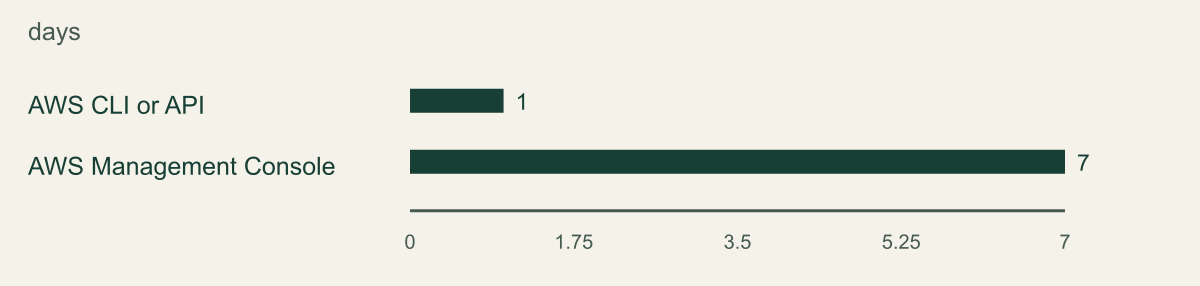
AWS documents different defaults for newly created DB instances when retention is not explicitly set. Creation through the RDS API or AWS CLI defaults to one day, while creation through the console defaults to seven days. The chart compares those two documented creation defaults. It does not describe observed customer settings, restored-instance defaults, Aurora behavior, or a recommendation that either default is sufficient for your application. [1]
For a DB instance, the documented retention range is zero through 35 days, with zero disabling automated backups. For a Multi-AZ DB cluster, the documented range is one through 35 days. During restore operations, current AWS guidance says that an omitted retention value can inherit the source setting. Those differences are reasons to inspect the actual resource after creation or restoration instead of reasoning from how a colleague remembers the console wizard. [1]
Use the database details or describe-db-instances to read BackupRetentionPeriod and the relevant resource identity. Record the account, Region, engine, and DB identifier, especially where development and production have similar names. The API supports pagination and returns detailed instance information, so select the intended instance and review the returned identity before turning an inventory into a modification. [4]
Check the infrastructure source as well. A repository template may explicitly override the console default, and a manual change may be overwritten by a later deployment. The backup manager may also be a different service or team. A reliable record says what the current instance reports and which configuration owns that result. It does not treat the default from a getting-started tutorial as the actual state of an existing production database.
RDS automated backups cover the DB instance rather than an individual logical database inside it. If the requested recovery concerns only one table or one application database, identify the additional data-extraction or reconciliation step after restoring a separate instance. A point-in-time restore does not automatically merge selected recovered rows into the running source. [2]
RDS DB instance creation defaults differ
A new RDS DB instance defaults to 1 day through the CLI or API and 7 days through the console when no retention value is specified.

Source. AWS documentation accessed September 12, 2026. [1]
Method. Values transcribed from cited AWS documentation. Labels are editorial; this is not measured tenant data. Scope: Documented default retention for a newly created RDS DB instance when the caller does not set the field. Not restore defaults, Aurora defaults or a measured recovery interval.
Accessible table and figure data
| DB instance creation path | Default retention days |
|---|---|
| AWS CLI or API | 1 |
| AWS Management Console | 7 |
| DB instance creation path | Default retention days |
|---|---|
| AWS CLI or API | 1 |
| AWS Management Console | 7 |
Choose retention around detection and investigation
Begin with the failures the database owner expects to recover from. Accidental deletion, a bad application release, and a corruption discovered during reconciliation can have different detection delays. Ask how long it may take to notice the problem, establish a safe restore point, and complete an authorized recovery decision. Retention should leave the relevant history available through that process. This is a planning method, not a universal number of days recommended for every database.
Consider a hypothetical application whose records are reconciled weekly. If an incorrect change is discovered during the next reconciliation, the team needs a restore point from before the mistake and enough time to investigate without that history expiring. The actual duration should come from the application's schedule and evidence requirements. Do not present a made-up industry average as the reason for selecting a particular retention value.
Separate recovery history from recovery speed. Keeping more days provides more possible historical targets when backups exist, but it does not prove that a restore will finish within a business deadline. Restore duration, data loading, database configuration, and application validation all affect when the service can be used. Test those steps under a relevant scenario rather than equating 35 days of retention with a fast or successful recovery. [1][3]
Also identify data-handling obligations with the appropriate owner. Longer retention preserves additional historical copies, including data later changed or removed from the live database. The application team should know which policy governs those copies and how recovery interacts with later corrections or deletion requests. This guide provides technical recovery planning, not a substitute for the organization's legal, privacy, or records-management decision about how long its data should be kept.
Plan the effect of a retention change
Changing the retention period can have an operational effect. AWS states that switching a DB instance from zero to a nonzero value, or from a nonzero value to zero, causes an outage. Review that transition before scheduling the change. A routine desire to enable backups should not become an unexplained interruption because the team treated the setting as a harmless metadata field. The same care applies before disabling automated backups. [1]
Review how the change is applied and whether the instance has other pending modifications. The modify-db-instance operation contains many settings and an apply-immediately option. Use a narrowly reviewed change and inspect the current pending state rather than blindly applying every outstanding modification to make retention take effect. Follow the current RDS behavior for the selected engine and deployment type, and coordinate any possible interruption through the application's maintenance procedure. [5]
Account for stopped databases. AWS documents that time spent stopped is not included in calculating the retention period and that automated backups are not created while the instance or cluster is stopped. A stopped development instance can therefore have a history that does not line up with a simple wall-calendar subtraction. Read the actual restore interval instead of assuming that retention always means now minus the configured number of days. [1]
After the change, read the saved configuration and inspect the evolving restore interval. Increasing retention cannot manufacture backups from before collection existed. Shortening retention can remove recovery options as older history expires. Preserve any specifically required historical snapshot through its approved process before relying on a shorter period. Reversing the setting later is not the same as recreating recovery history that has already been removed.
Check the earliest and latest restorable times
Inspect the automated backup record for the intended DB instance and Region. The describe-db-instance-automated-backups response exposes RestoreWindow.EarliestTime and RestoreWindow.LatestTime; describe-db-instances exposes the latest time but does not provide an earliest-time field. Record the backup ARN, status and both window boundaries with the observation time in UTC. A configured retention period alone does not establish that a desired historical second is available. [3][4][10]
Compare the returned records with the intended resource. An active backup follows a live DB instance; a retained backup can remain after its instance was deleted or backup replication stopped, and a creating record is still being prepared. Keep these states distinct when choosing a recovery source. Do not accept the first array item without checking its identity, Region and status. A missing or incomplete restore window needs investigation before a target time is selected. [10]
The command below targets an existing DB instance. Its --db-instance-identifier selector requires that instance to still exist. For a retained backup after deletion, use the documented --dbi-resource-id selector with the recorded source resource ID, or the supported filters, and verify the returned backup identity before continuing. Preserve that resource ID in the recovery record while the instance exists. [10]
Choose a test point for a reason. It might precede a known harmless test transaction or fall within an application state the owner can validate independently. Do not select the latest time simply because it is easy if the business scenario is recovery from a mistake discovered several days later. The test should exercise a useful historical decision, with expected data characteristics defined before the restore begins.
The preferred daily backup schedule is a separate operating detail. AWS notes that a backup can continue after the configured window ends if it takes longer, and the backup window cannot overlap the maintenance window. Engine and deployment details affect backup I/O behavior. Review those documented considerations when choosing the schedule, rather than assuming the configured interval is a guarantee that all backup work ends at a particular minute. [8]
If the current interval is unexpectedly narrow or stale, investigate before declaring the recovery design adequate. Inspect resource state, backup status, relevant events, and the selected backup-management service. An available database endpoint says the live service is running; it does not independently prove a healthy recovery history. Preserve the discrepancy as a concrete issue with an owner and a next check instead of accepting the enabled-backups label as the final result.
aws rds describe-db-instance-automated-backups \
  --db-instance-identifier "$CSD_DB_INSTANCE_ID" \
  --region "$CSD_AWS_REGION" \
--query 'DBInstanceAutomatedBackups[].{Database:DBInstanceIdentifier,Region:Region,Status:Status,BackupArn:DBInstanceAutomatedBackupsArn,RetentionDays:BackupRetentionPeriod,Earliest:RestoreWindow.EarliestTime,Latest:RestoreWindow.LatestTime}'Restore to a separate database before redirecting traffic
An RDS point-in-time restore creates a new DB instance without modifying the source instance. Use that separation to validate the recovered data before considering application cutover. Give the test instance a distinct identifier and an approved network placement. Avoid reusing a production endpoint name or placing the restored database where normal applications can begin writing to it accidentally. The restore is a data-recovery operation; traffic redirection is a separate change. [3]
Review the target configuration explicitly. Security groups, parameter groups, option groups, encryption permissions, and other engine-specific settings can affect whether the restored database is usable. AWS's restore guidance includes configuration considerations that should not be replaced by the assumption that every source setting appears exactly as desired. Use a restricted test path and the application owner's approved configuration rather than opening the database publicly to simplify validation. [3][7]
Record the restore request, selected time, new instance identifier, and status progression. Wait for the operation's relevant completion state, then verify connectivity through the intended authorized test route. AWS notes that after a restored instance becomes available, data blocks can continue loading in the background. The available state is therefore not a universal performance or application-readiness guarantee. Assess the behavior needed for the test rather than inventing a fixed warm-up time. [3]
Keep the test from performing production side effects. Restored database rows may contain job schedules, email destinations, payment references, or integration configuration. Connecting a full application without controlling those behaviors can cause duplicate processing. Use read-only validation where it answers the question, and isolate any necessary application test so it cannot act on real external systems without explicit authorization. This is an operational precaution based on the application's design, not a claim that RDS itself replays those integrations.
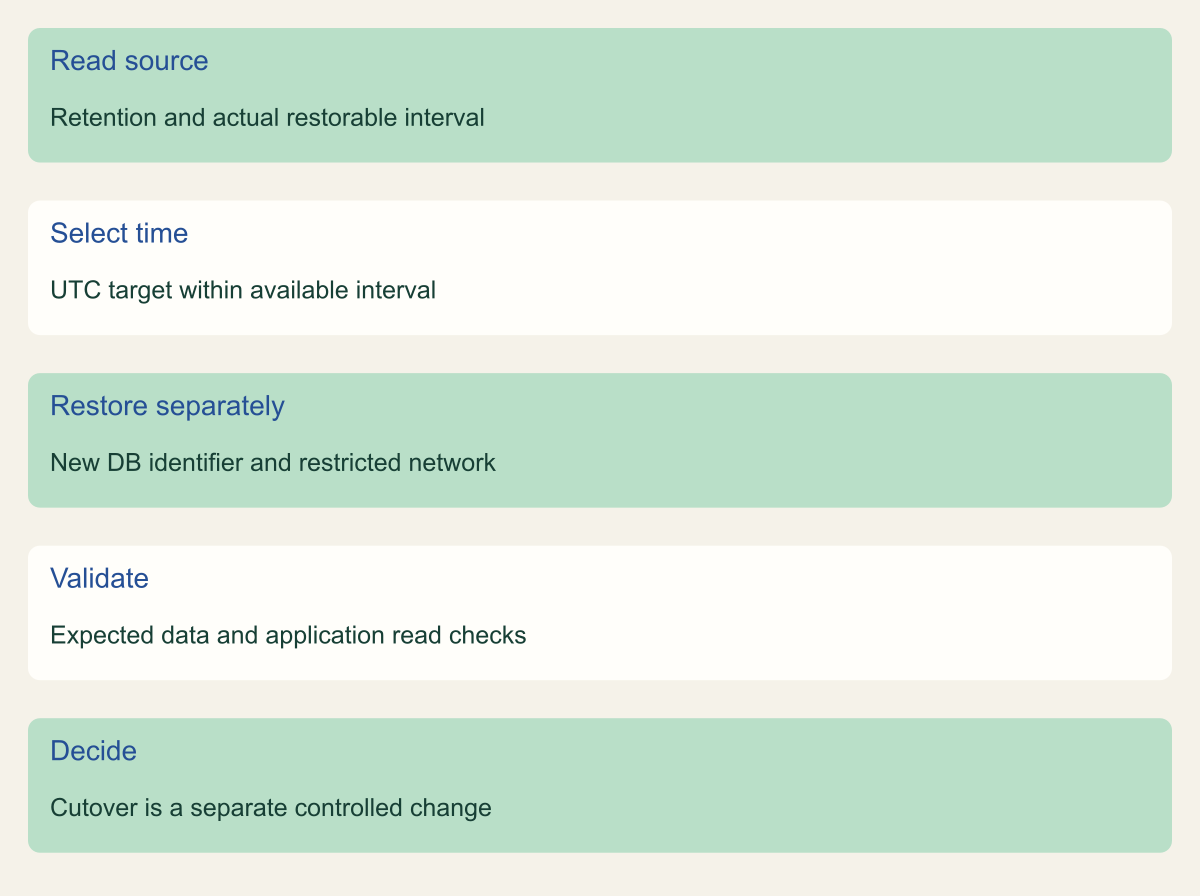
Validate a separate database before any cutover
Select a time inside the reported restore window, restore into a separate DB instance, and validate the application before deciding on cutover.

Source. Conceptual synthesis of AWS documentation accessed September 12, 2026. [1] [3] [4] [7] [10]
Method. Conceptual editorial synthesis of the cited service behavior; no measured outcomes. Scope: How do you choose RDS automated backup retention and verify a usable restore window?
Accessible table and figure data
| Stage | Required evidence |
|---|---|
| Read source | Retention and actual restorable interval |
| Select time | UTC target within available interval |
| Restore separately | New DB identifier and restricted network |
| Validate | Expected data and application read checks |
| Decide | Cutover is a separate controlled change |
| Stage | Required evidence |
|---|---|
| Read source | Retention and actual restorable interval |
| Select time | UTC target within available interval |
| Restore separately | New DB identifier and restricted network |
| Validate | Expected data and application read checks |
| Decide | Cutover is a separate controlled change |
Validate the data and application behavior
Start with a known data check tied to the selected restore time. Confirm that the expected record exists and that a later test change is absent where that distinction is part of the scenario. Use the application's actual schema and authorized read queries. Do not invent a table name or present a generic row count as proof that the business state is correct. The owner should define what successful recovery means before seeing the restored database.
Then validate the connection path and relevant application configuration. A database can be readable by an administrator while the application fails because of credentials, network controls, parameters, extensions, or dependent services. Check only the behavior needed for the test, with writes and external side effects controlled. If a full service restore is required, include those additional dependencies in the recovery plan rather than silently treating database availability as application availability. [7]
Measure what the exercise actually observed. Record the time from the approved restore start to the point at which the required validation passed, with the resource and test conditions. Do not publish an invented benchmark or assume the same duration applies to larger data, another engine, or another Region. If the test did not exercise production-scale behavior, preserve that limitation. The evidence can still be useful without claiming a broader recovery guarantee.
If validation fails, retain the restored target long enough for the authorized investigation when practical and cost-appropriate. Identify whether the issue concerns the chosen restore time, source backup history, target configuration, encryption access, or application dependencies. Correct the relevant part and repeat the necessary check. A successful API restore followed by a failed application test is an incomplete recovery result, not a pass that should be hidden in a footnote.
Keep the recovery decision after removing the test
After the owner accepts the test evidence, clean up the temporary database through the approved process. RDS deletion has choices around final snapshots and retained automated backups. Review them for the test resource rather than copying a deletion command from another environment. Confirm the identifier immediately before deletion so a familiar production name is not mistaken for the temporary restore target. Keep any required evidence or recovery copy under its normal retention policy. [6]
Record the cleanup outcome separately from the restore result. A test can validate recovery and still leave an unnecessary billable instance running. Conversely, removing the test database does not erase the useful evidence if the selected time, resource configuration, validation checks, observed duration, and limitations were recorded. Preserve nonsecret results in the change or recovery system and avoid retaining a full sensitive data dump merely to prove that a test occurred.
Update the operating procedure with the findings. If a parameter group, key permission, network rule, or external dependency was missing, make that requirement explicit for the next exercise. Keep the chosen retention and backup schedule in the infrastructure source that owns them, and assign an owner to review the actual restore interval. A recurring exercise should test a meaningful recovery question, not simply create and delete a database to satisfy a calendar entry.
The finished decision connects three facts: the configured retention matches the application's historical need, the current service state contains the required restore interval, and an isolated restore has passed the defined checks. Each fact has its own evidence and review trigger. That makes an RDS recovery window something the team can use when a mistake is discovered, rather than a number in the console that nobody has tried to recover from.
Method and provenance
Primary AWS documentation was retrieved and reviewed on September 12, 2026. The guide synthesizes documented service behavior into a bounded operational procedure; research records and figure data are maintained with the article.
Examples are hypothetical. Code and request shapes are checked locally where applicable, but no customer AWS account, production operation, recovery duration or benchmark was tested. Readers must verify their resource type, Region, permissions and organization controls.
AI assistance. AI assisted research organization, drafting and original visual planning. Sources, technical boundaries and final rendering are reviewed through the publication workflow.
Published under the Cloud Security Desk organizational byline. Read the practitioner guide policy.
References
- Backup retention period - Amazon Relational Database Service AWS. Accessed .
- Introduction to backups - Amazon Relational Database Service AWS. Accessed .
- describe-db-instances - AWS CLI 2.36.44 Command Reference AWS. Accessed .
- modify-db-instance - AWS CLI 2.36.44 Command Reference AWS. Accessed .
- Deleting a DB instance - Amazon Relational Database Service AWS. Accessed .
- Restoring to a DB instance - Amazon Relational Database Service AWS. Accessed .
- Managing automated backups - Amazon Relational Database Service AWS. Accessed .
- Amazon Relational Database Service backups - AWS Backup AWS. Accessed .