
A restore worksheet connects backup edition, log window, deletion protection, clean destination, application checks and cutover authority.
At a glance
Key findings
Begin with the mistake you need to undo
Set up Cloud SQL backups around a recovery task, then prove that an authorized person can restore the database and the application can use it. For a small PostgreSQL application, the first task is often recovering from an accidental data change. Configure the relevant backup option, retain the required transaction history for point-in-time recovery when needed, protect the instance against unintended deletion, and rehearse into a controlled destination. [1][2][5]
A backup marked successful is valuable evidence that a backup operation completed. It is not evidence that the application can reconnect, that the restored data is the right version, or that a business owner has approved a cutover. Keep those later decisions in the recovery plan. Otherwise, the first real incident becomes the first time the team tries to connect the backup interface to its application's needs.
This guide uses a hypothetical small PostgreSQL application on Cloud SQL. It emphasizes standard backups and distinguishes them from enhanced backups where the behavior differs. Cloud SQL offers different backup options with different management and retention contracts. Read the selected option for the actual instance before applying a setting or copying a command. [9]
Start with a concrete example: an approved application release accidentally updates the wrong set of rows. The team wants to restore a database state before that change, inspect the affected records, and decide how to recover without losing unrelated valid work. This is different from restarting a failed instance or switching to a healthy standby. The type of failure determines which recovery mechanism is useful.
Separate backups availability and recovery
High availability helps an application continue through certain infrastructure failures. A backup preserves data for a recovery operation. Point-in-time recovery uses a backup and retained transaction history to reconstruct an eligible earlier state. These capabilities support different outcomes. A standby that contains the same accidental row update does not undo that update merely because it is healthy. [1][2][6]
Describe the required outcome in application terms. The business may need the whole database returned to a previous point, a small set of records recovered, or a clean copy used for comparison. Those choices have different consequences for valid transactions written after the mistake. Do not assume that a full restore into the current production instance is the smallest or safest repair.
Define a recovery point objective and a recovery time objective using the team's actual needs. The first concerns how much data loss is acceptable; the second concerns how long the service can remain unavailable. A setting in the console does not establish that either objective is met. The team needs a plausible recovery path and evidence from rehearsals appropriate to the application.
Keep the simple first exercise limited. Restore harmless test data or an approved protected copy into an isolated destination and validate it without serving production traffic. This teaches the team where backups are listed, how permissions work, and which application settings must change. More complex regional or security-incident recovery can build on that understanding without being falsely claimed by the first test.
Inventory the actual backup configuration
Open the instance's current backup and data-protection configuration. Record the database version, edition, backup option, automated backup schedule, retention setting, backup location, point-in-time recovery status, and relevant deletion protections. Use the actual instance state rather than a remembered default or a deployment file that might not describe the running service. [1][4][8]
Inspect recent completed backups and any failed or missing operations. The scheduled configuration expresses intent, while the backup history shows what is available. A long-running application can have a familiar schedule but an unexpected operational gap. Assign failures to an owner and resolve the cause rather than counting the presence of a schedule as proof of recovery coverage.
For standard automated backups, understand the retention unit. The documented setting is the number of automated backups to retain, from one to 365, with a default of seven in the instance-settings documentation. A count of retained backups is not always identical to a guaranteed number of calendar days of recoverable history. Schedule and completion behavior matter. [4][8]
Record on-demand backups separately. Their lifecycle can differ from automated backups, and enhanced backups have different retention choices. An old manual backup can be useful without representing the intended current recovery point. Include its purpose and owner so it is not mistaken for routine protection or deleted casually because it appears outside the automated schedule. [1][9]
Set a usable retention window
Choose retention around the time needed to discover a mistake and complete recovery. A database error found during a daily reconciliation has a different discovery window from one found during a month-end review. Add the time needed to investigate and authorize the restore. The desired point must still be available when the team is ready to act.
Review the point-in-time recovery configuration for the instance's edition and backup option. Transaction logs are required for that capability, and the retained log window is a separate setting from automated backup count. The relationship between backup retention and log retention must follow the current Cloud SQL documentation. Do not assume that keeping a backup indefinitely also preserves indefinite point-in-time recovery. [1][2]
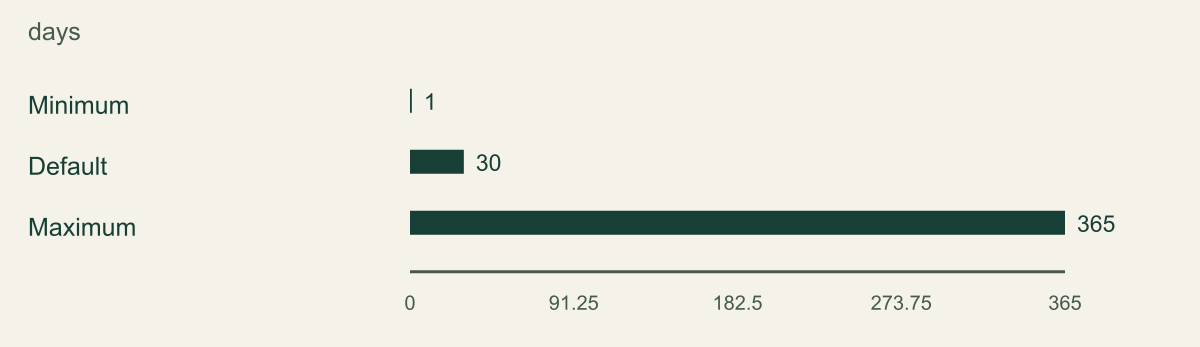
Keep final-backup retention distinct again. For standard final backups, Google documents a retention range of one to 365 days and a default of thirty days. The figure plots those three values in days because they describe the same setting. It does not mix them with automated backup count or present the maximum as a universal recommendation. [4]
Evaluate the cost and operational effect of the selected retention. More retained data can be useful, but the team should know which history it expects to use and why. Use current pricing and the actual instance's usage for budget decisions.
Standard final-backup retention options
Cloud SQL for PostgreSQL standard final-backup retention as reviewed September 12 2026. Values are days, not automated backup counts or a point-in-time recovery window.

Source. Google Cloud documentation [4]. Reviewed September 12, 2026.
Method. Direct transcription of the documented configuration or limit values. No measured customer data, inferred performance, interpolation, or normalization.
Accessible table and figure data
| Setting | Retention days |
|---|---|
| Minimum | 1 |
| Default | 30 |
| Maximum | 365 |
| Setting | Retention days |
|---|---|
| Minimum | 1 |
| Default | 30 |
| Maximum | 365 |
Protect against instance deletion
Enable the appropriate deletion protection through the approved configuration workflow and confirm the effective state. Cloud SQL deletion protection helps prevent an instance from being deleted until the protection is disabled. It is a control on that administrative operation, not a substitute for backups or a guarantee against every way data can be lost. [5]
Inspect retained-backup and final-backup behavior for the selected backup option. Standard backups can be retained after instance deletion when configured, and final-backup settings have their own retention rules. Enhanced backups use a different management design. The correct recovery plan depends on which option the instance actually uses. [1][4][9]
Understand the permissions around disabling protection and deleting the instance. A control that an ordinary deployment account can casually disable may provide less separation than the team expects. Review the change path and ownership. This guide does not require a complex new approval system, but the record should identify who is allowed to remove the protection and why.
Do not test deletion protection by deleting a valuable instance. Use a disposable instance or a supported harmless verification method under the team's change process. Also avoid toggling production backup settings casually: the official management instructions identify changes that can restart an instance. Read the current procedure and plan the maintenance effect before applying it. [4]
Make a recovery plan before a restore
Write a short recovery worksheet before clicking Restore. Name the source instance, selected backup or target time, proposed destination, database version constraints, network path, recovery operator, application owner, and person authorized to approve cutover. Include the reason for choosing that point. A timestamp with no explanation is difficult to defend after the team discovers later valid transactions.
Determine whether the incident requires preserving the current database state. A corrupted or mistakenly updated source can still contain valid recent work and evidence of what happened. Restoring over it may erase that information. Use a controlled destination when possible and preserve the source according to the organization's incident and recovery requirements.
Check what the restore operation replaces. Cloud SQL's restore overview distinguishes recovery approaches and warns about effects on existing instances and related resources. Read the specific workflow for the chosen target. A backup restore is not a database-version upgrade mechanism, and replica relationships can require additional handling. [1][3]
Prepare application configuration without switching traffic. The restored database may have a different instance connection name, address, credentials, or secret reference. Identify which deployment setting controls the connection and how it is changed through the normal release process. A recovery worksheet should include that application step because the database becoming available is only part of returning service to users.
Restore to a controlled destination
Choose a destination whose access and network settings are appropriate for the data. An isolated restore copy still contains the database's information. Do not make it public or grant broad developer access merely because it is temporary. Use the approved project, location, service identities, and connectivity model for the recovery exercise.
Select the intended completed backup or eligible point-in-time target through the documented workflow. Verify the source identifiers and time zone. A local time copied without its offset can select the wrong recovery point. Record the absolute time and the reason it precedes the unwanted change. For point-in-time recovery, check the currently available recovery interval rather than assuming it extends exactly to the present second. [2][3]
Follow the restore operation to completion and inspect its status. An accepted request or an operation identifier is not a completed restore. Preserve the final operation result and any error. If the operation fails, investigate the documented cause before retrying against a different target or changing unrelated permissions.
Keep production writes away from the destination during validation. A test application or a restricted connection can verify the database without making the recovered copy authoritative. If the team needs a clone for an exercise, distinguish that feature from restoration of a historical backup. Cloud SQL documents cloning separately, and a copy of current state is not evidence that an earlier recovery point is usable. [7]
Validate the database and application
Connect using an authorized validation identity and confirm the database is the expected recovered instance. Check schema presence, required extensions, important tables, and the application account's permissions. Then inspect a small set of known business records that establish the selected recovery point. Avoid relying only on a total row count, which can match even when the wrong records are present.
Use application-specific integrity checks. For a hypothetical order system, verify that an order and its related line items agree, that the known erroneous update is absent, and that expected earlier records remain. These are example checks, not measured results. The real owner should choose relationships that reveal whether the application can safely operate on the restored data.
Test the application through a controlled deployment or approved validation mode. Confirm a representative read, a safe write if appropriate, and the handling of any external dependency. Prevent test messages, payments, or production jobs from being triggered by the restored copy. A recovered database can contain queued work that an application would normally execute on startup.
Record failures without hiding them behind a successful database operation. A restore can complete while the application cannot authenticate, a required extension differs, or a secret still points to the old instance. Assign those issues and repeat the affected checks. The recovery evidence should describe the application behavior restored, not just the infrastructure status shown in the console.
Choose a safe cutover
Before directing production traffic to a restored database, decide what happens to writes made after the chosen recovery point. Returning the whole application to an earlier state can discard valid transactions. Recovering selected records may require a reviewed data repair instead. The business owner and database owner should approve the approach using the available evidence.
Plan how writes will be paused or controlled during cutover. The exact method depends on the application, but it must prevent two database copies from independently accepting authoritative work without a reconciliation design. A connection-string change alone does not establish that every worker, scheduled job, and long-lived connection has switched.
Use the ordinary release and secret-management process for the connection change. Identify the rollback conditions and which database state would remain authoritative if the cutover fails. Reverting application code is not always equivalent to reversing a data recovery. If the new destination has accepted writes, moving back can create a second data divergence that needs an explicit decision.
Verify the live application after the approved switch. Check the active connection target, representative user workflow, background jobs, and error signals. Keep the old source protected until the team has decided what evidence and valid data must be retained. Do not delete it immediately merely to simplify the instance list.
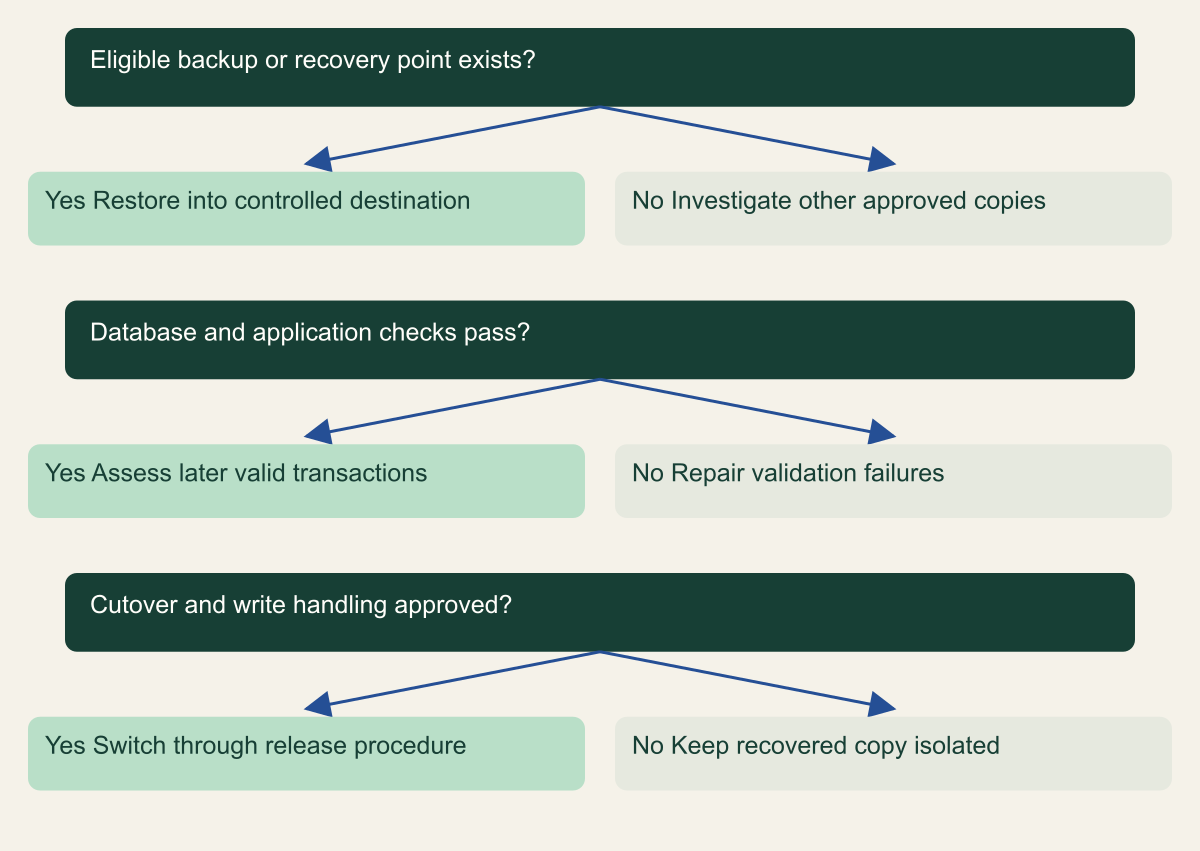
Keep restoration separate from production cutover
Original recovery decision framework. A completed restore offers a recoverable copy; production authority is a separate decision.

Source. Google Cloud documentation [1][2][3][6]. Reviewed September 12, 2026.
Method. Original conceptual synthesis of the cited documentation. Rows describe responsibilities, decisions, or hypothetical states, not measured results.
Accessible table and figure data
| Question | Yes | No |
|---|---|---|
| Eligible backup or recovery point exists? | Restore into controlled destination | Investigate other approved copies |
| Database and application checks pass? | Assess later valid transactions | Repair validation failures |
| Cutover and write handling approved? | Switch through release procedure | Keep recovered copy isolated |
| Question | Yes | No |
|---|---|---|
| Eligible backup or recovery point exists? | Restore into controlled destination | Investigate other approved copies |
| Database and application checks pass? | Assess later valid transactions | Repair validation failures |
| Cutover and write handling approved? | Switch through release procedure | Keep recovered copy isolated |
Test the loss window and timing
Measure recovery time during an actual rehearsal, with a clear start and finish definition. The start might be the declaration that a recovery is required; the finish might be a validated application workflow. State those definitions with the result. A database operation's duration is only one component and should not be presented as the application's complete recovery time.
Measure the achieved recovery point from the test data and selected target. Record which known changes are present and which are absent. If the team uses synthetic markers, create them deliberately in the approved test environment and label them as test data. Compare the observed recovery point with the application's objective and record any gap.
Include the human steps in the review. Waiting for an owner, finding the correct backup, resolving a missing role, and updating application configuration can dominate a small team's response. Those observations can lead to practical fixes such as clearer ownership or a prepared validation account. They should not be hidden because the underlying managed service restored promptly.
Repeat only the tests justified by a meaningful change or unresolved concern. A database version upgrade, backup-option change, new network design, or major application schema change can justify another rehearsal. Repeating the same harmless restore without checking new assumptions may create cost without much information. Keep the exercise tied to the recovery claim the team needs to establish.
Clean up copies without losing evidence
A restored test instance is a live resource with access and cost implications. After the exercise, decide which evidence to retain and which temporary resources to remove. Keep the operation identifiers, source and destination configuration, validation results, and unresolved actions. Avoid keeping a full duplicate of sensitive production data indefinitely simply because nobody owns cleanup.
Remove test application connections and scheduled work before deleting a recovery copy. Verify that no production deployment accidentally points to it. Then follow the approved deletion process, including any configured protection and final-backup behavior. Deleting a temporary instance can itself retain backups according to its settings, so record the expected remaining resources. [4][5]
Treat backup deletion as a separate decision from deleting the test compute instance. An on-demand backup may have been created for a specific release or incident and still be required. Check the owner and retention purpose before removal. The backup option determines its lifecycle, and the cleanup record should identify which copies remain intentionally. [1][9]
Close the exercise with a short action list. Fix missing access, unclear ownership, invalid application assumptions, and recovery steps that could not be reproduced. A completed rehearsal with a known limitation is more useful than a polished report that calls every step successful. The next operator needs the real procedure and its constraints.
Keep the plan current
Store the worksheet with the application's operating documentation and identify its owner. Review it when the instance's edition, backup option, database version, retention settings, or connectivity changes. Also review it when the application adds a new worker or external side effect that must be controlled during recovery.
Keep source review dates separate from test dates. This article's documentation was reviewed on September 12, 2026. That does not imply that a customer instance was configured or a restoration was performed on that date. An organization adopting the procedure should record its own settings, exercise date, and observed results.
A small application does not need a large recovery manual to begin. It needs a known source of recoverable data, a controlled destination, an authorized operator, meaningful application checks, and a cutover decision. The first rehearsal should establish those parts clearly. Later exercises can extend the scope to regional failure, compromised credentials, or more demanding recovery objectives.
The useful completion record tells a future responder which backup or point they can choose, how to restore it, what to test, and who can make it authoritative. Those answers turn a configured backup feature into an operational capability while keeping the limits of the evidence visible.
Rehearse an accidental update
Consider a hypothetical test database containing orders and order items. The team creates a known safe starting state, records the test time, and performs a deliberately incorrect update on disposable rows. The exercise is authorized and isolated from production. Its purpose is to determine whether the configured recovery path can produce the expected earlier records, not to simulate every consequence of a real incident.
Select a recovery target before the unwanted update and verify that it falls within the available point-in-time interval. Restore into the controlled destination using the documented workflow. After completion, compare the known rows and their relationships with the expected state. Also inspect a valid test change made before the target, so the exercise distinguishes the intended recovery point from an unrelated empty or outdated database. [2]
Next, consider a valid test transaction made after the erroneous update. A full return to the earlier point would exclude that transaction too. The exercise should make that consequence visible to the application owner. The eventual production response might use the restored copy to recover selected records rather than replacing the entire database. That repair needs its own reviewed method and validation.
Keep the result precise. The team can state that it restored the selected test point and validated named business relationships. It cannot claim that every possible corruption scenario is covered or that recovery always takes the observed time. The test provides a useful baseline and exposes specific operational gaps, such as missing permissions or an incomplete validation query, that can be fixed before the next rehearsal.
Check the recovered application's outside effects
A database contains more than passive records. It can contain queued emails, scheduled jobs, webhook attempts, payment references, or state that application workers interpret as unfinished work. Starting an ordinary production worker against a restored copy can therefore repeat actions outside the database. Review those paths before connecting the application during an exercise.
For the hypothetical order application, disable external message delivery in the test deployment and use an approved inert destination for integration checks. Confirm that the application does not automatically run production jobs merely because the recovered database contains their records. Keep this configuration separate from the production deployment so the test cannot accidentally disable real notifications or redirect live customer traffic.
At cutover, decide how outstanding jobs will be reconciled. A job that appears pending at the restored point may already have completed in an external system. A job that completed only after the target point may be absent from the restored database. The application owner needs a procedure for those differences. Database integrity checks alone cannot establish that external business state is consistent.
This is why recovery validation should include one representative workflow beyond opening a database connection. The exact check depends on the application, and it may be a dry run or a carefully controlled transaction. Record which external effects were prevented, which were inspected, and which remain outside the rehearsal's scope. Those limits help the team plan a real cutover without overclaiming what the exercise proved.
Assign the decisions that cannot be automated
A restore operation can be automated, but the choice of recovery point and the acceptance of data loss often require accountable human decisions. Name those owners in advance. A database operator may know how to start recovery without knowing whether the business can discard the last hour of valid work. An application owner may know the desired outcome without having authority to change the database connection.
Use the worksheet to connect those responsibilities. One person identifies the suspected bad change and available evidence. Another confirms the eligible recovery point and target configuration. The business owner approves the treatment of later transactions. The release owner controls when the application switches. In a small team, several responsibilities may belong to one person, but the questions should still be answered explicitly.
During an incident, preserve unresolved choices rather than disguising them as technical defaults. If the team does not yet know whether later transactions can be replayed safely, keep the restored copy isolated while investigating. A completed restore provides an option; it does not force an immediate cutover. That separation gives the team room to choose the smallest repair that restores the service and preserves valid data.
Include encryption dependencies in the rehearsal
If the instance uses customer-managed encryption, include the documented key requirements in the recovery plan. Identify the key owner, project, location, and permissions needed by the chosen restore workflow. Do not copy key material into the recovery worksheet. The operator needs an authorized way to use the required key, not an informal copy of a secret.
Check that the recovery destination and service identities satisfy the current Cloud SQL requirements for the selected backup. A readable backup listing does not prove that a restore can use every encryption dependency. The restore documentation should be reviewed alongside the organization's key lifecycle process before disabling or destroying a key that protected recoverable data. [3]
Record this as a separate dependency check in the exercise. If customer-managed encryption is not used, state that configuration fact rather than adding an unnecessary key-management procedure. The purpose is to cover the actual instance's restore path and to avoid discovering a missing external dependency after the recovery operation has already been approved.
Method and provenance
Source-based technical guidance using current Google Cloud documentation reviewed September 12, 2026. The procedures and decision frameworks are original editorial synthesis. Examples are explicitly hypothetical.
No customer project was configured and no cloud command, restoration, or workload experiment was executed for this article. Documented settings and limits are not measured service performance; actual configuration and supported product behavior must be checked before use.
AI assistance. AI assisted with research organization, drafting, and editing. Original illustrations were generated with ChatGPT and reviewed alongside source-based diagrams; visual and release verification is recorded separately.
Published under the Cloud Security Desk organizational byline. Read the practitioner guide policy.
References
- Cloud SQL backups overview Google Cloud. Accessed .
- Perform point-in-time recovery (PITR) Google Cloud. Accessed .
- Restore an instance overview Google Cloud. Accessed .
- Manage standard backups Google Cloud. Accessed .
- Prevent deletion of an instance Google Cloud. Accessed .
- About high availability Google Cloud. Accessed .
- Clone instances Google Cloud. Accessed .
- About instance settings Google Cloud. Accessed .
- Choose your backup option Google Cloud. Accessed .