
A beginner-friendly retention worksheet distinguishes query needs, accepted retention values, deletion lag and protection from manual deletion. Choose CloudWatch Logs retention by deciding how far back the people using that log group need to investigate, troubleshoot, or verify a change.
At a glance
Key findings
- Choose CloudWatch Logs retention by deciding how far back the people using that log group need to investigate, troubleshoot, or verify a change. Then confirm that the saved retention matches the decision and that the required records can actually be queried. CloudWatch Logs retains data indefinitely by default unless retention is configured. Leaving a setting at Never Expire is a choice about keeping data, even when nobody explicitly made that choice. [1]
- A beginner-friendly retention worksheet distinguishes query needs, accepted retention values, deletion lag and protection from manual deletion.
- The diagrams are conceptual; documented numeric values describe AWS specifications, not a measured customer environment.
Give each log group a reason to retain data
Choose CloudWatch Logs retention by deciding how far back the people using that log group need to investigate, troubleshoot, or verify a change. Then confirm that the saved retention matches the decision and that the required records can actually be queried. CloudWatch Logs retains data indefinitely by default unless retention is configured. Leaving a setting at Never Expire is a choice about keeping data, even when nobody explicitly made that choice. [1]
There is no universal number of days that makes every application log useful or compliant. An application debug log, a security investigation log, and a record used for operational reporting can have different purposes. Start by naming the questions the log group supports and who is responsible for answering them. If a legal or contractual retention requirement applies, obtain its actual scope from the responsible owner rather than translating a generic internet checklist into a policy.
This guide focuses on one existing CloudWatch log group and its retention setting. It does not design an organization-wide archive or claim that a retention period protects records from every deletion path. The service organizes events into streams and groups; streams in a group share retention and access-control settings. That grouping matters when unrelated producers have different needs, because a single retention setting applies across the group. [1]
A small useful outcome is a record with the group name, AWS Region, owner, intended uses, selected duration, change date, and verification result. It should explain why the duration exists. A future operator can then decide whether a new consumer or a longer investigation horizon requires a change, instead of inheriting an unexplained setting and assuming it reflects a deliberate policy.
Identify the log group and its owner
Confirm the AWS account and Region before editing a log group. Similar application names can exist in development and production, and the same prefix can match several groups. Inspect the complete group name, current retention, log class, and known producers. Also identify subscriptions, operational queries, and people who rely on older events. Changing the storage window can affect work outside the team that originally created the group.
Use describe-log-groups to inspect the current configuration when a command-line record is useful. The operation supports prefix selection and pagination. A prefix narrows the result; it is not an exact group selector. Review the returned names before turning an inventory command into a mutation. Preserve the group's retentionInDays value and the observation time. When the field is absent, interpret it using the service's indefinite-retention behavior rather than converting it into zero retained days. [1][3]
Check how the group is created. A deployment template, an application framework, or an AWS service may create it, and the repository may already own its retention. A manual console edit can be overwritten by a later deployment if the source configuration disagrees. Record that ownership before changing the value. The lasting fix normally belongs in the configuration that creates or manages the group, with the console used to verify the resulting state.
Log class is a separate decision. AWS documents feature differences between Standard and Infrequent Access, and states that a group's class cannot be changed after creation. Do not assume that reducing retention changes the log class or enables a missing query feature. If the investigation requires a feature unavailable in the current class, address that compatibility issue separately rather than compensating with a longer storage duration. [6]
Choose from the actual retention settings
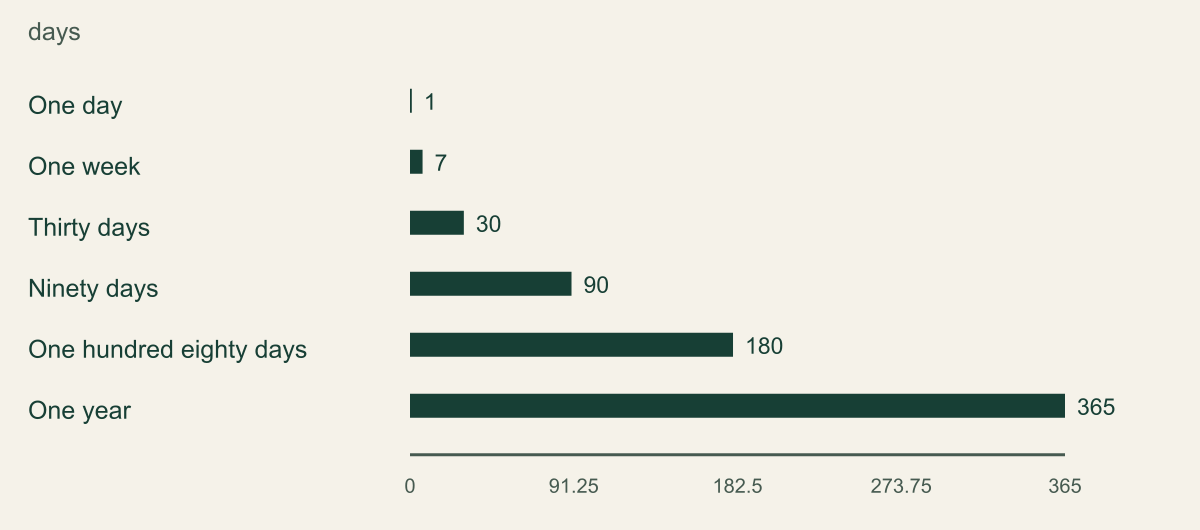
CloudWatch Logs accepts a documented set of retentionInDays values, not every integer a caller might choose. The API includes short periods such as 1 and 7 days, intermediate settings such as 30 and 90 days, and longer options extending to 3653 days. The chart shows six supported choices through one year so a reader can compare scale. It does not show usage frequency or suggest that those six options are recommended for every application. [2]
Never Expire is intentionally omitted from the numeric chart. Indefinite retention is not zero days, and plotting it as an arbitrary large number would misrepresent the setting. The service uses DeleteRetentionPolicy to remove the expiry policy. That name can be confusing: deleting a retention policy means removing the configured time limit, not deleting the log group or immediately deleting its events. Read the operation's purpose before treating its name as a cleanup command. [2]
Choose the period by working backward from the log's purpose. If a team discovers a problem only during a monthly reconciliation, it needs enough history to cover the relevant records and investigation, not merely the days since the last deployment. This is a reasoning method, not a measured retention recommendation. Write down the actual schedule and the evidence the owner needs, then choose a supported setting that fits the requirement with an intentional margin.
Longer retention also means keeping potentially sensitive operational content longer. Inspect whether the producer writes user data, secrets, request bodies, or unnecessary identifiers before treating indefinite storage as harmless. The retention review should identify that issue for the application owner; it should not copy sensitive log samples into an unrestricted planning document. Reducing unnecessary collection and choosing an appropriate retention period are complementary decisions, each with its own implementation and verification.
Selected supported CloudWatch Logs retention periods
CloudWatch Logs offers fixed retention choices; Never Expire is a separate setting. These selected values show supported periods rather than every available choice.

Source. AWS documentation accessed September 12, 2026. [2]
Method. Values transcribed from cited AWS documentation. Labels are editorial; this is not measured tenant data. Scope: Six selected supported CloudWatch Logs retention values from one day through one year; longer supported settings and Never Expire omitted. Selection illustrates choices, not usage frequency.
Accessible table and figure data
| Supported setting | Days |
|---|---|
| One day | 1 |
| One week | 7 |
| Thirty days | 30 |
| Ninety days | 90 |
| One hundred eighty days | 180 |
| One year | 365 |
| Supported setting | Days |
|---|---|
| One day | 1 |
| One week | 7 |
| Thirty days | 30 |
| Ninety days | 90 |
| One hundred eighty days | 180 |
| One year | 365 |
Change one reviewed log group
Before shortening retention, determine whether older records need to be preserved elsewhere. A shorter period can make existing events eligible for deletion, so the change is more consequential than editing a display preference. If the owner needs an archive, complete and verify that transfer before relying on it. Do not assume that a planned export, an empty destination bucket, or a successful request submission means the required records have been preserved. [1][2]
In the CloudWatch console, open Logs, then Log groups, select the exact group, and edit its retention setting. Choose the reviewed duration and save it. AWS documents this operation in the log group guide. For infrastructure-managed groups, make the corresponding source change through the normal deployment process so the desired value survives future updates. Keep the change narrow enough that a reviewer can connect it to the named group and its owner. [1]
The AWS CLI operation put-retention-policy accepts a log group name and retention-in-days. Specify the Region and a profile that points to the intended account. A readable command targets one exact group rather than expanding a shell pattern into many mutations. The caller needs appropriate CloudWatch Logs permission. A permission denial should prompt a review of the authorized role, not a switch to an unrestricted credential just to make the command succeed. [4][7]
Record the previous value, new value, account, Region, and change time. If the previous setting was indefinite, write that explicitly. A blank field in a spreadsheet is easy to misread as missing evidence. For shorter retention, also record which records were intentionally allowed to expire and which preservation check was completed. That decision is the essential context if someone later asks why an old event can no longer be retrieved.
Check the setting and the data separately
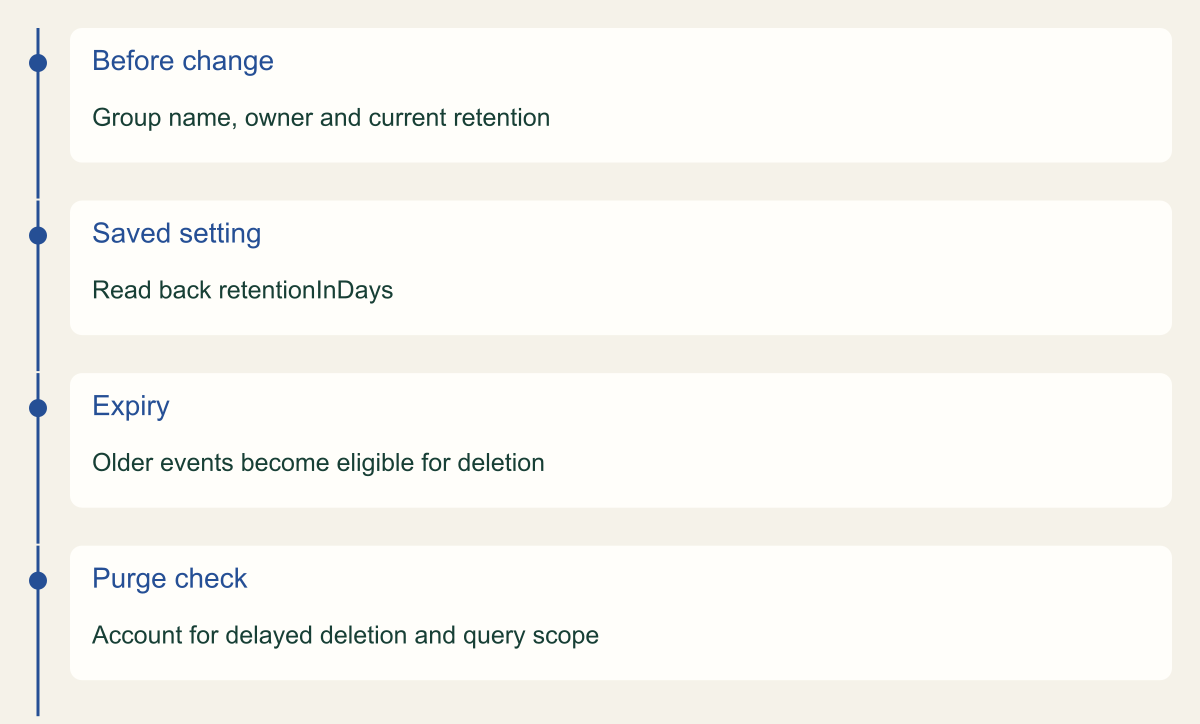
After the change, read the group's configuration again and compare retentionInDays with the approved value. Inspect the exact group name in the result. This proves that the configuration now reports the requested retention, subject to the scope and time of the observation. It does not prove that an application is still sending events or that every older event has already been physically deleted. Those require separate checks. [2][3]
Check recent ingestion through a known producer or a known event without exposing sensitive content. A retention change should not normally be used to modify the producer, but an empty log view can make an unrelated ingestion problem look like successful expiry. Confirm the relevant stream and query time range. If the application emits only on particular events, use its documented behavior rather than assuming that silence means collection is broken.
For a historical check, run an appropriately scoped Logs Insights query over the interval the owner needs. The query language supports fields, filtering, sorting, and limiting results. Prefer selecting timestamps and a safe identifier over displaying every message field. Save the query, time range, and result summary so another reviewer can understand the test. A query result only describes the selected groups, filters, permissions, and time window. [8]
If an older event cannot be found, investigate the obvious alternatives before claiming it was purged. The wrong Region, a narrow query, a changed log stream, insufficient permission, or a producer that never emitted the event can all produce an empty result. A retention verification should state what was checked and what remains uncertain. It is reasonable to confirm the setting while marking the data-deletion observation incomplete; those are different pieces of evidence.
fields @timestamp, @logStream
| sort @timestamp desc
| limit 20Verify retention as configuration and data behavior
Reading back the saved retention policy and investigating expired records are separate checks; an empty query alone does not prove purge completion.

Source. Conceptual synthesis of AWS documentation accessed September 12, 2026. [1] [2] [3]
Method. Conceptual editorial synthesis of the cited service behavior; no measured outcomes. Scope: What retention should a CloudWatch log group have and how do you verify the change?
Accessible table and figure data
| Stage | Evidence |
|---|---|
| Before change | Group name, owner and current retention |
| Saved setting | Read back retentionInDays |
| Expiry | Older events become eligible for deletion |
| Purge check | Account for delayed deletion and query scope |
| Stage | Evidence |
|---|---|
| Before change | Group name, owner and current retention |
| Saved setting | Read back retentionInDays |
| Expiry | Older events become eligible for deletion |
| Purge check | Account for delayed deletion and query scope |
Allow for asynchronous deletion
CloudWatch Logs does not immediately remove an event at the instant it reaches the retention limit. AWS says deletion typically takes up to 72 hours after expiry and can take longer in rare situations. Events marked for deletion no longer count toward archival storage charges or the storedBytes value. Those documented behaviors explain why a storage metric and a query observation should not be treated as interchangeable proof of the event's physical removal. [1][2]
The delay also makes repeated retention changes difficult to reason about. AWS describes how extending a setting while expired events have not yet been deleted can affect the timing of their eventual removal. If the goal is permanent deletion under a shorter policy, follow the documented guidance about leaving the lower setting in place through the relevant deletion interval or confirming removal. Do not bounce between short and long durations simply to make a console view match an expected result. [2]
Reversing a configuration change is not the same as recovering deleted events. If the group was changed from 90 days to 7 days and records were purged, setting it back to 90 days does not recreate those records. The numbers here are a hypothetical example using supported settings. A usable rollback plan therefore starts before shortening retention: identify what can be lost, preserve required evidence, and obtain the owner's decision about the remaining deletion.
Avoid promising an exact purge deadline based only on the typical delay. An organization that needs a formal deletion assurance should define what evidence it accepts and how exceptional delays are handled. That may require a broader data lifecycle review involving exports and downstream consumers. For an ordinary operational change, record the configured period, the documented asynchronous behavior, and the actual observations without inventing a stronger guarantee than the service documentation provides.
Preserve evidence that needs stronger protection
Retention determines when events expire under that policy. It does not automatically answer who can delete a log group, change the policy, or remove an exported copy. Review the permissions and any available deletion-protection controls separately. The current log group documentation includes protection from log-group deletion, but that should not be confused with a universal immutable-record guarantee. Read the specific protection's scope before relying on it for an investigation archive. [1][7]
If logs need to be kept in Amazon S3, use the documented export path and verify the destination's account, Region, permissions, and retention requirements. AWS notes that data can take up to 12 hours to become available for export, and export tasks can time out. These are operational constraints when preservation must finish before a retention reduction. An export request that has started is not yet a complete archive of the selected interval. [5]
Validate a completed export with a small retrieval check that proves the required time range and expected records are present. Preserve its job identifier and destination location under the normal evidence controls. Decide whether the destination needs stronger deletion protection or a separate administrative owner. The right arrangement depends on the threat and recovery requirements; simply moving logs into another bucket does not establish isolation from the people who control the original application.
For near-real-time consumers, examine the actual subscription or delivery path instead of treating periodic export as equivalent. AWS distinguishes export from real-time processing and Logs Insights analysis. Retention changes should account for those consumers' own storage and deletion behavior. A group can expire an event while a downstream analytics system keeps its copy, which matters both for investigation continuity and for a claim that data has been removed everywhere. [5]
Keep new groups from inheriting an accidental policy
Apply the chosen retention deliberately when creating future log groups. If the deployment framework creates a group automatically, make its retention an explicit part of the reviewed configuration when supported. A good source record identifies why the value was selected and which owner can change it. Copying a setting from another service without checking the new log's purpose can preserve the appearance of consistency while losing required evidence.
Periodically compare the desired configuration with the actual groups in the account and Region. Focus on missing owners, indefinite settings that were never reviewed, and groups whose consumers changed. Use an inventory to identify those questions, then resolve them through scoped changes. A bulk script that shortens every group's retention can remove useful records from unrelated applications and make it difficult to understand which operational need was considered.
Keep the final verification record compact. Include the exact group, before and after values, source configuration reference, preservation decision, read-back result, query scope, and any outstanding deletion check. If the group has an archive or downstream consumer, link to that system's retention decision. The reader of the record should be able to distinguish data that expired intentionally from evidence that is missing for an unexplained reason.
The maintenance trigger is a changed requirement, not simply the passage of time. Revisit retention when investigation schedules, application data, logging volume, support obligations, or archive arrangements change. The resulting policy should remain easy to explain: this group retains this history because these people need it for these tasks, and the team has checked that the configured and observable behavior matches that decision.
Method and provenance
Primary AWS documentation was retrieved and reviewed on September 12, 2026. The guide synthesizes documented service behavior into a bounded operational procedure; research records and figure data are maintained with the article.
Examples are hypothetical. Code and request shapes are checked locally where applicable, but no customer AWS account, production operation, recovery duration or benchmark was tested. Readers must verify their resource type, Region, permissions and organization controls.
AI assistance. AI assisted research organization, drafting and original visual planning. Sources, technical boundaries and final rendering are reviewed through the publication workflow.
Published under the Cloud Security Desk organizational byline. Read the practitioner guide policy.
References
- Working with log groups and log streams - Amazon CloudWatch Logs AWS. Accessed .
- PutRetentionPolicy - Amazon CloudWatch Logs AWS. Accessed .
- describe-log-groups - AWS CLI 2.36.44 Command Reference AWS. Accessed .
- put-retention-policy - AWS CLI 2.36.44 Command Reference AWS. Accessed .
- Exporting log data to Amazon S3 - Amazon CloudWatch Logs AWS. Accessed .
- Log classes - Amazon CloudWatch Logs AWS. Accessed .