
An implementation guide for detection engineers and SOC platform owners moving Microsoft Sentinel from the Azure portal to the Defender portal, built from Microsoft Learn pages checked on October 9, 2026. It inventories the incident, automation, API and detection changes that onboarding causes, flags where Microsoft's pages disagree, and gives a rehearsal plan, an automation inventory script and a cutover order.
At a glance
Key findings
- Microsoft's pages, checked on October 9, 2026, say Sentinel is unsupported in the Azure portal after March 31, 2027, but the behavioral changes arrive when a workspace is onboarded, not on that date. [1][2][3]
- After onboarding, every incident reports
Microsoft XDRas its provider,SecurityIncidentloses Description, alerts from alert-only rules are hidden, Fusion is disabled and automation rules can run up to 10 minutes late, with updates inside 5 to 10 minutes collapsed into one. [3] - Microsoft's pages disagree on whether analytics rule alerts are correlated by default; the correlation settings page says the tenant default starts off and documents the
#DONT_CORR#and#INC_CORR#tags. [3][7][15] - Custom detections cannot yet trigger Sentinel automation rules, and over Defender XDR data their lookback is fixed at four run intervals for hourly to 12-hourly rules and 30 days for daily rules. [14][15]
- The primary workspace is a tenant-wide choice that carries the Defender XDR connector with it, which limits how a nonproduction rehearsal can be built. [5]
What the March 31, 2027 date changes
Microsoft's current documentation gives one date: after March 31, 2027, Microsoft Sentinel is no longer supported in the Azure portal, and anyone still using it there is redirected to the Defender portal. A January 2026 entry on Sentinel's what's-new page moved the date from July 2026, the date announced in a July 2025 entry that is still on the same page. On October 9, 2026, the same March 31, 2027 wording appeared on the Defender portal overview and on the playbook migration page. The pages describe the redirect for users; they do not describe what happens to a workspace that was never connected, so plan to connect yours deliberately before then. [1][2][12]
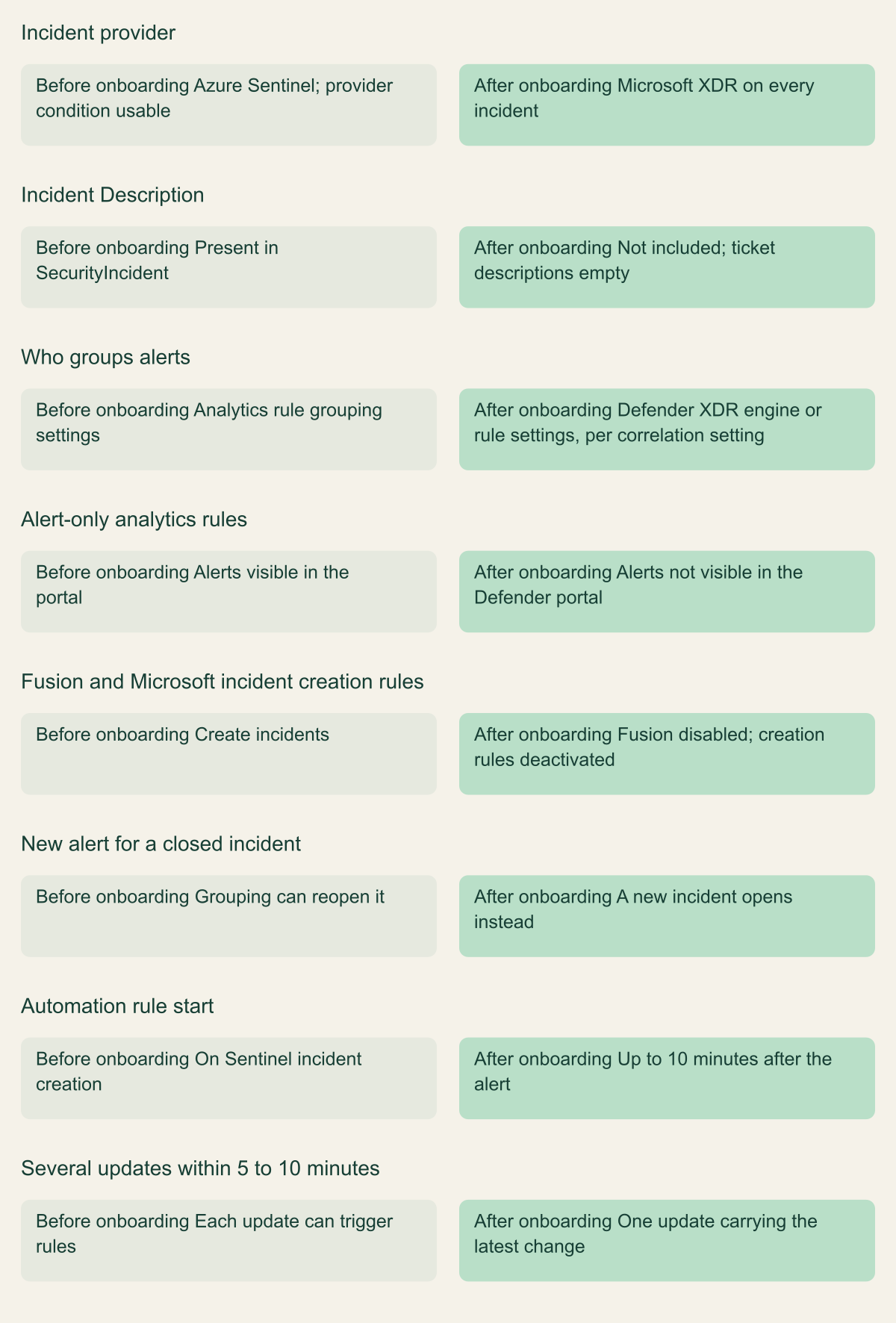
The date is not when behavior changes. Behavior changes when a workspace is connected to the Defender portal, whether that happens next week or under the pressure of the redirect. From that moment the Defender XDR engine creates incidents, every incident reports Microsoft XDR as its provider, the SecurityIncident table stops carrying a Description, analytics rules that create alerts without incidents drop out of view, the Fusion rule is disabled and Microsoft incident creation rules are deactivated. Automation rules can start up to 10 minutes after the alert fires, and several updates to one incident within 5 to 10 minutes reach Sentinel as one. Microsoft's pages describe no error or warning for any of these changes. [3]
The work is therefore an inventory and a rehearsal, in order of risk. Find every automation rule, playbook and integration that reads one of those fields or behaviors. Fix the conditions that break in either portal while you are still in the Azure portal. Decide how incidents will be grouped and which workspace is primary. Rehearse onboarding on a path that cannot move production, measure the differences, then onboard. Rewriting analytics rules as custom detections comes last and only where it pays.
What stays in the workspace and what moves
Most of the SIEM stays where it is. Log data remains in the Log Analytics workspace, non-Microsoft connectors keep running, and analytics rules keep their wizard, repository and API management. Azure RBAC still governs Sentinel access, and role changes made in Azure are reflected in the Defender portal. What changes underneath is policy and encryption: data handled in the Defender portal falls under Defender XDR's storage, retention and sharing policies, and in a workspace with customer-managed keys, logs, analytics rules and automation rules stay CMK-encrypted while alerts and incidents no longer are. [3][4]
Microsoft's own alerts take a new route. After onboarding with Defender XDR, alerts from Microsoft security products arrive through the Defender XDR connector instead of the standalone product connectors, and the schema shifts with the route. For a Defender for Identity alert, CompromisedEntity becomes the literal string CompromisedEntity. Defender for Endpoint's category moves from ExtendedProperties.MicrosoftDefenderAtp.Category to ExtendedProperties.Category, Defender for Office 365's ExtendedProperties.Status uses a different value set, Defender for Cloud informational alerts are not ingested, and Entra ID alerts below High severity are left out unless ingestion is set to include all severities. Analytics rules and workbooks that query SecurityAlert for these products need a pass against the new shape. [6]
Multiple workspaces turn onboarding into a tenant-wide decision. A tenant has exactly one primary workspace in the Defender portal. Only its alerts are correlated with Defender XDR data, the Defender XDR connector attaches to it alone, and custom detections can be created only there. Any other workspace previously connected to the Defender XDR connector becomes secondary and loses it, and analytics rules and automation built on that data stop working until table ingestion is configured. Standalone connectors for Defender for Office 365, Entra ID Protection, Defender for Cloud Apps, Defender for Endpoint and Defender for Identity are disconnected in secondary workspaces during onboarding. [5]
Onboarding also writes to Azure RBAC. Microsoft assigns the Microsoft Sentinel Contributor role to the Microsoft Threat Protection and WindowsDefenderATP apps in the subscription, so a team that alerts on role-assignment changes should expect those events on onboarding day and record them as planned. Workspace Manager is not available in the Defender portal; Microsoft points to repositories and the multitenant portal for distributing content across workspaces. Retention changes model as well: for an existing customer not yet on the Sentinel data lake, Microsoft says total retention moves from archive-based retention to data lake retention after onboarding, with the lake tier enabled per table from Table management. [2][3]
Incident grouping, merging and titles
The largest behavioral change is who builds incidents, and Microsoft's pages do not agree on the default. The transition guide says the Defender XDR correlation engine fully controls alert grouping and incident merging, so separate analytics rules that each create one incident per alert can end up in a merged incident. The correlation settings page, updated August 11, 2026, says that on first onboarding all analytics rules are excluded from correlation at tenant level, because the Incident correlation default setting starts off, and that excluded rules group alerts only by their own grouping configuration, as in Sentinel. The feature comparison page, updated October 4, 2026, still lists excluding incidents from the correlation engine as planned. [3][7][15]
This guide follows the correlation settings page, because it documents a specific control, its location and its default, while the other two summarize. The tenant switch is at System > Settings > Microsoft Defender XDR > Rules > Incident correlation, and per-rule overrides are tags at the start of the analytics rule's Description: #DONT_CORR# excludes a rule and #INC_CORR# includes it. The tag is the state, so removing it changes the rule's correlation, and a change applies only to alerts created afterward. Read the switch in the rehearsal environment right after onboarding and test both states, since the documented default is exactly the kind of detail that changes between page revisions. [7]
Where correlation applies, merges change incident identity. A merge closes the source incident, moves its alerts and tags to the target, adds a Redirected tag to the source and adds the source's analytics rules to the target's list; the closed source stays visible in the Azure portal. Defender does not merge when one incident is closed, when the two have different owners, or when their classifications differ. It follows that an integration keyed on incident ID needs explicit handling for incidents closed by a merge, which a status check alone reads as resolved. [8]
Several familiar behaviors stop. Alerts from analytics rules set to create alerts without incidents are not visible in the Defender portal. The Fusion rule is disabled and Defender XDR correlation takes over its job. Active Microsoft incident creation rules are deactivated; the onboarding dialog offers Retain Sentinel incident creation behavior for XDR alerts, which converts them to Defender alert grouping rules once and does not sync later edits. Alert grouping can no longer reopen a closed incident, so new alerts open new incidents. Incidents created through the API, by a Logic Apps playbook or by hand in the Azure portal are not synced to the Defender portal. And even with correlation excluded, a rule with a dynamic title can get a different incident title, because Defender falls back to the alerts' common MITRE tactic where Sentinel used the first alert's title. [3][7][9]
What onboarding changes for incidents and automation
The changes happen at onboarding and raise no documented errors; each row is something an automation rule or integration may depend on. [3][7]

Source. Documented behavior from Microsoft Learn transition, correlation settings and automation pages, checked October 9, 2026. [3][7][10]
Method. Paraphrased from the cited pages; where Microsoft's pages disagree on alert grouping, the row reflects the correlation settings page. No workspace was onboarded or observed.
Accessible table and figure data
| Behavior | Before onboarding | After onboarding |
|---|---|---|
| Incident provider | Azure Sentinel; provider condition usable | Microsoft XDR on every incident |
| Incident Description | Present in SecurityIncident | Not included; ticket descriptions empty |
| Who groups alerts | Analytics rule grouping settings | Defender XDR engine or rule settings, per correlation setting |
| Alert-only analytics rules | Alerts visible in the portal | Alerts not visible in the Defender portal |
| Fusion and Microsoft incident creation rules | Create incidents | Fusion disabled; creation rules deactivated |
| New alert for a closed incident | Grouping can reopen it | A new incident opens instead |
| Automation rule start | On Sentinel incident creation | Up to 10 minutes after the alert |
| Several updates within 5 to 10 minutes | Each update can trigger rules | One update carrying the latest change |
| Behavior | Before onboarding | After onboarding |
|---|---|---|
| Incident provider | Azure Sentinel; provider condition usable | Microsoft XDR on every incident |
| Incident Description | Present in SecurityIncident | Not included; ticket descriptions empty |
| Who groups alerts | Analytics rule grouping settings | Defender XDR engine or rule settings, per correlation setting |
| Alert-only analytics rules | Alerts visible in the portal | Alerts not visible in the Defender portal |
| Fusion and Microsoft incident creation rules | Create incidents | Fusion disabled; creation rules deactivated |
| New alert for a closed incident | Grouping can reopen it | A new incident opens instead |
| Automation rule start | On Sentinel incident creation | Up to 10 minutes after the alert |
| Several updates within 5 to 10 minutes | Each update can trigger rules | One update carrying the latest change |
Automation rules and playbooks
Automation rules survive onboarding, but some of their conditions change meaning without warning. The Incident provider condition is removed in both portals because every incident now carries Microsoft XDR in ProviderName, so a rule that was limited to Sentinel incidents starts running on Defender XDR incidents as well. Microsoft's suggested scope is the Analytic rule name condition, which matches only incidents containing alerts from the named rule. Conditions on Description stop working because the field is gone from SecurityIncident, and conditions on incident titles become unreliable once correlation renames incidents; Microsoft recommends analytics rule names and tags instead. In the Updated by condition, the value Microsoft 365 Defender is replaced by Other. [3][10]
Triggers narrow as well. In the Defender portal, the When incident is created trigger fires when the Defender portal creates an incident, and alert-trigger rules act only on Sentinel alerts from Scheduled, NRT and Microsoft security analytics rules. For Defender XDR alerts Microsoft offers the Enhanced Alert Trigger, which works at tenant level but can only run generated playbooks or update alerts, has no ordering or expiration, allows one action per rule, does not write runs to SentinelHealth and has no automatic migration from standard alert-trigger rules. A reasonable reading is that existing Logic Apps playbooks still depend on incident triggers or Sentinel alert triggers. [10][11]
Microsoft documents the timing changes as upper bounds. Defender incidents can take up to 5 minutes to appear in Sentinel, delaying any playbook they trigger, and an automation rule can run up to 10 minutes after the alert, because the incident is created in Defender and then forwarded to Sentinel. The batching window is harder on sequential workflows: when an incident changes several times within 5 to 10 minutes, Sentinel receives one update with only the latest change. A playbook that reacts to severity raised, then owner assigned, then status changed may see only the final state. [3]
Some actions disappear outright. Running a playbook on demand against an alert or an entity is not supported in the Defender portal, playbooks can no longer add alerts to incidents or remove them, a playbook started on an incident that has not synced yet shows a message that it cannot access data related to the action until the sync completes, and in the Defender portal automation rules must be built from the Automation page rather than directly from an incident. Two 2026 changes land on the same rules. Microsoft scheduled the deprecation of playbooks invoked directly from analytics rules for March 2026; the migration page, last updated August 8, 2026, still does not say whether existing classic attachments have stopped, so move them to automation rules rather than find out. And Microsoft set July 1, 2026 as the deadline for automation that compares Account Name with a full UPN, because when an analytics rule maps a full UPN to Account Name, the value is now always the UPN prefix, with the suffix in a new UPNSuffix field. [2][3][12]
The script below is a starting inventory. It reads automation rules through the Sentinel REST API and prints those with alert triggers or with conditions on the properties that change meaning: IncidentDescription, IncidentTitle, IncidentProviderName, IncidentUpdatedBySource and AccountName. Playbooks that read the same fields inside Logic Apps need a separate review of each workflow definition. [13]
#!/usr/bin/env bash
# Example fragment: list automation rules in one workspace that use alert
# triggers or read properties whose meaning changes after Defender portal
# onboarding. Read-only. Replace the placeholder identifiers.
set -euo pipefail
SUB="00000000-0000-0000-0000-000000000000"
RG="example-rg"
WS="example-workspace"
URL="https://management.azure.com/subscriptions/${SUB}/resourceGroups/${RG}/providers/Microsoft.OperationalInsights/workspaces/${WS}/providers/Microsoft.SecurityInsights/automationRules?api-version=2025-09-01"

az rest --method get --url "$URL" | jq -r '
  .value[]
  | .properties as $p
  | ([$p.triggeringLogic.conditions[]? | .. | objects | .propertyName? // empty] | unique) as $props
  | select($p.triggeringLogic.triggersOn == "Alerts"
      or ($props | any(. == "IncidentDescription" or . == "IncidentTitle"
                       or . == "IncidentProviderName" or . == "IncidentUpdatedBySource"
                       or . == "AccountName")))
  | [$p.displayName, $p.triggeringLogic.triggersOn, $p.triggeringLogic.triggersWhen,
     ($p.triggeringLogic.isEnabled | tostring), ($props | join(","))]
  | @tsv'
When to rewrite an analytics rule as a custom detection
Onboarding does not require rewriting analytics rules; Microsoft says their functionality stays the same in the Defender portal. It does steer new work toward custom detections, and recommends them for use cases that combine Sentinel and Defender XDR data when the Defender XDR data does not need to be kept longer than 30 days, because such a rule can query both without ingesting Defender XDR data into Sentinel. [3][15]
Microsoft's feature comparison is the decision table, and for an automation-heavy SOC it argues for waiting. As of October 4, 2026, it lists Sentinel automation rules with incident triggers and with alert triggers as planned for custom detections, along with SentinelHealth rule health, reruns over a past window, creation on any onboarded workspace and cross-workspace queries. Custom detections do not support alerts without incidents, post-run alert suppression or custom alert grouping. In return they offer Defender XDR tables, streaming NRT that is not sensitive to ingestion delay, native Defender remediation actions and on-demand runs. Microsoft also lists custom detections among the capabilities that are limited or unavailable when Sentinel runs in the Defender portal without other Defender services. [1][15]
A working rule follows from that table, as an inference rather than Microsoft guidance: keep a detection as an analytics rule while any automation rule, playbook or suppression depends on it, or while it lives outside the primary workspace, and rewrite it when it needs Defender XDR tables, device or user remediation, or streaming evaluation. Rules with no downstream automation are the low-risk first candidates.
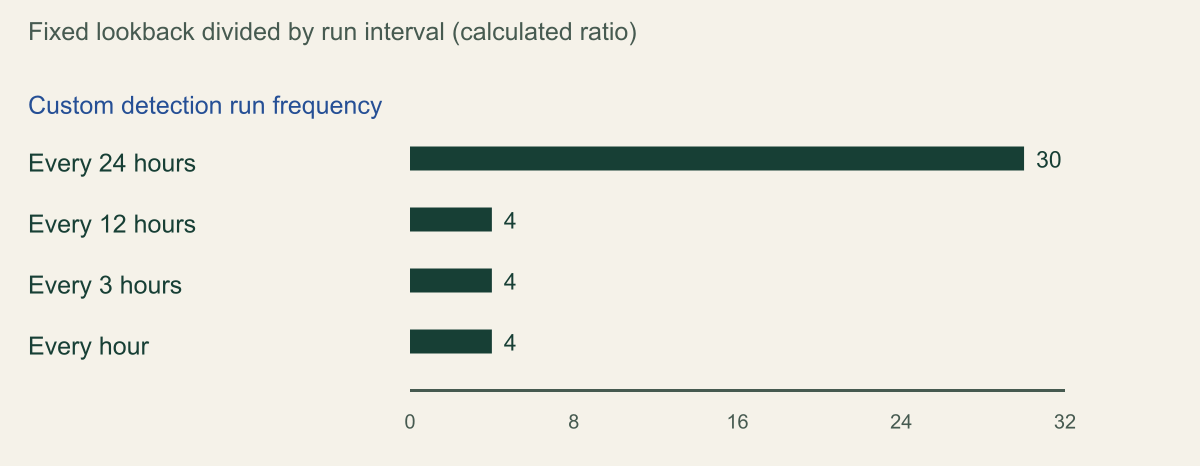
The timing model is what changes detection logic. When a custom detection includes Defender XDR data, the lookback is fixed by frequency: 30 days for a daily rule, 48 hours for a 12-hour rule, 12 hours for a 3-hour rule and 4 hours for an hourly rule. Rules on Sentinel data alone can use a custom frequency from 5 minutes to 14 days, with a configurable lookback that the comparison page still marks as public preview. Every new rule also runs on save against the past 30 days, and duplicates from overlapping lookbacks are grouped into one alert when entities and details match. [14][15]
Threshold rules are where a direct rewrite goes wrong. In a hypothetical analytics rule that fires on more than 10 failed sign-ins per user in one hour, an hourly custom detection over Defender data counts across four hours, so the same threshold is reached by slower activity than the rule was designed for. Keep the threshold's window explicit with the query's own time filter, which Microsoft permits when a rule must evaluate a specific part of the lookback, and expect a burst of alerts from the 30-day first run while both versions are live. Custom detections evaluate ingestion_time() and can include events whose timestamps predate the lookback, so late data needs its own check. [14]
Two documentation conflicts deserve a test rather than a decision. The custom detection page lists Sentinel tables such as AWSCloudTrail, SigninLogs and SecurityEvent as supporting Continuous (NRT) frequency, while the advanced hunting known issues still say NRT is unavailable for detections that include Sentinel data and that custom functions saved in Sentinel are not supported. The same known-issues list warns that a time range defined inside a function is overridden by the time range set in the custom detection interface, which matters for any analytics rule built on a parser. [14][16]
Custom detections on Defender data read four run intervals, or 30 for daily rules
An hourly custom detection over Defender XDR data evaluates four hours each run, so threshold rules need their own time filter. [14]

Source. Calculated from the fixed lookback periods in Microsoft's Create custom detection rules page (Lookback section), checked October 9, 2026. Applies to rules that include Defender XDR data. [14]
Method. Lookback in run intervals = fixed lookback hours / run interval hours (720/24 = 30; 48/12 = 4; 12/3 = 4; 4/1 = 4), with 30 days taken as 720 hours. Excludes Continuous (NRT) and custom frequencies, which apply to other cases.
Accessible table and figure data
| Run frequency | Run interval (hours) | Fixed lookback (hours) | Lookback in run intervals |
|---|---|---|---|
| Every 24 hours | 24 | 720 | 30 |
| Every 12 hours | 12 | 48 | 4 |
| Every 3 hours | 3 | 12 | 4 |
| Every hour | 1 | 4 | 4 |
| Run frequency | Run interval (hours) | Fixed lookback (hours) | Lookback in run intervals |
|---|---|---|---|
| Every 24 hours | 24 | 720 | 30 |
| Every 12 hours | 12 | 48 | 4 |
| Every 3 hours | 3 | 12 | 4 |
| Every hour | 1 | 4 | 4 |
APIs, ticket sync and content as code
Integrations that read incidents through the Sentinel SecurityInsights API keep working against Sentinel resources, but the response body changes. providerName becomes Microsoft XDR instead of Azure Sentinel. A new providerIncidentUrl links directly to the incident for ticket sync, while incidentUrl still points at the Sentinel portal, and new fields serviceSource, detectionSource and productName identify the product and sensor behind an alert. For unified incidents and alerts Microsoft recommends the Microsoft Graph REST API v1.0, where alertProductNames requires ?$expand=alerts on the incident request. [3]
Ticketing is the integration most likely to degrade without failing. Microsoft names ServiceNow as an example where the incident description goes missing after onboarding, and merges close incidents that an open ticket may still reference. Before onboarding, list every field the connector maps from Sentinel incidents, decide where description content will come from instead, and add handling for the Redirected tag. [3][8]
Content-as-code pipelines carry their own dates. Older API versions used by Sentinel repositories stopped being supported in June 2026; Microsoft's entry gives both June 1 and June 15, and recommends 2025-09-01, 2025-06-01 or 2025-07-01-preview. Since July 2026, custom detection rules can be managed in repositories through the Microsoft Security Bicep extension, in preview. One more inference from the correlation settings page: because a rule's correlation state lives in a tag at the start of its Description, a pipeline that deploys analytics rules must carry #DONT_CORR# or #INC_CORR# in the source description, or the next deployment changes the rule's correlation state. [2][7]
Rehearse onboarding without moving production
Microsoft's advice for the 2026 account-naming change is to test in a nonproduction workspace first, and onboarding deserves the same treatment. The constraint is the primary workspace. Because a tenant has one primary and the Defender XDR connector follows it, a reasonable reading of the multi-workspace page is that onboarding a test workspace in the production tenant as primary would take the connector away from a production workspace that had it. [2][5]
That leaves three rehearsal paths, each with a cost. A separate test tenant rehearses primary-workspace behavior faithfully but needs Defender licensing and representative data, and Microsoft notes that many customers who start with Sentinel after July 1, 2025 are onboarded to the Defender portal automatically, so a new tenant may never show the Azure portal baseline. Onboarding production as primary with test workspaces as secondaries protects the connector, but secondaries are not correlated with Defender XDR, so they cannot rehearse merges. The third path is to onboard production directly with an observation window and a rollback plan; offboarding is supported, but it also disconnects the Defender XDR connector, which then has to be reconnected. [4][5]
Whichever path you choose, capture a baseline before onboarding: incidents per analytics rule, their titles, automation rule runs, playbook outcomes and the fields the ticketing tool receives. Run the same detections afterward and compare. The query after the test cases measures the gap between incident creation and each automation rule run, which Microsoft documents as up to 10 minutes after onboarding. These are the cases to exercise. [3]
- An automation rule with a Description condition, plus a ticket that maps Description: expect no match and an empty field. [3]
- A rule that was scoped by incident provider: confirm whether it now runs on Defender XDR incidents. [3]
- Three updates to one incident inside five minutes: record which updates trigger automation. [3]
- An alert-only analytics rule with an alert-trigger playbook: confirm the playbook still runs although the alert is not visible. [3][10]
- Two rules that share an entity, with correlation on and off: record merges, titles and the Redirected tag. [7][8]
- A closed incident that receives a matching alert: expect a new incident instead of a reopen. [3]
- An incident created by a playbook or the API: confirm it is absent from the Defender queue. [3]
- An Account Name condition written against a full UPN: expect no match until it uses the prefix and
UPNSuffix. [2]
// Example KQL fragment: minutes from incident creation to each automation rule run.
let lookback = 14d;
let incidents = SecurityIncident
    | where TimeGenerated > ago(lookback)
    | summarize arg_min(TimeGenerated, CreatedTime, ProviderName, Title) by IncidentNumber;
SentinelHealth
| where TimeGenerated > ago(lookback)
| where SentinelResourceType == "Automation rule" and OperationName == "Automation rule run"
| extend IncidentNumber = toint(ExtendedProperties.IncidentNumber),
         TriggeredWhen = tostring(ExtendedProperties.TriggeredWhen)
| where TriggeredWhen == "Created"
| join kind=inner incidents on IncidentNumber
| extend LagMinutes = datetime_diff('second', TimeGenerated, CreatedTime) / 60.0
| summarize Runs = count(), P50 = percentile(LagMinutes, 50),
            P95 = percentile(LagMinutes, 95), Worst = max(LagMinutes)
    by AutomationRule = SentinelResourceName, ProviderName, Status
Order of the cutover
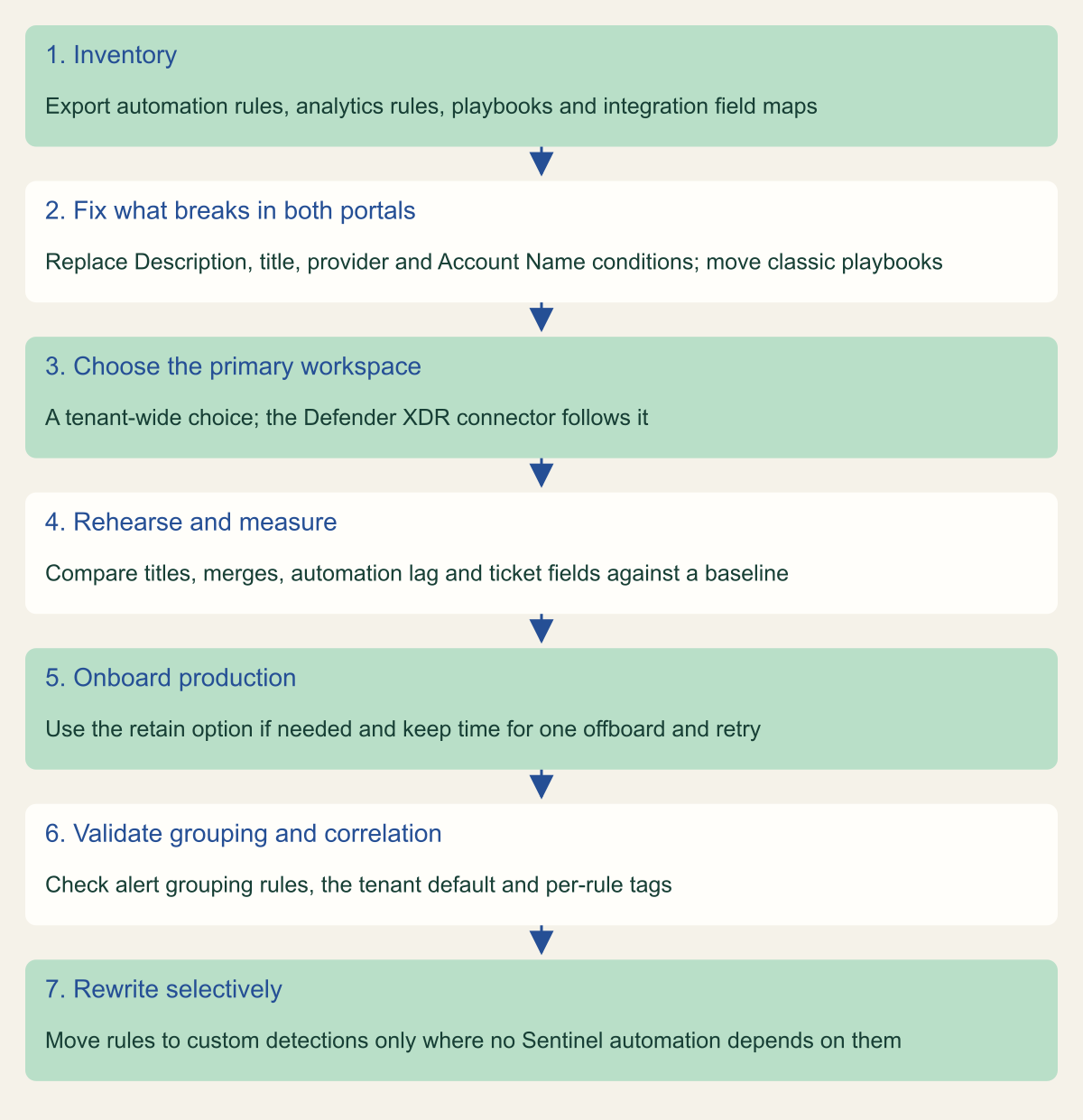
Fix first what breaks in both portals, because those changes are safe to make while the workspace is still in the Azure portal: replace Description, title and provider conditions with analytics rule names and tags, move classic playbook attachments to automation rules and rewrite Account Name equality checks. Then choose the primary workspace, rehearse, and onboard production, using the retain option if Microsoft incident creation rules matter and validating the alert grouping rules it creates. Set the correlation default and per-rule tags once you have seen merges in the rehearsal. Rewrite analytics rules as custom detections last, one at a time. [3][7][9][12]
Stop at three points. After the inventory, if an integration depends on Description or on alert-only rules being visible, solve that before onboarding. After the rehearsal, if the measured automation lag or the batching window breaks a response commitment, redesign the workflow before going further. After production onboarding, if merges or new titles break routing, exclude the affected rules with #DONT_CORR# while the automation is adapted. Plan the production onboarding early enough that one offboard and retry still fits before March 31, 2027. [4][7]
This order assumes the documentation as checked on October 9, 2026. Three items are moving: the correlation default, NRT support for Sentinel data in custom detections, and Sentinel automation rule triggers for custom detections. Recheck the comparison and correlation pages before each phase; once custom detections can trigger Sentinel automation rules, the case for keeping analytics rules weakens considerably. [7][15]
Cutover order from inventory to selective rewrites
Fix what breaks in both portals first, rehearse before production, and rewrite detections last. [3][5][7][15]

Source. Conceptual order of operations based on Microsoft Learn transition, multi-workspace, correlation settings and feature comparison pages, checked October 9, 2026. [3][5][7][15]
Method. Conceptual sequence; the ordering is an editorial recommendation derived from the cited documentation, not a Microsoft procedure.
Accessible table and figure data
| Step | What to do |
|---|---|
| 1. Inventory | Export automation rules, analytics rules, playbooks and integration field maps |
| 2. Fix what breaks in both portals | Replace Description, title, provider and Account Name conditions; move classic playbooks |
| 3. Choose the primary workspace | A tenant-wide choice; the Defender XDR connector follows it |
| 4. Rehearse and measure | Compare titles, merges, automation lag and ticket fields against a baseline |
| 5. Onboard production | Use the retain option if needed and keep time for one offboard and retry |
| 6. Validate grouping and correlation | Check alert grouping rules, the tenant default and per-rule tags |
| 7. Rewrite selectively | Move rules to custom detections only where no Sentinel automation depends on them |
| Step | What to do |
|---|---|
| 1. Inventory | Export automation rules, analytics rules, playbooks and integration field maps |
| 2. Fix what breaks in both portals | Replace Description, title, provider and Account Name conditions; move classic playbooks |
| 3. Choose the primary workspace | A tenant-wide choice; the Defender XDR connector follows it |
| 4. Rehearse and measure | Compare titles, merges, automation lag and ticket fields against a baseline |
| 5. Onboard production | Use the retain option if needed and keep time for one offboard and retry |
| 6. Validate grouping and correlation | Check alert grouping rules, the tenant default and per-rule tags |
| 7. Rewrite selectively | Move rules to custom detections only where no Sentinel automation depends on them |
Method and provenance
Source-led analysis of Microsoft Learn documentation for Microsoft Sentinel, Microsoft Defender XDR and the Sentinel REST API. Every behavior and date, including the March 31, 2027 Azure portal date, was checked against the current pages on October 9, 2026.
No Sentinel workspace, Defender tenant, automation rule or playbook was configured, onboarded or observed. Behavior is bounded to Microsoft's documentation as of October 9, 2026, which changes often and in places disagrees with itself; the jq filter was checked only against a synthetic response and the KQL query was not run.
AI assistance. AI assisted research synthesis, drafting, figure planning and visual production, with deterministic editorial checks. No personal deployment experience, independent human review or live test is claimed.
Published under the Cloud Security Desk organizational byline. Read the practitioner guide policy.
References
- Microsoft Sentinel in the Microsoft Defender portal Microsoft. Published . Accessed .
- What's new in Microsoft Sentinel Microsoft. Published . Accessed .
- Transition your Microsoft Sentinel environment to the Defender portal Microsoft. Published . Accessed .
- Connect Microsoft Sentinel to the Microsoft Defender portal Microsoft. Published . Accessed .
- Multiple Microsoft Sentinel workspaces in the Defender portal Microsoft. Published . Accessed .
- Alert schema differences: Standalone vs. Microsoft Defender XDR connector Microsoft. Published . Accessed .
- Manage analytics rule correlation settings in Microsoft Defender XDR Microsoft. Published . Accessed .
- Alert correlation and incident merging in the Microsoft Defender portal Microsoft. Published . Accessed .
- Migrate Microsoft Sentinel incident creation rules to alert grouping rules Microsoft. Published . Accessed .
- Automate threat response in Microsoft Sentinel with automation rules Microsoft. Accessed .
- Generate playbooks using AI in Microsoft Sentinel Microsoft. Published . Accessed .
- Migrate your Microsoft Sentinel alert-trigger playbooks to automation rules Microsoft. Published . Accessed .
- Automation Rules - List (Microsoft Sentinel REST API 2025-09-01) Microsoft. Accessed .
- Create custom detection rules in Microsoft Defender XDR Microsoft. Published . Accessed .
- Feature comparison: Microsoft Sentinel analytics rules and Microsoft Defender custom detections Microsoft. Published . Accessed .
- Advanced hunting with Microsoft Sentinel data in Microsoft Defender portal Microsoft. Published . Accessed .