
An investigation playbook for detection engineers and SaaS administrators, built from primary reports on the Salesloft Drift, Gainsight and Klue integration breaches and Salesforce, Google and Microsoft documentation reviewed in October 2026. It covers grant inventory, containment that ends sessions, Salesforce evidence by license, query reconstruction, secrets in records and the conditions for reconnecting.
At a glance
Key findings
- In all three waves the stolen tokens were revoked platform-wide only after activity that began on August 8, 2025 (Salesloft Drift), October 23, 2025 (Gainsight) and June 11, 2026 (Klue), so the evidence window starts at the advisory's first indicator, not at the notice. [2][3][9]
- A Salesforce connected app's default refresh token policy is valid until revoked, and changing the policy does not end a session already issued; blocking the app ends current sessions and prevents new ones. [6][11]
- Query-level Salesforce evidence, such as ApiEvent and the REST API event log, needs Shield or the Event Monitoring add-on, while Login History and the Login and API Total Usage event logs come without extra cost. [18][19][20]
- GTIG assessed that the Drift actor's main aim was harvesting credentials from exported records, including AWS keys beginning with AKIA and Snowflake tokens, which makes a secrets search of the queried objects part of scoping. [2]
- Microsoft documents that refresh tokens issued to confidential clients survive a user's own password change or self-service reset, and Google lists a password change as ending a refresh token only when it carries Gmail scopes. [15][16]
The reach of a stolen integration token
When a vendor reports that the OAuth tokens it stores for your SaaS tenants were stolen, assume the thief held the integration's full delegated access and could use it from its own infrastructure until the tokens were revoked. The FBI described the mechanism in its FLASH of September 12, 2025, writing about malicious connected apps: access through an authorized app gets past MFA, password resets and login monitoring, and because Salesforce issued the tokens itself, the traffic resembles a trusted integration [1]. The FLASH does not say this about a legitimate integration whose tokens were copied, but nothing in the mechanism differs.
The response therefore has three jobs that the vendor's notice cannot do for you. Establish from your own tenant's logs what the tokens did, keyed to the integration's app and user. Revoke at every authorization server where the vendor held a grant, and end the sessions those grants had already opened. Then treat every record the tokens could read as a possible credential leak, because in at least one campaign the records were the means rather than the end.
Each of the three integration waves between August 2025 and June 2026 makes one of those jobs concrete. In the Salesloft Drift campaign, Google Threat Intelligence Group (GTIG) assessed that the actor's main aim was harvesting credentials, and saw it search the exported Salesforce data for AWS access key IDs beginning with AKIA, passwords and Snowflake tokens [2]. In the Gainsight case, Salesforce told customers that revoking the app's tokens had not deleted their Setup Audit Trail, Event Monitoring or API activity records, and asked for a full log review covering October and November 2025 rather than a match against indicators alone [3]. In the Klue case, Huntress, itself an affected customer, warned that revoking the integration may not be enough when credentials were harvested and advised revoking active sessions on the affected services [4].
Why the exposure is broad comes down to what a refresh token is. RFC 9700, the IETF's OAuth security guidance published as BCP 240 in January 2025, calls refresh tokens attractive targets because they carry the full scope granted to a client and are not limited to one resource server, so a replayed refresh token lets an attacker mint new access tokens [5]. A Salesforce connected app's default refresh token policy is valid until revoked [6], so in the common configuration time alone does not close the exposure.
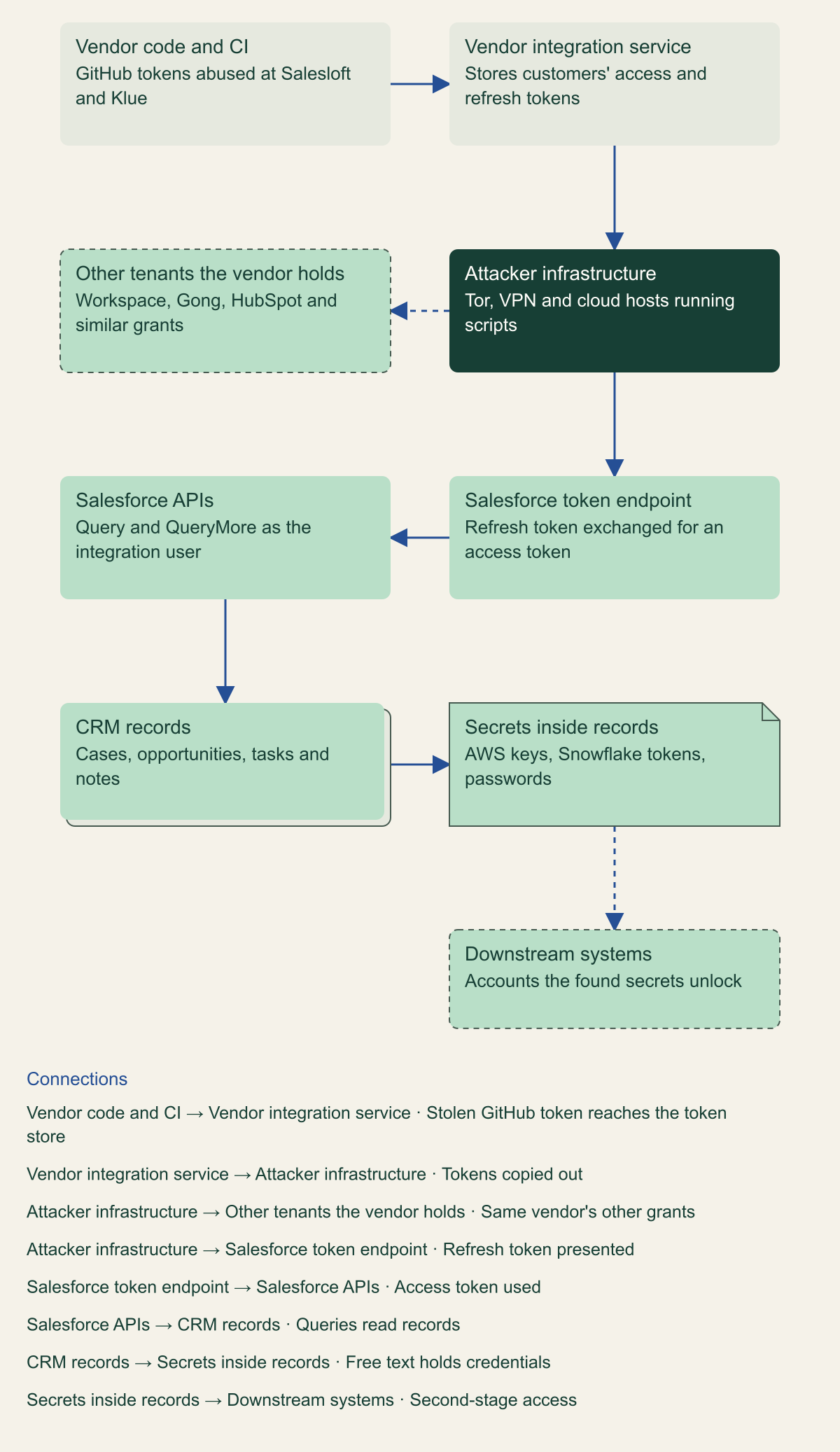
The diagram follows one token from the vendor's systems to your records and on to whatever those records unlock. Each hop leaves evidence somewhere different. The vendor's code and token store are the vendor's to fix; the token endpoint and the APIs are yours to log and close; and a secret found in a record leads to systems that neither the vendor nor Salesforce controls.
A stolen integration token travels from the vendor's store to your records and beyond
Each hop leaves evidence in a different system, and only the middle hops are yours to log and close. [7][9][2]

Source. Conceptual diagram based on the Salesloft and Mandiant, GTIG, Klue and CrowdStrike, and Salesforce accounts of the three incidents, reviewed October 9, 2026. [7][2][9][3]
Method. Conceptual. Nodes and edges summarize the documented attack paths; not every wave used every hop, and the Drift Email path into Google Workspace stands for the vendor's other grants.
Accessible table and figure data
| Component | Role in the token path |
|---|---|
| Vendor code and CI | GitHub tokens abused at Salesloft and Klue |
| Vendor integration service | Stores customers' access and refresh tokens |
| Attacker infrastructure | Tor, VPN and cloud hosts running scripts |
| Other tenants the vendor holds | Workspace, Gong, HubSpot and similar grants |
| Salesforce token endpoint | Refresh token exchanged for an access token |
| Salesforce APIs | Query and QueryMore as the integration user |
| CRM records | Cases, opportunities, tasks and notes |
| Secrets inside records | AWS keys, Snowflake tokens, passwords |
| Downstream systems | Accounts the found secrets unlock |
| Component | Role in the token path |
|---|---|
| Vendor code and CI | GitHub tokens abused at Salesloft and Klue |
| Vendor integration service | Stores customers' access and refresh tokens |
| Attacker infrastructure | Tor, VPN and cloud hosts running scripts |
| Other tenants the vendor holds | Workspace, Gong, HubSpot and similar grants |
| Salesforce token endpoint | Refresh token exchanged for an access token |
| Salesforce APIs | Query and QueryMore as the integration user |
| CRM records | Cases, opportunities, tasks and notes |
| Secrets inside records | AWS keys, Snowflake tokens, passwords |
| Downstream systems | Accounts the found secrets unlock |
Three incident waves and what they share
Salesloft Drift, August 2025. GTIG tracks the actor as UNC6395 and dates its use of Drift's Salesforce tokens from as early as August 8 to at least August 18, 2025. The actor ran COUNT() queries against Account, Opportunity, User and Case before exporting records, and deleted its query jobs afterwards without affecting the logs. Salesloft and Salesforce revoked every active Drift access and refresh token on August 20 [2]. GTIG's August 28 update widened the scope to every token stored in or connected to Drift, after finding that Drift Email tokens had been used on August 9 to read mail in a very small number of Google Workspace accounts configured for the integration [2]. Mandiant's findings on Salesloft's trust site place the actor in Salesloft's GitHub account from March to June 2025; the actor then reached Drift's AWS environment and took customers' integration tokens [7].
Gainsight, November 2025. Salesforce disabled the connection between Gainsight-published applications and Salesforce on November 20, 2025. Its advisory lists indicators first seen on October 23 from an AWS address doing reconnaissance with a compromised Gainsight access token, followed by VPN and Tor addresses through November 19, and it notes that the Salesforce-Multi-Org-Fetcher/1.0 user agent seen on November 18 and 19 was also observed in the Drift activity [3]. Neither Salesforce nor Gainsight names an actor, and neither does this guide. The response spread past Salesforce: Gainsight reported that HubSpot, Zendesk and Gong paused their connections on their own, and that Google disabled Gainsight's OAuth clients and asked Gainsight to revoke tokens, rotate client secrets and complete a CASA Tier 3 assessment before reinstating them [8]. Salesforce re-enabled the integrations on December 10, 2025, after Mandiant and CrowdStrike validated Gainsight's remediation [3].
Klue, June 2026. According to the CrowdStrike findings Klue published on July 1, 2026, an actor used a previously compromised GitHub personal access token on June 11 to add code to Klue's integration service that collected OAuth access and refresh tokens, Salesforce's among them. Salesforce notified Klue of suspicious activity on June 12, and that morning Klue disabled the affected pods and the compromised GitHub tokens and rotated its OAuth credentials [9]. On June 17, Salesforce's trust site announced that it had disabled the Klue Battlecards connection to Salesforce for every customer [10]. Huntress lists the nine integrations Klue suspended: Salesforce, HubSpot, SharePoint, Zoom, Gong, Chorus, Clari, Google Drive and the Slack app [4]. Huntress described the initial credential as a long-unused one created for an abandoned prototype, while Klue's later summary calls it a compromised GitHub token whose origin CrowdStrike could not establish; this guide follows the completed investigation [4][9]. Huntress attributes the compromise, with high confidence by its own assessment, to the Icarus threat actor, which listed Klue and then some of Klue's customers on its data leak site [4].
Side by side, the waves share a shape that should drive the response. Where the entry point is published, the compromise began in the vendor's engineering systems and ran through GitHub tokens, at Salesloft and at Klue; neither Salesforce nor Gainsight has published how the Gainsight tokens were obtained [7][9]. The stolen asset was a store of many customers' tokens, not one customer's credentials. Salesforce or the vendor revoked access platform-wide before most customers had details, so a tenant's first containment step is usually a confirmation. And the activity ran for very different lengths of time before revocation: 12 days for Drift, from August 8 to August 20; 28 days for Gainsight, from the first indicator on October 23 to the November 20 shutdown; and about one day for Klue [2][3][9]. That spread is why the evidence window comes from the advisory's earliest indicator rather than the date the notice arrived.
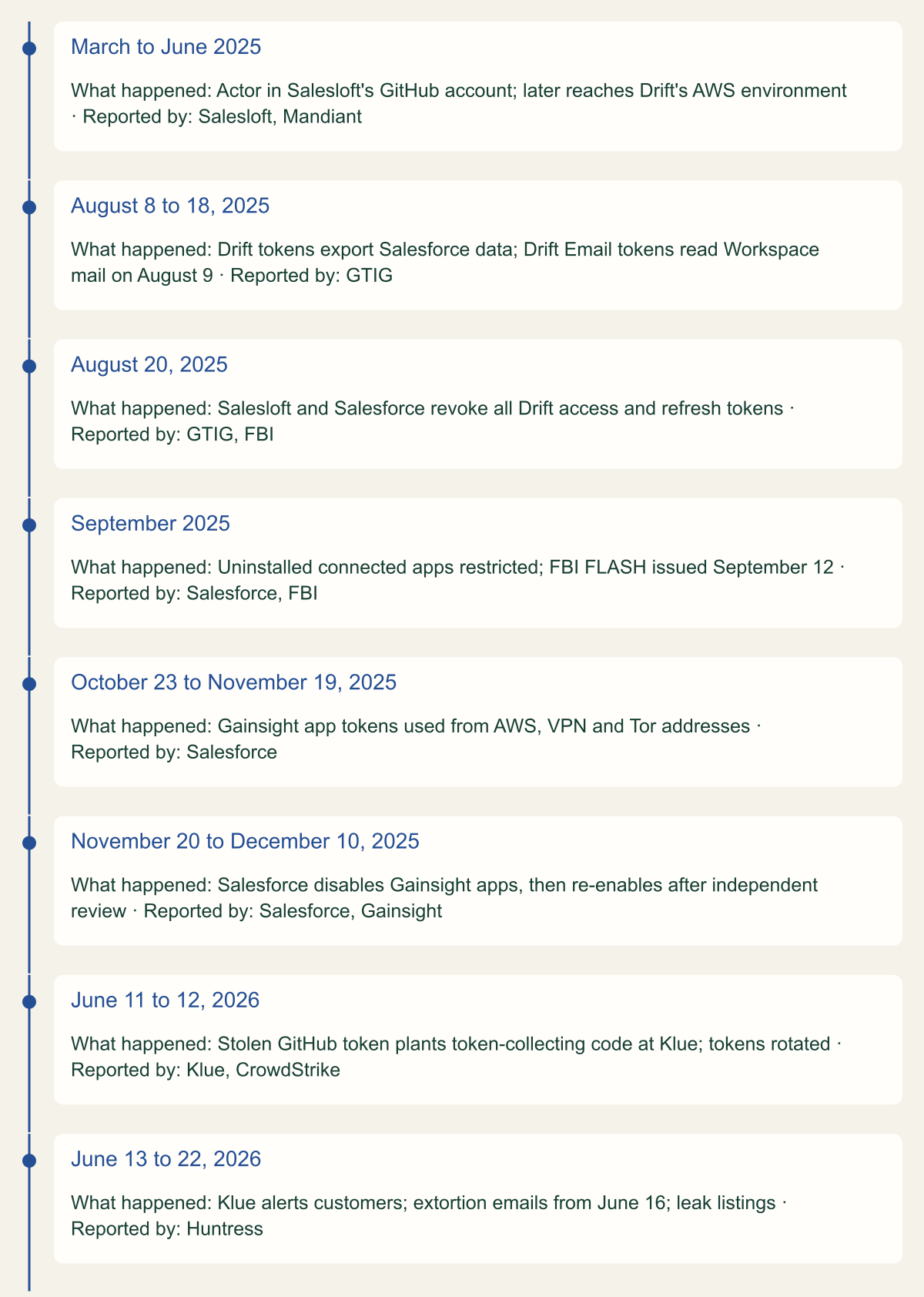
Three integration token waves, from vendor compromise to reconnection
Activity ran for about a day to 28 days before platform-wide revocation, and each wave reached platforms beyond Salesforce. [2][3][9]

Source. Dates from GTIG, the Salesloft trust site, the FBI FLASH, Salesforce advisories, Gainsight, Klue and Huntress, reviewed October 9, 2026. [7][2][1][11][3][8][9][4]
Method. Dates are copied from the cited reports. Where reports give a range, the range is shown; the September 2025 restriction is dated early September by Salesforce.
Accessible table and figure data
| Date | What happened | Reported by |
|---|---|---|
| March to June 2025 | Actor in Salesloft's GitHub account; later reaches Drift's AWS environment | Salesloft, Mandiant |
| August 8 to 18, 2025 | Drift tokens export Salesforce data; Drift Email tokens read Workspace mail on August 9 | GTIG |
| August 20, 2025 | Salesloft and Salesforce revoke all Drift access and refresh tokens | GTIG, FBI |
| September 2025 | Uninstalled connected apps restricted; FBI FLASH issued September 12 | Salesforce, FBI |
| October 23 to November 19, 2025 | Gainsight app tokens used from AWS, VPN and Tor addresses | Salesforce |
| November 20 to December 10, 2025 | Salesforce disables Gainsight apps, then re-enables after independent review | Salesforce, Gainsight |
| June 11 to 12, 2026 | Stolen GitHub token plants token-collecting code at Klue; tokens rotated | Klue, CrowdStrike |
| June 13 to 22, 2026 | Klue alerts customers; extortion emails from June 16; leak listings | Huntress |
| Date | What happened | Reported by |
|---|---|---|
| March to June 2025 | Actor in Salesloft's GitHub account; later reaches Drift's AWS environment | Salesloft, Mandiant |
| August 8 to 18, 2025 | Drift tokens export Salesforce data; Drift Email tokens read Workspace mail on August 9 | GTIG |
| August 20, 2025 | Salesloft and Salesforce revoke all Drift access and refresh tokens | GTIG, FBI |
| September 2025 | Uninstalled connected apps restricted; FBI FLASH issued September 12 | Salesforce, FBI |
| October 23 to November 19, 2025 | Gainsight app tokens used from AWS, VPN and Tor addresses | Salesforce |
| November 20 to December 10, 2025 | Salesforce disables Gainsight apps, then re-enables after independent review | Salesforce, Gainsight |
| June 11 to 12, 2026 | Stolen GitHub token plants token-collecting code at Klue; tokens rotated | Klue, CrowdStrike |
| June 13 to 22, 2026 | Klue alerts customers; extortion emails from June 16; leak listings | Huntress |
Inventory every grant the vendor holds
Start from the vendor, not from Salesforce. Every wave reached past the first platform named in the notice: Drift's Google Workspace tokens, Gainsight's HubSpot, Zendesk, Gong and Google OAuth clients, Klue's nine integrations [2][8][4]. GTIG's advice after its Drift update was to treat every token stored in or connected to the vendor's platform as compromised, beginning with the integrations listed in the Drift admin settings [2]. Grants run in both directions, so the inventory has two halves.
- Tokens the vendor holds into your tenants: every SaaS platform where an admin or user authorized the vendor's app, with the app's client ID, the integration username, the scopes granted and the first and last dates of use.
- Credentials you gave the vendor: API keys, storage keys and warehouse logins configured inside its product. Gainsight told customers to rotate S3, BigQuery, Zuora and Snowflake connector credentials, and on December 4, 2025 deactivated S3 connections whose keys had not been rotated since before January 2025 [8].
- Salesforce: Setup, Connected Apps OAuth Usage lists each app with a user count that opens a per-user view of first connection, last use and use count. Apps not used recently may not appear there, so compare it with the vendor's own list [11].
- Google Workspace: the app access page shows configured and accessed apps, but the accessed list updates 48 hours after a token is granted or revoked [12], so take timing from the OAuth log events instead [13].
- Platforms such as Gong or Slack, where the record of the vendor's access may exist only on the provider's side and must be requested [4].
Cut access without losing evidence
Record the identifiers before changing anything: the connected app ID, the integration user's ID and the vendor's documented egress addresses. They become the keys for every later query, and the egress list separates the integration's normal traffic from the attacker's. Salesloft told integration partners that genuine Drift traffic came from a published set of addresses and that any authenticated use of Drift tokens from elsewhere should be treated as suspect [7]. Ask every other vendor in the inventory for the same list in writing.
Containment and preservation do not compete in Salesforce the way they can on other platforms. Salesforce's Gainsight advisory states that revoking the app's OAuth tokens left Setup Audit Trail entries, Event Monitoring logs and API activity records intact [3]. What works against you is retention, covered in the next section, so start the exports alongside containment rather than before it.
Treat the platform's revocation as a fact to confirm, not as the end of containment. In your own org, block the vendor's app from Connected Apps OAuth Usage; Salesforce documents that blocking an app ends all current user sessions and prevents future ones [11]. Revoking a token at Salesforce's /services/oauth2/revoke endpoint ends a refresh token and the access tokens issued from it [14], but you rarely hold the stolen values, so blocking is the practical tool. Changing the app's refresh token policy is incomplete containment: Salesforce evaluates the policy only when a refresh token is next used, so even Immediately expire refresh token stops new sessions but leaves an already issued session working until it times out [6].
Outside Salesforce the action that ends access differs, and some obvious moves leave tokens alive. Microsoft lists refresh tokens issued to confidential clients, which is how a server-side vendor integration normally registers, as surviving a user's own password change and self-service reset, while an admin revoking all of a user's refresh tokens ends them [15]. Google's developer documentation ends a refresh token after six months without use and lists a password change as a cause only when the token carries Gmail scopes [16], and setting a service to Restricted stops untrusted apps and revokes their tokens [12]. Huntress's advice from the Klue case covers the rest: where credentials were harvested, revoke active sessions on each affected service, or the specific credentials if the investigation can name them [4].
| Platform | Default lifetime | Leaves it working | Ends it |
|---|---|---|---|
| Salesforce connected app | Valid until revoked | Current session after a refresh token policy change | Blocking the app; token revocation |
| Microsoft identity platform | 90 days; 24 hours for single-page apps | User password change or self-service reset | Admin revokes all refresh tokens |
| Google OAuth | Ends after six months unused | Password change without Gmail scopes | User or admin revokes access |
Pull tenant evidence before it ages out
What you can reconstruct depends more on licensing than on effort. Salesforce's log analysis guide separates Setup Audit Trail for configuration changes, daily event log files, and Real-Time Event Monitoring objects with lower latency and more detail [17]. The object reference is precise about the free tier: the Login, Logout and API Total Usage event types, among a few others, come with supported editions at no additional cost, and the rest are purchased [18]. ApiEvent, the real-time record of queries, requires Shield or the Event Monitoring add-on and the View Real-Time Event Monitoring Data permission [19]. The guide's broader line that Event Monitoring logs need Shield reads as covering the paid types; this guide follows the object reference for the free ones because it names them.
Retention sets the order of exports. Login History shows up to 20,000 records in Setup and can be downloaded for the past six months [20], and Setup Audit Trail keeps 180 days of configuration changes [21]. Shield and Event Monitoring subscribers keep event log files for one year by default and Developer Edition and trial orgs for one day; daily files appear the day after the events and hourly files three to six hours later [22]. The documentation reviewed does not state a retention period for the free event types in production orgs, so query the oldest LogDate your org returns before assuming the window is covered. Salesforce also says event log files are not a system of record and can have gaps after site switches or outages [22], so a missing hour does not prove nothing happened. Google keeps OAuth log events for six months and they can lag by a few hours [23].
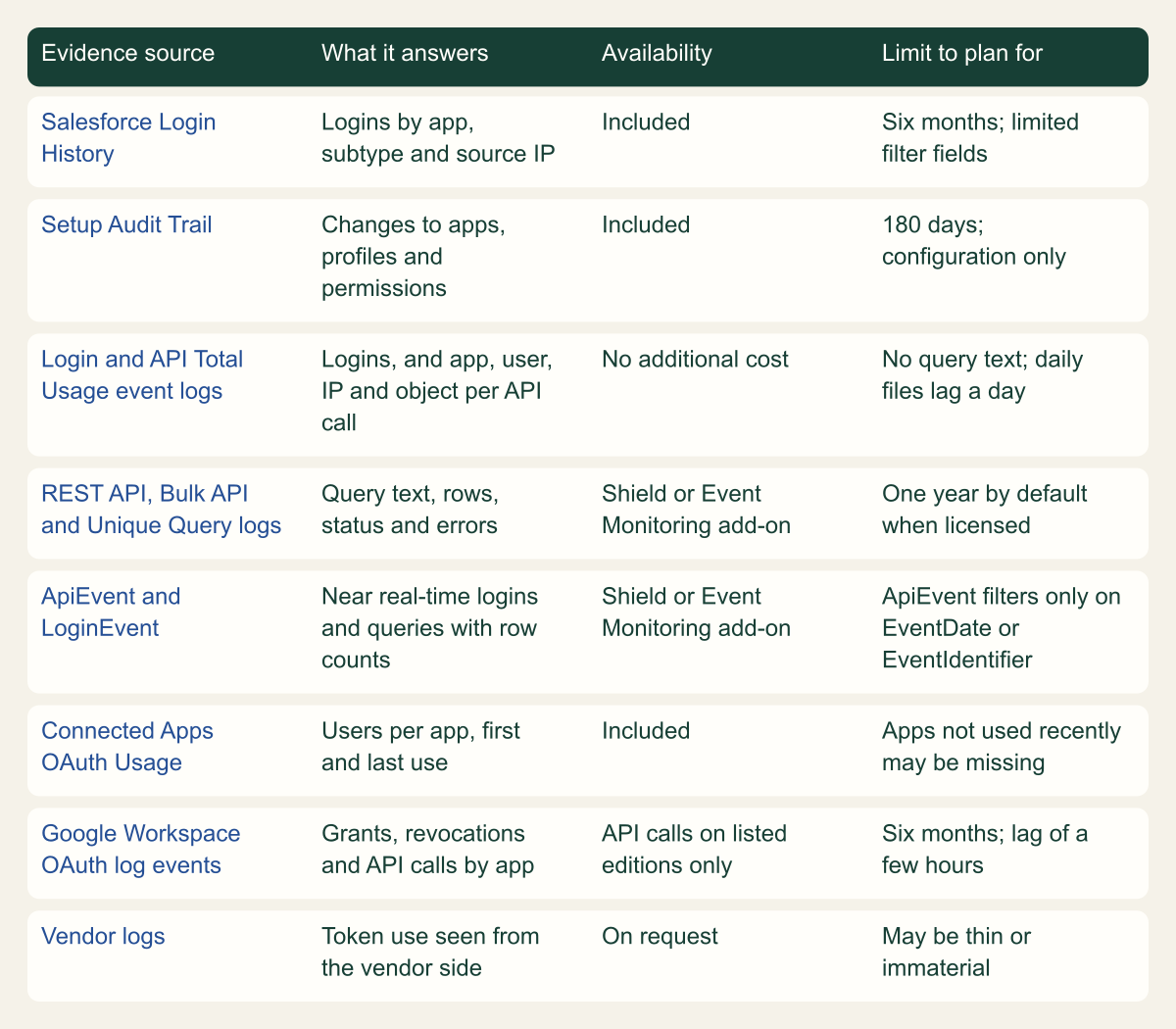
The matrix lists what a responder should expect on the platforms these waves touched. On Google Workspace, OAuth log events record grants and revocations by app, user, scope and IP address, but API call events, the record of what a token read, exist only on Enterprise Standard and Plus, Education Standard and Plus, and Cloud Identity Premium [13]. Vendor logs are the least predictable row: Gainsight told customers that Salesforce's records of its app's logins and API calls were the authoritative source and that its own logs would add little [8].
The fragment preserves the two Salesforce sources every org has, Login History and the event log file index, for the integration user and the advisory window, and downloads each log file the license provides. LoginHistory can be filtered only on a short list of fields that includes UserId and LoginTime but not Application or LoginSubType, so those filters belong in analysis [24]. The download path is the one Salesforce documents for event log files [22]. Keep the hashes with the files and store both with restricted access, because they hold user and customer data.
# Example: preserve Salesforce evidence for one integration user.
# Placeholders: MyDomainName, the user ID and the window start.
# SF_TOKEN belongs to an admin with API Enabled, View Event Log Files,
# and Manage Users or Monitor Login History.
API="https://MyDomainName.my.salesforce.com/services/data/v64.0"
AUTH="Authorization: Bearer ${SF_TOKEN}"
START="2025-10-01T00:00:00Z"

# LoginHistory filters only on fields such as UserId and LoginTime.
# Filter Application and LoginSubType after export.
curl -sG "$API/query" -H "$AUTH" --data-urlencode \
  "q=SELECT LoginTime, UserId, Application, LoginType, LoginSubType, SourceIp, Status, ApiType FROM LoginHistory WHERE UserId = '005xx000001AbCdAAA' AND LoginTime >= ${START} ORDER BY LoginTime" \
  -o login-history.json

# Index every event log file in the window, then download each by Id.
curl -sG "$API/query" -H "$AUTH" --data-urlencode \
  "q=SELECT Id, EventType, LogDate, Interval, LogFileLength FROM EventLogFile WHERE LogDate >= ${START} ORDER BY LogDate" \
  -o elf-index.json
jq -r '.records[].Id' elf-index.json | while read -r id; do
  curl -s "$API/sobjects/EventLogFile/${id}/LogFile" -H "$AUTH" -o "elf-${id}.csv"
done
shasum -a 256 login-history.json elf-index.json elf-*.csv > evidence.sha256
Which evidence each platform keeps, and what it costs to have it
The free Salesforce sources show who connected and which objects were touched; the query text and row counts need Event Monitoring. [18][19][17]

Source. Compiled from Salesforce documentation, Salesforce's log analysis guide, Google Workspace Admin Help and the Gainsight and Huntress reports, reviewed October 9, 2026. [20][21][17][18][22][19][11][13][23][8][4]
Method. Each cell restates a documented property. Availability reflects editions and add-ons named in the documentation; it does not price them. Retention is shown only where a source states it.
Accessible table and figure data
| Evidence source | What it answers | Availability | Limit to plan for |
|---|---|---|---|
| Salesforce Login History | Logins by app, subtype and source IP | Included | Six months; limited filter fields |
| Setup Audit Trail | Changes to apps, profiles and permissions | Included | 180 days; configuration only |
| Login and API Total Usage event logs | Logins, and app, user, IP and object per API call | No additional cost | No query text; daily files lag a day |
| REST API, Bulk API and Unique Query logs | Query text, rows, status and errors | Shield or Event Monitoring add-on | One year by default when licensed |
| ApiEvent and LoginEvent | Near real-time logins and queries with row counts | Shield or Event Monitoring add-on | ApiEvent filters only on EventDate or EventIdentifier |
| Connected Apps OAuth Usage | Users per app, first and last use | Included | Apps not used recently may be missing |
| Google Workspace OAuth log events | Grants, revocations and API calls by app | API calls on listed editions only | Six months; lag of a few hours |
| Vendor logs | Token use seen from the vendor side | On request | May be thin or immaterial |
| Evidence source | What it answers | Availability | Limit to plan for |
|---|---|---|---|
| Salesforce Login History | Logins by app, subtype and source IP | Included | Six months; limited filter fields |
| Setup Audit Trail | Changes to apps, profiles and permissions | Included | 180 days; configuration only |
| Login and API Total Usage event logs | Logins, and app, user, IP and object per API call | No additional cost | No query text; daily files lag a day |
| REST API, Bulk API and Unique Query logs | Query text, rows, status and errors | Shield or Event Monitoring add-on | One year by default when licensed |
| ApiEvent and LoginEvent | Near real-time logins and queries with row counts | Shield or Event Monitoring add-on | ApiEvent filters only on EventDate or EventIdentifier |
| Connected Apps OAuth Usage | Users per app, first and last use | Included | Apps not used recently may be missing |
| Google Workspace OAuth log events | Grants, revocations and API calls by app | API calls on listed editions only | Six months; lag of a few hours |
| Vendor logs | Token use seen from the vendor side | On request | May be thin or immaterial |
Reconstruct what the tokens did
Fix the window first: from the earliest indicator in the advisory to the later of the platform's revocation and your own block. For Gainsight that meant October 23 to November 20, 2025, and Salesforce asked customers to search October and November rather than the days around its notice [3]. Inside the window, split the integration user's activity by source address. Logins from the vendor's published ranges are the integration doing its job; logins from anywhere else are the population to explain [7].
In Login History, the LoginSubType value OauthRefreshToken, labeled OAuth Refresh Token, marks a session started by exchanging a refresh token [24]. Datadog saw the Klue actor use refresh tokens in only a subset of affected orgs and treats the subtype as a supporting indicator rather than a primary one [25]. Even so, a refresh token login from an unfamiliar address is the clearest single sign that a stored token, not a password, was used. Carry each suspicious session's LoginKey and SessionKey forward from the Login event log or LoginEvent, which record them where Login History does not; Salesforce's guide uses them to tie a login to the API calls made in the same session [17][24].
For what was read, ApiEvent gives the operation (Query, QueryAll or QueryMore), the SOQL text, the queried objects and RowsProcessed, and Salesforce's guide treats a RowsProcessed value above zero as confirmation that records went back to the client [17][19]. Two documented limits shape the work. ApiEvent can be filtered only on EventDate and EventIdentifier and sorted only by EventDate descending, so pull the whole window and filter afterwards. And ConnectedAppId is populated only when a call triggers an OAuth authentication and is null when the user already holds an active token [19], so a filter on the app ID alone can drop the attacker's later calls. Filter on the integration user and the suspicious sessions instead.
Where the org has the REST API event log but not real-time events, the URI, QUERY, ROWS_PROCESSED, STATUS_CODE and EXCEPTION_MESSAGE columns tell most of the same story [26]. Huntress found nearly all malicious Klue requests going to /services/data/v59.0/query/ with a user agent of 5238 or a blank value, plus Python urllib clients [4]. Salesforce documents the REST log's USER_AGENT field as a numeric code for the type of client [26], so 5238 is most likely that code rather than a header string, and searching other platforms' logs for it will find nothing. That is a reading of the field definition, not something Huntress or Datadog state.
Look at failures as well as successes. Datadog saw the Klue actor's broad queries fail with ApiException messages, including a SELECT FIELDS(STANDARD) FROM Event that exceeded a result limit, and use of QueryMore, which any large export through the query API needs because one request returns at most 2,000 records [25][17]. GTIG and Salesloft published the Drift pattern: COUNT() queries to size each object, then pulls of Case records with fields such as Description, Subject and Comments, and a LIKE filter on the Case SuppliedEmail field [2][7]. Without query-level logs, API Total Usage still records the app, user, IP address and object for each call [17], and GTIG's advice was to open a Salesforce support case for the actor's specific queries [2].
Treat the exported records as a credential leak
GTIG's instruction after Drift was to search the integrated platforms for secrets and act on every one: revoke API keys, rotate credentials and check whether the actor used them. Its suggested search terms were AKIA for long-term AWS access key IDs, Snowflake and snowflakecomputing.com, the words password, secret and key, and the organization's own VPN or SSO login addresses, with a scanner such as TruffleHog for wider coverage [2].
Search what the attacker read, field by field. Support cases, tasks and opportunity notes are free-text fields, and the Drift queries went straight for Case descriptions and comments [7]. Export those objects and fields for the window yourself, scan the export on a controlled workstation, and print record IDs and pattern names rather than matched values, so the scan output does not become a second copy of the secrets. The fragment does that for patterns built from GTIG's search terms; it complements a dedicated scanner and sees only what you export.
Each hit is a credential incident of its own. Rotate or revoke the credential at its issuer, then search the issuer's logs from the first day of the exposure window for any use of it; for an AWS key that means CloudTrail queried by access key ID. A key pasted into a case in 2023 and never rotated is as exposed as one created last week. Credentials the vendor held on your behalf deserve the same treatment, and Gainsight's handling is a usable model: in December 2025 it deactivated S3 connections whose keys predated January 2025 instead of waiting for each customer to rotate [8].
# Example: flag credential patterns in CSV exports of the objects that were read.
# Prints file, record Id, field and pattern name; never the matched value.
import csv
import re
import sys

csv.field_size_limit(10_000_000)  # long text area fields exceed the default

ORG_LOGIN_HOSTS = ["vpn.example.com", "sso.example.com"]  # replace with your own

PATTERNS = {
    "aws_access_key_id": re.compile(r"\bAKIA[0-9A-Z]{16}\b"),
    "snowflake": re.compile(r"snowflake", re.IGNORECASE),  # also matches snowflakecomputing.com
    "credential_word": re.compile(r"\b(?:password|passwd|secret|api[_ ]?key)\b\s*[:=]", re.IGNORECASE),
    "org_login_host": re.compile("|".join(re.escape(h) for h in ORG_LOGIN_HOSTS), re.IGNORECASE),
}


def scan(path):
    with open(path, newline="", encoding="utf-8-sig") as handle:  # tolerates a byte order mark
        for row in csv.DictReader(handle):
            record_id = row.get("Id", "")
            for field, value in row.items():
                if not value:
                    continue
                for name, pattern in PATTERNS.items():
                    if pattern.search(value):
                        print(f"{path}\t{record_id}\t{field}\t{name}")


if __name__ == "__main__":
    for export in sys.argv[1:]:
        scan(export)
Prove the tokens stopped working
Revocation is a claim until the logs agree with it. After the platform's revocation and your own block, the integration user should show no successful logins or API calls from outside the vendor's ranges, and no successful refresh-token logins at all until someone reauthorizes the app. Rerun the Login History and API queries from the reconstruction step on a schedule for at least as long as the window you investigated.
Ask the vendor what it changed and when. Salesloft reported rotating all centrally managed client keys, which invalidated the affected tokens [7], and Klue reported disabling the stolen GitHub tokens and rotating OAuth credentials [9]. RFC 9700 explains why the client secret matters: for confidential clients, OAuth 2.0 already requires that a refresh token be usable only by the client it was issued to [5]. It follows that an attacker who copied tokens without the client credentials could not refresh them, although an unexpired access token would still work, and that one who took both, as an actor inside the vendor's environment can, is stopped by rotating the client secret. Your tenant-side revocation is the independent check that does not depend on the vendor being right.
Rotation also changes what a theft looks like. Under refresh token rotation as RFC 9700 describes it, each use invalidates the previous refresh token, so when an attacker and the legitimate client both hold copies, one of them presents an invalidated token and the server revokes the active one [5]. Microsoft's platform does not revoke old refresh tokens when they are used [15], so by that design a stolen copy and the vendor's copy can both keep working without errors. Ask whether the vendor's connector logged unexplained refresh failures during the window; under rotation, that is the expected symptom of a second party using the token.
Finally, check the policies that would let a surviving token back in. A connected app set to Enforce IP restrictions, but relax for refresh tokens applies profile IP ranges at the first login and skips them when the app later uses a refresh token, which is the path a stolen token takes; Relax IP restrictions skips them entirely [6]. Connected apps from a managed package use the default setting, which enforces the restrictions, and restrictions apply only where a profile defines them [6]. That is consistent with Gainsight's advice to set IP ranges on the integration user's profile [8]. On Google Workspace, confirm with OAuth log events rather than the accessed-apps list, which lags by up to 48 hours [12].
Report, notify and watch for the follow-on
Three parties hold evidence you lack, and each needs an explicit request. Salesforce support can provide the queries the actor ran, which GTIG recommended asking for [2]. The vendor and any downstream provider can supply logs you cannot see; Huntress recommends stating that the request is part of an active security investigation and notes that response times depend on the vendor's SLA and support contract and may be on the order of hours [4]. Ask even when the vendor expects its logs to add little, as Gainsight did [8]: a downstream provider may hold the only record of what was read there, and Huntress established what was accessed in Gong from Gong's own query logs [4].
The FBI asks recipients of the FLASH to report suspicious activity to IC3 or a local field office, with the date, time, location and type of activity and a point of contact [1]. Whether you also owe a regulator, customers or partners a notice depends on what the reconstruction shows was read, and the obligations that apply start their clocks at different moments.
Plan for the second wave that uses the data. In the Klue case, extortion emails reached current and former staff from June 16, some in spam folders, and Huntress advised keeping them for forensics rather than deleting them. It warned against downloading leaked archives, which can carry malware, and expected phishing that reuses the stolen sales data, so tell the customers and partners whose contact records were exposed [4].
Conditions for letting the integration back in
Reconnection is where the next incident's reach gets decided, and Salesforce changes since August 2025 give administrators better controls than they had during the Drift wave. Since early September 2025, users cannot authorize connected apps that an admin has not installed, except users who had already authorized one before the change and are not using the device flow. A new Approve Uninstalled Connected Apps permission bypasses the restriction, and Salesforce says it should go only to highly trusted users such as administrators and the people who manage or test integrations [11]. Gainsight customers met this when reauthorizing, because their OAuth users lacked the permission [8]. Creating new connected apps has also been restricted since Spring '26, with external client apps recommended instead [6].
Reconnect only when every condition below holds. If any fails, keep the app blocked; a delayed sync costs less than a second investigation.
- The app is installed in the org with Permitted Users set to Admin approved users are pre-authorized, and no integration user holds Use Any API Client, which overrides that setting [6].
- It runs as a dedicated integration user whose profile carries login IP ranges for the vendor's published addresses, with IP Relaxation left at Enforce IP restrictions [2][6].
- API access comes from a permission set rather than the profile, and the app's scopes exclude full access unless the integration needs it [2].
- If the org has API Access Control, which Salesforce enables through Customer Support, the app is on its allowlist [11].
- The refresh token policy expires unused tokens instead of the default of valid until revoked [6]. Test the change first: on January 12, 2026 Gainsight reported connectors disconnecting after a fixed 30-day authorization window that Salesforce was enforcing, and on January 26 that the requirement had been removed because the connector already rotated its refresh tokens [8].
- The vendor has stated in writing what it rotated, how its token store and source code access are now protected, and which addresses its traffic will come from [7][9].
When the next vendor notice arrives
The order matters more than any single query: inventory the vendor's grants on every platform, block the app and end its sessions, export Login History and the event logs for the advisory window, reconstruct by user and session rather than by app ID, scan what was read for secrets, prove the tokens are dead, and only then reconnect. Containing early is safe in Salesforce, which has said its revocation of an app's tokens did not erase the audit records [3]; retention is the clock to watch.
Then close the gap that made this investigation hardest. If the org could not say which fields were read because it lacks Event Monitoring, decide now whether query-level logs are worth the license for the integrations that touch your most sensitive objects. If the secrets search found credentials in case notes, the next stolen token will find them too unless they stop being stored there. The sequence assumes the vendor stored refresh tokens. If an integration instead signs a fresh assertion with its own key for each token request, as the JWT bearer flow does, the stolen asset is that key; Salesforce always applies profile IP restrictions to that flow, whatever the app's relaxation setting [6].
Method and provenance
Source-led investigation playbook built from vendor, platform and responder reports on the Salesloft Drift (August 2025), Gainsight (November 2025) and Klue (June 2026) integration breaches, the FBI FLASH of September 12, 2025, and Salesforce, Google, Microsoft and IETF documentation. Sources were reviewed on October 9, 2026 and re-checked in an independent fact-check on October 10, 2026.
No Salesforce org, Google Workspace tenant or vendor integration was configured or tested. Incident facts are limited to what the cited advisories state and may change as investigations are updated. Field names and query rules come from Salesforce documentation current on the review date, and the code fragments were checked for syntax only.
AI assistance. AI assisted research synthesis, drafting, diagram planning and visual production, with deterministic editorial checks. No personal incident response experience, independent human review or live test is claimed.
Published under the Cloud Security Desk organizational byline. Read the practitioner guide policy.
References
- FLASH-20250912-001: Cyber criminal groups UNC6040 and UNC6395 compromising Salesforce instances for data theft and extortion Federal Bureau of Investigation. Published . Accessed .
- Widespread data theft targets Salesforce instances via Salesloft Drift Google Threat Intelligence Group and Mandiant. Published . Accessed .
- Cybercrime breaches Klue: Salesforce data impacted for many victims, including Huntress Huntress. Published . Accessed .
- RFC 9700: Best Current Practice for OAuth 2.0 Security IETF. Accessed .
- Manage OAuth access policies for a connected app Salesforce. Accessed .
- Salesforce security advisory FAQs (Gainsight community post and updates) Gainsight. Published . Accessed .
- CrowdStrike investigation summary and security improvements Klue. Published . Accessed .
- Security advisory: Third-party app integration disabled (Trust status message 20000257) Salesforce. Published . Accessed .
- Prepare for Salesforce connected app usage restrictions change (Knowledge Article 005132365) Salesforce. Accessed .
- Control which apps access Google Workspace data Google Workspace Help. Accessed .
- OAuth log events Google Workspace Help. Accessed .
- Revoke OAuth tokens programmatically Salesforce. Accessed .
- Refresh tokens in the Microsoft identity platform Microsoft. Accessed .
- Using OAuth 2.0 to access Google APIs: refresh token expiration Google for Developers. Accessed .
- Salesforce log analysis guide: Investigating data exfiltration using event logs (Knowledge Article 005229030) Salesforce. Published . Accessed .
- EventLogFile supported event types (Object Reference for the Salesforce Platform) Salesforce. Accessed .
- ApiEvent (Platform Events Developer Guide) Salesforce. Accessed .
- Monitor login history Salesforce. Accessed .
- Monitor setup changes with Setup Audit Trail Salesforce. Accessed .
- Using event monitoring (REST API Developer Guide) Salesforce. Accessed .
- Data retention and lag times Google Workspace Help. Accessed .
- LoginHistory (Object Reference for the Salesforce Platform) Salesforce. Accessed .
- Detecting the Klue supply chain attack in Salesforce instances Datadog Security Labs. Published . Accessed .
- REST API event type (Object Reference for the Salesforce Platform) Salesforce. Accessed .