
An implementation guide for identity governance and cloud security teams that need one inventory of machine identities across AWS, Microsoft Entra and Azure, and Google Cloud. It draws on OWASP and provider documentation reviewed in October 2026 and gives a record schema, per-cloud enumeration sources with their blind spots, a join pipeline, an ownership method and a credential ranking tied to the OWASP NHI Top 10.
At a glance
Key findings
- An inventory supports retirement and rotation decisions only when each identity records an owner, a credential type, a privilege summary and a last-use value with its source and lookback. [1]
- The AWS credential report covers only the first two access keys per user and omits service-specific credentials, and IAM reports role activity only for the trailing 400 days. [2][3]
- Entra service principal and credential last-use data comes from preview reports on the Microsoft Graph beta endpoint and needs a Microsoft Entra ID P1 or P2 license. [4]
- Google service account insights flag accounts idle for 90 days but do not record requests made with API keys bound to service accounts or domain-wide delegation to Workspace APIs. [5]
- Disable before deleting: Google recommends a waiting period before deleting a service account, and Entra applications can be deactivated so they stop receiving tokens. [6][7]
What the inventory must hold
A usable inventory of non-human identities is one table with a row for every machine identity in every account, tenant and project, built from each provider's own records rather than from a survey of teams. A row is ready to support a decision when it holds four facts: who owns the identity, what kind of credential it uses, what it is allowed to do, and when it was last used, stored together with the report that produced that date and the window the report covers. Without an owner, nobody can approve removing a stale identity. Without the credential type, you cannot tell which identities could leak a reusable secret. Without privilege, a read-only reporting identity looks the same as a deployment role. Without last use, every identity looks equally necessary.
Each major cloud already records this data. In AWS, the IAM credential report, the GetAccountAuthorizationDetails operation and IAM Access Analyzer unused access findings cover users, access keys, roles and recent activity. [2][8][9] In Microsoft Entra ID, Microsoft Graph lists service principals with a servicePrincipalType that separates applications, managed identities and legacy apps. Two preview reports add last use for each service principal and each credential. [10][4] In Google Cloud, Cloud Asset Inventory lists service accounts and keys across an organization, and service account insights and Activity Analyzer report when they last authenticated. [11][12][5][13]
The OWASP Non-Human Identities Top 10 for 2025 asks for the same record. Its first entry, NHI1:2025 Improper Offboarding, tells teams to "periodically recertify NHIs to confirm they are still in use, actively needed, and have valid owners". [1] This guide covers what to count, which fields to keep, the enumeration source in each cloud and where each source has gaps, and how to turn the table into decisions to keep, rotate, replace or retire each identity.
What counts as a non-human identity
The OWASP project describes NHIs as the identities that production applications need, which are "often associated with secrets, which are used as credentials similarly to the way humans authenticate". [14] For a cloud inventory, a practical test is anything that authenticates to a cloud API without a person completing the sign-in. It covers four groups.
- AWS: IAM roles assumed by compute, pipelines or other accounts; IAM users that hold access keys for scripts; and service-linked roles, which carry
aws-service-rolein their ARN path. [15] - Microsoft Entra and Azure: application service principals, including those for multitenant apps registered in other tenants; system-assigned and user-assigned managed identities; legacy service principals; and agent identities, which Graph reports with the
ServiceIdentitytype. [10][16] - Google Cloud: user-managed service accounts, default service accounts that some services create when enabled, service agents, and user-managed keys attached to any of them. [17]
- Federated workloads that never get a principal of their own, such as a CI job or Kubernetes pod that exchanges an OIDC token. These appear only as trust configuration on a role, an app or an identity pool, so record them through that configuration.
The fields each record needs
Keep each record small enough that every field can come from a system of record or a named person. The table lists the minimum. Two fields matter most and are the easiest to get wrong. Last use must be stored with its source and window, because each provider measures it differently. Owner must name a team that still exists, not the engineer who happened to create the identity.
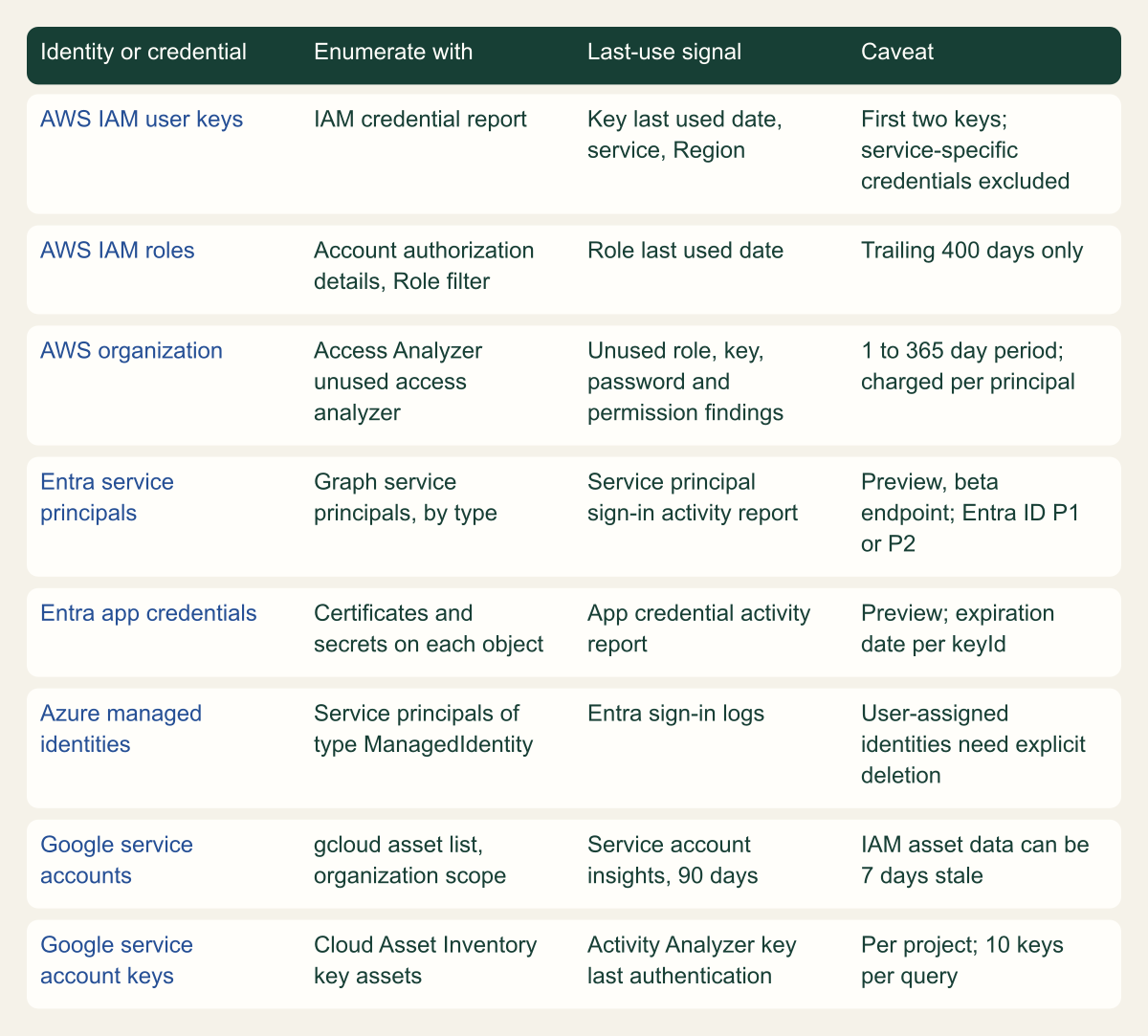
The figure below shows, for each cloud, the report, API or command that fills the identity, credential and last-use fields. Every row is a documented source. The caveat column records the limit that each source documents but that is easy to miss.
| Field | Why it matters | Typical source |
|---|---|---|
| Stable identifier | Names change; identifiers survive a rename | ARN, object ID, service account unique ID |
| Boundary | The same name can exist in many places | Account, tenant or project |
| Identity kind | Sets which lifecycle rules apply | Role, user, servicePrincipalType, service account type |
| Credential type and ID | Separates stored secrets from platform tokens | Access key ID, keyId, key name |
| Credential created and expiry | Finds secrets that outlive their purpose | Credential report, keyCredentials, key records |
| Privilege summary | Separates readers from deployers | Policies, role assignments, app roles |
| Last use, source and window | Supports retirement without guessing | Provider activity reports |
| Owner team and contact | Someone must approve every change | Tags, owners, description field |
| Workload and environment | Shows reuse across systems and stages | Tags, naming, deployment metadata |
| Decision and review date | Proves the inventory is acted on | Inventory system |
Where each cloud records identities and last use
Every cloud exposes last use, but each source has its own window, scope or license limit. [2][4][5]

Source. AWS IAM, Microsoft Entra and Microsoft Graph, and Google Cloud documentation. [2][3][19][10][4][16][12][5][13]
Method. Each cell transcribes a documented operation, field or limit from the cited pages, reviewed October 7, 2026. Cells are shortened; the provider sections give the full wording.
Accessible table and figure data
| Identity or credential | Enumerate with | Last-use signal | Caveat |
|---|---|---|---|
| AWS IAM user keys | IAM credential report | Key last used date, service, Region | First two keys; service-specific credentials excluded |
| AWS IAM roles | Account authorization details, Role filter | Role last used date | Trailing 400 days only |
| AWS organization | Access Analyzer unused access analyzer | Unused role, key, password and permission findings | 1 to 365 day period; charged per principal |
| Entra service principals | Graph service principals, by type | Service principal sign-in activity report | Preview, beta endpoint; Entra ID P1 or P2 |
| Entra app credentials | Certificates and secrets on each object | App credential activity report | Preview; expiration date per keyId |
| Azure managed identities | Service principals of type ManagedIdentity | Entra sign-in logs | User-assigned identities need explicit deletion |
| Google service accounts | gcloud asset list, organization scope | Service account insights, 90 days | IAM asset data can be 7 days stale |
| Google service account keys | Cloud Asset Inventory key assets | Activity Analyzer key last authentication | Per project; 10 keys per query |
| Identity or credential | Enumerate with | Last-use signal | Caveat |
|---|---|---|---|
| AWS IAM user keys | IAM credential report | Key last used date, service, Region | First two keys; service-specific credentials excluded |
| AWS IAM roles | Account authorization details, Role filter | Role last used date | Trailing 400 days only |
| AWS organization | Access Analyzer unused access analyzer | Unused role, key, password and permission findings | 1 to 365 day period; charged per principal |
| Entra service principals | Graph service principals, by type | Service principal sign-in activity report | Preview, beta endpoint; Entra ID P1 or P2 |
| Entra app credentials | Certificates and secrets on each object | App credential activity report | Preview; expiration date per keyId |
| Azure managed identities | Service principals of type ManagedIdentity | Entra sign-in logs | User-assigned identities need explicit deletion |
| Google service accounts | gcloud asset list, organization scope | Service account insights, 90 days | IAM asset data can be 7 days stale |
| Google service account keys | Cloud Asset Inventory key assets | Activity Analyzer key last authentication | Per project; 10 keys per query |
Enumerate in AWS
Start with the credential report, which is cheap to generate and covers IAM users. aws iam generate-credential-report builds a CSV for the account. If a report was generated in the past four hours, IAM returns that one instead of building a new one. [2] Columns such as access_key_1_last_rotated, access_key_1_last_used_date and access_key_1_last_used_service give the age and last use of each user's keys. The report has three gaps. It includes only "the first two access keys per user" and leaves out service-specific credentials such as CodeCommit passwords and Amazon Bedrock long-term API keys; for those, AWS points to ListAccessKeys and ListServiceSpecificCredentials. [2] An N/A in a last-used column can mean the user has no key, the key was never used, or it has not been used since tracking began on April 22, 2015. [2] And nothing in the report says whether an IAM user is a person or a script, so you have to classify each one.
Roles need a second call. GetAccountAuthorizationDetails returns users, groups, roles and policies with the links between them. It accepts the filter values User, Role, Group, LocalManagedPolicy and AWSManagedPolicy and pages results with Marker. [8] Each RoleDetail in the response includes the trust policy in AssumeRolePolicyDocument, attached and inline policies, tags, and RoleLastUsed, which only reports activity from the trailing 400 days. [3] Federated workloads show up in the trust policy. A role that trusts a CI or Kubernetes OIDC provider is the inventory record for every job that assumes it, so store the trusted issuer and subject conditions with the role.
Both calls work one account at a time. For an organization, the IAM Access Analyzer unused access analyzer runs from the management account or a delegated administrator and generates findings for unused roles, unused IAM user access keys and passwords, and unused permissions. [9] The tracking period can be set from 1 to 365 days, and an entity is evaluated only if it existed for the whole period. Specific accounts and tagged principals can be excluded. [19] AWS charges for unused access findings per IAM role and user analyzed per month; external access findings are free. [9]
# Example fragment: run in each account with a read-only audit role.
# Placeholders only; write outputs to a protected location.
aws iam generate-credential-report
aws iam get-credential-report --query Content --output text \
  | base64 --decode > credential-report-111122223333.csv
aws iam get-account-authorization-details --filter Role User \
  --output json > authz-111122223333.json
aws iam list-service-specific-credentials --all-users \
--output json > service-credentials-111122223333.jsonEnumerate in Microsoft Entra and Azure
In Entra ID, inventory service principals, not app registrations. The application object lives in its home tenant and acts as a template. A service principal is created in each tenant where the app is used, and that object defines what the app can do in that tenant. [7] List /servicePrincipals in Microsoft Graph and read servicePrincipalType. Its values are Application, ManagedIdentity, Legacy, ServiceIdentity for agent identities, and SocialIdp, which is for internal use. [10] The appOwnerOrganizationId property holds the tenant where the app is registered, which separates your own apps from third-party ones. keyCredentials and passwordCredentials list the certificates and secrets on the object. The owners relationship returns the users or service principals allowed to modify it, and Microsoft's guidance is that service principals should have at least two owners. [10]
Last use comes from two reports. servicePrincipalSignInActivities returns, for each app, its most recent sign-in as a client or as a resource, in delegated and app-only flows. appCredentialSignInActivities returns, for each credential, the keyId, keyType, expirationDate and last sign-in. [4] Microsoft labels both reports preview, publishes them only on the Graph beta endpoint, and requires a Microsoft Entra ID P1 or P2 license. [4] Reading them takes the AuditLog.Read.All permission and, for delegated access, a role such as Reports Reader. [20]
Managed identities need Azure context. A system-assigned identity shares the lifecycle of its resource and is deleted with it. A user-assigned identity is a standalone resource that must be deleted explicitly and can be attached to more than one resource. [16] As a result, user-assigned identities are the ones that go stale and the ones most likely to end up shared. Their Azure permissions are granted through Azure role-based access control, and their sign-ins appear in the Entra sign-in logs. [16] Join the role assignments for each identity's object ID so the privilege field covers Azure resources as well as directory permissions.
# Example requests. The beta reports need Entra ID P1 or P2 and AuditLog.Read.All.
GET https://graph.microsoft.com/v1.0/servicePrincipals?$select=id,appId,displayName,servicePrincipalType,appOwnerOrganizationId,keyCredentials,passwordCredentials,notes&$expand=owners($select=id,displayName)

GET https://graph.microsoft.com/beta/reports/servicePrincipalSignInActivities

GET https://graph.microsoft.com/beta/reports/appCredentialSignInActivitiesEnumerate in Google Cloud
Google sorts service accounts into user-managed accounts, default accounts and service agents. [17] Cloud Asset Inventory lists them across a whole organization: gcloud asset list takes one of --organization, --folder or --project, along with --asset-types and --content-type. [11] Both iam.googleapis.com/ServiceAccount and iam.googleapis.com/ServiceAccountKey are supported asset types. Google gives two timing caveats: "IAM data can be stale by up to 7 days", and enabling or disabling a service account can take up to 48 hours to show in Cloud Asset Inventory. [12] Use the asset list for the population and the IAM API when you need the current state of one account.
Last use is reported per project. Service account insights, insight type google.iam.serviceAccount.Insight, flag service accounts in a project that have not authenticated in the past 90 days and are listed with gcloud recommender insights list. [5] Activity Analyzer answers a narrower question for named accounts or keys through the serviceAccountLastAuthentication and serviceAccountKeyLastAuthentication activity types. It accepts up to 10 accounts or keys per query and may leave out very recent events. [13] Both can report a busy account as idle. Authentication to Google APIs outside Google Cloud, such as domain-wide delegation to Workspace, is not tracked by either, so Google recommends cross-checking Cloud Monitoring service account usage metrics before disabling an account. Requests made with API keys bound to a service account are missing from those usage metrics too, so check for bound API keys separately. [5]
Privilege in Google Cloud includes who can act as the account. A service account with a few direct role bindings can still be reachable from many principals through impersonation grants, so the privilege field should list who can impersonate the account as well as what the account can reach.
# Example fragment. Replace the placeholder organization and project.
gcloud asset list --organization=123456789012 \
  --asset-types=iam.googleapis.com/ServiceAccount,iam.googleapis.com/ServiceAccountKey \
  --content-type=resource --format=json > gcp-service-accounts.json

gcloud recommender insights list --project=example-project --location=global \
  --insight-type=google.iam.serviceAccount.Insight --format=json

gcloud policy-intelligence query-activity --project=example-project \
--activity-type=serviceAccountKeyLastAuthenticationJoin the sources into one record
Most of the pipeline is bookkeeping, but two rules keep the result accurate. First, key every record on the provider's stable identifier plus its boundary, and never merge records by display name. A service principal named deploy in two tenants is two identities. Second, store last use as three values: the timestamp, the report that produced it and that report's window. AWS reports role activity for 400 days, Google insights cover 90 days, Access Analyzer uses whatever period you set, and an empty value means something different in each. [3][5][19]
Give empty values their own states. AWS writes N/A for a key that does not exist, was never used, or has not been used since tracking began, and a role with no activity in the trailing 400 days has no recorded last use even if it was used earlier. [2][3] Keep "no activity in window" separate from "never used" and from "source unavailable", such as a tenant without the Entra license the reports need. Collapsing these three states is how a quarterly job ends up disabled.
Record the run date on every record and keep earlier snapshots. Changes between runs are findings in their own right: a new identity with no owner tag, a secret added to a service principal that had none, or a policy change on a role nobody has assumed in months.
From provider snapshots to a decision per identity
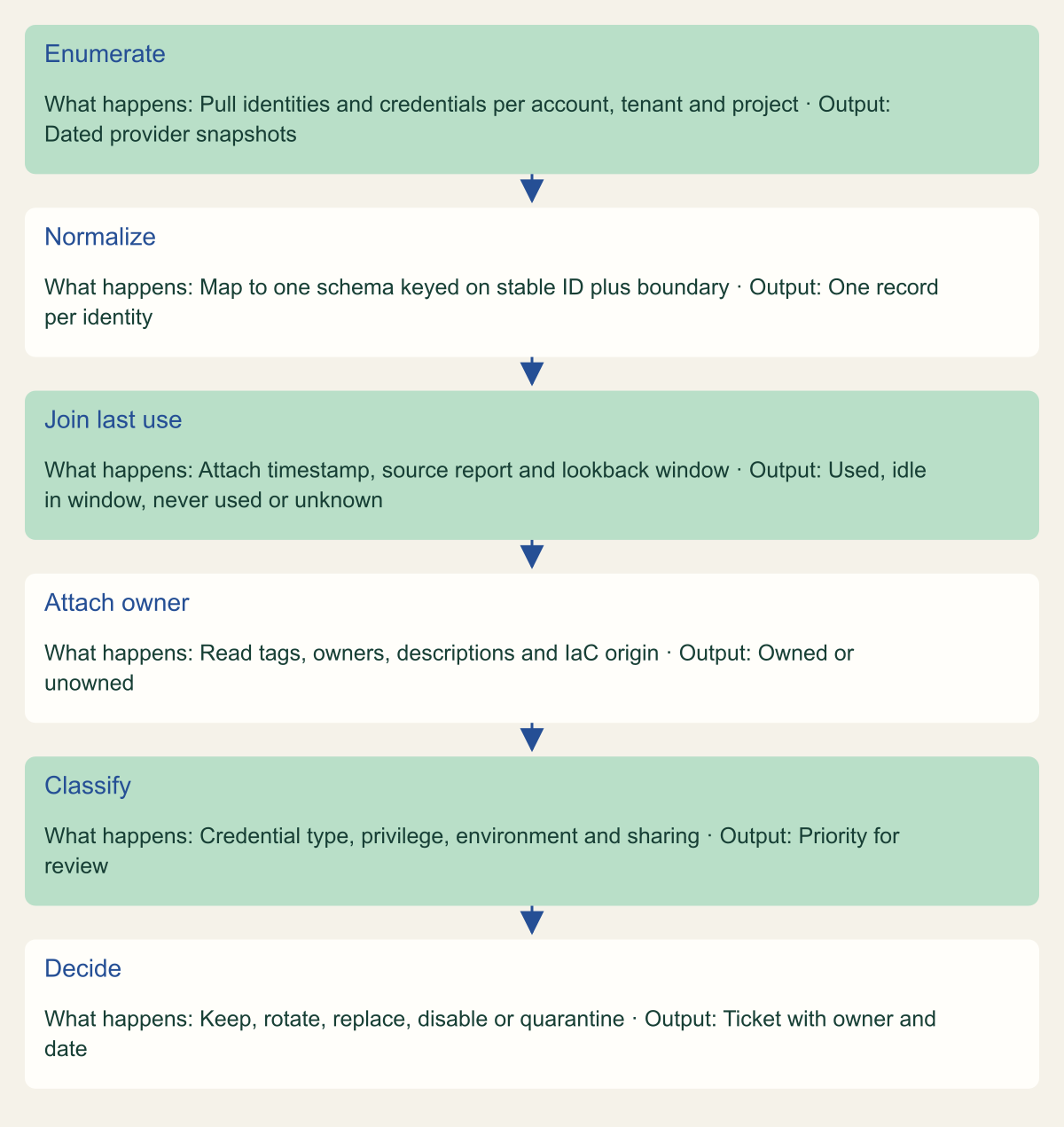
Last use is stored with its source and window, and ownership is attached before any decision is made.

Source. Conceptual pipeline based on the AWS, Microsoft and Google enumeration sources and OWASP NHI1 recertification guidance. [2][4][5][1]
Method. Conceptual sequence of steps. It does not represent a specific product or measured run.
Accessible table and figure data
| Step | What happens | Output |
|---|---|---|
| Enumerate | Pull identities and credentials per account, tenant and project | Dated provider snapshots |
| Normalize | Map to one schema keyed on stable ID plus boundary | One record per identity |
| Join last use | Attach timestamp, source report and lookback window | Used, idle in window, never used or unknown |
| Attach owner | Read tags, owners, descriptions and IaC origin | Owned or unowned |
| Classify | Credential type, privilege, environment and sharing | Priority for review |
| Decide | Keep, rotate, replace, disable or quarantine | Ticket with owner and date |
| Step | What happens | Output |
|---|---|---|
| Enumerate | Pull identities and credentials per account, tenant and project | Dated provider snapshots |
| Normalize | Map to one schema keyed on stable ID plus boundary | One record per identity |
| Join last use | Attach timestamp, source report and lookback window | Used, idle in window, never used or unknown |
| Attach owner | Read tags, owners, descriptions and IaC origin | Owned or unowned |
| Classify | Credential type, privilege, environment and sharing | Priority for review |
| Decide | Keep, rotate, replace, disable or quarantine | Ticket with owner and date |
Assign ownership
Ownership is the one field enumeration cannot fill. Each provider gives you somewhere to record it: tags on IAM roles and users, the owners relationship and free-text notes property on Entra service principals, and the description field on Google service accounts. Google suggests using that field to add "a contact person, links to relevant documentation, or other notes". [3][10][6] Pick one convention per provider. Record a team as the accountable owner and a person as the current contact, and use the inventory to check that both values are still valid.
Fill in owners from evidence before asking anyone to volunteer. Useful evidence includes the pipeline or infrastructure-as-code repository that created the identity, the resource a system-assigned managed identity belongs to, and the group that owns the project. Identities still unclaimed after a fixed period go on a quarantine list. For staff who leave, OWASP's guidance under NHI1 is to review the NHIs associated with the departing employee, decommission those no longer required, and otherwise "transfer ownership to another employee and rotate any credentials". It also recommends connecting HR systems to IAM tools so these steps run automatically. [1]
With owners recorded, finding orphans becomes a join: the owner contact is disabled in the directory, the owner team no longer appears in the team list, or the Entra owners list is empty. Look for signs of people using machine identities too. OWASP recommends tools that audit and track NHI usage so that human use is "detectable and accountable". [18] A service principal that signs in from an office network during working hours deserves a second look.
Rank identities by credential type
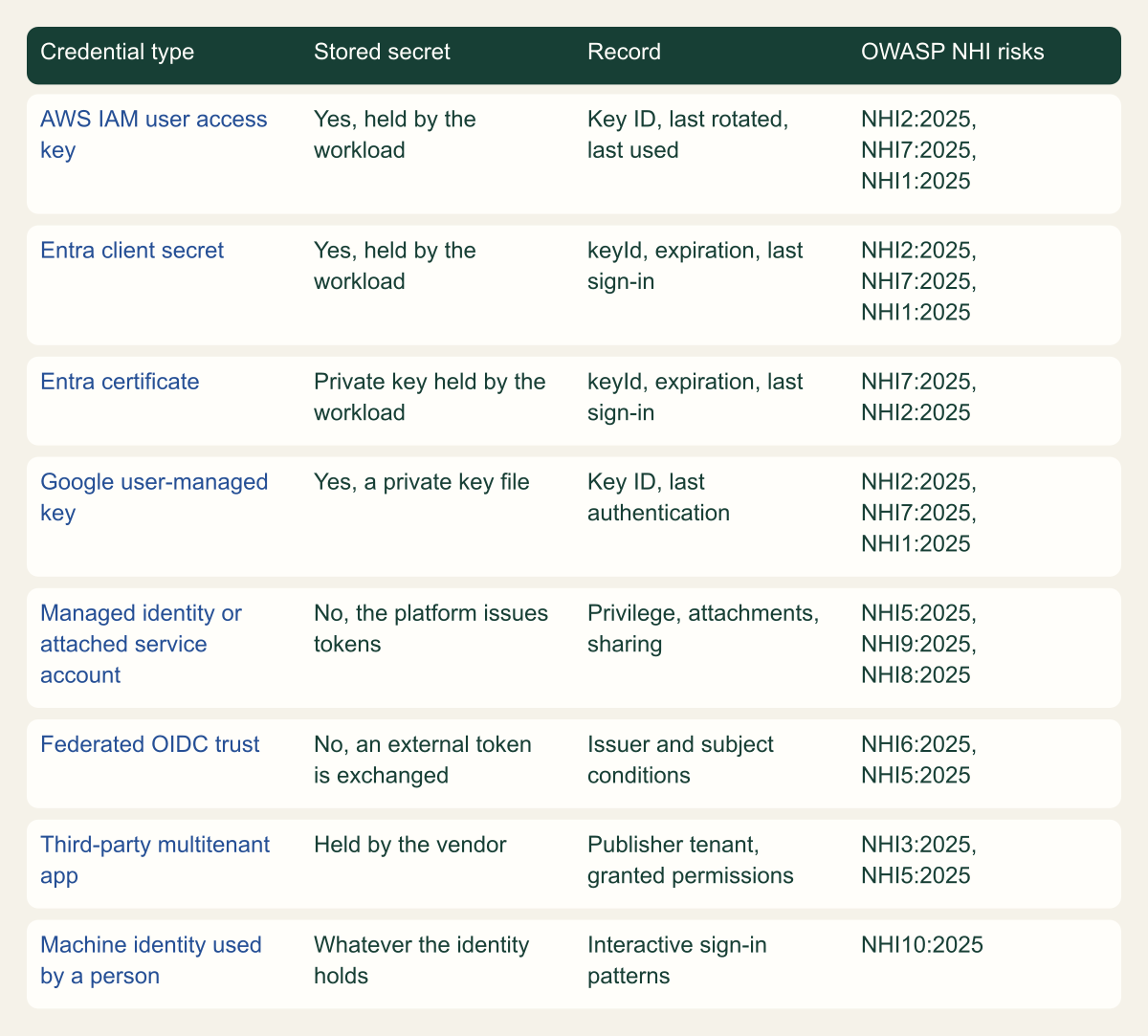
Credential type predicts how an identity is likely to fail better than a generic risk score does. A static secret held by a workload can leak and be reused until someone revokes it. A token issued by the platform to a managed identity, an attached service account or an assumed role leaves no stored secret to leak, so the exposure comes from privilege and sharing. The matrix maps each credential type to the OWASP NHI risks it raises most directly. The mapping is this guide's reading of the OWASP risk descriptions, not something OWASP publishes.
Use the ranking to set the order of work. First come static keys and client secrets that were used recently and carry broad permissions, because they combine NHI2:2025 Secret Leakage and NHI7:2025 Long-Lived Secrets with NHI5:2025 Overprivileged NHI. [14] Next come user-assigned managed identities and service accounts shared by several workloads, because one compromise reaches everything that shares them; this matches NHI9:2025 NHI Reuse and, across stages, NHI8:2025 Environment Isolation. [14][16] Federated trust that accepts too broad a subject falls under NHI6:2025 Insecure Cloud Deployment Configurations, and multitenant apps from other publishers fall under NHI3:2025 Vulnerable Third-Party NHI. [14] The table lists, for each of the ten 2025 risks, the inventory field that shows it.
| OWASP risk | Inventory field that exposes it |
|---|---|
| NHI1:2025 Improper Offboarding | Owner status and last use |
| NHI2:2025 Secret Leakage | Credential type: stored secret or platform token |
| NHI3:2025 Vulnerable Third-Party NHI | Publisher tenant and granted permissions |
| NHI4:2025 Insecure Authentication | Credential type and authentication method |
| NHI5:2025 Overprivileged NHI | Privilege summary and unused permissions |
| NHI6:2025 Insecure Cloud Deployment Configurations | Federated trust issuer and subject conditions |
| NHI7:2025 Long-Lived Secrets | Credential created and expiry dates |
| NHI8:2025 Environment Isolation | Environment of each consuming workload |
| NHI9:2025 NHI Reuse | Number of workloads using the identity |
| NHI10:2025 Human Use of NHI | Interactive sign-in patterns |
Credential type decides what can leak
Stored secrets raise leakage and lifetime risks; platform tokens shift the risk to privilege and sharing.

Source. Conceptual mapping by this guide of credential types to OWASP Non-Human Identities Top 10 2025 risks, using AWS, Microsoft and Google credential documentation. [14][2][4][16][17]
Method. Conceptual classification. Risk identifiers are copied from the OWASP project page; their assignment to credential types is this guide's interpretation and is not an OWASP ranking.
Accessible table and figure data
| Credential type | Stored secret | Record | OWASP NHI risks |
|---|---|---|---|
| AWS IAM user access key | Yes, held by the workload | Key ID, last rotated, last used | NHI2:2025, NHI7:2025, NHI1:2025 |
| Entra client secret | Yes, held by the workload | keyId, expiration, last sign-in | NHI2:2025, NHI7:2025, NHI1:2025 |
| Entra certificate | Private key held by the workload | keyId, expiration, last sign-in | NHI7:2025, NHI2:2025 |
| Google user-managed key | Yes, a private key file | Key ID, last authentication | NHI2:2025, NHI7:2025, NHI1:2025 |
| Managed identity or attached service account | No, the platform issues tokens | Privilege, attachments, sharing | NHI5:2025, NHI9:2025, NHI8:2025 |
| Federated OIDC trust | No, an external token is exchanged | Issuer and subject conditions | NHI6:2025, NHI5:2025 |
| Third-party multitenant app | Held by the vendor | Publisher tenant, granted permissions | NHI3:2025, NHI5:2025 |
| Machine identity used by a person | Whatever the identity holds | Interactive sign-in patterns | NHI10:2025 |
| Credential type | Stored secret | Record | OWASP NHI risks |
|---|---|---|---|
| AWS IAM user access key | Yes, held by the workload | Key ID, last rotated, last used | NHI2:2025, NHI7:2025, NHI1:2025 |
| Entra client secret | Yes, held by the workload | keyId, expiration, last sign-in | NHI2:2025, NHI7:2025, NHI1:2025 |
| Entra certificate | Private key held by the workload | keyId, expiration, last sign-in | NHI7:2025, NHI2:2025 |
| Google user-managed key | Yes, a private key file | Key ID, last authentication | NHI2:2025, NHI7:2025, NHI1:2025 |
| Managed identity or attached service account | No, the platform issues tokens | Privilege, attachments, sharing | NHI5:2025, NHI9:2025, NHI8:2025 |
| Federated OIDC trust | No, an external token is exchanged | Issuer and subject conditions | NHI6:2025, NHI5:2025 |
| Third-party multitenant app | Held by the vendor | Publisher tenant, granted permissions | NHI3:2025, NHI5:2025 |
| Machine identity used by a person | Whatever the identity holds | Interactive sign-in patterns | NHI10:2025 |
Use the inventory for decisions
The inventory is worth maintaining only if every row ends up in one of a few states, each with a named next step. One workable set is listed below. Google recommends disabling a service account and deleting it "only after a certain period has elapsed", which keeps its bindings if it has to come back. [6] Entra applications can be deactivated, which stops new tokens while keeping the objects for investigation. [7]
- Unused and owned: the owner confirms, then the identity is disabled, observed through at least one full business cycle, and deleted.
- Unused and unowned: quarantine it with the disable date announced in advance, and delete it after the window if nobody claims it.
- Used and unowned: do not disable it. Trace the owner through the workload that calls it, assign the owner, then decide.
- Used, owned and holding a static credential: plan a move to a managed identity, attached service account, role or federated credential, and track expiry and rotation until then.
- Used, owned and using platform tokens: compare its privilege with unused-permission findings and narrow the scope.
- Provider-managed: count it, leave it out of recertification, and alert on unexpected changes.
The first inventory pass
Enumerate all three clouds into one table first, with a source and window on every last-use value. Fill in owners from infrastructure-as-code and attachment evidence. Publish the unowned list with a claim deadline. Act on static credentials that are both unused and unowned. Then put everything else on a fixed recertification schedule, where the owner answers the three questions OWASP sets out: is it still in use, is it still needed, and does it still have an owner. [1]
The first number to report is not how many identities you have. It is the share of records that have both an owner and a last-use value from a known window. A large inventory with those two fields filled supports decisions; a small one without them does not.
Method and provenance
Source-led technical analysis of OWASP, AWS, Microsoft and Google documentation, with an original field model, pipeline and credential classification. Sources were reviewed on October 7, 2026.
No AWS account, Entra tenant or Google Cloud organization was inspected. Report behavior, lookback windows, license requirements and preview status are limited to the cited documentation as of the review date, and the Entra activity reports are preview APIs that may change.
AI assistance. AI assisted research synthesis, drafting, diagram planning and visual production, with deterministic editorial checks. No personal deployment experience, independent human review or live test is claimed.
Published under the Cloud Security Desk organizational byline. Read the practitioner guide policy.
References
- NHI1:2025 Improper Offboarding OWASP Foundation. Accessed .
- Generate credential reports for your AWS account Amazon Web Services. Accessed .
- RoleDetail Amazon Web Services. Accessed .
- Usage and insights report Microsoft. Accessed .
- Find unused service accounts with service account insights Google Cloud. Accessed .
- Best practices for using service accounts securely Google Cloud. Accessed .
- Apps and service principals in Microsoft Entra ID Microsoft. Accessed .
- GetAccountAuthorizationDetails Amazon Web Services. Accessed .
- IAM Access Analyzer findings Amazon Web Services. Accessed .
- servicePrincipal resource type (Microsoft Graph v1.0) Microsoft. Accessed .
- gcloud asset list Google Cloud. Accessed .
- Cloud Asset Inventory supported asset types Google Cloud. Accessed .
- View recent usage for service accounts and keys Google Cloud. Accessed .
- OWASP Non-Human Identities Top 10 OWASP Foundation. Accessed .
- Create a service-linked role Amazon Web Services. Accessed .
- Managed identities for Azure resources Microsoft. Accessed .
- Service accounts overview Google Cloud. Accessed .
- NHI10:2025 Human Use of NHI OWASP Foundation. Accessed .
- Create an IAM Access Analyzer unused access analyzer Amazon Web Services. Accessed .
- List servicePrincipalSignInActivities (Microsoft Graph beta) Microsoft. Accessed .