
A comparison and implementation guide for platform and security engineers giving pods cloud access on EKS, AKS and GKE, drawn from AWS, Microsoft, Google and Kubernetes documentation reviewed in October 2026. It covers each mechanism's trust setup, documented limits, blast radius, the node-credential fallback and a migration and verification order.
At a glance
Key findings
- EKS, AKS and GKE all use the same pattern: the pod receives a projected service account token, and the cloud exchanges it for short-lived credentials tied to one role or identity. No key is stored. [1][2][3]
- AWS recommends EKS Pod Identity over IRSA wherever Pod Identity runs. It needs no per-cluster OIDC provider and adds six session tags, but it does not run on Fargate, Windows nodes, Outposts or EKS Anywhere. [4][1]
- Microsoft Entra allows at most 20 federated credentials per managed identity and matches issuer and subject exactly. AKS identity bindings, still in preview, get around the cap by moving authorization into Kubernetes RBAC. [5][6]
- GKE treats the same namespace and service account name in any cluster of a project as one IAM principal, so the project boundary is the trust boundary. [3]
- None of these mechanisms removes node credentials by itself. You also need to block IMDS on EKS, turn on IMDS restriction (preview) on AKS, run GKE_METADATA node pools on GKE and keep application pods off the host network. [7][8][3][9]
What goes wrong with node and static credentials
The answer has the same shape on all three managed services. Give each workload its own Kubernetes service account. Let the cluster project a short-lived signed token for that account into the pod. Then have the cloud exchange that token for credentials scoped to one role or identity. On EKS that is EKS Pod Identity, with IAM roles for service accounts (IRSA) where Pod Identity cannot run. On AKS it is Microsoft Entra Workload ID, with a federated identity credential on a user-assigned managed identity. On GKE it is Workload Identity Federation for GKE, ideally with IAM roles granted straight to the Kubernetes principal. None of these puts a long-lived key in a Secret, an environment variable or an image. [1][2][3]
Get any of this wrong and the node is what still leaks. Every worker node is a cloud VM with its own identity, which pods can reach through the metadata address 169.254.169.254. AWS says plainly that with IRSA or Pod Identity a pod can still inherit the rights of the node's instance profile unless instance metadata is blocked. It adds that with IMDS unrestricted, containers may also reach the credentials of other pods' roles on the same node. On AKS every pod can reach IMDS by default, and the control that restricts it is in preview. GKE puts its own metadata server in front of pods on node pools configured for it, but pods on the host network skip it. [7][1][8][3]
Static keys and node credentials fail in different ways. An AWS access key or a Google service account key file in a Kubernetes Secret can be read by anyone who can read that Secret or exec into the pod. It does not expire on its own, and nothing in it records which workload used it. Node credentials fail because they are shared. On EKS, the VPC CNI's aws-node DaemonSet uses the node role by default, and AWS notes that the attached managed policies, such as AmazonEKS_CNI_Policy, effectively let every pod on the node attach and detach network interfaces and assign IP addresses. A single compromised container that can reach metadata gets all of that. [7]
Per-pod mechanisms fix the static-key problem outright. They fix the shared-node problem only if you also close the metadata path, and most of this guide is about doing both on each provider. It covers pods calling their own cloud's APIs on EKS, AKS and GKE. A pod on one cloud calling another cloud's APIs needs a separate trust chain with its own decisions, which belongs in a different design review.
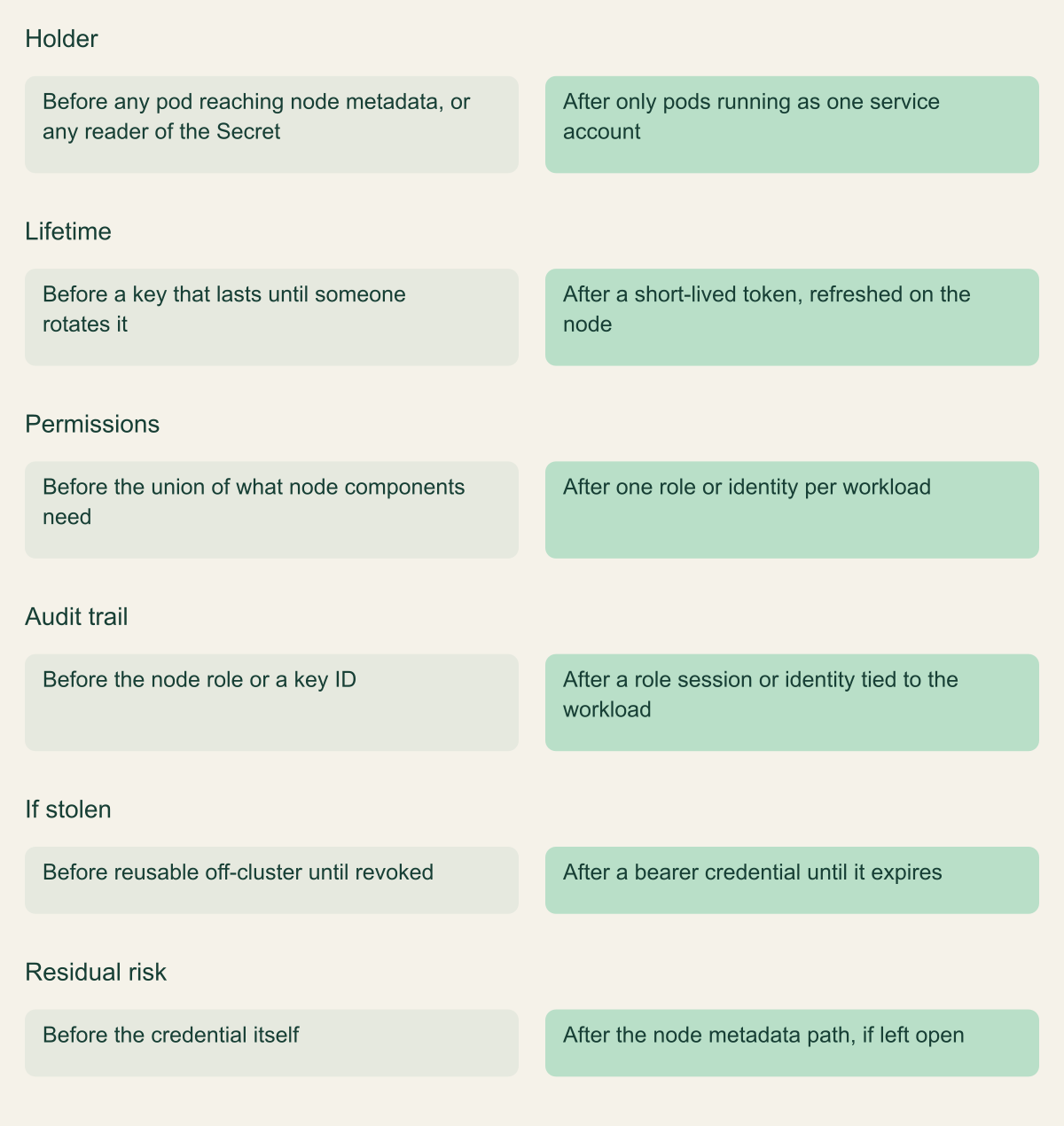
What changes when the credential moves from node to pod
Per-pod credentials shrink who holds a credential and for how long, but the node path stays open until you close it. [7][1]

Source. Conceptual comparison based on AWS EKS identity guidance and Pod Identity documentation. [7][1]
Method. Conceptual before and after; cells summarize documented behavior and do not describe a measured environment.
Accessible table and figure data
| Aspect | Before | After |
|---|---|---|
| Holder | any pod reaching node metadata, or any reader of the Secret | only pods running as one service account |
| Lifetime | a key that lasts until someone rotates it | a short-lived token, refreshed on the node |
| Permissions | the union of what node components need | one role or identity per workload |
| Audit trail | the node role or a key ID | a role session or identity tied to the workload |
| If stolen | reusable off-cluster until revoked | a bearer credential until it expires |
| Residual risk | the credential itself | the node metadata path, if left open |
| Aspect | Before | After |
|---|---|---|
| Holder | any pod reaching node metadata, or any reader of the Secret | only pods running as one service account |
| Lifetime | a key that lasts until someone rotates it | a short-lived token, refreshed on the node |
| Permissions | the union of what node components need | one role or identity per workload |
| Audit trail | the node role or a key ID | a role session or identity tied to the workload |
| If stolen | reusable off-cluster until revoked | a bearer credential until it expires |
| Residual risk | the credential itself | the node metadata path, if left open |
How a projected token becomes a cloud credential
Kubernetes service account tokens used to be non-expiring JWTs that only the API server could validate. Projected service account tokens replaced them for this use. The kubelet requests a token for the pod's service account with a chosen audience and lifetime and writes it into a projected volume. expirationSeconds defaults to one hour, with a minimum of ten minutes, and audience names the system that should accept the token. Any recipient whose identifier is not in the audience should reject it. [10][11]
Before a cloud will accept that token, it has to trust the cluster as an OpenID Connect issuer. EKS hosts a public OIDC discovery endpoint for each cluster that serves the signing keys, and it rotates the private key every seven days. AKS publishes /.well-known/openid-configuration and /openid/v1/jwks under an issuer URL of the form https://{region}.oic.prod-aks.azure.com/{tenant_id}/{uuid}. The cloud's token service fetches those keys and checks the signature. It then checks the issuer, the subject (system:serviceaccount:<namespace>:<name>) and the audience, and only after that issues its own short-lived credential. [10][2][12]
Where the providers differ is who performs the exchange. With IRSA and AKS Workload ID, the SDK in the pod reads the token file and calls the token endpoint itself: AssumeRoleWithWebIdentity in AWS STS, or the Microsoft Entra v2 token endpoint. With EKS Pod Identity, an agent on the node calls the EKS Auth API for the pod. On GKE, the GKE metadata server on each node intercepts calls to the metadata address and performs the exchange with Security Token Service. In the last two designs the SDK talks to a local endpoint, so the same design also decides what happens to the node's own metadata. [13][2][3]
Two things follow. First, the token file is a bearer credential for as long as it is valid. In the designs where the pod calls the token endpoint directly, anything that can read the file can present it until it expires. That is an inference from how the exchange works, not a documented attack. Keep lifetimes at the default or shorter. Avoid subPath mounts, which the Kubernetes documentation says do not receive projected volume updates, and reread the file rather than caching it. Second, the exchange only helps if the SDK takes that path. Credential chains stop at the first source that works, so a leftover access key variable or a reachable metadata endpoint can win. [11][2][13]
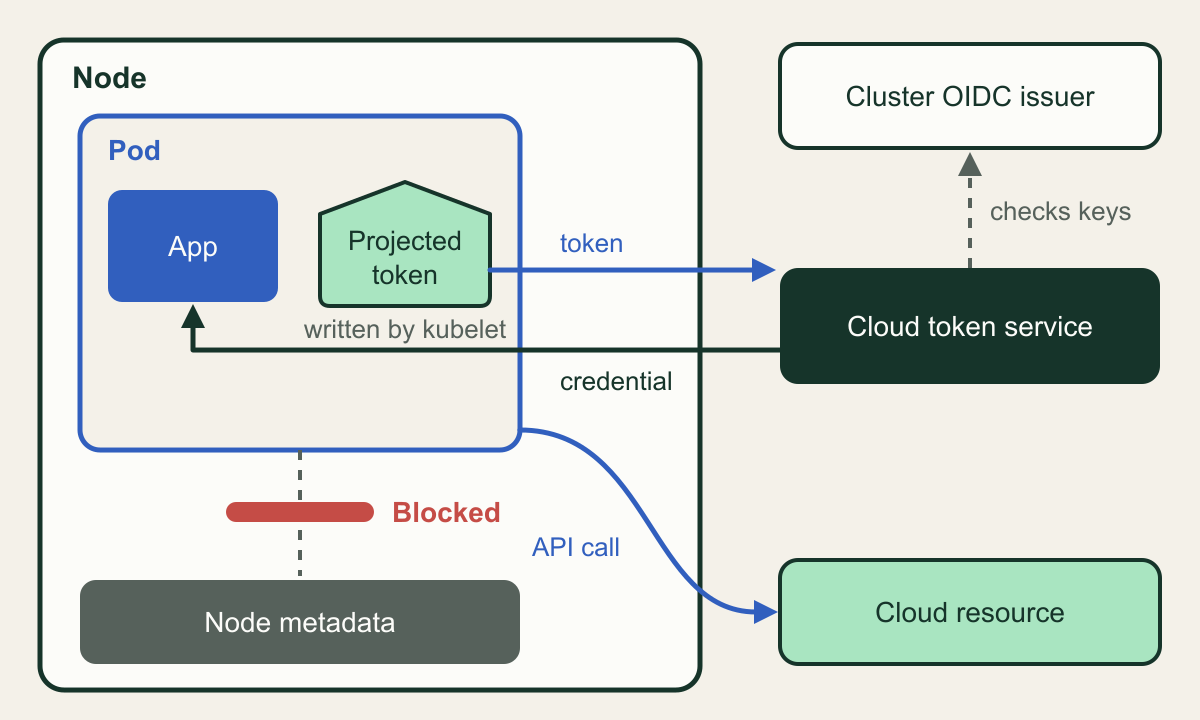
A pod trades its projected token, and the node path stays shut
The pod's own token buys a short-lived credential; the route to node metadata must be closed separately. [2][3][7]

Source. Conceptual illustration based on Microsoft Entra Workload ID, Workload Identity Federation for GKE and AWS EKS identity documentation. [2][3][7]
Method. Conceptual illustration; it combines the three providers into one generic flow and omits provider-specific agents.
Accessible table and figure data
| Element | What it represents |
|---|---|
| Projected token | Signed service account token written into the pod |
| Cluster OIDC issuer | Discovery document and signing keys the cloud trusts |
| Cloud token service | AWS STS or EKS Auth, Microsoft Entra, or Google STS |
| Short-lived credential | Role session or access token for one identity |
| Cloud resource | The API the workload is allowed to call |
| Node metadata | Instance metadata endpoint holding the node identity |
| Red barrier | IMDS block, IMDS restriction or GKE metadata server |
| Element | What it represents |
|---|---|
| Projected token | Signed service account token written into the pod |
| Cluster OIDC issuer | Discovery document and signing keys the cloud trusts |
| Cloud token service | AWS STS or EKS Auth, Microsoft Entra, or Google STS |
| Short-lived credential | Role session or access token for one identity |
| Cloud resource | The API the workload is allowed to call |
| Node metadata | Instance metadata endpoint holding the node identity |
| Red barrier | IMDS block, IMDS restriction or GKE metadata server |
EKS Pod Identity and IRSA
AWS recommends EKS Pod Identity whenever possible. Setup has three parts. Install the EKS Pod Identity Agent add-on once per cluster; it is built into EKS Auto Mode. Give an IAM role a trust policy for the service principal pods.eks.amazonaws.com with sts:AssumeRole and sts:TagSession. Then create an association that maps the role to a namespace and a service account. Nothing about the association is stored in the cluster, and there is no service account annotation. When a pod that uses the service account starts, EKS adds AWS_CONTAINER_CREDENTIALS_FULL_URI, pointing at http://169.254.170.23/v1/credentials, and AWS_CONTAINER_AUTHORIZATION_TOKEN_FILE, along with a projected token whose audience is pods.eks.amazonaws.com and whose expiry is 24 hours. [4][1][13]
The agent is a DaemonSet on the host network. It listens on ports 80 and 2703 at 169.254.170.23 and [fd00:ec2::23] and serves credentials only to pods on its own node. It calls the AssumeRoleForPodIdentity API with the pod's token and the agent's IAM role. The credentials that come back carry six session tags: eks-cluster-arn, eks-cluster-name, kubernetes-namespace, kubernetes-service-account, kubernetes-pod-name and kubernetes-pod-uid. With those tags, one role can serve several workloads through attribute-based conditions, and the role's trust policy can limit which cluster, namespace and service account may use it. One inference follows: someone who replays a stolen Pod Identity token away from the node also needs credentials that can call the EKS Auth API, and the node's own role has that permission. That is one more reason to protect the node role. [1][7][14]
Several limits shape the design. A cluster supports up to 5,000 associations. Each service account maps to one role in the cluster's own account, and association changes are eventually consistent, taking several seconds to apply. Pod Identity runs only on Linux EC2 worker nodes. It does not run on Fargate, Windows nodes, AWS Outposts, EKS Anywhere or self-managed Kubernetes on EC2, and workloads need a supported AWS SDK version. Cross-account access uses role chaining: an association can name a targetRoleArn, and EKS assumes the local role and then the target role, returning the target role's credentials. An optional session policy can narrow a shared role for one association, but it can only be set when session tags are disabled. [1][15]
IRSA is the fallback where Pod Identity cannot run. It also works on EKS Anywhere, Red Hat OpenShift Service on AWS and self-managed clusters on EC2. Each cluster needs its own IAM OIDC provider. Each role's trust policy names that provider and sets conditions on the token's sub claim and on its aud claim (sts.amazonaws.com). The SDK in the pod calls AssumeRoleWithWebIdentity, which counts against your account's STS request quota. AWS's guidance is to match the exact service account name in the trust policy. A StringLike condition with * in place of the name lets every service account in the namespace assume the role. IRSA sets no session tags, so every pod that uses a role gets all of its permissions. [4][16][7]
Here is a hypothetical example. A cluster runs an invoice-reader service account in a payments namespace, and it only needs to read one S3 prefix. With Pod Identity, the trust policy below ties the role to that cluster, namespace and service account through request tags. Its aws:SourceOrgId condition limits the role to callers in your own AWS Organization, which is the confused-deputy protection AWS recommends. The permissions policy on the role then grants s3:GetObject on that prefix and nothing else. [14][7]
{
  "Version": "2012-10-17",
  "Statement": [
    {
      "Sid": "AllowEksAuthForOneServiceAccount",
      "Effect": "Allow",
      "Principal": {
        "Service": "pods.eks.amazonaws.com"
      },
      "Action": [
        "sts:AssumeRole",
        "sts:TagSession"
      ],
      "Condition": {
        "StringEquals": {
          "aws:SourceOrgId": "${aws:ResourceOrgId}",
          "aws:RequestTag/eks-cluster-arn": "arn:aws:eks:us-east-1:111122223333:cluster/example-cluster",
          "aws:RequestTag/kubernetes-namespace": "payments",
          "aws:RequestTag/kubernetes-service-account": "invoice-reader"
        }
      }
    }
  ]
}
AKS Workload ID
On AKS the mechanism is Microsoft Entra Workload ID. AKS Automatic clusters come with it and the OIDC issuer already configured. On AKS Standard you turn both on with az aks update --enable-oidc-issuer --enable-workload-identity, which needs Azure CLI 2.47.0 or later and AKS 1.22 or later. Next, create a user-assigned managed identity (or an app registration) and annotate a service account with azure.workload.identity/client-id. Then add a federated identity credential to the identity. Its issuer is the cluster's issuer URL, its subject is system:serviceaccount:<namespace>:<name>, and its audience is api://AzureADTokenExchange, the value Microsoft recommends keeping. [2][12]
The opt-in sits on the pod, not on the service account. The mutating webhook only changes pods labeled azure.workload.identity/use: "true". For those pods it injects the projected token volume and Azure environment variables, including AZURE_FEDERATED_TOKEN_FILE. Microsoft requires the label so that workload identity fails closed, and says unlabeled pods fail after a restart. Changes to service account annotations only take effect after the pod restarts. The projected token lifetime defaults to 3600 seconds and can be set anywhere from 3600 to 86400. The Entra token returned by the exchange is a separate credential, and Microsoft's AKS documentation says those tokens expire 24 hours after issue. Read the token path from the environment variable rather than hard-coding it, because the mount path can change. [2]
Entra matches every value exactly. The issuer and subject pair must be unique on the identity, and no property accepts wildcards. A wrong subject is accepted when you create the credential and only fails later, at token exchange. Each app registration or user-assigned identity holds at most 20 federated identity credentials. New credentials take time to propagate, and a token request made soon after creation can fail with AADSTS70021. Creating several credentials on the same identity at once returns HTTP 409, so automation has to create them one at a time. As of this review, user-assigned identities in Malaysia South cannot take federated credentials. [5]
The 20-credential cap is the main AKS design constraint. Every cluster has its own issuer, so the same service account in 21 clusters needs 21 credentials on one identity. Identity bindings, still in preview, map one managed identity to many clusters through a single AKS-managed federated credential and move authorization into the cluster. A ClusterRole and ClusterRoleBinding then decide which namespaces and service accounts may use the identity. The final say moves from Entra administrators to whoever controls Kubernetes RBAC. Applications have to opt in through WorkloadIdentityCredential in specific preview SDK versions. The binding token uses the audience api://AKSIdentityBinding, so a pod that uses both bindings and direct federation must project a second token for the direct path. [6][2]
Pod-managed identity, the older AKS method, intercepted IMDS calls with an NMI DaemonSet and is now retired. The open source project was deprecated on October 24, 2022 and archived in September 2023, and the managed add-on was supported only through September 2025. Microsoft provides a migration sidecar that proxies IMDS calls to OIDC, and it describes the sidecar as a short-term bridge, not a long-term solution. [17][2]
# Example fragment. The client ID is a placeholder for a user-assigned managed
# identity whose federated credential subject is
# system:serviceaccount:reports:report-reader.
apiVersion: v1
kind: ServiceAccount
metadata:
  name: report-reader
  namespace: reports
  annotations:
    azure.workload.identity/client-id: "00000000-0000-0000-0000-000000000000"
automountServiceAccountToken: false
---
apiVersion: apps/v1
kind: Deployment
metadata:
  name: report-reader
  namespace: reports
spec:
  replicas: 2
  selector:
    matchLabels:
      app: report-reader
  template:
    metadata:
      labels:
        app: report-reader
        azure.workload.identity/use: "true"
    spec:
      serviceAccountName: report-reader
      automountServiceAccountToken: false
      containers:
        - name: app
          image: example.azurecr.io/report-reader:1.0.0
          securityContext:
            allowPrivilegeEscalation: false
runAsNonRoot: trueWorkload Identity Federation for GKE
Google now calls the feature Workload Identity Federation for GKE and recommends it for GKE workloads that call Google Cloud APIs. It is always on in Autopilot. On Standard clusters you set a workload pool, which is always PROJECT_ID.svc.id.goog, on the cluster and run node pools with --workload-metadata=GKE_METADATA. Once the cluster has the feature, new node pools use it by default. Updating an existing node pool takes effect immediately and cuts its workloads off from the node service account, and Google warns that this can cause disruptions. [3][18]
On Linux nodes the GKE metadata server runs as a DaemonSet and intercepts requests to metadata.google.internal at 169.254.169.254:80. It gets the pod's Kubernetes service account token from the API server, exchanges it with Security Token Service and hands the workload a short-lived federated access token. Pods on those node pools can no longer reach the Compute Engine metadata server. That is how GKE keeps the node service account away from workloads by default, and Google also credits the design with protecting sensitive node metadata. [3][19]
With the feature on, you can grant IAM roles straight to a Kubernetes service account using a principal identifier such as principal://iam.googleapis.com/projects/PROJECT_NUMBER/locations/global/workloadIdentityPools/PROJECT_ID.svc.id.goog/subject/ns/NAMESPACE/sa/KSA_NAME. A principalSet selector covers a group of them. Some APIs do not support these principals. For those, link the Kubernetes service account to an IAM service account: annotate it with iam.gke.io/gcp-service-account and grant roles/iam.workloadIdentityUser to serviceAccount:PROJECT_ID.svc.id.goog[NAMESPACE/KSA_NAME]. You need both the annotation and the binding. This route adds an impersonation hop, and its permissions need their own review. [3][18]
The sharp edge is identity sameness. All clusters in a project share one workload pool, so IAM treats the same namespace and service account name in two clusters as one principal and cannot tell which cluster made a call. Google recommends putting clusters in separate projects or keeping namespace names distinct. For example, a development cluster created in the production project with a payments/invoice-reader service account receives every grant that production's payments/invoice-reader has. [3]
There are operational limits too. Authentication attempts in a pod's first few seconds can fail. The metadata server accepts 500 concurrent connections per node, and the kubelet may terminate metadata server pods in clusters with more than 3,000 Kubernetes service accounts. The Exchange Token API has a quota of 6,000 requests per minute. Network policies must allow egress to 169.254.169.252/32 on port 988, or to 169.254.169.254/32 on port 80 with GKE Dataplane V2. Google also recommends giving nodes a custom service account with only roles/container.defaultNodeServiceAccount instead of the Compute Engine default account. That matters for any pod that still ends up seeing the node identity. [3][19]
# Example fragment for a GKE Standard cluster. All names and numbers are
# placeholders. The node pool update cuts its workloads off from the node
# service account immediately, so grant roles to the workloads first.
gcloud container clusters update example-cluster \
  --location=us-central1 \
  --workload-pool=example-project.svc.id.goog

# Grant one read role on one bucket to one Kubernetes service account.
gcloud storage buckets add-iam-policy-binding gs://example-bucket \
  --role=roles/storage.objectViewer \
  --member=principal://iam.googleapis.com/projects/123456789012/locations/global/workloadIdentityPools/example-project.svc.id.goog/subject/ns/reports/sa/report-reader \
  --condition=None

gcloud container node-pools update example-pool \
  --cluster=example-cluster \
  --location=us-central1 \
--workload-metadata=GKE_METADATAComparing trust setup and blast radius
The mechanisms put the trust decision in different places, and that decides who can widen access. With IRSA and AKS direct federation, the cloud side holds the whole binding. The role trust policy or the federated credential names the exact issuer and subject, so only an IAM or Entra administrator can add a cluster or a service account. With EKS Pod Identity the role trusts a service principal and the binding lives in the EKS association. Anyone allowed to create associations and pass the role can point it at a new service account, unless the trust policy has conditions on the session tags. On GKE the binding is an IAM grant to a principal string that any cluster in the project can match. AKS identity bindings give the final say to whoever controls Kubernetes RBAC. [4][14][3][6]
If someone steals a credential from inside a pod, the blast radius looks much the same under all four: the role or identity bound to that service account, for as long as the credential lasts. The difference is in reuse. Session tags narrow a Pod Identity role shared across services; nothing narrows an IRSA role shared across pods. On GKE, a grant to a namespace-wide principalSet covers every service account in that namespace in every cluster of the project. In every design the node path multiplies the damage. One unblocked metadata endpoint turns a single compromised pod into the node identity and, on EKS, possibly into other pods' credentials on the same node. [4][3][1]
Kubernetes permissions are now cloud permissions. A team that can create service accounts and pods in a namespace can use any cloud identity bound to a service account name in that namespace. Count namespace creation and the right to set serviceAccountName as part of the cloud permission model. Give each distinct identity its own namespace and service account, as Google's hardening guidance recommends for GKE. [19]
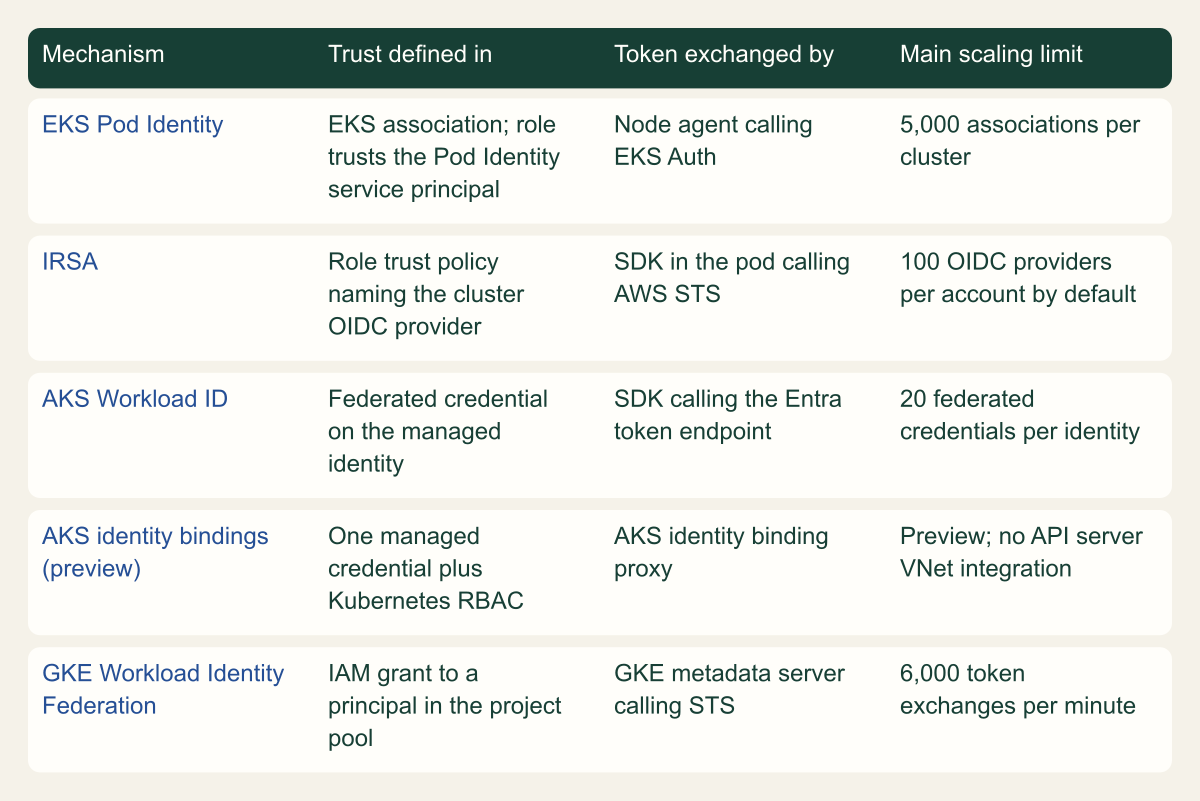
Where each mechanism keeps the trust decision
The binding lives in IAM, Entra, an EKS association or Kubernetes RBAC, and that decides who can widen it. [4][5][6][3]

Source. Comparison compiled from AWS, Microsoft and Google documentation reviewed October 7, 2026. [4][1][5][6][3]
Method. Source-derived qualitative matrix; cells paraphrase the cited pages. Limits are documented defaults, some adjustable.
Accessible table and figure data
| Mechanism | Trust defined in | Token exchanged by | Main scaling limit |
|---|---|---|---|
| EKS Pod Identity | EKS association; role trusts the Pod Identity service principal | Node agent calling EKS Auth | 5,000 associations per cluster |
| IRSA | Role trust policy naming the cluster OIDC provider | SDK in the pod calling AWS STS | 100 OIDC providers per account by default |
| AKS Workload ID | Federated credential on the managed identity | SDK calling the Entra token endpoint | 20 federated credentials per identity |
| AKS identity bindings (preview) | One managed credential plus Kubernetes RBAC | AKS identity binding proxy | Preview; no API server VNet integration |
| GKE Workload Identity Federation | IAM grant to a principal in the project pool | GKE metadata server calling STS | 6,000 token exchanges per minute |
| Mechanism | Trust defined in | Token exchanged by | Main scaling limit |
|---|---|---|---|
| EKS Pod Identity | EKS association; role trusts the Pod Identity service principal | Node agent calling EKS Auth | 5,000 associations per cluster |
| IRSA | Role trust policy naming the cluster OIDC provider | SDK in the pod calling AWS STS | 100 OIDC providers per account by default |
| AKS Workload ID | Federated credential on the managed identity | SDK calling the Entra token endpoint | 20 federated credentials per identity |
| AKS identity bindings (preview) | One managed credential plus Kubernetes RBAC | AKS identity binding proxy | Preview; no API server VNet integration |
| GKE Workload Identity Federation | IAM grant to a principal in the project pool | GKE metadata server calling STS | 6,000 token exchanges per minute |
Ceilings that shape the trust topology
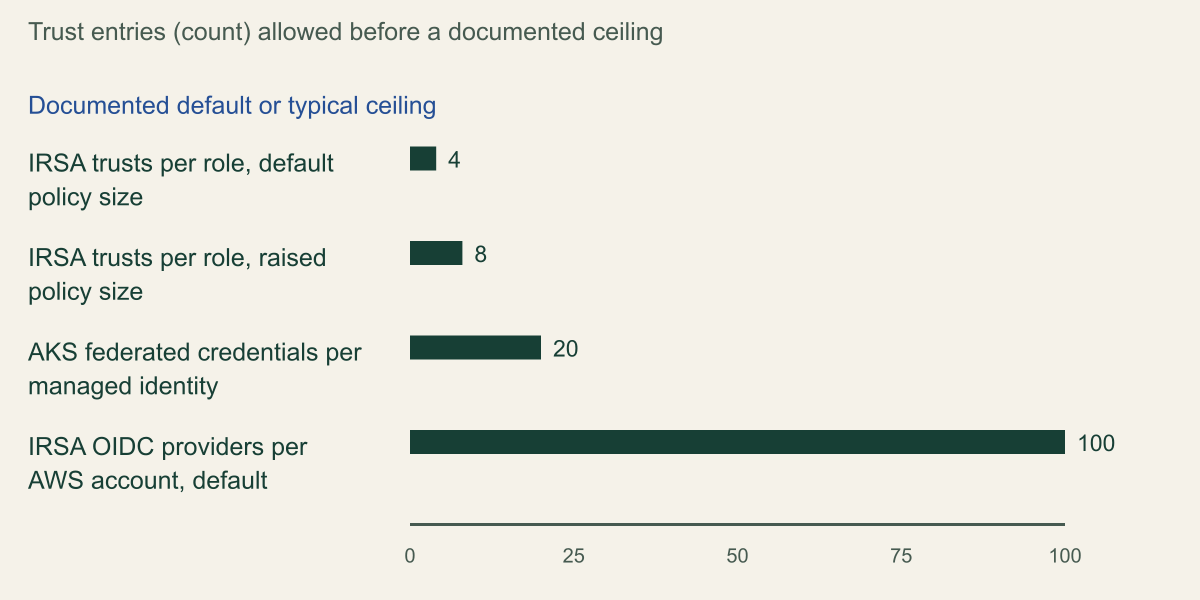
The documented ceilings explain why large estates drift toward one mechanism. IRSA has two. A role trust policy is 2,048 characters by default, which AWS says typically fits four service account trust relationships, and about eight once the quota is raised to its 8,192-character maximum. Each AWS account also gets 100 IAM OIDC providers by default, one per cluster, adjustable to 700. AKS direct federation stops at 20 federated credentials per managed identity, and every distinct pair of cluster issuer and subject uses one. [4][20][5]
Pod Identity and GKE avoid per-identity trust lists, which is the main argument for them at scale. They have their own counts: 5,000 associations per EKS cluster, and on GKE the metadata server's 500-connection and 3,000-service-account limits plus the 6,000-per-minute Exchange Token API quota. The chart shows only the trust-entry ceilings, which share one unit. Hitting one usually means the topology needs rethinking, not that you should raise a quota and keep copying trust entries. Two such rethinks are a shared role per environment narrowed by Pod Identity session tags, or AKS identity bindings once they leave preview. [1][3][6]
Default trust-entry ceilings of 4, 8, 20 and 100
IRSA role trust policies and Entra federated credentials hit low ceilings; Pod Identity and GKE avoid per-identity trust lists. [4][20][5]

Source. AWS EKS service account comparison and IAM quotas; Microsoft Entra workload identity federation considerations. [4][20][5]
Method. Values copied from the cited pages. AWS describes 4 and 8 as typical counts for 2,048 and 8,192 character trust policies; the OIDC provider quota can be raised to 700.
Accessible table and figure data
| Limit | Trust entries | Applies to |
|---|---|---|
| IRSA trusts per role, default policy size | 4 | One IAM role |
| IRSA trusts per role, raised policy size | 8 | One IAM role |
| AKS federated credentials per managed identity | 20 | One Entra identity |
| IRSA OIDC providers per AWS account, default | 100 | One AWS account |
| Limit | Trust entries | Applies to |
|---|---|---|
| IRSA trusts per role, default policy size | 4 | One IAM role |
| IRSA trusts per role, raised policy size | 8 | One IAM role |
| AKS federated credentials per managed identity | 20 | One Entra identity |
| IRSA OIDC providers per AWS account, default | 100 | One AWS account |
Closing the node-credential fallback
Per-pod credentials only take precedence when the SDK finds them. AWS notes that a workload already using credentials earlier in the chain keeps using them after you create a Pod Identity association. IRSA and Pod Identity move to the front of the chain, but the instance profile stays reachable. On Azure, DefaultAzureCredential tries environment credentials, then workload identity, then managed identity through IMDS. A pod that never got the webhook label therefore falls through to whatever managed identity the node can reach. Microsoft advises replacing DefaultAzureCredential with a specific credential once an app is deployed, or limiting the chain with the AZURE_TOKEN_CREDENTIALS variable. [13][7][21]
Close the path at the node itself, with each provider's control:
- EKS: require IMDSv2 and set the PUT response hop limit to 1 in the node group launch template, as AWS recommends. Do not disable IMDS completely, because components such as the node termination handler depend on it. Pods without IRSA or Pod Identity lose the node role, which is the goal, so inventory them first. [7]
- AKS: turn on IMDS restriction with
--enable-imds-restriction, then reimage the nodes withaz aks upgrade --node-image-only. The feature is in preview; it needs the aks-preview CLI extension, the IMDSRestrictionPreview feature registration and the OIDC issuer. It does not support Windows node pools, and it cannot be enabled alongside several add-ons, including Container Insights, Azure Policy, application routing and the Flux and Dapr extensions. Until it fits, keep node pool identities minimal: the kubelet identity has no default permissions and needs only an ACR pull role. [8][22] - GKE: run every node pool with
GKE_METADATAand audit for any pool that is not. Give nodes a custom service account with onlyroles/container.defaultNodeServiceAccount. [18][19] - Everywhere: keep application pods off the host network. On EKS and AKS, host-network pods keep IMDS access, and they bypass the GKE metadata server. The Pod Security Standards Baseline level already disallows
hostNetwork: true. [1][8][3][9]
| Platform | Default exposure | Documented control | Still exposed after control |
|---|---|---|---|
| EKS | IMDS and the node instance profile | IMDSv2 required, hop limit 1 | Host-network pods |
| AKS | IMDS and node pool managed identities | IMDS restriction (preview), node reimage | Host-network pods; Windows pools unsupported |
| GKE Standard | Compute Engine metadata unless the pool uses GKE_METADATA | GKE_METADATA on every node pool | Host-network pods |
| GKE Autopilot | GKE metadata server always on | None needed | Host-network pods where allowed |
# Example node-fallback probe. Run it from a throwaway pod that uses a service
# account with no cloud binding, once per node pool. Each check should fail or
# return something other than the node's identity.

# EKS: with IMDSv2 required and hop limit 1, the token PUT should not succeed.
curl -s --max-time 3 -X PUT "http://169.254.169.254/latest/api/token" \
  -H "X-aws-ec2-metadata-token-ttl-seconds: 60" || echo "EKS: IMDSv2 token not reachable"
# EKS: a plain IMDSv1 GET must also fail; if it prints a role name, IMDSv1 is still open.
curl -s --max-time 3 "http://169.254.169.254/latest/meta-data/iam/security-credentials/" && echo "EKS: IMDSv1 OPEN"

# AKS: with IMDS restriction active, this request should time out.
curl -s --connect-timeout 10 --noproxy "*" -H "Metadata: true" \
  "http://169.254.169.254/metadata/instance?api-version=2023-11-15" || echo "AKS: IMDS not reachable"

# GKE: this must not print the node service account email.
curl -s --max-time 3 -H "Metadata-Flavor: Google" \
"http://169.254.169.254/computeMetadata/v1/instance/service-accounts/default/email"Migration and verification
Migrate in an order that never leaves a workload without credentials. On AWS, add the new binding first. Pod Identity is designed so that older credentials earlier in the chain keep working until you remove them, so you can create the association, roll the pods and then delete the old key or annotation. On AKS, Microsoft gives two routes off pod-managed identity: annotate service accounts with the existing identities, or upgrade the Azure Identity library, with the migration sidecar as a bridge. On GKE, moving a node pool to GKE_METADATA cuts off the node service account at once, so grant roles to the Kubernetes principals before you update the pool. [13][2][18]
Moving from IRSA to Pod Identity follows the same rule. Add a trust statement for pods.eks.amazonaws.com to the role and create the association. Remove the eks.amazonaws.com/role-arn annotation in the same rollout, because a pod with both sets of injected variables uses whichever provider its SDK checks first. The payoff shows up at cluster replacement. A blue/green upgrade with IRSA means editing every role's trust policy for the new cluster's OIDC provider. With Pod Identity you create associations in the new cluster and update only trust policy conditions that name the old cluster. [13][7]
Verify from inside the pod and from the cloud side. Inside the pod, aws sts get-caller-identity should return an assumed-role ARN for the associated role. On GKE, request a token from the metadata server as Google's verification steps do, then call the target API. On AKS, check that the pod has the injected token volume and that the application authenticates through WorkloadIdentityCredential. Then run the fallback probe from an unbound pod on every node pool. On the cloud side, find the workload's sessions in audit logs. Pod Identity sessions carry the namespace, service account and pod name as tags, and AWS names CloudTrail as the audit record for both EKS mechanisms. [18][12][1][10]
Then remove what you replaced. Delete static keys and unused IRSA annotations. Delete stale federated credentials, which count toward the 20 per identity. With identity bindings, also delete the auto-created credential once no binding uses it, because AKS does not garbage-collect it. Record each binding (cluster, namespace, service account, role or identity, and owner) so the next review can see who can widen it. [5][6]
The order of decisions is short. On EKS, use Pod Identity unless the nodes are Fargate, Windows or outside EKS; then use IRSA with an exact sub match. On AKS, use direct federation until the 20-credential cap bites, then evaluate identity bindings once they are generally available. On GKE, grant roles directly to Kubernetes principals and use separate projects for separate trust boundaries. Whatever the platform, the job is not finished until an unbound pod on every node pool fails to get a cloud credential.
Method and provenance
Source-led technical analysis of AWS, Microsoft, Google and Kubernetes documentation, with original comparisons, a node-fallback probe and explicitly hypothetical examples. Sources were reviewed on October 7, 2026.
No EKS, AKS or GKE cluster, cloud account or live credential flow was inspected. Feature status, limits and defaults are bounded to the cited documentation as of the review date, and preview features may change before general availability.
AI assistance. AI assisted research synthesis, drafting, diagram planning and visual production, with deterministic editorial checks. No personal deployment experience, independent human review or live test is claimed.
Published under the Cloud Security Desk organizational byline. Read the practitioner guide policy.
References
- Learn how EKS Pod Identity grants pods access to AWS services Amazon Web Services. Accessed .
- Use a Microsoft Entra Workload ID on Azure Kubernetes Service (AKS) Microsoft. Accessed .
- About Workload Identity Federation for GKE Google Cloud. Accessed .
- Grant Kubernetes workloads access to AWS using Kubernetes Service Accounts Amazon Web Services. Accessed .
- Workload identity federation for app considerations Microsoft. Accessed .
- Identity bindings for Azure Kubernetes Service (AKS) Microsoft. Accessed .
- Amazon EKS best practices: Identity and Access Management Amazon Web Services. Accessed .
- Block pod access to the IMDS endpoint (preview) Microsoft. Accessed .
- Pod Security Standards Kubernetes. Accessed .
- IAM roles for service accounts Amazon Web Services. Accessed .
- Projected Volumes Kubernetes. Accessed .
- Deploy and configure an AKS cluster with Microsoft Entra Workload ID Microsoft. Accessed .
- Understand how EKS Pod Identity works Amazon Web Services. Accessed .
- Create IAM role with trust policy required by EKS Pod Identity Amazon Web Services. Accessed .
- CreatePodIdentityAssociation (Amazon EKS API Reference) Amazon Web Services. Accessed .
- Assign IAM roles to Kubernetes service accounts Amazon Web Services. Accessed .
- Use Microsoft Entra pod-managed identities in AKS (Preview) Microsoft. Accessed .
- Authenticate to Google Cloud APIs from GKE workloads Google Cloud. Accessed .
- Harden your cluster's security Google Cloud. Accessed .
- IAM and AWS STS quotas Amazon Web Services. Accessed .
- Credential chains in the Azure Identity library for Python Microsoft. Accessed .
- Managed identities in Azure Kubernetes Service (AKS) overview Microsoft. Accessed .
- Network Policies Kubernetes. Accessed .