
A migration guide for Azure administrators and DevOps engineers whose automation still uses Microsoft Entra user accounts. It draws on Microsoft and HashiCorp documentation reviewed in October 2026 and gives the phase 2 scope and timeline, a sign-in log query, a replacement-identity decision tree and verification steps.
At a glance
Key findings
- Phase 2 requires MFA for user accounts that create, update or delete resources through Azure Resource Manager from CLI, PowerShell, SDKs, REST or IaC tools; reads, managed identities and service principals are out of scope. [1]
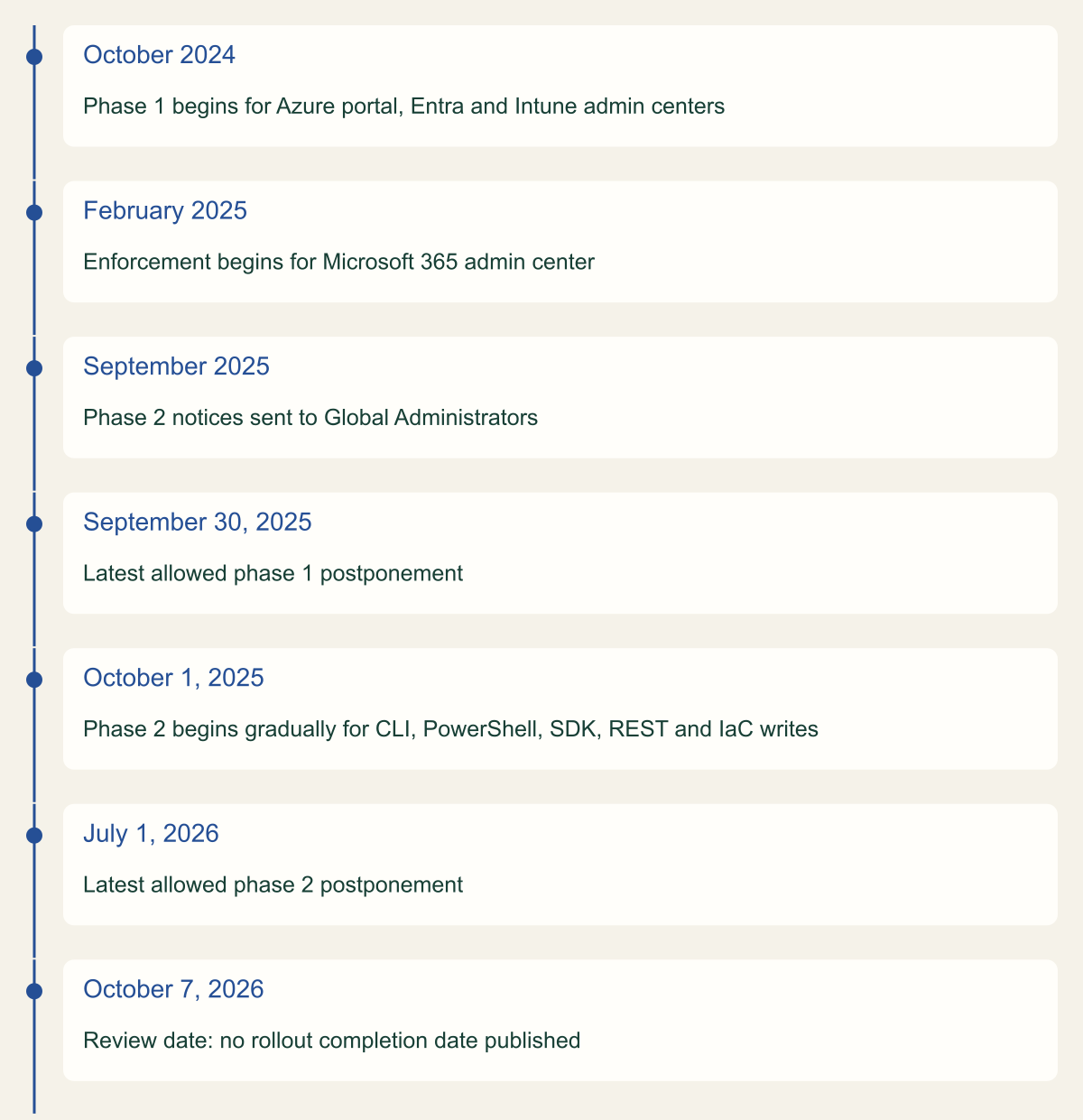
- The last allowed phase 2 postponement date was July 1, 2026, and Microsoft publishes no rollout completion date, so confirm enforcement on the tenant's Phase 2 page. [1]
- User-account jobs usually sign in, then fail on the first write with a claims challenge; jobs using the password grant fail at sign-in. [1][4][7]
- Sign-in logs filtered by the Azure CLI and Azure PowerShell application IDs, with AuthenticationRequirement and AuthenticationProtocol, surface candidate accounts. [1][5]
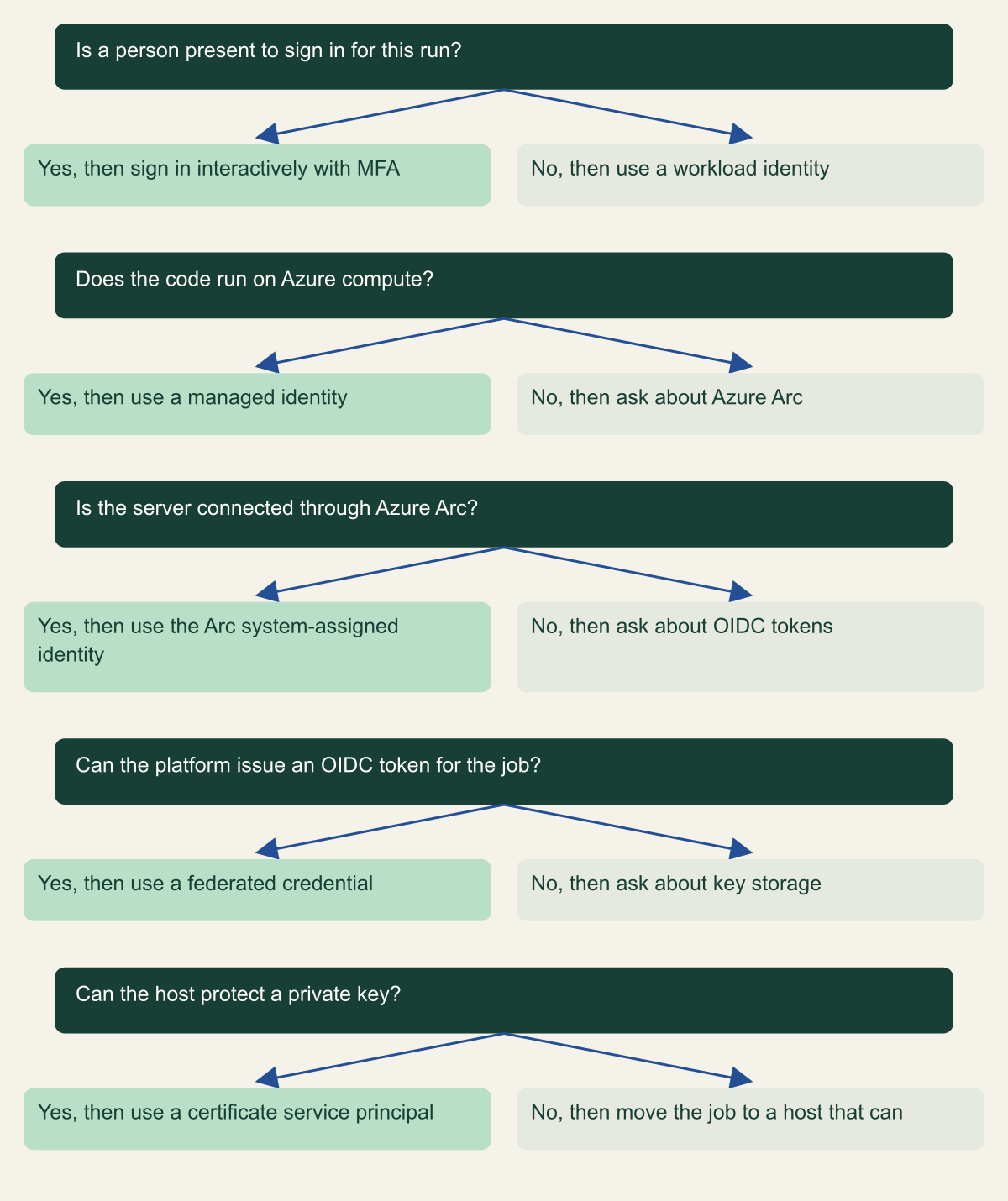
- Microsoft's replacement order is a managed identity on Azure, a federated credential for external OIDC issuers, and a certificate only when neither fits. [7][9]
What phase 2 enforces
Any automation that signs in to Azure as a Microsoft Entra user account and then creates, updates or deletes resources through Azure Resource Manager now needs a token that shows the user completed MFA. Microsoft lists the affected clients as Azure CLI, Azure PowerShell, the Azure mobile app, infrastructure as code tools, Azure SDKs and the Resource Manager REST API. The check sits on the Resource Manager side: requests to management.azure.com are in scope whatever client sent them. Read operations do not require MFA. [1]
Managed identities and service principals are not affected by either enforcement phase. Microsoft's own advice is to migrate user accounts that run scripts or scheduled tasks to workload identities rather than trying to make a person's account behave like a service. In practice that means a managed identity when the code runs on Azure compute, a federated credential when another platform can issue a token for the job, and a certificate-backed service principal only when neither is available. [1][7]
Phase 2 enforcement began rolling out gradually on October 1, 2025. Global Administrators could postpone their tenant's start date, but no later than July 1, 2026, and that window has now closed. Microsoft's planning page, reviewed on October 7, 2026, describes a gradual rollout and does not publish a date by which every tenant was enforced, so check the Multifactor authentication (Phase 2) page in the Azure portal for a banner confirming that enforcement began in your tenant. After enforcement starts, a Global Administrator can ask Microsoft support to lift it temporarily. [1]
There is no opt-out and no account-type exemption. The FAQ names student accounts, break-glass accounts, administrators with eligible or activated roles and users excluded from your own Conditional Access policies as all subject to enforcement, and test tenants get no exception. Enforcement currently applies only in the public Azure cloud, not Azure Government or other sovereign clouds. [1]
| Caller and request | MFA required | Detail |
|---|---|---|
| User account writing through Resource Manager | Yes | Create, update or delete from CLI, PowerShell, SDK, REST or IaC |
| User account reading through Resource Manager | No | Read operations are excluded |
| Managed identity | No | Workload identity, outside both phases |
| Service principal | No | Workload identity, outside both phases |
| Requests to Microsoft Graph | Generally no | Only requests to the Resource Manager endpoint are in scope |
| Entra Connect or Cloud Sync service account | No | Synchronization account is not affected |
| Azure Government and sovereign clouds | Not currently | Public Azure cloud only |
Phase 2 postponement has run out
Enforcement began October 1, 2025 and the last allowed postponement date was July 1, 2026. [1]

Source. Microsoft mandatory MFA planning page and phase 2 announcement. [1][2]
Method. Dates transcribed from the cited pages; month-only dates are shown as published. Ordinal layout, spacing does not represent elapsed time.
Accessible table and figure data
| Date | Milestone |
|---|---|
| October 2024 | Phase 1 begins for Azure portal, Entra and Intune admin centers |
| February 2025 | Enforcement begins for Microsoft 365 admin center |
| September 2025 | Phase 2 notices sent to Global Administrators |
| September 30, 2025 | Latest allowed phase 1 postponement |
| October 1, 2025 | Phase 2 begins gradually for CLI, PowerShell, SDK, REST and IaC writes |
| July 1, 2026 | Latest allowed phase 2 postponement |
| October 7, 2026 | Review date: no rollout completion date published |
| Date | Milestone |
|---|---|
| October 2024 | Phase 1 begins for Azure portal, Entra and Intune admin centers |
| February 2025 | Enforcement begins for Microsoft 365 admin center |
| September 2025 | Phase 2 notices sent to Global Administrators |
| September 30, 2025 | Latest allowed phase 1 postponement |
| October 1, 2025 | Phase 2 begins gradually for CLI, PowerShell, SDK, REST and IaC writes |
| July 1, 2026 | Latest allowed phase 2 postponement |
| October 7, 2026 | Review date: no rollout completion date published |
How a user-account job fails
The sign-in often still works. Microsoft notes that a user who signs in without MFA can open a phase 2 client, and the failure arrives only when the client tries to create, update or delete something: Resource Manager returns an error saying MFA is required, along with a claims challenge. Some clients turn that challenge into an MFA prompt and others just surface the error. An unattended job has nobody to answer a prompt, so a script that reads state and then writes it tends to fail partway through, after its read-only steps have already succeeded. [1]
Azure CLI 2.76.0 and later print a RequestDisallowedByPolicy error that includes the text "Users must authenticate with multi-factor authentication to create or update resources" and suggests running az logout followed by az login with --scope and --claims-challenge. Earlier CLI versions return less specific messages, including "Due to a configuration change made by your administrator". The suggested interactive login is a fix for a person at a terminal. In a pipeline log it is a diagnosis: the job is a user account and needs a different identity. For compatibility, Microsoft recommends Azure CLI 2.76 and Azure PowerShell 14.3 or later. [1][4]
Jobs that sign in with a username and password break earlier and harder. The resource owner password credentials grant is incompatible with MFA, and Microsoft warns that once MFA applies, MSAL methods built on it throw exceptions. The same applies to the Azure Identity libraries: UsernamePasswordCredential, and DefaultAzureCredential or EnvironmentCredential when AZURE_USERNAME and AZURE_PASSWORD are set, need code changes. Microsoft has marked UsernamePasswordCredential deprecated in the .NET, Go, Java, JavaScript and Python Azure Identity libraries. [1][7]
The deny itself comes from Azure Policy. Microsoft's announcement says phase 2 is applied across tenants through Azure Policy, and the tutorial for self-enforcement names the two built-in definitions involved: "Users must authenticate with multi-factor authentication to create or update resources" and "Users must authenticate with multi-factor authentication to delete resources", both shown at version 1.0.0-preview. That is why the error is a policy error rather than a sign-in failure, and why the evidence for blocked writes lives in the Activity log as well as in Entra sign-in logs. [1][2][3]
Find automation that signs in as a user
Three sources each catch something the others miss. Entra sign-in logs show which user accounts authenticate to Azure CLI or Azure PowerShell, from where and how. Azure Policy events show which writes arrived without MFA. Source repositories and pipeline variables show the jobs that have not run recently enough to appear in either log, such as a quarterly certificate renewal.
Start with sign-ins. Microsoft publishes the client application IDs for the phase 2 apps, 04b07795-8ddb-461a-bbee-02f9e1bf7b46 for Azure CLI and 1950a258-227b-4e31-a9cf-717495945fc2 for Azure PowerShell, and says IaC tools use those same IDs. Query both interactive and non-interactive user sign-ins. Automation that refreshes tokens shows up as non-interactive, where the client presents a token or code instead of a user-supplied factor, and the Microsoft Graph sign-ins API returns only interactive events unless you filter on signInEventTypes. [1][6]
Two fields carry most of the signal. AuthenticationRequirement records singleFactorAuthentication or multiFactorAuthentication, and AuthenticationProtocol records ropc for the password grant, which cannot satisfy MFA at all. Then look at IPAddress and UserAgent: a user account that signs in from a build agent's egress address on a fixed schedule is a job, not a person. Treat single-factor results as leads rather than proof, because Microsoft documents that the requirement field reflects the stage reached in that sign-in and does not account for claims satisfied earlier. [5][6]
Where the tenant has no workspace, or as a cross-check, assign the two built-in MFA definitions in audit mode at a test scope. Microsoft's tutorial says each resulting Activity log event represents a create, update or delete by a user who did not authenticate with MFA, and that the compliance view always shows zero resources because the policy evaluates requests rather than resources. In enforcement mode, each deny event marks a blocked write instead. The tutorial includes an AzureActivity query that filters on the create-or-update definition ID 4e6c27d5-a6ee-49cf-b2b4-d8fe90fa2b8b. [3]
Finally, search code and configuration. Look for AZURE_USERNAME, AZURE_PASSWORD, UsernamePasswordCredential, AcquireTokenByUsernamePassword, acquire_token_by_username_password, and az login or Connect-AzAccount calls fed from a stored user password. Each hit needs an owner, the identity it should move to and the role it actually needs. Logs prove what ran in the retention window; the repository search finds what will run next month.
// Example query. Requires Entra sign-in logs routed to a Log Analytics workspace.
let phase2Clients = dynamic([
  "04b07795-8ddb-461a-bbee-02f9e1bf7b46",  // Azure CLI
  "1950a258-227b-4e31-a9cf-717495945fc2"   // Azure PowerShell
]);
union SigninLogs, AADNonInteractiveUserSignInLogs
| where TimeGenerated > ago(30d)
| where AppId in (phase2Clients)
| summarize SignIns = count(),
    SingleFactor = countif(AuthenticationRequirement == "singleFactorAuthentication"),
    PasswordGrant = countif(AuthenticationProtocol == "ropc"),
    SourceIPs = make_set(IPAddress, 20),
    UserAgents = make_set(UserAgent, 5),
    LastSeen = max(TimeGenerated)
  by UserPrincipalName, AppDisplayName
| order by PasswordGrant desc, SingleFactor desc, SignIns descChoose the replacement identity
Microsoft's guidance for moving off the password grant gives a clear order for jobs with no user context, and it names a CI pipeline script as an example. If the code runs on Azure infrastructure, use a managed identity. If it runs on a platform with its own OAuth 2.0 compliant identity provider, such as GitHub, use federated identity credentials. If neither is possible, use a certificate credential. MFA does not apply to service principals, so any of the three removes the enforcement problem; the order reflects how much credential handling each leaves you with. [7]
Managed identities come in two kinds. A system-assigned identity is created with one Azure resource, can only be used by that resource and is deleted with it. A user-assigned identity is a separate resource with its own lifecycle that can be attached to several resources, and Microsoft calls it the recommended type for Microsoft services. Neither exposes a credential to you, and both are free. A single VM running its own maintenance job suits a system-assigned identity; a pool of build agents or a scale set that is rebuilt often suits a user-assigned identity, because its role assignments survive the rebuild. [8]
Workload identity federation configures a user-assigned managed identity or an app registration to trust tokens from an external identity provider. The external workload exchanges its own token for a Microsoft Entra access token, so there is no secret to store, rotate or leak. Microsoft lists Kubernetes clusters anywhere, GitHub Actions, Google Cloud, AWS through IAM outbound identity federation, SPIFFE and SPIRE, Azure Pipelines and other OIDC issuers as supported sources. Tokens issued by Microsoft Entra itself cannot be used as the external token. [9]
A certificate-backed service principal is the fallback for a host that is outside Azure, not connected through Azure Arc and unable to obtain an OIDC token. A client secret is a weaker fallback still: Azure PowerShell, for example, stores a service principal secret used with Connect-AzAccount in AzureRmContext.json under the user profile, so the secret ends up on disk unless you protect that directory. [14]
Whatever the identity, give it only the role assignments the job needs, at the narrowest scope that works. Do not copy the human account's assignments, which usually reflect years of unrelated tasks. A reporting job that only reads resources is not blocked by phase 2, but it still keeps a human password in a script, so it belongs in the same migration with a read-only role.
Choose the identity by where the code runs
Managed identity first, federation next, a certificate only when neither fits. [7]

Source. Conceptual decision aid based on Microsoft guidance on migrating from the password grant, managed identities, workload identity federation and Arc-enabled servers. [7][8][9][15]
Method. Conceptual ordering of documented options. It does not cover multitenant applications or sovereign clouds.
Accessible table and figure data
| Question | Yes, then | No, then |
|---|---|---|
| Is a person present to sign in for this run? | sign in interactively with MFA | use a workload identity |
| Does the code run on Azure compute? | use a managed identity | ask about Azure Arc |
| Is the server connected through Azure Arc? | use the Arc system-assigned identity | ask about OIDC tokens |
| Can the platform issue an OIDC token for the job? | use a federated credential | ask about key storage |
| Can the host protect a private key? | use a certificate service principal | move the job to a host that can |
| Question | Yes, then | No, then |
|---|---|---|
| Is a person present to sign in for this run? | sign in interactively with MFA | use a workload identity |
| Does the code run on Azure compute? | use a managed identity | ask about Azure Arc |
| Is the server connected through Azure Arc? | use the Arc system-assigned identity | ask about OIDC tokens |
| Can the platform issue an OIDC token for the job? | use a federated credential | ask about key storage |
| Can the host protect a private key? | use a certificate service principal | move the job to a host that can |
Pipelines and federated credentials
For GitHub Actions, create a federated credential on an app registration or user-assigned managed identity that trusts your repository, grant that identity its role, and sign in with azure/login@v2 using client-id, tenant-id and subscription-id. The job needs id-token: write permission to request its OIDC token. The action's audience input defaults to api://AzureADTokenExchange for the public cloud. Entra compares the credential's issuer, subject and audience with the token case-sensitively, so a subject written for the production environment will not match a job that runs without that environment. [9][10]
Azure DevOps recommends workload identity federation for Azure Resource Manager service connections, either through an automatically created app registration or through an existing user-assigned managed identity. An existing secret-based connection that Azure DevOps created automatically, and that only one project uses, can be converted with the Convert action and reverted within seven days. Manually created and cross-project connections cannot use the conversion tool. New federated connections use the Microsoft Entra issuer by default, and the older Azure DevOps token issuer retires on July 1, 2027, so converting now avoids a second migration. [11]
If a pipeline currently calls az login with a user's password from a variable group, replace that step with the service connection rather than adding a second credential. The Azure CLI and Azure PowerShell tasks can then run under the federated identity, and the variable holding the password can be deleted once the pipeline runs clean.
Terraform runs need the same change. The AzureRM provider has supported OpenID Connect since version 3.7.0, enabled with use_oidc or the ARM_USE_OIDC environment variable alongside ARM_CLIENT_ID, ARM_TENANT_ID and ARM_SUBSCRIPTION_ID; on GitHub Actions it picks up the runner's token request variables automatically. A Terraform run that authenticates through a person's Azure CLI session is enforced like any other CLI call, because Microsoft states that IaC tools use the Azure CLI or Azure PowerShell application IDs. [1][12]
# Example workflow fragment. The client ID belongs to a user-assigned managed
# identity or app registration whose federated credential trusts this repository.
name: deploy-infrastructure
on:
  push:
    branches: [main]
permissions:
  id-token: write
  contents: read
jobs:
  deploy:
    runs-on: ubuntu-latest
    environment: production
    steps:
      - uses: actions/checkout@v4
      - uses: azure/login@v2
        with:
          client-id: ${{ secrets.AZURE_CLIENT_ID }}
          tenant-id: ${{ secrets.AZURE_TENANT_ID }}
          subscription-id: ${{ secrets.AZURE_SUBSCRIPTION_ID }}
- run: az deployment group create --resource-group example-rg --template-file main.bicepScripts on machines
Scheduled scripts on virtual machines and jump hosts are often the oldest user-account automation, because they predate the pipeline. On an Azure VM, enable a managed identity, grant it the role the script needs, and replace the login line. Azure CLI uses az login --identity for a system-assigned identity and adds --client-id, --object-id or --resource-id to select a user-assigned one. Azure PowerShell uses Connect-AzAccount -Identity, with -AccountId set to the client ID or resource ID of a user-assigned identity. [13][14]
Servers outside Azure can get the same model through Azure Arc. An Arc-enabled server has a system-assigned managed identity, and code on the server requests tokens from a local endpoint published in the IDENTITY_ENDPOINT variable on port 40342. To receive a token, the caller must read a challenge file that only members of the local Administrators or Hybrid Agent Extension Applications groups can read on Windows, or the himds group on Linux. Run the scheduled task under a dedicated account in that group, and remember that every process running as that account can act as the server's Azure identity. [15]
Where a machine can use neither, sign in as a service principal with a certificate held in the machine's certificate store, for example Connect-AzAccount -ServicePrincipal -ApplicationId with -Tenant and -CertificateThumbprint. Record the certificate's expiry next to the job so the renewal does not become the next outage. [14]
# Example fragment: a nightly job on an Azure VM that carries a user-assigned
# managed identity. Placeholders only; grant the identity one role at one scope.
az login --identity --client-id "00000000-0000-0000-0000-000000000000"
az account set --subscription "11111111-1111-1111-1111-111111111111"
az group update --name example-rg --tags lastReviewed="$(date +%F)"

# PowerShell equivalent on the same host:
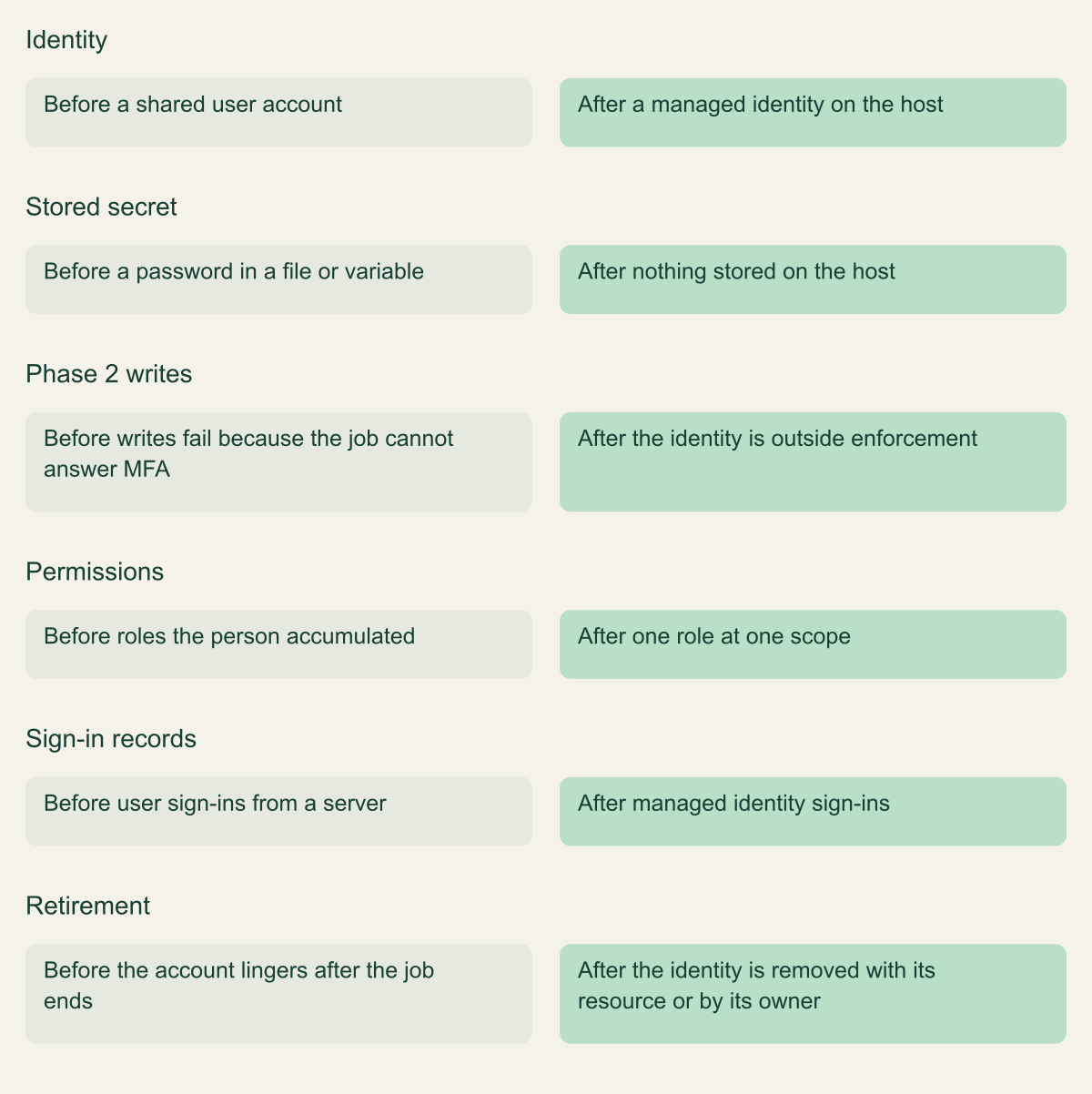
# Connect-AzAccount -Identity -AccountId 00000000-0000-0000-0000-000000000000Replace the account, not just the login line
The migrated job holds no reusable secret and only the role it needs.

Source. Conceptual comparison based on Microsoft mandatory MFA, managed identity and sign-in log documentation. [1][6][8]
Method. Conceptual hypothetical script; no environment was inspected.
Accessible table and figure data
| Aspect | Before | After |
|---|---|---|
| Identity | a shared user account | a managed identity on the host |
| Stored secret | a password in a file or variable | nothing stored on the host |
| Phase 2 writes | writes fail because the job cannot answer MFA | the identity is outside enforcement |
| Permissions | roles the person accumulated | one role at one scope |
| Sign-in records | user sign-ins from a server | managed identity sign-ins |
| Retirement | the account lingers after the job ends | the identity is removed with its resource or by its owner |
| Aspect | Before | After |
|---|---|---|
| Identity | a shared user account | a managed identity on the host |
| Stored secret | a password in a file or variable | nothing stored on the host |
| Phase 2 writes | writes fail because the job cannot answer MFA | the identity is outside enforcement |
| Permissions | roles the person accumulated | one role at one scope |
| Sign-in records | user sign-ins from a server | managed identity sign-ins |
| Retirement | the account lingers after the job ends | the identity is removed with its resource or by its owner |
What not to do
Most of the tempting shortcuts either do not work against this enforcement or trade one standing credential for a worse one.
- Do not exclude the service account from your Conditional Access MFA policy. Microsoft states that exceptions and exclusions you configured no longer apply to this enforcement, and user exclusions are listed among the accounts still enforced. [1]
- Do not plan around a support request to lift enforcement. It is temporary, needs a Global Administrator, and leaves the user-account job exactly where it was. [1]
- Do not replace a user password with a client secret on a service principal that holds Owner on the subscription. The job stops failing, but the secret is still a reusable credential in a variable, now attached to an identity that cannot do MFA. Prefer a managed identity or federated credential, and scope the role. [7]
- Do not switch the script to device code sign-in. It needs a person to complete the prompt each time, so it moves the problem onto whoever is on call.
- Do not forget emergency access accounts. They are enforced too, and Microsoft suggests passkeys (FIDO2) or certificate-based authentication to satisfy the requirement. [1]
- Do not leave the old user account enabled after the job moves. An unused account with a known password and old role assignments is the risk this migration exists to remove.
Verify after migration
A migrated job leaves a different trail. Its sign-ins move from the user tables to service principal or managed identity sign-ins, and the Graph clientCredentialType property records federatedIdentityCredential, managedIdentity or certificate. Federated sign-ins also populate federatedCredentialId, which tells you which trust on the identity was used. Meanwhile the old account's rows from that agent's address or user agent should stop. [6]
Exercise the write path on purpose. Run the job, or a harmless step such as a tag update on a test resource group, and confirm in the Activity log that the caller is now the workload identity and that no MFA policy deny events appear for that resource. A successful read proves nothing here, because reads were never enforced. [1][3]
Then retire the human account in stages: disable it, wait through at least one full cycle of the slowest job it served, remove its role assignments, and delete it. Reclaim the user license at that point; Microsoft notes it can be replaced with a Workload ID license. [1]
The order of operations that follows from the documentation is short. Inventory candidates from sign-in logs, policy events and code. Pick the identity by where the code runs: managed identity on Azure or Arc, federation for pipelines and other OIDC issuers, a certificate otherwise. Grant one role at one scope, switch the login, verify by sign-in type and Activity log caller, and only then disable the old account. Upgrade Azure CLI and Azure PowerShell for the people who still sign in interactively, so that the claims challenge they will see is the informative one.
Method and provenance
Source-led technical analysis of Microsoft and HashiCorp documentation, with an original decision aid and explicitly hypothetical examples. Sources were reviewed on October 7, 2026.
No Azure tenant, pipeline or live sign-in data was inspected. Enforcement scope, dates and client behavior are bounded to the cited documentation as of the review date, and the per-tenant rollout status cannot be determined from public sources.
AI assistance. AI assisted research synthesis, drafting, diagram planning and visual production, with deterministic editorial checks. No personal deployment experience, independent human review or live test is claimed.
Published under the Cloud Security Desk organizational byline. Read the practitioner guide policy.
References
- Plan for mandatory Microsoft Entra multifactor authentication (MFA) Microsoft. Accessed .
- Azure mandatory multifactor authentication: Phase 2 starting in October 2025 Microsoft. Published . Accessed .
- Tutorial: Self-enforce MFA through Azure Policy Microsoft. Accessed .
- Troubleshooting Azure CLI Microsoft. Accessed .
- AADNonInteractiveUserSignInLogs table reference Microsoft. Accessed .
- signIn resource type (Microsoft Graph beta) Microsoft. Accessed .
- Microsoft identity platform and OAuth 2.0 Resource Owner Password Credentials Microsoft. Accessed .
- Managed identities for Azure resources Microsoft. Accessed .
- Workload identity federation Microsoft. Accessed .
- Authenticate to Azure from GitHub Actions by OpenID Connect Microsoft. Accessed .
- Use an Azure Resource Manager service connection Microsoft. Accessed .
- Azure provider: authenticating using a service principal and OpenID Connect HashiCorp. Accessed .
- Sign into Azure using a managed identity and Azure CLI Microsoft. Accessed .
- Sign in to Azure PowerShell non-interactively for automation scenarios Microsoft. Accessed .
- Access Azure resources with managed identity on Azure Arc-enabled servers Microsoft. Accessed .