
Give a person or team management visibility into one Azure resource group. Review inherited access, distinguish Reader from data roles, create the scoped assignment and verify the intended reader before removing temporary access.
At a glance
Key findings
- Assign Reader without granting write access or assuming it grants data access.
- A qualitative matrix separates management visibility scope from permission to read stored data.
- Conceptual comparison assumes the broad assignment is separately reviewed and removed; adding Reader alone does not restrict existing rights.
Start with an access request you can test
A colleague needs to inspect the resources in one Azure resource group. Assign the built-in Reader role at that resource group, then verify the result with the colleague's identity. Reader provides management-plane visibility without the write permissions of Contributor. It does not automatically grant access to the contents of a storage container, a database or a Key Vault secret. Those are separate requests that need their own permissions. [1] [3]
A useful request names the resource group, the person or group that needs access, the reason and the expected end date. For example, a hypothetical support team might need to inspect the configuration of the resources belonging to a test application while investigating an installation problem. That request does not automatically include production resources, database records or permission to fix the configuration. Write those exclusions into the request in ordinary language so that both sides can recognize a mistake.
The outcome to prove is specific. The reader should be able to open the selected resource group and inspect an agreed resource. They should not acquire new write access from this assignment, and they should not acquire access to a neighboring group from it. If the same person already has broader rights elsewhere, a new Reader assignment cannot establish that they are restricted to this group. Baseline access matters as much as the role being added.
Use a test identity with known permissions when the purpose is to demonstrate a boundary. Use the real colleague's identity when the purpose is to verify their working experience. These are different checks. A clean test account can show what the new assignment contributes; the colleague's session shows how that assignment combines with the access they already have. Keeping the two results separate avoids a false conclusion from an administrator's successful portal session.
Understand what Reader actually permits
Azure role assignments connect three things: a security principal, a role definition and a scope. The principal identifies who can act, the role describes permitted actions and the scope identifies where those permissions apply. A principal can be a user, group, service principal or managed identity. The same role can therefore describe a human review task or an application's resource inventory task, but the identity should still match the intended consumer. [1]
The built-in Reader role contains management read actions and no data actions. In practice, it is useful for inspecting resource configuration, finding identifiers and reviewing management information exposed by the relevant resource provider. A role with a reassuring name is not a substitute for examining its definition. In the portal, view the role's permissions; in an automated review, retain the role-definition identifier with the assignment. [3] [8]
Consider a hypothetical storage account in the selected resource group. Reader can help someone locate the account and inspect its configuration. Reading the contents of a private blob is another operation. If the task is only to review whether anonymous access is disabled, giving blob-data access would add a capability that the request did not require. If the task really includes opening a sample file, define that data access separately and select an appropriate storage role at a suitable scope.
Read access can still expose useful operational information. Names, tags, resource relationships and configuration values can reveal how a system is organized. Treat the recipient and duration thoughtfully even though the role cannot edit resources. A support request that contains sensitive information should not be used as an excuse to place secrets in resource tags. The access review should focus on the actual information the role reveals, rather than treating every read-only permission as harmless.
Choose the smallest useful scope
Azure scopes form a hierarchy. Management groups contain subscriptions, subscriptions contain resource groups and resource groups contain resources. Assignments at a higher scope are inherited by lower scopes. For a request limited to one application resource group, begin at that group instead of at the subscription. A resource-level assignment may be more appropriate when the person only needs to inspect one resource. [2]
Scope is a resource identifier, not just a friendly label. Two subscriptions can contain similarly named groups. Before making the assignment, compare the subscription and group shown in the portal with the approved request. Copy the resource ID from the group's properties if the work will be scripted. A role assignment aimed at a correctly spelled group in the wrong subscription is still the wrong assignment.
Resource-group scope follows the group, including the resources placed in it later. That is convenient for a support team responsible for the whole application, but it also means that the group's purpose needs to remain coherent. If unrelated production resources are added to the group, the old access decision may cover more than the reviewer expected. Put an ownership or lifecycle review around the group instead of assuming its contents will never change.
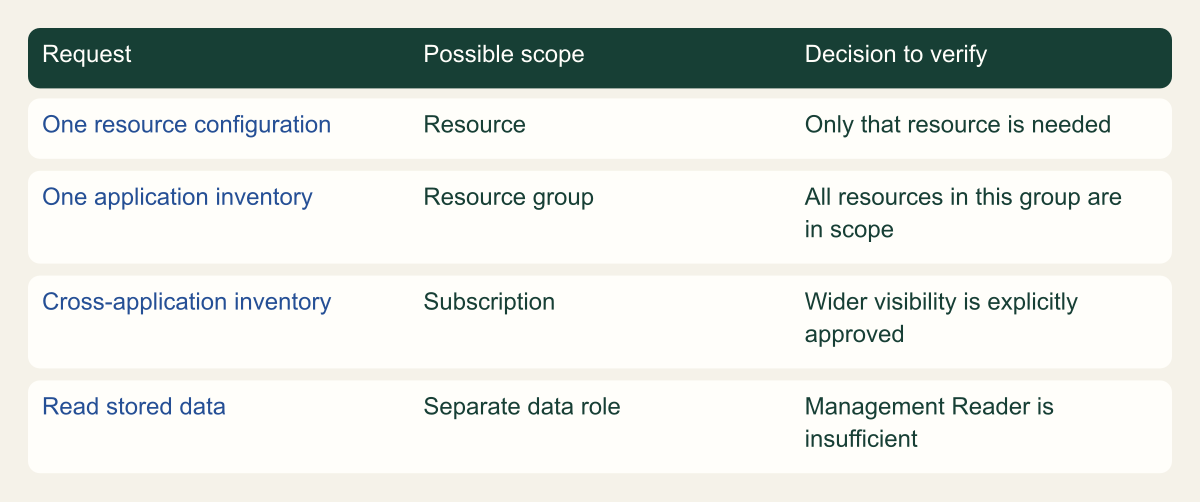
Use the decision matrix to match the request to one resource, one application group or a genuinely wider inventory. A resource-group assignment is appropriate only when that group matches the approved work. A central operations team may have a documented subscription-wide inventory responsibility; a vendor reviewing a single storage account may not. Choose the scope that expresses the actual job, and record why broader alternatives were unnecessary for that request.
Choose a scope that matches the review
A qualitative matrix separates management visibility scope from permission to read stored data.

Source. Microsoft documentation: Understand scope for Azure RBAC [2]; Azure built-in roles for General - Azure RBAC [3]; Understand Azure role definitions - Azure RBAC [8].
Method. Original conceptual synthesis of the cited Microsoft documentation. No deployment measurements or risk scores. Reviewed 2026-09-12.
Accessible table and figure data
| Request | Possible scope | Decision to verify |
|---|---|---|
| One resource configuration | Resource | Only that resource is needed |
| One application inventory | Resource group | All resources in this group are in scope |
| Cross-application inventory | Subscription | Wider visibility is explicitly approved |
| Read stored data | Separate data role | Management Reader is insufficient |
| Request | Possible scope | Decision to verify |
|---|---|---|
| One resource configuration | Resource | Only that resource is needed |
| One application inventory | Resource group | All resources in this group are in scope |
| Cross-application inventory | Subscription | Wider visibility is explicitly approved |
| Read stored data | Separate data role | Management Reader is insufficient |
Find access that already exists
Before adding Reader, inspect the intended person's existing assignments and relevant group memberships. Azure RBAC combines applicable role assignments. A Reader assignment at a resource group does not reduce Contributor permissions inherited from the subscription. Likewise, removing a direct role does not eliminate access provided by a group assignment. This additive behavior is the most common reason a restricted-looking assignment produces a broad result. [1]
Use Access control (IAM) and its access-checking or role-assignment views to inspect the selected principal. Pay attention to the scope and to whether the assignment is inherited. A list filtered only to directly assigned roles can be useful for administration, but it is not a complete explanation of effective access. Record the source of any broad role rather than assuming it was created by the change you are making. [5]
Do not remove an existing production assignment merely to make a demonstration look cleaner. It may serve another approved task. If the person already has broad access, state that the new Reader role is redundant for their current effective permissions. The right next step may be to review that broader grant with its owner, select a different test principal or decline to add an unnecessary assignment. That decision should follow the access request, not a desire to produce a successful screenshot.
A baseline can be concise. Record the recipient's object identifier, direct assignments at the target, relevant inherited assignments and the membership path used for group access. The record need not reproduce the entire directory. It should explain enough to answer a later question such as why the person could edit a resource despite this Reader-only change. Preserve uncertainty when directory membership or another authorization layer could not be inspected.
A useful baseline exercise compares two hypothetical recipients before any change. One has no relevant assignments; the other already belongs to an operations group with a subscription-level role. Giving both Reader at the application group can produce the same successful view of that group, but the second recipient may still have broader access. The identical positive result does not establish identical permissions. The baseline explains why the negative scope test matters.
For a temporary external reviewer, also establish what happens when the review ends. Removing the resource-group role may be appropriate, while deleting the directory account could affect another approved engagement. Conversely, leaving the account in a broadly authorized group can preserve access after the personal role is removed. Connect the resource decision to the identity owner without making unrelated directory changes as part of this task.
When reviewing role definitions, remember that an excluded action in one role is not automatically a universal denial across all roles. Microsoft's role-definition guidance describes how Actions and NotActions work within a definition. Another assignment may still grant the operation. Avoid treating a custom role's exclusions as a substitute for understanding the recipient's other access paths. [8]
A practical acceptance worksheet can have one row for configuration visibility, one for an approved data operation if separately requested and one for an out-of-scope resource. Write the expected result before testing and identify the identity used for each row. This is not a maturity score. It is a small way to keep a portal success from being stretched into a claim about capabilities that were never checked.
If the request cannot name an appropriate negative case because the recipient legitimately has broad access everywhere involved, state that limit. The saved Reader assignment can still be reviewed for correctness, but the recipient's session cannot demonstrate the narrow boundary in isolation. A separate test identity or a wider entitlement review would answer that different question. Do not conceal the limitation by omitting the baseline from the handoff.
Choose a person or a maintained group
A direct assignment is understandable for a short, clearly owned task. A group assignment is often easier to maintain for an ongoing team responsibility because membership can change without repeatedly changing the resource role. Azure supports group-based assignments, including transitive group membership. The important operational question is who controls the membership and whether that membership still represents the approved readers. [1]
For a hypothetical application-support group, give the group a recognizable purpose and identify the owner who approves additions. A broad company-wide group may be convenient to find in the picker but inappropriate for a narrowly scoped troubleshooting request. A group copied from an older project may also contain people who no longer need access. The role-assignment screen cannot determine whether the group's business meaning is still correct.
Verify the selected identity by more than its display name. Similar names can belong to different users, applications or managed identities. External users can also appear in the directory with labels that are easy to confuse. Check the object identifier and expected directory before saving. If the request is for a partner user, confirm that their invitation and sign-in arrangements already exist; assigning an Azure role is not a complete partner-onboarding process.
Separate the membership change from the resource assignment in the record. One grants the group access to the resource; the other admits a person into that group. If multiple teams own those steps, say so. This makes offboarding easier to verify and reduces the temptation to remove an entire team's resource role when only one person should leave. It also gives an investigator a clear path from the person to the role that made access possible.
Prepare the assignment without changing other access
The administrator creating the role assignment needs the relevant role-assignment write permission at the target scope. Reader cannot grant itself more access, and ordinary resource editing authority should not be confused with role administration. Microsoft's portal instructions identify roles such as Role Based Access Control Administrator or User Access Administrator for this task. Use the organization's existing authorized administration route. [4]
A disabled Add role assignment control is a reason to inspect the administrator's permission and scope, not a reason to ask for subscription Owner automatically. The requested grant may be limited to one resource group, and the person able to administer that group can perform it without giving the recipient administrative authority. Keep the acting administrator and the receiving reader distinct throughout the process.
Prepare the exact role, principal, scope and description before opening the assignment wizard. A short description can connect the grant to the application owner or support request without embedding personal or sensitive incident details. If the change is temporary, write down how it will be removed. A calendar reminder is a process aid; it does not make a permanent assignment automatically expire.
For automation, obtain the scope from Azure instead of constructing a long identifier by memory. The Azure CLI supports explicit assignee and scope parameters for role assignment creation. Use a reviewed script in the correct subscription context and retain the resulting assignment ID. Check that the script or infrastructure definition makes the principal, role and scope visible for review before it creates the assignment. [9]
# Replace the example group name with the approved resource group.
CSD_AZ_GROUP='example-app-rg'
az group show --name "$CSD_AZ_GROUP" --query id --output tsv
az role assignment list --resource-group "$CSD_AZ_GROUP" --include-inherited --output json
Assign Reader in the resource group
Open the intended resource group, choose Access control (IAM), then Add role assignment. Select the built-in Reader role, choose the intended member and review the final summary before saving. The location from which the wizard is opened matters because it establishes the target scope. Recheck the resource group and subscription in the review rather than assuming the earlier navigation was correct. [4]
After the assignment is created, inspect its saved details. Confirm the recipient, role and scope, and note whether it is a direct assignment. If the group already has the same effective grant through a parent scope, investigate why another assignment is being added. Duplicate access routes increase the work required to explain or remove access later, even if they do not immediately change what the reader can do.
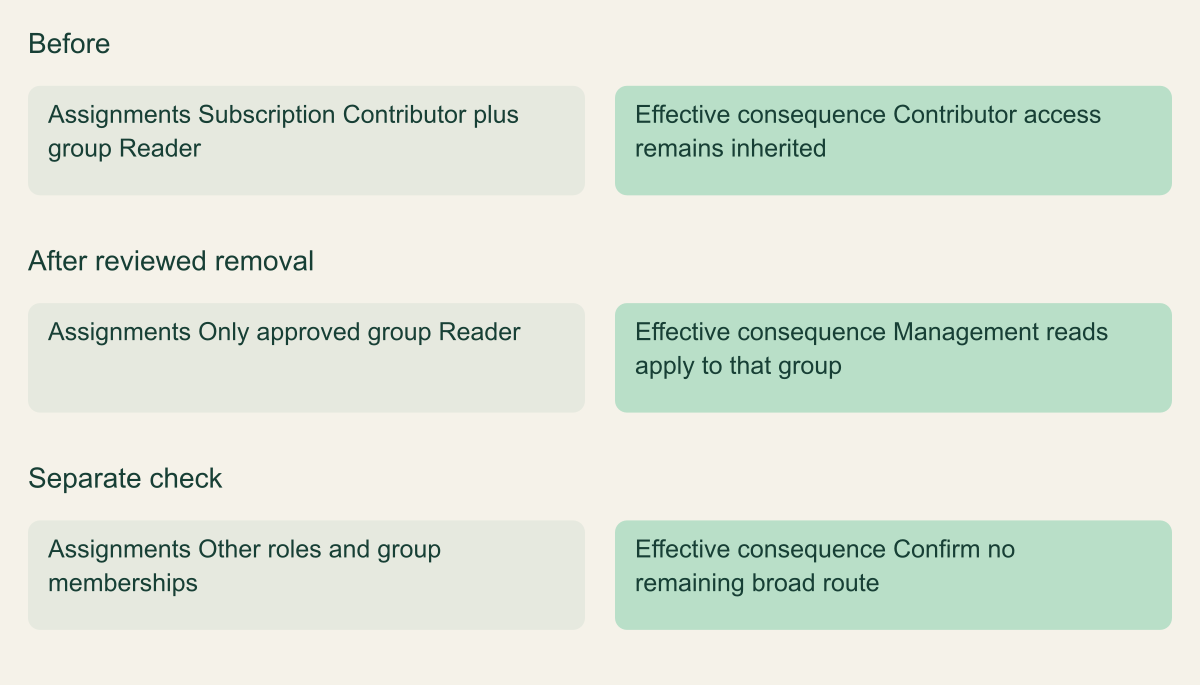
Compare the intended scope with the reviewer's existing assignments before calling the change complete. In the hypothetical before-and-after example, a subscription assignment gives the reviewer visibility across unrelated groups, while the approved work concerns one group. Adding a narrow assignment leaves the broad assignment in place. Review that broader grant separately and remove it only with authorization, then test the reviewer's access again. The narrower assignment alone does not establish that unrelated resources are inaccessible.
Record the exact saved assignment rather than only the intended inputs. A request and a configuration are different pieces of evidence. If an automation command reports an error or the portal result is ambiguous, inspect the current assignment state before retrying. Repeating a change without checking the result can leave multiple records or make it difficult to tell which action succeeded. The observable configuration should determine the next step.
A narrow assignment does not cancel a broad one
Conceptual comparison assumes the broad assignment is separately reviewed and removed; adding Reader alone does not restrict existing rights.

Source. Microsoft documentation: What is Azure role-based access control (Azure RBAC)? [1]; Understand scope for Azure RBAC [2]; Remove Azure role assignments - Azure RBAC [6].
Method. Original conceptual synthesis of the cited Microsoft documentation. No deployment measurements or risk scores. Reviewed 2026-09-12.
Accessible table and figure data
| Design | Assignments | Effective consequence |
|---|---|---|
| Before | Subscription Contributor plus group Reader | Contributor access remains inherited |
| After reviewed removal | Only approved group Reader | Management reads apply to that group |
| Separate check | Other roles and group memberships | Confirm no remaining broad route |
| Design | Assignments | Effective consequence |
|---|---|---|
| Before | Subscription Contributor plus group Reader | Contributor access remains inherited |
| After reviewed removal | Only approved group Reader | Management reads apply to that group |
| Separate check | Other roles and group memberships | Confirm no remaining broad route |
Verify access using the intended reader
Ask the reader to open a fresh authenticated session in the correct directory and subscription context. Have them navigate to the named resource group and inspect an agreed resource property. Use a harmless configuration item such as the resource location or an approved tag. Avoid using a secret value or a production database query merely to demonstrate that the portal works.
Check the result against the access request. If the person can inspect the target resource but cannot read a private blob, that may be exactly the intended behavior. If they cannot see an unrelated resource group, record that as the negative scope check for the test identity. If they can see it, inspect other assignments before blaming the new Reader role. The test should explain the effective access path, not simply classify every unexpected result as a failure of Azure.
Do not test write denial by attempting a disruptive production change. Review the role definition and effective assignments first. Where a live denial test is useful and explicitly permitted, use a disposable resource and an innocuous operation in a sandbox. A test designed to fail can still succeed when an undiscovered permission exists, so its potential successful outcome must be acceptable too.
Allow for authorization propagation and session state. Microsoft's troubleshooting guidance describes delays and cached access information in several RBAC scenarios. Refresh the session or token as appropriate and retry within the documented context before broadening the role. Record when the assignment was created and when the reader tested it. An immediate denial followed by a later success does not justify claiming that Reader needed extra permissions. [7]
Handle missing data without granting Contributor
A request to inspect resource configuration can grow into a request to read application data. Treat that as a new decision. Ask which object the person needs, what they will do with it and whether a sanitized sample would serve the purpose. Granting Contributor to fix a missing blob view changes the management permissions and may still fail to express the correct data-access requirement.
Azure role definitions separate Actions from DataActions. Management read access and service data access can therefore differ even when they concern the same resource. A storage data role should be chosen for a storage-data task; a Key Vault secret role should be chosen for secret retrieval. Do not build a personal rule that every portal access problem is solved by moving one step up from Reader. [8]
The portal can add another source of confusion because browsing a resource and operating on its data are presented close together. A person might open the storage account overview successfully and then receive an authorization error in a data blade. Preserve the failing operation and endpoint in the support note. That detail helps the owner distinguish an intended data restriction from a management-role or network problem.
Keep the data-access approval separate even if the same administrator implements both changes. For example, an application owner may approve configuration review while a data owner controls access to uploaded customer files. A convenient interface does not merge those responsibilities. The final record should say whether only Reader was assigned or whether a separate data role was approved and verified, with its own scope and duration.
Seeing resource configuration is different from reading stored data
The Reader role provides management-plane read access at its assigned scope. Stored data requires the applicable data permission; other assignments can separately supply it.

Source. Microsoft documentation [3][8]. Reviewed September 12, 2026.
Method. Original conceptual illustration generated with ChatGPT and visually reviewed. The accessible table identifies the metaphor and its limits. It is not a provider screenshot, a complete policy evaluator, or measured service evidence.
Accessible table and figure data
| Visual element | Azure concept | Limit |
|---|---|---|
| Reading window | Management information visible to Reader | Visibility is bounded by the assignment scope |
| Inner screen | A separate data authorization decision | Reader alone is not a general data reader role |
| Stored documents | The contents of the managed resource | Other roles or credentials can provide access |
| Visual element | Azure concept | Limit |
|---|---|---|
| Reading window | Management information visible to Reader | Visibility is bounded by the assignment scope |
| Inner screen | A separate data authorization decision | Reader alone is not a general data reader role |
| Stored documents | The contents of the managed resource | Other roles or credentials can provide access |

Diagnose unexpected access and denial
When the reader sees too much, work outward from the resource. Check direct role assignments, inherited assignments and relevant groups. Verify that the browser is using the intended account rather than an administrator session left open in another tab. If the unexpected operation uses a service key or another authentication mechanism, an Azure Reader review alone will not explain it. Identify the actual credential and authorization path.
When the reader sees too little, identify the exact operation that failed. Resource lookup, data retrieval, network reachability and directory sign-in are separate questions. Check the resource identifier, tenant and subscription before editing permissions. A wrong context can produce an error that looks like a missing role. The error details should guide the investigation without being copied wholesale into a public issue or screenshot.
If the assignment appears correct but access has not changed, use Microsoft's RBAC troubleshooting guidance for the applicable principal and service. Some scenarios involve cached credentials or delayed changes. Do not turn a timing question into a permanent privilege increase. A short, documented retry plan is more useful than a series of broader grants whose effects cannot later be separated. [7]
Keep the test scope modest. This procedure does not audit every authorization mechanism in an Azure subscription, and it does not prove that a user lacks all possible data access. It verifies a particular Reader assignment and its intended resource scope. If the access request requires a complete entitlement review, include the other services, credentials and group ownership processes that can grant access. The narrow task can provide evidence for that larger review without pretending to replace it.
Remove the grant when the task ends
Use the saved assignment ID or the exact principal-role-scope combination to identify the grant that should end. Remove the assignment from the scope where it was created. An inherited assignment must be managed at its parent scope rather than deleted from a child resource's view. Microsoft's removal guidance also emphasizes that removing one assignment may leave access through other assignments. [6]
For a group-based grant, decide whether the task ending means removing one person's membership or removing the whole group's access to the resource. These actions have different effects. Removing the group role can interrupt other authorized readers; removing one member may be the appropriate offboarding action. Coordinate with the group owner instead of treating every membership change as a resource administration task.
Verify the withdrawal with the same care used for granting access. Record the intended assignment's removal and check the relevant access after appropriate session refresh and propagation. If the person remains able to inspect the group, investigate the remaining route. Do not report access revoked merely because the one row created for the task disappeared from the portal.
For a recurring support need, review whether a maintained team group and a documented membership process would be easier to manage than repeated personal grants. That is an operating decision, not a reason to leave temporary access indefinitely. The record should make clear who owns the standing need, when membership is reconsidered and which resource changes would require a fresh scope review.
Keep a small record of the decision
A useful handoff fits into the ordinary change or support record. Keep the intended recipient, the resource-group ID, the Reader role, the saved assignment, the reason for access and the agreed review or removal date. Add the allowed test, any negative test and the known broader assignments that influenced the result. The record should enable another administrator to explain the grant without reconstructing the whole conversation.
Avoid storing screenshots as the only evidence. A screenshot can omit the subscription, truncate the scope or show a filtered list. It can also include information that should not be widely shared. Text identifiers and a short description of the test make the result easier to review. When a screenshot is useful, capture only the relevant configuration and keep it with the authorized record.
The most valuable follow-up is often a clearer access request. If the reader needed configuration visibility, data access and permission to restart a resource, those were three distinct capabilities. Separating them at the start makes the role selection easier and produces a test that matches the job. A vague request for access to Azure leaves the administrator to guess which privileges the work actually requires.
The assignment is ready to hand over when its role, recipient and scope match the approved task and the reader can perform the agreed inspection. Remaining uncertainty should be named, such as unreviewed group memberships or a service-specific authorization path. A narrow, verified grant is useful because its purpose is understandable and its end is manageable. That clarity should survive the day the original administrator is no longer available.
Method and provenance
Microsoft primary documentation was reviewed on September 12, 2026. The guide combines documented service behavior with original implementation guidance, conceptual figures and clearly identified hypothetical examples.
No Azure tenant, production application or customer deployment was executed or measured. Commands were checked against the cited references and locally parsed where applicable; the reader must verify permissions, service support and outcomes in the intended environment.
AI assistance. AI-assisted source research, drafting, original visual planning and consistency review. No firsthand deployment experience or human review is claimed.
Published under the Cloud Security Desk organizational byline. Read the practitioner guide policy.
References
- What is Azure role-based access control (Azure RBAC)? Microsoft. Accessed .
- Understand scope for Azure RBAC Microsoft. Accessed .
- Azure built-in roles for General - Azure RBAC Microsoft. Accessed .
- Assign Azure roles using the Azure portal - Azure RBAC Microsoft. Accessed .
- List Azure role assignments using the Azure portal - Azure RBAC Microsoft. Accessed .
- Remove Azure role assignments - Azure RBAC Microsoft. Accessed .
- Troubleshoot Azure RBAC Microsoft. Accessed .
- Understand Azure role definitions - Azure RBAC Microsoft. Accessed .
- Assign Azure roles using Azure CLI - Azure RBAC Microsoft. Accessed .