
A partner-access design guide for Microsoft Entra workforce tenants. It separates default and organization-specific cross-tenant settings, MFA and device-claim trust, resource authorization and the external-user grants that lifecycle reviews can miss.
At a glance
Key findings
- Cross-tenant settings and resource permissions govern different parts of partner access.
- Home-tenant MFA and device claims should be accepted only against a defined resource-tenant requirement.
- Guest-only reviews can miss external members and direct resource permissions outside the reviewed assignments.
Write a partner trust contract
Define partner access as a contract between two organizations: which users and applications can collaborate, which home-tenant claims the resource tenant accepts, which resource permissions are granted and how those permissions end. Microsoft Entra cross-tenant settings address important parts of this contract, but they do not replace the application's access decision or the lifecycle of every external grant. A successful partner sign-in is therefore a starting observation, not the complete acceptance test. [1][3][6]
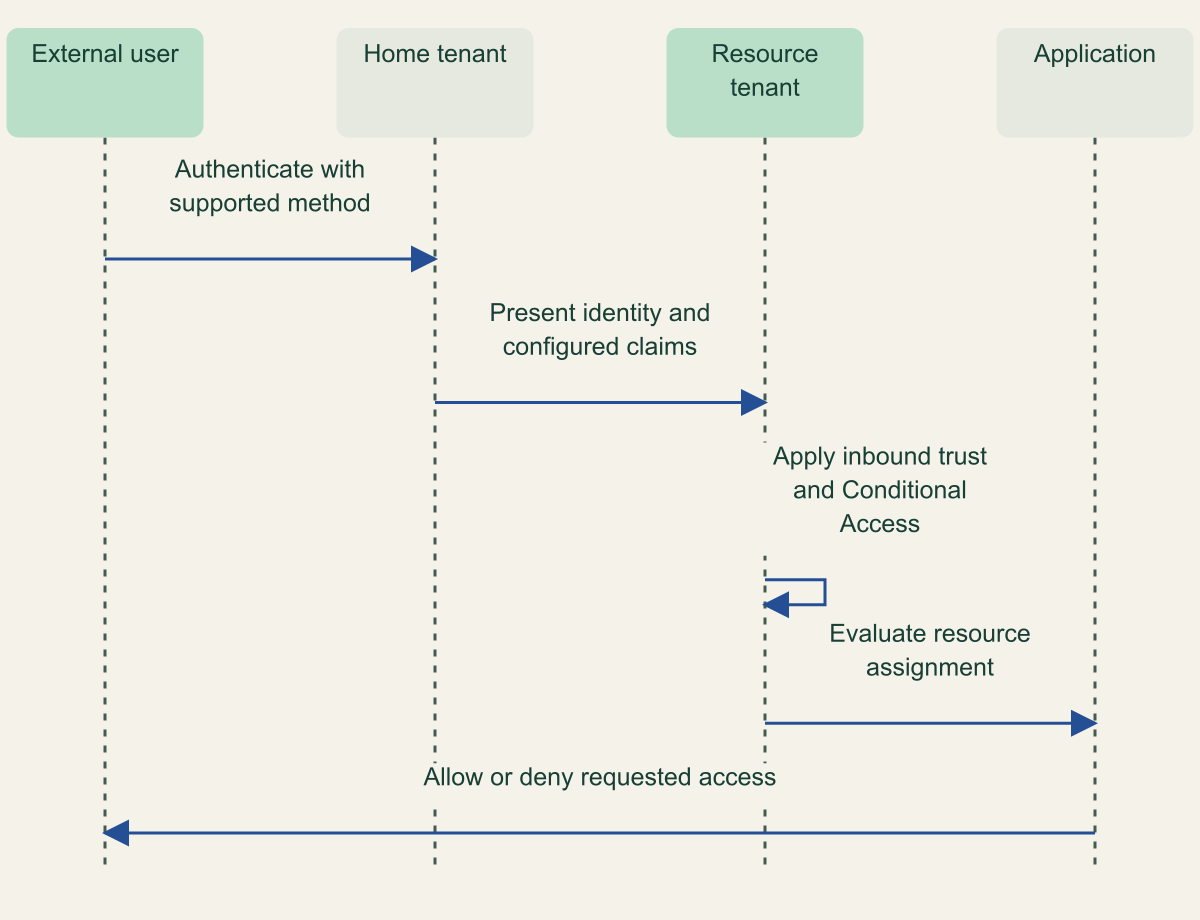
The home tenant is where an external Entra user authenticates. The resource tenant hosts the application or resource being accessed. Keeping those roles explicit prevents confusion about who issued an authentication claim and who decides whether it is sufficient for the requested access. The same company can be a home tenant in one relationship and a resource tenant in another; trust settings need to reflect the direction of the particular request. [3]
Use a named partner record rather than an unexplained trusted-organizations list. Identify the business owner, partner tenant identifier, allowed populations, intended applications, accepted claims and review owner. These are proposed governance fields, not a requirement that every organization adopt a new database. A short, maintained record is more useful than a large matrix whose broad entries nobody can explain when a partner changes its identity practices.
The scope here is collaboration between workforce Entra organizations through B2B collaboration and B2B direct connect. Those mechanisms have different requirements, and neither should be confused with a customer identity tenant or an application consent grant. Start from the actual collaboration mechanism before copying settings from a similarly named integration. Microsoft documents cross-tenant access and external collaboration controls separately because they solve different parts of external access. [1][5]
A useful opening question for the resource owner is whether the partner needs any access beyond a specific assignment. If the answer is no, trusting claims must not become shorthand for making every application available. Authentication assurance and resource entitlement are separate decisions. An organization can accept a partner's MFA evidence for a narrowly assigned application without endorsing every account or every resource request originating from that tenant.
Inspect the default before adding an exception
Default cross-tenant access settings apply to external Entra organizations unless an organization-specific configuration overrides them. For organizations in the same Azure cloud, Microsoft documents initial defaults that enable B2B collaboration while blocking B2B direct connect, with MFA and device claims from other tenants not trusted. Cross-cloud collaboration requires separate Microsoft cloud settings. These are starting settings, not a statement about the configuration of an existing tenant that administrators may already have changed. Inspect the actual default and each relevant override. [1]
This inheritance structure creates two different change scopes. Modifying the default can affect partners without their own overrides. Modifying one organization's settings can affect that named relationship while leaving others on the default. A reviewer needs to know which mechanism a proposed change uses. A screenshot showing an approved partner entry is incomplete if a separate default already permits a broader collaboration path.
Inbound and outbound access settings also have different owners and effects. Inbound settings govern access from the external organization to the resource tenant; outbound settings govern the local users' access to external organizations. A bilateral workflow can fail because either organization's configuration does not permit the intended path. Document the direction being tested instead of assuming that enabling an inbound entry automatically creates reciprocal access. [1][2]
For a hypothetical supplier portal, the customer organization may allow a named supplier population into the portal while its own users have no need to access supplier applications. That is not an inconsistency. It is a one-directional business requirement. A reciprocal arrangement should be approved separately when it exists, with its own resource and population scope, rather than created merely for visual symmetry in the settings.
Distinguish users or groups from the resources they may reach. A broad population combined with broad application scope has different consequences from a tightly scoped partner team accessing one application. Record both dimensions, then compare the configured selectors with the business requirement. Do not rely on an application display name alone where an object or application identifier is needed to distinguish similarly named resources.
The effective collaboration path also depends on resource-level configuration. If a partner cannot sign in, investigate direction, organization override, application scope and resource requirements separately. Broadening the default to make one test work can change far more relationships than intended. Preserve the failed request's relevant non-secret identifiers and policy result so troubleshooting can identify the responsible layer before changing it.
Decide which claims are acceptable
MFA trust allows the resource tenant to accept eligible MFA evidence from a user's home tenant rather than requiring the user to perform another MFA step in the resource tenant. Microsoft emphasizes that the resource tenant's Conditional Access policies still apply. Trusting the claim changes how a requirement can be satisfied; it does not remove the requirement or turn every authenticated partner request into an allowed request. [1][3]
Device claims deserve a similar distinction. A compliant-device assertion reports a state evaluated under the home organization's management and compliance arrangements. Deciding whether that state satisfies the resource organization's requirement is a trust decision. The presence of the claim does not prove that both organizations use the same baseline. Ask what the partner's compliance policy means before making it acceptable for a sensitive resource.
Authentication strength introduces a method-specific constraint. Microsoft provides a table showing which authentication methods can satisfy strengths when performed in the home tenant versus the resource tenant. The columns are not identical. Do not assume that accepting generic MFA and requiring a particular strong method are interchangeable configurations, or that a method available to an internal user can be performed in the same place by every external user. [4]
For example, the documented table places FIDO2 security keys and Windows Hello for Business in the home-tenant column, while methods such as text message and voice call have entries in both columns. The correct lesson is not to choose the weakest shared method. It is to design the partner authentication path around the assurance requirement and the supported method location, then verify the actual user experience under the selected trust configuration. [4]
MFA trust is optional for B2B collaboration; for B2B direct connect, it is required when the resource tenant's Conditional Access policy requires MFA, according to Microsoft's authentication guidance. This is another reason to name the mechanism before applying an authentication recipe. A configuration valid for a collaboration guest should not be generalized to direct connect merely because both involve an external organization. The required trust and supported resource scenario must be checked together. [3]
The decision record should identify the claim, the organization authorized to issue it and the resource requirement it satisfies. Include what happens if the claim is missing or no longer accepted. This creates a meaningful change review when a partner switches MFA methods or device-management practices. Without that mapping, an administrator can preserve a green sign-in by weakening a requirement without realizing that the original assurance decision has changed.
Passkey or authentication-strength rollout remains a separate operating concern. Account recovery, enrollment and existing sessions can affect access even when the cross-tenant trust setting is correct. Link the partner contract to those established procedures instead of duplicating them inside every organization override. A trusted authentication claim should have an understood recovery story, not only a successful demonstration on one user's device.
The resource tenant still owns its access decision
Home-tenant authentication supplies claims that configured resource-tenant policies must still evaluate. Conceptual sequence, not a measured result.

Source. Microsoft, Entra cross-tenant access overview, Inbound and outbound settings, default access and MFA/device trust. [1]; Microsoft, B2B authentication and Conditional Access, External Entra user authentication flow [3]; Microsoft, Authentication strengths for external users, Home-tenant and resource-tenant method table [4].
Method. Original conceptual sequence synthesizing the cited documentation. It represents design relationships, not observed test results. Reviewed 2026-09-02.
Accessible table and figure data
| From | To | Message |
|---|---|---|
| External user | Home tenant | Authenticate with supported method |
| Home tenant | Resource tenant | Present identity and configured claims |
| Resource tenant | Resource tenant | Apply inbound trust and Conditional Access |
| Resource tenant | Application | Evaluate resource assignment |
| Application | External user | Allow or deny requested access |
| From | To | Message |
|---|---|---|
| External user | Home tenant | Authenticate with supported method |
| Home tenant | Resource tenant | Present identity and configured claims |
| Resource tenant | Resource tenant | Apply inbound trust and Conditional Access |
| Resource tenant | Application | Evaluate resource assignment |
| Application | External user | Allow or deny requested access |
Authorize the actual resource
Guest invitation permissions and collaboration restrictions govern who may invite external users and which external domains are allowed or blocked under those settings. They are not the same controls as cross-tenant inbound trust. Microsoft exposes these as external collaboration settings, while cross-tenant settings govern the relationship with other Entra organizations. Review both where they affect the workflow; changing one does not establish the state of the other. [1][5]
An invitation also is not a complete application assignment. The resource may use group membership, an enterprise-application assignment, a role inside the application or a direct permission stored elsewhere. Identify the actual entitlement that makes the resource available. A partner user's presence in the directory can be a prerequisite without being sufficient permission to read a particular site, record or document.
The application owner should define the resource boundary in terms a tester can observe. For a hypothetical supplier team, access to the shared project space might be approved while access to another supplier's space is not. Test both paths. The authentication experience can be identical in each case; the object or workspace authorization is what should produce the different result. Cross-tenant MFA trust cannot substitute for that application decision.
Be careful with broad group assignments. They can make onboarding convenient while allowing future membership changes to expand partner access automatically. Identify who can change the group and whether membership is governed by the same owner who approved the resource assignment. This is a proposed authority review rather than a claim that dynamic or broad groups are inherently inappropriate. Their change authority must be part of the access contract.
Maintain a distinction between a blocked authentication path and a removed entitlement. Blocking a partner through one configuration does not necessarily remove assignments or resource permissions that could become usable again if the block is reversed. Similarly, removing an assignment does not prove that all relevant sign-in paths are blocked. The withdrawal plan should state whether it is containing access temporarily, removing grants permanently or doing both.
Find access that guest-only reviews miss
Microsoft's access-review guidance explicitly warns that a Guest users only review does not include external members whose userType is member. It also warns about access granted outside the reviewed Entra assignment model, including direct access to shared SharePoint content. A review labeled external users can therefore have a narrower population than the business owner expects. Inspect the review's selection rules and target resources. [6]
User type is a directory property, not a complete business classification of employment or partnership. A resource owner deciding who should retain partner access needs a reliable way to identify the relevant relationship. Do not assume every guest is a current supplier or every member is an internal employee. Use the organization and resource inventory to interpret the directory records instead of making a lifecycle decision from one label.
Access packages can organize resources and their lifecycle, but their coverage needs to be explicit. Entitlement management provides configurable blocking and deletion behavior for invited external users after their last access-package assignment ends. That behavior is useful for the users and assignments it manages. It should not be generalized into a promise that ending one package removes all unrelated direct permissions or every access path created outside the package. [7]
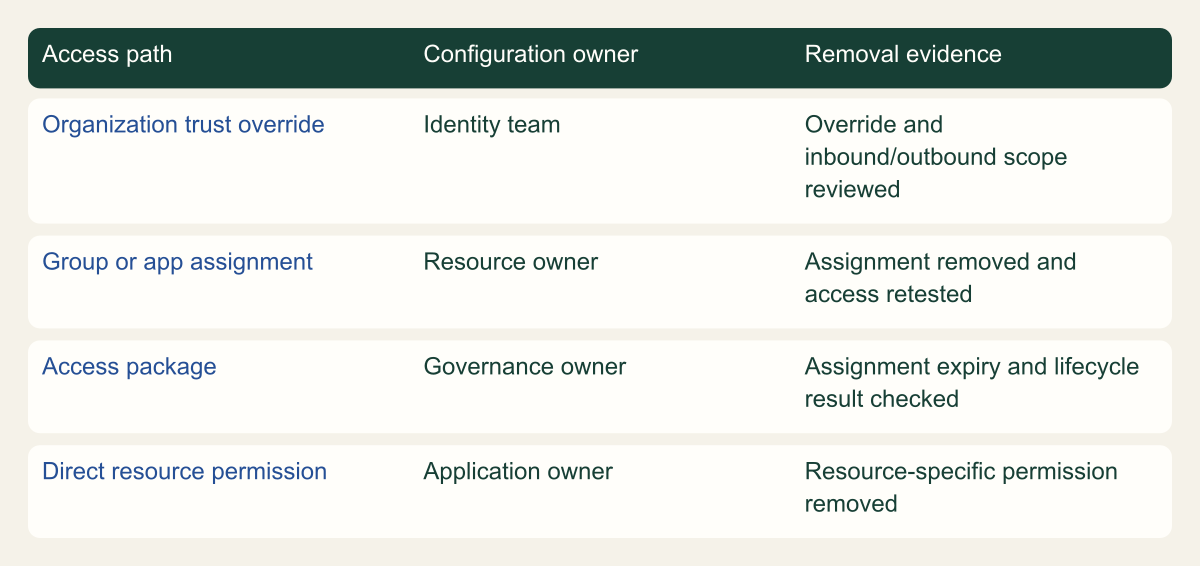
The review matrix separates organization trust, group or application assignments, access packages and direct resource permissions. Its rows identify different evidence owners. The identity team can inspect an organization override; the application owner may need to remove an internal role; the governance owner can review package assignments. A single owner can coordinate the work without pretending to operate every permission store through the same control.
For partner withdrawal, retain the intended result at each layer. State whether new invitations are restricted, the organization trust is changed, group membership is removed, package assignments end and direct resource grants are cleared. Re-test the relevant resource paths after the authorized changes. This proposed checklist is not an assertion that every action immediately terminates all sessions; session behavior must be checked separately for the resource and policy involved.
Offboarding evidence from an upstream identity integration belongs in this record, but it is not a substitute for application evidence. An external account can be disabled at one source while a downstream assignment or application-specific permission remains unresolved. The review should be able to name that unresolved layer. A provider status saying the user was processed is less useful than a clear account of the access that was actually removed.
Partner removal reaches several different grant types
Organization trust, assignments, access packages and direct resource grants require distinct removal evidence. Conceptual matrix, not a measured result.

Source. Microsoft, Configure external collaboration, Guest invitation permissions and collaboration restrictions [5]; Microsoft, Plan access reviews, Review external access and membership limitations [6]; Microsoft, Govern external access packages, External user lifecycle and access-package governance [7].
Method. Original conceptual matrix synthesizing the cited documentation. It represents design relationships, not observed test results. Reviewed 2026-09-02.
Accessible table and figure data
| Access path | Configuration owner | Removal evidence |
|---|---|---|
| Organization trust override | Identity team | Override and inbound/outbound scope reviewed |
| Group or app assignment | Resource owner | Assignment removed and access retested |
| Access package | Governance owner | Assignment expiry and lifecycle result checked |
| Direct resource permission | Application owner | Resource-specific permission removed |
| Access path | Configuration owner | Removal evidence |
|---|---|---|
| Organization trust override | Identity team | Override and inbound/outbound scope reviewed |
| Group or app assignment | Resource owner | Assignment removed and access retested |
| Access package | Governance owner | Assignment expiry and lifecycle result checked |
| Direct resource permission | Application owner | Resource-specific permission removed |
Pilot allowed and denied partner paths
Choose pilot cases that expose the trust assumptions. Include a user who presents the expected home-tenant authentication method, a user without an accepted device claim, an approved application and an unapproved resource. Record the actual partner tenant and test population. One successful internal administrator sign-in cannot stand in for an external user's route through the configured trust relationship.
Test organization overrides against the inherited default. If the pilot organization has a custom configuration, confirm that an organization without that override behaves as intended too. This is especially important when the proposed change narrows one partner but leaves permissive defaults elsewhere. The acceptance question is whether the effective configuration matches the approved scope, not whether the administrator edited the correct-looking screen.
Where Conditional Access changes are evaluated before enforcement, label that evidence accurately. Evaluation can identify likely impact, but it does not prove how every client behaves under an enforced block. Coordinate the identity and application owners for an actual permitted enforcement test and preserve relevant policy outcomes. The guide does not claim that these tenant tests were performed during its research.
Give each exception an owner and a review trigger. A temporary method exception, a broader device-trust allowance or an extra application assignment should state why it exists and when the condition will be reconsidered. Calendar expiry can help, but changes to the partner's authentication or device policy can justify an earlier review. An exception that silently becomes the default undermines the value of the original trust decision.
Keep authentication-flow restrictions in view as well. An approved partner identity can use a flow whose session behavior has separate implications, such as device-code authentication. Cross-tenant trust answers whose claims are accepted; it does not decide that every available authentication flow is appropriate. Coordinate those policies without weakening a resource requirement merely to make an unfamiliar client work.
The final partner record should be concise enough to use during an incident: accepted claims, allowed populations and applications, resource owners, removal paths and known limitations. When those decisions are explicit, a sign-in failure can be routed to the right owner and a partner withdrawal can be verified beyond the guest list. That is the practical value of treating trust as a maintained agreement rather than a tenant-wide endorsement.
Method and provenance
Primary documentation and standards were reviewed on September 2, 2026. The guide combines source-supported behavior with explicitly framed implementation recommendations and hypothetical examples.
No customer deployment, production environment or live cloud configuration was tested. Product behavior is limited to the cited documentation and stated scope; actual versions, policies and application behavior require verification.
AI assistance. AI-assisted research synthesis, drafting and consistency checks. No human review or firsthand deployment experience is claimed.
Published under the Cloud Security Desk organizational byline. Read the practitioner guide policy.
References
- Entra cross-tenant access overview Microsoft. Accessed .
- Configure B2B cross-tenant access Microsoft. Accessed .
- B2B authentication and Conditional Access Microsoft. Accessed .
- Authentication strengths for external users Microsoft. Accessed .
- Configure external collaboration Microsoft. Accessed .
- Plan access reviews Microsoft. Accessed .
- Govern external access packages Microsoft. Accessed .