
An implementation guide for Entra administrators who own Conditional Access, built from Microsoft's token protection, PRT, token lifetime, CAE and device filter documentation reviewed October 9, 2026. It records GA and preview status by platform and gives a status-code triage that separates Windows and Apple meanings, a log query, a policy fragment and companion controls for the unbound surface.
At a glance
Key findings
- On October 9, 2026, Microsoft's token protection overview, last updated August 20, 2026, listed native apps as generally available on Windows, iOS, iPadOS and macOS, and browser apps only as a preview for selected Azure Resource Manager web apps on Windows and macOS. [1][4]
- Status code 1003 on Windows means an unsupported registration type or one made without fresh sign-in credentials, with no self-remediation described, while on Apple platforms it means a legacy registration that upgrades itself at the next prompt, as 1004 does. [2][3][4]
- Token protection rejects bearer refresh tokens for the listed resources; it does not bind access tokens already issued, which last 60 to 90 minutes by default and up to 28 hours in CAE sessions. [5][7][8]
- Microsoft pairs the policy with blocking unknown platforms and requiring compliance on known ones, because an attacker can appear to come from an unsupported platform and the device platform condition is read from the user agent. [2][12]
- The Policy impact view, a preview, covers interactive sign-ins only, while every sample query in Microsoft's token protection guides reads the non-interactive sign-in log by default. [2][11]
Tokens bound to one device, and what stays unbound
Roll out token protection as a narrowly scoped session control, never as a tenant-wide switch. Build a Conditional Access policy with the session control Require token protection for sign-in sessions, target the individual resources Microsoft supports (Office 365 Exchange Online, Office 365 SharePoint Online and Microsoft Teams Services, plus Azure Virtual Desktop, Windows 365 and Windows Cloud Login where Windows App is deployed), limit it to Windows, iOS and macOS, and set Client apps to mobile apps and desktop clients. Run it in report-only mode for a pilot group, triage each unbound request by signInSessionStatusCode and platform, exclude registration types that cannot bind, and put the two companion policies Microsoft names in force before this one. Leave the Azure Resource Manager browser preview until native enforcement has run for a pilot group, as Microsoft recommends. [1][2][3][4]
The control acts where tokens are issued. When an application asks Entra ID for a token to a protected resource, Entra ID accepts the request only if it is backed by a device-bound sign-in session token such as a Primary Refresh Token (PRT). A PRT is tied to key pairs generated when the device registers. On Windows the session key that proves possession is held by the TPM, token and renewal requests are signed with it, and Entra ID invalidates any request from the device that is not. Microsoft's token-theft guidance states the result directly: bearer refresh tokens, which work from any device, are rejected. A refresh token copied off the laptop loses its value for the protected resources, because the thief cannot sign with a key that never left the hardware. [1][5][6]
Four things fall outside that binding. Token protection checks the sign-in session when an app requests access, so an access token issued before the theft is outside it, and Microsoft notes that without CAE a stolen access token stays valid for its full lifetime. Resources outside Microsoft's list are not enforced, so the policy rejects nothing for an enterprise app or another Microsoft API. Devices without a PRT from a registered device cannot take part, which rules out unregistered devices and, on Apple platforms, devices without MDM. And the binding covers only the user signed in to the device: a second account used in the same Windows session has no PRT of its own and cannot be protected. [1][3][5][9]
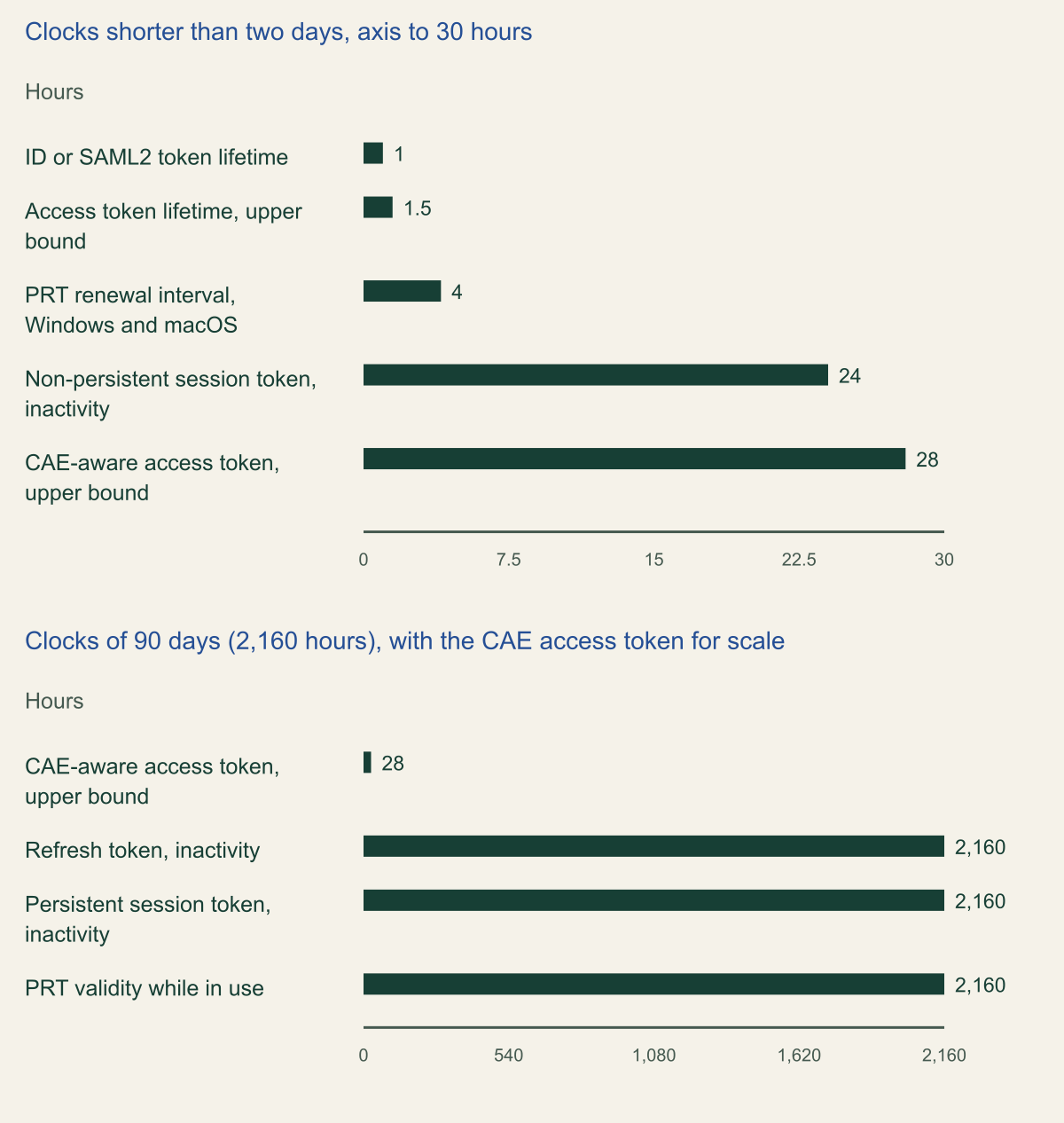
The chart puts numbers on that split. An Entra refresh token has a maximum inactive time of 90 days and no fixed maximum age, a persistent SSO session token survives 90 days of inactivity, and a PRT remains valid for 90 days while the device is in use, renewing every four hours on Windows and macOS. Access tokens are short by comparison: a random 60 to 90 minutes by default, or up to 28 hours when client and resource negotiate a CAE-aware session. Token protection shortens none of these clocks. It decides which device may use the 90-day credentials and leaves the access-token window to continuous access evaluation and network conditions. [6][7][8]
Conditional Access is not evaluated when a PRT is issued or renewed. It follows that the policy bites at the next application token request, not at Windows sign-in: a user can sign in to a device that fails the policy and meet the block only when Outlook or Teams asks for a token. The idea resembles sender-constrained OAuth, but the mechanism is Entra's own and reaches only the resources Microsoft built it for. [1][6]
The 90-day clocks sit on the refresh side
Refresh tokens, persistent sessions and PRTs last 90 days while used; access tokens run at most 1.5 hours by default or 28 hours in CAE sessions, and token protection changes none of these values. [6][7][8]

Source. Documented defaults from Microsoft's configurable token lifetimes, PRT and continuous access evaluation pages, reviewed October 9, 2026. [6][7][8]
Method. Hours calculated from documented values: minutes divided by 60, days multiplied by 24. Access token rows plot the upper bound of each documented range (60 to 90 minutes; 24 to 28 hours). Refresh and session token maximum ages are until-revoked and cannot be plotted. The CAE row appears in both panels for scale.
Accessible table and figure data
| Token or interval | Hours | As documented |
|---|---|---|
| ID or SAML2 token lifetime | 1 | One hour |
| Access token lifetime, upper bound | 1.5 | Random 60 to 90 minutes, 75 on average |
| PRT renewal interval, Windows and macOS | 4 | Every 4 hours |
| Non-persistent session token, inactivity | 24 | 24 hours |
| CAE-aware access token, upper bound | 28 | 24 to 28 hours |
| Refresh token, inactivity | 2160 | 90 days |
| Persistent session token, inactivity | 2160 | 90 days |
| PRT validity while in use | 2160 | 90 days |
| Token or interval | Hours | As documented |
|---|---|---|
| ID or SAML2 token lifetime | 1 | One hour |
| Access token lifetime, upper bound | 1.5 | Random 60 to 90 minutes, 75 on average |
| PRT renewal interval, Windows and macOS | 4 | Every 4 hours |
| Non-persistent session token, inactivity | 24 | 24 hours |
| CAE-aware access token, upper bound | 28 | 24 to 28 hours |
| Refresh token, inactivity | 2160 | 90 days |
| Persistent session token, inactivity | 2160 | 90 days |
| PRT validity while in use | 2160 | 90 days |
Support status on October 9, 2026
Microsoft's overview page is the authority for status; the three deployment guides add the app lists and the limits. Checked on October 9, 2026, the overview (last updated August 20, 2026) listed native applications as generally available on Windows, iOS and iPadOS, and macOS. Browser-based applications were in preview only for selected web apps that call Azure Resource Manager, on Windows and macOS, and were not supported on iOS or iPadOS. Android and Linux do not appear, and each guide repeats that token protection policies are currently available only for Windows and Apple devices. All three guides require Microsoft Entra ID P1. Microsoft's token-theft guidance, last updated April 25, 2025, still describes support for Windows native apps only, so record the date beside every status you rely on. [1][2][3][4][5]
Supported native apps differ by platform. On Windows they include Outlook, Teams, OneDrive, OneNote, Word, Excel, PowerPoint, Loop, To Do, Copilot, Power BI Desktop, Visual Studio Code, Visual Studio with the Windows authentication broker option, Windows App, the Exchange PowerShell module, Microsoft Graph PowerShell through WAM, PowerQuery for Excel on Current Channel, and Edge for profile sign-in only. The Apple list adds Company Portal, Authenticator and the SharePoint app on iOS and Microsoft Scout on macOS, and drops the Windows-only tools. [2][3]
The known breaks are just as specific. On Windows, Office perpetual clients are unsupported, and PowerShell modules that access SharePoint, PowerQuery outside Current Channel and Visual Studio Code extensions that reach Exchange or SharePoint are blocked. Surface Hub and Windows-based Teams Rooms devices are unsupported. On Apple platforms the native Mail and Calendar apps do not support token protection and are blocked once the policy is enforced. External users pass only when they meet the device registration requirements in their home tenant, and those who do not see an error that gives no root cause. [2][3]
The browser preview is narrower than its resource name suggests. Only the Azure portal, Microsoft Intune admin center, Microsoft Entra admin center, Microsoft Engage Center and Microsoft Engage Hub are supported. Other web apps that call ARM are blocked when the policy is enforced, and Microsoft names Azure Data Factory, Azure Synapse Studio, Power BI, Azure OpenAI Studio and the Power Platform admin center among them. [4]
Older pages lag the overview, and the overview disagrees with itself once. Its device list keeps the heading Apple (Preview) beneath a table that marks Apple native apps generally available; the Apple guide has no preview banner, so this article follows the table. The PRT explainer, last updated July 22, 2025, says iOS lacks hardware binding for PRTs, while the newer Apple guide says Entra ID keeps proof-of-possession keys in the Secure Enclave, falling back to the Data Protection Keychain on Macs without one. The Apple guide is followed here. [1][3][6]
| Platform and minimum | Native apps | Browser apps | Native resources |
|---|---|---|---|
| Windows 10 or later joined, hybrid joined or registered; Windows Server 2019 or later hybrid joined | Generally available | Preview, selected ARM web apps, Windows 11 build 26100.8246 or 26200.8246 and later | Exchange, SharePoint, Teams, Azure Virtual Desktop, Windows 365 |
| macOS 14.0 or later, MDM-managed | Generally available | Preview, selected ARM web apps | Exchange, SharePoint, Teams |
| iOS and iPadOS 16.0 or later, MDM-managed | Generally available | Not supported | Exchange, SharePoint, Teams |
| Android and Linux | Not available | Not available | None |
Read the status codes by platform
Sign-in log entries include tokenProtectionStatusDetails: its signInSessionStatus shows whether the request was bound or unbound, and for unbound requests it also carries a signInSessionStatusCode. In the admin center the same value appears as Token Protection - Sign In Session on the Basic info tab. Judge a sign-in by all of its requests: one bound request does not satisfy the policy when others in the same sign-in are unbound, and Microsoft suggests filtering by user or by correlation ID to see them all. [2][3]
The code that needs the most care is 1003, because its meaning depends on the platform. On Windows it means the device state does not meet the policy: the device was registered through an unsupported method, or not with fresh sign-in credentials. The guides describe no self-remediation for either. On macOS, iOS and iPadOS, 1003 means a legacy registration and 1004 one that is not hardware-backed; users in either state are prompted once after enforcement, the registration upgrades to hardware-backed storage, and Microsoft counts them as eligible for enforcement. Report-only mode still shows them as unbound. A raw unbound count therefore overstates Apple breakage, and reading Windows 1003 the Apple way understates Windows breakage. [2][3][4]
The other codes are simpler. 1002 means the request has no Entra device state, so the device needs to be registered or joined. 1006 is an unsupported OS version. 1007, listed in the Apple and web app guides, means the registration is not hardware-backed and the signed-in user is not the device's registered owner; the fix is re-registration or an upgrade by the owner. 1008 means the client does not use the platform broker. On Windows that broker is WAM, on Apple platforms it is the broker app working with the Enterprise SSO plug-in, and for the browser preview Microsoft says 1008 and 1002 usually mean the Microsoft Single Sign On extension is missing or disabled, EnablePlatformAuth is not set, the browser is Firefox or Safari, or the app is unsupported. 1005 is unspecified and needs the correlation ID. [2][3][4]
Admin tooling produces 1008 less obviously. Microsoft's Windows app list supports Graph PowerShell only through WAM and names an EnableLoginByWAM option, while the current Set-MgGraphOption reference documents only -DisableLoginByWAM, keeps WAM on with the default client ID and persists the setting across sessions. A reasonable inference: a jump host where someone disabled WAM for a custom client ID keeps producing unbound requests until the setting is reversed. [2][15]
Triage unbound requests by code and platform
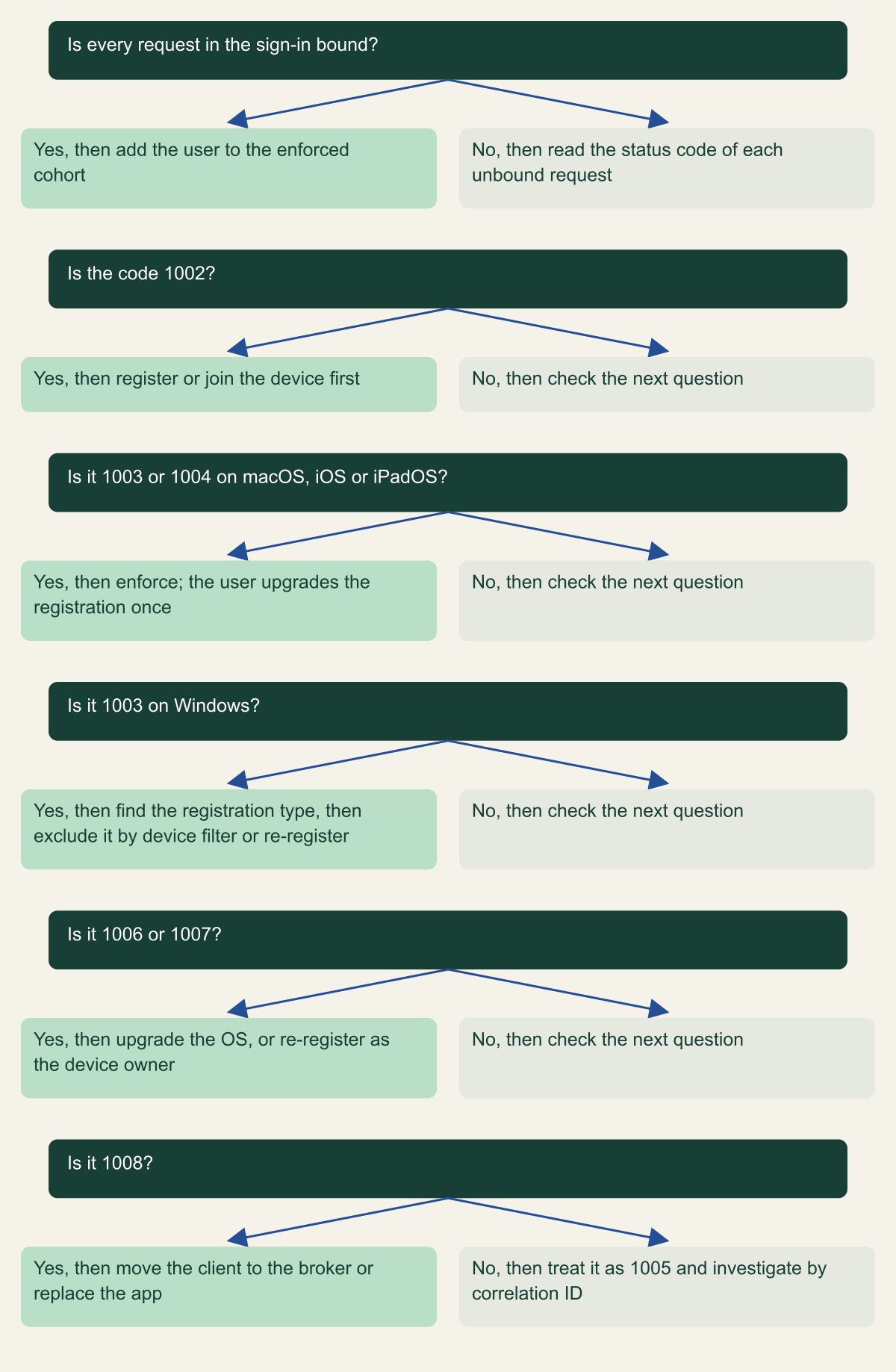
The same code, 1003, blocks enforcement on Windows and fixes itself at the next prompt on Apple platforms. [2][3][4]

Source. Conceptual decision aid based on the status code tables in Microsoft's Windows, Apple and web app token protection guides, reviewed October 9, 2026. [2][3][4]
Method. Conceptual ordering of documented status codes and actions. Codes 1004 and 1007 appear in the Apple and web app guides only. Apply it to each unbound request, then roll results up by user and device.
Accessible table and figure data
| Question | Yes, then | No, then |
|---|---|---|
| Is every request in the sign-in bound? | add the user to the enforced cohort | read the status code of each unbound request |
| Is the code 1002? | register or join the device first | check the next question |
| Is it 1003 or 1004 on macOS, iOS or iPadOS? | enforce; the user upgrades the registration once | check the next question |
| Is it 1003 on Windows? | find the registration type, then exclude it by device filter or re-register | check the next question |
| Is it 1006 or 1007? | upgrade the OS, or re-register as the device owner | check the next question |
| Is it 1008? | move the client to the broker or replace the app | treat it as 1005 and investigate by correlation ID |
| Question | Yes, then | No, then |
|---|---|---|
| Is every request in the sign-in bound? | add the user to the enforced cohort | read the status code of each unbound request |
| Is the code 1002? | register or join the device first | check the next question |
| Is it 1003 or 1004 on macOS, iOS or iPadOS? | enforce; the user upgrades the registration once | check the next question |
| Is it 1003 on Windows? | find the registration type, then exclude it by device filter or re-register | check the next question |
| Is it 1006 or 1007? | upgrade the OS, or re-register as the device owner | check the next question |
| Is it 1008? | move the client to the broker or replace the app | treat it as 1005 and investigate by correlation ID |
Query both sign-in log tables
Microsoft's rollout steps ask for both interactive and non-interactive sign-in logs, and every sample query it publishes for this control reads AADNonInteractiveUserSignInLogs by default. The Policy impact view in Conditional Access, itself a preview, summarizes interactive sign-ins only, so it can look clean while the background token requests that will fail sit in the other table. Route both sign-in categories to a Log Analytics workspace before the pilot starts. [1][2][11]
Read Microsoft's samples critically. In the Windows guide, the per-application and per-user queries filter ResourceDisplayName twice in a row, and the second filter keeps only Exchange Online and SharePoint Online, so Azure Virtual Desktop and Windows 365 rows never reach the output. The web app guide's samples mark every blocked 1003 or 1004 request as self-remediable without checking the platform, which its own status table contradicts for Windows. Neither flaw changes the policy, but both change the totals that go into a decision to enforce. [2][4]
The fragment below groups unbound requests by a triage label, operating system, trust type and code. In AADNonInteractiveUserSignInLogs, TokenProtectionStatusDetails and DeviceDetail are string columns, which is why it parses them; Microsoft's own samples parse the same column and note that SigninLogs can be swapped in. [3][14]
Set the lookback to a full business cycle. Microsoft says to analyze logs long enough to cover normal application use without giving a number, and its samples use seven days, a window that can miss month-end add-ins, quarterly scripts and travel. Give each triage group an owner and keep the output with the decision to enforce. [1][2]
// Example: unbound sign-in session requests by triage group, platform and code.
// Run as written, then again with SigninLogs in place of the first table name.
AADNonInteractiveUserSignInLogs
| where TimeGenerated > ago(30d)   // cover a full business cycle, not one week
| where isnotempty(TokenProtectionStatusDetails)
// Optional: | where ResourceDisplayName in ("Office 365 Exchange Online", "Office 365 SharePoint Online")
| extend tp = parse_json(TokenProtectionStatusDetails), dev = parse_json(DeviceDetail)
| extend Status = tostring(tp.signInSessionStatus),
         Code = toint(tp.signInSessionStatusCode),
         OS = tostring(dev.operatingSystem),
         TrustType = tostring(dev.trustType)
| where Status == "unbound"
| extend IsApple = OS contains "mac" or OS contains "ios" or OS contains "ipad"
| extend Triage = case(
    Code in (1003, 1004) and IsApple, "Apple: one-time upgrade at next prompt",
    Code == 1003, "Windows: unsupported or stale registration",
    Code == 1002, "No device state: register or join",
    Code == 1008, "Client not using the broker",
    Code in (1006, 1007), "OS version or device owner",
    "Investigate by correlation ID")
| summarize Requests = count(), Users = dcount(UserPrincipalName),
            Apps = make_set(AppDisplayName, 10) by Triage, OS, TrustType, Code
| sort by Requests desc
Exclude registration types that cannot bind
Some Windows devices register in ways token protection does not support, and they will never produce a bound session. Microsoft lists Entra joined Azure Virtual Desktop session hosts, devices deployed by bulk enrollment, Entra joined Windows 365 Cloud PCs, Entra joined Power Automate hosted machine groups, Autopilot devices in self-deploying mode, and Azure virtual machines that use the Entra sign-in extension. They appear as 1003. The guide's remedy is a device filter that excludes them, matched on systemLabels, trustType, profileType or the Intune enrollmentProfileName. [2]
Write that filter against the device filter reference rather than copying the guide's examples. The guide writes systemLabels -eq "CloudPC", but the reference lists only Contains and NotContains for systemLabels, which holds a collection of labels, and its examples use the device. prefix and defer to the dynamic membership rule syntax for combining expressions. Following the reference gives rules such as device.systemLabels -contains "CloudPC" -and device.trustType -eq "AzureAD", and device.profileType -eq "SecureVM" -and device.trustType -eq "AzureAD" for Azure virtual machines. Positive operators never match an unregistered device, whose properties all evaluate as null, so the exclusion does not exempt unregistered devices from the policy. [2][10]
Every exclusion is a device class that keeps bearer refresh tokens for Exchange, SharePoint and Teams. Record each with an owner and the companion control that covers it, usually a compliant-device requirement or a network condition, and recheck the list when Microsoft adds support. Surface Hub and Windows-based Teams Rooms, both unsupported, need the same treatment by device filter or by excluding the resource accounts that sign in on them. [2]
Report-only first, then enforce by cohort
Both native guides build the policy the same way. Assign a pilot group and exclude emergency access accounts. Select the individual resources rather than the Office 365 app group, which Microsoft warns can cause unintended failures here, an exception to its usual advice. Set Device platforms to Windows, or to iOS and macOS, and under Client apps choose only Mobile apps and desktop clients; leaving Browser selected can block MSAL.js apps such as Teams on the web. Windows steps add Microsoft Teams Services to Exchange and SharePoint, while the Apple steps select only Exchange and SharePoint even though Teams is a supported Apple resource. [2][3]
Teams that manage Conditional Access as code can express the same policy through Microsoft Graph, with one catch. The session control, secureSignInSession, exists only on the beta endpoint; the v1.0 conditionalAccessSessionControls resource had no such property when checked on October 9, 2026, and Microsoft does not support beta APIs in production applications. The fragment is most useful for reviewing exported policies against the settings above. [13]
Apple devices need preparation before the policy means anything. Configure hardware-backed registration first: Microsoft Authenticator as the broker with the Enterprise SSO plug-in on iOS and iPadOS, and Company Portal with either the SSO plug-in or Platform SSO on macOS. Users who registered before that change get the one-time upgrade prompt after enforcement. Brief the help desk on that prompt, and tell users of Apple Mail and Calendar in advance that they will be blocked. [3]
Pick the first cohort for value and clean devices. Microsoft names users in specialized privileged roles as possible targets, so administrators on Entra joined Windows 11 laptops and MDM-managed Macs make a reasonable first group, with emergency access accounts excluded and tested separately. Then expand by device population rather than department, because unbound requests cluster by platform and registration method. [2]
Once the policy is on, Windows users on unregistered devices are prompted to register; devices without the September 2026 Windows update still show the older prompt. Users of unsupported apps see a block screen after authenticating, which is when the help desk needs the app list. [2]
Treat the ARM browser preview as a separate project. It needs Windows 11 build 26100.8246 or 26200.8246 or later, or an MDM-managed Mac; Edge or Chrome with the Microsoft Single Sign On extension; and on Windows the EnablePlatformAuth registry value under the BrowserCore policy key. Wait at least 24 hours after configuring devices before reading report-only data, target the Windows Azure Service Management API with Client apps set to Browser only, and keep emergency access accounts out. Because the policy covers the Azure portal and the Entra and Intune admin centers, it follows that a device missing the extension can be shut out of the consoles used to fix the policy. [4]
{
  "displayName": "CA-TP-01 Require token protection, Windows native apps, pilot",
  "state": "enabledForReportingButNotEnforced",
  "conditions": {
    "users": {
      "includeGroups": [
        "<pilot-group-object-id>"
      ],
      "excludeGroups": [
        "<emergency-access-group-object-id>"
      ]
    },
    "applications": {
      "includeApplications": [
        "<Office 365 Exchange Online appId>",
        "<Office 365 SharePoint Online appId>",
        "<Microsoft Teams Services appId>"
      ]
    },
    "platforms": {
      "includePlatforms": [
        "windows"
      ]
    },
    "clientAppTypes": [
      "mobileAppsAndDesktopClients"
    ],
    "devices": {
      "deviceFilter": {
        "mode": "exclude",
        "rule": "(device.systemLabels -contains \"CloudPC\" -and device.trustType -eq \"AzureAD\") -or (device.systemLabels -contains \"AzureVirtualDesktop\" -and device.trustType -eq \"AzureAD\") -or (device.profileType -eq \"SecureVM\" -and device.trustType -eq \"AzureAD\")"
      }
    }
  },
  "sessionControls": {
    "secureSignInSession": {
      "isEnabled": true
    }
  }
}Cover what stays unbound
Every Microsoft guide carries the same warning: because token protection policies apply only to Windows and Apple devices, an attacker can try to appear to come from another platform. The device platform condition is derived from the user agent string, which the client controls, so a stolen refresh token presented with an Android user agent falls outside a policy scoped to Windows. The two companion policies close that gap: block unknown or unsupported device platforms, and require a compliant device for every platform you allow. [2][12]
Issued access tokens need network controls instead. CAE-capable services such as Exchange Online, SharePoint Online and Teams enforce IP-based location policies at the resource instantly, and react within up to 15 minutes to critical events such as disablement, a password reset or revocation of all refresh tokens. CAE understands only IP-based named locations; with country locations or MFA trusted IPs, Entra ID issues a one-hour token without the instant check. Strict location enforcement, a public preview, removes the split-path exception but needs dedicated, enumerable egress addresses, and Teams calls and chat ignore IP-based policies. [8]
A compliant network policy through Global Secure Access works on both planes. At authentication, Entra ID denies a token request made with a stolen refresh token from a device outside the tenant's compliant network; at the resource, CAE-capable services integrated with Global Secure Access reject replayed access tokens. It also covers resources and identities that token protection cannot reach, which is why Microsoft's token-theft guidance pairs the two. [5][9]
Token protection also assumes the attacker cannot sign in fresh. A reasoned consequence of the design is that someone who obtains a password and a new MFA method can register a device of their own, receive a PRT bound to it and satisfy the policy honestly. Recovery and registration controls handle that case, and device code phishing, which Microsoft lists separately under reducing risk, needs its own flow policy. [5][6]
| Unbound path | Why the policy misses it | Companion control |
|---|---|---|
| Android, Linux or a spoofed user agent | Policy scope uses the device platform, read from the user agent | Block unknown platforms; require a compliant device on allowed platforms |
| Unmanaged iPhone, iPad or Mac | The Enterprise SSO plug-in needs MDM | Compliant device requirement |
| Excluded Cloud PCs, AVD hosts and VMs | The device filter removes them from scope | Compliant network or IP-based location policy |
| Access tokens already issued | Not bound; valid until expiry | CAE with IP-based named locations, or compliant network |
| Enterprise apps and other Microsoft APIs | Only the listed resources are enforced | Compliant network policy on all resources |
| Second account on a signed-in device | Only the device's signed-in user holds the PRT | Network-based policy, which covers other identities |
| Microsoft 365 in a browser | Native apps only; the browser preview covers ARM | Compliant device or compliant network |
Read the logs after enforcement
After the switch to On, the evidence moves from the Report-only tab to the Conditional Access tab of each sign-in, where Session Controls show whether the token protection requirement was satisfied. In exported data the control appears in enforcedSessionControls and sessionControlsNotSatisfied as SignInTokenProtection; before late June 2023 the string was Binding, so queries over long retention should match both. [2]
Review three patterns weekly. A supported app that starts failing after a client update: check for 1008, which means it no longer uses the broker. New Windows 1003 rows: often a device class nobody excluded, such as a new virtual desktop pool. External users failing without a clear error: check their home tenant's device state before anyone weakens the policy. Keep a report-only copy pointed at the next cohort while the enforced copy covers the current one, in line with Microsoft's advice to validate changes with a report-only copy before editing an enforced policy. [2][11]
Where token protection is the wrong control
Token protection does nothing outside its list. In these situations the companion controls carry the weight, and forcing token protection onto them only produces exclusions. [1][2][3][5]
- Shared and multi-account devices. Only the device's signed-in user is protected, and Surface Hub and Windows-based Teams Rooms are unsupported, so kiosks and meeting rooms belong to device and network policy. [2][5]
- Android-heavy fleets. Android is not a supported platform, so its users depend on compliance and network conditions. [1]
- Apple devices without MDM. The Enterprise SSO plug-in requires MDM, and on unmanaged iOS the broker returns the refresh token to the calling app, where it is not protected. [3][6]
- Browser-first work in Microsoft 365. Native apps are covered; Outlook on the web and Teams on the web are not, and the browser preview applies only to selected ARM web apps. [1][2][4]
- Virtual desktop estates on unsupported registration types. Entra joined AVD session hosts and Cloud PCs are excluded, so protection there comes from network and device controls. [2]
- Non-Microsoft resources and your own APIs. They are outside the resource list; compliant network covers enterprise apps, and sender-constrained tokens are a design choice for APIs you build. [5][9]
Enforce for the first cohort, then widen
The sequence below front-loads the policies that close bypasses and leaves enforcement until the logs say a cohort is ready.
- Run the unknown-platform block and the compliant-device requirement in report-only, then enforce them, so the platform condition cannot be used to step around token protection. [2][12]
- On Apple devices, deploy the broker apps and the SSO plug-in or Platform SSO with hardware-backed registration before users register. [3]
- Create the token protection policy in report-only for a pilot group: individual resources, supported platforms, mobile apps and desktop clients only, emergency access excluded. [2][3]
- Collect interactive and non-interactive sign-ins for a full business cycle and triage unbound requests by code and platform. [1][2][3]
- Exclude unsupported registration types with device filters written to the filter reference, and record an owner and companion control for each. [2][10]
- Enforce for the pilot, watch the 1008 and 1003 trends, then expand by device population. [2]
- Start the ARM browser preview only after native enforcement is stable, and recheck the overview page before each expansion. [1][4]
Method and provenance
Source-led analysis of Microsoft Learn documentation on token protection, Primary Refresh Tokens, token lifetimes, continuous access evaluation, compliant network, device filters, report-only evaluation, Microsoft Graph and Azure Monitor sign-in tables, with a calculated chart of documented token clocks and original triage aids. Sources were reviewed on October 9, 2026, and statuses, status codes, lifetimes and fragment field names were re-checked against the same pages on October 10, 2026.
No Entra tenant, device, policy or sign-in log was configured or queried. The triage, filter rules, policy fragment and query follow the cited documentation as of the review date and were not run. Supported apps, platform status and status codes change between page updates.
AI assistance. AI assisted research synthesis, drafting, diagram planning and visual production, with deterministic editorial checks. No personal deployment experience, independent human review or live test is claimed.
Published under the Cloud Security Desk organizational byline. Read the practitioner guide policy.
References
- Token Protection in Microsoft Entra Conditional Access (page updated August 20, 2026) Microsoft. Accessed .
- Token Protection deployment guide, Windows (page updated September 21, 2026) Microsoft. Accessed .
- Token Protection deployment guide, Apple platforms (page updated August 20, 2026) Microsoft. Accessed .
- Token Protection deployment guide, web apps (Preview) (page updated August 7, 2026) Microsoft. Accessed .
- Protecting tokens in Microsoft Entra (page updated April 25, 2025) Microsoft. Accessed .
- Understanding Primary Refresh Token (PRT) (page updated July 22, 2025) Microsoft. Accessed .
- Continuous access evaluation (page updated April 8, 2026) Microsoft. Accessed .
- Enable compliant network check with Conditional Access (page updated April 4, 2026) Microsoft. Accessed .
- Conditional Access: Filter for devices (page updated March 24, 2026) Microsoft. Accessed .
- Analyze Conditional Access policy impact (page updated June 1, 2026) Microsoft. Accessed .
- Block unknown or unsupported device platform (page updated March 24, 2026) Microsoft. Accessed .
- conditionalAccessSessionControls resource type, Microsoft Graph beta Microsoft. Accessed .
- Set-MgGraphOption, Microsoft Graph PowerShell reference Microsoft. Accessed .