
An implementation guide for engineers who approve SaaS integrations and for SaaS teams that build AWS onboarding, based on AWS IAM, STS, CloudTrail, Access Analyzer and Organizations documentation, Praetorian's 2020 vendor test and Datadog's 2024 and 2025 measurements, reviewed October 10, 2026. It covers trust policy operators, vendor-side refusal tests, permission scope, drift checks, an organization-wide RCP and the offboarding order.
At a glance
Key findings
- AWS's confused deputy guidance requires the external ID to be unique among a vendor's customers and controlled by the vendor, while other AWS pages describe it as any identifier known to both parties or one the role owner sends; the vendor-generated rule is the one that stops the attack. [1][2][3]
- In Praetorian's 2020 test of 90 vendors, 37 percent had not implemented the external ID correctly and another 15 percent showed a read-only value in the interface but accepted a tampered one through the API. [12]
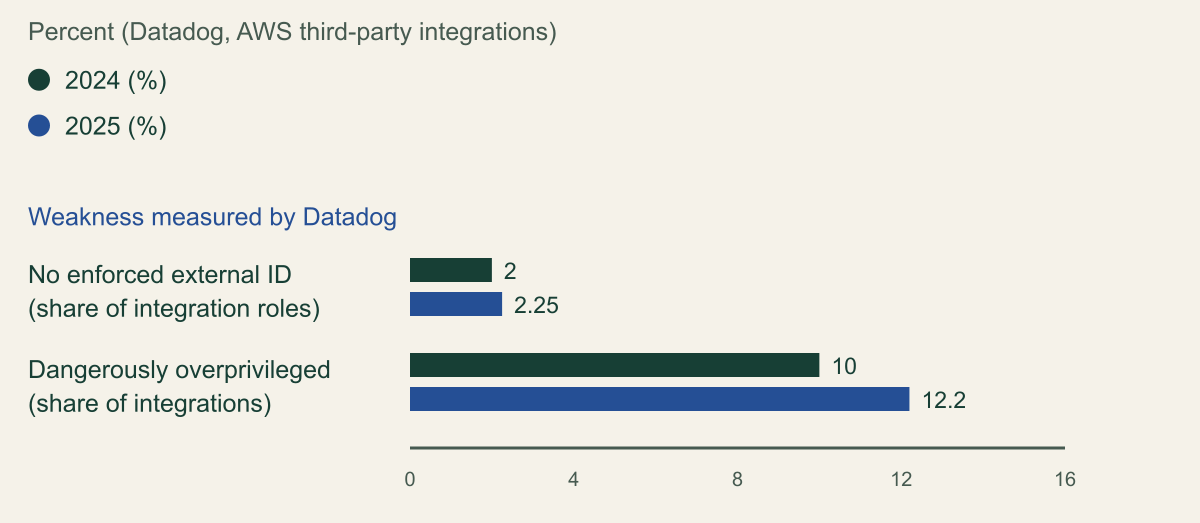
- Datadog counted an average of 13 third-party integration roles per organization in 2025, up from 10.2 in 2024; the share without an enforced external ID rose from 2 to 2.25 percent and dangerously overprivileged integrations from 10 to 12.2 percent. [13][14]
StringEqualsIfExistsandForAllValues:StringEqualspass a call with no external ID, andStringLikewith*passes another tenant's; require an exactStringEqualsmatch on the vendor's value instead. [5]- CloudTrail does not log denied cross-account role assumptions in the role owner's account, so a blocked confused deputy attempt leaves no trace on the customer side. [6]
Three conditions that stop a confused deputy
A SaaS vendor's cross-account role resists the confused deputy problem only when three conditions hold together. Your trust policy admits the vendor's principal only if the AssumeRole request carries one exact sts:ExternalId value. The vendor's backend generated that value, keeps it unique to your tenant, lets no customer set or change it, and sends the value belonging to whichever tenant asked for the work. And your review keeps confirming that the condition, the permissions and the relationship still match what was approved, then removes the role when the relationship ends. AWS is explicit that the value must be unique among the vendor's customers and controlled by the vendor, not by you. [1][2]
The attack this prevents needs no stolen credential. Your role ARN is not a secret. If another customer of the same vendor enters your ARN in its own integration settings, the vendor's backend calls AssumeRole with the vendor's own credentials, and AWS sees a request from exactly the account your role trusts. The only part of that request the other customer cannot control is the external ID, and only if the vendor chose it per tenant and never takes it from user input. [1][2]
Each party owns a different proof: the trust policy that the role answers only to your tenant's ID, the vendor's onboarding code that tenants cannot choose or swap IDs, and your review that neither has drifted.
How a vendor role becomes a confused deputy
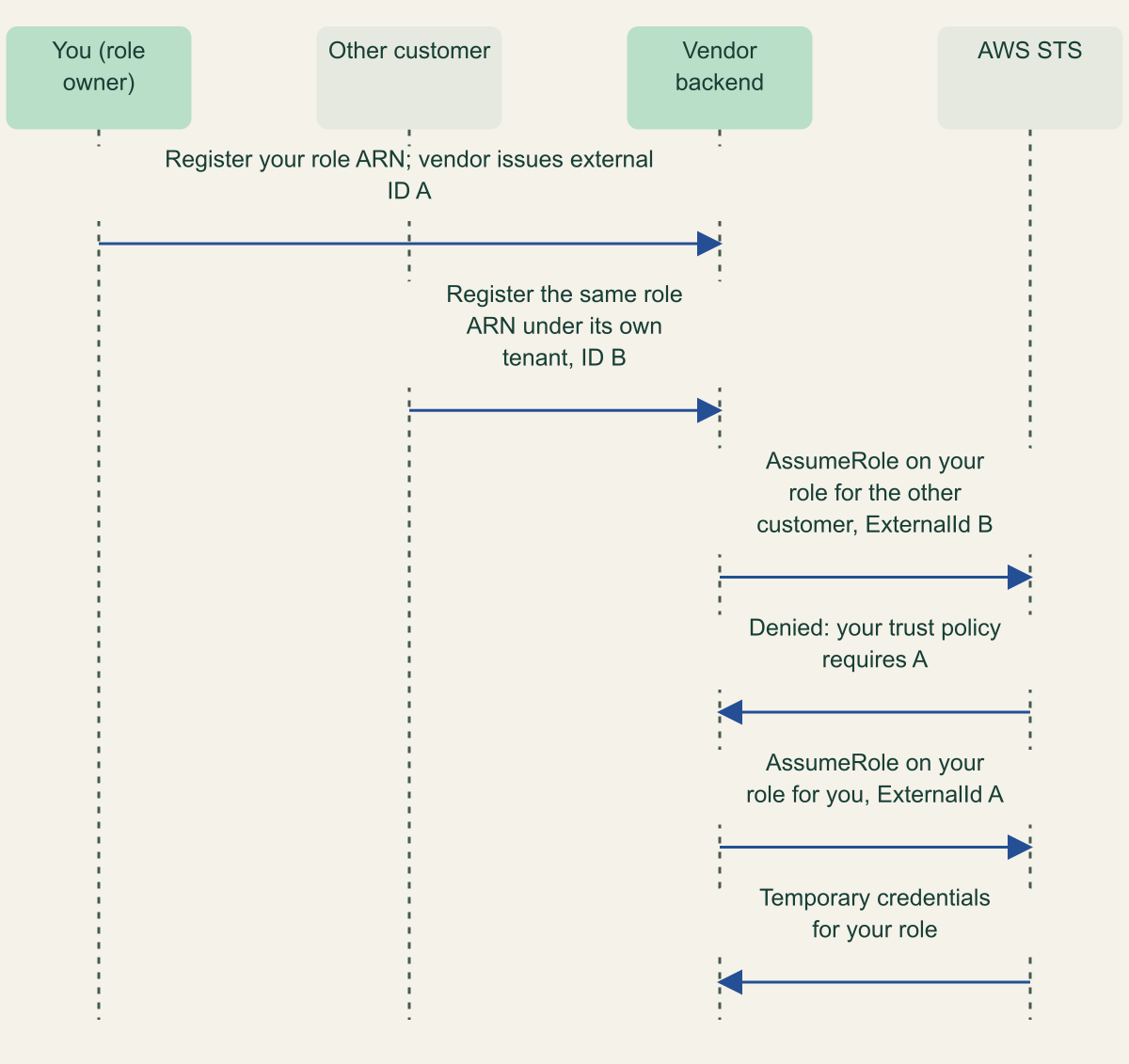
AWS's worked example is a cost-monitoring company, Example Corp, serving many customers from one AWS account. You create AWS1:ExampleRole, trust Example Corp's account and hand over the ARN. A second customer submits the same ARN, which AWS notes it may simply have learned or guessed, and asks Example Corp to work on what it claims is its own account. A trust policy that names only an account cannot tell a request made for you from one made for anyone else, so Example Corp acts on your resources for the wrong customer. [1]
Adding an external ID moves that decision into the request. Example Corp assigns each customer a unique value, generally a GUID, and includes the requesting customer's value in every AssumeRole call. Your trust policy requires your value. A request made on behalf of the other customer carries that customer's value, fails the condition and returns an error to the vendor, and the other customer has no way to change what the vendor sends. The sequence figure traces both requests through the same role. [1]
An attacker needs little else. Praetorian's 2020 analysis lists four inputs: a vendor with the flaw, the victim's account ID, the role name and the external ID. Account IDs and role names leak through documentation, repositories and screenshots, some vendors prescribe one role name for every customer, and role names can be enumerated with tools such as Pacu, whose failed attempts are logged in the attacker's CloudTrail rather than the victim's. [12]
The same blind spot covers the confused deputy attempt itself. AWS documents that CloudTrail does not log denied STS requests in the target account for cross-account role assumption. When your external ID condition blocks another tenant's request, your account records nothing; only the vendor's account sees the failure. What you can see is every successful assumption, which is where the monitoring described below concentrates. [6]
Two requests for the same role ARN
The vendor sends the requesting tenant's external ID, so the other customer's request fails at STS while yours succeeds. [1]

Source. AWS IAM User Guide, The confused deputy problem, cross-account scenario with Example Corp. [1]
Method. Message order condensed from AWS's documented scenario; AWS's sample identifiers 12345 and 67890 are shown as A and B. The denied request is not logged in your account. [1][6]
Accessible table and figure data
| From | To | Message |
|---|---|---|
| You | Vendor backend | Register your role ARN; the vendor issues external ID A |
| Other customer | Vendor backend | Register the same role ARN under its own tenant, ID B |
| Vendor backend | AWS STS | AssumeRole on your role for the other customer, ExternalId B |
| AWS STS | Vendor backend | Denied: your trust policy requires A |
| Vendor backend | AWS STS | AssumeRole on your role for you, ExternalId A |
| AWS STS | Vendor backend | Temporary credentials for your role |
| From | To | Message |
|---|---|---|
| You | Vendor backend | Register your role ARN; the vendor issues external ID A |
| Other customer | Vendor backend | Register the same role ARN under its own tenant, ID B |
| Vendor backend | AWS STS | AssumeRole on your role for the other customer, ExternalId B |
| AWS STS | Vendor backend | Denied: your trust policy requires A |
| Vendor backend | AWS STS | AssumeRole on your role for you, ExternalId A |
| AWS STS | Vendor backend | Temporary credentials for your role |
What the external ID proves and what it does not
AWS describes the external ID as a way for the caller to assert the circumstances it is acting in, and for the role owner to accept the call only in those circumstances. It is not an authentication factor. AWS states that it does not treat the value as a secret, and anyone allowed to view the role can read it in the trust policy. The vendor's AWS credentials authenticate the call; the external ID only ties it to a tenant. [2]
Three limits follow. The control protects you from the vendor's other customers, not from the vendor: whoever controls its outbound principal and its stored pairs of role ARNs and IDs can assume every customer's role, which is why Datadog tells SaaS providers to treat that outbound role as a crown jewel. A value shared by several tenants protects none of them from each other; AWS recommends one external ID per AWS account. And it does nothing for AWS services acting through service principals, where the guard is a condition such as aws:SourceArn or aws:SourceAccount. [15][2][1]
AWS's own pages also disagree about who creates the value and how private it is, as the table shows. The confused deputy page is the one written for a provider serving many customers, and its rule is the one followed here: the vendor generates the value and you never choose it. A customer-chosen value can collide with or be copied by another tenant whenever the vendor accepts typed input. [1][2][3]
Praetorian is stricter about secrecy than AWS. Its 2020 recommendations tell vendors to treat the external ID like a private key, keep it out of clear-text logs and stop displaying it after the first successful connection test. AWS is describing what the role owner can rely on, and the condition works without secrecy; Praetorian is describing defense in depth at the vendor, where a leaked list of ARN and ID pairs turns any tenant-isolation flaw into access. Treat the ID as non-secret in your account and expect the vendor to store it under access control, as Datadog says it does in a secrets manager. [2][12][15]
| AWS page | Who creates the value | Is it secret |
|---|---|---|
| The confused deputy problem | The vendor, unique per customer; you do not choose it | Not addressed; the role ARN is not secret |
| Third-party access, opening list | Any identifier known only to you and the third party, such as an invoice ID | Implied, not stated |
| Third-party access, scenario and key points | A random string the third party generates, one per AWS account | No; visible to anyone who can view the role |
| STS AssumeRole API reference | The role owner might send one to the trusted account; any string, such as a passphrase | Not addressed |
What the vendor's backend must refuse
Most defects Praetorian found sat in vendor code, not customer policies. Across the 90 vendors in its results (key-only vendors excluded), 37 percent had not implemented the external ID correctly in the interface, for example a correct create form with an editable update form. Another 15 percent showed the value as read-only while the API accepted a tampered one, typically sent in a POST or PUT body. It was common for vendors to refuse an AWS account ID already linked to another tenant, which blocked the attack even where ID handling was weak. [12]
One test needs an addition. AWS's third-party page asks vendors to check the role both with and without the correct external ID, but the AWS Partner Network post and Datadog's sample code implement that as a single call with no external ID. That catches a trust policy with no condition. It misses a condition that only requires the key to exist, such as StringLike with a value of *, which matches any external ID the vendor sends, including another tenant's. A random wrong value catches both. [2][11][15][5]
Read together, AWS's third-party guidance, the 2022 AWS Partner Network post and Datadog's provider guide give a short list of behaviors to require, whether you are building the onboarding flow or approving one. [2][11][15]
- Generate the ID on the server as a random value, such as a UUID, one per customer AWS account, and never accept one from a customer. [2][11]
- Keep it immutable through every path, including edit forms and API request bodies. If regeneration is offered, the server creates the new value. [11][12]
- Look up the ID from the tenant that asked for the work, never from the role ARN or account ID the request names, and send it on every
AssumeRolecall. [1][2] - Before storing a role ARN, try to assume it with no external ID and with a random wrong one. Store it only if both attempts fail and the correct value works, and repeat the test on a schedule to catch drift. [2][15]
- Refuse to link an AWS account ID that another tenant already uses, unless sharing an account between tenants is a deliberate feature. [12][15]
- Run the outbound principal in a dedicated account that is not an AWS Organizations management account, and give each internal service a session policy so its credentials carry only the actions it needs. [15][3]
# Example vendor onboarding check. Run with the outbound integration
# role's credentials. Placeholder ARN and external ID.
ROLE_ARN="arn:aws:iam::111122223333:role/example-vendor-integration"
TENANT_EXTERNAL_ID="3f6c2a9e-5b1d-4c47-9a0e-7d2b8c1e4f60"  # from the tenant record
WRONG_ID="$(uuidgen)"

try_assume() {
  aws sts assume-role --role-arn "$ROLE_ARN" \
    --role-session-name onboarding-check "$@" \
    --query 'AssumedRoleUser.Arn' --output text >/dev/null 2>&1
}

if try_assume; then
  echo "REJECT: role can be assumed without an external ID"; exit 1
fi
if try_assume --external-id "$WRONG_ID"; then
  echo "REJECT: role accepts an external ID that is not this tenant's"; exit 1
fi
if try_assume --external-id "$TENANT_EXTERNAL_ID"; then
  echo "ACCEPT: store the role ARN for this tenant"
else
  echo "PENDING: the tenant's external ID does not work yet"; exit 1
fi
Two measurements with different denominators
Two independent sources have measured how often this goes wrong, and they count different things. Praetorian's post of June 12, 2020 counts vendors: 90 tested through their onboarding flows, key-only vendors excluded, none named. Datadog's State of Cloud Security reports count IAM roles in the AWS accounts of a sample of thousands of Datadog customer organizations, treating a role as a vendor integration when its trust policy names an account on the fwd:cloudsec list of known AWS accounts, with Datadog's own tuning. The 2024 and 2025 editions use data collected each September. [12][13][14][16]
Datadog's figures moved the wrong way. The average organization ran 10.2 integration roles in 2024, with a median of 3, and 13 in 2025. The share of integration roles that do not enforce an external ID rose from 2 percent to 2.25 percent, and the share of integrations Datadog calls dangerously overprivileged, able to read all data in the account or take it over, rose from 10 percent to 12.2 percent. The chart shows those two shares. Praetorian's results are left out of it because they measure vendors, not roles. [13][14]
It follows from Datadog's definition that the external ID share is a floor rather than a full count. A role counts as enforcing an external ID if its trust policy uses StringEquals, StringLike or ForAnyValue:StringEquals on sts:ExternalId, so a StringLike condition with a wildcard value counts as enforced although it accepts any ID. The measurement also cannot see vendor backends, where Praetorian found most defects: a role with a perfect condition is still exposed if the vendor lets a tenant pick its own value. [14][5][12]
The editions differ slightly on vendors per organization: 2.4 on average in 2024, median 2, and 2.5 in 2025, described there as unchanged. Each figure is reported as published. [13][14]
Both integration-role weaknesses Datadog tracks rose in 2025
Roles without an enforced external ID went from 2 to 2.25 percent and dangerously overprivileged integrations from 10 to 12.2 percent. [13][14]

Source. Datadog, State of Cloud Security 2024 (Fact 5, data collected September 2024) and 2025 (Fact 6, data collected September 2025), AWS only. [13][14]
Method. Values copied without transformation. Datadog counts IAM roles that trust an account on the fwd:cloudsec known AWS accounts list, with its own tuning, in a sample of thousands of its customers' organizations. A role counts as enforcing an external ID if any StringEquals, StringLike or ForAnyValue:StringEquals condition uses sts:ExternalId. Datadog reports the external ID share per integration role and the overprivileged share per integration. Praetorian's 2020 vendor figures use a different denominator and are not plotted. [13][14][16]
Accessible table and figure data
| Datadog measure | 2024 (%) | 2025 (%) |
|---|---|---|
| No enforced external ID (share of integration roles) | 2 | 2.25 |
| Dangerously overprivileged (share of integrations) | 10 | 12.2 |
| Datadog measure | 2024 (%) | 2025 (%) |
|---|---|---|
| No enforced external ID (share of integration roles) | 2 | 2.25 |
| Dangerously overprivileged (share of integrations) | 10 | 12.2 |
Write the trust policy
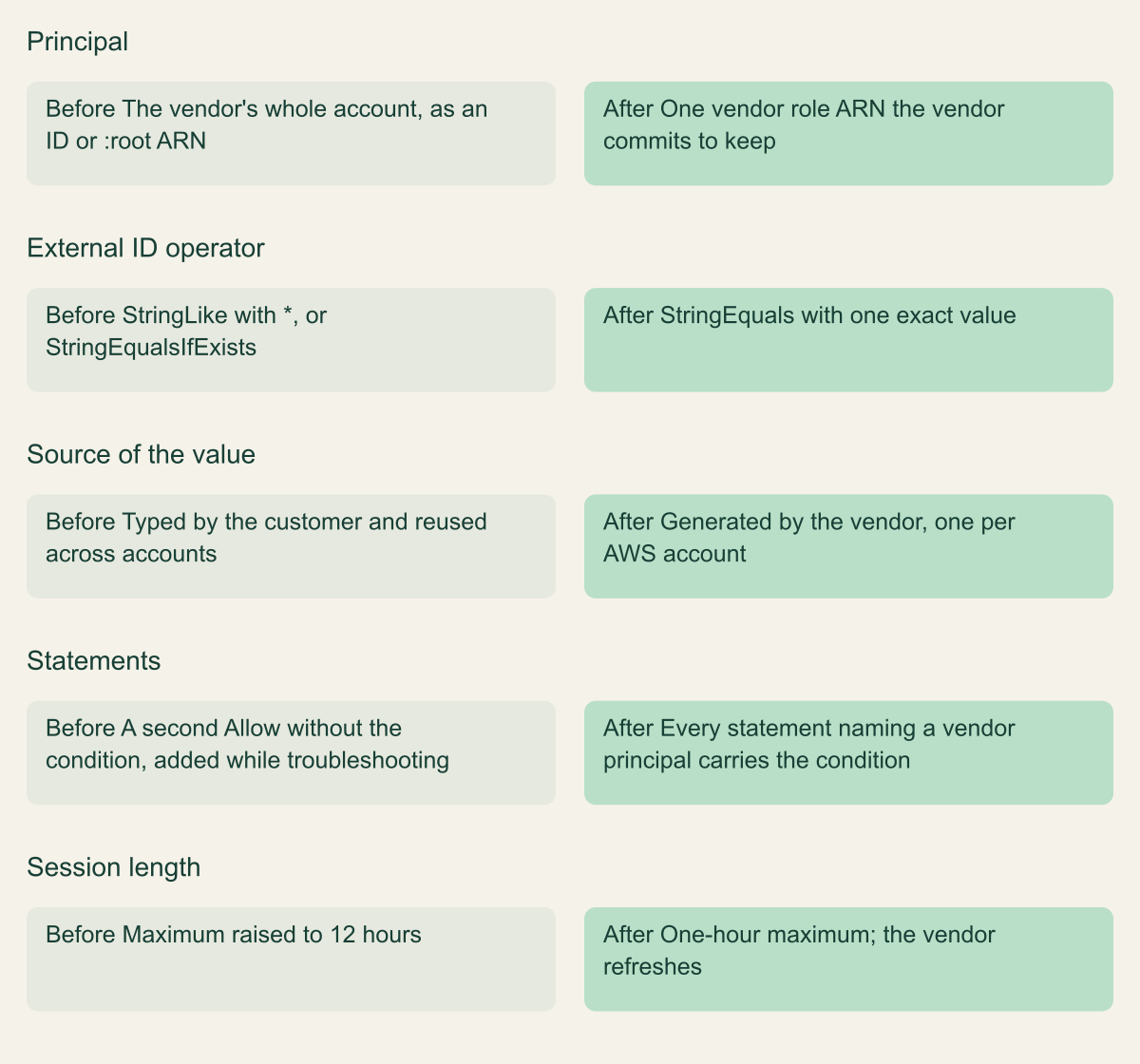
Start from the vendor's documented principal and the external ID it generated for your tenant, then hold the policy to three rules. Match sts:ExternalId with StringEquals and the exact value. Name the narrowest principal the vendor supports. And put the condition on every statement that allows a vendor principal, because a second Allow statement without it, often added while troubleshooting, reopens the role. [1][5]
The operator decides whether the condition binds. When a key is missing from the request, ordinary operators such as StringEquals do not match, which is the behavior you want. StringEqualsIfExists reverses it and evaluates to true when the vendor sends no external ID. ForAllValues:StringEquals also returns true when the key is absent. StringLike accepts wildcards, so a value of * admits any ID at all. None of these belongs in a vendor trust policy. [5]
Principal choice is a tradeoff the vendor has to support. An account ID or :root ARN delegates to the whole vendor account, so any principal there allowed to call sts:AssumeRole on your role can use it once it has your external ID. A role ARN narrows that to one vendor role, but IAM stores it as the role's unique principal ID: if the vendor deletes and recreates the role, even under the same name, your trust stops matching until you replace the stale principal ID with the role ARN and save the policy again, and the vendor can never rename it. Use a role ARN when the vendor publishes one and commits to keeping it. [4][15]
The comparison figure sets a policy that would pass a quick review against one that holds up. Leave the role's maximum session duration at one hour. A vendor backend that runs as a role is role chaining when it assumes yours, which AWS caps at one hour whatever the role's maximum, and a request without DurationSeconds gets one hour anyway. [3]
{
  "Version": "2012-10-17",
  "Statement": [
    {
      "Sid": "VendorIntegrationWithExternalId",
      "Effect": "Allow",
      "Principal": {
        "AWS": "arn:aws:iam::444455556666:role/example-vendor-outbound"
      },
      "Action": "sts:AssumeRole",
      "Condition": {
        "StringEquals": {
          "sts:ExternalId": "3f6c2a9e-5b1d-4c47-9a0e-7d2b8c1e4f60"
        }
      }
    }
  ]
}A vendor trust policy that only looks protected, and one that is
An exact StringEquals on a vendor-generated value, on every statement, is what binds the role to one tenant. [1][5]

Source. Conceptual comparison based on the AWS IAM User Guide pages on the confused deputy problem, third-party access, the Principal element and condition operators, and the STS AssumeRole API reference. [1][2][3][4][5]
Method. Conceptual, hypothetical example; no measured data. Each row pairs a documented weakness with the documented alternative. [1][4][5]
Accessible table and figure data
| Aspect | Before | After |
|---|---|---|
| Principal | The vendor's whole account, as an ID or :root ARN | One vendor role ARN the vendor commits to keep |
| External ID operator | StringLike with *, or StringEqualsIfExists | StringEquals with one exact value |
| Source of the value | Typed by the customer and reused across accounts | Generated by the vendor, one per AWS account |
| Statements | A second Allow without the condition, added while troubleshooting | Every statement naming a vendor principal carries the condition |
| Session length | Maximum raised to 12 hours | One-hour maximum; the vendor refreshes |
| Aspect | Before | After |
|---|---|---|
| Principal | The vendor's whole account, as an ID or :root ARN | One vendor role ARN the vendor commits to keep |
| External ID operator | StringLike with *, or StringEqualsIfExists | StringEquals with one exact value |
| Source of the value | Typed by the customer and reused across accounts | Generated by the vendor, one per AWS account |
| Statements | A second Allow without the condition, added while troubleshooting | Every statement naming a vendor principal carries the condition |
| Session length | Maximum raised to 12 hours | One-hour maximum; the vendor refreshes |
Limit what the role can reach
Your external ID condition decides who can use the role; the permissions policy decides what a failure costs. AWS's third-party page warns that the vendor can reach any resource the policy specifies and that its use of your resources is billed to you. Datadog's 12.2 percent figure for 2025 counts integrations where the cost of a failure is the whole account. [2][14]
Ask the vendor for the exact actions each feature needs and attach a customer managed policy built from that list instead of an AWS managed policy. Datadog's provider guide gives two examples of why. ReadOnlyAccess reads every S3 object and DynamoDB table and every Systems Manager parameter, which often hold secrets. SecurityAudit includes ec2:DescribeInstanceAttribute, which returns instance user data, and lambda:ListFunctions, which returns function environment variables. Datadog also notes that AWS changes managed policies without notice. [15]
Keep write access in a separate role. Praetorian rates the external ID flaw low to medium where the vendor role reads metadata and billing data, and high or critical where it can read data or write, as with data analytics, backup, auto-remediation and managed service tooling. A separate role for write features, with its own permissions, means a confused deputy against the monitoring role cannot change anything, and the write role can be removed without breaking monitoring. [12]
Review vendor roles after onboarding
IAM Access Analyzer supplies the inventory. An external access analyzer with your organization as its zone of trust raises a finding for each role whose trust policy admits a principal outside the organization. It does not read logs, knows nothing about the vendor's account, and considers only condition keys an external caller cannot directly influence or that otherwise affect authorization; sts:ExternalId is not among the examples its filter key reference lists. Since the vendor can assume the role either way, a reasonable reading is that the finding appears with or without the condition, so use findings to list and catch outside trusts, not to verify the external ID. [7][8]
If you archive findings for approved vendors, scope each rule with both the resource and principal.AWS filter keys, so that a new role trusting the same vendor still raises an active finding. When a trusted account ID is unfamiliar, the fwd:cloudsec list of known AWS accounts maps vendor and AWS service account IDs to names, and asks that each entry be publicly documented. [8][16]
Drift in the condition needs a check of its own. The fragment lists the roles in one account, keeps every Allow statement that admits an AWS principal outside your own accounts, and reports any such statement without a StringEquals match on sts:ExternalId. Run it per account on a schedule, or apply the same test to the trust policies already collected for your machine identity inventory. [5][4]
CloudTrail covers use. A successful cross-account AssumeRole appears in your account with userIdentity.type set to AWSAccount, the caller's account and principal IDs, the role ARN, the session name and the source IP address. Alert when a vendor role is assumed by an unexpected vendor principal, from addresses outside the ranges the vendor publishes (Datadog asks providers to publish them for this purpose), or far more often than its schedule. [6][3][15]
Last-used data says when to end the relationship. IAM reports when a role was last used within a trailing 400-day window. A vendor role unused for a quarter is a candidate for removal, and one still in use after the contract ended is an incident. [10]
# Example fragment: flag trust policy statements that admit an outside AWS
# account without a StringEquals match on sts:ExternalId. Read-only.
import boto3

OWN_ACCOUNTS = {"111122223333", "777788889999"}  # replace with your accounts


def as_list(value):
    return value if isinstance(value, list) else [value]


def account_of(entry):
    if entry == "*" or entry.isdigit():
        return entry
    if entry.startswith("arn:"):
        return entry.split(":")[4]
    return "unresolved:" + entry  # principal ID left by a deleted role


def outside_accounts(statement):
    principal = statement.get("Principal", {})
    if principal == "*":
        return {"*"}
    entries = as_list(principal.get("AWS", [])) if isinstance(principal, dict) else []
    return {account_of(e) for e in entries} - OWN_ACCOUNTS


def has_exact_external_id(statement):
    block = statement.get("Condition", {}).get("StringEquals", {})
    return any(key.lower() == "sts:externalid" for key in block)


iam = boto3.client("iam")
for page in iam.get_paginator("list_roles").paginate():
    for role in page["Roles"]:
        document = role["AssumeRolePolicyDocument"]  # boto3 returns a dict
        for statement in as_list(document.get("Statement", [])):
            if statement.get("Effect") != "Allow":
                continue
            outside = outside_accounts(statement)
            if outside and not has_exact_external_id(statement):
print(role["Arn"], ",".join(sorted(outside)), "no exact sts:ExternalId", sep="\t")Require the condition across the organization
Per-role checks find drift after it happens. An organization can also refuse it in advance, because AWS STS is one of the services resource control policies support, and an RCP applies to principals outside the organization as well as inside it. [9]
The example has two deny statements. The first refuses sts:AssumeRole to any principal outside your organization whose account is not on your approved vendor list. The second refuses it to any outside principal that sends no external ID. Neither can check that the value is the right one, which only the trust policy can do, but together they stop a role created without the condition, or trusting an unapproved account, from being usable from outside. Both exempt AWS service principals. [9][5]
Two limits matter before attaching it. RCPs do not apply to resources in the management account or to calls made by service-linked roles, so roles there still need the per-role check. And because CloudTrail does not log denied cross-account role assumptions in your account, a vendor broken by the policy fails silently on your side. Attach it to a test organizational unit first and ask each affected vendor to confirm that its integration still works. [9][6]
{
  "Version": "2012-10-17",
  "Statement": [
    {
      "Sid": "OnlyApprovedVendorAccountsFromOutside",
      "Effect": "Deny",
      "Principal": "*",
      "Action": "sts:AssumeRole",
      "Resource": "*",
      "Condition": {
        "StringNotEqualsIfExists": {
          "aws:PrincipalOrgID": "o-exampleorgid",
          "aws:PrincipalAccount": [
            "444455556666",
            "555566667777"
          ]
        },
        "BoolIfExists": {
          "aws:PrincipalIsAWSService": "false"
        }
      }
    },
    {
      "Sid": "OutsidePrincipalsMustSendExternalId",
      "Effect": "Deny",
      "Principal": "*",
      "Action": "sts:AssumeRole",
      "Resource": "*",
      "Condition": {
        "StringNotEqualsIfExists": {
          "aws:PrincipalOrgID": "o-exampleorgid"
        },
        "Null": {
          "sts:ExternalId": "true"
        },
        "BoolIfExists": {
          "aws:PrincipalIsAWSService": "false"
        }
      }
    }
  ]
}Offboard in a fixed order
Praetorian describes the case that makes offboarding a security step and not housekeeping. A trial ends, or someone removes the integration in the vendor's portal, and the role stays in the customer account because the vendor cannot delete it. If that vendor relies on refusing to register an account ID twice, removing the integration frees your account ID for the next tenant to claim, and the role is still waiting. [12]
AWS's role deletion guidance offers disabling as an alternative to deletion, by changing the role's policies and revoking sessions or by editing the trust policy, and recommends checking last use before deleting. For a vendor role, combine them in a fixed order. Ask the vendor to disable the integration and delete your role ARN and external ID from its records, then confirm in CloudTrail that successful AssumeRole calls stop across at least one of its scheduled cycles; while the trust still exists, that silence means something. Then remove the vendor principal from the trust policy, revoke older sessions and delete the role, its customer managed policies and any stack that created it. Afterwards a quiet log proves nothing, because denied attempts are not recorded in your account. [10][6]
If the trigger is a breach at the vendor rather than the end of a contract, skip the waiting step. Remove the trust and revoke sessions first, treat the role as an access path under investigation, and assume the vendor's stored pairs of role ARNs and external IDs are exposed.
When the vendor should not hold a role
A standing role suits vendors that must read state across many services on their own schedule, as posture, cost and inventory tools do. A vendor that only needs data your systems already produce, such as logs, findings or metrics, can receive it from your workload instead, and then nothing in your account has to trust the vendor's account. Praetorian's 2020 conclusion was that vendors and customers should question whether role trust is the right mechanism for each multi-tenant integration. [12]
Sending data out used to mean storing a vendor API key. With AWS outbound identity federation, a workload calls GetWebIdentityToken for a short-lived JWT signed by AWS STS, and the external service checks the issuer against those it trusts, verifies the signature with AWS's published keys and validates subject, audience and expiry. The tenant-binding question moves to that validation, which must map your token's subject and audience to your tenant only. Where the vendor can register your account's issuer and data flows outward, that design removes the inbound role and its confused deputy surface. [17]
Handle the next vendor request
Before anything is created, get four answers from the vendor in writing: it generates a unique external ID per AWS account that no customer can set or change; its backend refuses a role assumable without that ID or with a wrong one; which principal will call your role; and which actions each feature needs. A vendor that cannot answer the first two may have one of the flaws Praetorian measured in 2020, including the 15 percent whose interface looked correct while the API accepted a tampered ID. [12]
Then build in order. Write the trust policy with StringEquals on the vendor's value and the narrowest principal it supports. Attach a customer managed policy built from the vendor's action list, with write features in a separate role. Before production, submit a throwaway role that has no permissions and no external ID condition to the vendor's onboarding flow; it should be refused, which shows that the backend check exists. [2][12]
After onboarding, keep three checks running: Access Analyzer findings for new outside trusts, the external ID drift check in every account, and CloudTrail alerts on AssumeRole from unexpected principals or addresses. When the relationship ends, confirm that the vendor has stopped while the trust still exists, then remove the trust, then delete the role. [7][6][10]
Method and provenance
Source-led technical analysis of AWS IAM, STS, CloudTrail, IAM Access Analyzer and AWS Organizations documentation, the AWS Partner Network post of September 13, 2022, Praetorian's vendor test of June 12, 2020, Datadog's State of Cloud Security 2024 and 2025 reports and Datadog Security Labs' guide for SaaS providers. Sources were reviewed on October 10, 2026.
No AWS account, vendor integration or policy was deployed or tested; policy and code examples were checked against current documentation, not executed. Praetorian's figures describe 90 vendors in 2020 and Datadog's describe roles in its own customers' accounts; neither is a census, and the two are not combined.
AI assistance. AI assisted research synthesis, drafting, figure planning and visual production, with deterministic editorial checks. No personal deployment experience, independent human review or live test is claimed.
Published under the Cloud Security Desk organizational byline. Read the practitioner guide policy.
References
- The confused deputy problem (IAM User Guide) Amazon Web Services. Accessed .
- Access to AWS accounts owned by third parties (IAM User Guide) Amazon Web Services. Accessed .
- AssumeRole (AWS Security Token Service API Reference) Amazon Web Services. Accessed .
- AWS JSON policy elements: Principal (IAM User Guide) Amazon Web Services. Accessed .
- IAM JSON policy elements: Condition operators (IAM User Guide) Amazon Web Services. Accessed .
- Logging IAM and AWS STS API calls with AWS CloudTrail (IAM User Guide) Amazon Web Services. Accessed .
- Understand how IAM Access Analyzer findings work (IAM User Guide) Amazon Web Services. Accessed .
- IAM Access Analyzer filter keys (IAM User Guide) Amazon Web Services. Accessed .
- Resource control policies (RCPs) (AWS Organizations User Guide) Amazon Web Services. Accessed .
- Delete roles or instance profiles (IAM User Guide) Amazon Web Services. Accessed .
- Securely Using External ID for Accessing AWS Accounts Owned by Others (AWS Partner Network Blog) Amazon Web Services. Published . Accessed .
- AWS IAM Assume Role Vulnerabilities Found in Many Top Vendors Praetorian. Published . Accessed .
- State of Cloud Security 2024 Datadog. Accessed .
- State of Cloud Security 2025 Datadog. Accessed .
- A SaaS provider's guide to securely integrating with customers' AWS accounts (Datadog Security Labs) Datadog. Published . Accessed .
- Known AWS accounts (fwdcloudsec/known_aws_accounts) fwd:cloudsec. Accessed .
- Federating AWS identities to external services (IAM User Guide) Amazon Web Services. Accessed .