
A threat analysis and audit procedure for platform and security engineers who own RBAC on EKS, AKS, GKE or self-managed clusters, based on Kubernetes documentation, KEP-2862 and KEP-5284, independent nodes/proxy research and provider access-control documentation reviewed October 9, 2026. It maps grants to escalation outcomes, gives a nodes/proxy migration table for v1.36, and supplies can-i and SubjectAccessReview checks plus a removal order.
At a glance
Key findings
- Reading Secrets with
get,listorwatch, creating workloads, minting a token withserviceaccounts/token, or approving a client certificate each hand a subject an identity it was never granted directly, so these are escalation paths even though none of them namescluster-admin. [1][8][11] getonnodes/proxyis not a read-only permission: a WebSocketGETto the kubelet on port 10250 reaches the/execendpoint and runs commands in any pod on the node, and that direct call is not recorded by Kubernetes API audit and not seen by admission. [2][3][12]- Kubernetes v1.36 made fine-grained kubelet authorization generally available and locked the feature gate on, so a monitoring agent that also reads
/pods,/healthzor/configzcan holdnodes/pods,nodes/healthzornodes/configz, alongside the long-standingnodes/metricsandnodes/stats, instead ofnodes/proxy, which removes the exec path for that workload. [4][2] - Constrained impersonation reached beta and is on by default in v1.36: it splits impersonation into an identity grant and a scoped action grant, so a controller moved from the legacy
impersonateverb to the constrained verbs can no longer act as a user across every resource, while legacyimpersonaterules keep working until they are removed. [5][6] kubectl auth can-i --listreflects only Kubernetes RBAC and can be incomplete, and on EKS it does not show permissions that come from access policies, so an audit that reads only--listunderstates a principal's real access. [8][19][21]
Permissions that are really escalation paths
A grant is an escalation path when it lets a subject reach authority the grant never names. The useful way to read a cluster's RBAC is not verb by verb but by what each grant yields. Four outcomes cover almost every path to cluster admin: reading or minting a credential, substituting another identity, rewriting the admission or namespace policy that constrains everyone else, and running code on a node. The official RBAC good practices page lists the individual risky permissions; grouping them by outcome is what turns a long list into an audit you can finish. [1]
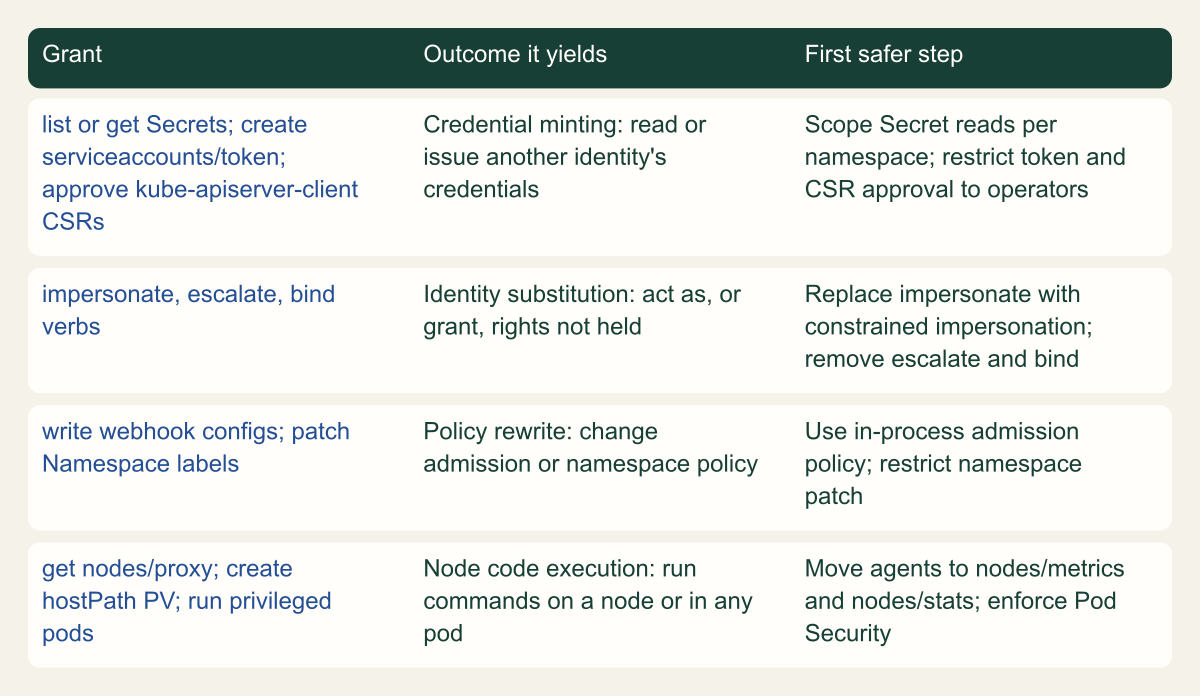
Start from the outcomes, because they tell you what to look for first. Credential outcomes come from get, list or watch on Secrets, from create on serviceaccounts/token, and from approving a kubernetes.io/kube-apiserver-client certificate signing request. Identity substitution comes from the impersonate, escalate and bind verbs. Policy rewrite comes from writing validatingwebhookconfigurations or mutatingwebhookconfigurations and from patching a Namespace's labels. Node code execution comes from nodes/proxy, from creating hostPath PersistentVolumes, and from running privileged pods. Each of these appears in the good practices page's list of privilege-escalation risks, and each lands in one of the four buckets. [1]
The figure maps the common grants to the outcome they produce and names the first safer step for each. Treat it as the order of a review: a subject that can mint credentials or substitute an identity is already close to cluster admin, so those rows come before the convenience grants. The rest of the article works through each outcome, covers the 2026 changes that reshape the node path and the impersonation path, shows how managed clusters feed the same graph, and ends with a repeatable test and a removal order that does not break monitoring agents or controllers.
RBAC grants grouped by the escalation outcome they yield
Reading the grants by outcome, not by verb, puts credential and identity paths ahead of convenience grants in a review. [1][6]

Source. Conceptual grouping of the privilege-escalation risks named in the Kubernetes RBAC good practices page and the user impersonation reference, reviewed October 9, 2026. [1][6]
Method. Conceptual. Each grant is placed in the outcome it produces; the first safer step restates the documented mitigation for that grant.
Accessible table and figure data
| Grant | Outcome it yields | First safer step |
|---|---|---|
| list or get Secrets; create serviceaccounts/token; approve kube-apiserver-client CSRs | Credential minting: read or issue another identity's credentials | Scope Secret reads per namespace; restrict token and CSR approval to operators |
| impersonate, escalate, bind verbs | Identity substitution: act as, or grant, rights not held | Replace impersonate with constrained impersonation; remove escalate and bind |
| write webhook configs; patch Namespace labels | Policy rewrite: change admission or namespace policy | Use in-process admission policy; restrict namespace patch |
| get nodes/proxy; create hostPath PV; run privileged pods | Node code execution: run commands on a node or in any pod | Move agents to nodes/metrics and nodes/stats; enforce Pod Security |
| Grant | Outcome it yields | First safer step |
|---|---|---|
| list or get Secrets; create serviceaccounts/token; approve kube-apiserver-client CSRs | Credential minting: read or issue another identity's credentials | Scope Secret reads per namespace; restrict token and CSR approval to operators |
| impersonate, escalate, bind verbs | Identity substitution: act as, or grant, rights not held | Replace impersonate with constrained impersonation; remove escalate and bind |
| write webhook configs; patch Namespace labels | Policy rewrite: change admission or namespace policy | Use in-process admission policy; restrict namespace patch |
| get nodes/proxy; create hostPath PV; run privileged pods | Node code execution: run commands on a node or in any pod | Move agents to nodes/metrics and nodes/stats; enforce Pod Security |
Verbs that change identity or policy
The RBAC API normally stops a subject from creating a role with more rights than it already holds. Two verbs remove that guardrail. escalate on roles or clusterroles lets a subject put any permission into a role it writes, including permissions it does not have. bind on a referenced role lets a subject create a binding to that role without holding the role's permissions first. Either verb turns the ability to edit RBAC objects into the ability to grant arbitrary access, which is why the good practices guidance flags them alongside the more obvious impersonate. [1][7]
The impersonate verb is the bluntest of the three. Legacy impersonation is all or nothing: once a subject can impersonate a user, a group or a service account, it can perform every action that identity can perform, across all resources and namespaces, and impersonating a user is not namespace scoped. A controller that is granted impersonate on users to debug authorization has, in effect, been handed the union of every user's access. The 2026 answer to that bluntness is constrained impersonation, covered later; for an audit today, treat any impersonate grant as a path that needs justification. [6]
Policy rewrite is quieter and easy to miss. A subject that can write webhook configurations controls an object that reads, and for mutating webhooks can change, everything admitted to the cluster. A subject that can patch a Namespace can edit its labels, which in a cluster using Pod Security Admission can move the namespace to a more permissive policy, and in a cluster using NetworkPolicy can open paths an administrator meant to deny. For clusters using Dynamic Resource Allocation, the good practices page notes that labeling a namespace with resource.kubernetes.io/admin-access: "true" lets anyone who can create ResourceClaims there request admin access to devices. The label write never mentions privilege, but it rewrites the rules that constrain the namespace. [1]
Where a webhook exists only to enforce a rule the API server can evaluate itself, you can often remove the external object entirely. ValidatingAdmissionPolicy and MutatingAdmissionPolicy express policy in CEL inside the API server, and MutatingAdmissionPolicy graduated to stable in v1.36. Moving a rule into a policy object removes a validatingwebhookconfigurations or mutatingwebhookconfigurations write from the set of grants that can rewrite admission, which is one fewer identity-and-policy path to audit. [17]
Workload creation and node access as escalation
Permission to create workloads in a namespace is an escalation path because a pod can run as any service account in that namespace and can mount any Secret, ConfigMap or PersistentVolume there. The good practices page states this plainly: granting create on Pods, or on the controllers that manage Pods, implicitly grants the API access levels of every service account in the namespace. A role informally called developer, scoped to one namespace, may therefore be able to run a pod as a service account that reads cloud credentials or talks to the control plane. Boundaries inside a single namespace are weak, so separate trust levels with namespaces and enforce the Baseline or Restricted Pod Security Standard where you do not fully trust the principal. [1]
PersistentVolume creation reaches the node directly. A subject allowed to create arbitrary PersistentVolumes can create a hostPath volume, which gives a pod access to the host filesystem on whichever node runs it. From the host filesystem there are several routes onward, including reading other containers' data and using the credentials of node services such as the kubelet. The good practices page's own recommendation is to let only trusted cluster operators create PersistentVolumes and to give constrained users PersistentVolumeClaims against volumes an administrator provisioned. [1]
Running a privileged pod is the most direct node path of all. The good practices page says users who can run privileged pods can use that access to gain node access and potentially go on to broaden their privileges. A node foothold is bounded: the Node authorizer limits a kubelet's credential to its own Node object, the pods bound to that node and the Secrets, ConfigMaps and volumes those pods use, and the NodeRestriction admission plugin limits what it can write. Bounded is not small, though. Every Secret mounted by any pod on that node is in reach, which is why the good practices page also advises limiting the number of nodes that run powerful pods and keeping them apart from untrusted ones. Workload creation and node access belong in the same review because the ability to write a pod spec is the ability to request host access unless admission refuses it. [1][18]
The kubelet API and the nodes/proxy exec path
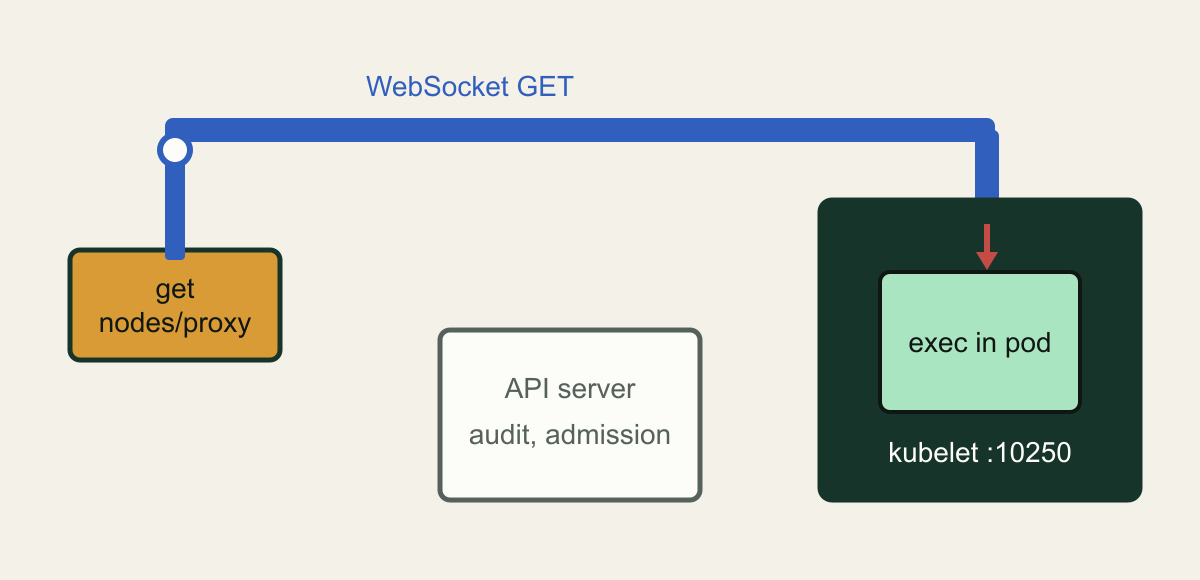
The grant most likely to be misread is get on nodes/proxy. It looks read-only, it is commonly handed to monitoring agents to scrape metrics, and it is not read-only. The kubelet exposes an HTTPS API on port 10250 that includes pod listings, metrics, container logs and, critically, command execution in any container on the node. When the kubelet delegates authorization, it maps the request's HTTP method to an RBAC verb and the request path to a subresource. Paths that are not specifically recognized, including /exec, /run, /attach and /portforward, fall through to the proxy subresource. The official kubelet authorization page carries the warning in plain words: nodes/proxy grants access to all other kubelet APIs, some of those endpoints use WebSocket over an HTTP GET, and so get on nodes/proxy is not read-only and authorizes running commands in any container on the node. [2][3]
In January 2026, security researcher Graham Helton published a write-up that demonstrated this end to end and traced it through the kubelet source. His account is independent research, and the Kubernetes Security Team closed his report as working as intended. It describes two design choices that combine. The WebSocket protocol requires an HTTP GET for its opening handshake, and the kubelet maps that GET to the RBAC get verb, then never rechecks for the create that the exec operation would otherwise need. Because /exec has no dedicated subresource, the check it does perform is against nodes/proxy with the get verb, which a monitoring service account holds. A WebSocket client connecting straight to the kubelet on port 10250 can therefore run a command in a pod with only get on nodes/proxy, while the same operation sent as an HTTP POST through the API server proxy path is correctly denied as a create. [3]
The reason this matters for detection is that the direct call does not go through the API server. Kubernetes audit records API server activity, so a pods/exec through the API server shows up with the command in the request URI. A WebSocket exec straight to the kubelet produces only the kubelet's own SubjectAccessReview to the API server, recording that some node asked whether a subject may get nodes/proxy, and never records the command that ran. The API server bypass risks page states the same boundary: direct access to the kubelet API is not subject to admission control and is not logged by Kubernetes audit logging. An audit policy tuned for pods/exec will not see this path at all. [12][3]
Helton reported the behavior through the Kubernetes disclosure process on November 1, 2025. On January 23, 2026 the security team confirmed it as working as intended and declined to assign a CVE, taking the position that a double-authorization patch in the kubelet and API server would be brittle and that the correct resolution is to make nodes/proxy unnecessary for monitoring through fine-grained kubelet authorization. That feature, covered next, is the migration this article treats as the fix. Until the grant is gone, the bypass risks page lists the practical controls: do not grant the nodes/proxy catch-all even with get, allow only trusted address ranges to reach the kubelet port, keep kubelet authentication in webhook or certificate mode, and leave the unauthenticated read-only port disabled. Helton names the same network control, restricting traffic to port 10250, and notes he did not test its side effects on a cluster. [12][3]
A read-looking grant reaches node command execution
get on nodes/proxy lets a WebSocket GET reach the kubelet exec endpoint directly, skipping the API server audit and admission controls. [2][3]

Source. Conceptual illustration based on the Kubernetes kubelet authorization reference warning, the API server bypass risks page, and Graham Helton's January 2026 nodes/proxy write-up. [2][3][12]
Method. Conceptual hand-authored illustration. It simplifies the request path to one node and one pod and omits authentication and network details.
Accessible table and figure data
| Element | What it represents |
|---|---|
| get nodes/proxy tile | The grant that looks read-only |
| WebSocket GET bridge | Handshake GET the kubelet maps to the get verb |
| Skipped API server box | Audit and admission controls a direct kubelet call avoids |
| kubelet port 10250 box | The node endpoint reached directly |
| exec in pod box and red arrow | Command run in a container on the node |
| Element | What it represents |
|---|---|
| get nodes/proxy tile | The grant that looks read-only |
| WebSocket GET bridge | Handshake GET the kubelet maps to the get verb |
| Skipped API server box | Audit and admission controls a direct kubelet call avoids |
| kubelet port 10250 box | The node endpoint reached directly |
| exec in pod box and red arrow | Command run in a container on the node |
Replace nodes/proxy with fine-grained kubelet permissions
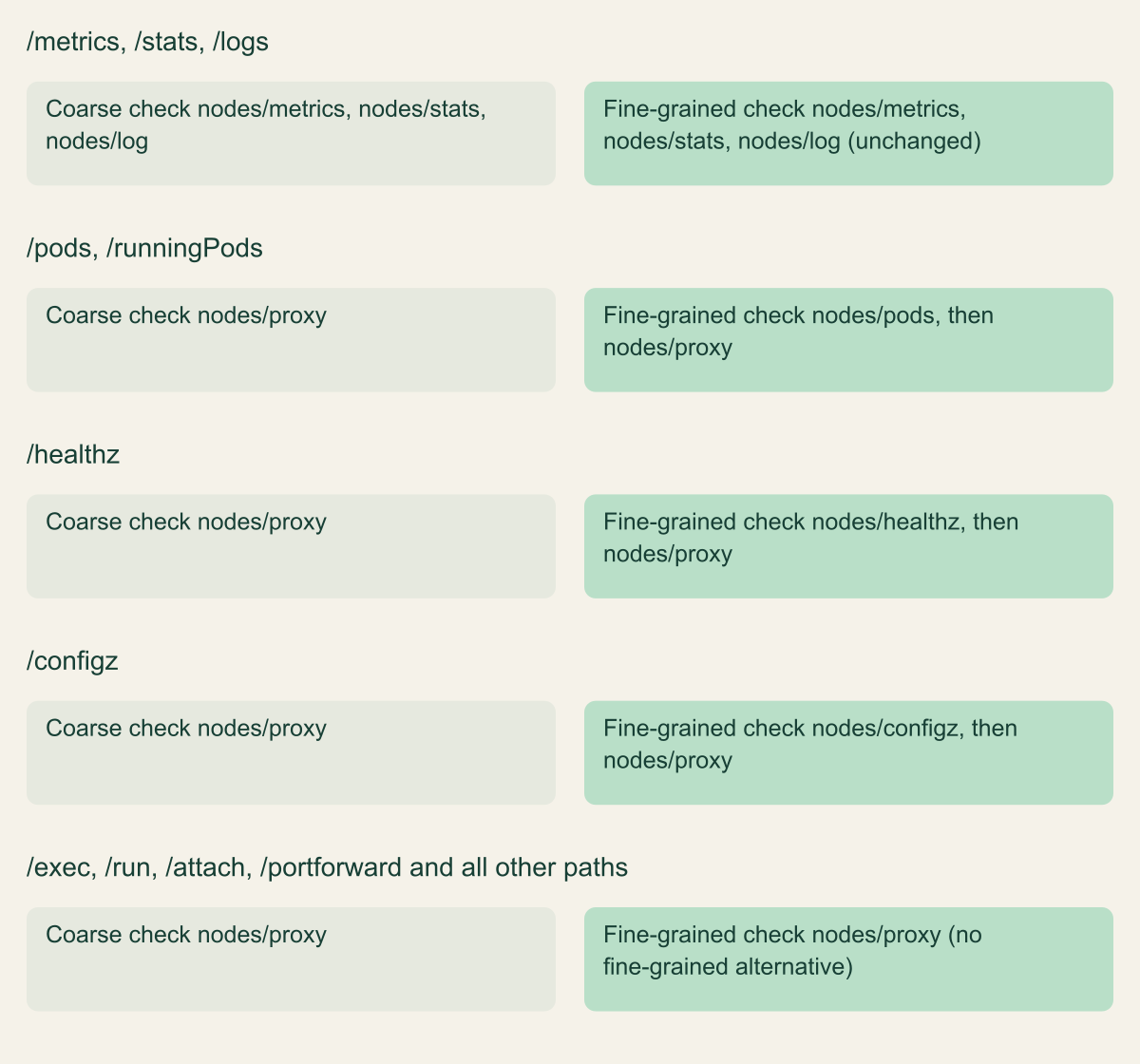
Fine-grained kubelet authorization is the migration that removes the exec path for a workload that only needs to read from the kubelet. It graduated to general availability in Kubernetes v1.36, released on April 22, 2026, and the KubeletFineGrainedAuthz feature gate is now locked on, so there is nothing to enable. The /stats, /metrics, /logs, /spec and /checkpoint paths always had dedicated subresources. What the feature adds, on by default since it reached beta in v1.33, is a fine-grained check for /pods and /runningPods against the pods subresource, and for /healthz and /configz against healthz and configz, before falling back to proxy. A monitoring agent that scrapes /metrics and /stats and lists pods through /pods can therefore hold nodes/metrics, nodes/stats and nodes/pods and nothing more. None of those subresources reaches /exec, so the WebSocket path described above is not available to that service account. The v1.36 announcement describes the older model loosely, as mapping almost every kubelet path to nodes/proxy, metrics included; the reference page's tables are exact about which paths already had their own subresource, and this article follows the reference. [4][2]
The migration is designed to be safe to roll out incrementally because the kubelet does a dual check: it first sends a SubjectAccessReview for the specific subresource, and only if that fails does it retry against nodes/proxy for backward compatibility. A ClusterRole that still grants nodes/proxy keeps working, and one that grants the new subresources starts working immediately. The figure shows which kubelet paths have a fine-grained subresource and which still fall through to nodes/proxy. The built-in system:kubelet-api-admin ClusterRole is updated automatically to include every new subresource, so the API server's own kubelet client keeps full access without any manual change. [4][2]
Verify the agent before and after. Confirm which workloads hold nodes/proxy today, change their ClusterRole to the specific subresources they use, roll the pods, and confirm the metrics still arrive and that the agent can no longer reach /exec. The last check matters because /exec is still authorized against nodes/proxy, so a role that keeps nodes/proxy keeps the exec path no matter how many narrow subresources you add beside it. The point of the migration is to remove nodes/proxy. The project has been explicit that it may eventually deprecate nodes/proxy for monitoring as adoption grows, so a cluster that migrates now is ahead of that change rather than behind it. [4]
Charts are already moving. Helton's January write-up counted 69 Helm charts that mention nodes/proxy get, from what he describes only as a quick search, and noted that some use it only when an optional feature is turned on. One chart on his list, prometheus-community's prometheus chart, grants nodes and nodes/metrics and no nodes/proxy in its ClusterRole template at chart version 29.36.1, checked on October 9, 2026. Audit the rendered RBAC of the chart version you actually run, because a vendor name on a January list says little about a release you installed later. [3][20]
Two gaps remain, and the audit should record them rather than assume the migration closed everything. The fine-grained subresources cover read-oriented endpoints; there is still no dedicated subresource for /exec, /run, /attach or /portforward, so any workload that genuinely needs those must still hold nodes/proxy, and for that workload the WebSocket get behavior is unchanged. And a fine-grained grant to nodes/metrics does not help if the subject also keeps nodes/proxy from an old binding. The migration reduces blast radius only when the broad grant is removed, so the review has to look for the old grant, not just the presence of the new one.
# Example fragment for Kubernetes 1.36: a monitoring agent ClusterRole before and
# after moving off nodes/proxy. Least privilege: the agent reads node metrics and
# stats and never gains access to the kubelet exec endpoint. Add "nodes/pods" only
# if the agent also reads the kubelet /pods endpoint.
#
# Before (overly broad: get on nodes/proxy also authorizes command execution):
apiVersion: rbac.authorization.k8s.io/v1
kind: ClusterRole
metadata:
  name: monitoring-agent-old
rules:
  - apiGroups: [""]
    resources: ["nodes/proxy"]
    verbs: ["get"]
---
# After (scoped to the kubelet paths the agent actually scrapes):
apiVersion: rbac.authorization.k8s.io/v1
kind: ClusterRole
metadata:
  name: monitoring-agent
rules:
  - apiGroups: [""]
    resources: ["nodes/metrics", "nodes/stats"]
    verbs: ["get"]
# Remove the old ClusterRole and its bindings once the agent is confirmed working;
# leaving nodes/proxy in place keeps the exec path open, because /exec is still
# authorized against nodes/proxy.Which kubelet paths still need nodes/proxy
With fine-grained kubelet authorization, on by default since v1.33 and locked on in v1.36, /pods, /healthz and /configz gain their own subresources, while exec, run, attach and port-forward still map only to nodes/proxy. [2][4]

Source. Kubernetes kubelet authentication and authorization reference, kubelet authorization and fine-grained authorization tables, and the v1.36 fine-grained kubelet authorization announcement, reviewed October 10, 2026. [2][4]
Method. Values copied from the kubelet authorization reference's coarse and fine-grained subresource tables. The fine-grained column lists the dedicated subresource first and the nodes/proxy fallback the kubelet retries. Fine-grained checks have been on by default since v1.33 (beta) and locked on since v1.36 (GA), per the announcement's journey table.
Accessible table and figure data
| Kubelet path | Coarse check | Fine-grained check |
|---|---|---|
| /metrics, /stats, /logs | nodes/metrics, nodes/stats, nodes/log | nodes/metrics, nodes/stats, nodes/log (unchanged) |
| /pods, /runningPods | nodes/proxy | nodes/pods, then nodes/proxy |
| /healthz | nodes/proxy | nodes/healthz, then nodes/proxy |
| /configz | nodes/proxy | nodes/configz, then nodes/proxy |
| /exec, /run, /attach, /portforward and all other paths | nodes/proxy | nodes/proxy (no fine-grained alternative) |
| Kubelet path | Coarse check | Fine-grained check |
|---|---|---|
| /metrics, /stats, /logs | nodes/metrics, nodes/stats, nodes/log | nodes/metrics, nodes/stats, nodes/log (unchanged) |
| /pods, /runningPods | nodes/proxy | nodes/pods, then nodes/proxy |
| /healthz | nodes/proxy | nodes/healthz, then nodes/proxy |
| /configz | nodes/proxy | nodes/configz, then nodes/proxy |
| /exec, /run, /attach, /portforward and all other paths | nodes/proxy | nodes/proxy (no fine-grained alternative) |
Token and certificate minting
Credential minting is the outcome that most directly produces a usable identity. The clearest case is Secrets: the good practices page notes that get reveals a Secret's contents, and so do list and watch, because a list response includes the data of every Secret it returns. The default view role leaves Secrets out for exactly this reason: the RBAC reference says reading Secrets exposes the namespace's service account credentials and so allows API access as any service account there. AKS's built-in Reader role repeats both the exclusion and its reasoning, while EKS's AmazonEKSAdminViewPolicy is documented as including Secrets, so a read-only label on a managed role is not evidence either way. A cluster-scoped list secrets is close to a grant of every service account identity that still has a Secret-backed token. [1][7][16][14]
The TokenRequest API is minting without reading anything. A subject with create on serviceaccounts/token can request a token for an existing service account, and the token authenticates to the API server as that account. Tokens from TokenRequest are time-bound, and the documentation says there is no specific mechanism to invalidate one: deleting the pod a token is bound to expires it, and a token that is not bound to a pod can only be cut short by deleting and re-creating the ServiceAccount, which changes its UID. For an auditor, create on serviceaccounts/token against a privileged service account is equivalent to holding that account's credentials for as long as a freshly minted token lives. [11]
Certificate signing is minting a longer-lived client identity. The CSR API lets a subject with create on certificatesigningrequests, plus update on certificatesigningrequests/approval and approve on the signers resource for the kubernetes.io/kube-apiserver-client signer, issue client certificates that the API server honors. Those certificates can carry arbitrary subject names, and the good practices page warns that this effectively allows privilege escalation. The kubernetes.io/kube-apiserver-client signer is never auto-approved by the controller manager, and the CertificateSubjectRestriction admission plugin restricts the system:masters subject, but those are narrow protections around a broad capability. A subject that can create and approve its own client certificates can issue itself a new identity whose expiry is set by the signer and that no RoleBinding governs. [10][1]
Constrained impersonation instead of blanket impersonate
The identity-substitution problem has a new answer in v1.36. Constrained impersonation graduated to beta and is enabled by default, behind the ConstrainedImpersonation feature gate on the API server. It replaces the all-or-nothing impersonate verb with two permissions that both have to hold: one to impersonate a specific identity, and one to perform a specific action while impersonating. Expressed as RBAC, the identity grant uses a verb like impersonate:user-info, impersonate:serviceaccount, impersonate:arbitrary-node or impersonate:associated-node on a resource in the authentication.k8s.io group, and the action grant uses a verb like impersonate-on:user-info:list on the target resource. A controller can then be limited to impersonate one user only to list and watch pods in one namespace, rather than to do anything that user can do. [5][6]
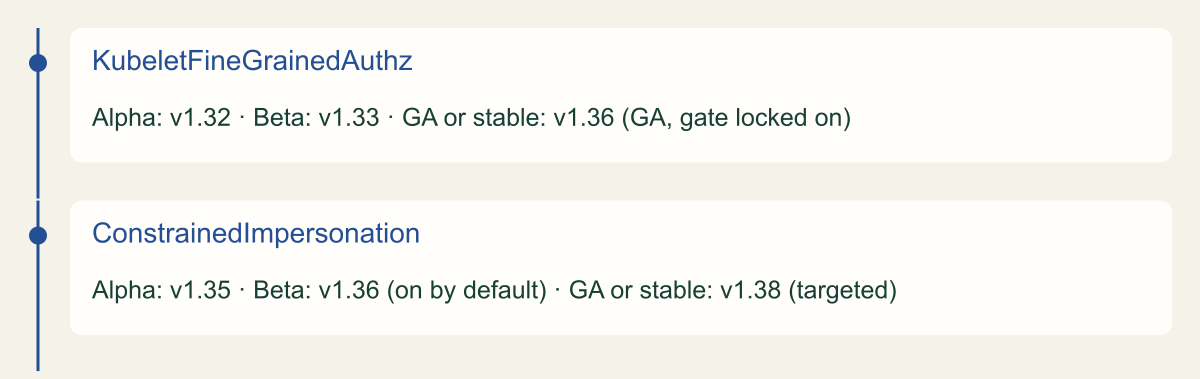
The design is deliberately incremental. Existing impersonate rules keep working, and the API server checks the constrained permissions first and falls back to the legacy verb, so a cluster can migrate one controller at a time rather than on a flag day. The v1.36 release announcement describes the intent as preventing support tools, controllers and node agents from using impersonation to gain broader access than they themselves hold, even when their impersonation RBAC is misconfigured. The timeline figure places this change next to the kubelet one: constrained impersonation was alpha in v1.35, became beta in v1.36, is still listed as beta in the v1.37 documentation, and targets stable in v1.38. [5][6][17]
The canonical use case is the one that made blanket impersonation dangerous in the first place: a per-node agent, such as a CNI plugin, that needs to read the pods on its own node without cluster-wide pod access. With constrained impersonation the agent holds impersonate:associated-node and impersonate-on:associated-node:list and get on pods, learns its node name from the downward API, and impersonates system:node:<node> only to read that node's pods. The example below shows the shape. There is one limitation worth recording in the audit: because the two permissions are checked separately, their effect is the union within a mode, so you cannot express per-identity action pairs in one grant. The modes keep the unioning from crossing between user, service account and node impersonation, which is the property that makes it safer than the legacy verb. [6][5]
# Example fragment for Kubernetes 1.36 (ConstrainedImpersonation, beta, on by default).
# A node agent reads pods on the node it runs on, without cluster-wide pod access
# and without the blanket impersonate verb. Both grants are required to take effect.
apiVersion: rbac.authorization.k8s.io/v1
kind: ClusterRole
metadata:
  name: impersonate-associated-node-identity
rules:
  - apiGroups: ["authentication.k8s.io"]
    resources: ["nodes"]
    verbs: ["impersonate:associated-node"]
---
apiVersion: rbac.authorization.k8s.io/v1
kind: ClusterRole
metadata:
  name: impersonate-list-pods-on-node
rules:
  - apiGroups: [""]
    resources: ["pods"]
    verbs: ["impersonate-on:associated-node:list", "impersonate-on:associated-node:get"]
# Bind both ClusterRoles to the agent's ServiceAccount with ClusterRoleBindings.
# The agent sets Impersonate-User to system:node:<its own node> using the downward API.Release stages of the two 2026 RBAC changes
Fine-grained kubelet authorization is GA in v1.36; constrained impersonation is beta in v1.36 and targets stable in v1.38. [4][5]

Source. KEP-2862 and the v1.36 fine-grained kubelet authorization announcement; KEP-5284 Constrained Impersonation milestones and the v1.36 release announcement, reviewed October 9, 2026. [4][5][17]
Method. Ordinal timeline, not a quantitative series. Release stages copied from the KEP milestones and the release announcements; v1.38 for ConstrainedImpersonation is a target, not shipped.
Accessible table and figure data
| Feature | Alpha | Beta | GA or stable |
|---|---|---|---|
| KubeletFineGrainedAuthz | v1.32 | v1.33 | v1.36 (GA, gate locked on) |
| ConstrainedImpersonation | v1.35 | v1.36 (on by default) | v1.38 (targeted) |
| Feature | Alpha | Beta | GA or stable |
|---|---|---|---|
| KubeletFineGrainedAuthz | v1.32 | v1.33 | v1.36 (GA, gate locked on) |
| ConstrainedImpersonation | v1.35 | v1.36 (on by default) | v1.38 (targeted) |
Managed clusters feed the same graph
On a managed cluster the escalation graph has an extra entrance that the in-cluster RBAC objects do not show. On EKS, access entries associate an IAM principal with Kubernetes permissions in one of two ways: by attaching an AWS-managed access policy, or by mapping the principal to a Kubernetes group that your own RoleBindings reference. The access policies carry real permissions. AmazonEKSClusterAdminPolicy is wildcard access to everything, AmazonEKSAdminViewPolicy grants get, list and watch on all resources including Secrets, and AmazonEKSAdminPolicy and AmazonEKSEditPolicy include impersonate on service accounts and create on pods/exec. One restore policy even grants create, update, escalate and bind on roles and clusterroles. An audit that reads only the cluster's Role and ClusterRole objects misses every one of these, because access policies are associated through the EKS API and never appear as RBAC objects inside the cluster. [13][14]
The EKS mapping also breaks the obvious audit command. The documentation states that kubectl auth can-i --list does not show any permissions that come from access policies; it shows only permissions granted through Kubernetes Role or ClusterRole objects bound to the group or username on the access entry. And if you impersonate a user or group with --as, EKS forces the Kubernetes RBAC path, so the access-policy permissions drop out of the answer entirely. The practical consequence: on EKS you have to audit access entries and their attached policies with the EKS API in addition to running the in-cluster checks, or you will understate a principal's access. [21]
GKE and AKS integrate the cloud's IAM with Kubernetes RBAC rather than layering managed policies on top. On GKE, an action is allowed if either Kubernetes RBAC or IAM permits it, with RBAC checked first and IAM second, and GKE notes that IAM can even grant the escalate and bind verbs, an approach it advises against. GKE's own documentation notes that kubectl auth can-i without --as is answered by IAM, while adding --as switches the answer to Kubernetes RBAC, which is the same split to keep in mind when testing. On AKS with Azure RBAC for Kubernetes, Azure role assignments drive a webhook authorizer, and the built-in roles mirror the upstream view, edit, admin and cluster-admin semantics, including the deliberate exclusion of Secrets from the Reader role. In all three, the lesson is the same: the subjects in your RBAC graph include cloud identities, and the authority they hold has to be read from the cloud's access model, not only from inside the cluster. [15][16]
Audit and negative-test with can-i and SubjectAccessReview
The audit has two halves: enumerate who holds the escalation grants, then prove a specific subject cannot do the thing you removed. For enumeration, kubectl auth can-i --list --as <subject> prints the actions a subject can perform and is the fastest way to scan a principal. Treat its output as a lead, not a verdict. The SelfSubjectRulesReview that backs --list is documented to return a list that may be incomplete depending on the authorization mode, and the API reference says plainly that it should not be used to drive authorization decisions because of confused-deputy and cache concerns. Use it to find candidates, then confirm each candidate grant with a direct check. [8][9][19]
For confirmation, ask the authoritative question one grant at a time. kubectl auth can-i <verb> <resource> --as <subject> runs a SelfSubjectAccessReview and works regardless of the authorization mode, and --subresource lets you ask about a subresource such as nodes/proxy or pods/exec. Run the checks that correspond to the four outcomes against every subject you care about: can it list secrets, create serviceaccounts/token, get nodes/proxy, create pods, escalate or bind on roles, and write webhook configurations. A yes on any of these is a grant to explain or remove. [8][9]
The part teams skip is the negative test after a change. Removing a grant is only done when you have proven the subject can no longer use it, so re-run the same check and require a no. Build a small, repeatable set of checks rather than a one-time command, and keep the expected answer for each one so the review is reproducible. The fragment below runs a fixed list of outcome checks for a subject, each with its expected answer, and flags any result that differs. On a managed cluster, remember that --as forces the Kubernetes RBAC path on EKS and GKE, so a clean --as result does not cover permissions that come from an EKS access policy or a GKE IAM role; those need the cloud's own access review in addition. [8][21][15]
# Example fragment: negative test a subject against the escalation outcomes.
# Each entry is verb:resource[:subresource]=expected. Every grant you removed should
# answer "no"; the narrow replacement grant you kept (nodes/metrics) should answer "yes".
# Uses SelfSubjectAccessReview via can-i with --as, so the caller needs impersonate rights.
set -u
subject="system:serviceaccount:monitoring:example-agent"
namespace="default"

checks=(
  "list:secrets=no"
  "create:serviceaccounts:token=no"
  "get:nodes:proxy=no"
  "get:nodes:metrics=yes"
  "create:pods=no"
  "escalate:roles=no"
  "bind:clusterroles=no"
  "create:validatingwebhookconfigurations=no"
)

for c in "${checks[@]}"; do
  expected="${c##*=}"
  spec="${c%=*}"
  verb="${spec%%:*}"
  rest="${spec#*:}"
  resource="${rest%%:*}"
  args=(auth can-i "$verb" "$resource" --as "$subject" -n "$namespace")
  if [ "$rest" != "$resource" ]; then
    args+=(--subresource "${rest#*:}")
  fi
  actual="$(kubectl "${args[@]}" 2>/dev/null | awk '{print $1}')"
  status="ok"
  if [ "$actual" != "$expected" ]; then status="CHECK"; fi
  printf '%-42s expected=%-4s actual=%-4s %s\n' "$spec" "$expected" "${actual:-error}" "$status"
done

# Note: on EKS, --as forces the Kubernetes RBAC path and omits access-policy
# permissions; also review access entries with the EKS API.
Remove a grant without breaking controllers
Work in the order that removes the most authority for the least risk. First, the credential and identity grants, because they are closest to cluster admin: find every subject that can read or list Secrets cluster-wide, create tokens for privileged service accounts, approve kube-apiserver-client certificates, or hold escalate, bind or blanket impersonate. Application workloads seldom need any of these, so removals here tend to be low risk. Where an impersonation grant is genuinely needed, replace it with the constrained form, which is beta and on by default, rather than deleting the capability, and then remove the legacy impersonate rule, because the API server falls back to it. [1][6]
Second, the node path, because it is the one that executes code and evades audit. Inventory every holder of nodes/proxy and separate the monitoring agents, which only read, from the few workloads that truly need exec, attach or port-forward. Migrate the monitoring agents to nodes/metrics, nodes/stats and nodes/pods, roll them, confirm the metrics still flow, and then delete the old nodes/proxy ClusterRole and its bindings. Deleting the broad grant is the step that closes the path, because /exec is authorized only against nodes/proxy. For any workload that keeps nodes/proxy, restrict network access to port 10250 and record that its exec path is unlogged by audit. [2][12]
Third, the workload and policy grants, which need the most care because controllers depend on them. A controller that creates pods, writes webhook configurations or patches namespaces may be doing exactly what it is supposed to do, so confirm the owner and the purpose before narrowing it. Prefer an in-process ValidatingAdmissionPolicy or MutatingAdmissionPolicy to a webhook-configuration write where the rule allows it, and scope namespace-patch rights so a tenant cannot relabel its way to a weaker Pod Security policy. [1]
The rule that holds all three together is this: a change to RBAC is finished only when the negative test passes. Remove the grant, run the fixed check for that subject and that outcome, require a no, and keep the before-and-after result with the change. At each start-up the API server adds missing permissions back to default cluster roles and missing subjects back to default bindings, so a removal that edits a system: object can quietly reverse itself; review those objects separately and leave them to the control plane. [7] On a managed cluster, close the loop in the cloud's access model too, because an access entry or an IAM role can re-grant from outside the cluster what you just removed inside it.
Method and provenance
Source-led technical analysis of Kubernetes documentation (RBAC good practices, kubelet and user-impersonation authorization references, the v1.36 release and feature announcements, and KEP-2862 and KEP-5284), independent nodes/proxy research by Graham Helton, and the EKS, GKE and AKS access-control documentation. Sources were reviewed on October 9, 2026 against Kubernetes 1.36. An independent fact-check on October 10, 2026 rechecked the feature stages against the v1.37 documentation and KEP pages, which show no change to them.
No cluster was deployed and no command was executed; the exploit path and the audit commands are described from the cited documentation and research, not from a live test. Managed-cluster defaults and the status of beta features change, so versions and stages are stated as of the review date. The 69-chart count is a single figure from the cited write-up with a method the author describes only as a quick search.
AI assistance. AI assisted the research synthesis, drafting, diagram planning and visual production, with deterministic editorial checks. No personal deployment experience, independent human review or live test is claimed.
Published under the Cloud Security Desk organizational byline. Read the practitioner guide policy.
References
- Role Based Access Control Good Practices The Kubernetes Authors. Published . Accessed .
- Kubelet authentication/authorization The Kubernetes Authors. Published . Accessed .
- Kubernetes Remote Code Execution Via Nodes/Proxy GET Permission Graham Helton. Published . Accessed .
- Kubernetes v1.36: Fine-Grained Kubelet API Authorization Graduates to GA The Kubernetes Authors. Published . Accessed .
- KEP-5284: Constrained Impersonation The Kubernetes Authors. Accessed .
- User Impersonation The Kubernetes Authors. Accessed .
- Using RBAC Authorization The Kubernetes Authors. Accessed .
- Authorization: Checking API access The Kubernetes Authors. Accessed .
- kubectl auth can-i reference The Kubernetes Authors. Accessed .
- Certificates and Certificate Signing Requests The Kubernetes Authors. Accessed .
- Managing Service Accounts The Kubernetes Authors. Accessed .
- Kubernetes API Server Bypass Risks The Kubernetes Authors. Accessed .
- Grant IAM users access to Kubernetes with EKS access entries Amazon Web Services. Accessed .
- Review access policy permissions Amazon Web Services. Accessed .
- Authorize actions in clusters using role-based access control Google Cloud. Accessed .
- Use Microsoft Entra ID authorization for the Kubernetes API in AKS Microsoft. Accessed .
- Kubernetes v1.36: Haru The Kubernetes Authors. Published . Accessed .
- Using Node Authorization The Kubernetes Authors. Accessed .
- SelfSubjectRulesReview v1 API reference The Kubernetes Authors. Accessed .
- prometheus chart ClusterRole template (prometheus-community/helm-charts) Prometheus Community. Accessed .
- Associate access policies with access entries Amazon Web Services. Accessed .