
A threat analysis and control guide for identity, help desk and detection teams, based on the CISA Scattered Spider advisory, Mandiant M-Trends 2026, NIST SP 800-63B-4 and Microsoft, Okta and AWS documentation reviewed in October 2026. It covers the attack sequence, role reach, verification tiers, reset outputs, log signals with an example query, and response steps.
At a glance
Key findings
- CISA's July 29, 2025 update to AA23-320A describes actors posing as employees to get help desks to reset passwords and transfer MFA, then registering their own MFA tokens and moving into SSO-connected cloud services. [1]
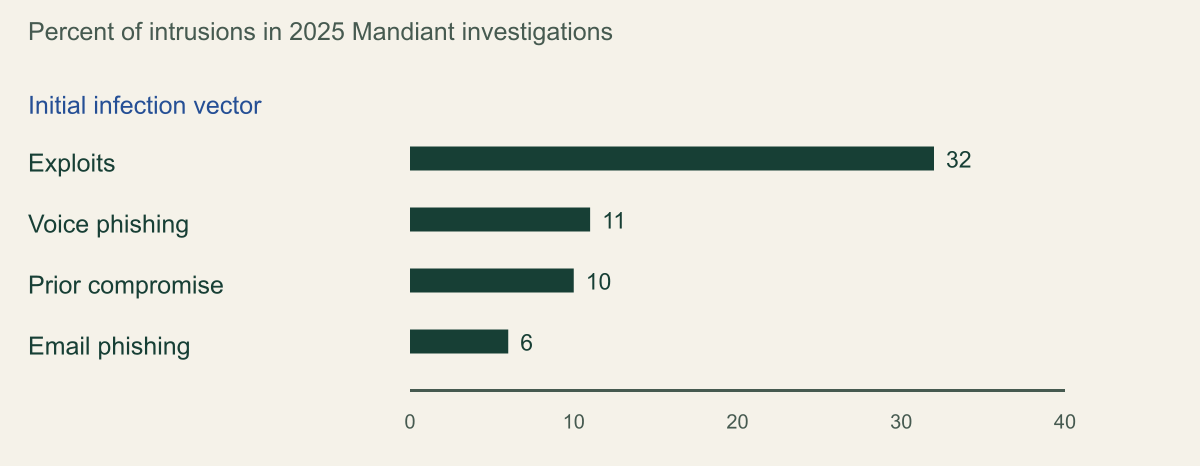
- Mandiant's M-Trends 2026 puts voice phishing at 11% of 2025 intrusions, second only to exploits at 32%, while email phishing fell to 6%. [3][4]
- In Entra ID, help desk roles cannot reset Global Administrators, but by the documented role tables a user with no Entra role and full Azure or AWS rights is still within their reach unless placed in a role-assignable group or restricted management unit. [6][7]
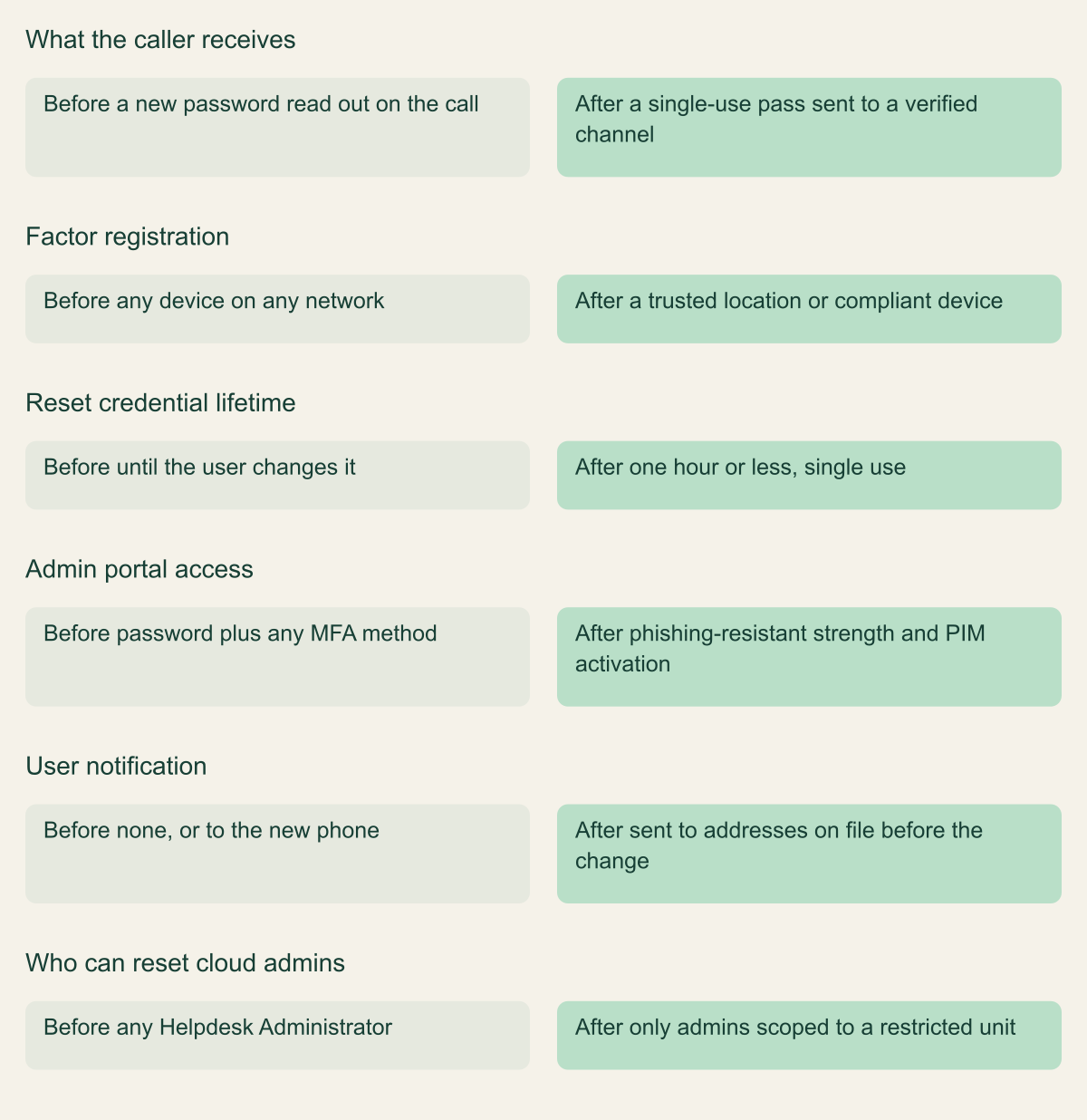
- A short single-use Temporary Access Pass delivered through a verified channel, plus Conditional Access on security info registration, limits what a deceived agent can hand over. [10][11]
- The reset leaves named audit events, such as Entra's
Admin registered security infoand Okta'suser.mfa.factor.reset_all, that can be joined to the target's next registration and sign-in. [12][15]
How a help desk call becomes cloud admin access
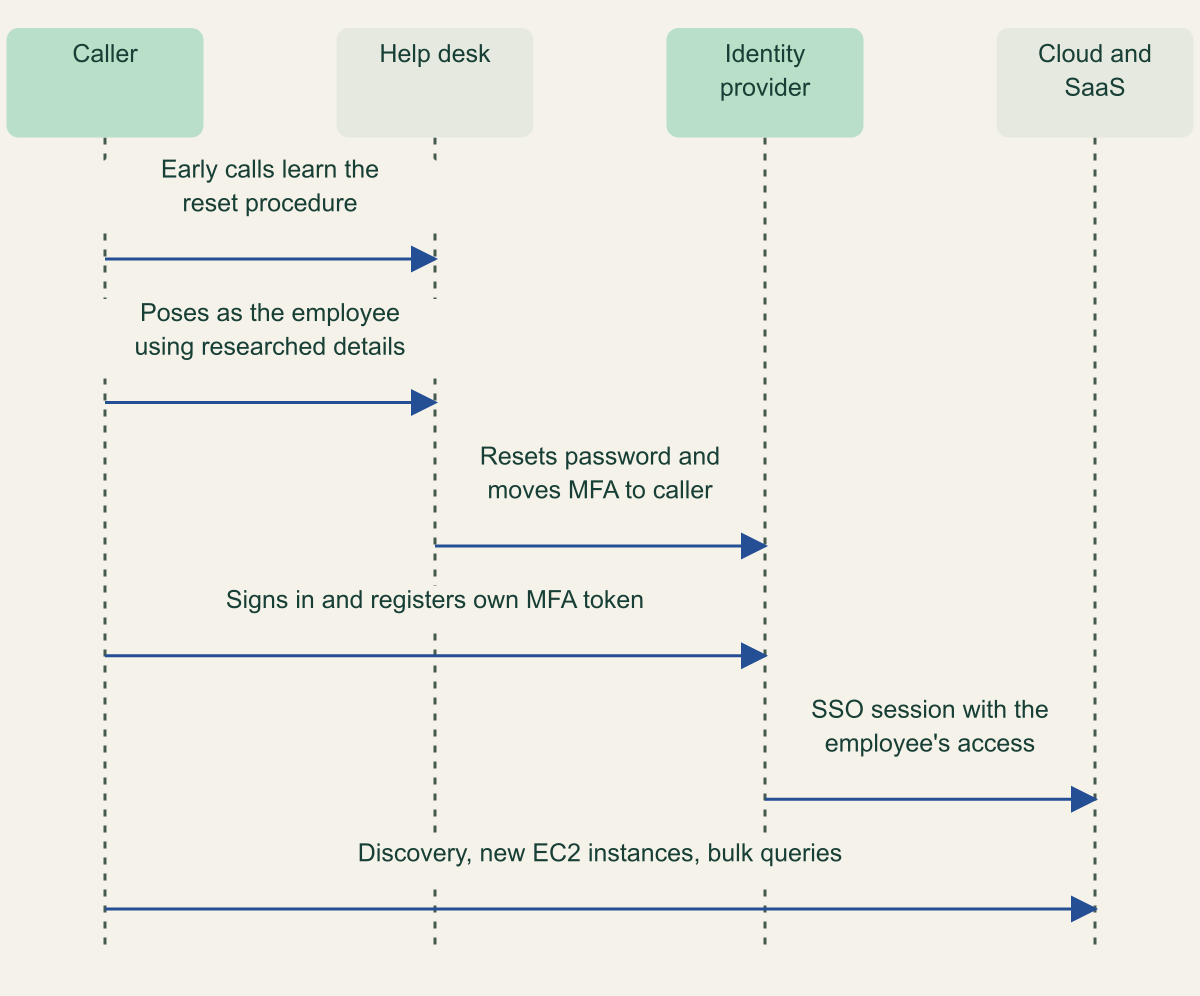
Attackers do not need to defeat MFA if someone with authority will replace it for them. In the pattern CISA and its partner agencies document for Scattered Spider, a caller poses as an employee, persuades IT or help desk staff to reset the password and move the employee's MFA to a device the caller controls, then signs in through single sign-on as that employee. Every cloud console, SaaS application and data platform federated to that identity provider is then reachable with the employee's access. The defense is to treat the reset process as an authentication system in its own right: verify callers with something an impersonator cannot look up, limit what a completed reset lets the new credential do, and alert on the audit events every reset produces. [1]
The calls are prepared. CISA's July 29, 2025 update to advisory AA23-320A describes the actors collecting personal information about users with elevated access from social media, open sources, commercial intelligence tools and leaked databases, then working in stages: early calls learn what the help desk needs for a reset, later calls gather reset details for a specific employee, and a final call asks the agent to reset the password or transfer the MFA token. The account takeover then happens in the SSO environment. [1]
What follows is why this belongs in a cloud security program. According to the advisory, the actors register their own MFA tokens to keep access. They have historically added a federated identity provider to the victim's SSO tenant with automatic account linking, which let them sign in as any user with a matching attribute; CISA says this is not currently identified as an active technique but may still be in use. They search SharePoint for credential documentation and VPN instructions, turn on AWS Systems Manager Inventory to find lateral movement targets, move to existing and newly created EC2 instances, and look for Snowflake access so they can run thousands of queries quickly. They also search Slack, Microsoft Teams and Exchange Online for signs that responders have noticed them, and the 2025 update adds DragonForce ransomware against VMware ESXi servers. [1]
Mandiant tracks an overlapping cluster as UNC3944 and notes that it targets large enterprises with large help desks and outsourced IT functions. [2] Nothing in the technique depends on that profile. Any organization whose reset process accepts a confident voice and a few researchable facts is exposed to the same sequence.
The reset is the intrusion
One persuaded agent turns researched personal data into an SSO session for every federated cloud app. [1]

Source. Conceptual sequence based on CISA advisory AA23-320A, last revised July 29, 2025. [1]
Method. Conceptual ordering of behaviors the advisory describes; not every intrusion includes every step.
Accessible table and figure data
| Step | From | To | Message |
|---|---|---|---|
| 1 | Caller | Help desk | Early calls learn the reset procedure |
| 2 | Caller | Help desk | Poses as the employee using researched details |
| 3 | Help desk | Identity provider | Resets password and moves MFA to caller |
| 4 | Caller | Identity provider | Signs in and registers own MFA token |
| 5 | Identity provider | Cloud and SaaS | SSO session with the employee's access |
| 6 | Caller | Cloud and SaaS | Discovery, new EC2 instances, bulk queries |
| Step | From | To | Message |
|---|---|---|---|
| 1 | Caller | Help desk | Early calls learn the reset procedure |
| 2 | Caller | Help desk | Poses as the employee using researched details |
| 3 | Help desk | Identity provider | Resets password and moves MFA to caller |
| 4 | Caller | Identity provider | Signs in and registers own MFA token |
| 5 | Identity provider | Cloud and SaaS | SSO session with the employee's access |
| 6 | Caller | Cloud and SaaS | Discovery, new EC2 instances, bulk queries |
What the 2025 incident data shows
Mandiant's M-Trends 2026, published March 23, 2026, is based on Mandiant Consulting investigations of targeted attack activity between January 1 and December 31, 2025. Exploits were the most common initial infection vector for the sixth consecutive year, at 32% of intrusions. Voice phishing rose to 11% and second place, just ahead of prior compromise at 10%, while email phishing fell from 14% in 2024 to 6%. The executive edition tells organizations to train help desk staff specifically on live voice-based social engineering and unauthorized MFA reset requests. [3][4]
Read those numbers as one incident response firm's caseload, not as the population of attacks. Organizations that bring in Mandiant probably skew toward large enterprises and serious intrusions, and the public summaries do not state how many investigations had an identified vector or how the remaining share divides among other vectors. The report's voice phishing category also covers calls placed to ordinary employees, so it bounds help desk impersonation from above rather than measuring it. [3][4]
The cloud breakdown sits in the full report, which requires registration. SecurityWeek's summary of that report states that voice phishing was the most common initial vector in cloud-related compromises at 23%, ahead of third-party compromise at 17% and stolen credentials at 16%, and attributes much of it to ShinyHunters and Scattered Spider activity. That figure is secondary reporting here and is not charted. [5]
Voice phishing ranked second in 2025 investigations
Voice phishing reached 11% of intrusions, ahead of prior compromise and well ahead of email phishing. [3][4]

Source. Mandiant M-Trends 2026 announcement and Executive Edition, covering investigations from January 1 to December 31, 2025. [3][4]
Method. Values copied as published. Only the four vectors named on the public pages are shown; the remaining share is not broken down publicly, and the number of investigations is not stated.
Accessible table and figure data
| Initial infection vector | Share of intrusions (%) |
|---|---|
| Exploits | 32 |
| Voice phishing | 11 |
| Prior compromise | 10 |
| Email phishing | 6 |
| Initial infection vector | Share of intrusions (%) |
|---|---|
| Exploits | 32 |
| Voice phishing | 11 |
| Prior compromise | 10 |
| Email phishing | 6 |
Find the accounts a reset can reach
Start with a list of who can reset whom. In Microsoft Entra ID the built-in roles already draw some of the line: a Helpdesk Administrator or Password Administrator cannot reset a Global Administrator's password, and only a Privileged Authentication Administrator or another Global Administrator can. Microsoft also notes that the ability to reset a password includes the ability to change mobilePhone, businessPhones and otherMails, the properties self-service password reset relies on, so a reset role can redirect where future recovery codes go. [6]
The gap is the account the directory does not treat as an administrator. In Microsoft's permission tables, a user with no Entra administrator role can have their password reset by every reset-capable role. That same user may hold Owner on a production Azure subscription through Azure RBAC, an administrator permission set in AWS through IAM Identity Center, or a privileged role in a data warehouse reached through SSO. None of those grants is an Entra directory role. Reading the published tables, a Helpdesk Administrator can therefore reset that user's password and an Authentication Administrator can manage their methods. Microsoft does not state this about Azure or AWS roles; it is an inference from the documented rules, and it is the route by which a routine help desk action reaches a cloud console. [6]
Entra offers two ways to move such accounts out of reach. Members and owners of a role-assignable group can only have their passwords reset by a Privileged Authentication Administrator or a Global Administrator. Restricted management administrative units go further: only administrators assigned at that unit's scope can change its members, and Microsoft's own example is protecting executive accounts from Helpdesk Administrators. Even a tenant-scoped Global Administrator is blocked unless they assign themselves to the unit, which is an auditable event. The restriction must be chosen when the unit is created, a tenant can have at most 100 such units, and their members cannot be managed with PIM, entitlement management, lifecycle workflows or access reviews, so plan the move before making it. [6][7]
Credentials outside the identity provider need the same review. The AWS root user, for example, recovers through the account email address and phone number, and a mailbox reset or a ported phone number is a help desk or carrier decision, not an AWS one.
| Target account | Helpdesk or Password Administrator | Authentication Administrator | Privileged Authentication Administrator |
|---|---|---|---|
| User with no Entra admin role, including one with Azure or AWS admin rights | Yes | Yes | Yes |
| Global Administrator | No | No | Yes |
| Privileged Role Administrator | No | No | Yes |
| Member or owner of a role-assignable group | No | No | Yes |
| Member of a restricted management administrative unit | Only if assigned at that unit | Only if assigned at that unit | No, at tenant scope |
Verification that resists impersonation
Most help desk scripts verify facts: employee number, date of birth, manager's name, start date, the last digits of a national identifier. CISA documents the attackers collecting exactly this kind of personal information before they call, and Mandiant advises against relying on publicly available data such as date of birth or the last four digits of a Social Security number because UNC3944 often has it. A fact that can be looked up proves research, not identity. [1][2]
Stronger checks make the caller prove possession or presence through a channel the attacker does not control. For privileged accounts, Mandiant lists on-camera or in-person verification, ID verification and challenge-response, with out-of-band confirmation such as a callback to a registered number or a confirmation through a known corporate email address. Okta, after seeing callers persuade service desks to reset every MFA factor on highly privileged accounts in 2023, recommended visual verification and phishing-resistant authenticators. [2][9] The options below run roughly from strongest to weakest, and the last applies on top of any of them:
- An approval from an authenticator already bound to the account, such as a sign-in with the user's existing passkey to a self-service page. It costs the least and covers the common case of a forgotten password.
- A live video check in which the agent compares the caller's face with a government ID and the photo on record, or an in-person visit for administrators. [2]
- A callback to a number or address recorded before the request, taken from the HR system or the directory, never from the caller. A SIM-swapped number still passes this check, and CISA documents the same actors performing SIM swaps. [1][2]
- Questions answerable only from inside the organization and absent from exported HR data, used to supplement another check and never alone. [2]
- A second approval from the user's manager or a senior agent through a separate channel before any change to a privileged account's methods, which adds a second person the attacker must deceive.
What the standard expects of recovery
NIST SP 800-63B-4, finalized in August 2025, recognizes four classes of account recovery: saved recovery codes, issued recovery codes sent to a stored address, recovery contacts, and repeated identity proofing. To recover an account that can authenticate at AAL2, the subscriber must present two recovery codes obtained by different methods, one recovery code plus a single-factor authenticator still bound to the account, or complete repeated identity proofing. A provider may add an application-specific method such as interaction with an agent, but only on the basis of a documented risk analysis. Every recovery must send a notification to the subscriber or their designee, and binding a new authenticator must trigger a notification through a mechanism independent of that transaction. [8]
The standard's threat table names social engineering of customer service agents directly and its mitigation is to avoid authenticators that present that risk to third parties. Applied to a workforce, that suggests a tiered policy, offered here as a design choice rather than a requirement: password resets for standard users through self-service with a bound authenticator; any change to MFA methods only after a live check; any change to an account with cloud admin reach only after a live check, a callback and a second approver. The script should also say what happens under pressure. A caller who claims to be an executive with a deadline gets the same process, and the agent may end the call and open a ticket without penalty. [2][8]
Limit what a reset grants
Verification will sometimes fail, so the output of a reset should be worth as little as possible. The worst output is a new password plus an MFA phone number supplied by the caller, which hands over both factors at once. A Temporary Access Pass in Entra ID is a better output: a time-limited passcode the user signs in with to register new methods. Its lifetime can be set from 10 minutes to 30 days with a default of one hour, the policy can make every pass single use, and each user can hold only one. Authentication Administrators can create a pass for non-administrators only; for administrators, Microsoft names the Privileged Authentication Administrator role. [10]
A TAP is still a credential. It satisfies Conditional Access requirements for multifactor authentication, which Microsoft describes as the reason it lets users register from any device or location. Tokens issued during a TAP sign-in are capped at the pass's expiry at the moment of issuance, but expiry does not end sessions that already exist, so the sign-in frequency control decides how long that access lasts. In a federated domain, a user with a TAP authenticates in Entra and is not redirected to the federated identity provider. Deliver the pass through the verified channel, never read it to the caller on the line, and use the shortest lifetime the process tolerates. [10][11]
Then gate what the new credential can do. The Conditional Access user action Register security information lets a policy treat method registration like an application: Microsoft's template requires an authentication strength outside trusted locations and blocks guest registration from untrusted networks, and Mandiant recommends allowing MFA registration and changes only from trusted IP locations and compliant devices. From July 6, 2026, policies that target this action also apply when users register Windows Hello for Business and macOS Platform SSO credentials. [2][11]
For accounts with cloud admin reach, require a phishing-resistant authentication strength on admin portals and on privileged role activation, so a freshly registered authenticator app does not open the console by itself. Keep standing privilege off these accounts. With eligible assignments in PIM, a reset gives the attacker an eligible user rather than an active administrator, and the activation becomes a second event to alert on. Mandiant's hardening guide also recommends decoupling the main identity store from cloud admin consoles for privileged access, which in practice means separate administrative identities that the general help desk never services. [2]
Make a successful deception worth less
A short, single-use pass sent through a verified channel and gated registration leave a fooled agent with less to give away.

Source. Conceptual comparison based on Microsoft Temporary Access Pass, Conditional Access and restricted administrative unit documentation, NIST SP 800-63B-4 and Mandiant hardening guidance. [2][7][8][10][11]
Method. Conceptual hypothetical process; no environment was inspected.
Accessible table and figure data
| Aspect | Before | After |
|---|---|---|
| What the caller receives | a new password read out on the call | a single-use pass sent to a verified channel |
| Factor registration | any device on any network | a trusted location or compliant device |
| Reset credential lifetime | until the user changes it | one hour or less, single use |
| Admin portal access | password plus any MFA method | phishing-resistant strength and PIM activation |
| User notification | none, or to the new phone | sent to addresses on file before the change |
| Who can reset cloud admins | any Helpdesk Administrator | only admins scoped to a restricted unit |
| Aspect | Before | After |
|---|---|---|
| What the caller receives | a new password read out on the call | a single-use pass sent to a verified channel |
| Factor registration | any device on any network | a trusted location or compliant device |
| Reset credential lifetime | until the user changes it | one hour or less, single use |
| Admin portal access | password plus any MFA method | phishing-resistant strength and PIM activation |
| User notification | none, or to the new phone | sent to addresses on file before the change |
| Who can reset cloud admins | any Helpdesk Administrator | only admins scoped to a restricted unit |
Signals to alert on
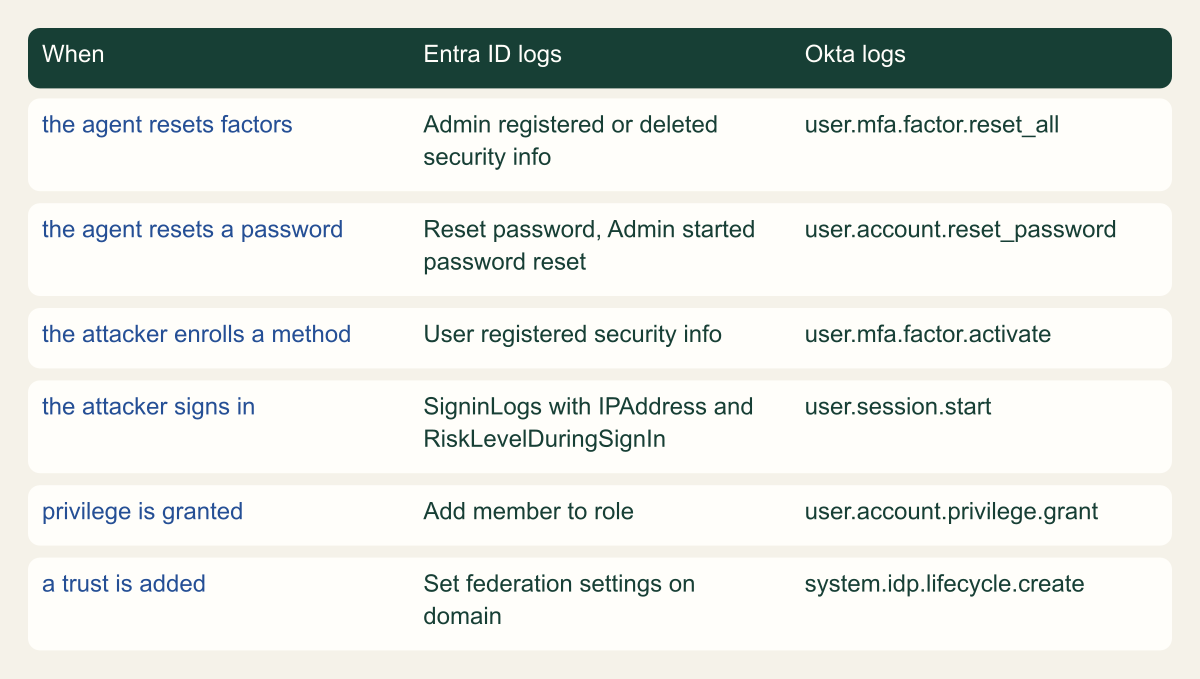
Each step of the sequence leaves a record, but not in one place. The agent's action lands in the identity provider's audit log, the attacker's new method follows shortly after in the same log, the sign-in appears in sign-in logs, and cloud activity appears in the cloud provider's logs under a federated identity. Detection is mostly a join across those sources, keyed on the target user and a short time window.
In Entra ID, the Authentication Methods service logs Admin registered security info, Admin updated security info, Admin deleted security info and Admin started password reset in the UserManagement category, and the user's own follow-up appears as User registered security info or User changed default security info. Core Directory logs Reset password, Change user password and Add member to role, and the domain activities Set domain authentication and Set federation settings on domain cover the federation persistence CISA describes. In Log Analytics these land in the AuditLogs table, where OperationName, LoggedByService, InitiatedBy, TargetResources, Result and CorrelationId carry the detail a rule needs. Interactive sign-ins land in SigninLogs, where UserPrincipalName, IPAddress, AuthenticationDetails and RiskLevelDuringSignIn describe who signed in, from where, how and at what assessed risk. [1][12][13][19]
Okta's System Log uses event types. user.mfa.factor.reset_all fires when all of a user's factors or authenticator enrollments are reset and names both the target and the administrator who did it; user.mfa.factor.deactivate covers a single factor. user.account.reset_password, user.mfa.factor.activate, user.account.privilege.grant and system.idp.lifecycle.create cover the password, the new enrollment, admin privilege changes and a new identity provider. Okta's 2023 guidance singles out factor resets and new identity providers for alerting. Where an account management policy sends users to an identity verification service, user.identity_verification records the result. [9][15]
AWS IAM Identity Center sees less, because the reset usually happens upstream. When users come from an external identity provider, Identity Center's sign-in events record CredentialType as EXTERNAL_IDP, and the reset itself is visible only in the provider's logs. For users in the Identity Center directory, the UserAuthentication event lists the verified factors in CredentialType, and DeviceEnrollmentRequired set to true shows the user had to register an MFA device during that sign-in, which is what a sign-in right after an MFA reset looks like. AuthWorkflowID ties together the CredentialChallenge, CredentialVerification and UserAuthentication events of one sign-in, and CreateAccountAssignment records a new account assignment. [16][17]
The rule worth paging on is a sequence rather than a single event: an admin-initiated method change or password reset for an account with cloud admin reach, followed within hours by that user registering a method and signing in from an address or device not seen before. Two further rules are cheap: Mandiant's suggestion to alert when the same phone number or MFA device appears on more than one account, and any new federation or identity provider configuration, which should be rare enough to review every time. [2][12]
Retention decides whether any of this can be investigated later. Entra keeps audit and sign-in logs for seven days on the Free tier and 30 days on P1 and P2, and risky sign-ins for 90 days only on P2. Route AuditLogs and the sign-in tables to a workspace or storage account so that a reset from five weeks ago can still be traced. [14]
| Event or field | What it shows | Applies to |
|---|---|---|
| CredentialChallenge | Identity Center asked for a factor, named in CredentialType | Identity Center directory, AD Connector, AWS Managed Microsoft AD |
| CredentialVerification | Whether that factor succeeded or failed | Identity Center directory, AD Connector, AWS Managed Microsoft AD |
| UserAuthentication | Sign-in completed; CredentialType lists verified factors, EXTERNAL_IDP for federated users | All identity sources |
| DeviceEnrollmentRequired set to true | The user had to register an MFA device during this sign-in | UserAuthentication events |
| CreateAccountAssignment | A user or group received a permission set in an account | IAM Identity Center API |
// Example query. Requires Entra audit and sign-in logs in a Log Analytics workspace.
// Restrict TargetUpn to a watchlist of accounts with cloud admin reach before alerting.
let lookback = 7d;
let followUp = 4h;
let helpDeskActions = dynamic(["Reset password", "Admin started password reset",
    "Admin registered security info", "Admin updated security info",
    "Admin deleted security info"]);
let resets = AuditLogs
    | where TimeGenerated > ago(lookback)
    | where OperationName in (helpDeskActions) and Result == "success"
    | mv-expand Target = TargetResources
    | where tostring(Target.type) == "User"
    | project ResetTime = TimeGenerated, ResetAction = OperationName,
        TargetUpn = tolower(tostring(Target.userPrincipalName)),
        ResetBy = tostring(InitiatedBy.user.userPrincipalName);
let selfRegistrations = AuditLogs
    | where TimeGenerated > ago(lookback)
    | where OperationName in ("User registered security info", "User changed default security info")
    | project RegTime = TimeGenerated, RegAction = OperationName,
        TargetUpn = tolower(tostring(InitiatedBy.user.userPrincipalName));
let signIns = SigninLogs
    | where TimeGenerated > ago(lookback)
    | project SignInTime = TimeGenerated, TargetUpn = tolower(UserPrincipalName),
        IPAddress, AppDisplayName, RiskLevelDuringSignIn;
resets
| join kind=inner selfRegistrations on TargetUpn
| where RegTime between (ResetTime .. (ResetTime + followUp))
| join kind=inner signIns on TargetUpn
| where SignInTime between (ResetTime .. (ResetTime + followUp))
| summarize Apps = make_set(AppDisplayName, 10), IPs = make_set(IPAddress, 10),
    Risk = make_set(RiskLevelDuringSignIn, 5), FirstSignIn = min(SignInTime)
    by TargetUpn, ResetAction, ResetBy, ResetTime, RegAction, RegTime
| order by ResetTime descWhere each step shows up in the identity provider
Every step of the reset sequence has a named event in both Entra ID and Okta, so the sequence can be joined. [12][15]

Source. Conceptual mapping of documented event names from Microsoft and Okta references. [9][12][13][15][19]
Method. Conceptual mapping. Event names are copied from provider documentation reviewed October 8, 2026; field availability depends on licensing and log routing.
Accessible table and figure data
| When | Entra ID logs | Okta logs |
|---|---|---|
| the agent resets factors | Admin registered or deleted security info | user.mfa.factor.reset_all |
| the agent resets a password | Reset password, Admin started password reset | user.account.reset_password |
| the attacker enrolls a method | User registered security info | user.mfa.factor.activate |
| the attacker signs in | SigninLogs with IPAddress and RiskLevelDuringSignIn | user.session.start |
| privilege is granted | Add member to role | user.account.privilege.grant |
| a trust is added | Set federation settings on domain | system.idp.lifecycle.create |
| When | Entra ID logs | Okta logs |
|---|---|---|
| the agent resets factors | Admin registered or deleted security info | user.mfa.factor.reset_all |
| the agent resets a password | Reset password, Admin started password reset | user.account.reset_password |
| the attacker enrolls a method | User registered security info | user.mfa.factor.activate |
| the attacker signs in | SigninLogs with IPAddress and RiskLevelDuringSignIn | user.session.start |
| privilege is granted | Add member to role | user.account.privilege.grant |
| a trust is added | Set federation settings on domain | system.idp.lifecycle.create |
Response when a reset was fraudulent
A confirmed fraudulent reset is an identity compromise with a known start time, and that is an advantage: the ticket marks when the attacker gained control, so scoping starts there instead of at the first alert. Mandiant's playbook guidance is to revoke tokens and access keys, review MFA device registrations, review changes to authentication requirements and review newly enrolled devices. [2] A workable order:
- Contain the identity. Block sign-in, then call
revokeSignInSessions, which invalidates refresh tokens and browser session cookies by resettingsignInSessionsValidFromDateTime. Microsoft warns of a delay of a few minutes, and because it acts on refresh tokens and cookies, access tokens already issued are outside its reach. In Okta, clearing sessions logsuser.session.clear. [15][18] - Remove every authentication method registered since the reset time, then restore the real user's methods through the verified path. Do not repeat a phone-based reset for the same account.
- Look for persistence beyond the user: role assignments, new federation or identity provider settings, new application registrations or consents, and newly joined devices. [1][12]
- Follow the federation downstream. Cloud sessions issued while the attacker held the identity do not end when the identity provider session does, so each connected cloud needs its own revocation step.
- Run the response out of band. CISA reports the actors searching Slack, Teams and Exchange for discussion of the intrusion and joining incident response calls, so use a channel the compromised identity cannot reach and verify who is on it. [1]
- Review the help desk record: which agent handled the call, what verification was recorded, and whether calls with the same number or story reached other agents. CISA describes reconnaissance calls before the reset, so earlier tickets may show the preparation. [1]
Measure the reset process
Measure the reset process from the logs, not from the help desk's own reporting. The audit events above give a complete count of resets and method changes; the ticketing system gives the claimed verification. Joining the two produces the numbers that matter:
- Coverage: the share of admin-initiated resets and method changes on privileged accounts that link to a ticket with a recorded verification method. An audit event with no ticket is either an undocumented process or an incident.
- Output: the share of resets that issued a short single-use TAP rather than a password or a new phone number, and the lifetimes actually used. [10]
- Notification: the share of resets the user acknowledged, and how quickly users report resets they did not request. [8]
- Resistance: results of authorized simulated calls to the help desk under agreed rules of engagement, including callers with researched personal details and pressure scripts. Mandiant recommends measuring how long detection and response take for interactive social engineering. [4]
- Detection latency: the time from a test reset on a monitored account to the alert reaching an analyst.
Method and provenance
Source-led analysis of the CISA advisory, Mandiant reporting, NIST SP 800-63B-4 and Microsoft, Okta and AWS documentation, with original diagrams and an example query. Sources were reviewed on October 7 and 8, 2026.
No identity provider tenant, help desk system or live log data was inspected. Event names, role permissions and limits are bounded to the cited documentation as of the review date, and incident statistics come from one firm's caseload with the cloud breakdown available only through secondary reporting.
AI assistance. AI assisted research synthesis, drafting, diagram planning and visual production, with deterministic editorial checks. No personal deployment experience, independent human review or live test is claimed.
Published under the Cloud Security Desk organizational byline. Read the practitioner guide policy.
References
- Scattered Spider (AA23-320A), last revised July 29, 2025 CISA, FBI and partner agencies. Published . Accessed .
- Defending Against UNC3944: Cybercrime Hardening Guidance from the Frontlines Mandiant, Google Cloud. Published . Accessed .
- M-Trends 2026: Data, Insights, and Strategies From the Frontlines Mandiant, Google Cloud. Published . Accessed .
- M-Trends 2026 Report: Executive Edition Mandiant, Google Cloud. Accessed .
- M-Trends 2026: Initial Access Handoff Shrinks From Hours to 22 Seconds SecurityWeek. Published . Accessed .
- Privileged roles and permissions in Microsoft Entra ID Microsoft. Accessed .
- Restricted management administrative units in Microsoft Entra ID Microsoft. Accessed .
- NIST SP 800-63B-4, Digital Identity Guidelines: Authentication and Authenticator Management NIST. Published . Accessed .
- Cross-Tenant Impersonation: Prevention and Detection Okta. Published . Accessed .
- Configure a Temporary Access Pass in Microsoft Entra ID Microsoft. Accessed .
- Control security information registration with Conditional Access Microsoft. Accessed .
- Microsoft Entra audit log activity reference Microsoft. Accessed .
- Azure Monitor Logs reference: AuditLogs Microsoft. Accessed .
- Microsoft Entra data retention Microsoft. Accessed .
- Event types (System Log) Okta. Accessed .
- Understanding IAM Identity Center sign-in events Amazon Web Services. Accessed .
- IAM Identity Center information in CloudTrail Amazon Web Services. Accessed .
- user: revokeSignInSessions (Microsoft Graph v1.0) Microsoft. Accessed .
- Azure Monitor Logs reference: SigninLogs Microsoft. Accessed .