
A threat and implementation guide for AWS security engineers and storage owners on SSE-C ransomware, built from AWS documentation, AWS blog posts and two clearly labeled vendor reports reviewed in October 2026. It gives a dated timeline, the exact April 2026 default behavior, an example RCP, a CloudTrail and EventBridge detection pattern, containment steps and the limits of each recovery source.
At a glance
Key findings
- SSE-C ransomware uses a stolen credential to rewrite objects with an attacker-chosen key; S3 keeps only a salted HMAC, so neither AWS nor the owner can decrypt them. [2][7]
- From April 6, 2026, S3 blocks SSE-C writes by default on new general purpose buckets and on existing buckets in accounts with no SSE-C objects; accounts with SSE-C objects kept their settings. [4][5]
- Anyone with
s3:PutEncryptionConfigurationcan unblock SSE-C, so pair the bucket setting with an RCP that denies the SSE-C header and limits who can change bucket encryption. [3][7][13] - SSE-C writes show
"SSEApplied":"SSE_C"or the customer-algorithm request parameter in CloudTrail data events, which trails do not log unless you configure them. [7][9][10] - Recovery depends on earlier versions or backups the attacker could not delete; Object Lock keeps locked versions from lifecycle expiration, and AWS Backup does not back up SSE-C objects. [19][20]
How the attack uses S3's own encryption
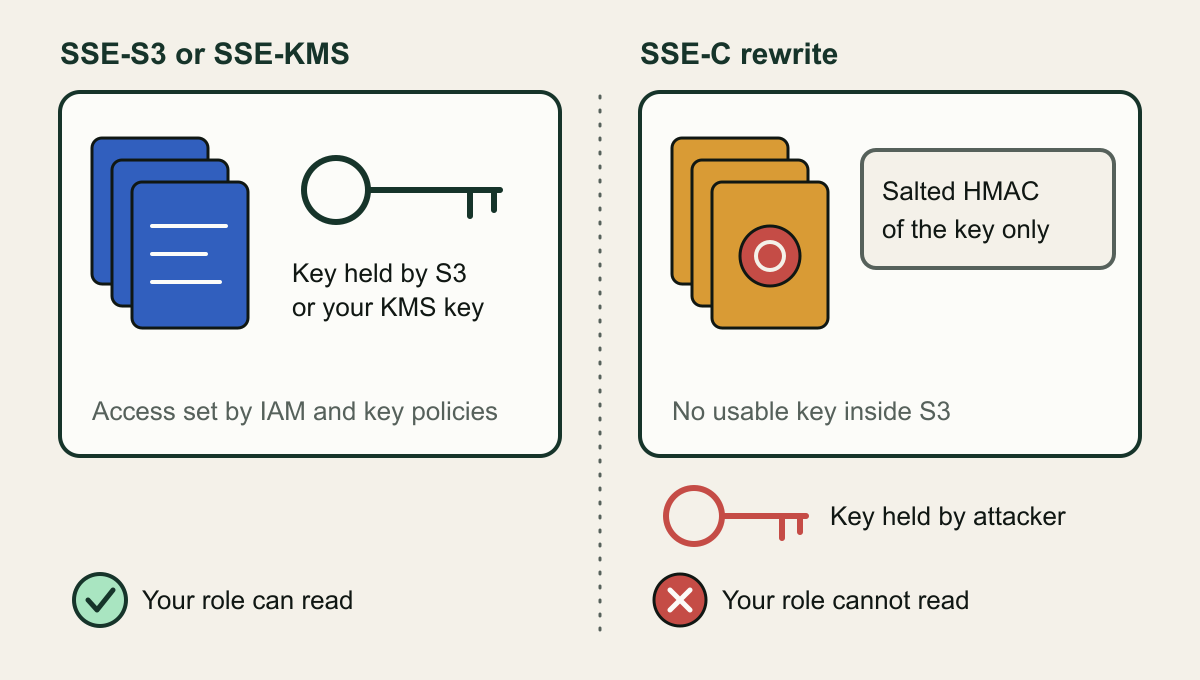
SSE-C ransomware needs no malware and no flaw in S3. It needs a credential that can write to a bucket. With server-side encryption with customer-provided keys, the caller sends a 256-bit key in the x-amz-server-side-encryption-customer-key header, S3 encrypts the object with AES-256 and removes the key from memory, and it keeps only a randomly salted HMAC of the key to validate later requests. AWS states that the HMAC cannot be used to derive the key or decrypt the object. Whoever chose the key is the only party who can read that object again. [1][2]
AWS's Customer Incident Response Team described the pattern in January 2025: actors holding valid customer credentials ran large numbers of CopyObject operations with SSE-C, overwriting objects in place and re-encrypting them under keys the owners never had. AWS said the activity misused legitimately obtained credentials rather than any AWS vulnerability. [7] Two days earlier the security vendor Halcyon had published its account of a campaign by an actor it calls Codefinger, adding details AWS did not give: lifecycle rules that scheduled files for deletion within seven days and a ransom note left in the bucket. That report is third-party analysis, so this guide uses it only for attacker behavior and labels it where it appears. [8]
What to do now: since April 6, 2026, S3 blocks SSE-C writes by default on new general purpose buckets and on existing buckets in accounts that held no SSE-C objects. That narrows exposure, but the precondition is still there. Accounts that already used SSE-C kept it on every bucket, any principal with s3:PutEncryptionConfiguration can switch it back on, and the setting does nothing about credentials that can delete or copy out data. [3][4] The controls that matter, in order: confirm the block on every bucket, deny SSE-C headers with an organization policy, alert on SSE-C writes and on the bucket changes that come before them, protect earlier object versions from lifecycle deletion, and stop issuing long-term access keys.
Where the key lives decides who can read
After an SSE-C rewrite the only usable key is outside AWS. [2]

Source. Conceptual illustration based on AWS SSE-C documentation and AWS incident response guidance. [1][2][7]
Method. Conceptual, hand-authored SVG. It shows key custody only and omits request flow, KMS key policies and client-side encryption.
Accessible table and figure data
| Element | Meaning |
|---|---|
| Left panel | Objects encrypted with SSE-S3 or SSE-KMS |
| Key inside the bucket | S3 or your KMS key decrypts for authorized callers |
| Right panel | Objects rewritten with SSE-C by a stolen credential |
| Salted HMAC tag | S3 keeps only an HMAC of the key, not the key |
| Key outside the bucket | Only the attacker holds the key |
| Check and cross | Whether your own role can still read the object |
| Element | Meaning |
|---|---|
| Left panel | Objects encrypted with SSE-S3 or SSE-KMS |
| Key inside the bucket | S3 or your KMS key decrypts for authorized callers |
| Right panel | Objects rewritten with SSE-C by a stolen credential |
| Salted HMAC tag | S3 keeps only an HMAC of the key, not the key |
| Key outside the bucket | Only the attacker holds the key |
| Check and cross | Whether your own role can still read the object |
From attack reports to a changed default
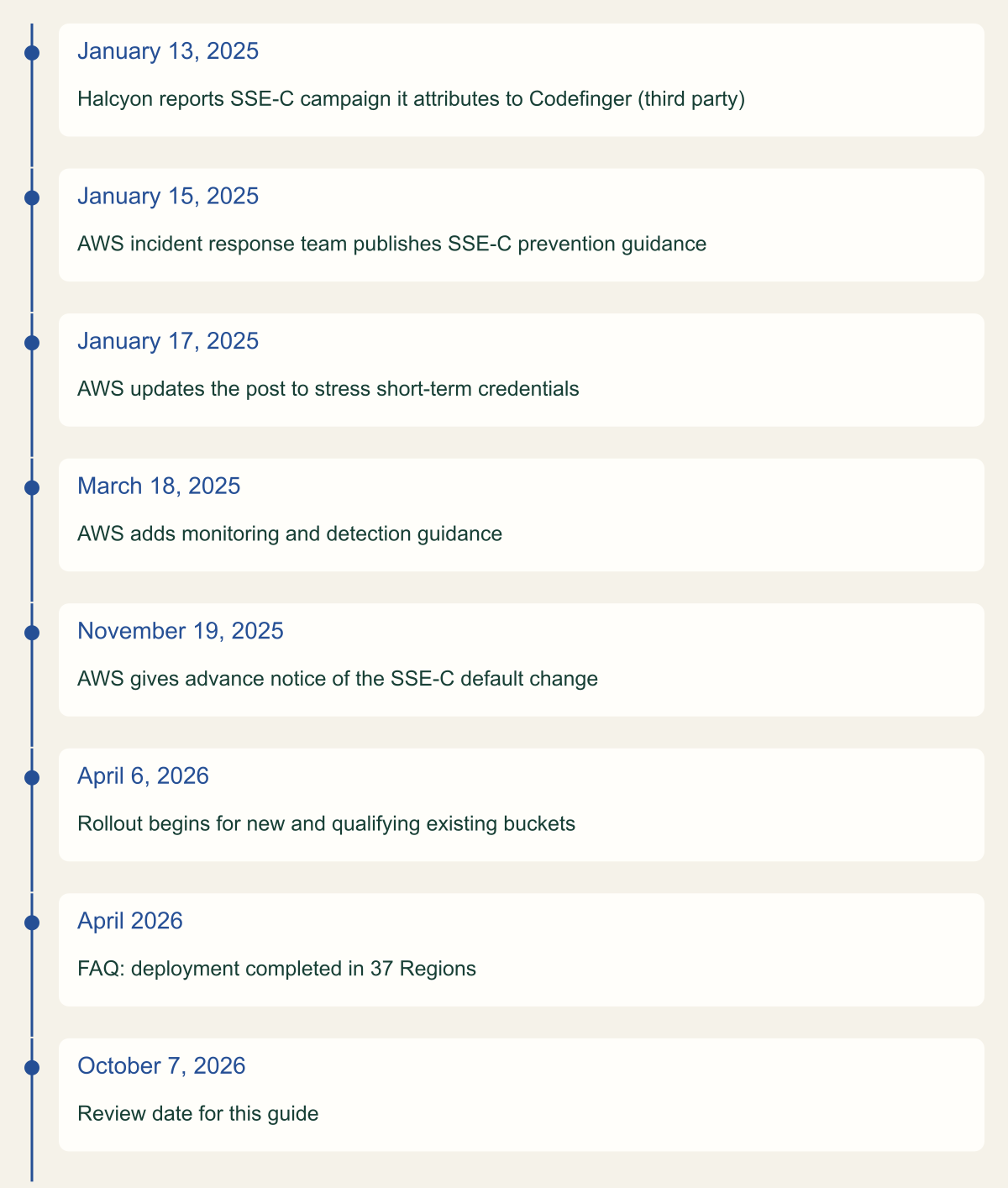
About fifteen months passed between the first public report and the start of the rollout. The AWS incident response post was revised twice after publication: on January 17, 2025 to stress short-term credentials, and on March 18, 2025 to add monitoring and detection guidance. AWS announced the default change on November 19, 2025 and began deploying it on April 6, 2026. Its FAQ now says the deployment completed in April 2026 across 37 Regions, including the AWS China and AWS GovCloud (US) Regions. [4][5][6][7]
The FAQ also carries a regional exception it does not explain: newly created buckets in every Region except Middle East (Bahrain) and Middle East (UAE) have SSE-C disabled by default. If you create buckets in me-south-1 or me-central-1, check each new bucket's setting rather than assuming the default applied. [4]
About fifteen months from report to default
AWS began blocking SSE-C by default on April 6, 2026, about fifteen months after the first public report. [5][8]

Source. AWS Security Blog, AWS Storage Blog, AWS What's New, S3 FAQ and Halcyon's report (secondary). [4][5][6][7][8]
Method. Dates transcribed from the cited pages; the April 2026 completion is month-only as published. The final row is the review date, not an event. Ordinal layout; spacing does not represent elapsed time.
Accessible table and figure data
| Date | Milestone |
|---|---|
| January 13, 2025 | Halcyon reports SSE-C campaign it attributes to Codefinger (third party) |
| January 15, 2025 | AWS incident response team publishes SSE-C prevention guidance |
| January 17, 2025 | AWS updates the post to stress short-term credentials |
| March 18, 2025 | AWS adds monitoring and detection guidance |
| November 19, 2025 | AWS gives advance notice of the SSE-C default change |
| April 6, 2026 | Rollout begins for new and qualifying existing buckets |
| April 2026 | FAQ: deployment completed in 37 Regions |
| October 7, 2026 | Review date for this guide |
| Date | Milestone |
|---|---|
| January 13, 2025 | Halcyon reports SSE-C campaign it attributes to Codefinger (third party) |
| January 15, 2025 | AWS incident response team publishes SSE-C prevention guidance |
| January 17, 2025 | AWS updates the post to stress short-term credentials |
| March 18, 2025 | AWS adds monitoring and detection guidance |
| November 19, 2025 | AWS gives advance notice of the SSE-C default change |
| April 6, 2026 | Rollout begins for new and qualifying existing buckets |
| April 2026 | FAQ: deployment completed in 37 Regions |
| October 7, 2026 | Review date for this guide |
What changed on April 6, 2026
The change is a bucket-level setting called BlockedEncryptionTypes. It sits in the default encryption rule that PutBucketEncryption writes and GetBucketEncryption returns, and its EncryptionType array takes SSE-C to block or NONE to allow. While SSE-C is blocked, any PutObject, CopyObject, PostObject, multipart upload or replication request that specifies SSE-C fails with HTTP 403 AccessDenied. Changing the setting requires s3:PutEncryptionConfiguration; reading it requires s3:GetEncryptionConfiguration. [3]
Reads are untouched. Existing SSE-C objects stay readable with GetObject and HeadObject when the caller supplies the key, and blocking does not re-encrypt or alter anything already stored. That is what let AWS apply the setting to existing buckets without breaking applications, and it is also why the default cannot undo a rewrite that already happened. [3]
Which existing buckets changed depended on the account, not the bucket. If no bucket in an account held SSE-C objects, AWS blocked SSE-C on all of that account's buckets. If any bucket held even one SSE-C object, AWS left every bucket configuration in that account unchanged. New buckets now need a separate PutBucketEncryption call that sets NONE before they accept SSE-C uploads. [4]
Blocking SSE-C removes one convenient method, not the attack class. A credential that can read and write objects can still download them, encrypt them outside AWS and upload the ciphertext as an ordinary SSE-S3 object, which no encryption-type setting can tell apart from a normal upload. That follows from how the APIs work rather than from an AWS statement, and it is why version protection and credential controls stay in the plan below.
| Bucket | SSE-C writes after April 2026 | What to verify |
|---|---|---|
| New bucket | Blocked by default | Bahrain and UAE exceptions; later changes to NONE |
| Existing bucket, account had no SSE-C objects | Blocked by AWS | Later changes by your own principals |
| Existing bucket, account had SSE-C objects anywhere | Unchanged, so still allowed | Every bucket in that account |
| Replication destination with SSE-C blocked | SSE-C replicas fail with 403 | Replication failures |
Block SSE-C where you do not use it
Start with an inventory, because the account-level rule means some buckets may still allow SSE-C. GetBucketEncryption shows each bucket's blocked types. S3 Inventory reports an encryption status of SSE-C for objects that use it, which tells you whether a bucket actually depends on SSE-C before you block it, and the CloudTrail data events described in the next section show whether anything still writes with it. [3][21]
To block, call PutBucketEncryption with "BlockedEncryptionTypes": {"EncryptionType": ["SSE-C"]}. AWS's SDK examples send the block inside the same rule as ApplyServerSideEncryptionByDefault. Read the bucket's current rule first and send it back with the block added, so a bucket that defaults to SSE-KMS keeps its KMS key setting, then confirm the result with GetBucketEncryption. [3]
Infrastructure as code needs the same review. CloudFormation exposes the setting as the BlockedEncryptionTypes property with an EncryptionType list that accepts NONE or SSE-C, and changing it updates the bucket without interruption. A shared module that sets NONE will reopen SSE-C on every bucket it deploys, so search templates and modules for that value and treat it as an exception that needs an owner. [23]
The bucket setting has a structural weakness. It is governed by s3:PutEncryptionConfiguration, a permission that broad administrator roles carry, so an attacker holding one can set NONE and then rewrite objects. The AWS pages reviewed for this guide document no condition key for the blocked encryption types, and Fog Security, a third-party vendor, wrote in April 2026 that SCPs and RCPs therefore cannot deny unblocking specifically. [3][14] Two policy statements work around that gap. The first denies requests that carry the SSE-C algorithm header, the control AWS published as a bucket policy and an RCP in January 2025 [7]; it applies whatever the bucket setting says. The second, adapted from Fog Security's suggestion to block encryption changes, limits which role can change bucket encryption at all. [14]
An RCP fits better than an SCP here. RCPs apply to resources in member accounts, so they cover the account root user and principals outside the organization that a bucket policy might admit, while an SCP only constrains your own principals. RCPs do not affect resources in the management account or calls made by service-linked roles, and AWS recommends testing on individual accounts before attaching an RCP higher in the organization. Attach this one to the organizational units whose accounts do not use SSE-C, and keep any account that genuinely depends on SSE-C in a separate unit without the first statement. [13]
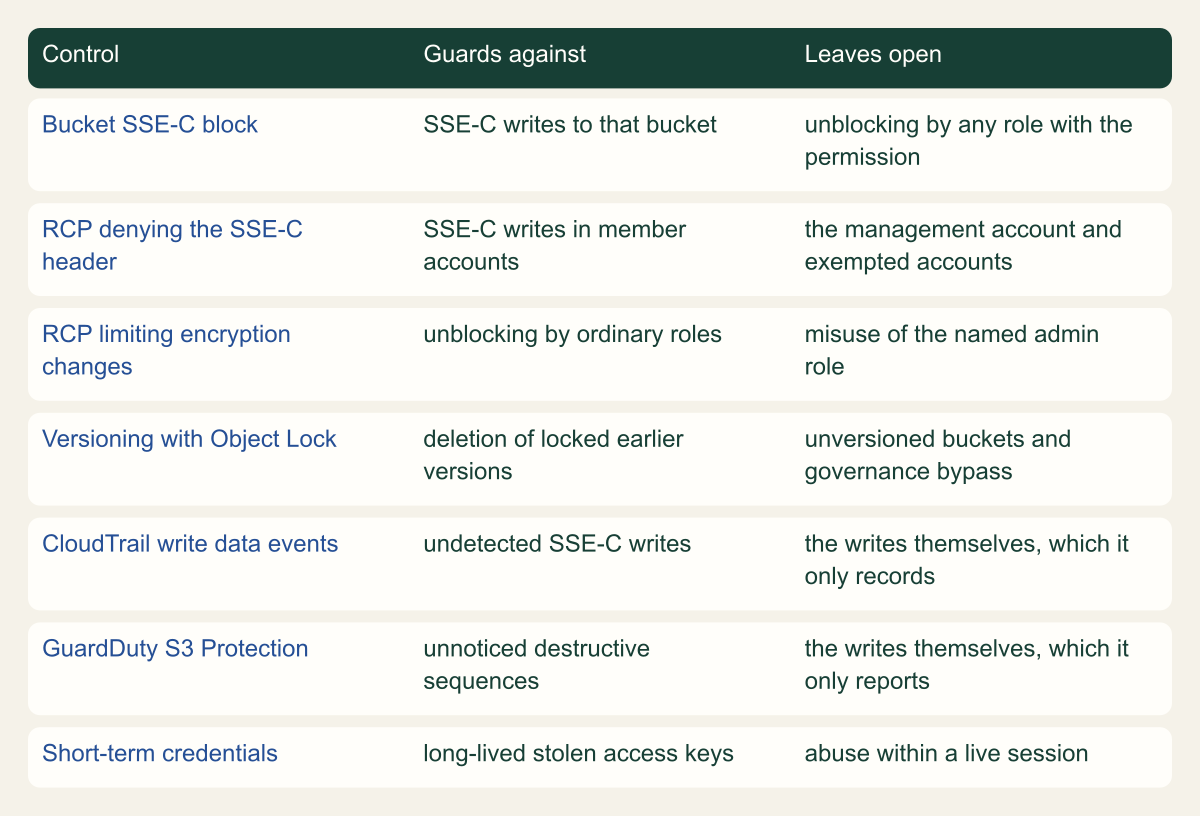
No single layer covers every path. The matrix below sets out what each control guards against and what it leaves open, which is the reason to deploy them together rather than pick one.
{
  "Version": "2012-10-17",
  "Statement": [
    {
      "Sid": "DenySSECObjectWrites",
      "Effect": "Deny",
      "Principal": "*",
      "Action": "s3:PutObject",
      "Resource": "*",
      "Condition": {
        "Null": {
          "s3:x-amz-server-side-encryption-customer-algorithm": "false"
        }
      }
    },
    {
      "Sid": "RestrictBucketEncryptionChanges",
      "Effect": "Deny",
      "Principal": "*",
      "Action": "s3:PutEncryptionConfiguration",
      "Resource": "*",
      "Condition": {
        "ArnNotLike": {
          "aws:PrincipalArn": "arn:aws:iam::*:role/storage-encryption-admin"
        }
      }
    }
  ]
}Each layer stops a different step
The bucket block, RCP, version protection and credential controls cover each other's gaps. [3][7][13]

Source. Conceptual comparison based on S3 SSE-C blocking, RCP, Object Lock, CloudTrail and GuardDuty documentation. [3][10][13][15][19]
Method. Conceptual matrix. Coverage statements summarize documented behavior; the restriction on encryption changes is an original recommendation.
Accessible table and figure data
| Control | Guards against | Leaves open |
|---|---|---|
| Bucket SSE-C block | SSE-C writes to that bucket | unblocking by any role with the permission |
| RCP denying the SSE-C header | SSE-C writes in member accounts | the management account and exempted accounts |
| RCP limiting encryption changes | unblocking by ordinary roles | misuse of the named admin role |
| Versioning with Object Lock | deletion of locked earlier versions | unversioned buckets and governance bypass |
| CloudTrail write data events | undetected SSE-C writes | the writes themselves, which it only records |
| GuardDuty S3 Protection | unnoticed destructive sequences | the writes themselves, which it only reports |
| Short-term credentials | long-lived stolen access keys | abuse within a live session |
| Control | Guards against | Leaves open |
|---|---|---|
| Bucket SSE-C block | SSE-C writes to that bucket | unblocking by any role with the permission |
| RCP denying the SSE-C header | SSE-C writes in member accounts | the management account and exempted accounts |
| RCP limiting encryption changes | unblocking by ordinary roles | misuse of the named admin role |
| Versioning with Object Lock | deletion of locked earlier versions | unversioned buckets and governance bypass |
| CloudTrail write data events | undetected SSE-C writes | the writes themselves, which it only records |
| GuardDuty S3 Protection | unnoticed destructive sequences | the writes themselves, which it only reports |
| Short-term credentials | long-lived stolen access keys | abuse within a live session |
Detect SSE-C writes in CloudTrail
Object writes are CloudTrail data events, and CloudTrail does not log data events unless a trail or event data store is configured for them, at additional charge. Without that configuration an SSE-C rewrite leaves no CloudTrail record of the object-level calls, only of bucket-level changes. Advanced event selectors can filter on resources.type AWS::S3::Object, readOnly, eventName and resources.ARN, so a selector with readOnly set to false captures writes without the much larger volume of reads. [10]
Two fields identify SSE-C in those records. When a request carries encryption headers, S3 adds "SSEApplied":"SSE_C" to additionalEventData; for multipart uploads the value appears on the request that starts the upload. AWS's incident response guidance points to requestParameters.x-amz-server-side-encryption-customer-algorithm instead. Match either. The key itself is not recoverable from logs: AWS says S3 keeps only a salted HMAC, and Halcyon reported that CloudTrail logs record only an HMAC rather than the key. [2][7][8][9]
For alerting, CloudTrail delivers data events to the default EventBridge bus, and rules in the default ENABLED state match them provided the trail captures those data event types. The pattern below uses the $or and exists operators to match either field. [11][12] Once SSE-C is blocked, attempted rewrites fail with AccessDenied, so a run of denied writes from a single principal deserves the same response as a successful one. [3]
Before routing matches to on-call, establish what legitimate SSE-C looks like. In accounts the April change skipped, some application probably still writes with SSE-C; the inventory step shows which buckets, and a week of matched events shows which principals. Suppress on the exact pair of principal and bucket, never on the bucket alone, because the attack uses the same API calls as the application.
Correlate the object events with bucket-level management events, which CloudTrail logs by default: PutBucketEncryption for changes to the block, PutBucketLifecycle (the CloudTrail name for lifecycle configuration writes), and PutBucketVersioning. A lifecycle change followed by SSE-C writes from the same principal matches the sequence in the Codefinger report. [8][10]
GuardDuty adds a second view that does not depend on your trail. S3 Protection analyzes CloudTrail data events for S3 itself, so you do not need to enable S3 data event logging in CloudTrail to use it. AWS's incident guidance says S3 Protection with Extended Threat Detection can detect ransomware attempts that use SSE-C, and the correlated finding for data destruction in S3 is AttackSequence:S3/CompromisedData, rated critical. GuardDuty raises findings; it does not block the writes. [7][15][16]
{
  "source": [
    "aws.s3"
  ],
  "detail-type": [
    "AWS API Call via CloudTrail"
  ],
  "detail": {
    "eventSource": [
      "s3.amazonaws.com"
    ],
    "$or": [
      {
        "additionalEventData": {
          "SSEApplied": [
            "SSE_C"
          ]
        }
      },
      {
        "requestParameters": {
          "x-amz-server-side-encryption-customer-algorithm": [
            {
              "exists": true
            }
          ]
        }
      }
    ]
  }
}From SSE-C signal to recovery
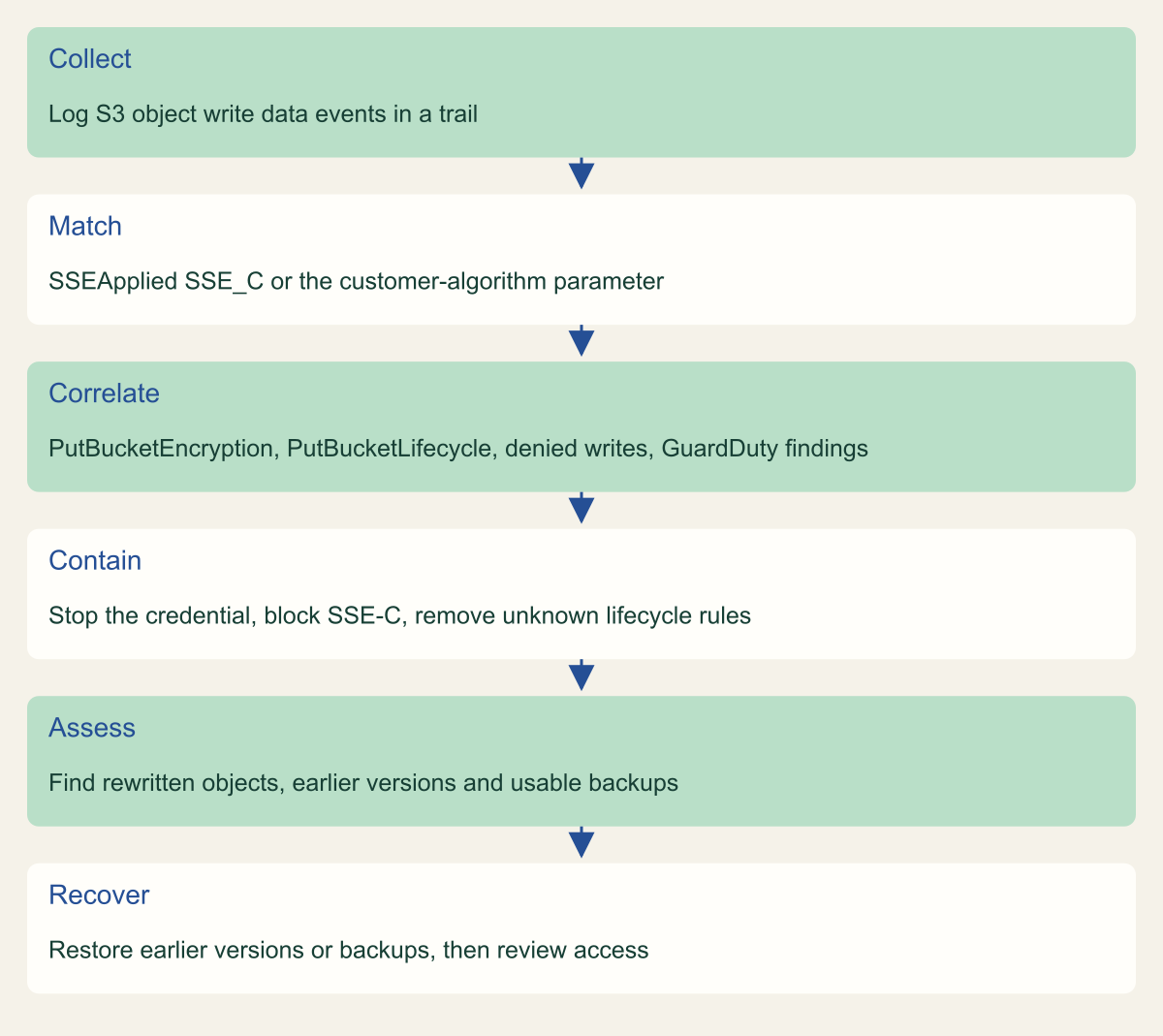
Logging write data events is the prerequisite; containment comes before assessment. [7][10]

Source. Conceptual workflow based on S3 CloudTrail, EventBridge, GuardDuty and IAM documentation and AWS incident response guidance. [3][7][9][10][16][22]
Method. Conceptual sequence; it omits legal, communication and ransom-decision steps.
Accessible table and figure data
| Step | Signal or action |
|---|---|
| Collect | Log S3 object write data events in a trail |
| Match | SSEApplied SSE_C or the customer-algorithm parameter |
| Correlate | PutBucketEncryption, PutBucketLifecycle, denied writes, GuardDuty findings |
| Contain | Stop the credential, block SSE-C, remove unknown lifecycle rules |
| Assess | Find rewritten objects, earlier versions and usable backups |
| Recover | Restore earlier versions or backups, then review access |
| Step | Signal or action |
|---|---|
| Collect | Log S3 object write data events in a trail |
| Match | SSEApplied SSE_C or the customer-algorithm parameter |
| Correlate | PutBucketEncryption, PutBucketLifecycle, denied writes, GuardDuty findings |
| Contain | Stop the credential, block SSE-C, remove unknown lifecycle rules |
| Assess | Find rewritten objects, earlier versions and usable backups |
| Recover | Restore earlier versions or backups, then review access |
Contain an active rewrite
Each successful copy replaces a current version, so stop the credential first, then the method, then the conditions that would turn a recoverable incident into a permanent one.
- For an IAM user's access key, deactivate it rather than deleting it, so the key ID stays available to the investigation. For a role, use Revoke active sessions, which attaches the
AWSRevokeOlderSessionsinline policy and denies requests from sessions issued before that moment; sessions from IAM Identity Center permission sets are revoked in Identity Center instead. [22] - Set
BlockedEncryptionTypestoSSE-Con every affected bucket and confirm the RCP is attached to the account's organizational unit. [3][13] - Read each affected bucket's lifecycle configuration and remove rules you did not create, especially noncurrent version expiration, which permanently deletes the earlier versions you will restore from. [8][17]
- Preserve the CloudTrail files and GuardDuty findings before cleanup, and leave the rewritten versions in place until you have confirmed which earlier versions exist.
Recovery options and their limits
Without the attacker's key, recovery depends on a copy the attacker did not overwrite. In a versioning-enabled bucket an overwrite creates a new version and the previous one can be restored, so an in-place SSE-C CopyObject leaves the original behind as a noncurrent version. An unversioned bucket has no such fallback: the overwrite replaces the object, and only a copy outside that bucket helps. [17]
Versions last only as long as the lifecycle rules and delete permissions around them allow. Noncurrent version expiration permanently removes earlier versions, which is how a seven-day deletion rule of the kind Halcyon described would convert a recoverable incident into data loss. Object Lock closes that path: a locked version cannot be deleted by a lifecycle expiration policy, and in compliance mode no user, including the root user, can overwrite or delete it during the retention period. Governance mode can be bypassed by principals with s3:BypassGovernanceRetention. Object Lock does not stop new versions from being written on top, so it preserves the original rather than preventing the attack. [8][18][19]
A hypothetical example shows how these pieces interact. A versioned bucket keeps noncurrent versions for 30 days under an existing lifecycle rule. An attacker whose stolen role can both write objects and change lifecycle configuration first replaces the rule with one that expires noncurrent versions after a day, then rewrites every object with SSE-C, and within days the originals are gone. The same attack through a role that holds only s3:PutObject leaves encrypted current versions over intact originals for 30 days, which is enough time to restore. Against a bucket with compliance-mode retention, the lifecycle change cannot touch the locked versions at all.
To restore, copy the earlier version into the same bucket so it becomes the current version; S3 preserves every existing version, including the encrypted one, which keeps it available as evidence. Permanently deleting the current version also brings the earlier one back, but it destroys that record. [24]
AWS Backup does not back up SSE-C-encrypted objects. Recovery points taken before the rewrite therefore still hold the originals, and the rewritten versions should simply be absent from later backups rather than overwriting good copies; this follows from that exclusion, and AWS does not describe it directly. Continuous S3 backups restore to any point in the last 35 days and periodic backups can be retained for up to 99 years, but both help only if the compromised credential cannot delete them. [20]
Replication can work in your favor after the April 2026 change. If a destination bucket blocks SSE-C, replicating SSE-C-encrypted source objects to it fails with HTTP 403, so the rewritten versions do not reach the replica. Watch for a sudden rise in replication failures; during an incident it is a signal, not a fault to fix by unblocking the destination. [3]
| Source | Survives the rewrite | Limit |
|---|---|---|
| Noncurrent version | Yes, until deleted | Lifecycle rules or version deletes can remove it |
| Version under compliance-mode retention | Yes, for the retention period | Retention must be in place before the attack |
| Version under governance-mode retention | Yes, unless bypassed | Principals with s3:BypassGovernanceRetention can override |
| AWS Backup recovery point | Earlier points, yes | SSE-C objects are not backed up |
| Replica in a bucket that blocks SSE-C | Yes | SSE-C replication fails and needs watching |
| Unversioned bucket | No | Only an external copy helps |
Credential hygiene that removes the precondition
Every documented variant of this attack starts with a valid credential. AWS's own conclusion in its incident guidance is that the most effective mitigation is not to create long-term credentials at all: IAM roles for EC2, ECS, EKS and Lambda workloads, IAM Roles Anywhere for systems outside AWS, and IAM Identity Center with MFA for people at workstations. [7]
Then separate the permission to write data from the permission to change how a bucket keeps it. A role that uploads reports needs s3:PutObject on its prefix. It does not need s3:PutLifecycleConfiguration, s3:PutEncryptionConfiguration or s3:PutBucketVersioning. When those live in different roles, one stolen credential can rewrite current objects but cannot also schedule the old versions for deletion or reopen SSE-C on the bucket. This is a design recommendation drawn from the attack sequence, not an AWS requirement.
Where a workload genuinely needs SSE-C, give it its own bucket, ideally in its own account, set NONE only there and record why. AWS notes that objects encrypted with SSE-C cannot be decrypted natively by AWS managed services, and that most workloads use SSE-S3 or SSE-KMS instead, so a migration to SSE-KMS is often the cleaner long-term fix. [1]
Questions for buckets you cannot rebuild
For a bucket holding data you could not rebuild, the useful question is not whether SSE-C is blocked. It is whether one stolen credential can both overwrite the current versions and remove the old ones. If it can, fix that before anything else. A practical order:
- List buckets whose encryption rule does not report
SSE-Cas blocked, and use S3 Inventory to see whether any object there actually uses SSE-C. - Block SSE-C on every bucket that does not need it, and attach the RCP to organizational units whose accounts do not use SSE-C.
- Log S3 write data events for buckets that matter, route the SSE-C pattern and
PutBucketLifecyclechanges to your incident queue, and enable GuardDuty S3 Protection. - Confirm versioning, review noncurrent version expiration, and add Object Lock retention where the data justifies it.
- Replace long-term access keys with roles, and move lifecycle, versioning and encryption permissions out of data-writing roles.
Method and provenance
Source-led technical analysis of AWS documentation, AWS blog posts and two third-party vendor reports, with original control and detection guidance and labeled inferences. Sources were reviewed on October 7, 2026.
No AWS account, trail, bucket or GuardDuty detector was inspected. Default behavior, Regions and event fields are bounded to the cited documentation as of the review date. Attacker behavior beyond AWS's own description comes from Halcyon's report and is not independently confirmed.
AI assistance. AI assisted research synthesis, drafting, diagram planning and visual production, with deterministic editorial checks. No personal deployment experience, independent human review or live test is claimed.
Published under the Cloud Security Desk organizational byline. Read the practitioner guide policy.
References
- Using server-side encryption with customer-provided keys (SSE-C) Amazon Web Services. Accessed .
- Specifying server-side encryption with customer-provided keys (SSE-C) Amazon Web Services. Accessed .
- Blocking or unblocking SSE-C for a general purpose bucket Amazon Web Services. Accessed .
- Default SSE-C setting for new buckets FAQ Amazon Web Services. Accessed .
- Amazon S3 starts rolling out new security best practice to new and existing buckets by default Amazon Web Services. Published . Accessed .
- Advanced notice: Amazon S3 to disable the use of SSE-C encryption by default for all new buckets and select existing buckets in April 2026 Amazon Web Services. Published . Accessed .
- Preventing unintended encryption of Amazon S3 objects Amazon Web Services. Published . Accessed .
- Abusing AWS Native Services: Ransomware Encrypting S3 Buckets with SSE-C Halcyon. Published . Accessed .
- Monitoring default encryption with AWS CloudTrail and Amazon EventBridge Amazon Web Services. Accessed .
- Amazon S3 CloudTrail events Amazon Web Services. Accessed .
- AWS service events delivered via AWS CloudTrail Amazon Web Services. Accessed .
- Comparison operators for use in event patterns in Amazon EventBridge Amazon Web Services. Accessed .
- Resource control policies (RCPs) Amazon Web Services. Accessed .
- Disabling SSE-C Encryption For Amazon S3 Buckets: What to Know for Data Protection and Ransomware Prevention Fog Security. Published . Accessed .
- GuardDuty S3 Protection Amazon Web Services. Accessed .
- GuardDuty attack sequence finding types Amazon Web Services. Accessed .
- Retaining multiple versions of objects with S3 Versioning Amazon Web Services. Accessed .
- Locking objects with Object Lock Amazon Web Services. Accessed .
- Object Lock considerations Amazon Web Services. Accessed .
- Amazon S3 backups Amazon Web Services. Accessed .
- Cataloging and analyzing your data with S3 Inventory Amazon Web Services. Accessed .
- Revoke IAM role temporary security credentials Amazon Web Services. Accessed .
- AWS::S3::Bucket BlockedEncryptionTypes Amazon Web Services. Accessed .
- Restoring previous versions Amazon Web Services. Accessed .