
An incident response guide for teams whose CI pipeline ran a compromised GitHub Action or package. It draws on maintainer advisories, CISA alerts and GitHub and AWS documentation reviewed in October 2026, and gives calculated exposure windows, a retention checklist, run-finding and hunting commands, and a closing rule.
At a glance
Key findings
- Published exposure windows for one incident can differ by a factor of almost four: for tj-actions/changed-files, CISA's window covers 84 hours and StepSecurity's observed window about 22. [4][8]
- A job's log records the commit each action resolved to, which settles whether a moved tag or a nested action delivered malicious code. [15][1][2]
- The
workflows.prepared_workflow_jobaudit event lists the secrets passed to each job, but it appears only in exports, the REST API and streaming, not in the web interface. [6][5] - Since October 1, 2026, GitHub's 90-day default retention removes workflow runs and checks as well as logs, and Git events in the audit log last seven days. [10][5]
- Trivy's maintainers say a credential rotation that was not atomic could have let the attacker capture newly rotated secrets and carry out the March 19, 2026 attack. [2]
Start with the window and the reach
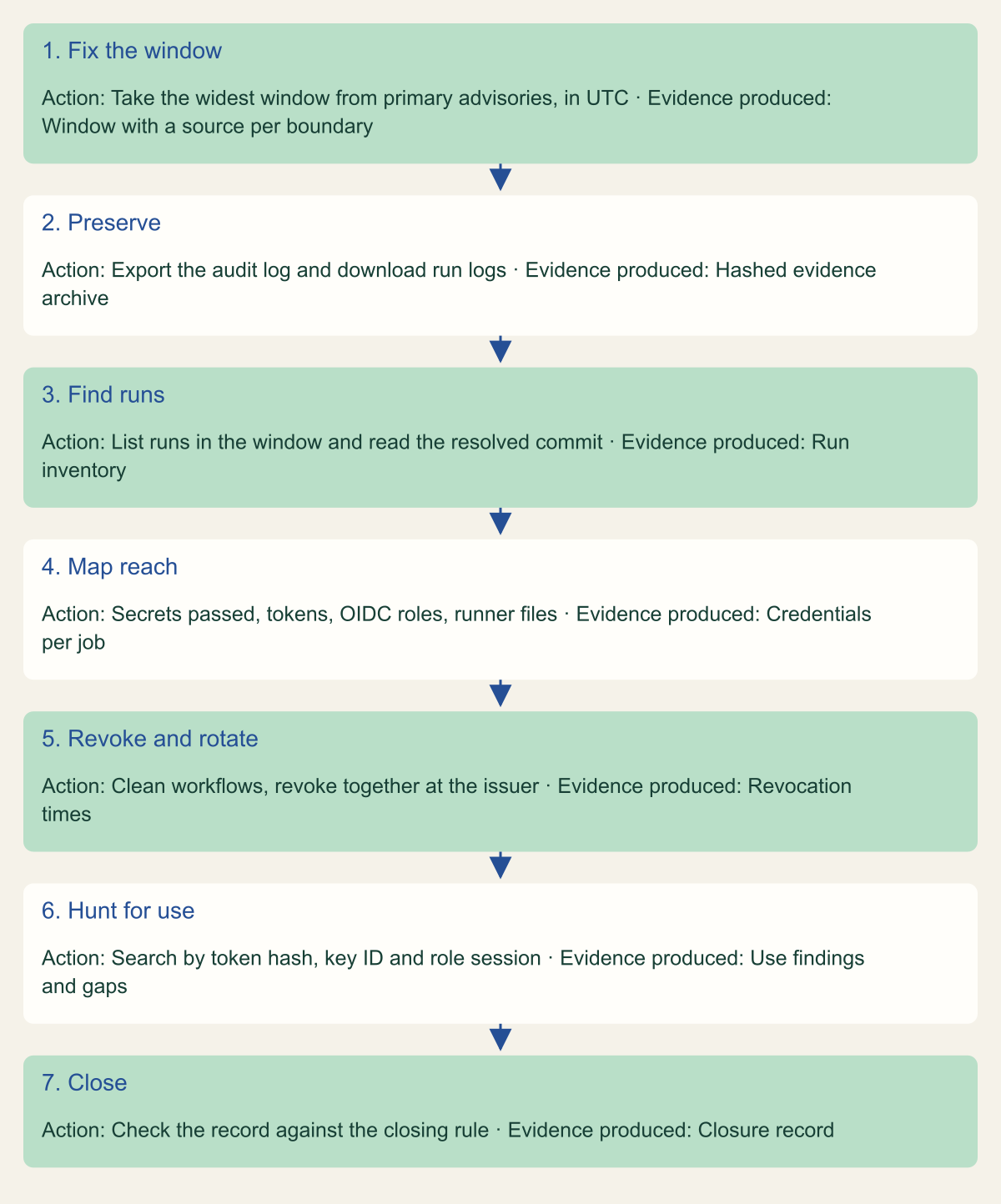
When a dependency in your pipeline turns out to have been malicious, the useful question is not whether you use it. It is which jobs executed the malicious code, and which credentials were present in those jobs. Answer it in seven steps: fix the exposure window from primary advisories, preserve logs before retention deletes them, list every run that executed the component inside the window, record what each of those jobs could reach, revoke those credentials at their issuers together, search provider logs for use of what was taken, and close with a record that ties the steps together.
Scoping by package or action name gets both directions wrong. It over-scopes repositories that referenced a safe commit, and it misses jobs that pulled the malicious code indirectly. The reviewdog advisory states that other reviewdog actions using reviewdog/action-setup@v1 were compromised "regardless of version or pinning method". [1] Trivy's advisory makes the same point: a workflow that pinned aquasecurity/trivy-action to a commit from before April 9, 2025 got a safe trivy-action, which then fetched a malicious setup-trivy during that action's exposure window. [2]
Where the stolen data went changes urgency, not scope. The tj-actions payload printed secrets into the job log, readable by anyone who could read the logs. [3] The Trivy payload encrypted what it collected and sent it to attacker infrastructure, so a private repository's private logs offered no protection. [2] The flowchart at the end of this section is the order this guide follows. Each step produces the evidence the next step needs.
Seven steps from advisory to closure
Each step produces the evidence the next one needs; preservation comes before anything that changes state.

Source. Conceptual sequence based on GitHub, AWS, CISA and maintainer guidance. [4][5][6][2]
Method. Conceptual ordering by the editors. It summarizes this guide and contains no measured data.
Accessible table and figure data
| Step | Action | Evidence produced |
|---|---|---|
| 1. Fix the window | Take the widest window from primary advisories, in UTC | Window with a source per boundary |
| 2. Preserve | Export the audit log and download run logs | Hashed evidence archive |
| 3. Find runs | List runs in the window and read the resolved commit | Run inventory |
| 4. Map reach | Secrets passed, tokens, OIDC roles, runner files | Credentials per job |
| 5. Revoke and rotate | Clean workflows, revoke together at the issuer | Revocation times |
| 6. Hunt for use | Search by token hash, key ID and role session | Use findings and gaps |
| 7. Close | Check the record against the closing rule | Closure record |
| Step | Action | Evidence produced |
|---|---|---|
| 1. Fix the window | Take the widest window from primary advisories, in UTC | Window with a source per boundary |
| 2. Preserve | Export the audit log and download run logs | Hashed evidence archive |
| 3. Find runs | List runs in the window and read the resolved commit | Run inventory |
| 4. Map reach | Secrets passed, tokens, OIDC roles, runner files | Credentials per job |
| 5. Revoke and rotate | Clean workflows, revoke together at the issuer | Revocation times |
| 6. Hunt for use | Search by token hash, key ID and role session | Use findings and gaps |
| 7. Close | Check the record against the closing rule | Closure record |
Establish the exposure window
An exposure window is the interval during which a reference your workflows used resolved to malicious code. Take its boundaries from primary records: the maintainer's advisory, the GitHub Advisory Database, CISA, or the researchers who found the compromise. Convert every boundary to UTC before comparing it with run timestamps. Nx published its timeline in EDT, while Trivy published UTC times with a tilde where the time is approximate. [7][2]
Sources often disagree, and the disagreement matters. For tj-actions/changed-files, the maintainer's advisory and the GitHub Advisory Database give dates only: March 14 and 15, 2025. [3] StepSecurity, which detected the compromise, puts the start at about 16:00 UTC on March 14 and GitHub's removal of the action at 14:00 UTC on March 15. [8] CISA's alert, updated March 26, 2025, tells organizations to audit for projects using any version of tj-actions/changed-files between 2025-03-12 00:00 UTC and 2025-03-15 12:00 UTC. [4] Use the widest window an authoritative source publishes and record which source set each boundary. Narrowing the window later costs little, while finding a missed run after rotation means doing the rotation again.
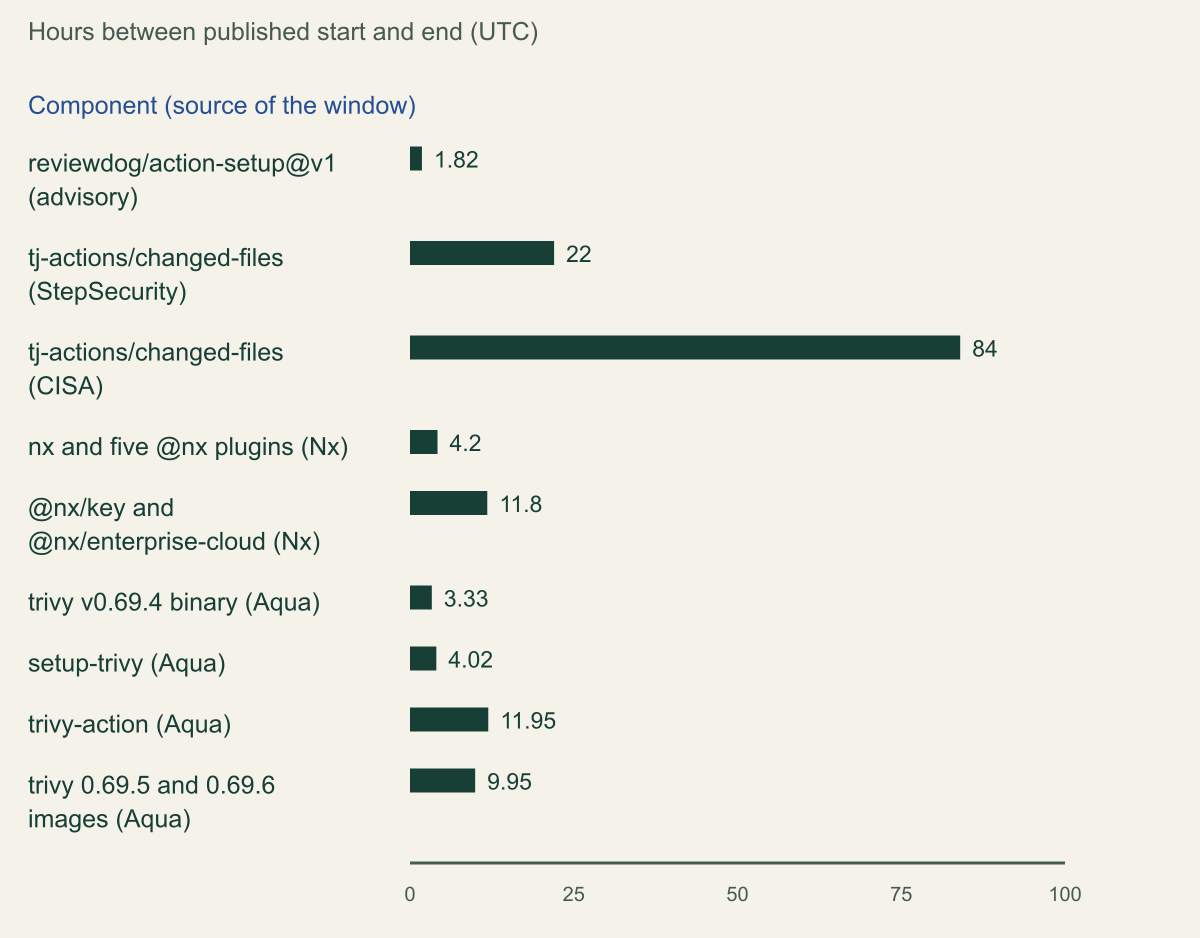
The chart compares windows calculated from published start and end times for four compromises. Short windows are not low risk. reviewdog/action-setup@v1 was malicious for 1 hour and 49 minutes, and any job that fetched it in that interval ran the payload with access to every secret the job held. [1] One incident can also have several windows. Trivy published four, one per distribution channel, and Nx's packages were removed at different times: the @nx/key and @nx/enterprise-cloud 3.2.0 versions stayed on npm for 11.8 hours, against 4.2 hours for nx itself. [2][7]
Some compromises have no single window. The Shai-Hulud worm spread in September 2025 by authenticating to npm as each compromised developer and publishing infected versions of their other packages, reaching more than 500 packages. [9] CISA's guidance was to review npm dependencies and pin to releases from before September 16, 2025. [9] For a worm like this, scope by package version from lockfiles and artifact caches first, then use time to establish when each bad version first entered a build.
| Source | Start (UTC) | End (UTC) | Hours |
|---|---|---|---|
| Maintainer advisory and GitHub Advisory Database | March 14, 2025 (date only) | March 15, 2025 (date only) | Not calculable |
| StepSecurity timeline | 2025-03-14 about 16:00 | 2025-03-15 about 14:00 | about 22 |
| CISA alert | 2025-03-12 00:00 | 2025-03-15 12:00 | 84 |
Published exposure windows ranged from under 2 hours to 84
The same tj-actions incident yields 22 or 84 hours depending on the source, so record which window you used. [8][4]

Source. Calculated from timestamps in the reviewdog and Trivy advisories, the Nx advisory, StepSecurity's timeline and CISA's alert. [1][8][4][7][2]
Method. Hours equal end minus start, rounded to two decimals. Nx times were published in EDT and converted to UTC by adding 4 hours. A tilde marks a time the source gives as approximate. The maintainer's date-only window for tj-actions cannot be expressed in hours and is excluded.
Accessible table and figure data
| Component and window source | Hours | Start (UTC) | End (UTC) |
|---|---|---|---|
| reviewdog/action-setup@v1 (advisory) | 1.82 | 2025-03-11 18:42 | 2025-03-11 20:31 |
| tj-actions/changed-files (StepSecurity) | 22 | 2025-03-14 ~16:00 | 2025-03-15 ~14:00 |
| tj-actions/changed-files (CISA) | 84 | 2025-03-12 00:00 | 2025-03-15 12:00 |
| nx and five @nx plugins (Nx) | 4.2 | 2025-08-26 22:32 | 2025-08-27 02:44 |
| @nx/key and @nx/enterprise-cloud (Nx) | 11.8 | 2025-08-26 22:32 | 2025-08-27 10:20 |
| trivy v0.69.4 binary (Aqua) | 3.33 | 2026-03-19 18:22 | 2026-03-19 ~21:42 |
| setup-trivy (Aqua) | 4.02 | 2026-03-19 ~17:43 | 2026-03-19 ~21:44 |
| trivy-action (Aqua) | 11.95 | 2026-03-19 ~17:43 | 2026-03-20 ~05:40 |
| trivy 0.69.5 and 0.69.6 images (Aqua) | 9.95 | 2026-03-22 15:43 | 2026-03-23 ~01:40 |
| Component and window source | Hours | Start (UTC) | End (UTC) |
|---|---|---|---|
| reviewdog/action-setup@v1 (advisory) | 1.82 | 2025-03-11 18:42 | 2025-03-11 20:31 |
| tj-actions/changed-files (StepSecurity) | 22 | 2025-03-14 ~16:00 | 2025-03-15 ~14:00 |
| tj-actions/changed-files (CISA) | 84 | 2025-03-12 00:00 | 2025-03-15 12:00 |
| nx and five @nx plugins (Nx) | 4.2 | 2025-08-26 22:32 | 2025-08-27 02:44 |
| @nx/key and @nx/enterprise-cloud (Nx) | 11.8 | 2025-08-26 22:32 | 2025-08-27 10:20 |
| trivy v0.69.4 binary (Aqua) | 3.33 | 2026-03-19 18:22 | 2026-03-19 ~21:42 |
| setup-trivy (Aqua) | 4.02 | 2026-03-19 ~17:43 | 2026-03-19 ~21:44 |
| trivy-action (Aqua) | 11.95 | 2026-03-19 ~17:43 | 2026-03-20 ~05:40 |
| trivy 0.69.5 and 0.69.6 images (Aqua) | 9.95 | 2026-03-22 15:43 | 2026-03-23 ~01:40 |
Preserve evidence before retention deletes it
GitHub deletes workflow logs and artifacts after 90 days by default. Public repositories can set 1 to 90 days and private repositories 1 to 400, and a change applies only to new objects, never retroactively. Since October 1, 2026, the same setting also governs checks, workflow runs and commit statuses, which were previously kept for 400 days or more whatever the setting. [10] For a compromise discovered late, the run records themselves may now be gone, not only their logs, and raising retention during the incident does not bring anything back.
The organization audit log keeps 180 days of web events, but Git events for only seven days. The events that matter most here, created and completed workflow runs and started jobs with the secrets provided to each, are not shown in the web interface at all. They are available through JSON or CSV export, the REST API (on GitHub Enterprise Cloud) and streaming. [5] CloudTrail Event history covers 90 days of management events in each Region. [11] Anything older depends on what you streamed or delivered to storage yourself.
Download first, then delete. If a log contains an unredacted secret, GitHub's guidance is to delete the log and rotate the secret, and deleting requires write access. [12][13] Fetch the archive before you delete it, store it in a restricted location with a hash, and keep it, because it is the record of exactly what was exposed. The download endpoint returns a redirect URL that expires after one minute. [14] An archive from a partially re-run workflow contains only the re-run jobs, so fetch each attempt separately. [13]
| Evidence | Default retention | Where to get it |
|---|---|---|
| Job logs and artifacts | 90 days (public 1 to 90, private 1 to 400) | Web interface or REST logs endpoint |
| Workflow runs, checks, statuses | Same setting, since October 1, 2026 | REST workflow runs endpoint |
| Audit log web events | 180 days | Web interface, export, REST, streaming |
| Run and job events with secrets passed | 180 days, not in web interface | Export, REST, streaming |
| Git events | 7 days | JSON export, REST, streaming |
| CloudTrail Event history | 90 days, management events, per Region | Console or lookup-events |
| Streamed audit log or trail | Your own retention policy | Your SIEM or storage bucket |
Find every run inside the window
List the repositories that could have referenced the component, including archived repositories, then use the REST API to list runs whose created time falls in the window. The endpoint returns at most 1,000 results for a search that filters on created, so split a long window into shorter ranges and check that no range hits the cap. [14] Widen the start of the range as well. A job downloads its actions when it starts, so a run created shortly before the window could still have fetched the malicious version if its jobs sat in a queue. That buffer is a reasoned allowance, not a documented rule; size it from your own longest queue times.
Do not decide from the workflow file. Version tags were moved in these incidents: the tj-actions attacker pointed existing tags at commit 0e58ed8671d6b60d0890c21b07f8835ace038e67, and the Trivy attacker force-pushed 76 of the 77 trivy-action tags. [3][2] A reference to @v45 therefore says nothing about which code ran. The job log does: for every action it downloads, the runner writes a line of the form Download action repository 'owner/name@ref' (SHA:...) with the commit the ref resolved to at that moment; for immutable action packages it writes a Source commit SHA line instead. [15] Compare that SHA with the commits in the advisory, and search for nested action names too, because a composite action fetches its own dependencies.
Package compromises leave different traces. The evidence is the lockfile at the run's head_sha, the install step's log and your registry proxy's download records. Nx's malicious versions ran a postinstall script on installation, and its maintainers warned that transitive dependencies, editors and other tools can trigger installs nobody typed. [7] Purge caches as part of the scope: Nx told maintainers of internal registries such as Artifactory and Nexus to remove the bad versions, and Trivy warns that removed artifacts may linger in intermediary caches. [7][2]
For actions, the fragment below applies this to the Trivy action window. It fetches each attempt's log archive separately and prints the resolved commits for later comparison. Keep the archives: they are both the run inventory's evidence and the material for the next step.
# Example fragment: list runs created in a window, then show which commit
# each job resolved for the affected actions. Placeholders: example-org, example-repo.
OWNER=example-org
REPO=example-repo
# Trivy action window (about 17:43 March 19 to 05:40 March 20 UTC), start widened by 6 hours
WINDOW='2026-03-19T11:43:00Z..2026-03-20T06:00:00Z'

gh api -X GET "repos/$OWNER/$REPO/actions/runs" \
  -f created="$WINDOW" -F per_page=100 --paginate \
  --jq '.workflow_runs[] | [.id, .run_attempt, .head_sha, .path, .created_at] | @tsv' > runs.tsv

while IFS=$'\t' read -r id attempts sha path created; do
  for n in $(seq 1 "$attempts"); do
    gh api "repos/$OWNER/$REPO/actions/runs/$id/attempts/$n/logs" > "logs-$id-$n.zip"
    unzip -p "logs-$id-$n.zip" \
      | grep -E "Download action repository 'aquasecurity/(trivy-action|setup-trivy)@" \
      | sed "s/^/$id attempt $n: /"
  done
done < runs.tsv
Determine what each run could reach
Treat every credential available to a job that executed the payload as exposed, whether or not it shows up in a log. GitHub's own guidance is that a compromised action has access to all secrets configured for the repository and may be able to use the GITHUB_TOKEN to write to it. [12] Both the tj-actions and Trivy payloads read the Runner.Worker process memory, which is where those secrets sit during the job. [3][2]
Build the list per job from the audit log, not by reading YAML at each commit. The workflows.prepared_workflow_job event records that a job started and includes secrets_passed, along with job_workflow_ref, environment_name and the runner's name, group and labels. [6] Join it to your run inventory on workflow_run_id and you have the named secrets for every affected job. Named secrets are only part of the reach, though:
- The
GITHUB_TOKENexpires when the job finishes, or after at most 6 hours on GitHub-hosted runners and 24 hours on self-hosted runners. [16] It has usually expired by the time you investigate; what matters is what it did during the job. Nx believes its attacker used a workflow token to trigger a second workflow that held the npm token. [7] - A job with permission to request an OIDC token could have assumed any cloud role that trusts its subject. An AWS session from
AssumeRoleWithWebIdentitylasts one hour by default and up to the role's maximum, which can be 12 hours. [17] - Files on the runner count. The Trivy payload swept more than 50 paths for SSH keys, AWS, Google Cloud and Azure credentials, Kubernetes tokens, Docker configs and
.envfiles. [2] Credentials written by earlier steps, such as a registry login or a cloud CLI profile, were on disk for later steps to read. - Self-hosted runners can be persistently compromised by code in a workflow. [12] Rebuild any non-ephemeral runner that executed the payload, and add the host's own identity, such as an instance role, to the list.
A worked example
Consider a hypothetical repository, example-org/example-api, whose pull request workflow runs aquasecurity/trivy-action@0.28.0 in a scan job and has a separate release job that never uses Trivy. Listing runs for the widened Trivy window returns 14 runs. Twelve of them started in the buffer before 17:43 UTC, and their logs show the action resolving to the same commit as the new v0.28.0 tag, which the maintainers published, pointing at the original legitimate commit, after deleting the hijacked 0.28.0 tag. [2] Two runs, whose scan jobs started at 18:05 and 23:10 UTC on March 19, show a different commit. Both times fall inside the trivy-action window, which ran until about 05:40 the next morning, even though the 23:10 job started after the setup-trivy window had closed. [2]
For those two jobs, the exported workflows.prepared_workflow_job events list SNYK_TOKEN and SLACK_WEBHOOK_URL in secrets_passed, and the workflow grants id-token: write so the job can upload results through an AWS role. The credential list is therefore two named secrets plus any role sessions issued during those two jobs. The release job's publishing token stays off the list, provided the scan job's token could not modify or trigger it: it ran in a different job, and GitHub-hosted runners execute jobs in ephemeral, clean, isolated virtual machines. [12] Scoping by name would have rotated everything the repository holds and still left open whether the role was used.
Rotate in the right order
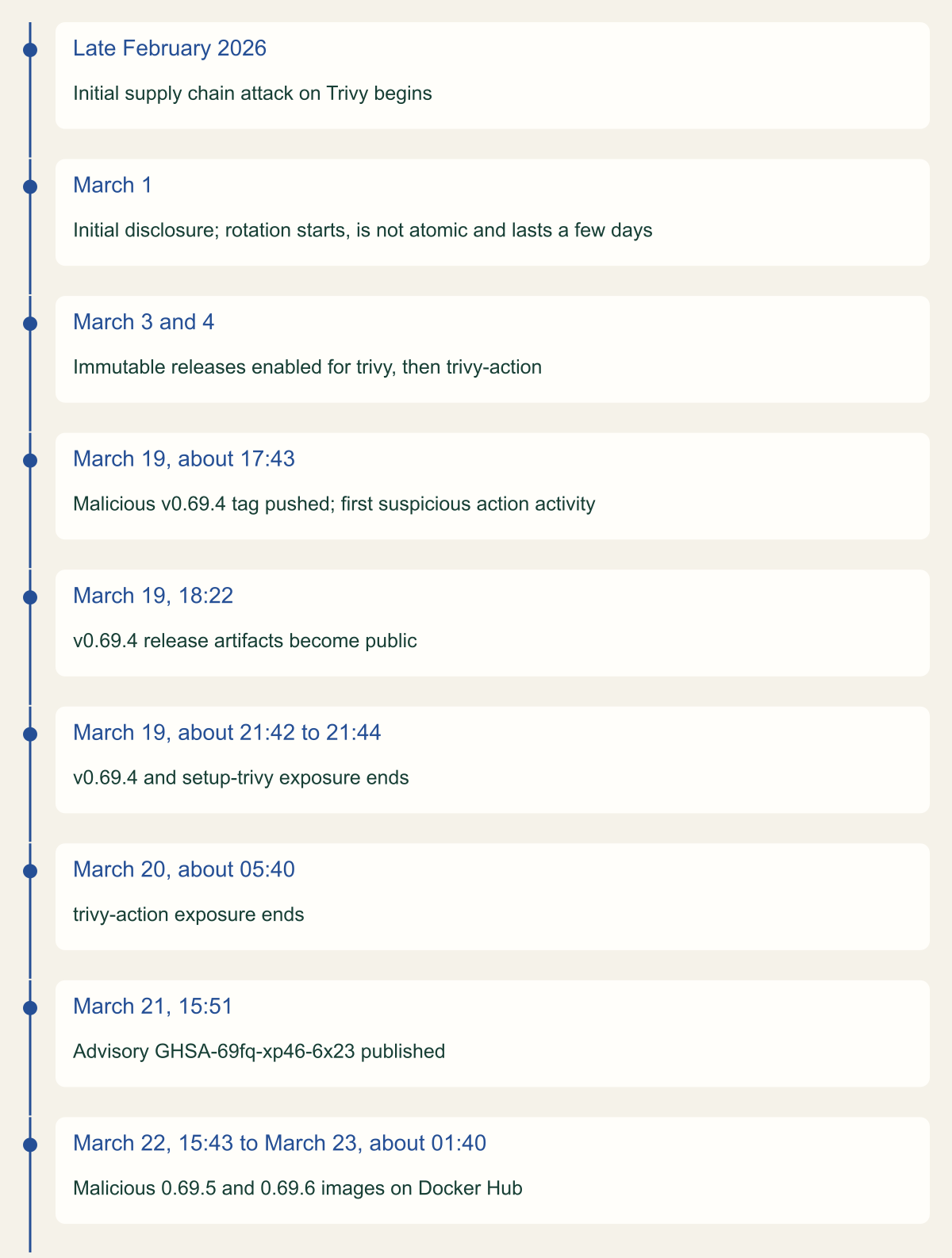
Trivy's advisory is the clearest public account of rotation going wrong. After the initial disclosure on March 1, 2026, credentials were rotated, but not atomically: not everything was revoked at once, and the rotation took a few days. The maintainers state that the attacker could have used a still-valid token to exfiltrate the newly rotated secrets, and that this could have allowed the March 19 attack. [2] The timeline at the end of this section shows the sequence. The order below is built to avoid that gap:
- Stop the bleeding first. Remove or replace the malicious reference, or disable the affected workflows, before issuing anything new; otherwise the new secret flows straight into the payload.
- Revoke together, at the issuer, every credential that can read, mint or reset other credentials: GitHub personal access tokens and GitHub App private keys with administrative or secrets scope, package publishing tokens, and cloud keys with IAM permissions. Overwriting the repository secret alone leaves the old value valid wherever it was copied.
- Revoke sessions already issued. AWS role credentials stay valid until they expire; Revoke active sessions attaches an
AWSRevokeOlderSessionspolicy that denies sessions issued before roughly 30 seconds after you click, and leaves later sessions alone. [18] - Issue replacements only to workflows you have cleaned, then confirm each consumer picked up the new value before calling the rotation complete.
A partial rotation preceded the second Trivy compromise
Eighteen days separated the first disclosure from the attack that the maintainers link to a non-atomic rotation. [2]

Source. Aqua Security advisory GHSA-69fq-xp46-6x23 and its GitHub publication timestamp. [2]
Method. Dates and times transcribed from the advisory's summary, exposure window table, root cause and affected components sections. Ordinal layout; spacing does not represent elapsed time.
Accessible table and figure data
| Date (UTC) | Event |
|---|---|
| Late February 2026 | Initial supply chain attack on Trivy begins |
| March 1 | Initial disclosure; rotation starts, is not atomic and lasts a few days |
| March 3 and 4 | Immutable releases enabled for trivy, then trivy-action |
| March 19, about 17:43 | Malicious v0.69.4 tag pushed; first suspicious action activity |
| March 19, 18:22 | v0.69.4 release artifacts become public |
| March 19, about 21:42 to 21:44 | v0.69.4 and setup-trivy exposure ends |
| March 20, about 05:40 | trivy-action exposure ends |
| March 21, 15:51 | Advisory GHSA-69fq-xp46-6x23 published |
| March 22, 15:43 to March 23, about 01:40 | Malicious 0.69.5 and 0.69.6 images on Docker Hub |
| Date (UTC) | Event |
|---|---|
| Late February 2026 | Initial supply chain attack on Trivy begins |
| March 1 | Initial disclosure; rotation starts, is not atomic and lasts a few days |
| March 3 and 4 | Immutable releases enabled for trivy, then trivy-action |
| March 19, about 17:43 | Malicious v0.69.4 tag pushed; first suspicious action activity |
| March 19, 18:22 | v0.69.4 release artifacts become public |
| March 19, about 21:42 to 21:44 | v0.69.4 and setup-trivy exposure ends |
| March 20, about 05:40 | trivy-action exposure ends |
| March 21, 15:51 | Advisory GHSA-69fq-xp46-6x23 published |
| March 22, 15:43 to March 23, about 01:40 | Malicious 0.69.5 and 0.69.6 images on Docker Hub |
Look for use of stolen credentials
Search from the start of the exposure window to the later of two times: when you revoked the credential, and when it would have expired anyway. Revocation stops new use; it does not tell you about use that already happened.
On GitHub, most audit log events carry hashed_token, token_id and programmatic_access_type. [6] To find everything a leaked token did, compute its SHA-256 hash in base64 and search for hashed_token:"VALUE". Searches in the web interface and the REST API do not return Git events; those need an export, and Git events only go back seven days. [19][5] Look as well for the moves these attackers made: new repositories (Nx told users to check repo.create in their security log), changed workflow files and deleted runs. [7] Nx reconstructed the attacker's since-deleted pull request and a deleted publish.yml workflow from its audit log after the fact, and the event catalogue records run deletions as workflows.delete_workflow_run. [7][6]
In AWS, lookup-events filters on AccessKeyId across 90 days of management events, but only in one Region per call and at two requests per second per account and Region. [11] That suits a leaked IAM user key. For role sessions you rarely know the temporary key ID in advance, because accessKeyId in each event is the session's own key. [20] Start from the role instead: the AssumeRoleWithWebIdentity entry in CloudTrail includes the subject of the presented token. [17] Compare every assumption of a CI role in the window with your run inventory. An assumption with no matching run, or API calls under that session from an unexpected source address, is a finding.
Be precise about what the logs cannot show. Event history holds management events only, so reads of objects in S3 or secrets fetched from a store you did not log as data events leave no record there. If no trail captured those data events, record that the question cannot be answered rather than reporting no access.
LEAKED_ACCESS_KEY_ID to the exposed key ID. Run the AWS loop for every Region you use.# Example fragment: look for use of a leaked GitHub token and AWS access key.
# GitHub audit log REST search requires GitHub Enterprise Cloud.
HASH=$(printf '%s' "$LEAKED_TOKEN" | openssl dgst -sha256 -binary | base64)
ENC=$(python3 -c 'import sys, urllib.parse; print(urllib.parse.quote(sys.argv[1], safe=""))' "$HASH")
gh api "orgs/example-org/audit-log?phrase=hashed_token:%22${ENC}%22&per_page=100" --paginate \
--jq '.[] | [."@timestamp", .action, .actor, .repo] | @tsv'
# AWS: management events signed with one access key ID, one Region per call.
for region in us-east-1 eu-west-1; do
aws cloudtrail lookup-events --region "$region" \
--lookup-attributes AttributeKey=AccessKeyId,AttributeValue="$LEAKED_ACCESS_KEY_ID" \
--start-time 2026-03-19T11:43:00Z \
--query 'Events[].[EventTime,EventName,Username]' --output text
doneClose the investigation with evidence
An investigation like this ends with a record that someone else can check, not with a statement that secrets were rotated. Keep it short and specific, in five parts:
- The window in UTC, with the source for each boundary and the reason the widest one was chosen.
- The run inventory: repository, run ID, attempt, head commit, start time and the action or package commit the log shows was fetched.
- Credentials per affected job, from
secrets_passedplus tokens, OIDC roles, runner files and host identities. - Revocation and session revocation times for each credential, and confirmation that consumers adopted replacements.
- Every use search: the query, its time range, its result, and the logs that were unavailable.
Method and provenance
Source-led incident response analysis of maintainer advisories, GitHub Advisory Database entries, CISA alerts, the original researchers' timeline, and GitHub and AWS documentation, with exposure windows calculated from published timestamps. Sources were reviewed on October 7, 2026.
No GitHub organization, pipeline, cloud account or live log data was inspected. Exposure windows are bounded by the precision of the cited advisories, several of which give approximate times, and retention behavior reflects GitHub and AWS documentation on the review date.
AI assistance. AI assisted research synthesis, drafting, calculation checks and visual production, with deterministic editorial checks. No personal incident response experience, independent human review or live test is claimed.
Published under the Cloud Security Desk organizational byline. Read the practitioner guide policy.
References
- Multiple Reviewdog actions were compromised during a specific time period (GHSA-qmg3-hpqr-gqvc) GitHub Advisory Database. Published . Accessed .
- Trivy ecosystem supply chain temporarily compromised (GHSA-69fq-xp46-6x23) Aqua Security. Published . Accessed .
- tj-actions changed-files through 45.0.7 allows remote attackers to discover secrets by reading actions logs (GHSA-mrrh-fwg8-r2c3) GitHub Advisory Database. Published . Accessed .
- Reviewing the audit log for your organization (GitHub Enterprise Cloud) GitHub Docs. Accessed .
- Audit log events for your organization GitHub Docs. Accessed .
- Malicious versions of Nx and some supporting plugins were published (GHSA-cxm3-wv7p-598c) Nx (nrwl). Published . Accessed .
- Harden-Runner detection: tj-actions/changed-files action is compromised StepSecurity. Accessed .
- Widespread Supply Chain Compromise Impacting npm Ecosystem CISA. Published . Accessed .
- Viewing recent management events with the AWS CLI AWS. Accessed .
- Secure use reference for GitHub Actions GitHub Docs. Accessed .
- Using workflow run logs GitHub Docs. Accessed .
- REST API endpoints for workflow runs GitHub Docs. Accessed .
- ActionManager.cs in the GitHub Actions runner source GitHub (actions/runner). Accessed .
- GITHUB_TOKEN GitHub Docs. Accessed .
- AssumeRoleWithWebIdentity AWS. Accessed .
- Revoke IAM role temporary security credentials AWS. Accessed .
- Identifying audit log events performed by an access token GitHub Docs. Accessed .
- CloudTrail userIdentity element AWS. Accessed .