
A migration guide for maintainers and platform teams who publish npm packages from CI, based on npm documentation, GitHub changelog posts, a CISA alert and OpenJS Foundation guidance reviewed in October 2026. It covers the token changes since late 2025, the OIDC exchange, a stage-only workflow example, the OpenJS concerns and when a token is still needed.
At a glance
Key findings
- npm revoked every classic token on December 9, 2025; granular write tokens now default to 7 days and cannot exceed 90, and
npm loginissues two-hour sessions. [2][3][5] - Granular tokens that bypass 2FA lost account and trust configuration actions in August 2026, and npm targets January 2027 to remove their direct publishing. [6][7][20]
- A trusted publisher exchanges a CI-issued OIDC ID token for a short-lived token scoped to one package; npm documents no fixed lifetime for it. [1][10]
- Trusted publisher configurations created after September 3, 2026 stage by default, and unvalidated ones expire 48 hours after creation. [1][8][14]
- OpenJS advised in November 2025 against trusted publishing for critical packages; staging and bulk configuration answer some of its concerns, while code running in the publish job remains a risk. [1][15][18]
What changed for npm tokens
To move a package to trusted publishing, register the release workflow as a trusted publisher in the package settings on npmjs.com, give only the publish job the id-token: write permission, and run a release within 48 hours so npm validates the configuration. Once a release has gone through, set the package to Require two-factor authentication and disallow tokens, then revoke the automation token and delete it from CI secrets. You need npm CLI 11.5.1 or later and Node 22.14.0 or later to publish this way, and npm 11.15.0 or later to use npm stage publish. [1][8][9]
Tokens changed in a short burst. GitHub announced on September 29, 2025 that granular tokens would get a default expiration of seven days instead of 30, and a maximum of 90 days where there had been none. On November 5, 2025 npm stopped creating classic tokens through the website, CLI and API, capped existing granular write tokens at 90 days, and made new write tokens enforce 2FA unless the creator ticks a Bypass 2FA box that is off by default. A write token that would have expired later was moved to February 3, 2026. The classic token revocation planned for November 19 happened on December 9, 2025, when npm login also switched to two-hour session tokens. [2][3][4][5]
The pressure continued into 2026. Since early August 2026, granular tokens set to bypass 2FA can no longer create or delete tokens, change maintainers or package access, or edit trusted publishing configuration. [6][20] npm is targeting January 2027 to stop those tokens from publishing directly, so any pipeline that still runs npm publish with a stored token has a deadline. The two exits GitHub names are trusted publishing over OIDC and staged publishing with human approval. [6][7]
Trusted publishing removes the stored publish secret, but publish authority does not disappear: it moves to the workflow file, the events that start it, the environment that gates it and the people who can change any of those. The rest of this guide sets that up deliberately.
| Credential | Before September 2025 | At review, October 2026 |
|---|---|---|
| Classic token | Created on website, CLI or API | Creation stopped November 5, 2025; all revoked December 9, 2025 |
| Granular write token, maximum | No maximum | 90 days |
| Granular write token, default | 30 days | 7 days |
| Existing long-dated write token | Kept its own expiry | Expiry moved to February 3, 2026 at the latest |
| npm login credential | Long-lived token | Two-hour session, 2FA enforced on publish |
| Stage-only write token | Not available | Since September 18, 2026; cannot run npm publish |
| Trusted publishing token | Not applicable | Short-lived, per package; exact lifetime not documented |
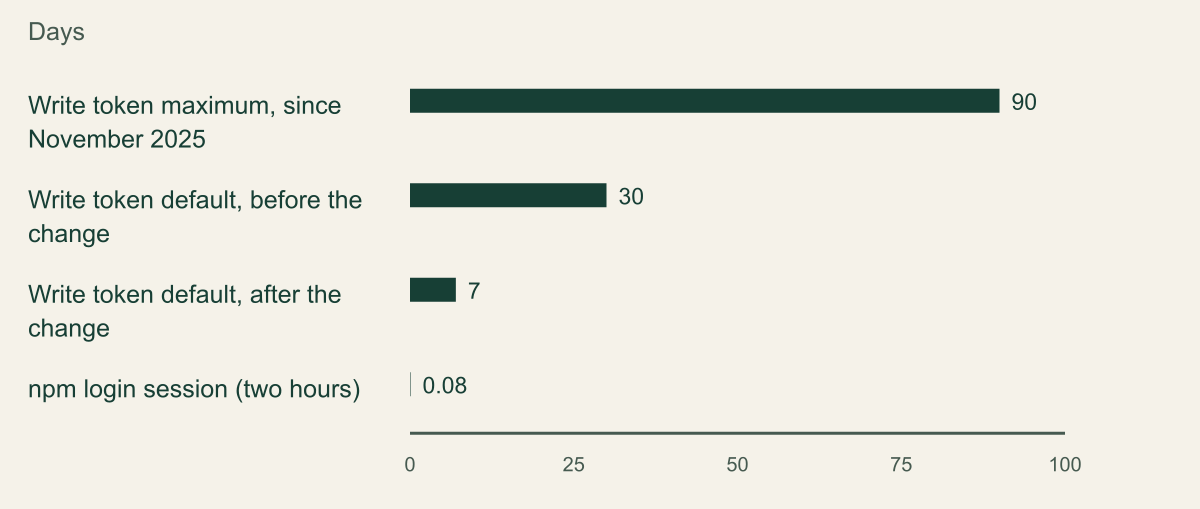
Write tokens now expire within 90 days
The default write-token lifetime fell from 30 days to 7 and the maximum went from none to 90 days; an npm login session lasts two hours. [2][4][5]

Source. GitHub changelog, September 29 and December 9, 2025; GitHub community discussion 178140, October 27, 2025. [2][4][5]
Method. Values copied from the cited posts in days. The two-hour session is converted at 2 divided by 24 and rounded to 0.08 days. The previous write-token maximum (none) cannot be plotted and appears in the table above. The trusted publishing token is omitted because npm publishes no fixed lifetime.
Accessible table and figure data
| Credential limit | Days |
|---|---|
| Write token maximum, since November 2025 | 90 |
| Write token default, before the change | 30 |
| Write token default, after the change | 7 |
| npm login session (two hours) | 0.08 |
| Credential limit | Days |
|---|---|
| Write token maximum, since November 2025 | 90 |
| Write token default, before the change | 30 |
| Write token default, after the change | 7 |
| npm login session (two hours) | 0.08 |
How trusted publishing works
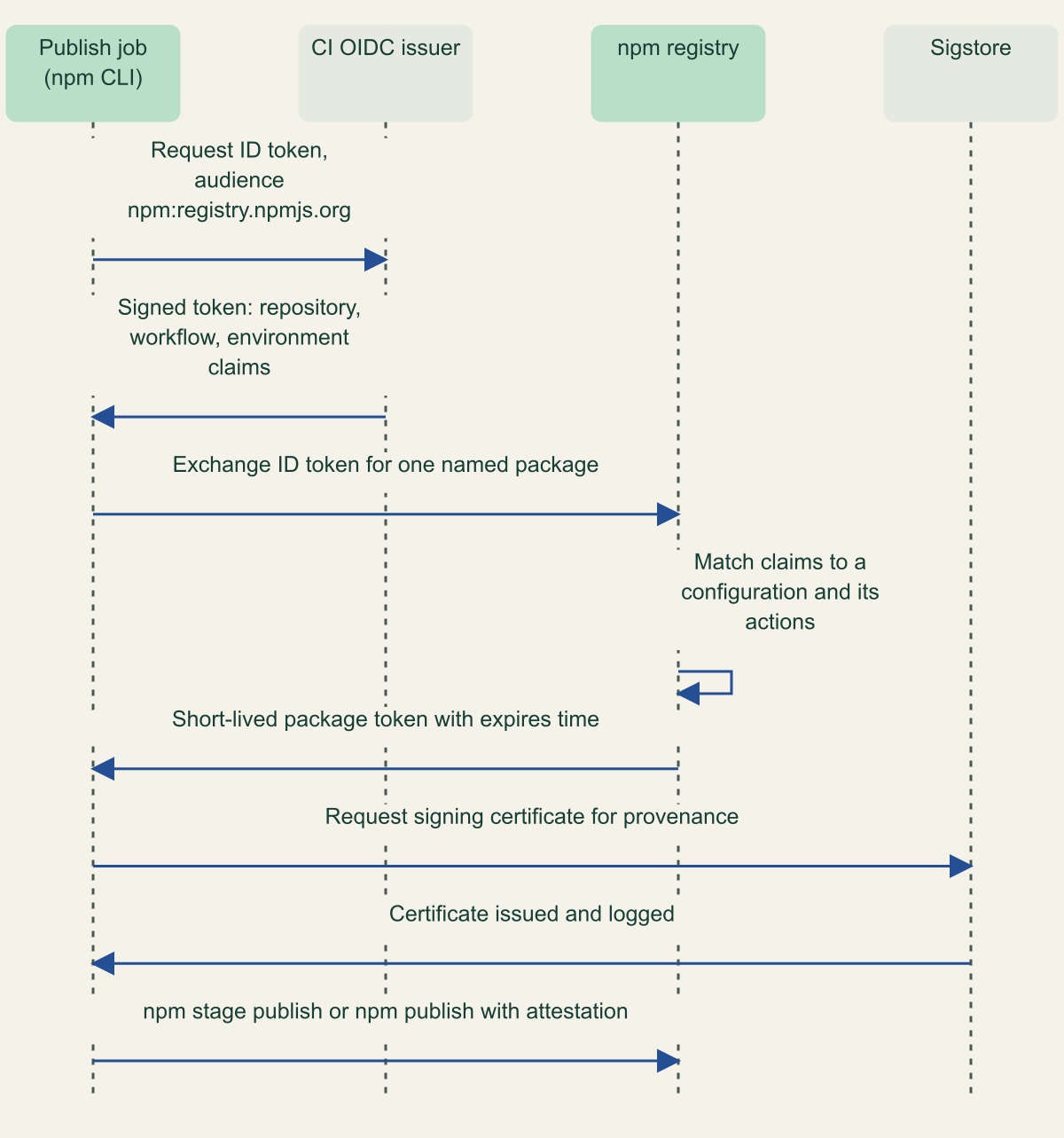
A trusted publisher is a registry-side rule that says which CI identity may obtain a publish credential for one package. npm accepts publishes from that workflow in addition to tokens and interactive publishes, which is why the disallow-tokens step matters later. The CLI detects a supported OIDC environment by itself and tries it before falling back to a token. [1]
The exchange is short. The job asks its CI provider for an OIDC ID token whose audience is npm:registry.npmjs.org. The CLI sends that token to POST /-/npm/v1/oidc/token/exchange/package/{package_name}, and a successful response returns token_type set to oidc, a registry token for that one package and an expires timestamp. npm describes the token only as short-lived and publishes no fixed duration, so nothing in a pipeline should depend on how long it lasts. [10] On GitHub the ID token carries claims such as repository, workflow_ref, job_workflow_ref, environment, event_name, ref and runner_environment. The id-token: write permission lets a job request that token; it grants no write access to anything else. [11]
For GitHub Actions the configuration names an organization or user, a repository, a workflow filename and, optionally, an environment. Enter the filename alone, such as release.yml, for a file that lives in .github/workflows/. Every field is case-sensitive, npm does not check the configuration when you save it, and the repository.url in package.json must match the GitHub repository exactly. A workflow that calls a reusable workflow is validated against the caller's filename, not the file that runs npm publish, and both need id-token: write. [1]
Each configuration also carries allowed actions. npm stage publish is always permitted; direct npm publish and npm dist-tag are separate opt-ins, and dist-tag management over OIDC needs npm 11.21.0 or 12.2.0 or later. OIDC covers nothing beyond those operations: install, view and access still need ordinary authentication, approving a staged version needs an interactive 2FA session, and npm whoami says nothing about trusted publishing permissions. [1]
One package, one exchange, one short-lived token
The registry trades a CI-issued ID token for a token scoped to a single package, after matching it to a configuration and its allowed actions. [1][10][19]

Source. npm trusted publishing documentation, npm registry API (exchangeOidcToken) and npm provenance documentation. [1][10][19]
Method. Sequence transcribed from the cited documentation. The Sigstore steps apply only when provenance is generated (GitHub Actions or GitLab CI/CD, public repository, public package). Token lifetimes are not shown because npm does not document them.
Accessible table and figure data
| From | To | Message |
|---|---|---|
| Publish job | OIDC issuer | Request ID token for audience npm:registry.npmjs.org |
| OIDC issuer | Publish job | Signed token with repository, workflow and environment claims |
| Publish job | npm registry | Exchange the ID token for one named package |
| npm registry | npm registry | Match claims to a configuration and its allowed actions |
| npm registry | Publish job | Short-lived package token with an expires time |
| Publish job | Sigstore | Request signing certificate for provenance |
| Sigstore | Publish job | Certificate issued and logged in transparency log |
| Publish job | npm registry | npm stage publish or npm publish with attestation |
| From | To | Message |
|---|---|---|
| Publish job | OIDC issuer | Request ID token for audience npm:registry.npmjs.org |
| OIDC issuer | Publish job | Signed token with repository, workflow and environment claims |
| Publish job | npm registry | Exchange the ID token for one named package |
| npm registry | npm registry | Match claims to a configuration and its allowed actions |
| npm registry | Publish job | Short-lived package token with an expires time |
| Publish job | Sigstore | Request signing certificate for provenance |
| Sigstore | Publish job | Certificate issued and logged in transparency log |
| Publish job | npm registry | npm stage publish or npm publish with attestation |
Trusted publishing kept changing in 2026
Trusted publishing reached general availability on July 31, 2025 for GitHub Actions on GitHub-hosted runners and GitLab CI/CD on GitLab.com shared runners, and it made the --provenance flag unnecessary for those publishes. [12] CircleCI cloud has since been added, without provenance. Self-hosted runners are still unsupported. [1]
Staged publishing became generally available on May 22, 2026. Instead of going live, the tarball lands in a queue and a maintainer approves it with 2FA, on npmjs.com or with npm stage approve. Staging itself needs no 2FA, so CI can do it unattended. [9][13] Staging also changed, in two steps, what a configuration allows by default, so the answer depends on when it was created. Configurations created before May 20, 2026 were set to allow npm publish only. Those created before September 3, 2026 must name at least one allowed action. Those created after September 3 allow staging, and direct publishing has to be switched on. [1][14] Two packages configured a few months apart can therefore behave differently, so read each configuration rather than assuming.
On September 3, 2026 npm also lifted the limit of one configuration per package (the documentation now allows up to 10) and disabled the approve button until malware scanning finishes. [1][14] On October 2, 2026 it made unvalidated configurations expire 48 hours after creation. The first successful publish binds a configuration to the repository's immutable identity, which limits the risk of trusting a repository or project name that later changes ownership. The same change rejects OIDC tokens from issue_comment events, alongside the existing block on pull_request_target. [1][8]
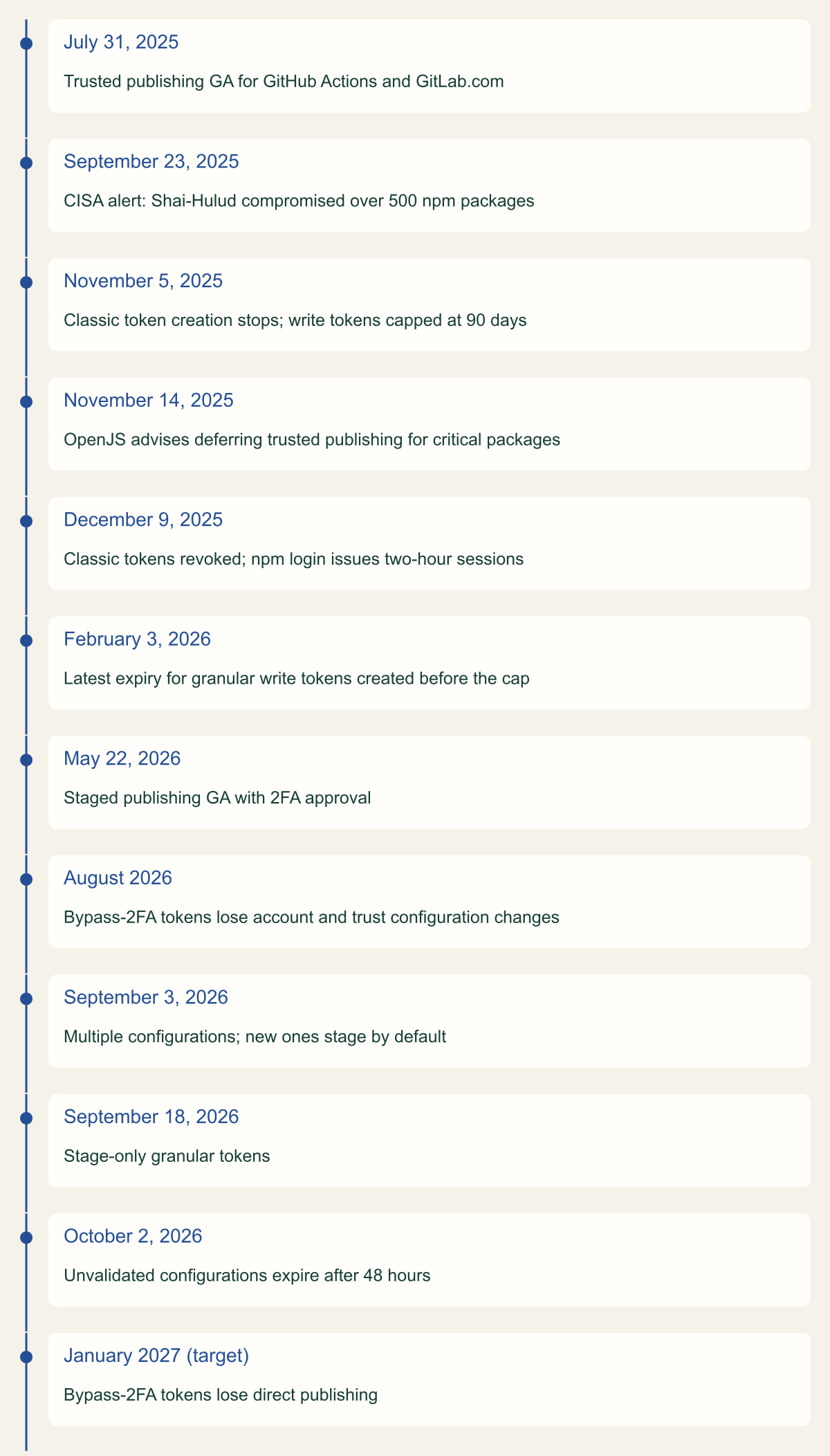
Fifteen months of npm publishing changes and one deadline ahead
Token restrictions arrived in late 2025; 2026 added staging, stage-only defaults and expiry for unvalidated trust. [3][5][6][8][12][13][14]

Source. GitHub changelog posts, GitHub community discussion 178140, CISA and OpenJS Foundation. [3][4][5][6][7][8][12][13][14][17][18]
Method. Dates copied from the cited posts; month-only dates are shown as published, and January 2027 is a stated target, not a completed change. Ordinal layout: spacing does not represent elapsed time.
Accessible table and figure data
| Date | Change |
|---|---|
| July 31, 2025 | Trusted publishing GA for GitHub Actions and GitLab.com |
| September 23, 2025 | CISA alert: Shai-Hulud compromised over 500 npm packages |
| November 5, 2025 | Classic token creation stops; write tokens capped at 90 days |
| November 14, 2025 | OpenJS advises deferring trusted publishing for critical packages |
| December 9, 2025 | Classic tokens revoked; npm login issues two-hour sessions |
| February 3, 2026 | Latest expiry for granular write tokens created before the cap |
| May 22, 2026 | Staged publishing GA with 2FA approval |
| August 2026 | Bypass-2FA tokens lose account and trust configuration changes |
| September 3, 2026 | Multiple configurations; new ones stage by default |
| September 18, 2026 | Stage-only granular tokens |
| October 2, 2026 | Unvalidated configurations expire after 48 hours |
| January 2027 (target) | Bypass-2FA tokens lose direct publishing |
| Date | Change |
|---|---|
| July 31, 2025 | Trusted publishing GA for GitHub Actions and GitLab.com |
| September 23, 2025 | CISA alert: Shai-Hulud compromised over 500 npm packages |
| November 5, 2025 | Classic token creation stops; write tokens capped at 90 days |
| November 14, 2025 | OpenJS advises deferring trusted publishing for critical packages |
| December 9, 2025 | Classic tokens revoked; npm login issues two-hour sessions |
| February 3, 2026 | Latest expiry for granular write tokens created before the cap |
| May 22, 2026 | Staged publishing GA with 2FA approval |
| August 2026 | Bypass-2FA tokens lose account and trust configuration changes |
| September 3, 2026 | Multiple configurations; new ones stage by default |
| September 18, 2026 | Stage-only granular tokens |
| October 2, 2026 | Unvalidated configurations expire after 48 hours |
| January 2027 (target) | Bypass-2FA tokens lose direct publishing |
Configure the release workflow
The workflow below is a hypothetical example for a package called @example-scope/example-package. It keeps tests in a job with no OIDC permission, grants id-token: write only to the publish job, binds that job to an environment named npm-release, and stages rather than publishes. It turns off the package manager cache, which npm's own example does with the comment never use caching in release builds, and installs a CLI new enough for npm stage publish. [1][9]
Two details in it are easy to get wrong. The trigger is a pushed tag matching v*, so anyone who can push such a tag can start a release; the protection section below deals with that. If the package installs private dependencies, pass a read-only granular token as NODE_AUTH_TOKEN on the npm ci step alone and leave the publish step without one, so the CLI uses OIDC. [1]
Other providers follow the same shape with different plumbing. A GitLab job declares id_tokens with NPM_ID_TOKEN set to audience npm:registry.npmjs.org, plus SIGSTORE_ID_TOKEN with audience sigstore for provenance, and the npm configuration names the namespace, project and top-level CI file path. A CircleCI job exports NPM_ID_TOKEN from circleci run oidc get with the npm audience, and the configuration takes organization, project and pipeline definition IDs, the VCS origin and, optionally, context IDs that restrict which jobs may publish. [1]
name: Release

on:
  push:
    tags:
      - 'v*'

permissions:
  contents: read

jobs:
  test:
    runs-on: ubuntu-latest
    steps:
      - uses: actions/checkout@v6
        with:
          persist-credentials: false
      - uses: actions/setup-node@v6
        with:
          node-version: '24'
      - run: npm ci
      - run: npm test

  publish:
    needs: test
    runs-on: ubuntu-latest
    environment: npm-release
    permissions:
      contents: read
      id-token: write
    steps:
      - uses: actions/checkout@v6
        with:
          persist-credentials: false
      - uses: actions/setup-node@v6
        with:
          node-version: '24'
          registry-url: 'https://registry.npmjs.org'
          package-manager-cache: false
      - run: npm install --global npm@^11.15.0
      - run: npm ci
      - run: npm run build --if-present
      - run: npm stage publish
Register the publisher and close the token path
On npmjs.com, open the package, go to Settings and then Trusted publishing, choose GitHub Actions and enter the owner, repository, release.yml and npm-release. Leave direct publishing unticked if you want every CI release to wait for approval. The same result is available from the command line with npm trust, which needs npm 11.15.0 or later, account-level 2FA and write access to a package that already exists; tokens set to bypass 2FA are not accepted. [1][15]
A brand new package has no settings page to configure. npm stage publish can create it from a session or token: npm publishes a public placeholder version 0.0.0-stage, and the real first version stays hidden until a maintainer approves it. Configure trust after that. [9] Maintainers with many packages can script npm trust; its documentation estimates about 80 packages fit inside the five-minute window in which the first 2FA approval is reused, with a two-second pause between calls. [15]
Do the cutover in this order so a release never depends on a half-configured path:
- Create the configuration, then push a release tag within 48 hours; an expired configuration must be deleted and recreated. [1][8]
- Approve the staged version with 2FA once the malware scan completes, and confirm that provenance was attached to it. [1][9][14]
- Switch Publishing access to Require two-factor authentication and disallow tokens. Trusted publishers keep working because they do not use token authentication. [1]
- Revoke the old automation token on npmjs.com and delete the repository or organization secret that held it. [1]
# Run locally as a maintainer with account 2FA enabled (npm 11.15.0 or later).
# Grants staging only: no --allow-publish, so direct npm publish stays refused.
npm trust github @example-scope/example-package \
  --file release.yml \
  --repo example-org/example-repo \
  --env npm-release \
  --allow-stage-publish

# Confirm what is registered for the package.
npm trust list @example-scope/example-package --json
When the first publish fails
Because npm does not check a configuration when it is saved, the first release is the test, and it has to succeed inside the 48-hour window. The usual symptom of a mismatch is an Unable to authenticate (ENEEDAUTH) error from npm stage publish or npm publish. npm's troubleshooting guidance points to a short list of causes. [1][8]
- The workflow filename differs from the configuration, including a
.ymlversus.yamlextension or a change of case. [1] - The job lacks
id-token: write, or a reusable workflow grants it in only one of the two files. [1] - The job runs on a self-hosted runner, which cannot use trusted publishing. [1]
- The
repository.urlinpackage.jsondoes not match the GitHub repository exactly, which often happens in a fork that kept the upstream value. [1] - The failure is in
npm cirather than publish, because a private dependency needs a read-only token that trusted publishing does not supply. [1]
Protect the workflow that now holds publish authority
After tokens are disallowed, a release can come from anyone who can make the registry see a matching ID token: someone who can change release.yml on a ref that runs it, push a tag that matches v*, satisfy the environment's protection rules, or edit the trusted publisher configuration. That list is an inference from how the claims are matched, and it is the real access review for the package. [1][11]
npm's claim that OIDC tokens cannot be extracted or reused is about storage: there is no secret left behind to steal. It does not stop code running inside the publish job, such as a compromised build dependency or action, from requesting its own ID token while the job runs, because the job holds id-token: write. Keeping the publish job small, and making it stage rather than publish, limits what such code can achieve. [1][11]
- Give the
npm-releaseenvironment required reviewers (up to six, with self-review prevented) and limit its deployment branches and tags to release tags. On GitHub Free, Pro and Team, required reviewers are available only for public repositories. [16] - Restrict who can create release tags, as npm recommends. [1] Require review for changes under
.github/workflows/too, because the workflow file is now part of the credential. - Never publish from
pull_request_targetorissue_comment; npm now rejects OIDC tokens from both. Usepush,releaseorworkflow_dispatch. [8] - Keep
id-token: writeoff every job except publish, and keep caching out of the release job. [1][11]
What the OpenJS guidance warned about
On November 14, 2025 the OpenJS Security Collaboration Space called npm's trusted publishing promising but not ready for critical packages. It recommended local publishing with non-SMS 2FA for small or critical projects, hardened CI with limited bot privileges for multi-maintainer teams, and deferring trusted publishing for security-sensitive packages until key controls matured. Its stated reasons were incomplete 2FA enforcement paths, setup fragility, per-package onboarding, token publishing remaining possible after onboarding, the configuration being changeable after an account takeover, and the view that trusted publishing in that state would not have prevented Shai-Hulud. [18]
Several of those gaps have since been addressed by GitHub, and some have not. The table pairs each concern with the documented position at review. This review found no later OpenJS statement withdrawing the November 2025 recommendation, so treat the right-hand column as GitHub's changes, not as OpenJS agreement.
A reasonable reading is that OpenJS's preference for a human with 2FA at the moment of release is now available inside the trusted publishing flow through staging, while its warnings about the CI job itself still apply. For a package with a few maintainers and high download counts, local publishing with 2FA remains a defensible choice; stage-only trusted publishing gives similar proof of presence while keeping the build in CI.
| OpenJS concern, November 2025 | Documented status, October 2026 |
|---|---|
| Incomplete 2FA enforcement paths | Staged versions need maintainer approval with 2FA; new configurations stage by default |
| Onboarding is manual, one package at a time | npm trust can script configuration across packages |
| Tokens can still publish after onboarding | Unchanged unless the package disallows tokens |
| Configuration can be edited after account takeover | Bypass-2FA tokens cannot change it since August 2026; a 2FA session still can |
| Fragile, case-sensitive setup | Still case-sensitive and unchecked at save; unvalidated configurations expire in 48 hours |
| Would not stop a Shai-Hulud style attack | Partly open: code in the publish job can still obtain a token, but staging adds a human gate |
Provenance and what it proves
Publishing through trusted publishing from GitHub Actions or GitLab CI/CD generates provenance automatically, with no --provenance flag, when the repository is public and the package is public. A private repository gets no provenance even for a public package, and CircleCI publishes carry none. [1]
npm attaches two attestations. The provenance attestation links the package to its source repository and build instructions; the publish attestation is generated by the registry when an authorized identity publishes. A package published with provenance is signed by Sigstore's public good servers and logged in a public transparency ledger. Consumers can check them with npm audit signatures, which reports registry signatures and verified attestations for installed packages. [19]
npm's documentation is explicit that provenance does not mean a package is free of malicious code. It proves which repository, workflow and commit produced the tarball. It does not prove that the commit was reviewed, that the build dependencies were clean, or that the workflow did what its author intended. A provenance record for a hijacked release workflow is accurate and still describes a malicious build, so consumers who verify provenance should also pin the expected repository and workflow. [19]
When a token is still needed
Trusted publishing is not meant for npm install, so the read-only install token described above stays. Self-hosted runners and CI systems other than GitHub Actions, GitLab.com and CircleCI cloud cannot use OIDC with npm, and commands such as npm access still need ordinary authentication. [1]
If a pipeline must keep a write token, make it a stage-only token, created with Read and write (stage only). npm rejects direct npm publish from such a token even when it is set to bypass 2FA, while still letting it stage, move dist-tags and deprecate versions. [7] Plan rotation around the 90-day maximum, scope the token to named packages, and expect bypass-2FA direct publishing to stop around January 2027. [3][6]
If a token may already have leaked, revoking it is the start rather than the end: the investigation needs the workflow runs that used it and every version published while it was valid.
Moving a package estate in order
Begin with an inventory: for each package, record how it publishes today, which tokens exist and whether any have bypass 2FA set, since those lose direct publishing around January 2027. Then upgrade the release job's npm CLI, split publishing into its own job with id-token: write and an environment, and create a stage-only trusted publisher. Run one real release inside the 48-hour validation window and approve it with 2FA.
Only after a staged release has succeeded, disallow tokens on the package and revoke the old ones. Last, put the release workflow, tag rules and environment reviewers under the same review as any production deployment, because together they are the package's publish credential now.
Method and provenance
Source-led technical analysis of npm documentation, the npm registry API reference, GitHub changelog posts and documentation, a CISA alert and OpenJS Foundation guidance, with an original workflow example and migration order. Sources were reviewed on October 7, 2026.
No npm account, package or CI pipeline was used. Token limits, feature defaults and dates are bounded to the cited sources as of the review date; npm documents no lifetime for the trusted publishing token, and the January 2027 bypass-2FA change is a stated target.
AI assistance. AI assisted research synthesis, drafting, diagram planning and visual production, with deterministic editorial checks. No personal deployment experience, independent human review or live test is claimed.
Published under the Cloud Security Desk organizational byline. Read the practitioner guide policy.
References
- Trusted publishing for npm packages npm Docs. Accessed .
- Strengthening npm security: Important changes to authentication and token management GitHub. Published . Accessed .
- npm security update: Classic token creation disabled and granular token changes GitHub. Published . Accessed .
- Revised npm Security Timeline Based on Your Feedback (community discussion 178140) GitHub. Published . Accessed .
- npm classic tokens revoked, session-based auth and CLI token management now available GitHub. Published . Accessed .
- npm install-time security and GAT bypass2fa deprecation GitHub. Published . Accessed .
- Stage-only npm tokens for safer automation GitHub. Published . Accessed .
- Unvalidated npm trusted publishing configurations now expire GitHub. Published . Accessed .
- Staged publishing for npm packages npm Docs. Accessed .
- OpenID Connect reference GitHub Docs. Accessed .
- npm trusted publishing with OIDC is generally available GitHub. Published . Accessed .
- Staged publishing and new install-time controls for npm GitHub. Published . Accessed .
- Multiple trusted publishing configurations for npm GitHub. Published . Accessed .
- npm trust npm Docs. Accessed .
- Deployments and environments GitHub Docs. Accessed .
- Widespread Supply Chain Compromise Impacting npm Ecosystem CISA. Published . Accessed .
- Publishing More Securely on npm: Guidance from the OpenJS Security Collaboration Space OpenJS Foundation. Published . Accessed .
- Generating provenance statements npm Docs. Accessed .
- Requiring 2FA for package publishing and settings modification npm Docs. Accessed .