
An implementation guide for platform engineers running self-managed or managed Kubernetes, built from Kubernetes 1.37, AWS, Microsoft and Google documentation reviewed in October 2026. It explains the KMS v2 envelope, gives an EncryptionConfiguration example, compares managed services and sets out a rotation flow with verification steps.
At a glance
Key findings
- KMS v2 encrypts each write with a single-use DEK derived from a seed that an external KEK wraps, so copies of etcd are unreadable without the KMS, while authorized API readers still see plaintext. [1][2][3]
- KMS v1 has been deprecated since Kubernetes 1.28 and disabled by default since 1.29; KMS v2 has been stable since 1.29 and is selected with
apiVersion: v2in the provider block. [1][6] - Amazon EKS applies KMS v2 envelope encryption to all Kubernetes API data by default from Kubernetes 1.28, using an AWS owned key unless a customer managed key is associated. [7]
- On AKS, KMS is optional: the legacy experience configures KMS v2 from 1.27, and a newer platform-managed or customer-managed key experience for 1.33 and later was still in preview on October 7, 2026. GKE adds application-layer secrets encryption with a Cloud KMS key on request. [10][11][12][14]
- A key rotation protects new writes only. Existing objects need a rewrite, and running API servers keep cached keys, so a disabled or missing key often surfaces only at the next restart. [1][7][14]
What at-rest encryption protects
KMS v2 encryption changes what is written to etcd, not who can read a Secret. With a kms provider first in the API server's EncryptionConfiguration, the API server encrypts each Secret with a single-use data encryption key (DEK) before storing it. The seed those DEKs are derived from is itself encrypted by a key encryption key (KEK) that stays in an external key management service. A copy of the etcd data files, a snapshot, a backup or a discarded disk then holds ciphertext that cannot be read without a call to that external KMS. [1][2]
It does nothing for anyone who reads through the API. The API server decrypts for every authorized request, so a user who can get or list Secrets, a controller with broad RBAC and anyone allowed to create a Pod in a namespace see plaintext exactly as before. Pod creation is the quiet one: it allows mounting any Secret in that namespace, including indirectly through a Deployment. Data in volumes mounted into containers is also outside its scope; Kubernetes points to encrypted storage integrations or application-level encryption for that. [2][3]
On managed control planes the question is mostly what the provider already does. Amazon EKS applies KMS v2 envelope encryption to all Kubernetes API data by default on Kubernetes 1.28 and later, with an AWS owned key unless you associate a customer managed key. [7] AKS relies on platform storage encryption and offers KMS with Azure Key Vault as an option. [11] GKE encrypts customer content at rest by default and adds application-layer secrets encryption with a Cloud KMS key you manage when you turn it on. [14]
The work teams skip is the second half: rewriting objects stored before encryption or before a key change, and proving that an old key is no longer needed before anyone disables or destroys it. Most of this guide is about that half.
| Exposure | Protected | Why |
|---|---|---|
| Copy of etcd data files or a snapshot | Yes | Values are ciphertext and the KEK stays in the external KMS |
| Direct etcd client access | Yes | etcdctl returns values prefixed k8s:enc:kms:v2: |
User with get or list on Secrets | No | The API server decrypts for authorized requests |
| User who can create Pods in the namespace | No | A Pod can mount any Secret in its namespace |
| Root on a control plane host | Partly | No key file to copy, but plugin credentials and cached DEKs live there |
| Copies made by audit logging or tooling | No | They are stored outside etcd |
How KMS v2 builds the envelope
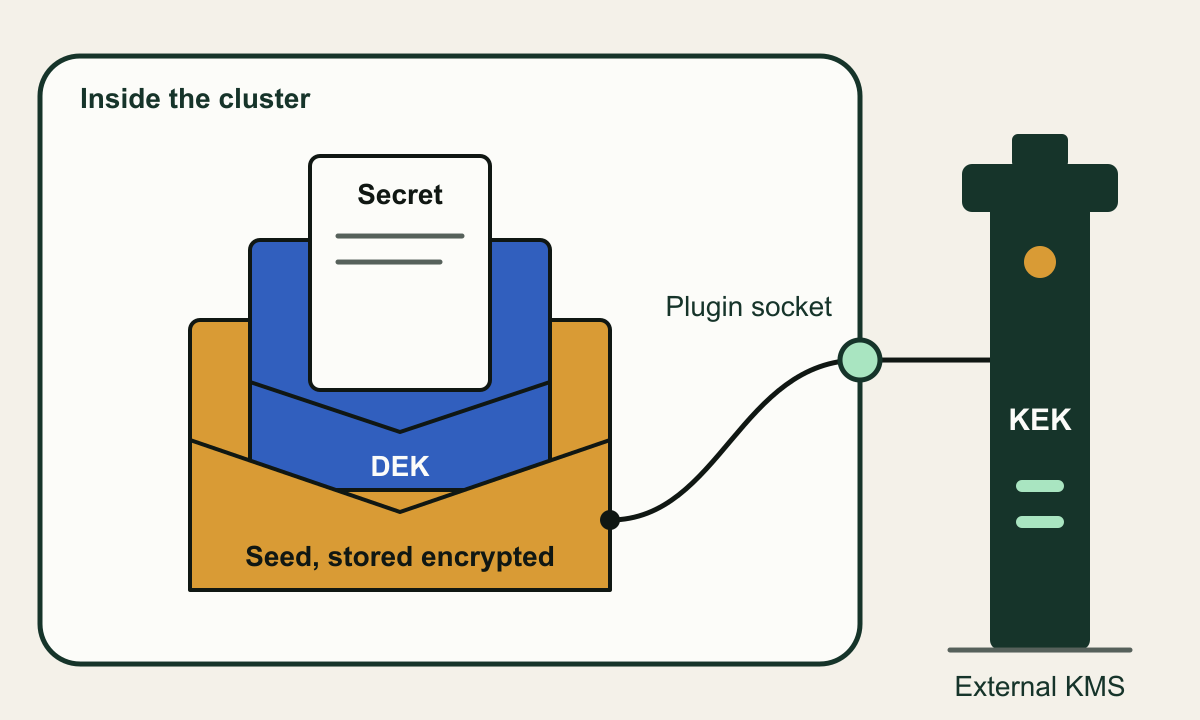
Kubernetes describes KMS encryption as an envelope scheme: data is encrypted with a DEK, and DEKs are protected by a KEK held in a remote KMS. [1] KMS v2 adds a layer between the two. At startup, and again whenever the KEK rotates, the API server generates a secret seed and asks the KMS plugin to encrypt it with the remote KEK. Each write then gets a fresh DEK derived from that seed and some random data through a key derivation function, and the object is encrypted with AES-GCM under that single-use key. [1][2][7]
That is the performance change from KMS v1, where every encryption generated a new DEK for the KMS to wrap and a cachesize setting limited how often reads had to call the KMS to unwrap one. KMS v1 has been deprecated since Kubernetes 1.28 and disabled by default since 1.29; it loads only with --feature-gates=KMSv1=true. KMS v2 has been stable since 1.29, and the Kubernetes 1.37 documentation tells you to use it wherever feasible. [1][6]
The API server never talks to the cloud KMS itself. It speaks gRPC over a UNIX domain socket to a KMS plugin on the same hosts as the control plane, and the plugin owns the credentials and protocol for reaching the remote KMS. The v2 plugin API has three calls. Status returns the plugin version, a healthz value of ok and the current key_id; the API server polls it about every minute when healthy and every 10 seconds when not. Encrypt returns ciphertext, the key_id used and optional annotations, and Decrypt reverses it. Kubernetes asks plugins to keep encrypt latency under 100 milliseconds and decrypt under 10, because a starting API server may make thousands of decrypt calls to fill its watch cache. [1]
The key_id is the public, non-secret name of the KEK in use. The API server treats the value from Status as authoritative: when it changes, data written under the old KEK is stale, and a no-op write re-encrypts it under the new one. Plugins must never reuse a key_id, even when reinstating an earlier key, and an Encrypt response whose key_id disagrees with Status is discarded and the plugin marked unhealthy. [1]
One property shapes every failure mode later in this guide. KMS v2 has no cachesize field: once the API server has unwrapped a DEK it keeps it in memory in the clear and can decrypt with it indefinitely without calling the KMS. A running API server therefore rides out a KMS outage or a disabled key, and a restarting one does not. [1][5]
Three keys, two of them inside the cluster
Only the KEK lives outside the cluster; the seed and DEKs are stored or cached inside it.

Source. Conceptual illustration based on the Kubernetes KMS provider and encryption at rest documentation and the Amazon EKS envelope encryption page. [1][2][7]
Method. Conceptual, hand-authored diagram of KMS v2 key layering. Sizes and positions carry no meaning.
Accessible table and figure data
| Element | What it represents |
|---|---|
| Secret | The object value written to etcd as ciphertext |
| DEK | Single-use AES-GCM key derived for one write |
| Seed | Secret seed the DEKs derive from, stored only encrypted |
| Plugin | gRPC server on a UNIX socket on the control plane host |
| KEK | Key encryption key that never leaves the external KMS |
| Element | What it represents |
|---|---|
| Secret | The object value written to etcd as ciphertext |
| DEK | Single-use AES-GCM key derived for one write |
| Seed | Secret seed the DEKs derive from, stored only encrypted |
| Plugin | gRPC server on a UNIX socket on the control plane host |
| KEK | Key encryption key that never leaves the external KMS |
Follow a write, a read and a restart
On a write, the stored value carries a prefix that tells later readers which provider produced it; for KMS v2 it is k8s:enc:kms:v2:. The provider name cannot be changed once set, so choose it with that in mind. Reading the key straight from etcd and finding that prefix is the check that proves an object is encrypted at rest. A successful kubectl get proves nothing, because the API server decrypts on the way out. [1][2]
On a read, each configured provider that matches the stored data tries to decrypt it in order. If none can, because the format or key no longer matches, the request fails and the object stays unreadable through the API until a working configuration returns or someone deletes the entry from etcd directly. [2]
The restart path carries the risk. A fresh API server has no cached seed or DEKs, so it must reach the plugin and the remote KMS before it can serve encrypted objects. AWS describes the result on EKS directly: after a customer managed key is disabled, running API servers continue on the cached key, but a restarted instance fails to boot with KMS_KEY_DISABLED. [7] GKE documents the same shape after a key version is destroyed: cached DEKs keep working until the control plane restarts or a DEK is no longer in the cache. [14]
Two metrics help before a planned restart or upgrade. apiserver_envelope_encryption_dek_source_cache_size approximates how many decrypt calls the server will make to the plugin when it comes back, and apiserver_envelope_encryption_kms_operations_latency_seconds shows KMS call latency by gRPC status code and method, which tells you how close the plugin is to its latency budget. Both are alpha-stability metrics, so check their names on each upgrade. [15]
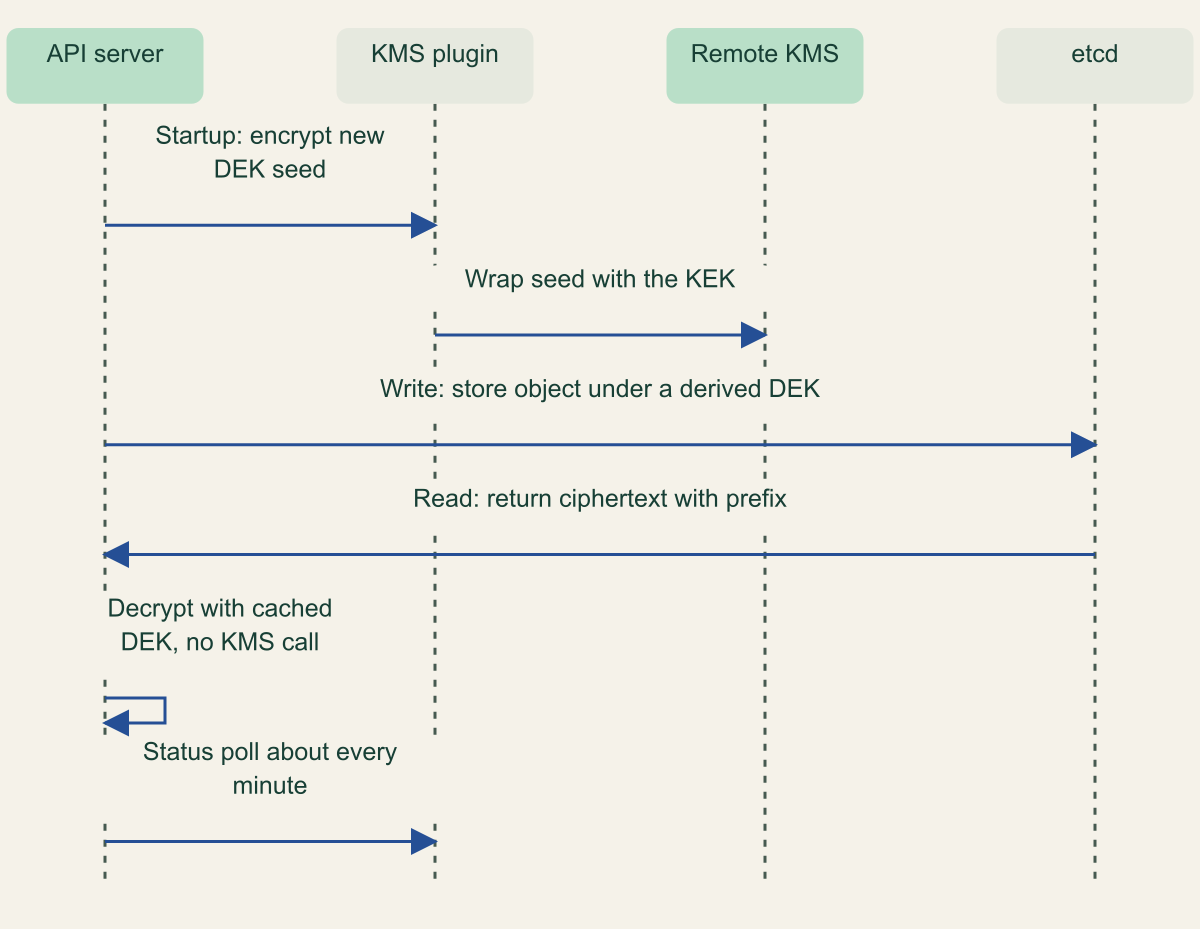
The KMS is called at startup and rotation, not on every write
Writes and reads use cached keys; a restart is when the remote KMS must answer.

Source. Conceptual sequence based on the Kubernetes KMS provider documentation and the Amazon EKS envelope encryption page. [1][7]
Method. Conceptual simplification of documented KMS v2 behavior; omits retries, annotations and the decrypt call a cold API server makes to unwrap stored seeds.
Accessible table and figure data
| Step | From | To | Message |
|---|---|---|---|
| 1 | API server | KMS plugin | Startup: encrypt new DEK seed |
| 2 | KMS plugin | Remote KMS | Wrap seed with the KEK |
| 3 | API server | etcd | Write: store object under a derived DEK |
| 4 | etcd | API server | Read: return ciphertext with prefix |
| 5 | API server | API server | Decrypt with cached DEK, no KMS call |
| 6 | API server | KMS plugin | Status poll about every minute |
| Step | From | To | Message |
|---|---|---|---|
| 1 | API server | KMS plugin | Startup: encrypt new DEK seed |
| 2 | KMS plugin | Remote KMS | Wrap seed with the KEK |
| 3 | API server | etcd | Write: store object under a derived DEK |
| 4 | etcd | API server | Read: return ciphertext with prefix |
| 5 | API server | API server | Decrypt with cached DEK, no KMS call |
| 6 | API server | KMS plugin | Status poll about every minute |
Configure KMS v2 on a self-managed control plane
Where you own the API server flags, as on kubeadm-built clusters, the setup is a plugin, a configuration file and a rolling restart. Deploy your KMS provider's plugin on every control plane host first, confirm it creates its socket and answers Status, and give it credentials that allow only encrypt and decrypt on one key. Kubernetes leaves plugin authentication to the plugin, and the Kubernetes guidance is explicit that you remain responsible for access controls on the managed key service and for protecting the token that lets the API server call it. [1][2]
The example below encrypts Secrets with a v2 provider and keeps identity last so that objects written before encryption can still be read during migration. apiVersion: v2 selects KMS v2, the API reference allows cachesize only for v1 providers, and timeout defaults to 3 seconds. To cover more than Secrets, list resources explicitly or use *.* on Kubernetes 1.27 or later, placing any identity exemption such as events in an earlier entry than the wildcard. If the cluster already uses aescbc or aesgcm, put the kms provider first and keep the old provider below it until every object has been rewritten; the Kubernetes provider table rates aescbc as weak because of padding oracle attacks, and both keep key material on the control plane host. [1][2][5]
Point --encryption-provider-config at the file, mount it read-only into the static API server Pod and restart the API servers one at a time. Every control plane node must end with an identical configuration; a node with a different provider list may be unable to decrypt what another node wrote. With --encryption-provider-config-automatic-reload=true, the API server polls the file every minute and apiserver_encryption_config_controller_automatic_reload_last_timestamp_seconds records when a change took effect. Health for v2 providers is reported on the single /healthz/kms-providers endpoint whether or not reload is on. [1][2][15]
Three checks complete the change. Create a test Secret and read its etcd key, for example /registry/secrets/default/secret1 as the Kubernetes task shows, to confirm the k8s:enc:kms:v2: prefix. Rewrite every existing Secret, because encryption happens only on write. Then remove the identity entry and restart each API server, which stops the server from honoring any plaintext value the rewrite missed. [1][2]
--encryption-provider-config on every control plane node.# Example EncryptionConfiguration for KMS v2 (apiserver.config.k8s.io/v1).
# Placeholder plugin name and socket path; use the values your plugin documents.
apiVersion: apiserver.config.k8s.io/v1
kind: EncryptionConfiguration
resources:
- resources:
- secrets
providers:
- kms:
apiVersion: v2
name: example-kms-plugin
endpoint: unix:///var/run/kmsplugin/socket.sock
timeout: 3s
- identity: {} # remove after every Secret has been rewritten
What EKS, AKS and GKE do for you
Amazon EKS. On Kubernetes 1.28 and later every cluster gets KMS v2 envelope encryption of all Kubernetes API data, not only Secrets, with no action required and no added control plane cost when the KEK is an AWS owned key. EKS migrated existing clusters itself, using an eks:kms-storage-migrator ClusterRole. You can instead use a customer managed key, which must be a symmetric key in the cluster's Region; the resources field of the encryption configuration no longer affects scope and returns ["secrets"] only for compatibility. AWS documents no way to remove or swap that key later: AssociateEncryptionConfig is described for clusters that do not already have encryption enabled, and the older secrets encryption procedure calls enablement irreversible. A customer managed key costs $1 per month plus request charges, which AWS says KMS v2 keeps low. [7][8][9]
AKS. Azure Storage encrypts the underlying data with 256-bit AES, and KMS is an optional second layer that encrypts Secrets with an Azure Key Vault key before they reach etcd. [11] In the legacy experience, turning on KMS from AKS 1.27 configures KMS v2, which removed the 2,000 Secret limit of earlier versions; you supply a user-assigned managed identity with the Key Vault Crypto User role and choose public or private vault access. [10][13] For clusters on 1.33 or later Microsoft now recommends a newer experience, enabled with --kms-infrastructure-encryption Enabled, using platform-managed keys or a customer-managed key referenced without a version. On October 7, 2026 that experience was still a preview behind the KMSPMKPreview feature flag, and it cannot be turned off once enabled. [11][12]
GKE. Customer content, including Secrets, is encrypted at rest by default. Application-layer secrets encryption adds envelope encryption under a Cloud KMS KEK you manage: GKE generates DEKs, encrypts locally with the AES-CBC provider and has the Kubernetes Engine Service Agent, which needs the Cloud KMS CryptoKey Encrypter/Decrypter role, wrap them with your key. The key must be in the cluster's region (the global location is not supported) but may live in another project, and Google recommends a separate key project. From GKE 1.35 the scope depends on the cluster state store: all API objects on Spanner, primarily Secrets on etcd, reported as ALL_OBJECTS_ENCRYPTION_ENABLED or ENCRYPTED in databaseEncryption.state. Turning the feature on or changing keys restarts the control plane, and zonal control planes are unavailable while it runs. [14]
Read the comparison as a list of decisions you still own. On all three, losing a customer-managed key that wraps cluster data is unrecoverable, and once you bring your own key you decide who may disable it.
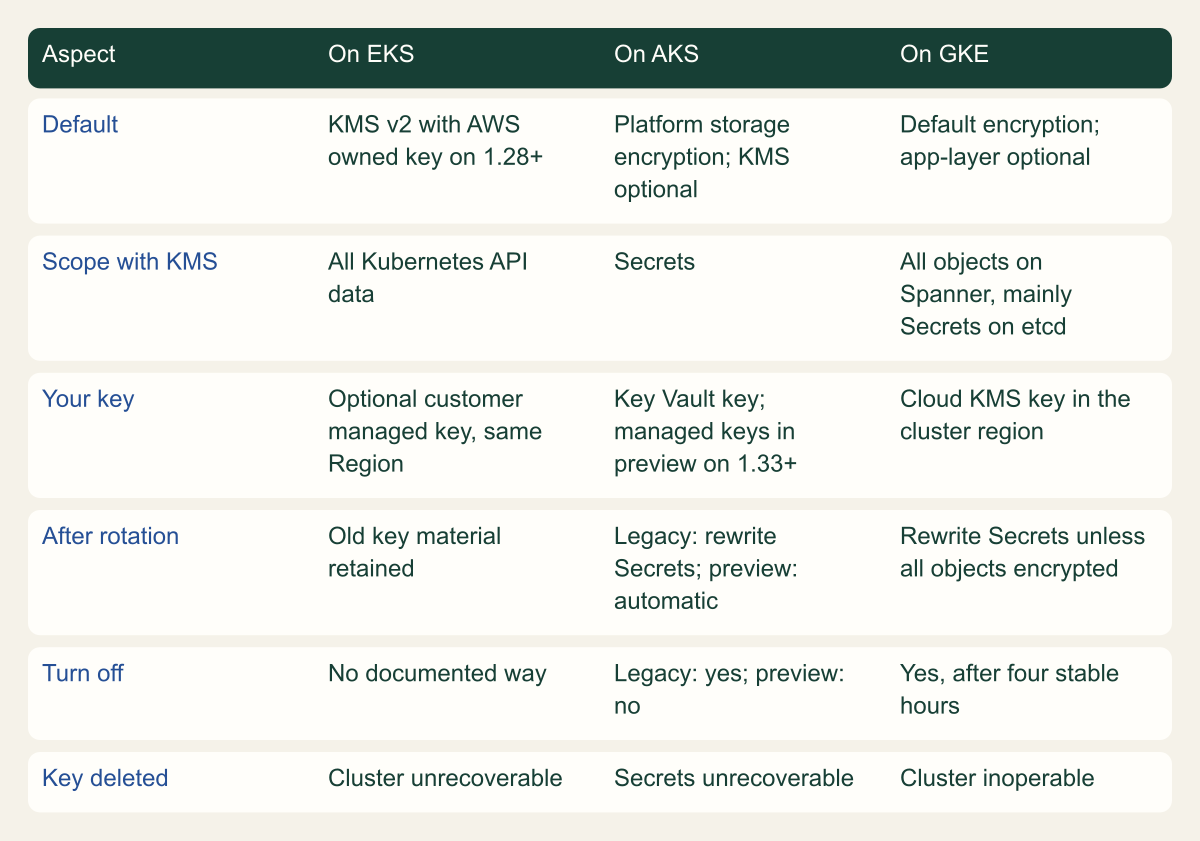
Managed services differ on defaults, scope and reversibility
Only EKS encrypts with KMS by default; every service makes key deletion fatal.

Source. Amazon EKS, AWS KMS, Microsoft AKS and Google GKE documentation reviewed October 7, 2026. [7][8][9][10][11][12][14][16]
Method. Each cell condenses statements from the cited provider pages. AKS cells distinguish the legacy KMS experience from the newer preview experience.
Accessible table and figure data
| Aspect | On EKS | On AKS | On GKE |
|---|---|---|---|
| Default | KMS v2 with AWS owned key on 1.28+ | Platform storage encryption; KMS optional | Default encryption; app-layer optional |
| Scope with KMS | All Kubernetes API data | Secrets | All objects on Spanner, mainly Secrets on etcd |
| Your key | Optional customer managed key, same Region | Key Vault key; managed keys in preview on 1.33+ | Cloud KMS key in the cluster region |
| After rotation | Old key material retained | Legacy: rewrite Secrets; preview: automatic | Rewrite Secrets unless all objects encrypted |
| Turn off | No documented way | Legacy: yes; preview: no | Yes, after four stable hours |
| Key deleted | Cluster unrecoverable | Secrets unrecoverable | Cluster inoperable |
| Aspect | On EKS | On AKS | On GKE |
|---|---|---|---|
| Default | KMS v2 with AWS owned key on 1.28+ | Platform storage encryption; KMS optional | Default encryption; app-layer optional |
| Scope with KMS | All Kubernetes API data | Secrets | All objects on Spanner, mainly Secrets on etcd |
| Your key | Optional customer managed key, same Region | Key Vault key; managed keys in preview on 1.33+ | Cloud KMS key in the cluster region |
| After rotation | Old key material retained | Legacy: rewrite Secrets; preview: automatic | Rewrite Secrets unless all objects encrypted |
| Turn off | No documented way | Legacy: yes; preview: no | Yes, after four stable hours |
| Key deleted | Cluster unrecoverable | Secrets unrecoverable | Cluster inoperable |
Rotate the KEK, then rewrite the data
Rotating a KEK protects new writes immediately and existing data not at all. Stored objects stay wrapped by whichever key was current when they were last written, so a rotation is finished only when every object has been rewritten and the old key version has gone unused long enough to retire. Because you do not control how many writes use a DEK seed, Kubernetes recommends rotating the KEK at least every 90 days with KMS v2. [1][14]
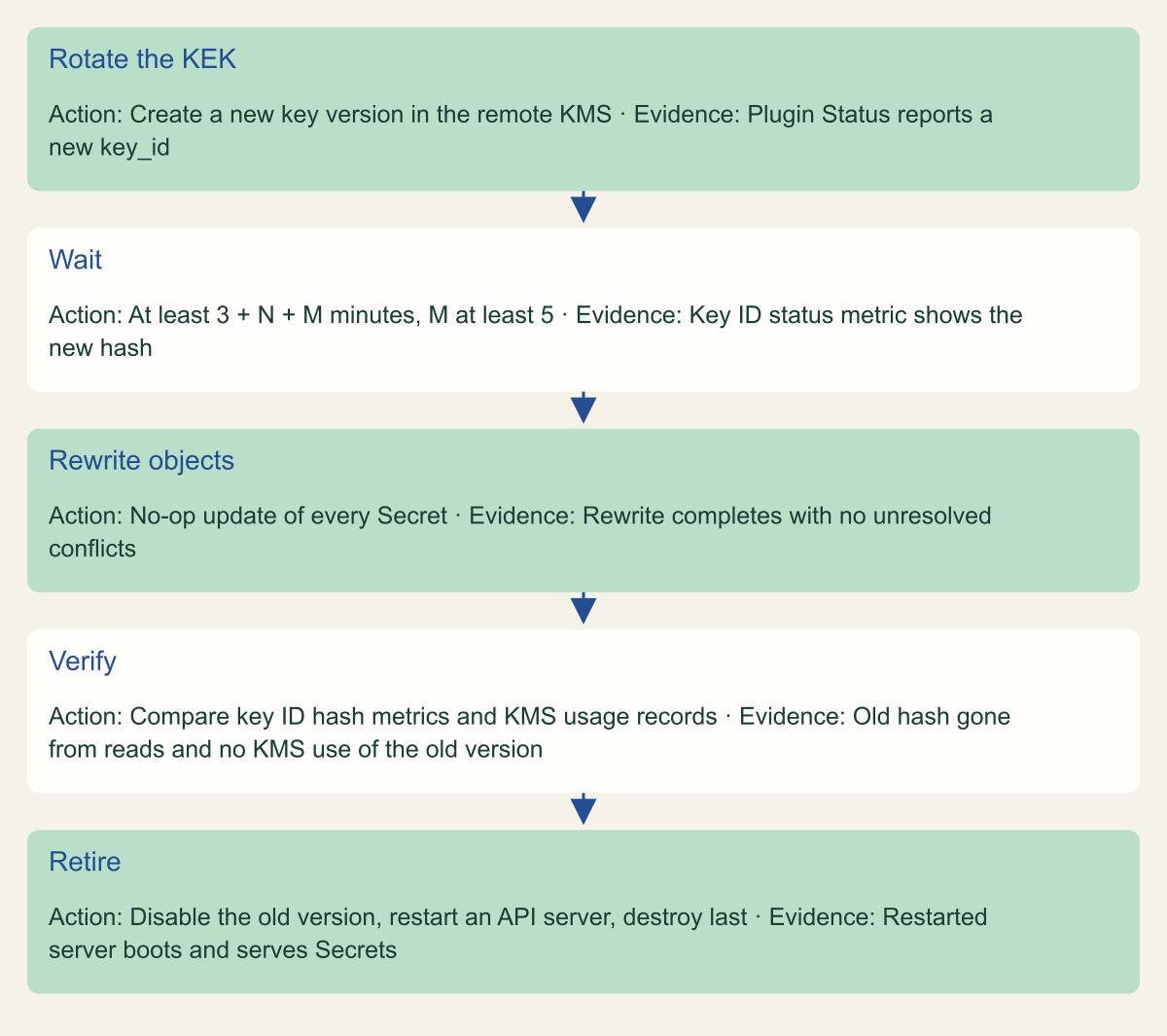
On a self-managed cluster with KMS v2 no API server restart is needed. Rotate the key in the remote KMS so the plugin reports a new key_id from Status. The API server polls about once a minute and may coast on the last valid state for about three minutes, so Kubernetes advises running the storage rewrite no sooner than 3 + N + M minutes after the rotation, where N is how long the plugin takes to notice the new key and M is a buffer of at least five minutes. Then rewrite all Secrets with a no-op update and keep the old KEK version enabled until you have evidence that nothing still reads with it. [1]
The documented rewrite is kubectl get secrets --all-namespaces -o json | kubectl replace -f -, run by an administrator who can read and write every Secret. Conflict errors are safe to retry, and large clusters can go namespace by namespace. GKE and EKS document annotating every Secret instead, which forces the same write. Kubernetes also has a storage version migrator, but its StorageVersionMigrator feature gate is beta and disabled by default from 1.35, so most teams will script the rewrite. [1][2][6][8][14]
For evidence, compare key usage before and after. apiserver_envelope_encryption_key_id_hash_total counts uses of each hashed key_id by transformation type and API server, and apiserver_envelope_encryption_key_id_hash_last_timestamp_seconds records when each was last used. An old hash that keeps appearing on reads after the rewrite suggests missed objects. That reading is an inference from the metric definitions rather than a documented acceptance test, so pair it with the key service's own usage records for the old version before retiring it. [15][14]
Managed services change who performs each step. In legacy AKS KMS you point the cluster at a new key version with az aks update and --azure-keyvault-kms-key-id, then rewrite all Secrets yourself; the plugin keeps two keys, so the oldest version can be expired only after a second rotation, and securityProfile.azureKeyVaultKms.keyId shows the version in use. [10] In the newer AKS experience, a versionless customer-managed key is checked for a new version every six hours and Microsoft says no manual re-encryption is needed. [12] GKE asks you to wait at least three hours after a rotation for the new version to become consistent and then annotate every Secret; clusters that encrypt all objects skip that step, and on Autopilot you must not disable the previous version because Secrets in managed namespaces such as kube-system keep using it. [14] With an EKS customer managed key, AWS KMS rotation keeps the same key ARN and retains earlier key material until the key is deleted, so rotation does not strand old ciphertext. [16]
kms-check Secret afterwards.# Example verification fragment for a self-managed control plane.
# Certificate paths follow kubeadm defaults; adjust them for your cluster.
kubectl create secret generic kms-check -n default --from-literal=probe=example
ETCDCTL_API=3 etcdctl \
--cacert=/etc/kubernetes/pki/etcd/ca.crt \
--cert=/etc/kubernetes/pki/etcd/server.crt \
--key=/etc/kubernetes/pki/etcd/server.key \
get /registry/secrets/default/kms-check | hexdump -C | head -n 4
# Expect k8s:enc:kms:v2: near the start of the stored value.
# After a KEK rotation, wait at least 3 + N + M minutes, then rewrite every Secret.
kubectl get secrets --all-namespaces -o json | kubectl replace -f -
# See which hashed key IDs the API server still uses.
kubectl get --raw /metrics | grep apiserver_envelope_encryption_key_id_hash_total
A rotation ends when the old key is unused
Rotate, wait, rewrite, verify, then retire, with a restart test before anything is destroyed.

Source. Conceptual flow based on the Kubernetes KMS provider documentation, the Kubernetes metrics reference and GKE key rotation guidance. [1][14][15]
Method. Conceptual order of operations. The waiting formula is from the Kubernetes documentation; the disable, restart and destroy ordering is a reasoned precaution, not a documented provider requirement.
Accessible table and figure data
| Step | Action | Evidence |
|---|---|---|
| Rotate the KEK | Create a new key version in the remote KMS | Plugin Status reports a new key_id |
| Wait | At least 3 + N + M minutes, M at least 5 | Key ID status metric shows the new hash |
| Rewrite objects | No-op update of every Secret | Rewrite completes with no unresolved conflicts |
| Verify | Compare key ID hash metrics and KMS usage records | Old hash gone from reads and no KMS use of the old version |
| Retire | Disable the old version, restart an API server, destroy last | Restarted server boots and serves Secrets |
| Step | Action | Evidence |
|---|---|---|
| Rotate the KEK | Create a new key version in the remote KMS | Plugin Status reports a new key_id |
| Wait | At least 3 + N + M minutes, M at least 5 | Key ID status metric shows the new hash |
| Rewrite objects | No-op update of every Secret | Rewrite completes with no unresolved conflicts |
| Verify | Compare key ID hash metrics and KMS usage records | Old hash gone from reads and no KMS use of the old version |
| Retire | Disable the old version, restart an API server, destroy last | Restarted server boots and serves Secrets |
Failure modes worth rehearsing
Most outages in this area come from the DEK cache hiding a problem until a restart, or from a key action that cannot be undone. Rehearse the first in a test cluster by restarting an API server while the KMS is unreachable; plan the second through key policy, because no test will bring a destroyed key back.
- Key disabled while API servers run: reads and writes continue on cached keys, then the next restart fails. EKS asks you to re-enable a disabled customer managed key within 30 days, and recovery can still depend on whether an automatic Kubernetes upgrade happened in the meantime. [7]
- Key deleted or destroyed: EKS clusters become unrecoverable, as they do for
KMS_KEY_NOT_FOUNDor revoked grants (KMS_GRANT_REVOKED); AKS Secrets can no longer be decrypted and the cluster may need recreating; GKE clusters degrade and become inoperable, and a Cloud KMS version is gone for good once its scheduled destruction time passes. [7][10][14] - Slow or unhealthy plugin: each call waits up to the provider
timeout, 3 seconds by default, before failing,Statuspolling drops to every 10 seconds, and the decrypt burst at startup exposes latency first. [1] - Configuration that differs between control plane nodes: one API server can fail to decrypt what another wrote. Plan each change so every server can always decrypt stored data, even halfway through the rollout. [2]
identityremoved before the rewrite finished: any Secret still stored in plaintext becomes unreadable through the API. [2]- Abstract socket endpoints such as
unix:///@kms: they have no file ACL and rely on network namespace isolation alone. [1] - AKS legacy specifics: KMS does not work with a system-assigned managed identity, scaling nodes to zero through the Virtual Machine Scale Sets API leaves the cluster unrecoverable, and after you turn KMS off the keys must not be deleted or expired. [10]
- GKE specifics: more than 30,000 Secrets, or average Secret metadata above 5 KiB in a namespace, can leave a cluster unstable or partly encrypted; exhausted Cloud HSM key quota can cut nodes off from the control plane; disabling the feature within four hours of enabling it can interrupt the initial encryption. [14]
Checks for an existing cluster
Look first at what the cluster does today, not what someone configured once. On a self-managed control plane, read the --encryption-provider-config file on every node, confirm that a kms provider with apiVersion: v2 comes first, and read one old and one recently written Secret straight from etcd. On EKS, confirm the Kubernetes version and whether a customer managed key ARN is associated. On AKS, read securityProfile.azureKeyVaultKms and check which KMS experience the cluster uses. On GKE, read databaseEncryption.state. [1][2][7][10][14]
Then write the order of operations down: who can disable or schedule deletion of the key, how an API server restart behaves if the KMS is unreachable, how existing objects get rewritten after a key change, and what evidence shows an old key version is unused. Treat at-rest encryption as protection for copies of etcd and its backups. The controls that decide who actually reads a Secret remain RBAC on get, list and watch, limits on who can create Pods, and keeping read access to etcd itself with cluster administrators. [3][4]
Method and provenance
Source-led technical analysis of Kubernetes, Amazon Web Services, Microsoft and Google Cloud documentation, with original diagrams and labeled example fragments. Sources were reviewed on October 7, 2026, against the Kubernetes 1.37 documentation.
No cluster, KMS plugin or cloud account was used. Feature status, limits and commands are bounded to the cited documentation as of the review date; the AKS managed-key experience was in preview and may change.
AI assistance. AI assisted research synthesis, drafting, diagram planning and visual production, with deterministic editorial checks. No personal deployment experience, independent human review or live test is claimed.
Published under the Cloud Security Desk organizational byline. Read the practitioner guide policy.
References
- Using a KMS provider for data encryption Kubernetes. Accessed .
- Encrypting confidential data at rest Kubernetes. Accessed .
- Secrets Kubernetes. Accessed .
- Good practices for Kubernetes Secrets Kubernetes. Accessed .
- kube-apiserver Configuration (v1): EncryptionConfiguration and KMSConfiguration Kubernetes. Accessed .
- Feature gates Kubernetes. Accessed .
- Default envelope encryption for all Kubernetes API data Amazon Web Services. Accessed .
- Encrypt Kubernetes secrets with KMS on existing clusters Amazon Web Services. Accessed .
- AssociateEncryptionConfig (Amazon EKS API reference) Amazon Web Services. Accessed .
- Add Key Management Service (KMS) etcd encryption to an AKS cluster (legacy) Microsoft. Accessed .
- Data encryption at rest concepts for AKS Microsoft. Accessed .
- Enable KMS data encryption in AKS clusters (Preview) Microsoft. Accessed .
- Migrate to KMS v2 for etcd encryption in AKS Microsoft. Accessed .
- Encrypt secrets at the application layer Google Cloud. Accessed .
- Kubernetes metrics reference Kubernetes. Accessed .
- Rotate AWS KMS keys Amazon Web Services. Accessed .