
An implementation guide for operators who own Kubernetes recovery, drawing on Kubernetes, Velero 1.18, AWS Backup for EKS, Backup for GKE and AKS Backup documentation reviewed in October 2026. It gives a state-layer model, volume backup routes, a managed service comparison, a restore-order flowchart with acceptance checks and drill commands.
At a glance
Key findings
- A cluster backup holds API definitions, configuration and Secrets, and volume data; the IAM roles, keys, images and networks that workloads rely on must already exist wherever you restore. [3][4][6]
- A CSI snapshot is not an independent copy: Velero uploads only the snapshot objects unless data movement is enabled, and warns that not all CSI drivers guarantee snapshot durability. [9][10]
- AWS Backup has supported EKS since November 10, 2025. Its restores never overwrite existing objects, and a restore job with failed objects still reports COMPLETED. [13][6]
- Velero, AWS Backup and Backup for GKE restore CRDs, namespaces and storage classes before claims, Secrets and workloads; dependencies between custom kinds must be declared. [18][6][19]
- A restore is proven only in an empty, separate cluster, by checking the restore phase, bound volumes with valid data, Ready pods and working cloud access. [6][20][21]
What a restorable backup holds
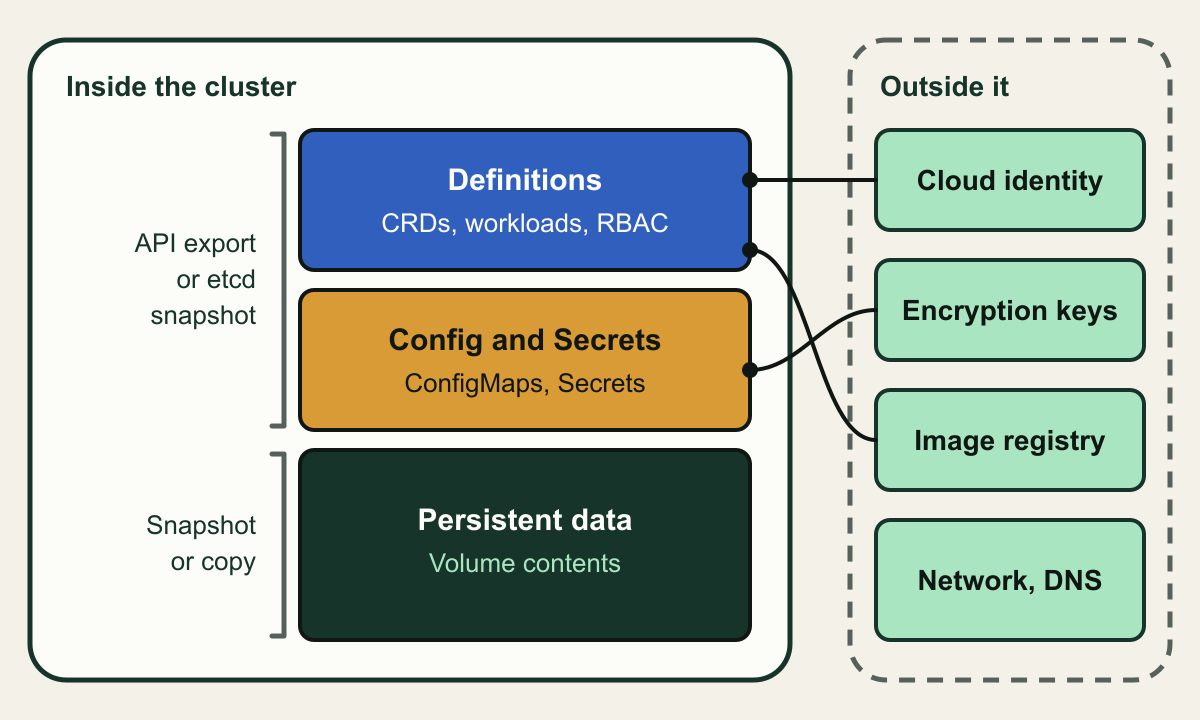
A Kubernetes backup has to carry four kinds of state, and only three of them live inside the cluster. Definitions are the API objects that describe workloads and their rules: Deployments, StatefulSets, Services, CustomResourceDefinitions and the custom resources built on them, roles and bindings. Configuration is ConfigMaps and Secrets. Persistent data is the contents of the volumes that PersistentVolumeClaims point to, which the API server never sees. The fourth kind sits outside: the cloud identities pods assume, the keys that decrypt Secrets and volumes, the images in a registry, DNS records, load balancers, and the network and node configuration of the cluster itself.
The main tools divide the work the same way. Velero uploads a tarball of Kubernetes objects to object storage and asks the provider to snapshot volumes [2]. AWS Backup writes a composite recovery point with one child for cluster state and one per persistent volume, and leaves out container images, VPCs, subnets and nodes [3]. It does record cluster settings such as node groups, add-ons and Pod Identity associations, so it can build a replacement cluster, but the IAM roles, subnets and keys those settings name must already exist where you restore [3][6]. Backup for GKE pairs a configuration backup of manifests read from the API server with volume backups, and does not capture node pools, machine types, networking configuration or enabled cluster features [4]. AKS Backup keeps cluster state in a blob container and volumes as disk or file share snapshots [5]. In all four, the external layer remains your job.
Proof is a restore into a different cluster that then passes checks written before anything broke: the expected objects present, every claim bound to data the application recognizes, pods Ready, and workloads able to reach the identities, keys and images they depend on. A completed backup job proves only that something was written. AWS Backup even reports a restore job as COMPLETED when one or more Kubernetes objects failed to restore [6], so a job status cannot carry the claim on its own.
Three layers inside the cluster, one outside it
Cluster backups capture definitions, configuration and volume data; identity, keys, images and network must be recovered separately.

Source. Conceptual illustration based on AWS Backup, Backup for GKE, AKS Backup and Velero documentation. [2][3][4][5]
Method. Conceptual, hand-authored diagram. Layer sizes and positions carry no meaning.
Accessible table and figure data
| Element | What it represents |
|---|---|
| Definitions | CRDs, workloads, Services and RBAC read from the API |
| Config and Secrets | ConfigMaps and Secrets, encrypted at rest if configured |
| Persistent data | Volume contents, never visible to the API server |
| API export or etcd snapshot | How definitions and configuration are captured |
| Snapshot or copy | How volume data is captured |
| Cloud identity | IAM roles, OIDC trust and managed identities pods use |
| Encryption keys | KMS keys for Secrets, volumes and backup vaults |
| Image registry | Container images, excluded from cluster backups |
| Network, DNS | VPC, load balancers and DNS records |
| Element | What it represents |
|---|---|
| Definitions | CRDs, workloads, Services and RBAC read from the API |
| Config and Secrets | ConfigMaps and Secrets, encrypted at rest if configured |
| Persistent data | Volume contents, never visible to the API server |
| API export or etcd snapshot | How definitions and configuration are captured |
| Snapshot or copy | How volume data is captured |
| Cloud identity | IAM roles, OIDC trust and managed identities pods use |
| Encryption keys | KMS keys for Secrets, volumes and backup vaults |
| Image registry | Container images, excluded from cluster backups |
| Network, DNS | VPC, load balancers and DNS records |
Capture definitions from etcd or from the API
On a self-managed control plane, an etcd snapshot is the most complete copy of the definitions and configuration layers. The Kubernetes documentation says the snapshot file contains all Kubernetes state and critical information, and tells you to encrypt snapshot files because of what they hold [1]. If encryption at rest is enabled, the Secrets inside the snapshot are ciphertext, so the snapshot is useful only where an API server can reach the same key.
The snapshot is all or nothing. Restoring it means stopping every API server, restoring state in every etcd member and restarting the API servers; the project also recommends restarting kube-scheduler, kube-controller-manager and kubelet so they do not act on stale data [1]. You cannot lift one namespace out of it, and it holds no volume data. It is the tool for rebuilding a control plane that lost etcd quorum, not for recovering a deleted namespace.
Managed control planes settle the question. On EKS, GKE and AKS the provider runs etcd, and each provider's backup service reads objects through the Kubernetes API instead [3][4][5]. API export, which is also how Velero works [2], gives up some completeness in exchange for control: you can filter by namespace or label, remap namespaces and restore into a newer cluster within each tool's limits, but anything the API does not return needs its own mechanism. Velero also states that its backups are not strictly atomic, so objects created or edited while a backup runs may be missing from it [2].
# Take and check a snapshot on a control plane node.
SNAP=/var/backups/etcd/snapshot-$(date +%Y%m%dT%H%M).db
ETCDCTL_API=3 etcdctl --endpoints=https://127.0.0.1:2379 \
  --cacert=/etc/kubernetes/pki/etcd/ca.crt \
  --cert=/etc/kubernetes/pki/etcd/server.crt \
  --key=/etc/kubernetes/pki/etcd/server.key \
  snapshot save "$SNAP"
etcdutl --write-out=table snapshot status "$SNAP"

# Restore only after every kube-apiserver instance is stopped.
etcdutl --data-dir /var/lib/etcd-restored snapshot restore "$SNAP"
# Point the etcd static Pod's etcd-data hostPath at /var/lib/etcd-restored,
# then restart the API servers, scheduler, controller manager and kubelet.
Get volume data out of the storage system
Volume data is where a backup can look complete and still be fragile, because a snapshot that stays with the storage system is not an independent copy. Kubernetes models CSI snapshots as VolumeSnapshot, VolumeSnapshotContent and VolumeSnapshotClass objects; they work only with CSI drivers, and the distribution is responsible for installing the CRDs and the snapshot controller [8]. When Velero takes a CSI snapshot it uploads the Kubernetes objects to object storage but not the snapshot data, and its documentation warns that not all CSI drivers guarantee snapshot durability [9].
Velero 1.18, at v1.18.4 since September 28, 2026 [7], offers the routes in the table below. CSI snapshot data movement, turned on with snapshotMoveData, has the node agent read the snapshot and write it with the Kopia uploader to a repository in object storage, then removes the snapshot [10]. File system backup reads files from the mounted volume instead. It reaches volumes that cannot be snapshotted, but it cannot back up hostPath volumes and does not capture data at a single point in time [11]. Restic is no longer a choice for new work: in 1.17 and 1.18 the Restic path is disabled for backups and kept only so older Restic backups can still be restored [11].
None of these routes makes a database consistent. A snapshot taken while a database is writing gives you, at best, the state the database would find after a crash. For an application-consistent copy, run a pre-backup hook that flushes or pauses writes and a post-backup hook that resumes them. Velero hooks run in the first container of the pod unless you name one, time out after 30 seconds by default and default to an on-error mode of Fail [12]. Where the application has its own dump format, a logical dump written to the volume before the snapshot is often easier to restore and verify than a paused file system.
| Route | Where the data ends up | Main limit |
|---|---|---|
| Provider snapshot plugin | The provider's snapshot service | Tied to that provider's volumes |
| CSI snapshot | Usually the storage system holding the volume | Durability depends on the CSI driver |
| CSI snapshot data movement | Kopia repository in object storage | Needs the node agent and CSI snapshots |
| File system backup (Kopia) | Kopia repository in object storage | Not point in time; no hostPath volumes |
snapshotMoveData needs Velero installed with --features=EnableCSI and --use-node-agent, plus a VolumeSnapshotClass labeled velero.io/csi-volumesnapshot-class: "true". The hook scripts are hypothetical placeholders for the database's own pause and resume commands.apiVersion: velero.io/v1
kind: Schedule
metadata:
name: nightly
namespace: velero
spec:
schedule: "0 2 * * *"
useOwnerReferencesInBackup: false
template:
includedNamespaces:
- "*"
excludedNamespaces:
- velero
includeClusterResources: true
snapshotMoveData: true
storageLocation: default
ttl: 720h0m0s
hooks:
resources:
- name: quiesce-postgres
includedNamespaces:
- payments
labelSelector:
matchLabels:
app: postgres
pre:
- exec:
container: postgres
command: ["/bin/sh", "-c", "/opt/hooks/pre-backup.sh"]
onError: Fail
timeout: 120s
post:
- exec:
container: postgres
command: ["/bin/sh", "-c", "/opt/hooks/post-backup.sh"]
onError: Continue
timeout: 60sWhat the managed services cover
AWS Backup added Amazon EKS on November 10, 2025, with restores of whole clusters, chosen namespaces or single persistent volumes [13]. It installs nothing in the cluster; the prerequisite is an authorization mode of API or API_AND_CONFIG_MAP, so that AWS Backup can create an access entry [3]. Volumes are covered when they use EBS, EFS or S3 through the EKS add-on CSI drivers. In-tree and CSI migration volumes, FSx, EFS subpath mounts and S3 prefixes are not [3]. The cluster state child is always a full backup, and a job can finish as Partial or Completed with issues when some volumes or objects fail [3]. Restores never overwrite an existing object, a namespace restore accepts at most five namespaces and also restores every cluster-scoped resource, and AWS Backup can create the target cluster as part of the restore [6].
Backup for GKE runs an agent in each cluster and is driven by a BackupPlan and a RestorePlan; configuration archives and Persistent Disk snapshots are kept in a Google-managed tenant project in the region the plan names [4]. Two plan flags deserve a second look: --include-secrets and --include-volume-data are both optional, and a plan without the second gives only new empty volumes or reused existing disks on restore [14]. Filestore is protected only through custom hooks [4]. For application consistency, a ProtectedApplication resource groups an application's resources by label and runs pre and post hooks, or uses the DumpAndLoad strategy to export data to one volume at backup time and load it on restore [15]. The target cluster must run the backup cluster's minor version or one up to three minor versions newer [16].
AKS Backup needs its Backup extension inside the cluster and Trusted Access between the cluster and the Backup vault [5]. It protects CSI volumes on Azure Disks and on Azure Files over SMB; NFS file shares, Blob and Azure Container Storage volumes are skipped [17]. Operational tier backups are snapshots in your own subscription, as often as every four hours. The Vault tier moves one recovery point a day outside your tenant, accepts only Azure Disk volumes of up to 1 TB each and up to 100 per backup instance, and is the only route to a restore in the paired region, where the effective RPO can reach 36 hours [17]. The kube-system, kube-node-lease and kube-public namespaces cannot be selected, and Microsoft says not to run the extension next to Velero [17].
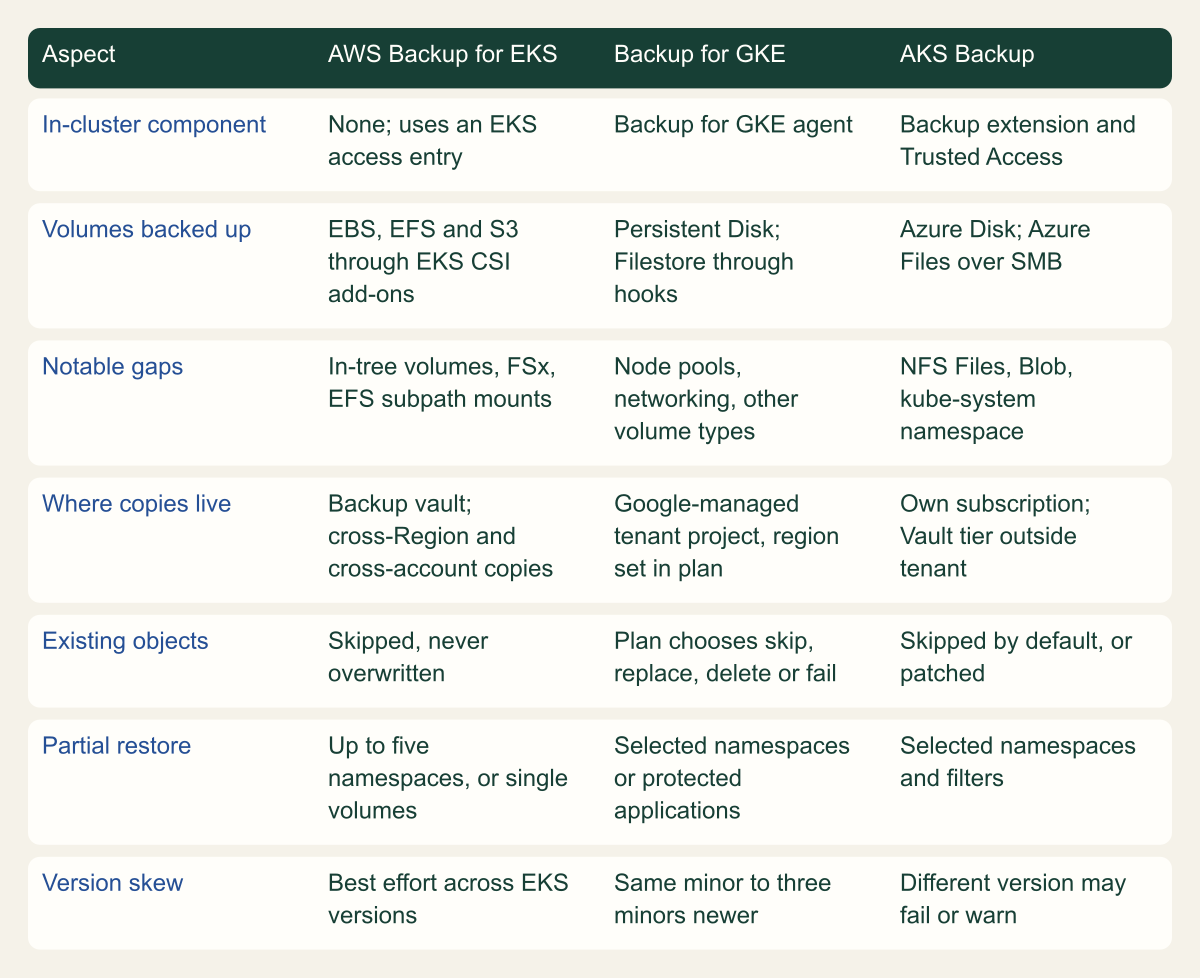
Read the matrix as preconditions, not a ranking. All three back up Kubernetes objects read through the API, with service-specific exclusions such as events and leases on AWS and system namespaces on AKS. They differ in which volumes they can copy, what they do when an object already exists, and how far a backup can travel from the cluster it protects.
Same API objects, different volume and restore rules
The managed services differ most in which volumes they copy, how they treat existing objects and how far a backup can travel.

Source. AWS Backup EKS backup and restore guides, Backup for GKE concepts and restore plan pages, AKS Backup overview and support matrix, reviewed October 8, 2026. [3][4][5][6][16][17]
Method. Documented features paraphrased into short cells; no scoring. Each cell traces to the cited pages as of the review date.
Accessible table and figure data
| Aspect | AWS Backup for EKS | Backup for GKE | AKS Backup |
|---|---|---|---|
| In-cluster component | None; uses an EKS access entry | Backup for GKE agent | Backup extension and Trusted Access |
| Volumes backed up | EBS, EFS and S3 through EKS CSI add-ons | Persistent Disk; Filestore through hooks | Azure Disk; Azure Files over SMB |
| Notable gaps | In-tree volumes, FSx, EFS subpath mounts | Node pools, networking, other volume types | NFS Files, Blob, kube-system namespace |
| Where copies live | Backup vault; cross-Region and cross-account copies | Google-managed tenant project, region set in plan | Own subscription; Vault tier outside tenant |
| Existing objects | Skipped, never overwritten | Plan chooses skip, replace, delete or fail | Skipped by default, or patched |
| Partial restore | Up to five namespaces, or single volumes | Selected namespaces or protected applications | Selected namespaces and filters |
| Version skew | Best effort across EKS versions | Same minor to three minors newer | Different version may fail or warn |
| Aspect | AWS Backup for EKS | Backup for GKE | AKS Backup |
|---|---|---|---|
| In-cluster component | None; uses an EKS access entry | Backup for GKE agent | Backup extension and Trusted Access |
| Volumes backed up | EBS, EFS and S3 through EKS CSI add-ons | Persistent Disk; Filestore through hooks | Azure Disk; Azure Files over SMB |
| Notable gaps | In-tree volumes, FSx, EFS subpath mounts | Node pools, networking, other volume types | NFS Files, Blob, kube-system namespace |
| Where copies live | Backup vault; cross-Region and cross-account copies | Google-managed tenant project, region set in plan | Own subscription; Vault tier outside tenant |
| Existing objects | Skipped, never overwritten | Plan chooses skip, replace, delete or fail | Skipped by default, or patched |
| Partial restore | Up to five namespaces, or single volumes | Selected namespaces or protected applications | Selected namespaces and filters |
| Version skew | Best effort across EKS versions | Same minor to three minors newer | Different version may fail or warn |
Restore in dependency order
Every tool restores in a fixed order because the API server rejects objects whose prerequisites are missing. Velero starts with CustomResourceDefinitions, Namespaces, StorageClasses and the snapshot classes and contents, then PersistentVolumes and PersistentVolumeClaims, RBAC, ServiceAccounts, Secrets and ConfigMaps, and only later Pods and ReplicaSets; any type not on its list is restored alphabetically between the high and low priority groups [18]. AWS Backup's default has the same shape: CRDs, Namespaces, StorageClasses and PersistentVolumes first, then claims, Secrets, ConfigMaps, ServiceAccounts, LimitRanges, Pods and ReplicaSets [6]. Backup for GKE builds its order from GroupKind dependencies such as CRDs before custom resources and claims before the workloads that mount them [19].
The defaults know the core types, not your operators. Velero waits at most one minute for a restored CRD to become available, and it drops any resource whose group and version it cannot discover in the target cluster [18]. A custom resource whose CRD is neither in the backup nor installed on the target is therefore excluded rather than reported as failed. Where one custom kind depends on another, declare it: GKE takes groupKindDependencies through --restore-order-file [19], AWS Backup a kubernetesRestoreOrder list [6], and Velero the server flag --restore-resource-priorities, which applies to every later restore [18].
Admission webhooks need a deliberate place in that order. What follows is an inference from documented behavior, not a documented failure. In Velero's default order, webhook configurations fall into the alphabetical middle, so a ValidatingWebhookConfiguration with failurePolicy: Fail can be registered before the pods that serve it are Ready, and the API server then rejects later objects the webhook matches. Moving both webhook configuration types after the - separator restores them last. The cost is that pods created before a mutating webhook returns are not mutated, so an injected sidecar is missing until those pods are recreated.
Objects that already exist are the other trap. Velero, AWS Backup and AKS Backup all skip an existing object by default [18][6][5], so a restore into a cluster that still holds stale copies keeps the stale copies and still reports success. Velero's --existing-resource-policy=update updates them on a best-effort basis [18], AKS offers a Patch mode [5], and a GKE restore plan makes you choose between merging, replacing, deleting before restoring, or failing on conflict [16]. For a drill, restore into an empty cluster so that no conflict can hide a gap.
- separator so they restore last. Keep the other server arguments your installation already sets; the flag applies to all restores.# Fragment of the velero Deployment (namespace velero, container velero).
spec:
template:
spec:
containers:
- name: velero
args:
- server
- --restore-resource-priorities=customresourcedefinitions,namespaces,storageclasses,volumesnapshotclass.snapshot.storage.k8s.io,volumesnapshotcontents.snapshot.storage.k8s.io,volumesnapshots.snapshot.storage.k8s.io,datauploads.velero.io,persistentvolumes,persistentvolumeclaims,clusterroles,roles,serviceaccounts,clusterrolebindings,rolebindings,secrets,configmaps,limitranges,priorityclasses,pods,replicasets.apps,clusterclasses.cluster.x-k8s.io,endpoints,services,-,clusterbootstraps.run.tanzu.vmware.com,clusters.cluster.x-k8s.io,clusterresourcesets.addons.cluster.x-k8s.io,apps.kappctrl.k14s.io,packageinstalls.packaging.carvel.dev,mutatingwebhookconfigurations.admissionregistration.k8s.io,validatingwebhookconfigurations.admissionregistration.k8s.ioRestore from the bottom up, check at each step
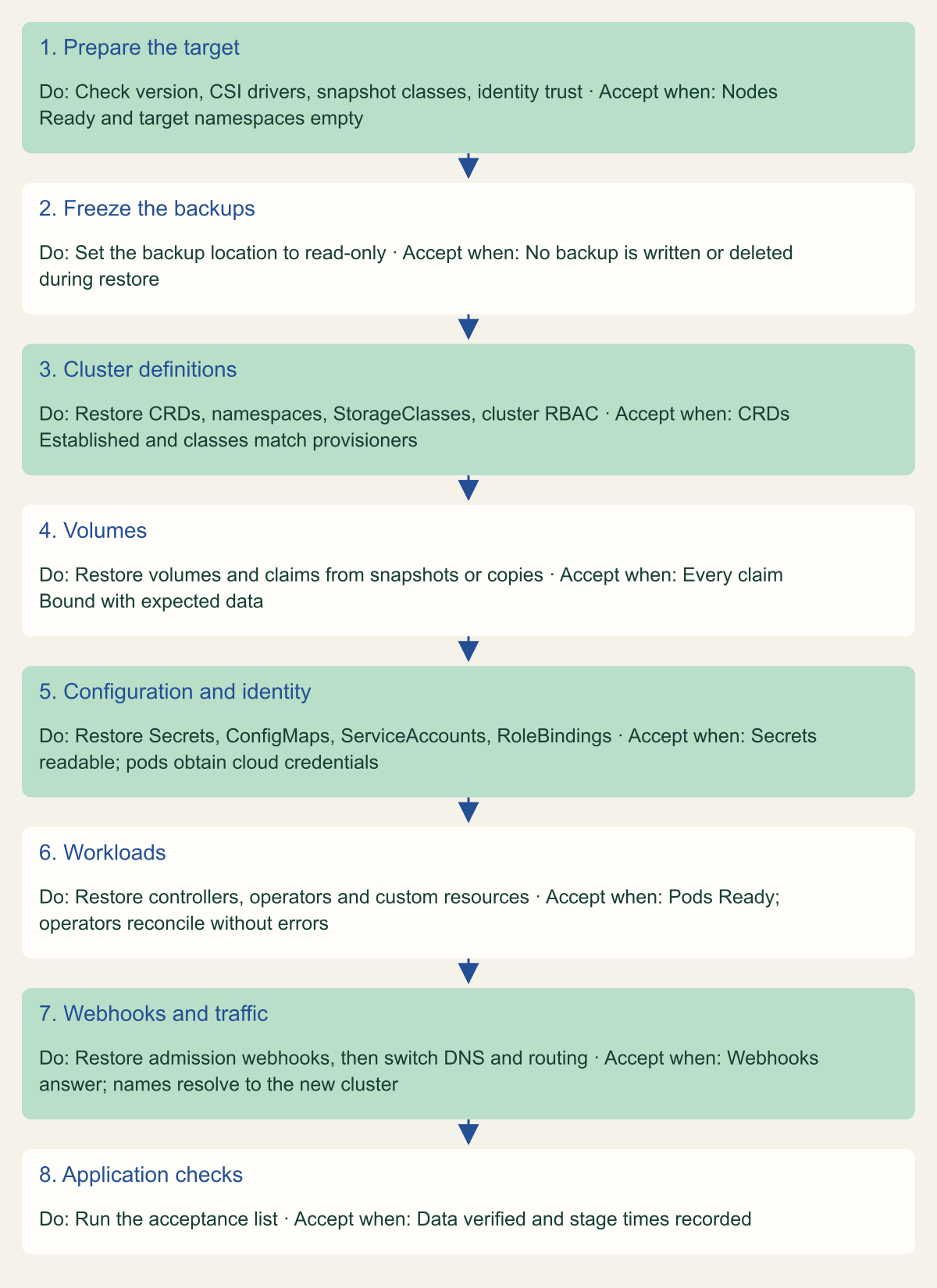
Each stage has an acceptance check; do not start the next stage until the previous one passes.

Source. Conceptual sequence synthesized from the Velero restore order and disaster recovery pages, the AWS Backup EKS default restore order and Backup for GKE default dependencies. [6][18][19][20]
Method. Conceptual ordering of documented restore behavior plus acceptance checks proposed in this article. Managed services run stages 3 to 6 themselves; the checks still apply.
Accessible table and figure data
| Stage | Do | Accept when |
|---|---|---|
| 1. Prepare the target | Check version, CSI drivers, snapshot classes, identity trust | Nodes Ready and target namespaces empty |
| 2. Freeze the backups | Set the backup location to read-only | No backup is written or deleted during restore |
| 3. Cluster definitions | Restore CRDs, namespaces, StorageClasses, cluster RBAC | CRDs Established and classes match provisioners |
| 4. Volumes | Restore volumes and claims from snapshots or copies | Every claim Bound with expected data |
| 5. Configuration and identity | Restore Secrets, ConfigMaps, ServiceAccounts, RoleBindings | Secrets readable; pods obtain cloud credentials |
| 6. Workloads | Restore controllers, operators and custom resources | Pods Ready; operators reconcile without errors |
| 7. Webhooks and traffic | Restore admission webhooks, then switch DNS and routing | Webhooks answer; names resolve to the new cluster |
| 8. Application checks | Run the acceptance list | Data verified and stage times recorded |
| Stage | Do | Accept when |
|---|---|---|
| 1. Prepare the target | Check version, CSI drivers, snapshot classes, identity trust | Nodes Ready and target namespaces empty |
| 2. Freeze the backups | Set the backup location to read-only | No backup is written or deleted during restore |
| 3. Cluster definitions | Restore CRDs, namespaces, StorageClasses, cluster RBAC | CRDs Established and classes match provisioners |
| 4. Volumes | Restore volumes and claims from snapshots or copies | Every claim Bound with expected data |
| 5. Configuration and identity | Restore Secrets, ConfigMaps, ServiceAccounts, RoleBindings | Secrets readable; pods obtain cloud credentials |
| 6. Workloads | Restore controllers, operators and custom resources | Pods Ready; operators reconcile without errors |
| 7. Webhooks and traffic | Restore admission webhooks, then switch DNS and routing | Webhooks answer; names resolve to the new cluster |
| 8. Application checks | Run the acceptance list | Data verified and stage times recorded |
Prove the restore
A restore drill answers three questions in order: did the tool restore what it backed up, did the cluster bring it to a running state, and does the application work against its real dependencies. Run it in a separate cluster, in a separate account or project where you can. That is the only way to find the external dependencies a backup does not carry.
Before restoring, freeze the backup location. Velero's disaster recovery procedure patches the BackupStorageLocation to ReadOnly so the restoring cluster cannot create or delete backup objects, and switches it back to ReadWrite afterwards [20]. After restoring, read the result instead of the exit code. A Velero restore can end in Completed, PartiallyFailed or Failed, with error and warning counts in its status [21]. On AWS, subscribe to the notifications for skipped and failed objects, since a job with failed objects still ends COMPLETED [6].
Then check each layer against a list written before the drill. Object counts per kind and namespace should match the backup's own resource list. Every claim should be Bound, and its data should pass a check the application owner defines, such as the latest order ID in a hypothetical payments database, not merely mount. Pods should be Ready and stay Ready through a restart. Workloads that call cloud APIs should succeed with their restored service accounts; AWS notes that IRSA annotations still point at the source cluster's OIDC provider after a cross-cluster restore, and recommends EKS Pod Identity for workloads that must move between clusters [6]. Last, check the outside layer: images pull in the target region or account, DNS names resolve to the new load balancers, and keys and certificates are reachable.
Record when each stage started and finished. Recovery time runs from the decision to restore to the first passing application check, and the timeline shows which stage to shorten first.
payments workload is hypothetical. Add the application checks your owners define.# Example drill with Velero 1.18 on a separate recovery cluster.
# 1. Stop this cluster's Velero from writing or deleting backups.
kubectl -n velero patch backupstoragelocation default --type merge \
-p '{"spec":{"accessMode":"ReadOnly"}}'
# 2. Restore the chosen backup and wait for it to finish.
velero backup get
velero restore create drill-20261008 \
--from-backup nightly-20261007020000 --wait
# 3. Read the phase, errors and warnings, not only the exit code.
velero restore describe drill-20261008 --details
velero restore logs drill-20261008 | grep -iE 'error|warn'
# 4. Look for state that did not come back.
kubectl get pvc -A --no-headers | awk '$3 != "Bound"'
kubectl get pods -A --field-selector=status.phase!=Running,status.phase!=Succeeded
kubectl -n payments rollout status statefulset/postgres --timeout=10m
# 5. Return the location to ReadWrite only if this cluster should write backups again.Gaps that break restores
Each gap below produces a backup that completes and a restore that does not bring the workload back. Most can be found by reading configuration before the next drill.
- Volume data or Secrets switched off. A Backup for GKE plan without
--include-volume-datarestores empty volumes, and Secrets are included only with--include-secrets[14]. - Unsupported volumes skipped. AKS Backup skips in-tree volumes, Azure Files over NFS and Blob volumes; AWS Backup does not support in-tree volumes, FSx or EFS subpath mounts [17][3]. List the provisioner of every StorageClass in use before trusting coverage.
- Snapshots that share fate with the volume. A CSI snapshot can sit in the same storage system as its volume [9]. On AKS, Operational tier snapshots are not protected by soft delete, and Azure Files snapshots are deleted with their file share [17].
- Keys and identity trust outside the backup. Encrypted Secrets and volumes are recoverable only while their keys are, and IRSA trust policies name the source cluster's OIDC provider [6].
- Version skew. Backup for GKE accepts a target up to three minor versions newer [16], AWS Backup restores across EKS versions on a best-effort basis [6], and Microsoft warns that a restore to a different AKS version may fail or finish with warnings [17]. Restore an older backup into the current version after each upgrade.
- Two backup tools in one cluster. Microsoft says not to install the AKS Backup extension alongside Velero and to keep
velero.iolabels and annotations off your own resources [17]. - Cluster infrastructure. AWS Backup records node groups and cluster settings but not the VPC, subnets or images, and asks for security groups to exist before it creates a cluster during a restore [3][6]. Backup for GKE leaves out node pools, networking and cluster features altogether [4]. Keep that layer in infrastructure code that can build the recovery cluster.
- Restic history. Velero 1.18 can still restore old Restic backups but cannot write new ones [11]; confirm recent backups use Kopia before the Restic ones expire.
The smallest drill worth running
If no restore has been tested yet, start with the smallest drill that touches all four layers: one namespace with a stateful workload, restored into an empty cluster in another account or project and checked against criteria the application owner wrote. It exposes missing identity trust, keys and images, which a review of backup settings alone does not show.
Choose the tool by platform and volume type. On a managed cluster whose volumes the provider's service supports, the managed service takes over the repository, schedule and vault plumbing you would otherwise run; check its volume, conflict and version rules first. Use Velero when you need one tool across providers, volume types the managed service skips, or restores into another provider, and plan for data movement so that volume copies leave the storage system. On a self-managed control plane, keep etcd snapshots for rebuilding the control plane alongside an API-level backup, not instead of it.
Repeat the drill after each Kubernetes minor upgrade, each new operator or CRD, each storage class change and each change of identity mechanism. Those are the changes that move restore order and external dependencies, so a drill run before them no longer describes the cluster you would restore.
Method and provenance
Source-led technical analysis of Kubernetes, Velero, AWS Backup, Backup for GKE and AKS Backup documentation, with original diagrams and explicitly hypothetical examples. Sources were reviewed on October 7 and 8, 2026.
No cluster, backup vault or restore was run. Service scope, limits and defaults are bounded to the cited documentation as of October 8, 2026, and Velero behavior to version 1.18.
AI assistance. AI assisted research synthesis, drafting, diagram planning and visual production, with deterministic editorial checks. No personal deployment experience, independent human review or live test is claimed.
Published under the Cloud Security Desk organizational byline. Read the practitioner guide policy.
References
- Operating etcd clusters for Kubernetes Kubernetes. Accessed .
- How Velero works (v1.18) Velero project. Accessed .
- Amazon EKS backups Amazon Web Services. Accessed .
- About Backup for GKE Google Cloud. Accessed .
- What is Azure Kubernetes Service (AKS) Backup? Microsoft. Accessed .
- Restore an Amazon EKS cluster Amazon Web Services. Accessed .
- Velero v1.18.4 release Velero project. Accessed .
- Volume Snapshots Kubernetes. Accessed .
- Container Storage Interface snapshot support in Velero (v1.18) Velero project. Accessed .
- CSI snapshot data movement (v1.18) Velero project. Accessed .
- File system backup (v1.18) Velero project. Accessed .
- Backup hooks (v1.18) Velero project. Accessed .
- AWS Backup now supports Amazon EKS Amazon Web Services. Published . Accessed .
- Plan a set of backups (Backup for GKE) Google Cloud. Accessed .
- Define a ProtectedApplication (Backup for GKE) Google Cloud. Accessed .
- Plan a set of restores (Backup for GKE) Google Cloud. Accessed .
- Azure Kubernetes Service (AKS) backup support matrix Microsoft. Accessed .
- Restore reference (v1.18) Velero project. Accessed .
- Specify resource restore ordering during restoration (Backup for GKE) Google Cloud. Accessed .
- Disaster recovery (Velero v1.18) Velero project. Accessed .
- Restore API type (Velero v1.18) Velero project. Accessed .