
A design guide for architects of multi-tenant and high-availability services, covering partition keys, the cell router, sizing, staged deployment, migration and when cells do not fit. It draws on AWS Well-Architected and Builders' Library guidance, Microsoft's Deployment Stamps pattern and Slack's published migration, and reproduces the shuffle-sharding numbers with stated formulas.
At a glance
Key findings
- Cells contain deployment, poison-request, overload and data-corruption failures only when the router, data and change process are also partitioned; AWS states cells were not designed as failover domains for shared dependencies. [2][3]
- The router is the one component shared by every cell, so it must stay thin, isolate dispatch per cell and keep serving from its last known mapping when the control plane is down. [12][13][14]
- Shuffle sharding eight workers into pairs yields C(8, 2) = 28 shards and a 1/28 full-impact share, while 12/28 of other customers share one worker and depend on client retries. [5]
- Route 53's 2,048 virtual name servers with four per domain give C(2048, 4) = 730,862,190,080 shards, matching the published 730 billion. [5]
- Cells add cost, routing and migration work, and Microsoft lists simple, single-instance-scalable and fully replicated workloads as poor fits. [6][8]
When cells reduce the impact of a failure
Splitting a service into cells reduces the impact of failures that start inside the workload: a bad deployment, a request that triggers a bug, one tenant's traffic surge, a corrupted record or an operator mistake. A cell is a complete, independent copy of the workload that serves only the requests whose partition key maps to it. AWS frames the payoff simply: if 10 cells serve 100 requests and one cell fails, 90 percent of requests are unaffected. [1]
That arithmetic holds only when nothing that fails is shared. Three things are usually shared by accident: the routing layer that picks a cell, the data that cells read and write, and the process that changes them. The Well-Architected bulkhead practice lists the matching anti-patterns: sharing state or components between cells other than the router, putting complex logic in the router, deploying to every cell at the same time, letting cells grow without bounds and not minimizing cross-cell interactions. [2] If any one of these remains, the cell boundary exists on the diagram and nowhere else.
Cells are also the wrong answer to some failures. The AWS cell guidance says cells mainly limit excessive load and faulty deployments, and that they were not intended to mitigate dependency failures or single points of failure, so they were not designed as failover domains. [3] An identity provider, DNS zone or Region that every cell depends on will still take every cell down. That class of failure belongs to multi-zone and multi-Region design, not to partitioning.
For sizing and routing, the short answer is this. Cap each cell at a maximum you have tested on the dimension that grows, such as requests per second, tenants or stored bytes, and grow by adding cells rather than enlarging them. [4][2] Route with a key that is present in every request, a deterministic mapping the router can evaluate locally, and a router that keeps serving from its last known mapping when the control plane is unavailable. Where a stateless fleet cannot be split into full cells, shuffle sharding offers related containment: with eight workers and two workers per customer there are 28 possible shards, so a problem tied to one customer fully affects about 1/28 of customers instead of the 1/4 that four fixed shards would expose. [5]
What a cell is and is not
AWS defines a cell as a complete workload with everything needed to operate independently, sitting beneath a cell router and managed by a control plane that provisions cells, removes them and migrates customers between them. [1] Microsoft describes the same structure as the Deployment Stamps pattern: independent copies of application components, including data stores, where each copy is called a stamp, service unit, scale unit or cell and serves a predefined set of tenants. [6] The vocabulary differs; the unit is the same.
A cell does not have to multiply infrastructure. The AWS guidance gives the example of an application on 30 hosts that keeps the same 30 hosts after the change, now grouped into cells behind a router. [1] What changes is that each group owns its own copy of every stateful component, so a failure inside one group has nowhere to travel.
Two neighboring ideas are easy to confuse with cells. A geode architecture lets every instance serve any user, while a stamp serves only its assigned subset, and the two can be combined. [6] Sharding only the database is narrower still: it partitions storage while the application tier remains one shared fleet, which is why Microsoft suggests sharding the data store instead of deploying stamps when only some components need to scale. [6] Shuffle sharding is different again, because its shards deliberately overlap; it is a technique for arranging workers within a fleet, not a substitute for independent cells.
A practical test is to look for the places where one cell can still reach another. If any of the following is true, the design has a shared fault path that the cell diagram hides.
- Two cells read or write the same database, queue, cache or storage bucket. [2]
- A cell calls another cell directly instead of sending cross-cell work back through the router. [7]
- One pipeline step, feature flag or fleet command changes every cell in the same moment. [2]
- No maximum size is defined, so a growing cell quietly becomes the old monolith. [2]
Blast radius as the design goal
The AWS guidance poses the trade directly: is it better for 100 percent of customers to experience a 5 percent failure rate, or for 5 percent of customers to experience a 100 percent failure rate? [8] Cells choose the second outcome. For most tenants that is a large improvement, but the tenants in the failed cell see a complete outage rather than a partial one, and the design has to give operators a way to help them, such as draining the cell or moving its tenants.
The deeper reason cells help is correlation. Redundancy only multiplies reliability when failures are independent. Joe Magerramov's Builders' Library article gives the arithmetic: if each server has a 0.01 percent chance of failing on a given day, two servers fail together with probability 0.000001 percent, but only if their failures are uncorrelated. [9] The same article names the correlation that most fleets carry: every server runs identical software with identical limits, and a load balancer spreads a harmful workload evenly across all of them, so the fault that kills one server kills the rest. [9]
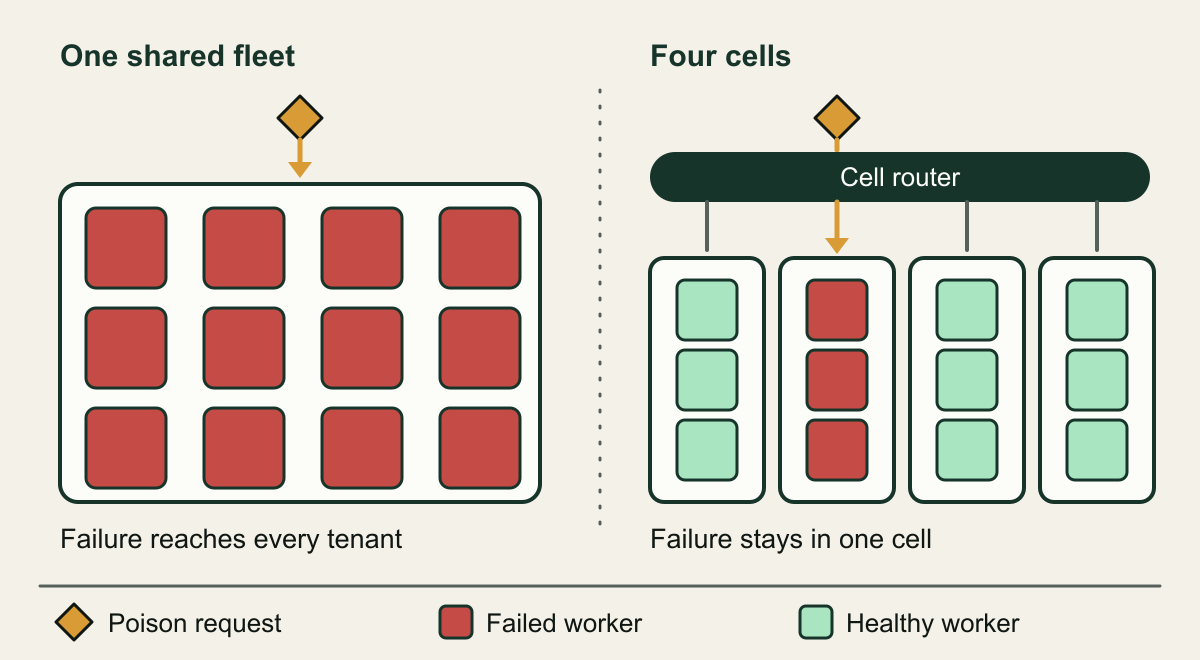
Cells break that correlation by making sure a given tenant's requests can only reach one subset of servers. A poison request, which is a request that triggers a specific failure mode, can crash its own cell repeatedly but cannot cascade through the whole fleet as clients retry it elsewhere. [1][16] The illustration below shows the difference with the same request in both designs.
Measure blast radius in the unit customers feel: tenants or requests affected per failure class. Host counts and cell counts are inputs to that number, not the number itself. The table sorts common failure classes by whether a correctly built cell boundary contains them. Bad deployments are contained only when changes are staggered cell by cell. [2] Shared-dependency failures are explicitly outside what cells were designed for. [3] An Availability Zone fault is contained only when cells are aligned to zones, which is the choice Slack made after a single-zone network fault produced user-visible errors across its service. [10]
| Failure class | Contained by cells | Condition |
|---|---|---|
| Faulty code or configuration change | Yes | Changes reach one cell at a time with automatic rollback |
| Poison request | Yes | The tenant's key always maps to the same cell |
| One tenant's traffic surge | Yes | Each cell sheds load at its tested limit |
| Data corruption from a bug | Yes | No database or bucket is shared between cells |
| Router or mapping defect | No | The router is shared by every cell |
| Shared dependency outage | No | Identity, DNS or Region failures sit below all cells |
| Availability Zone fault | Partly | Only when cells are zonal and traffic can be drained |
The same poison request in a shared fleet and in cells
Without a partition, one harmful request can fail every worker; behind a cell router it fails only its own cell.

Source. Conceptual illustration based on AWS cell-based architecture guidance and the Builders' Library account of request-triggered cascades. [1][5]
Method. Conceptual hand-authored illustration. Worker and cell counts are arbitrary and do not represent measured impact.
Accessible table and figure data
| Element | What it represents |
|---|---|
| Amber diamond | A request that triggers a failure |
| Shared fleet | Every worker can receive any tenant's request |
| Cell router | Thin shared layer mapping a key to a cell |
| Four cells | Independent copies of the whole workload |
| Red worker | Worker failed by the poison request |
| Mint worker | Worker still serving its tenants |
| Element | What it represents |
|---|---|
| Amber diamond | A request that triggers a failure |
| Shared fleet | Every worker can receive any tenant's request |
| Cell router | Thin shared layer mapping a key to a cell |
| Four cells | Independent copies of the whole workload |
| Red worker | Worker failed by the poison request |
| Mint worker | Worker still serving its tenants |
Choosing the partition key
The partition key decides which requests share a fate. AWS asks for a key that matches the grain of the service, meaning the natural way its workload divides with minimal cross-cell interaction, and that is easily accessible in most API calls, either as a direct parameter or a direct transformation of one. [7] The bulkhead practice is stricter: the key must be available in all requests, directly or by deterministic inference from other parameters, and upstream services should interact with a single cell for the lifecycle of their resources. [2] Customer ID and resource ID are the usual candidates. [1]
Test the key against every entry point, not only the public API. Queue consumers, scheduled jobs, webhooks, support tooling and data exports all need to know which cell owns the work before they touch state. A key that is present in the HTTP path but missing from an event payload forces the consumer to look it up in a shared service, which reintroduces exactly the cross-cell dependency the design is meant to remove.
Large customers test a key hardest. AWS warns that customer ID looks reasonable until one customer grows too large for a single cell, and recommends adding a second dimension aligned with the business to the key. [7] Decide before launch what happens to a tenant that outgrows the largest cell you can test: a dedicated cell, a split along a second dimension such as workspace or project, or a hard limit stated in the contract.
Some operations run against the grain of any key, such as an administrator searching across all tenants or a billing job that aggregates usage. AWS treats these scatter-gather cases as inevitable but expects them to be a minority, and recommends sending cross-cell calls back through the router instead of letting cells call each other. [7] For reporting, Microsoft suggests having every stamp publish data into a central warehouse, which keeps the aggregate query off the serving path. [6]
Once the key is chosen, the router needs a function from key to cell. AWS lists several families without recommending one, and requires that whichever is chosen comes with a way to distribute its state and a graceful path for migration when cells are added or removed. [7] A common design maps each key with naive modulo arithmetic onto a fixed, large number of logical buckets, tens of thousands for example, and then looks up the cell for that bucket in a much smaller table; adding a cell then means moving chosen buckets instead of rebalancing every tenant. [11] The table compares the approaches by what the router must hold and what happens when a cell is added. The note on modulo churn is arithmetic rather than a cited measurement: when a hash is taken modulo n and n grows by one, a key keeps its cell only when both remainders agree, which is roughly one key in n plus one.
| Mapping approach | State the router holds | Adding a cell | Fits |
|---|---|---|---|
| Explicit key-to-cell table | One entry per key | Nothing moves unless chosen | Few large tenants, dedicated cells |
| Key ranges or prefixes | One entry per range | Split a range to move part | Ordered keys, watch for hot ranges |
| Hash modulo cell count | Only the cell count | Most keys change cell | Stateless work or a fixed cell count |
| Hash to fixed buckets, then table | Bucket-to-cell table | Move selected buckets | Stateful cells that grow over time |
The routing layer as a shared dependency
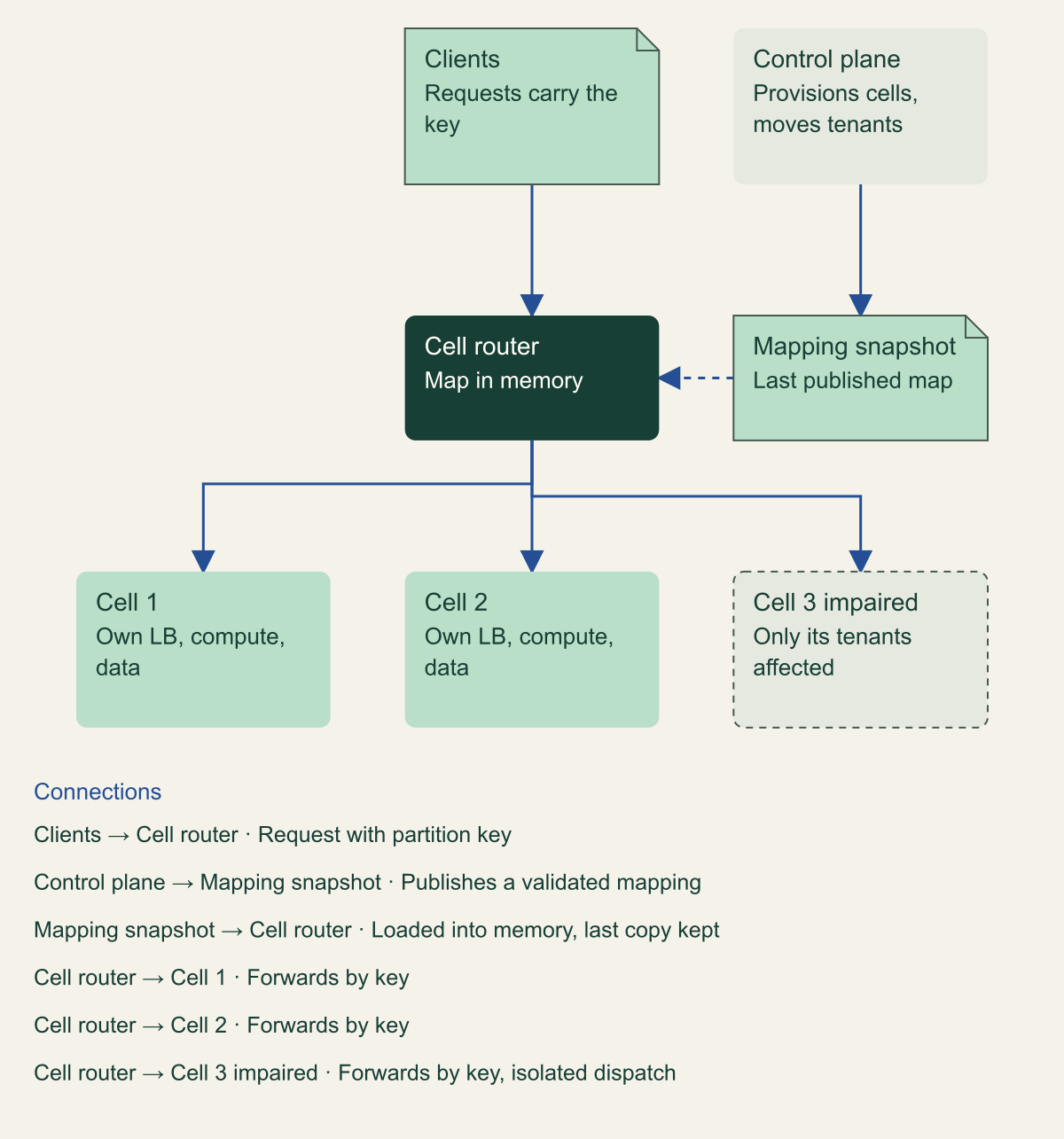
Every cell design has one component that cannot be cellular in the same way: the router is shared between cells and cannot follow their compartmentalization strategy. [12] AWS goes further and calls it the only component that holds the shared state of all cells, a single point of failure that must be built for maximum reliability and treated as a cellular component itself, with the same attention to service limits, size and observability. [13] That makes the router the first place to look for a hidden shared fault path.
The AWS router requirements read as a list of things to leave out. The router should be as simple as possible, isolate request dispatching between cells, carry minimal business logic, hide the cellular layout from clients, be fast, and keep operating normally for other cells when one cell is unreachable. [12] The recommended mapping is computationally cheap, such as a cryptographic hash combined with modular arithmetic. [12] Dispatch isolation matters more than it sounds: if all cells share one connection pool or worker queue in the router, a slow cell holds those resources and starves requests for healthy cells, so the failure crosses the boundary through the router's own capacity.
Mapping state needs a path that survives control plane failure. In the AWS example design the control plane writes the cell mapping to an object store, and routers load it into memory and refresh it when it changes; even if the control plane, the store or a zone is unavailable, the router keeps directing traffic with what it has. [14] The same page describes control planes as designed to fail rather than return wrong answers, while data planes prefer to stay available on stale information. [14] For a router, stale mapping is almost always safer than no mapping.
Treat every mapping change as a deployment. The AWS deployment article notes that runtime configuration such as feature flags and rate limits goes through dedicated pipelines with the same automatic rollback as code. [15] A mapping file that sends every bucket to one cell, or to a cell that no longer exists, is a global outage delivered by configuration. Validate that each bucket maps to an existing, healthy cell, publish new mappings to one router group before the rest, and keep the previous version loadable.
Slack's edge layer is a concrete example of a routing layer built this way. Slack drains traffic from an Availability Zone by sending new weights from its xDS control plane to edge Envoy load balancers, using weighted clusters and runtime weight updates; in-flight requests finish while new requests go elsewhere. [10] Its design goals included removing most traffic from a zone within 5 minutes, incremental undrains as small as 1 percent, and a drain mechanism that does not rely on resources in the zone being drained. [10] The router also has to cooperate with client retries and health checks. A router that retries a failed request in a different cell carries a poison request across the boundary, so retries should stay within the owning cell or return to the client.
A thin router between clients and independent cells
The router reads a mapping published by the control plane and keeps routing from memory if the control plane is down.

Source. Conceptual diagram derived from AWS cell routing, router resilience and control plane guidance. [12][13][14]
Method. Conceptual architecture. The object-store mapping path follows the AWS example design; other distribution methods are possible.
Accessible table and figure data
| Component | Role | Shared by all cells |
|---|---|---|
| Clients | Send requests carrying the partition key | Not applicable |
| Cell router | Maps key to cell and forwards | Yes |
| Control plane | Provisions cells, places and moves tenants | Yes, off the request path |
| Mapping snapshot | Last published key-to-cell map | Yes, cached in each router |
| Cells 1 to 3 | Full copy of the workload with own data | No |
| Component | Role | Shared by all cells |
|---|---|---|
| Clients | Send requests carrying the partition key | Not applicable |
| Cell router | Maps key to cell and forwards | Yes |
| Control plane | Provisions cells, places and moves tenants | Yes, off the request path |
| Mapping snapshot | Last published key-to-cell map | Yes, cached in each router |
| Cells 1 to 3 | Full copy of the workload with own data | No |
Sizing cells
AWS describes three opposing forces on cell size: big enough to fit the largest workloads, small enough to test at full scale and operate efficiently, and big enough to gain economies of scale. [4] The capacity questions are concrete: how many transactions per second a cell can handle, how many customers or tenants it supports, and how much transfer or storage it can carry. [4] The bulkhead practice adds the method: identify the maximum by testing until breaking points are reached and safe operating margins are known, then grow the workload by adding cells. [2]
The tradeoffs cut both ways. Smaller cells mean more cells to deploy and operate, but each outage or drain touches a smaller share of the fleet, each cell is less likely to hit account or service quotas, and full-scale tests are cheaper; with 10 cells each holds 10 percent of customers, and with 100 cells each holds 1 percent. [4] Larger cells use capacity more efficiently and need fewer copies of the workload. [4] Both AWS and Microsoft count higher infrastructure cost among the disadvantages. [8][6]
A hypothetical example shows how the numbers interact. Suppose a service peaks at 60,000 requests per second across 400 tenants, load tests show one cell sustains 10,000 requests per second before latency degrades, and the largest tenant peaks at 6,000. Placing tenants against a target of 70 percent of the tested limit gives 7,000 requests per second per cell, so the service needs nine cells for current peak plus at least one spare to receive migrations, with each of the nine serving cells carrying about 11 percent of traffic. The largest tenant fits under the target but would leave only 1,000 requests per second of headroom for its neighbors, which makes it the first candidate for a dedicated cell or a second key dimension. None of these figures are measurements; they show the calculation to run with your own load-test results.
A cell limit is useful only if the cell enforces it. When load exceeds the tested maximum, the cell should reject excess work early and predictably rather than slow down for every tenant it holds. Otherwise one tenant's surge becomes a whole-cell outage, which is precisely the failure the cell size was chosen to bound.
Shuffle sharding arithmetic
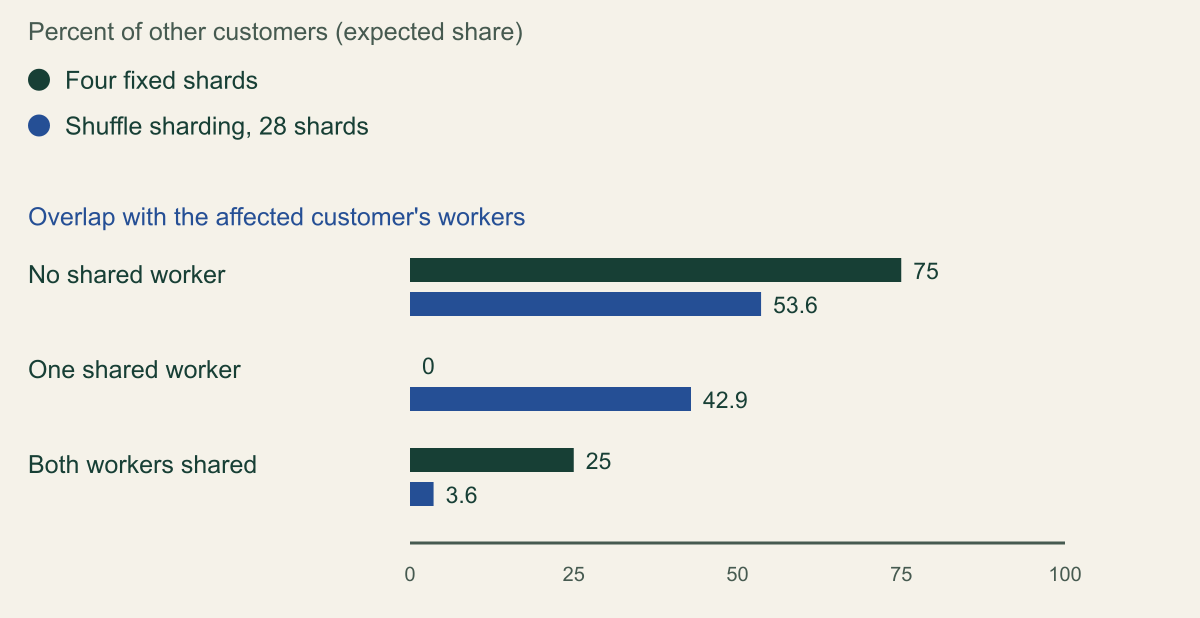
Colm MacCárthaigh's Builders' Library article starts from eight workers. Without sharding, a request-triggered failure can cascade through all of them. Splitting them into four fixed shards of two workers limits impact to the 25 percent of customers on the affected shard. Shuffle sharding instead gives each customer its own virtual shard of two workers chosen from all eight. There are 28 unique pairs, so with hundreds of customers assigned across those 28 shards, the scope of a problem tied to one customer is 1/28, which the article calls 7 times better than regular sharding. [5]
The count is a binomial coefficient: choosing k workers from N gives N! / (k! (N minus k)!) shards, which for N = 8 and k = 2 is 28. Overlap is the catch. The chance that a randomly chosen other shard shares exactly j workers with the affected one follows the hypergeometric formula C(k, j) C(N minus k, k minus j) / C(N, k). For eight workers and pairs this gives 15/28 sharing no worker, 12/28 sharing one worker and 1/28 identical. The 1/28 figure is the full-impact share. The 43 percent sharing one worker keep service only if their clients can fail over to the healthy worker, which is exactly the condition the article sets: the rose customer still gets service from worker eight because requestors are fault tolerant and retry. [5]
Readers comparing sources will find different numbers for the same example. The 2014 AWS Architecture Blog post on shuffle sharding counts 56 shards for two of eight instances and an impact of 1/1680 for four of eight. [16] Those values equal 8 x 7 and 8 x 7 x 6 x 5, which count ordered selections. A shard is an unordered set, so the counts are C(8, 2) = 28 and C(8, 4) = 70. The post's author update corrects the card-hand figure in its introduction but not the eight-instance figures, and the later Builders' Library article uses 28. [16][5]
Route 53 shows the technique at scale. The Builders' Library article describes 2,048 virtual name servers with each domain assigned a shuffle shard of four, giving about 730 billion possible shards, and says no customer domain shares more than two virtual name servers with any other. [5] C(2048, 4) is 730,862,190,080, which reproduces that figure. Random assignment alone would not deliver the no-more-than-two property: a random pair of four-server shards shares three or more servers with probability 8,177 / 730,862,190,080, about 1 in 89 million, and across a hypothetical one million domains that still predicts about 5,600 offending pairs. The 2014 post describes the mechanism that closes this gap in Route 53's open source Infima library: a stateful searching shuffle sharder that checks each new shard against every shard already assigned so it can guarantee overlap limits. [16][5] The Builders' Library article does not say which implementation Route 53 itself uses.
Two practical limits follow from the arithmetic. Shard size is bounded by how many endpoints a client is willing to try; the 2014 post pairs three retries with four instances per shard, and notes that Infima can pick endpoints from every Availability Zone instead of choosing at random. [16] Logical shards also isolate failures only if the physical resources under them are spread: Route 53's name servers are virtual and do not correspond to the physical servers hosting the service, so overlapping hardware underneath could reintroduce shared fate. [5] Shuffle sharding fits stateless or easily replicated work, where any worker in the shard can serve the customer; state that lives on one worker defeats the retry that makes overlap harmless.
| Workers N | Shard size k | Possible shards | Random shard identical | Shares k minus 1 or more |
|---|---|---|---|---|
| 8 | 2 | 28 | 3.57% | 46.4% |
| 8 | 4 | 70 | 1.43% | 24.3% |
| 20 | 4 | 4,845 | 0.0206% | 1.34% |
| 2,048 | 4 | 730,862,190,080 | 1 in 731 billion | 1 in 89 million |
from math import comb

def overlap_distribution(workers: int, shard_size: int) -> list[float]:
    """Chance that a uniformly random other shard shares j workers with a given shard."""
    total = comb(workers, shard_size)
    return [
        comb(shard_size, j) * comb(workers - shard_size, shard_size - j) / total
        for j in range(shard_size + 1)
    ]

print(comb(8, 2))                                          # 28
print([round(p, 3) for p in overlap_distribution(8, 2)])   # [0.536, 0.429, 0.036]
print(comb(2048, 4))                                       # 730862190080
Who else is hurt when one customer's shard fails
Shuffle sharding cuts full impact from 25 percent to 3.6 percent, but 42.9 percent of customers share one worker and rely on retries.

Source. Calculated from the eight-worker, two-per-shard example in the Amazon Builders' Library article on shuffle sharding. [5]
Method. Calculated. Fixed sharding: another customer is on the same shard with probability 1/4. Shuffle sharding: shards are C(8, 2) = 28 and another customer's shard shares j workers with probability C(2, j) C(6, 2 minus j) / 28, giving 15/28, 12/28 and 1/28. Assumes customers are spread uniformly at random. Values rounded to one decimal place, so the shuffle column sums to 100.1.
Accessible table and figure data
| Overlap with the affected shard | Four fixed shards | Shuffle sharding, 28 shards |
|---|---|---|
| No shared worker | 75 | 53.6 |
| One shared worker | 0 | 42.9 |
| Both workers shared | 25 | 3.6 |
| Overlap with the affected shard | Four fixed shards | Shuffle sharding, 28 shards |
|---|---|---|
| No shared worker | 75 | 53.6 |
| One shared worker | 0 | 42.9 |
| Both workers shared | 25 | 3.6 |
Deploying through cells
A cell contains a bad change only if the change reaches it alone. The bulkhead practice prefers staggered deployment over changing all cells at once, to keep a bad deployment or human error from reaching several cells. [2] AWS describes the pattern in its own pipelines: the first production wave deploys to a low-traffic Region one Availability Zone or cell at a time, the second wave does the same in a high-traffic Region where customers are likely to exercise every new code path, and later waves deploy to several Regions in parallel while each step still touches only one zone or cell per Region. [15]
Each wave in that pipeline starts with a one-box stage, a single virtual machine, container or small share of function invocations that typically serves at most 10 percent of the Region's or zone's requests, and it rolls back automatically on alarms scoped to that one box because its errors may be too small to move service-wide alarms. [15] The pipeline then waits: at least one hour after each one-box stage, at least 12 hours after the first regional wave and two to four hours after each later wave, with additional bake time for individual zones and cells. [15] Map these stages onto cells: a canary cell, then single cells, then growing groups, with a cell-scoped rollback alarm at every step.
The boundary has to cover every kind of change, not only application code. The AWS pipeline article puts configuration values and feature flags through their own pipelines with automatic rollback. [15] Magerramov's article makes the same point about operational tools: any tool that acts on many servers at once can introduce a correlated failure, so AWS adds velocity controls and, for cellular services, makes tooling avoid touching multiple cells at the same time. [9] A global feature flag, a fleet-wide patch run or a one-line script over every cell is a deployment that bypasses the cells.
Deployment rings fit naturally. Microsoft notes that stamps can implement rings, with customers who want updates at different frequencies placed on stamps that are updated on different schedules. [6] Internal tenants and tolerant customers belong in the first cells; risk-averse customers belong late in the order. That ordering only works if every metric, log and alarm carries the cell identifier, which is also what lets an on-call engineer see that one cell is failing instead of reading a fleet-wide average that hides it.
Schema changes deserve special care because cells will run different versions for hours or days during a rollout. Old and new application versions must each read data the other writes, and the rollback path must still work after the data has changed.
Migrating an existing service
AWS recommends treating the current stack as cell zero: add the router above it, then gradually distribute traffic according to the partition strategy. [17] The same page recommends running more than one cell from the first day, building a mechanism to move customers between cells from the first day, and performing a failure mode analysis of each component in a cell to confirm its failure does not reach other cells. [17] The order of work at the end of this section follows from those recommendations, and the note after it summarizes how AWS describes moving a tenant's state.
Microsoft is blunt about the cost of the move itself: because stamps are independent, moving tenants between them needs custom logic to transfer a tenant's data and remove it from the source, possibly through a backplane between stamps that adds complexity of its own. [6] Treat the migration tool as production software with its own tests, rate limits and audit trail, because it is the one component allowed to touch two cells at once.
Slack's published account shows what a real migration looks like. After a network link in one us-east-1 Availability Zone faulted intermittently on 30 June 2021 and degraded service, Slack asked why a single-zone failure was visible to users at all; part of the answer was that one API request can fan out into hundreds of internal calls, and that its strongly consistent Vitess datastore needs a single available primary for writes to each shard. [10] Slack's response was siloing: each service receives traffic only from within its zone and sends traffic only to servers in its zone, so draining a zone at the edge drains everything behind it. Slack reported moving its most critical user-facing services to this design over about 18 months. [10]
Zone-aligned cells like Slack's carry a cost the AWS guidance calls out. A single-zone cell that must survive a zone outage needs replicas in other zones, which means a replication layer and a disaster recovery model on top of the cell, with higher cost and complexity. [3] Decide early whether a zonal cell fails over or simply waits, because the answer changes the data design.
- Put the router in front of the existing stack with every key mapped to cell zero, and confirm it adds no new failure mode.
- Build cell one from the same templates and move internal or test tenants into it first.
- Exercise tenant migration in both directions before any paying tenant moves.
- Remove shared caches, queues and buckets one at a time, each with its own failure mode review.
- Only then send new tenants to cells by placement policy rather than by default.
When cells are the wrong tool
AWS positions cells for workloads where downtime has a large customer impact, financial services workloads critical to economic stability, ultra-scale systems, recovery point objectives under 5 seconds, recovery time objectives under 30 seconds and multi-tenant services where some tenants need a dedicated cell. [8] It lists the costs plainly: more architectural complexity, higher infrastructure cost, specialized operational tools and practices, and investment in a routing layer. [8]
Microsoft's list of poor fits is just as useful. Stamps are unsuitable when the solution is simple and does not need to scale far, when it can scale within a single instance, when data must be replicated across all instances (the geode pattern fits better), when only some components need to scale, and when the content is static and belongs on a content delivery network. [6] Microsoft also notes that stamps are not inherently redundant across Regions: if a Region hosting stamps fails, those tenants lose access until it recovers or they are moved. [6]
Cheaper controls give part of the benefit. Staggered deployment with automatic rollback contains many bad changes without partitioning any data. Per-tenant throttling limits noisy neighbors, although the 2014 post warns that throttles can themselves be overwhelmed and do nothing against a poison request. [16] Shuffle sharding a stateless tier adds request-level isolation at little cost. If those controls address the failures your incident history actually contains, cells may be a cost without a matching benefit.
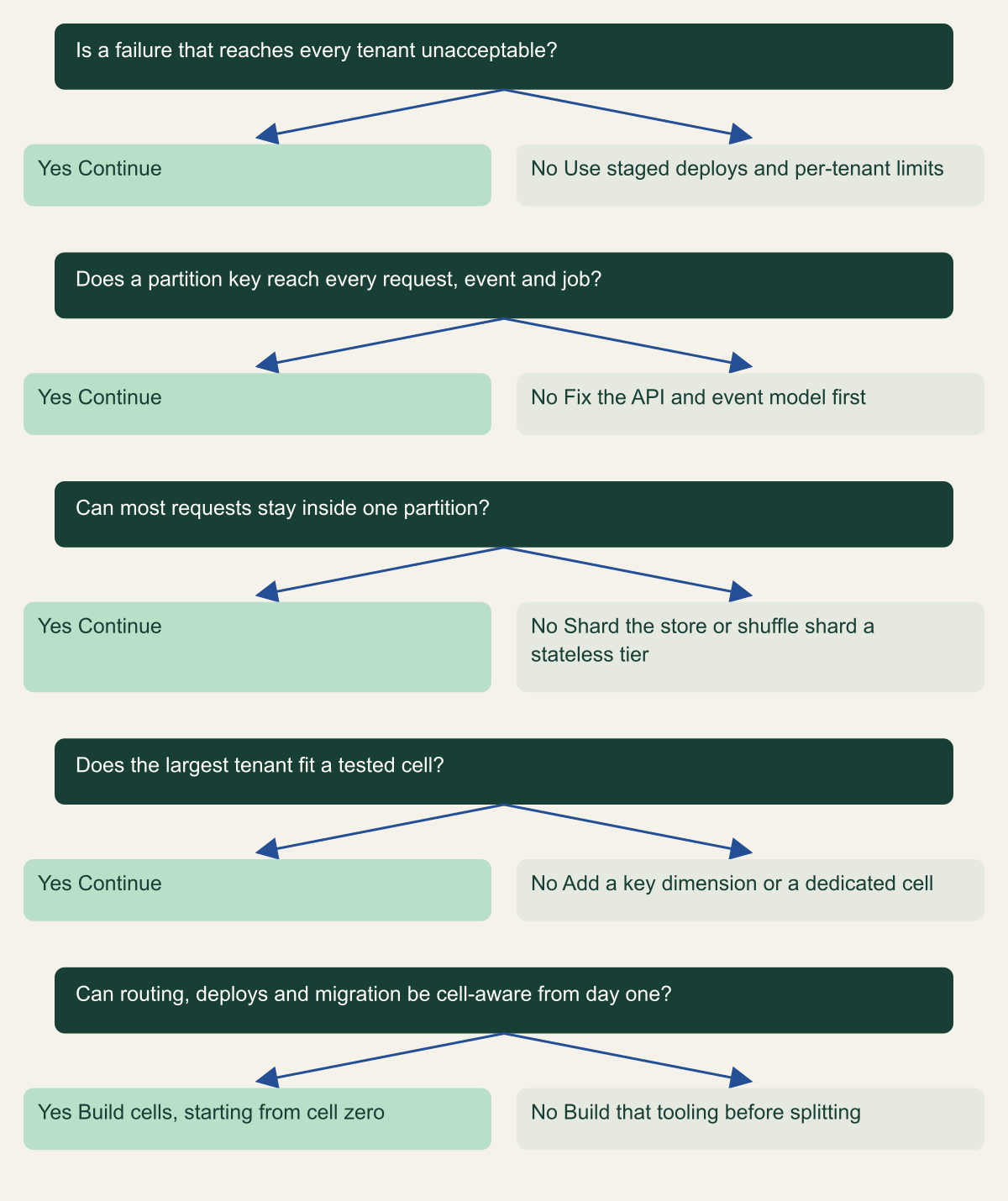
The decision tree below summarizes the questions to answer in order. A no at any step is not a permanent rejection; it names the work that has to happen before cells can deliver the containment they promise.
Questions to answer before building cells
Each no names work to do first, usually cheaper isolation, a better key or migration tooling.

Source. Conceptual framework synthesized from AWS and Microsoft guidance on when to use cells or stamps. [8][7][6][17]
Method. Conceptual decision aid. It orders questions; it does not score risk or predict availability.
Accessible table and figure data
| Question | Yes | No |
|---|---|---|
| Is a failure that reaches every tenant unacceptable? | Continue | Use staged deploys and per-tenant limits |
| Does a partition key reach every request, event and job? | Continue | Fix the API and event model first |
| Can most requests stay inside one partition? | Continue | Shard the store or shuffle shard a stateless tier |
| Does the largest tenant fit a tested cell? | Continue | Add a key dimension or a dedicated cell |
| Can routing, deploys and migration be cell-aware from day one? | Build cells, starting from cell zero | Build that tooling before splitting |
| Question | Yes | No |
|---|---|---|
| Is a failure that reaches every tenant unacceptable? | Continue | Use staged deploys and per-tenant limits |
| Does a partition key reach every request, event and job? | Continue | Fix the API and event model first |
| Can most requests stay inside one partition? | Continue | Shard the store or shuffle shard a stateless tier |
| Does the largest tenant fit a tested cell? | Continue | Add a key dimension or a dedicated cell |
| Can routing, deploys and migration be cell-aware from day one? | Build cells, starting from cell zero | Build that tooling before splitting |
When to build cells, and in what order
Build cells when you can name the failure classes you want contained, show that none of them live below the cells, name a partition key present on every path, and state the largest tenant's peak against a tested cell limit. If any of those four answers is missing, the cheaper controls come first. When the answers exist, work in this order.
- List recent incidents by failure class and mark which ones a cell boundary would have contained.
- Choose the key and trace it through every request, event, job and support tool.
- Build the router with local mapping evaluation, last-known-good mapping, per-cell dispatch isolation and staged mapping changes.
- Load test one cell to its breaking point and set the placement target below it.
- Make code, configuration, flags and operational tools change one cell at a time with cell-scoped rollback alarms.
- Ship tenant migration before the second paying cell exists.
- Shuffle shard stateless tiers inside or in front of cells where clients can retry across workers.
Method and provenance
Source-led technical analysis of AWS Well-Architected guidance, Amazon Builders' Library articles, Microsoft Azure Architecture Center guidance and Slack's published engineering account, with original calculations and explicitly hypothetical examples. Sources were reviewed on October 7, 2026.
No live environment, customer workload or load test was used. Shuffle-sharding probabilities are calculated from cited configurations under a stated random-assignment model, and the Route 53 and Slack details are as published by those organizations.
AI assistance. AI assisted research synthesis, calculation checks, drafting and visual production. No personal deployment experience, independent human review or live test is claimed.
Published under the Cloud Security Desk organizational byline. Read the practitioner guide policy.
References
- What is a cell-based architecture? AWS. Accessed .
- REL10-BP03 Use bulkhead architectures to limit scope of impact AWS. Accessed .
- Should a Single-AZ cell fail over if an AZ becomes unavailable? AWS. Accessed .
- Cell sizing AWS. Accessed .
- Deployment Stamps pattern Microsoft. Accessed .
- Cell partition AWS. Accessed .
- When to use a cell-based architecture? AWS. Accessed .
- Slack's migration to a cellular architecture Slack Engineering. Accessed .
- Consistent hashing AWS. Accessed .
- Cell routing AWS. Accessed .
- About resilience of the cell router AWS. Accessed .
- Control plane and data plane AWS. Accessed .
- Shuffle Sharding: Massive and Magical Fault Isolation AWS Architecture Blog. Accessed .
- Best practices AWS. Accessed .
- Cell migration AWS. Accessed .