
A guide for SREs and architects of single-region services on the recovery phase of a regional outage, built from AWS's October 2025 post-event summary, metastable failure research and AWS documentation reviewed in October 2026. It gives calculated impact windows, a recovery timeline, an admission order for backlog work and concrete retry, queue and Auto Scaling settings.
At a glance
Key findings
- AWS restored DynamoDB DNS by 2:25 AM PDT and customer connections by 2:40 AM, but EC2 was not fully normal until 1:50 PM and the last impaired Redshift clusters returned at 4:05 AM on October 21. [1]
- Recovery stalled on accumulated work: EC2's lease manager entered what AWS called congestive collapse, then a network propagation backlog and flapping NLB health checks extended the impact. [1]
- Metastable failure research treats the sustaining feedback loop as the root cause; at least 4 of 15 major AWS outages in the decade studied fit the pattern, and retries sustained more than half of 22 incidents analyzed. [2][3]
- An hour-long outage needs double capacity for another hour to clear its queue, so drain caps, message age limits and retry budgets set the length of recovery. [4][5][7]
- Instances already running stayed healthy, so automation that terminates capacity during a launch impairment turns a recoverable problem into lost capacity. [1][9]
The fix took three hours; recovery took the day
AWS's post-event summary for the October 19 and 20, 2025 disruption in us-east-1 gives every time in Pacific Daylight Time (UTC minus 7). A race condition in DynamoDB's DNS automation left the regional endpoint dynamodb.us-east-1.amazonaws.com with an empty record at 11:48 PM on October 19. All DNS information was restored by 2:25 AM, and customers could connect again as cached records expired by 2:40 AM, which AWS calls the completion of recovery from the primary disruption. The event as a whole ran until 2:20 PM, and the last Redshift clusters impaired by blocked replacement workflows came back at 4:05 AM on October 21. [1]
None of the eleven hours between 2:40 AM and full EC2 recovery at 1:50 PM went to DNS. They went to work that had piled up while DynamoDB was unreachable: EC2 droplet leases that had expired and could not be renewed fast enough, a queue of network configuration changes for new instances, load balancer health checks that flapped while that queue drained, and throttles AWS imposed to protect each subsystem and then had to lift slowly. [1]
For a service that runs in one primary region, the answer to how your own systems should behave in that period has four parts. Stop retry and redrive traffic from growing faster than the dependency recovers. Admit work in an explicit order, with control loops and fresh requests ahead of the backlog. Do not let automation destroy capacity you cannot currently replace. Drain the backlog at a rate tied to downstream health, not to how fast your consumers can scale.
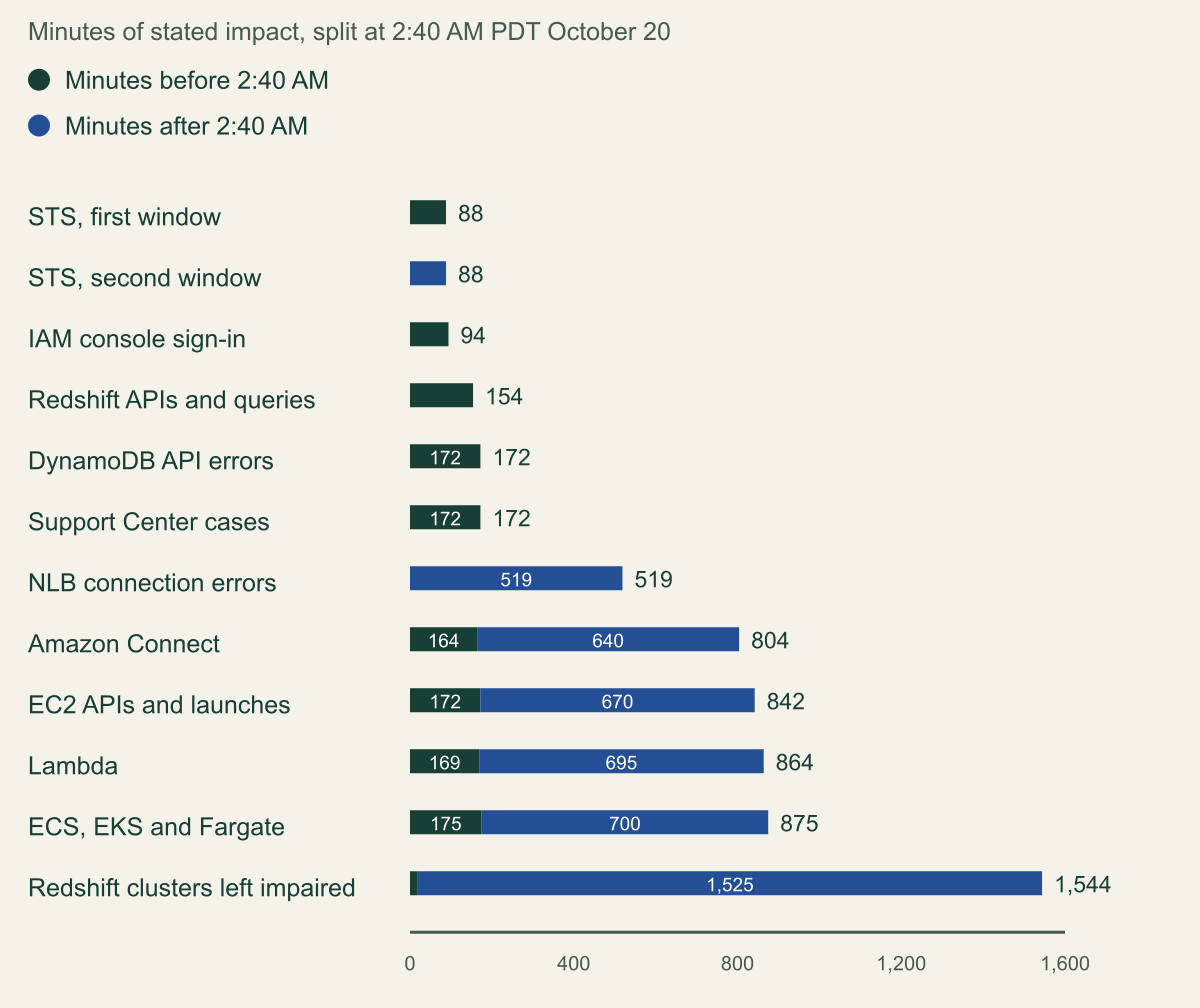
The chart splits each service's stated impact window at 2:40 AM. Problems that depended on DynamoDB alone, such as IAM console sign-in, ended before the split. Services that needed new capacity, new network state or a drained queue spent about four times as long impaired after DynamoDB returned as before it: EC2 172 minutes before and 670 after, Lambda 169 and 695. [1]
Most impact came after DynamoDB was back
EC2, Lambda, ECS and Connect each spent about four times as long impaired after 2:40 AM as before it. [1]

Source. Calculated from the impact windows in AWS's post-event summary for the October 2025 us-east-1 disruption. [1]
Method. Calculated. Minutes = stated end minus stated start, using the PDT (UTC minus 7) times in the AWS summary. Split point: 2:40 AM PDT October 20, when AWS says DynamoDB customer impact ended. Before = min(end, 2:40 AM) minus start; after = end minus max(start, 2:40 AM). EC2 11:48 PM to 1:50 PM = 842 (172 + 670). Lambda 11:51 PM to 2:15 PM = 864 (169 + 695). ECS, EKS, Fargate 11:45 PM to 2:20 PM = 875 (175 + 700). Connect 11:56 PM to 1:20 PM = 804 (164 + 640). NLB 5:30 AM to 2:09 PM = 519. DynamoDB and Support 11:48 PM to 2:40 AM = 172. Redshift APIs 11:47 PM to 2:21 AM = 154. IAM sign-in 11:51 PM to 1:25 AM = 94. STS 11:51 PM to 1:19 AM = 88 and 8:31 AM to 9:59 AM = 88. Impaired Redshift clusters are measured from 2:21 AM, when Redshift APIs recovered, to 4:05 AM October 21 = 1,544 (19 + 1,525); the summary gives no separate start, so this is a lower bound. Windows are stated spans: Connect and Lambda partly recovered inside them. ECS and Redshift start times precede the 11:48 PM event start as published.
Accessible table and figure data
| Service and impact | Stated window (PDT) | Minutes before 2:40 AM | Minutes after 2:40 AM | Total |
|---|---|---|---|---|
| STS, first window | 11:51 PM to 1:19 AM | 88 | 0 | 1 h 28 min |
| STS, second window | 8:31 AM to 9:59 AM | 0 | 88 | 1 h 28 min |
| IAM console sign-in | 11:51 PM to 1:25 AM | 94 | 0 | 1 h 34 min |
| Redshift APIs and queries | 11:47 PM to 2:21 AM | 154 | 0 | 2 h 34 min |
| DynamoDB API errors | 11:48 PM to 2:40 AM | 172 | 0 | 2 h 52 min |
| Support Center cases | 11:48 PM to 2:40 AM | 172 | 0 | 2 h 52 min |
| NLB connection errors | 5:30 AM to 2:09 PM | 0 | 519 | 8 h 39 min |
| Amazon Connect | 11:56 PM to 1:20 PM | 164 | 640 | 13 h 24 min |
| EC2 APIs and launches | 11:48 PM to 1:50 PM | 172 | 670 | 14 h 02 min |
| Lambda | 11:51 PM to 2:15 PM | 169 | 695 | 14 h 24 min |
| ECS, EKS and Fargate | 11:45 PM to 2:20 PM | 175 | 700 | 14 h 35 min |
| Redshift clusters left impaired | 2:21 AM to 4:05 AM Oct 21 | 19 | 1525 | 25 h 44 min |
| Service and impact | Stated window (PDT) | Minutes before 2:40 AM | Minutes after 2:40 AM | Total |
|---|---|---|---|---|
| STS, first window | 11:51 PM to 1:19 AM | 88 | 0 | 1 h 28 min |
| STS, second window | 8:31 AM to 9:59 AM | 0 | 88 | 1 h 28 min |
| IAM console sign-in | 11:51 PM to 1:25 AM | 94 | 0 | 1 h 34 min |
| Redshift APIs and queries | 11:47 PM to 2:21 AM | 154 | 0 | 2 h 34 min |
| DynamoDB API errors | 11:48 PM to 2:40 AM | 172 | 0 | 2 h 52 min |
| Support Center cases | 11:48 PM to 2:40 AM | 172 | 0 | 2 h 52 min |
| NLB connection errors | 5:30 AM to 2:09 PM | 0 | 519 | 8 h 39 min |
| Amazon Connect | 11:56 PM to 1:20 PM | 164 | 640 | 13 h 24 min |
| EC2 APIs and launches | 11:48 PM to 1:50 PM | 172 | 670 | 14 h 02 min |
| Lambda | 11:51 PM to 2:15 PM | 169 | 695 | 14 h 24 min |
| ECS, EKS and Fargate | 11:45 PM to 2:20 PM | 175 | 700 | 14 h 35 min |
| Redshift clusters left impaired | 2:21 AM to 4:05 AM Oct 21 | 19 | 1525 | 25 h 44 min |
What the October 2025 timeline shows
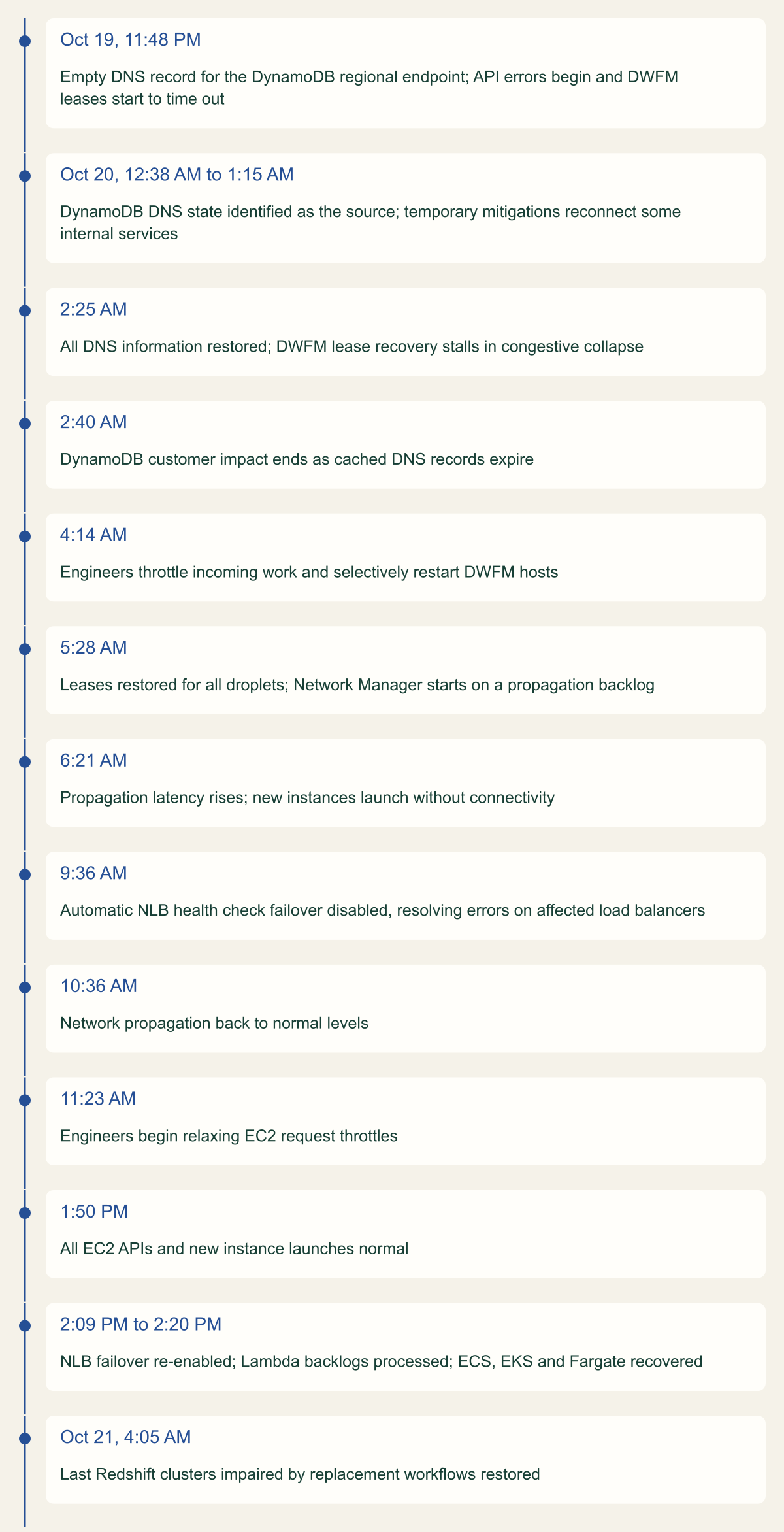
AWS groups customer impact into three periods: DynamoDB API errors from 11:48 PM to 2:40 AM, EC2 launch failures from 2:25 AM to 10:36 AM followed by connectivity problems on some new instances until 1:50 PM, and NLB connection errors from 5:30 AM to 2:09 PM. Each period began when the previous one released work that the next subsystem could not absorb. [1]
EC2 explains the first handoff. DropletWorkflow Manager (DWFM) holds a lease on every physical server, which EC2 calls a droplet, and completes a state check with each one every few minutes. Those checks depend on DynamoDB, so from 11:48 PM leases slowly timed out. Running instances were unaffected, but a droplet without a lease is not a candidate for launches, so the EC2 API returned insufficient capacity errors. When DynamoDB returned at 2:25 AM, DWFM tried to re-establish leases across the fleet, the attempts took so long that they timed out before completing, and the retries were queued. AWS writes that DWFM had entered a state of congestive collapse and could not make forward progress. There was no established recovery procedure. At 4:14 AM engineers throttled incoming work and selectively restarted DWFM hosts, which cleared the queues, and all leases were back by 5:28 AM. [1]
The second handoff followed at once. Network Manager, which propagates VPC network configuration to instances, now had a backlog of delayed changes, and its propagation latency rose from 6:21 AM, so instances launched but had no connectivity. NLB's health checking subsystem brought those instances into service before their network state existed, checks alternated between failing and passing, and nodes were removed from DNS and returned. The extra load degraded the health checker until it triggered automatic AZ DNS failover and took capacity out of service. Engineers disabled automatic health check failover at 9:36 AM, network propagation was normal by 10:36 AM, throttles began to relax at 11:23 AM, EC2 was normal at 1:50 PM, and NLB failover was re-enabled at 2:09 PM. [1]
When matching your own logs to this timeline, note that the summary's overview says launches failed until 10:36 AM, while its EC2 section says launches began to succeed by 5:28 AM, many still hitting request limit exceeded errors from AWS's added throttling. [1]
Each recovery step released work onto the next
DNS was restored at 2:25 AM; EC2 needed lease recovery, a propagation backlog and stepwise throttle relief before 1:50 PM. [1]

Source. AWS post-event summary for the October 2025 us-east-1 disruption. [1]
Method. Times and events transcribed from the summary's DynamoDB, EC2, NLB and Other AWS Services sections; wording shortened. Times are PDT as published. Ordinal layout: spacing does not represent elapsed time.
Accessible table and figure data
| Time (PDT) | Event |
|---|---|
| Oct 19, 11:48 PM | Empty DNS record for the DynamoDB regional endpoint; API errors begin and DWFM leases start to time out |
| Oct 20, 12:38 AM to 1:15 AM | DynamoDB DNS state identified as the source; temporary mitigations reconnect some internal services |
| 2:25 AM | All DNS information restored; DWFM lease recovery stalls in congestive collapse |
| 2:40 AM | DynamoDB customer impact ends as cached DNS records expire |
| 4:14 AM | Engineers throttle incoming work and selectively restart DWFM hosts |
| 5:28 AM | Leases restored for all droplets; Network Manager starts on a propagation backlog |
| 6:21 AM | Propagation latency rises; new instances launch without connectivity |
| 9:36 AM | Automatic NLB health check failover disabled, resolving errors on affected load balancers |
| 10:36 AM | Network propagation back to normal levels |
| 11:23 AM | Engineers begin relaxing EC2 request throttles |
| 1:50 PM | All EC2 APIs and new instance launches normal |
| 2:09 PM to 2:20 PM | NLB failover re-enabled; Lambda backlogs processed; ECS, EKS and Fargate recovered |
| Oct 21, 4:05 AM | Last Redshift clusters impaired by replacement workflows restored |
| Time (PDT) | Event |
|---|---|
| Oct 19, 11:48 PM | Empty DNS record for the DynamoDB regional endpoint; API errors begin and DWFM leases start to time out |
| Oct 20, 12:38 AM to 1:15 AM | DynamoDB DNS state identified as the source; temporary mitigations reconnect some internal services |
| 2:25 AM | All DNS information restored; DWFM lease recovery stalls in congestive collapse |
| 2:40 AM | DynamoDB customer impact ends as cached DNS records expire |
| 4:14 AM | Engineers throttle incoming work and selectively restart DWFM hosts |
| 5:28 AM | Leases restored for all droplets; Network Manager starts on a propagation backlog |
| 6:21 AM | Propagation latency rises; new instances launch without connectivity |
| 9:36 AM | Automatic NLB health check failover disabled, resolving errors on affected load balancers |
| 10:36 AM | Network propagation back to normal levels |
| 11:23 AM | Engineers begin relaxing EC2 request throttles |
| 1:50 PM | All EC2 APIs and new instance launches normal |
| 2:09 PM to 2:20 PM | NLB failover re-enabled; Lambda backlogs processed; ECS, EKS and Fargate recovered |
| Oct 21, 4:05 AM | Last Redshift clusters impaired by replacement workflows restored |
Why recovery creates its own load
Every subsystem in that chain did what it was built to do. What changed was volume: work that normally arrives spread over hours arrived together, and each mechanism's own retry or failover behavior added to it. Recovery load is the deferred work, plus retries of that work, plus the extra work that failure handling creates.
Other services in the summary show the same three parts. Lambda's internal subsystem that polls SQS queues failed and did not recover on its own; AWS restored it at 4:40 AM and cleared the message backlogs by 6:00 AM. From 7:04 AM, NLB health check failures triggered instance terminations that left some Lambda internal systems under-scaled, and with launches still impaired AWS throttled event source mappings and asynchronous invocations to protect synchronous calls, clearing the last backlogs at 2:15 PM. Redshift replaces cluster hosts whose credentials expire, but the replacement workflows needed EC2 launches, so clusters sat in a modifying state; engineers stopped the workflow backlog from growing at 6:45 AM, and it drained only after replacement instances began launching at 2:46 PM. [1]
Apart from fixing the DNS race, AWS's remediation list is a list of recovery-load controls. It adds a velocity control that limits how much capacity a single NLB can remove when health check failures cause AZ failover, a test suite that exercises the DWFM recovery workflow at scale, and better throttling in EC2's data propagation systems to rate limit incoming work based on the size of the waiting queue. The last one is a design any queue consumer can copy. [1]
| Subsystem | What accumulated | What released it |
|---|---|---|
| DWFM (EC2) | Expired droplet leases and queued lease retries | Throttled work and host restarts, 4:14 to 5:28 AM |
| Network Manager (EC2) | Delayed network state for new and terminated instances | Load reduction; normal by 10:36 AM |
| NLB health checking | Flapping checks and AZ DNS failovers | Automatic failover disabled at 9:36 AM |
| Lambda SQS polling | Unprocessed SQS messages | Subsystem restored 4:40 AM; backlog cleared 6:00 AM |
| Lambda async and event sources | Invocations deferred by deliberate throttling | Throttles reduced gradually; cleared 2:15 PM |
| Redshift automation | Host replacement workflows blocked on EC2 | Launches from 2:46 PM; done 4:05 AM October 21 |
What the metastable failure research says
Nathan Bronson, Abutalib Aghayev, Aleksey Charapko and Timothy Zhu named this pattern in "Metastable Failures in Distributed Systems" at HotOS '21. A metastable failure occurs in an open system with an uncontrolled source of load when a trigger pushes it into a bad state that persists after the trigger is removed. Goodput, the throughput of useful work, is unusably low, and a sustaining effect, often work amplification or reduced efficiency, keeps the system there. Leaving the state takes a strong corrective push such as a reboot or a dramatic cut in load. The authors treat the sustaining feedback loop, not the trigger, as the root cause, because many triggers lead to the same failed state. [2]
Their retry example is small. A database answers in under 100 ms below 300 queries per second and an order of magnitude slower above it, and the web tier retries once if a query takes over a second. At 280 queries per second, a 10-second network outage ends with a surge of retransmitted requests, latency passes the timeout, retries double the load to 560 queries per second, and every query times out. The system stays there until load drops below 150 queries per second or retries are held under 20 per second. The paper calls that boundary between the stable and vulnerable states hidden capacity, the load below which the system heals itself, as distinct from the higher advertised capacity at which it runs normally but is vulnerable. [2]
Lexiang Huang, Matthew Magnusson, Abishek Bangalore Muralikrishna, Salman Estyak, Rebecca Isaacs, Abutalib Aghayev, Timothy Zhu and Aleksey Charapko measured how common the pattern is in "Metastable Failures in the Wild" at OSDI '22. From public incident reports they studied 22 metastable failures at 11 organizations and found that at least 4 of 15 major AWS outages in the preceding decade were metastable. Retry policy was the most common sustaining effect, in more than half of the incidents. Direct load shedding such as throttling or dropping requests was used in over 55 percent of recoveries, and outages lasted from 1.5 to 73.53 hours, most often 4 to 10. The paper extends the model with two trigger types, load spikes and capacity decreases, and two amplification types, workload amplification and capacity degradation amplification. [3]
Reading the October 2025 event through that model is this guide's interpretation, not AWS's classification. The DWFM account fits it closely: DynamoDB was back at 2:25 AM, yet DWFM made no forward progress until engineers throttled work and restarted hosts, the strong push both papers describe. Lease expiry was a capacity-decreasing trigger, because droplets without leases could not take launches, and queued lease retries were workload amplification. NLB's flapping health checks removed serving capacity during recovery, which matches capacity degradation amplification. [1][2][3]
Two practical points follow. The threshold that matters is hidden capacity, which the authors note is difficult to measure during normal operation; Bronson and colleagues suggest applying a trigger at a given load and checking whether the system quiets down unaided. The remedies they survey are changes of policy during overload: retry budgets, LIFO scheduling, smaller internal queues, enforced priorities, load shedding and circuit breakers, switched on by a signal such as the minimum queueing latency over a sliding window. [2]
What your queues and retries do during recovery
Backlog arithmetic is unforgiving. David Yanacek's Builders' Library article on queue backlogs points out that after an hour-long outage, a queue-based system needs double its capacity for another hour to catch up, whatever its rate. His noisy-neighbor example turns 30 minutes of unthrottled enqueueing at 10 times consumer capacity into 300 minutes of drain time. In general, drain time is the backlog divided by spare capacity, meaning whatever the consumers can process beyond the arrival rate of new work, and it grows further when downstream systems cannot accept that extra throughput. [4]
The hypothetical example below assumes consumers with 50 percent headroom over normal arrivals. A backlog built during the 172-minute DynamoDB phase then takes 344 minutes to drain, even if every downstream dependency accepts the extra traffic immediately. A three-hour dependency outage becomes nearly nine hours of stale processing without any further failure.
Retries add to the same pile. Marc Brooker's article on timeouts and retries describes a five-deep call stack with three tries at each layer that increases database load 243 times once the database starts failing, and recommends retrying at a single point in the stack. Amazon limits retries locally with a token bucket rather than relying on circuit breakers, which Brooker says introduce modal behavior that is hard to test and can add significant time to recovery. [5]
The AWS SDKs implement that token bucket as the retry quota. Under the updated 2026 retry behavior, which as of October 7, 2026 requires opting in with AWS_NEW_RETRIES_2026=true, standard mode gives each client a 500-token budget, charges 14 tokens per transient retry and 5 per throttling retry, and restores 1 token for each first-try success, so retries stop when failures are widespread. Legacy mode has no standardized quota, and the guide warns that such a client continues to retry at full rate during service disruptions. The budget belongs to one client instance, not the fleet, so thousands of processes still retry in aggregate. Move clients off legacy mode and remove application retry loops wrapped around SDK calls that already retry. [7]
Asynchronous Lambda invocations need their own check. By default Lambda retries an asynchronous invocation twice and keeps events queued for up to six hours. MaximumEventAgeInSeconds accepts 60 to 21,600 seconds, and events that exceed it are discarded unless an on-failure destination or dead-letter queue is configured. The six-hour default is longer than the whole DynamoDB phase, so an event queued at its start could still run after dependencies returned. If an event is worthless after ten minutes, the configuration should say so. [13]
# Hypothetical drain estimate. Replace the rates with your own measurements.
outage_minutes = 172      # length of the DynamoDB phase in the AWS summary
arrival_per_min = 1_200   # normal arrival rate of new messages (hypothetical)
consumer_per_min = 1_800  # sustainable consumer throughput (hypothetical)

backlog = outage_minutes * arrival_per_min
spare = consumer_per_min - arrival_per_min
print(f"{backlog:,} messages queued")                       # 206,400
print(f"{backlog / spare:.0f} minutes to drain at full spare") # 344Admission control for the recovery period
In normal operation, admission control is a rate limit at the front door. In recovery it needs a priority order, because the work waiting to enter includes fresh requests, retries, deferred jobs and the system's own repair traffic, and they are not equally valuable. Yanacek's load shedding article gives the clearest example: the most important request a server receives is the load balancer's health check ping, because a server that misses it stops receiving requests and sits idle, shrinking the fleet in the middle of a brownout. [6]
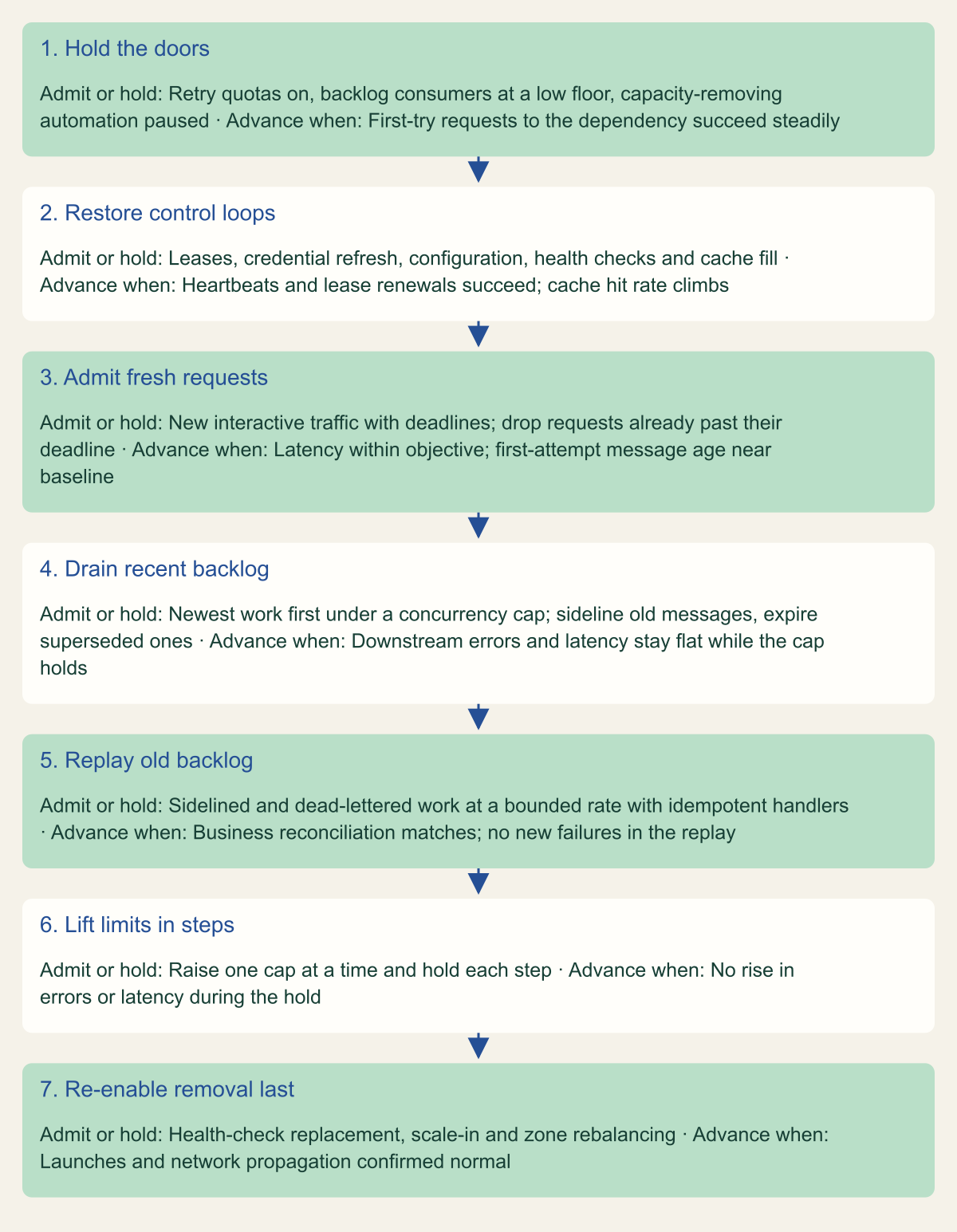
The flowchart is a conceptual order built from those sources and from the sequence AWS followed. Its first rule is that control loops come before customer traffic. Leases, credential refreshes, configuration and cache fills are the work that restores capacity, so they must not queue behind it. Bronson and colleagues make the same point about caches: in their look-aside example, refilling the cache should outrank serving clients, a priority that a read-through cache with a permissive database timeout can enforce. [2]
Fresh requests come next, ahead of the backlog. Yanacek observes that real-time systems built on FIFO queues often prefer LIFO behavior after an outage, and describes ways to approximate it: move messages older than a threshold into a separate backlog queue that is worked only once the live queue has caught up, drop messages that a later full synchronization has superseded, and push backpressure to producers by scaling an inbound throttle inversely with backlog size. He also tracks message age on first delivery attempt separately from retries, which shows whether fresh work is being served. [4]
Requests that will miss their deadline are not worth admitting. The load shedding article describes clients sending timeout hints, services passing the remaining deadline across hops, and servers discarding requests that waited on a queue too long, because work for a caller who has given up adds load without goodput. [6]
Lift limits in steps and hold each step long enough to see whether the next subsystem copes. AWS took about two and a half hours to go from relaxing EC2 throttles at 11:23 AM to full recovery at 1:50 PM, and re-enabled NLB's automatic health check failover only after EC2 had recovered. Automation that removes capacity belongs at the end of the order. [1]
For Lambda consumers, MaximumConcurrency on an SQS event source mapping accepts 2 to 1,000 and caps how many concurrent invocations that queue can drive, which makes it the simplest drain-rate control available. Without it, a standard-queue mapping starts with five concurrent invocations and adds up to 300 per minute, to a default ceiling of 1,250, so a deep backlog can reach a downstream database faster than it has ever been tested. Maximum concurrency cannot be combined with provisioned mode and should not exceed the function's reserved concurrency. [12]
# Example fragment: cap how fast an SQS backlog drains into one function,
# and stop running asynchronous events older than 15 minutes.
aws lambda update-event-source-mapping \
  --uuid "a1b2c3d4-5678-90ab-cdef-11111EXAMPLE" \
  --scaling-config '{"MaximumConcurrency":20}'

aws lambda put-function-event-invoke-config \
  --function-name example-function \
  --maximum-event-age-in-seconds 900 \
  --maximum-retry-attempts 1 \
--destination-config '{"OnFailure":{"Destination":"arn:aws:sqs:us-east-1:111122223333:example-expired-events"}}'Admit repair work first and the backlog last
Restore control loops and fresh traffic before draining the backlog, and re-enable capacity-removing automation only at the end. [1][4][6]

Source. Conceptual order synthesized from the AWS post-event summary, Builders' Library articles on queue backlogs and load shedding, and Bronson et al. [1][2][4][6]
Method. Conceptual. The order follows the sequence AWS used (throttle, restore leases, relieve backlogs, relax throttles, re-enable failover last) and the prioritization techniques in the cited sources. Signals are examples, not thresholds.
Accessible table and figure data
| Step | Admit or hold | Advance when |
|---|---|---|
| 1. Hold the doors | Retry quotas on, backlog consumers at a low floor, capacity-removing automation paused | First-try requests to the dependency succeed steadily |
| 2. Restore control loops | Leases, credential refresh, configuration, health checks and cache fill | Heartbeats and lease renewals succeed; cache hit rate climbs |
| 3. Admit fresh requests | New interactive traffic with deadlines; drop requests already past their deadline | Latency within objective; first-attempt message age near baseline |
| 4. Drain recent backlog | Newest work first under a concurrency cap; sideline old messages, expire superseded ones | Downstream errors and latency stay flat while the cap holds |
| 5. Replay old backlog | Sidelined and dead-lettered work at a bounded rate with idempotent handlers | Business reconciliation matches; no new failures in the replay |
| 6. Lift limits in steps | Raise one cap at a time and hold each step | No rise in errors or latency during the hold |
| 7. Re-enable removal last | Health-check replacement, scale-in and zone rebalancing | Launches and network propagation confirmed normal |
| Step | Admit or hold | Advance when |
|---|---|---|
| 1. Hold the doors | Retry quotas on, backlog consumers at a low floor, capacity-removing automation paused | First-try requests to the dependency succeed steadily |
| 2. Restore control loops | Leases, credential refresh, configuration, health checks and cache fill | Heartbeats and lease renewals succeed; cache hit rate climbs |
| 3. Admit fresh requests | New interactive traffic with deadlines; drop requests already past their deadline | Latency within objective; first-attempt message age near baseline |
| 4. Drain recent backlog | Newest work first under a concurrency cap; sideline old messages, expire superseded ones | Downstream errors and latency stay flat while the cap holds |
| 5. Replay old backlog | Sidelined and dead-lettered work at a bounded rate with idempotent handlers | Business reconciliation matches; no new failures in the replay |
| 6. Lift limits in steps | Raise one cap at a time and hold each step | No rise in errors or latency during the hold |
| 7. Re-enable removal last | Health-check replacement, scale-in and zone rebalancing | Launches and network propagation confirmed normal |
Capacity you cannot launch
AWS states that EC2 instances launched before the event stayed healthy throughout it. What failed was new capacity: launches returned insufficient capacity or request limit exceeded errors, and for hours after launches resumed, some new instances lacked network connectivity. Any recovery step that depended on launching instances in the region, whether auto scaling, a replacement workflow or a scripted rebuild, was waiting on the slowest part of the event. [1]
Launch rates are bounded even on a healthy day. EC2 throttles RunInstances with a request token bucket and a separate resource token bucket. The documented defaults are a burst of 5 requests refilling at 2 per second, and a resource bucket of 1,000 instances refilling at 2 instances per second, so once the burst is spent an account adds about 120 instances a minute per region. During this event AWS added its own throttles on top, which made the documented quotas an upper bound rather than a plan. [1][8]
The more damaging pattern is automation that removes capacity you cannot replace. The instance terminations that left Lambda's internal systems under-scaled and Redshift's credential-driven host replacements, both described earlier, were sensible policies on a normal day and harmful while launches were impaired. [1]
On your own Auto Scaling groups, the controls are the suspendable processes. HealthCheck marks instances unhealthy, ReplaceUnhealthy terminates and replaces them, AZRebalance moves instances between zones and Terminate removes them on scale-in. AWS notes that suspending HealthCheck and ReplaceUnhealthy stops health-based terminations and suggests standby instead when you still want health checks on the remaining instances. Auto Scaling can also apply an administrative suspension to a group that has failed to launch instances for more than 24 hours. While launches are failing regionally, an instance that fails a health check is usually worth more running than terminated; put that decision in the runbook. [9][10]
Load balancer health checks deserve the same thought. The October NLB problem was inside AWS's own health checking fleet, not in customer target group settings, but the customer-side controls address the same risk. NLB target groups accept target_group_health.dns_failover.minimum_healthy_targets.count and .percentage, which mark a zone unhealthy in DNS, and target_group_health.unhealthy_state_routing.minimum_healthy_targets.count and .percentage, which send traffic to all targets, healthy or not, when too few pass. AWS says routing failover reduces the risk of overloading the remaining healthy targets when targets temporarily fail checks, and the DNS failover threshold must be at least the routing threshold. [11]
Instances that were already running stayed healthy through the launch impairment, which is the case for provisioning recovery capacity before an event rather than launching it during one. [1]
# Example fragment: during a regional launch impairment, stop health-check
# replacement and rebalancing so instances that cannot be replaced are kept.
aws autoscaling suspend-processes \
  --auto-scaling-group-name example-asg \
  --scaling-processes ReplaceUnhealthy AZRebalance

# Resume only after launches and network propagation are healthy again.
aws autoscaling resume-processes \
  --auto-scaling-group-name example-asg \
--scaling-processes ReplaceUnhealthy AZRebalanceExercises that rehearse the recovery
An exercise that ends when the injected fault is removed stops at the point where, in October, impact began to spread. Bronson and colleagues caution that stress tests on a replica give limited confidence because the strength of a feedback loop changes with scale, so use these exercises to find mechanisms rather than to certify thresholds. [2]
- Hold a dependency unavailable for about three hours, as long as the DynamoDB phase, then restore it and measure how long first-attempt message age, error rate and latency take to return to baseline. The interval after the restore is the number to track.
- Count attempts per logical request at every layer during the restore, and confirm each SDK client runs in standard mode with its retry quota active. [7]
- Deny
ec2:RunInstancesto the scaling role in a test account, fail health checks on part of the fleet, and confirm nothing terminates instances it cannot replace. - Let credentials, leases or certificates expire during the outage window and check whether any automation tries to replace hosts to renew them, as Redshift's did. [1]
- Restore the dependency with deferred work still queued and verify that control loops, live traffic and backlog drain in the order the runbook specifies.
- Lift each throttle in steps with a named owner and a hold period, and time the whole recovery from first step to normal limits.
What to change before the next regional event
If you can change only a few things before the next regional event, take them in this order. Put every SDK client on standard retry mode and remove stacked retry loops, because that bounds the multiplier on everything else. Give every queue and asynchronous invocation whose work goes stale an age limit, with an on-failure destination so expired work is recorded rather than silently lost. Put a drain-rate cap such as MaximumConcurrency between each backlog and the dependency it feeds. List the automation that removes capacity and the command that pauses each one. Then measure recovery rather than the outage: the time from dependency restored to first-attempt age back at baseline decides whether your next event ends when the provider's root cause does or many hours later.
Method and provenance
Source-led analysis of AWS's post-event summary, two peer-reviewed papers on metastable failures, Amazon Builders' Library articles and AWS service documentation, with impact windows calculated from the summary's stated times and an original conceptual admission order. Sources were reviewed on October 7, 2026.
No AWS account, workload or live incident data was used. Impact windows are AWS's stated spans for its own services, not measurements of customer workloads, and the metastable reading of the event is an interpretation. SDK retry details reflect the opt-in 2026 behavior documented on the review date.
AI assistance. AI assisted research synthesis, calculation, drafting, diagram planning and visual production, with deterministic editorial checks. No personal operational experience, independent human review or live test is claimed.
Published under the Cloud Security Desk organizational byline. Read the practitioner guide policy.
References
- Summary of the Amazon DynamoDB Service Disruption in the Northern Virginia (US-EAST-1) Region Amazon Web Services. Accessed .
- Metastable Failures in Distributed Systems (Bronson, Aghayev, Charapko and Zhu, HotOS '21) ACM HotOS 2021. Published . Accessed .
- Metastable Failures in the Wild (Huang et al., OSDI '22) USENIX OSDI 2022. Published . Accessed .
- Avoiding insurmountable queue backlogs (David Yanacek, Amazon Builders' Library) Amazon Web Services. Accessed .
- Timeouts, retries, and backoff with jitter (Marc Brooker, Amazon Builders' Library) Amazon Web Services. Accessed .
- Using load shedding to avoid overload (David Yanacek, Amazon Builders' Library) Amazon Web Services. Accessed .
- Retry behavior, AWS SDKs and Tools Reference Guide Amazon Web Services. Accessed .
- Request throttling for the Amazon EC2 API Amazon Web Services. Accessed .
- Suspend and resume Amazon EC2 Auto Scaling processes Amazon Web Services. Accessed .
- Considerations for suspending processes, Amazon EC2 Auto Scaling Amazon Web Services. Accessed .
- Target groups for your Network Load Balancers Amazon Web Services. Accessed .
- Configuring scaling behavior for SQS event source mappings Amazon Web Services. Accessed .
- PutFunctionEventInvokeConfig, AWS Lambda API Reference Amazon Web Services. Accessed .