
Emergency Entra access must be independently usable, strongly authenticated and observable under the failure conditions that disable normal administration.
At a glance
Key findings
- Entra emergency access needs an independent sign-in route, not merely a second privileged user.
- Current Microsoft guidance combines cloud-only accounts, permanent active emergency privilege and phishing-resistant authentication.
- A policy simulation, successful sign-in and delivered activity alert prove different parts of recovery readiness.
Define the failure the account must survive
An emergency administrator account is useful only when someone can use it during the failure that disabled normal administration. Creating another privileged user does not establish that independence. If both accounts depend on the same federation service, managed device, credential custodian or inaccessible password store, the apparent backup can fail for the same reason as the primary path. Entra emergency access should therefore be designed and tested as a complete sign-in route. [1][3]
Consider a hypothetical tenant whose ordinary administrators authenticate through a federated identity provider. That provider becomes unavailable while the cloud tenant remains reachable. The relevant question is whether an authorized operator can still obtain the approved emergency authenticator, reach Microsoft Entra ID and complete a privileged sign-in. A successful login during an ordinary working day answers only part of that question. The exercise must identify which normal dependencies were available and which failure condition it actually represented.
Start the design record with a short failure statement. Examples include unavailable federation, a mistaken Conditional Access change, loss of the administrator's usual device or the absence of the person holding a recovery credential. These are proposed scenarios, not reports of incidents at a particular organization. Each one changes the dependencies that deserve attention. A cloud-only account addresses federation dependence, while alternate custody addresses the unavailable custodian; neither measure proves the other problem is solved.
Keep the objective narrow enough to test safely. An emergency-access exercise does not authorize disabling a production identity provider, weakening tenant-wide policy or making unrelated administrative changes. It can inspect dependencies, simulate the relevant policy evaluation where supported, and perform a scheduled sign-in through the approved route. Record the difference between a configuration review, a simulation and an actual authentication attempt. That distinction prevents a runbook from claiming a recovery capability that its evidence never established.
The current Entra configuration contract
Microsoft's emergency-access guidance recommends at least two cloud-only accounts in the tenant's onmicrosoft.com domain. They should not be synchronized or federated from an on-premises environment. The purpose is to preserve a tenant-native authentication path when a dependency used by normal administrators is unavailable. Two accounts also give the organization room to separate credentials and custody, although the number alone does not prove independent availability. [1]
The same guidance calls for the Global Administrator role to be assigned permanently active to these emergency accounts, rather than making access depend on an eligible activation. That is a deliberate exception to the ordinary privileged-access workflow. If the emergency route required the same activation service, approval process or unavailable administrator that the incident had disabled, its privilege could remain inaccessible when needed. Document why the exception exists and which accounts are covered instead of extending it to everyday administration. [1][5]
Strong authentication remains part of that exception. Microsoft's guidance updated June 5, 2026 calls for phishing-resistant authentication, such as FIDO2 security keys or certificate-based authentication, for emergency access. The mandatory MFA requirements for covered administrative applications also apply to emergency accounts. An account excluded from a particular Conditional Access policy is not exempt from a platform requirement merely because it has an emergency label. Password-only instructions inherited from an older runbook need a current review. [1][2]
Choose an authentication method by examining its recovery dependencies, not just its name. A hardware security key requires physical availability and an enrollment record that identifies the correct account. Certificate-based authentication requires compatible clients and its documented validation infrastructure. Microsoft's credential-resilience guidance highlights dependencies such as certificate revocation infrastructure that may affect authentication. These considerations do not make one method universally preferable; they define what the organization must keep available and test. [3][6]
Keep emergency credentials out of routine workflows. An account used for regular administration creates ordinary operational dependencies and makes unusual use harder to distinguish. Microsoft's privileged-operations guidance treats emergency-account activity and changes as events that deserve attention. Use ordinary privileged identities for normal work, maintain an accountable owner for the emergency accounts, and make the decision to invoke them visible to the incident process. A powerful account without a clear purpose can become an undocumented administrative shortcut. [1][5][8]
The configuration record should identify each account, its intended authentication method, role assignment, custody arrangement and monitoring owner. It should also say what must remain independent. Do not put private keys, authentication secrets or recovery codes in the article's example record or an ordinary issue tracker. Store only the references needed to locate approved custody procedures. The useful handoff is an accountable map of the emergency path, not another uncontrolled copy of its credential.
An exclusion is narrower than an MFA exemption
Conditional Access evaluates scoped policies and their controls. Microsoft's emergency-access guidance says these accounts should be excluded from policies that would block or restrict their sign-in. The design must follow that guidance alongside the current mandatory MFA requirements, not replace one with the other. An exclusion affects the policy from which the account is excluded; it does not turn off every requirement imposed by the platform or the target application. [1][2][4]
This distinction matters when reviewing inherited exclusions. A runbook may say that emergency users bypass Conditional Access, while the actual account still needs an approved phishing-resistant method to reach an administrative portal. Conversely, an authentication-strength policy may allow only a combination unavailable to the emergency operator. Review the effective route from the account to the specific administrative application and identify which requirements remain in force. The authentication-strength documentation defines the allowed method combinations, but it does not prove that a particular enrolled credential is available during an incident. [6]
Use the Conditional Access What If tool for the question it can answer. It can help evaluate a sign-in scenario against configured policies, but Microsoft documents limitations, including that the tool does not test service dependencies. A favorable simulation result is therefore evidence about policy evaluation, not proof of end-to-end availability. A network outage, missing authenticator or unavailable certificate dependency can still prevent the operator from completing the intended sign-in. [7]
Keep the review controlled. Capture the relevant policy scope, exclusions and expected application before the exercise. If a discrepancy is found, correct it through the organization's authorized change process and repeat the relevant checks. Do not use a failed exercise as a reason to improvise broad exclusions across the tenant. The operating question is specific: which documented requirement prevented this emergency route, and what narrowly scoped change restores the intended configuration without making the account a routine bypass?
Also review exclusions after policy changes. An emergency-account configuration can remain unchanged while a new policy, authentication requirement or administrative application changes the route around it. The owner should treat those changes as triggers to revisit the dependency map. This is an operational recommendation based on the separation between account configuration and policy evaluation, not a claim that Microsoft guarantees a fixed set of controls forever. [1][4]
Credentials, workstations and alerts can share a failure
Physical custody belongs in the architecture diagram. A security key locked in an office that nobody on the incident team can enter is not an available recovery method for that team. A credential whose retrieval requires the same unavailable identity provider creates a circular dependency. Microsoft recommends protecting emergency credentials and ensuring authorized personnel can obtain them. The local design should make both availability and accountability explicit, including how the organization handles an unavailable primary custodian. [1][3]
Workstations introduce another dependency. Identify the approved environment from which emergency sign-in can occur and how an operator obtains access to it. The plan should not assume that the operator's normal managed laptop is always present, healthy and permitted by every relevant control. At the same time, independence does not mean using an arbitrary untrusted device. Choose a maintained recovery environment, state its security requirements and test the supported authentication method there.
Network reachability should be evaluated with similar precision. The tenant may be operating normally while an office network or administrative access path is unavailable. Record the route the emergency workstation needs to reach the intended Microsoft endpoints and who owns that route. A network diagram can expose a shared dependency, but it is not evidence that the path was used successfully. Distinguish the reviewed design from a permitted connectivity and sign-in result in the exercise record.
Monitoring must remain useful when normal administration is impaired. Microsoft's privileged-operations guidance recommends monitoring emergency-account activity and changes. Identify who receives the alert, what channel carries it and whether that recipient can access the channel without the failed dependency. An alert that reaches only the same locked-out administrator is technically delivered but operationally weak. This independent-recipient check is an editorial design recommendation derived from the need for observable emergency use. [5]
Custody and monitoring also create tradeoffs. Increasing the number of people who can retrieve a credential may improve availability while expanding the group trusted with access. Splitting responsibilities can improve accountability while introducing coordination delays. Record the chosen arrangement and its authorized exception process without inventing a universal response time. The organization needs a workable procedure for its staffing and physical constraints, with enough evidence to explain who accessed the credential and why.
Emergency access dependencies beyond the account
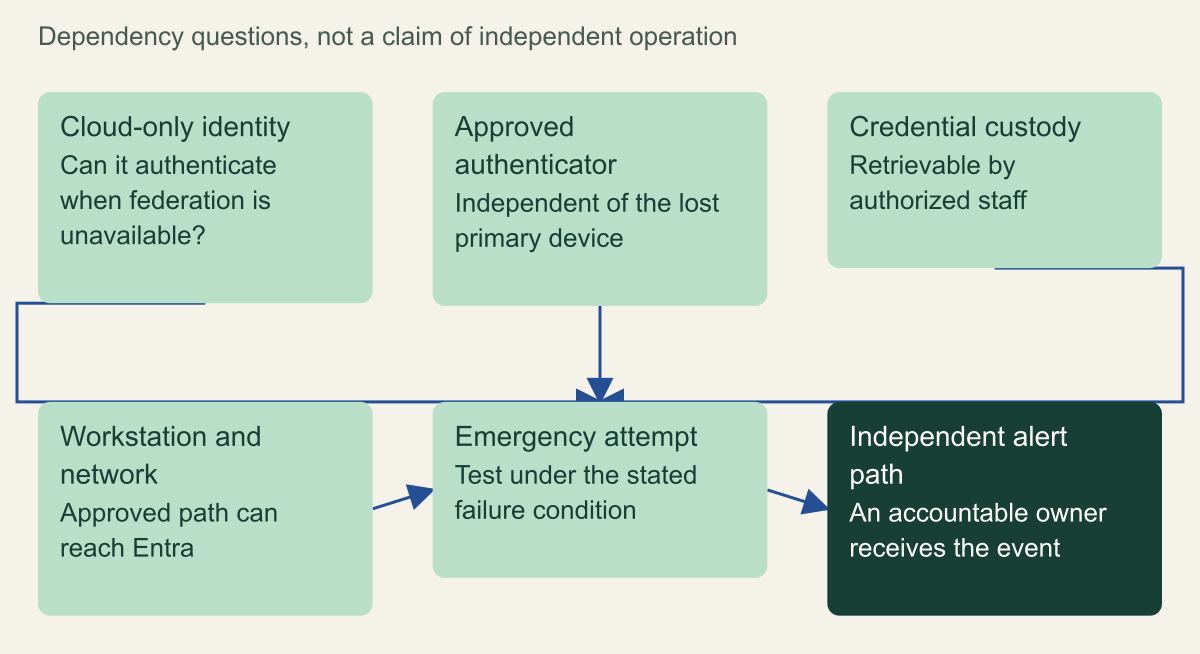
A second administrator identity can still share the same unavailable device, custodian or alerting dependency.

Source. Entra emergency access guidance [1]; Entra credential resilience [3]. Sources checked August 28, 2026.
Method. Original conceptual model synthesized from the cited documentation. The relationships and proposed tests explain design choices; they are not measured results or a claim about a deployed environment.
Accessible table and figure data
| Dependency | Normal path may rely on | Emergency design question |
|---|---|---|
| Identity | Federated identity provider | Is a cloud-only path available? |
| Authenticator | Primary managed device | Is an independent approved method available? |
| Custody | One administrator or location | Can authorized staff retrieve the credential? |
| Workstation and network | Normal administrative environment | Can the approved recovery environment reach Entra? |
| Alerting | The same unavailable identity path | Will another accountable owner receive the event? |
| Dependency | Normal path may rely on | Emergency design question |
|---|---|---|
| Identity | Federated identity provider | Is a cloud-only path available? |
| Authenticator | Primary managed device | Is an independent approved method available? |
| Custody | One administrator or location | Can authorized staff retrieve the credential? |
| Workstation and network | Normal administrative environment | Can the approved recovery environment reach Entra? |
| Alerting | The same unavailable identity path | Will another accountable owner receive the event? |
Run an exercise with observable completion
Microsoft calls for validating emergency accounts at least every 90 days and after changes that affect their operation. Treat that cadence as documented operating guidance, not a measured guarantee of recovery. A quarterly sign-in cannot establish that every dependency will remain available until the next test. The exercise record should show what was checked, which route was used and which assumptions remain untested. [1]
Begin with a scheduled, authorized scenario and a named observer. Confirm that the account and credential belong to the approved emergency set, that the intended administrative application is in scope, and that monitoring owners know the test window. Record a precondition such as unavailable normal federation in the scenario description. If that condition is only modeled rather than actually introduced, say so. There is no need to disrupt production authentication merely to give a rehearsal a more dramatic label.
Perform the permitted sign-in using the intended emergency authentication method and workstation. Capture the actual outcome and the relevant evidence available to the organization. A screenshot may show a successful portal session, while sign-in records can help explain the identity and authentication path. Neither should be described as proving more than it contains. Do not publish tenant identifiers, credential material or sensitive administrative details as part of an external evidence example.
Check the alert path separately. Confirm that the expected recipient received the event and could identify it as emergency-account use within the agreed process. A successful authentication does not establish notification delivery. If the event arrived through a channel dependent on normal federation, record that dependency even when the channel happened to work during the rehearsal. The useful result is an accurate map of observable completion, including the parts that still share a failure. [5]
After the test, end the session and follow the approved credential handling procedure. Record whether a credential was exposed, moved, replaced or changed during the exercise, and whether those actions require further review. Avoid routine role or policy changes simply to demonstrate administrative power. The exercise can prove access to the intended control surface with a narrowly scoped observation; unrelated mutations add risk without strengthening the authentication evidence.
When a test fails, preserve the failure rather than replacing it with a successful attempt on an easier route. Classify whether the problem arose from account configuration, authentication method, policy scope, credential custody, workstation, network or alerting. Assign a corrective owner and a repeat test for the affected boundary. A different successful account may provide useful continuity, but it does not erase the failed account's acceptance gap. This approach produces a maintained recovery record instead of a checklist whose green status depends on overlooking exceptions.
Validate each approved emergency account, not just whichever one is easiest to retrieve. Separate account records make a failed credential visible even when another account remains usable. If the organization deliberately tests different scenarios in different exercises, retain the scenario coverage alongside the date so a recent entry cannot be mistaken for a complete dependency test.
Evidence for each emergency access scenario
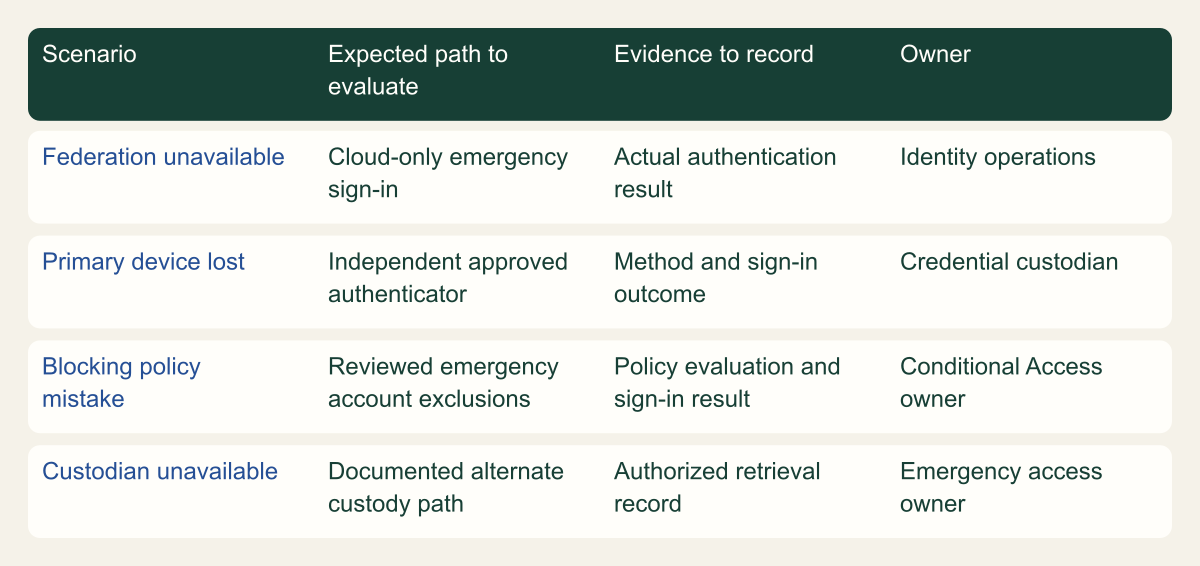
A recovery scenario needs an observed sign-in and evidence record, not only a configured account.

Source. Entra emergency access guidance [1]; Privileged-account security operations [5]; Conditional Access What If tool [7]. Sources checked August 28, 2026.
Method. Original conceptual model synthesized from the cited documentation. The relationships and proposed tests explain design choices; they are not measured results or a claim about a deployed environment.
Accessible table and figure data
| Scenario | Expected path to evaluate | Evidence to record | Owner |
|---|---|---|---|
| Federation unavailable | Cloud-only emergency sign-in | Actual authentication result | Identity operations |
| Primary device lost | Independent approved authenticator | Method and sign-in outcome | Credential custodian |
| Blocking policy mistake | Reviewed emergency account exclusions | Policy evaluation and sign-in result | Conditional Access owner |
| Custodian unavailable | Documented alternate custody path | Authorized retrieval record | Emergency access owner |
| Scenario | Expected path to evaluate | Evidence to record | Owner |
|---|---|---|---|
| Federation unavailable | Cloud-only emergency sign-in | Actual authentication result | Identity operations |
| Primary device lost | Independent approved authenticator | Method and sign-in outcome | Credential custodian |
| Blocking policy mistake | Reviewed emergency account exclusions | Policy evaluation and sign-in result | Conditional Access owner |
| Custodian unavailable | Documented alternate custody path | Authorized retrieval record | Emergency access owner |
What the next administrator needs to inherit
The final record should be usable by someone who did not design the emergency path. It needs the account references, approved purpose, authentication method, custody procedure, workstation route, policy considerations, monitoring recipient and latest exercise evidence. Include the actual source-review date and the next operational review date. Those dates describe different activities: reading updated Microsoft guidance is not the same as testing an enrolled credential in the organization's tenant.
Review the record when administrators leave, custodians change, authentication methods are replaced or Conditional Access and administrative application requirements change. Microsoft explicitly treats regular validation as part of maintaining emergency access. The organization can add change-based triggers that reflect its own dependency map. A new certificate validation dependency or a relocated physical key should not wait unnoticed for the next scheduled review. [1][3]
The acceptance decision should name the remaining limits. Perhaps the tenant-native account and authenticator were exercised, but alternate network access was only reviewed. Perhaps a secondary custodian is documented but has not completed an authorized retrieval rehearsal. Those are specific follow-up items, not reasons to claim that recovery is impossible or fully proven. They allow the incident owner to understand which parts of the emergency route have current evidence.
An Entra emergency account earns its role through a combination of independent dependencies, current authentication requirements and observed use. Keep the powerful role exception small, the credential strongly protected and the completion evidence precise. The question for the next review is whether an authorized person can still reach the intended administrative surface through the designed route when the named normal dependency is unavailable.
Method and provenance
Source-based technical analysis joining the primary documentation and standards cited above. Source contracts were reviewed on August 28, 2026. Original diagrams and decision records are editorial syntheses; quantitative figures, where present, preserve the source values and stated transformations.
Physical custody creates availability and accountability tradeoffs. Certificate-based authentication can depend on revocation infrastructure. What If simulation does not evaluate every service dependency and cannot replace actual permitted sign-in tests. Do not change production CA policies during a routine evidence exercise.
AI assistance. AI assisted research, drafting and visual planning. The article does not claim personal deployment experience, a customer case study or tests performed in a production environment.
Published under the Cloud Security Desk organizational byline. Read the practitioner guide policy.
References
- Entra emergency access guidance Microsoft. Published . Accessed .
- Entra mandatory MFA Microsoft. Accessed .
- Entra credential resilience Microsoft. Published . Accessed .
- Conditional Access deployment planning Microsoft. Accessed .
- Privileged-account security operations Microsoft. Accessed .
- Authentication strengths Microsoft. Accessed .
- Conditional Access What If tool Microsoft. Accessed .
- Entra architecture security practices Microsoft. Accessed .