
A scope analysis for Entra administrators and identity incident responders, built from Microsoft's Backup and Recovery, deletion, protected actions and role documentation reviewed October 9, 2026. It tests six common assumptions against the documented scope and recovery model, then gives a change-by-change outcome matrix, an export fragment for the gaps, a restore sequence that protects containment and a rehearsal plan.
At a glance
Key findings
- Microsoft Entra Backup and Recovery, listed as generally available in the June 2026 release notes, keeps one backup a day for seven days and recovers only listed properties: 33 on users, 19 on applications, 14 on service principals and 12 on groups, plus every property of Conditional Access policies and named locations. [1][2][9]
- No credential, owner or directory role assignment is in scope, so a secret added to an existing application, a new group owner or a role assignment survives a recovery, while static group membership is reverted. [2][6][7]
- A recovery soft-deletes every supported object created after the chosen backup and resets changed properties, which also undoes containment such as a disabled account or a new blocking policy unless the job is scoped. [3][4][5]
- Only eight object types can be soft-deleted and hard-deleted objects cannot be recovered; a protected action can require Conditional Access before anyone permanently deletes users, groups or applications from the recycle bin. [10][12]
- Entra Backup Administrator can start a tenant-wide recovery that cannot be undone automatically, yet the role carries no PRIVILEGED label and no backup permission can be made a protected action. [5][12][14]
A restore is not a cleanup
Microsoft Entra Backup and Recovery takes one backup a day of a defined set of directory objects and keeps seven days of them. A recovery job compares a chosen backup with the live tenant, sets supported properties and links back to the backup's values, restores objects that were soft-deleted and soft-deletes objects created after the backup. It runs by default in workforce tenants with Entra ID P1 or P2, and no administrator or application can turn it off, delete a backup or edit one. Microsoft's release notes list it as generally available in June 2026, after a public preview that began in March. [1][3][9]
After a bad script or a compromised administrator, the covered set is broad: every property of Conditional Access policies and named locations, the authentication methods policy for eight methods, listed properties of users, groups, applications and service principals, two authorization policy settings, the tenant's per-user MFA settings, static group membership, and the admin-consent grants and app role assignments that come back with a recovered service principal. [2][6]
What it leaves in place is the part an intruder relies on. Secrets, certificates and federated credentials added to existing applications stay. So do directory role assignments, group and application owners, delegated grants created by user consent, passwords, anything hard-deleted, changes to objects synchronized from on-premises Active Directory (group memberships aside), and object types the service does not list at all, such as domain federation, cross-tenant access settings and administrative units. Covering those takes exported known-good state older than seven days, an eviction list worked by hand, protected actions on hard deletion and tight control of who can start a recovery. The sections below take six assumptions a recovery runbook might make and check each against Microsoft's documentation as it stood on October 9, 2026. [1][2][7][10]
Assumption one: the backup is a copy of the tenant
Microsoft's scope page answers this directly: recovery applies only to the properties it lists and does not imply rolling back a whole object. Nine object types are in scope: users, groups, applications, service principals, Conditional Access policies, named locations, the authentication methods policy, the authorization policy and the organization object. Agent ID objects ride on those types, since an agent's user account is a user and an agent identity is a service principal. [2][3]
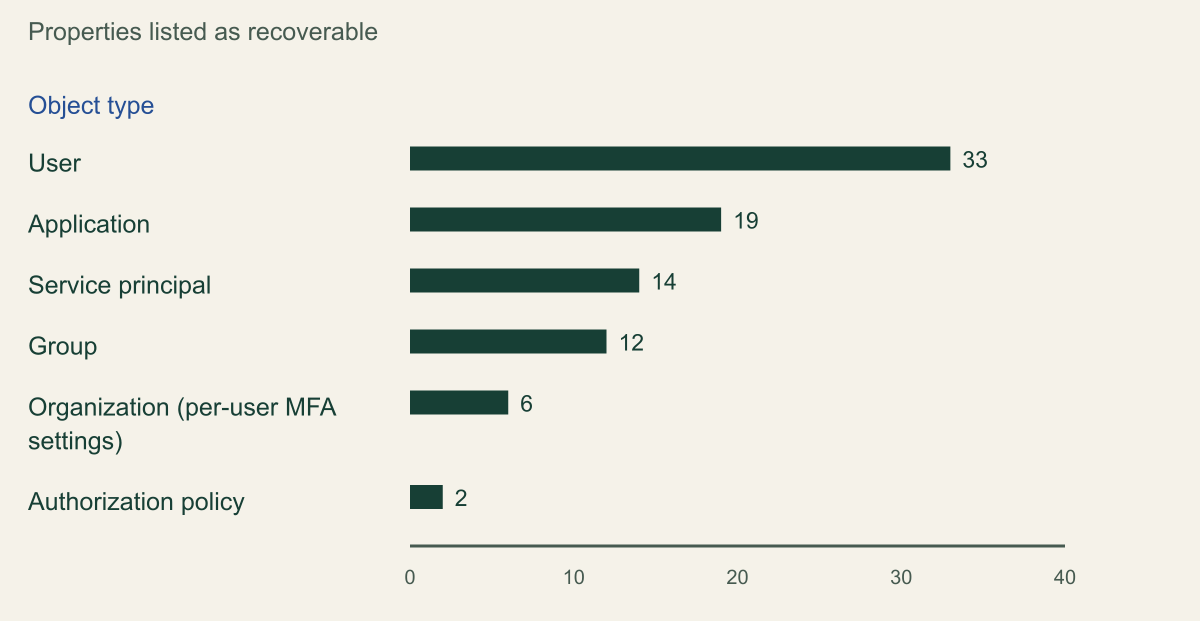
Counting the lists on the page dated August 25, 2026 gives 33 user properties, 19 application properties, 14 service principal properties, 12 group properties, six organization settings and two authorization policy properties. Conditional Access policies and named locations are covered in full. The authentication methods policy is covered for eight methods: email one-time password, FIDO2 passkey, Authenticator app, voice call, SMS, third-party software OATH, Temporary Access Pass and certificate-based authentication. [2]
What the lists leave out matters more than their length. The application list holds RequiredResourceAccess, SignInAudience, AppIdentifierUri and OptionalClaims, but no entry for password credentials, key credentials, federated identity credentials or owners. Microsoft's guide to recovering application secrets tells administrators to check redirect URIs, assigned permissions and exposed API settings by hand after a recovery, and says that claims and home realm discovery policies, attached managed identities and Application Proxy settings are not restored. [2][7]
The service principal list includes PreferredTokenSigningKeyThumbprint, which selects the active SAML signing certificate, but not the certificates themselves; a reasonable reading is that recovery can point the thumbprint back at an old certificate only while that certificate is still on the object. The user list includes AccountEnabled, UserPrincipalName, PerUserMfaState and OtherMail and excludes manager and sponsor changes. The group list excludes ownership and dynamic membership rules. The authorization policy list stops at blockMsolPowerShell and guestUserRoleId, so edits to allowInvitesFrom, allowUserConsentForRiskyApps, allowedToUseSSPR or defaultUserRolePermissions are not reverted. [2][16]
Microsoft says the supported set grows over time. The scope page's public history shows no growth since March 20, 2026: the per-type counts are identical in all seven revisions from that date to August 25, including the June 17 revision that prepared the page for general availability. Recheck the page before a runbook depends on a property, and record the date of the check. [2][17]
Recoverable properties run from 33 on users to 2 on the authorization policy
The scope page lists 33 recoverable user properties and 19 application properties, none of them credentials or owners. [2]

Source. Counted from Microsoft's Supported objects and recoverable properties page (ms.date August 25, 2026), fetched October 9, 2026; examples from the same page, the application secrets guide and the authorizationPolicy reference. [2][7][16]
Method. Source-derived count of bulleted properties in each object type's section, made by script on the rendered page and the published Markdown source and matched. Organization counts the six settings listed under two parent properties. Conditional Access policies and named locations (all properties) and the authentication methods policy (eight methods, a different unit) are not plotted. Property names on the page are directory names and do not map one to one onto Microsoft Graph properties.
Accessible table and figure data
| Object type | Recoverable properties listed | Examples not on the list |
|---|---|---|
| User | 33 | Password, manager, sponsor |
| Application | 19 | Credentials, owners, redirect URIs |
| Service principal | 14 | Credentials, owners |
| Group | 12 | Owners, dynamic membership rule |
| Organization (per-user MFA settings) | 6 | Other tenant settings |
| Authorization policy | 2 | Guest invitation and consent settings |
| Object type | Recoverable properties listed | Examples not on the list |
|---|---|---|
| User | 33 | Password, manager, sponsor |
| Application | 19 | Credentials, owners, redirect URIs |
| Service principal | 14 | Credentials, owners |
| Group | 12 | Owners, dynamic membership rule |
| Organization (per-user MFA settings) | 6 | Other tenant settings |
| Authorization policy | 2 | Guest invitation and consent settings |
Assumption two: a restore can reach back before the intrusion
Only when the intrusion began inside the window. Each daily backup is available for up to seven days from its timestamp; the March 2026 preview announcement described five, so material written during the preview understates the window. The troubleshooting page adds that a tenant can show fewer than seven days while the service initializes. [1][6][9]
The first question for a responder is therefore the time of the first malicious change, found in the audit log, which P1 and P2 tenants keep for 30 days. If that change is eight days old, every available backup already contains it and a recovery will faithfully restore the attacker's version of the setting. A backup taken between the first change and later ones still reverses the later ones, at the cost of leaving the earliest in place. Dwell time longer than a week is the case the built-in service cannot answer, which is why Microsoft's recoverability guidance asks for known-good state documented in an external, versioned repository. [11][15]
The records produced by a restore expire on a similar clock, and they are what an investigator or auditor asks for afterwards.
| Record | Kept for | After that |
|---|---|---|
| Backups | 7 days, one per day | Oldest ages out |
| Difference reports | 7 days after completion | Removed |
| Recovery job details and failed changes | 7 days after completion | Removed |
| Soft-deleted objects, eight types | 30 days | Hard-deleted |
| Entra audit log, P1 or P2 | 30 days | Lost unless exported |
| Tenant configuration management snapshots | 7 days | Deleted unless downloaded |
Assumption three: rolling back evicts the intruder
Take a hypothetical intrusion. An attacker who phished an Application Administrator adds a client secret to an existing app registration whose service principal holds powerful Microsoft Graph app roles, creates a new app registration and then, authenticating as the existing application, makes a second compromised user an owner of a security group, excludes that user from a Conditional Access policy and adds the user to a cloud security group that grants access to finance applications. Responders notice three days later and recover everything to the backup from the day before the first change.
The recovery reverts the Conditional Access exclusion, removes the added group member, since static membership is a supported link, and soft-deletes the new app registration as an object created after the backup. The secret stays on the existing application, and the attacker still holds it; the owner stays on the group, and anything the application did with its Graph permissions while the attacker held the secret stays done, including any directory role it assigned. None of this is a fault in the service; credentials, owners and role assignments are outside its documented scope. [2][3][6]
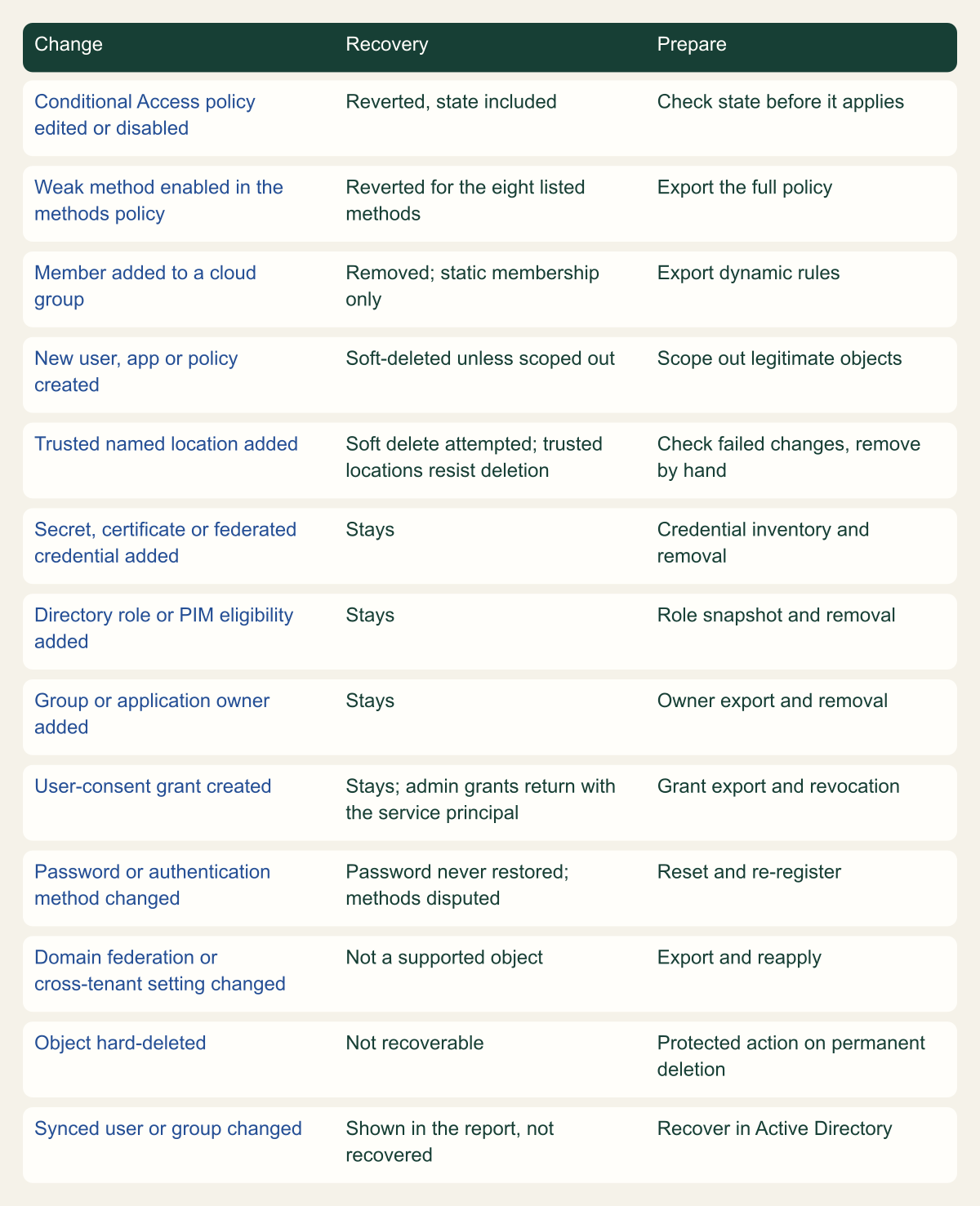
The matrix applies the same reading to common changes. Two rows need care. Recovering a service principal restores the admin-consent grants and app role assignments where that service principal is the target object, but the page does not say whether target means the client side or the resource side of an assignment, so test it before relying on it for a malicious assignment. Delegated grants created by user consent are not supported at all. [2]
Authentication methods are where Microsoft's pages disagree. The guide to recovering user authentication methods says Backup and Recovery restores users together with their authentication data and that methods cannot be restored apart from the user object; the scope page, which limits recovery to the properties it lists, lists no authentication method for users. For a compromised account the conflict has a practical answer, because the same guide tells responders to delete every method on the account, set a new password and have the user register again, even where Backup and Recovery could revert the methods. Passwords are never restored. [2][8]
Treat every row marked Stays as an eviction task with a named owner: remove credentials the backup cannot see and rotate the rest, remove role assignments and eligibility, remove owners, and revoke user-consent grants. Microsoft's application guide recommends rotating secrets after a malicious change even when they look untouched. [7]
What a recovery does with common changes
Policy and membership tampering is reverted; credentials, roles, owners and user consent stay until removed by hand. [2][3][6]

Source. Conceptual mapping of Microsoft's Backup and Recovery scope, recovery model, troubleshooting, application secrets and authentication methods pages and the deletion and protected actions guidance, reviewed October 9, 2026. [2][3][6][7][8][10][12]
Method. Conceptual. Each outcome follows from a documented scope rule or recovery action; the trusted named location row combines two documented rules whose interaction Microsoft does not describe, and the authentication methods row reflects a disagreement between two Microsoft pages.
Accessible table and figure data
| Change | Recovery | Prepare |
|---|---|---|
| Conditional Access policy edited or disabled | Reverted, state included | Check state before it applies |
| Weak method enabled in the methods policy | Reverted for the eight listed methods | Export the full policy |
| Member added to a cloud group | Removed; static membership only | Export dynamic rules |
| New user, app or policy created | Soft-deleted unless scoped out | Scope out legitimate objects |
| Trusted named location added | Soft delete attempted; trusted locations resist deletion | Check failed changes, remove by hand |
| Secret, certificate or federated credential added | Stays | Credential inventory and removal |
| Directory role or PIM eligibility added | Stays | Role snapshot and removal |
| Group or application owner added | Stays | Owner export and removal |
| User-consent grant created | Stays; admin grants return with the service principal | Grant export and revocation |
| Password or authentication method changed | Password never restored; methods disputed | Reset and re-register |
| Domain federation or cross-tenant setting changed | Not a supported object | Export and reapply |
| Object hard-deleted | Not recoverable | Protected action on permanent deletion |
| Synced user or group changed | Shown in the report, not recovered | Recover in Active Directory |
| Change | Recovery | Prepare |
|---|---|---|
| Conditional Access policy edited or disabled | Reverted, state included | Check state before it applies |
| Weak method enabled in the methods policy | Reverted for the eight listed methods | Export the full policy |
| Member added to a cloud group | Removed; static membership only | Export dynamic rules |
| New user, app or policy created | Soft-deleted unless scoped out | Scope out legitimate objects |
| Trusted named location added | Soft delete attempted; trusted locations resist deletion | Check failed changes, remove by hand |
| Secret, certificate or federated credential added | Stays | Credential inventory and removal |
| Directory role or PIM eligibility added | Stays | Role snapshot and removal |
| Group or application owner added | Stays | Owner export and removal |
| User-consent grant created | Stays; admin grants return with the service principal | Grant export and revocation |
| Password or authentication method changed | Password never restored; methods disputed | Reset and re-register |
| Domain federation or cross-tenant setting changed | Not a supported object | Export and reapply |
| Object hard-deleted | Not recoverable | Protected action on permanent deletion |
| Synced user or group changed | Shown in the report, not recovered | Recover in Active Directory |
Assumption four: a recovery only puts things back
Recovery applies the backup to the tenant as it is when the job runs, and the recovery model makes that a two-way operation. An object added since the backup is soft-deleted, an updated object is set back to the backup value, a soft-deleted object is restored, and an object restored from the recycle bin since the backup is soft-deleted again. The job never creates or hard-deletes objects, and Microsoft warns that its actions apply directly to the tenant and cannot be undone automatically. [3][4][5]
That cuts against responders as well as attackers. In the hypothetical above, if the team disabled the phished account and created a blocking Conditional Access policy before running the recovery, an unscoped job sets AccountEnabled back to its backup value of true and soft-deletes the blocking policy as an object added after the backup. Legitimate work since the backup, such as a new hire or an application registered for a release, is soft-deleted the same way. Both outcomes follow directly from the documented model. [2][3]
The controls are scope and sequence. A recovery can be limited to object types or to up to 100 object IDs, and a single object can be recovered from its entry in a difference report. A difference report shows the tenant when the report was created, while the recovery acts on the tenant when it runs, so a report taken before containment is stale afterwards. Only one difference report or recovery job runs at a time, a cancelled job keeps the changes it already made, and a job that ends as Completed with warnings has failed changes to review. [3][5][6]
Conditional Access deserves its own pass. Backup and Recovery returns every property of a policy, its state included, so a policy that was on in the backup comes back on. For a deleted policy, the Deleted policies page in Conditional Access can restore it in report-only mode, which Microsoft recommends before turning it back on. Named locations add a wrinkle: a location marked trusted cannot be deleted, and a location restored from soft delete comes back untrusted. The Backup pages do not say how a recovery handles a trusted location added after the backup, so look for it among the failed changes and remove it by hand if it remains. [2][10]
Assumption five: anything deleted waits 30 days
Only eight object types go to the recycle bin: users, Microsoft 365 groups, cloud security groups, application registrations, service principals, administrative units, Conditional Access policies and named locations. Every other type is hard-deleted at once, and Microsoft says neither administrators nor Microsoft can restore it. Backup and Recovery does not change that; it restores soft-deleted objects, cannot recreate hard-deleted ones and leaves them out of difference reports altogether. Soft delete for device objects appeared as a public preview in the May 2026 release notes. [6][9][10]
A soft-deleted object becomes hard-deleted after 30 days, or sooner when someone permanently deletes it from the recycle bin. The second path is the one an attacker uses to make a deletion stick, and Microsoft's answer is a protected action on microsoft.directory/deletedItems/delete, which puts a Conditional Access authentication context in front of permanently deleting a soft-deleted user, Microsoft 365 group, cloud security group or application. Microsoft's privileged roles page still describes protected actions as a preview, although the protected actions page itself carries no preview label. [7][12][13]
Two object behaviors change the arithmetic. A soft-deleted administrative unit cannot be hard-deleted during its 30 days at all. A multitenant application, one whose signInAudience admits other organizations or personal Microsoft accounts, is not hard-deleted automatically after 30 days and lingers until someone removes it. In the audit log, a Delete event means soft delete only for types that support it, and Microsoft's two deletion pages disagree about which audit entries those are; follow the eight-type list and alert on every Hard delete event. [10][11]
Assumption six: the backup roles are low risk
Two built-in roles run the service. Entra Backup Reader lists backups, reads jobs and, according to the built-in roles reference and the troubleshooting page, can create and cancel difference reports; the overview page instead describes initiating difference reports as a Backup Administrator task. Entra Backup Administrator adds microsoft.directory/backup/recovery/create, the permission to start a recovery, and Global Administrator includes every Backup Administrator permission. Neither backup role carries the PRIVILEGED label in Microsoft's built-in roles reference dated July 17, 2026, and no backup permission appears among the actions that protected actions can guard. [1][6][12][14]
Read against the recovery model, the missing label understates the role. A Backup Administrator can pick the oldest backup and run an unscoped recovery that reverts up to seven days of Conditional Access, authentication method and group membership changes and soft-deletes every supported object created since, with no automatic undo. It follows that a compromised Backup Administrator account is a tenant-wide destructive capability, and that a recovery started mid-incident by the wrong person can reopen paths the team has just closed. [3][5][14]
Govern it accordingly: make Backup Administrator eligible through PIM rather than standing, require approval, activate it only for a named incident or exercise, and give it only to accounts that lower-tier administrators cannot reset. Give Backup Reader to whoever prepares difference reports. The backups themselves cannot be altered, which settles one concern, but an immutable copy says nothing about who may apply it. [1]
Export what the backup does not hold
Microsoft's recoverability guidance asks for known-good state kept outside the tenant in a versioned repository, and names three routes: the snapshot APIs in Microsoft Graph tenant configuration management, whose snapshots are deleted after seven days and so still need downloading; direct Microsoft Graph exports, including the open-source Microsoft Entra Exporter; and third-party configuration tools. It warns that legacy MFA portal, Application Proxy and federation settings may not come out of the exporter or Graph, so those need written records. [11]
For incident response, the most useful exports describe the gaps above, because they turn eviction into a comparison against a known list. The fragment collects credential metadata on applications and service principals (key IDs, never secret values), federated identity credentials and application owners, delegated grants from user consent, owners of role-assignable groups, federation configuration for federated domains and the whole authorization policy. Add directory role assignments and PIM eligibility schedules to the same run.
Run it daily, keep history at least as long as the longest dwell time you plan for, and store it where the administrators it describes cannot change it. A diff between today's file and last month's is the list of credentials, owners and grants to remove when the built-in backup is already too young to help. That retention choice is an editorial recommendation, not a Microsoft figure.
# Example: read-only export of state that Entra Backup and Recovery does not restore.
# Microsoft Graph PowerShell, delegated scopes; a Global Reader account is enough.
# Exports credential metadata (key IDs), never secret values.
Connect-MgGraph -Scopes "Application.Read.All","Directory.Read.All","Policy.Read.All","Domain-InternalFederation.Read.All"
$stamp = Get-Date -Format "yyyy-MM-dd"

# 1. Credentials, federated credentials and owners on app registrations
Get-MgApplication -All -Property "id,appId,displayName,passwordCredentials,keyCredentials" |
  ForEach-Object {
    [pscustomobject]@{
      AppId     = $_.AppId
      Name      = $_.DisplayName
      SecretIds = ($_.PasswordCredentials.KeyId -join ";")
      CertIds   = ($_.KeyCredentials.KeyId -join ";")
      Federated = ((Get-MgApplicationFederatedIdentityCredential -ApplicationId $_.Id).Subject -join ";")
      Owners    = ((Get-MgApplicationOwner -ApplicationId $_.Id -All).Id -join ";")
    }
  } | Export-Csv "app-credentials-$stamp.csv" -NoTypeInformation

# 2. Credentials added directly to service principals
Get-MgServicePrincipal -All -Property "id,appId,displayName,passwordCredentials,keyCredentials" |
  Select-Object Id, AppId, DisplayName,
    @{n = "SecretIds"; e = { $_.PasswordCredentials.KeyId -join ";" } },
    @{n = "CertIds"; e = { $_.KeyCredentials.KeyId -join ";" } } |
  Export-Csv "sp-credentials-$stamp.csv" -NoTypeInformation

# 3. Delegated grants from user consent (only admin grants come back with a service principal)
Get-MgOauth2PermissionGrant -All -Filter "consentType eq 'Principal'" |
  Select-Object ClientId, PrincipalId, ResourceId, Scope |
  Export-Csv "user-consent-grants-$stamp.csv" -NoTypeInformation

# 4. Owners of role-assignable groups (owner changes are out of scope)
Get-MgGroup -All -Filter "isAssignableToRole eq true" | ForEach-Object {
  $group = $_
  Get-MgGroupOwner -GroupId $group.Id -All |
    Select-Object @{n = "Group"; e = { $group.DisplayName } }, @{n = "OwnerId"; e = { $_.Id } }
} | Export-Csv "role-group-owners-$stamp.csv" -NoTypeInformation

# 5. Federation settings on federated domains, and the whole authorization policy
Get-MgDomain -All | Where-Object AuthenticationType -eq "Federated" | ForEach-Object {
  Get-MgDomainFederationConfiguration -DomainId $_.Id
} | ConvertTo-Json -Depth 6 | Out-File "domain-federation-$stamp.json"
Get-MgPolicyAuthorizationPolicy | ConvertTo-Json -Depth 6 | Out-File "authorization-policy-$stamp.json"
A restore sequence after a malicious change
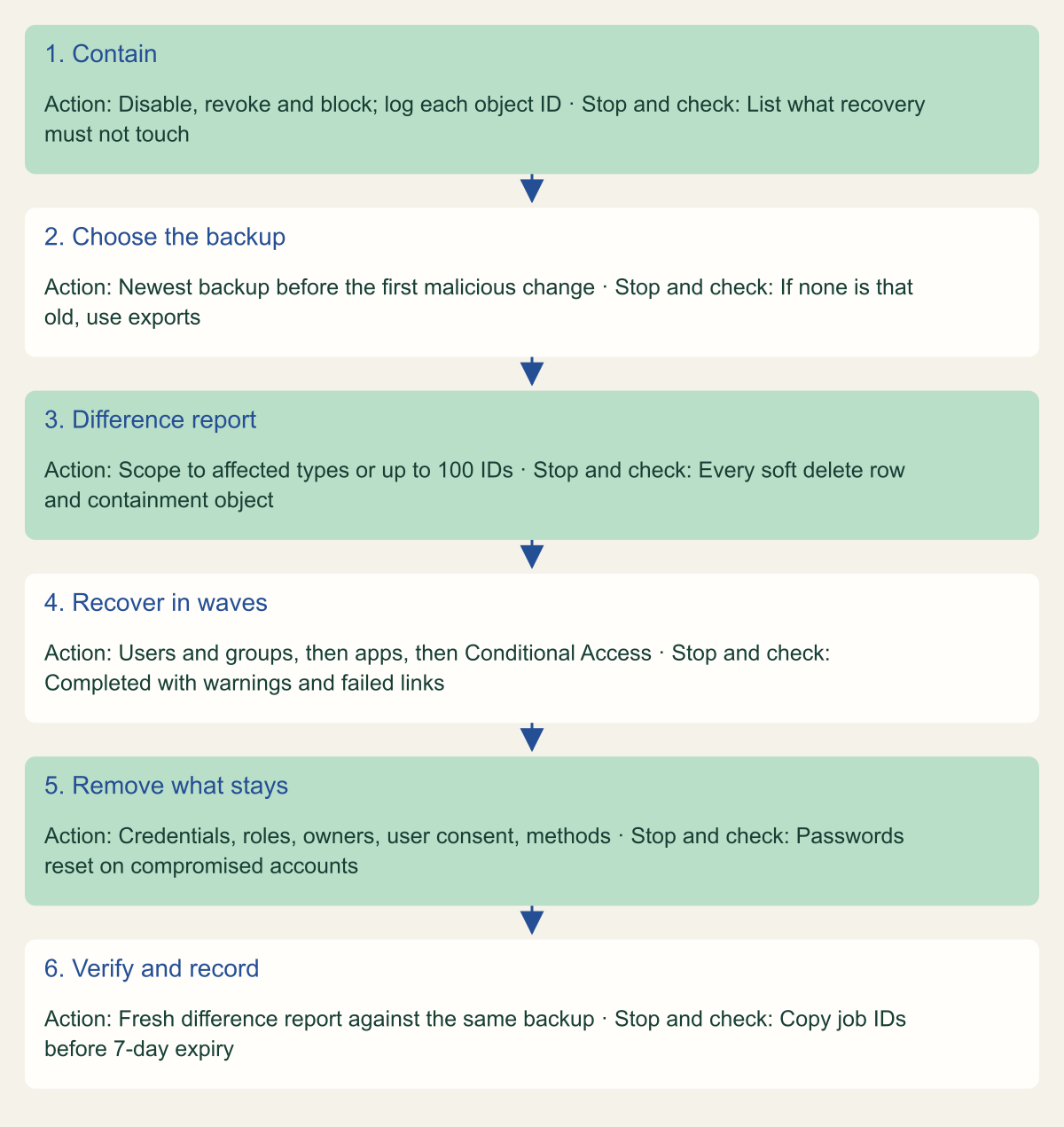
Order matters because recovery acts on the tenant as it stands when the job starts. Microsoft's application guide says to contain the threat and evict the actor first and leaves those steps out of its own scope, so the sequence below puts containment first and scopes the recovery around it. [7]
- Contain, and log every containment change with its object ID: disabled accounts, revoked sessions, new blocking policies, new emergency accounts. These are the objects the recovery must not touch. A new emergency account is an added object, and restored policies carry the backup's exclusions, which do not include it.
- Choose the newest backup taken before the first malicious change in the audit log. If no backup is that old, go straight to the manual path and your own exports.
- Run a difference report scoped to the affected types or object IDs. Allow for the first load: Microsoft estimates up to one hour for tenants of up to 50,000 objects and up to two and a half hours above 1,000,000, and about 45 minutes for full report generation with 100,000 changes. Stop and check every Soft delete action and every row that touches a containment object. [3]
- Recover in waves: users and groups, then applications and service principals, then Conditional Access by object ID, or restore deleted policies from Deleted policies in report-only mode. Microsoft puts recovering 500,000 changes at up to 30 hours, and only one job runs at a time. [3][10]
- Review Completed with warnings and any failed links, then remove what the backup cannot: credentials, role assignments, owners, user-consent grants and the methods on compromised accounts, and reset their passwords. [6][8]
- Run a fresh difference report against the same backup to confirm what remains, and copy the job IDs into the incident record before the seven-day retention removes them. [5][6]
Contain first, then scope the recovery around containment
A scoped difference report and recovery in waves keep containment in place; manual removal covers what the backup cannot. [3][5][7]

Source. Conceptual sequence based on Microsoft's Backup and Recovery recovery model, recover objects, troubleshooting and application secrets pages and the Conditional Access restore guidance, reviewed October 9, 2026. [3][5][6][7][10]
Method. Conceptual. The order is an editorial recommendation derived from the documented recovery model; Microsoft documents each mechanism but not this sequence.
Accessible table and figure data
| Step | Action | Stop and check |
|---|---|---|
| 1. Contain | Disable, revoke and block; log each object ID | List what recovery must not touch |
| 2. Choose the backup | Newest backup before the first malicious change | If none is that old, use exports |
| 3. Difference report | Scope to affected types or up to 100 IDs | Every soft delete row and containment object |
| 4. Recover in waves | Users and groups, then apps, then Conditional Access | Completed with warnings and failed links |
| 5. Remove what stays | Credentials, roles, owners, user consent, methods | Passwords reset on compromised accounts |
| 6. Verify and record | Fresh difference report against the same backup | Copy job IDs before 7-day expiry |
| Step | Action | Stop and check |
|---|---|---|
| 1. Contain | Disable, revoke and block; log each object ID | List what recovery must not touch |
| 2. Choose the backup | Newest backup before the first malicious change | If none is that old, use exports |
| 3. Difference report | Scope to affected types or up to 100 IDs | Every soft delete row and containment object |
| 4. Recover in waves | Users and groups, then apps, then Conditional Access | Completed with warnings and failed links |
| 5. Remove what stays | Credentials, roles, owners, user consent, methods | Passwords reset on compromised accounts |
| 6. Verify and record | Fresh difference report against the same backup | Copy job IDs before 7-day expiry |
Rehearse the restore in a test tenant
Microsoft recommends rehearsing restoration with test objects, ideally in a test tenant. Backup and Recovery needs a workforce tenant with P1 or P2 licensing, and because backups are daily, a useful exercise spans two days: build the baseline, wait for the next backup, then make the changes and recover. Six cases cover the questions the documentation leaves open. [1][11]
- Change a listed user property, a Conditional Access exclusion and a static group membership, and confirm each is reverted.
- Add a client secret, a federated credential and an owner to an existing test application, and confirm each survives; together they are your eviction list.
- Create one app role assignment where a test service principal is the assignee and one where it is the resource, change both, recover the service principal, and record which one returns.
- Create a user and a Conditional Access policy after the backup, and confirm the recovery soft-deletes them unless they are scoped out.
- If protected actions guard Conditional Access changes in the tenant, include a policy in the recovery; the Backup pages do not describe how a recovery job interacts with them.
- Time the first difference report and the recovery, and compare both with Microsoft's estimates for your tenant size. [3]
A decision rule for the next bad change
Use Backup and Recovery on its own when four conditions hold, checked in this order: the first bad change is younger than the oldest available backup, the affected objects are cloud-managed rather than synchronized, the changed settings appear on the scope page, and the cause is a mistake rather than an intruder. A script that rewrote group memberships yesterday, or an accidental edit to a Conditional Access policy, passes all four, and for cases like those the built-in service is the shortest documented path back.
When any condition fails, the built-in recovery becomes one step among several. An intruder brings the eviction list and a password reset for every compromised account. An old change means your own exports define the target state. A synchronized object goes back through Active Directory, and a hard-deleted one is rebuilt from documentation with a new object ID. Settle which case you are in before anyone selects Recover, because that one click cannot be taken back. [2][4][5]
Method and provenance
Source-led scope analysis of Microsoft Entra Backup and Recovery, deletion, protected actions and role documentation and the public documentation history on GitHub. Property counts were taken by script from the rendered scope page and its Markdown source and checked against three earlier revisions. Sources were reviewed on October 9, 2026.
No Entra tenant was configured and no backup, difference report or recovery was run. Outcomes for changes are read from Microsoft's documented scope and recovery model as of the review date; where pages disagree or are silent, the article says so. Microsoft states that supported objects and properties will expand.
AI assistance. AI assisted research synthesis, counting scripts, drafting, diagram planning and visual production, with deterministic editorial checks. No personal administration experience, independent human review or live test is claimed.
Published under the Cloud Security Desk organizational byline. Read the practitioner guide policy.
References
- Microsoft Entra Backup and Recovery overview Microsoft. Accessed .
- Supported objects and recoverable properties in Microsoft Entra Backup and Recovery Microsoft. Published . Accessed .
- Backup, difference report, and recovery model in Microsoft Entra Backup and Recovery Microsoft. Published . Accessed .
- Soft deletion in Microsoft Entra Backup and Recovery Microsoft. Accessed .
- Recover objects using Microsoft Entra Backup and Recovery Microsoft. Accessed .
- Troubleshoot Microsoft Entra Backup and Recovery Microsoft. Accessed .
- Recover application secrets using Microsoft Entra Backup and Recovery Microsoft. Accessed .
- Recover user authentication methods using Microsoft Entra Backup and Recovery Microsoft. Accessed .
- Microsoft Entra releases and announcements Microsoft. Accessed .
- Recover from deletions Microsoft. Accessed .
- Recoverability best practices Microsoft. Accessed .
- What are protected actions in Microsoft Entra ID? Microsoft. Accessed .
- Privileged roles and permissions in Microsoft Entra ID Microsoft. Accessed .
- Microsoft Entra built-in roles: Entra Backup Administrator and Entra Backup Reader Microsoft. Accessed .
- Microsoft Entra data retention Microsoft. Accessed .
- authorizationPolicy resource type (Microsoft Graph v1.0) Microsoft. Accessed .
- Commit history of scope-supported-objects-limitations.md (MicrosoftDocs/entra-docs) Microsoft. Accessed .