Application consent decisions become clearer when reviewers identify the resource, access mode, grant scope and people who control the application. This guide turns Entra permission and consent documentation into a concrete review record, including the distinction between workflow review and authority to grant consent.
At a glance
Key findings
- Delegated access and application access involve different authority models. A permission name alone does not explain the resulting exposure. [1]
- Being designated as an admin-consent reviewer does not itself confer the directory authority needed to grant the request. [3]
- Review people who can change application credentials alongside the permissions granted to the application. [5]
Start with the resource and access mode
A consent request may present a recognizable application name and a short list of permissions. The useful review begins one level below that presentation. Which resource receives the request? Does the application act with a signed-in user or without one? Which data or operations become reachable if consent is granted? These questions turn a general request for approval into a statement about authority.
Microsoft distinguishes delegated permissions, used with a signed-in user, from application permissions used without a user. Delegated access remains constrained by the user's authority as well as the application's grant. Application permissions follow the resource's application-access model. The same informal label, such as “read access,” should not hide the difference between these modes. [1]
Record the client application identifier, resource identifier, requested permission identifiers, access mode and intended users or workload. Use identifiers alongside display names because a name is not a durable scope boundary. Ask the requester to describe the business operation in ordinary language, then check whether each requested permission is necessary for that operation.
Record the grant that will actually be created
Separate a permission request from an existing grant. An application registration or consent screen can describe what the application wants; the review still needs the actual authorization state that would result from approval. Keep the proposed change and the currently granted access in different fields so a reviewer can see whether this is new authority, an expansion or a renewal of an unchanged arrangement.
For a delegated integration, identify the user population and the resource operations the application will perform on their behalf. For an application integration, identify the unattended process, its operating owner and the resources it must reach. Do not accept “required by the vendor” as a substitute for a concrete use case and a resource-specific explanation.
An effective change record includes a before-and-after grant inventory, the reason for each added permission and an acceptance check that exercises the intended workflow. If the integration fails without an additional permission, retain the failure evidence and investigate the requirement. Approving every requested permission to make an initial setup succeed makes the real dependency harder to review later.
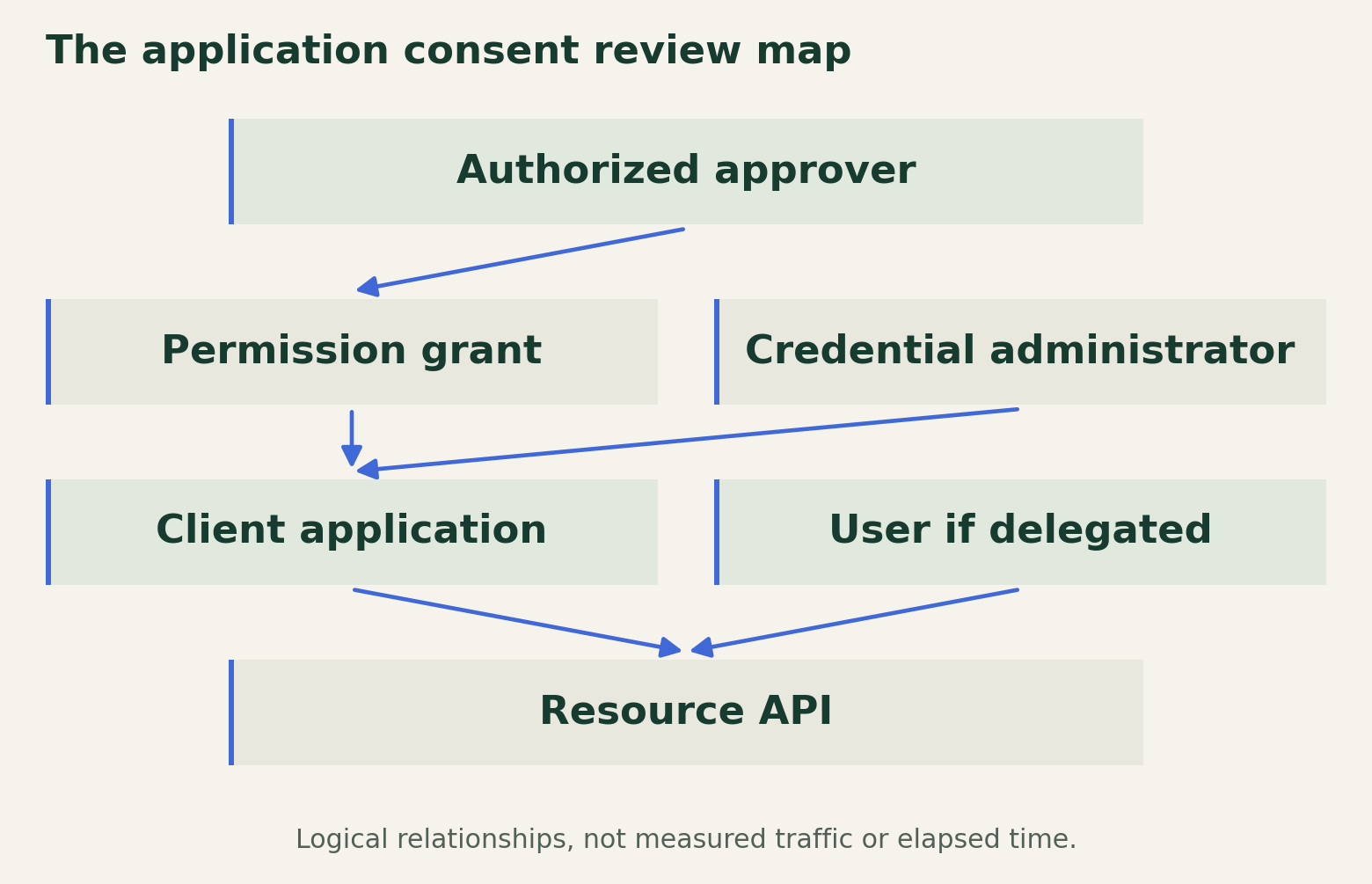
The application consent review map
A consent decision must connect the requested resource authority to the people who can grant it and control the application.

Source. Primary documentation [1] [2] [3] [4] [5]. Accessed August 28, 2026.
Method. Original authority map synthesized from Microsoft documentation. Relationships identify consent, application control and resource access. Table rows are review fields, not incident observations or numeric risk scores.
Accessible table and figure data
| Review field | Why it matters | Evidence |
|---|---|---|
| Access mode | Delegated and application grants differ | Permission type and resource |
| Consent scope | Individual and tenant-wide authority differ | Grant record |
| Reviewer authority | Workflow membership is insufficient | Assigned consent permission |
| Application control | Credential managers can exercise app identity | Owners and administrator roles |
| Removal test | Grant deletion alone is not a receipt | Resource-specific authorization check |
| Review field | Why it matters | Evidence |
|---|---|---|
| Access mode | Delegated and application grants differ | Permission type and resource |
| Consent scope | Individual and tenant-wide authority differ | Grant record |
| Reviewer authority | Workflow membership is insufficient | Assigned consent permission |
| Application control | Credential managers can exercise app identity | Owners and administrator roles |
| Removal test | Grant deletion alone is not a receipt | Resource-specific authorization check |
Review who may consent
Entra user-consent settings can restrict which users may grant consent and for which applications and permissions. Microsoft documents policies using publisher verification and permissions classified as low impact. Verify the selected policy and its scope in the tenant; a verified publisher is an identity-related signal, not proof that the requested access is appropriate for this organization. [2]
The admin-consent workflow adds a request-and-review process, but designation as a reviewer does not grant the directory permissions required to approve every request. Review the reviewer's actual authority and the relevant application permissions. A workflow notification reaching a person is not evidence that this person has the organizational or technical authority to grant the requested access. [3]
Keep requester, business owner, reviewer and granting administrator distinct in the record, even when one person performs more than one role. The distinctions explain who understood the operational need, who evaluated the authority and who executed the change. If separation of duties is required, verify those assignments before approving the request rather than inferring separation from the number of workflow steps.
Evaluate the business need without a risk score
Microsoft's consent-request management guidance provides the operational review surface for pending requests. Use it to examine the requested access and the request context, but do not treat an approval workflow as a substitute for examining the application's purpose and permissions. A completed request is a decision record; it does not demonstrate that the application's behavior was independently assessed. [4]
A useful review explains why the selected permission is acceptable, what a narrower alternative would prevent and which operational requirement justifies the difference. Avoid reducing that reasoning to an unsupported numeric risk score. The important distinction may be a particular dataset, a write capability or whether the process can run without an employee present.
Require an owner who can answer for changes after initial approval. Record an intended review trigger, such as a new permission request, a change in application operator or a material expansion in the integration's data scope. A calendar review can complement these triggers, but the record should not allow a substantial authority change to wait unnoticed until the next routine meeting.
Include people who can change the application
Microsoft warns that application administrators and cloud application administrators can add credentials to applications and use them to impersonate the application's identity. Reviewing only the consent approver therefore omits people who may gain use of already granted application authority. The administrative path to the application deserves review alongside its resource permissions. [5]
Identify who can change the application configuration and credentials, where approval for those changes occurs and how the operator detects an unexpected change. Keep application administrators, operational owners and resource owners in the review. They may each control a different part of the access path, and none necessarily has a complete view alone.
Consider a simple adverse scenario: the application's approved business purpose remains unchanged, but a new credential is added by an unexpected administrator. The consent decision may still look correct while control over the application has changed. The review should state what evidence would reveal that change and who is responsible for investigating it. This scenario is illustrative, not a report of an observed incident.
Define review, removal and verification
Every approval should include an exit condition. Record when the integration should be retired, who can request grant removal and which resource owners need to participate. Removal should have its own verification plan covering the access mode and resource in question. Do not promise a universal instant-revocation effect without checking the relevant token and service behavior.
After an authorized change, compare the actual grants with the approved record and run the agreed functional checks. Retain the permission identifiers and outcomes rather than only a screenshot of the application's name. If removal is being tested, distinguish a denied resource request from an unrelated network or application failure, and keep any residual access visible.
The completed review should let a later investigator answer four specific questions: what access was approved, why it was needed, who could alter the application and what evidence confirmed the final grant state. Keep the permission identifiers and application-control owners current when the integration changes. If ownership passes to another team, transfer the review record with the service so consent does not become durable authority whose original justification nobody can explain.
Method and provenance
Documentation review and original operational analysis using the cited primary sources, checked on August 28, 2026. The editorial date places the article in the retrospective series; publication and source review occurred in August 2026.
No tenant, application grant or resource authorization was inspected. Publisher verification and workflow approval are not application-security guarantees. Removal behavior depends on the resource and access mode. No empirical tests were performed for this article.
AI assistance. Researched, drafted and checked against cited sources with AI assistance. No independent human editorial review or original empirical testing is claimed.
Published under the Cloud Security Desk organizational byline. Read the series policy.
References
- Overview of permissions and consent in the Microsoft identity platform Microsoft. Accessed .
- Configure how users consent to applications Microsoft. Accessed .
- Configure the admin consent workflow Microsoft. Accessed .
- Application consent management and evaluation of consent requests Microsoft. Accessed .
- Delegate app registration permissions in Microsoft Entra ID Microsoft. Accessed .