
Create a focused Azure Activity Log alert for role-assignment changes. Test the action group separately, use a harmless Reader grant to verify matching and delivery, and retain the event context needed for review.
At a glance
Key findings
- Detect successful RBAC changes and test alert delivery without expanding a production role.
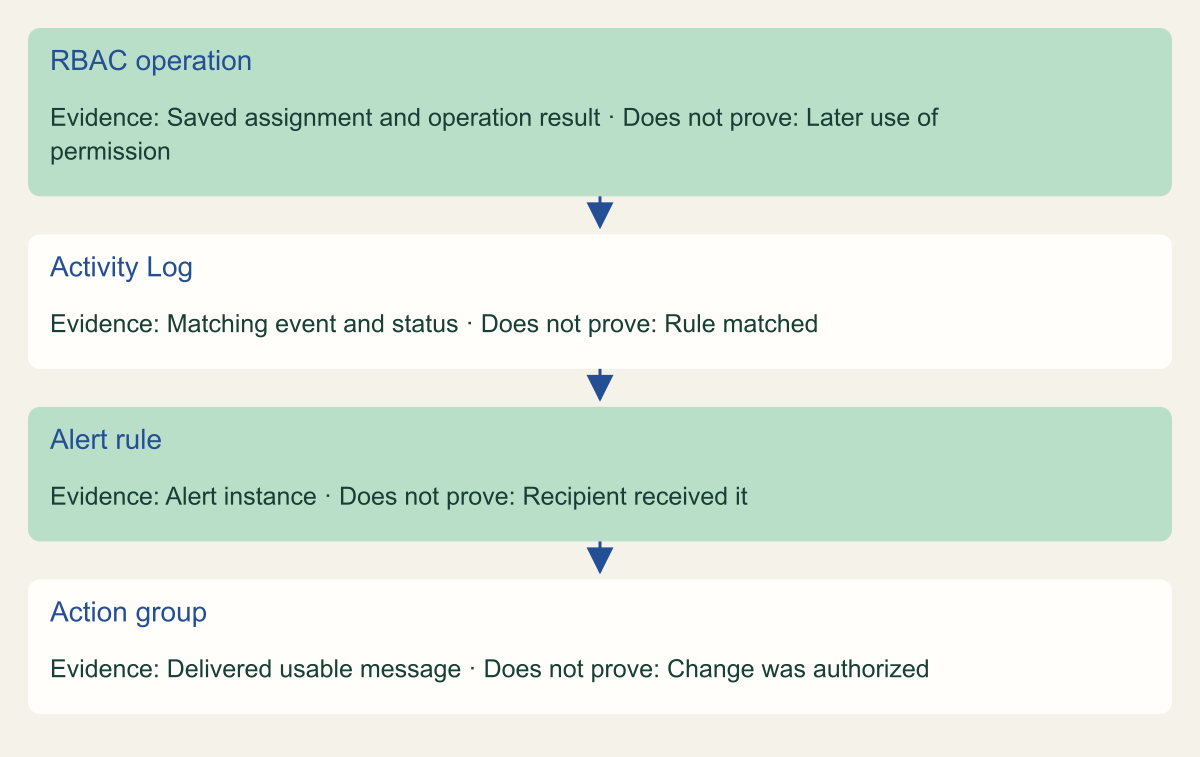
- Conceptual pipeline follows a role change from its management record through matching and delivery.
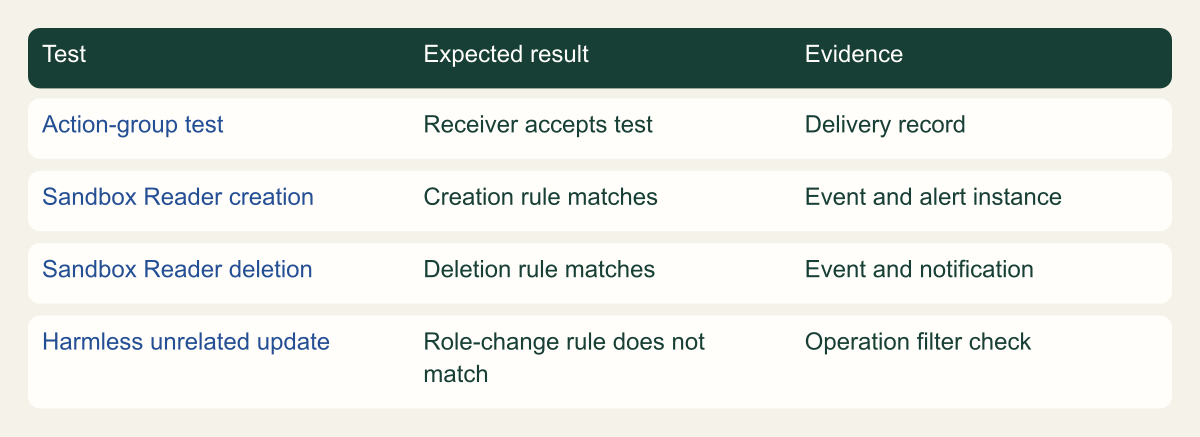
- A proposed acceptance matrix separates receiver delivery, role creation, role removal and an unrelated operation.
Watch one kind of Azure management change
Create an Azure Activity Log alert for role-assignment changes and connect it to a tested action group. This gives an operator a notification when the selected Azure RBAC operation occurs in the monitored scope. It does not decide whether the change was authorized, identify every Microsoft Entra directory-role change or prove that the new permission has already been used. The first useful result is a reliable pointer to a specific management event. [1] [5]
Start with a clear scope and owner. A small team might want successful role-assignment creation and deletion events for one application resource group. A central team may need subscription-wide coverage. The broader rule has a larger review workload, so decide who will assess the events before creating notifications that nobody owns.
Use a harmless test assignment rather than granting Owner to demonstrate the alert. A temporary Reader assignment in a sandbox can exercise the same operation family without creating unnecessary administrative access. Record the expected event, the person who should receive it and the maximum waiting period you will use before investigating the notification path. That waiting period is an operational test choice, not an Azure delivery guarantee.
Choose creation and deletion signals deliberately
Azure Activity Log Administrative events record Resource Manager write, delete and action operations, including Azure RBAC changes. A role-assignment creation uses Microsoft.Authorization/roleAssignments/write; removal uses the corresponding delete operation. The event schema distinguishes the operation and its status. A started operation and a successful operation answer different questions, so select the status that matches the alert's purpose. [5]
For a simple rule, watch successful assignment changes. If the team also wants failed attempts, make that an explicit additional condition or rule with an appropriate response. Do not label every attempted assignment as a completed privilege grant. The notification should help the operator find the saved state and operation outcome before deciding what changed.
Creation and deletion can be separate rules with clear names and a shared action group. This keeps each signal easy to test. Avoid filtering to one administrator's identity unless the purpose specifically requires that filter. Otherwise a new automation identity or another legitimate operator could make the same change without matching the rule.
Scope is part of the detection. A resource-group rule does not promise visibility into every parent-scope assignment that might affect the group. Review where role administration actually happens and decide whether subscription-level monitoring is needed. Write the coverage statement in terms of the selected scopes and operations, rather than saying that the alert monitors all access changes.
Build the action group before relying on it
An action group defines what Azure Monitor does when the alert fires, such as notifying an email recipient or invoking an approved integration. Create or choose an action group with a named owner and a destination that the team actually monitors. The action-group test can check notification handling separately from the event condition. That separation is useful when a later test produces no message. [3]
Current Microsoft guidance requires email receiver verification through a one-time passcode, with a defined verification window. Check the receiver's status in the action group and complete any required verification before relying on email delivery. An unverified or unsubscribed destination can make a correctly matched alert appear broken from the operator's perspective. [3]
Send the built-in test to the intended channel and inspect what the recipient sees. Confirm that the message identifies the resource and rule clearly enough to route the issue. If the destination is an automation workflow, validate the expected payload format and authentication arrangement with its owner. A successful email test does not prove that a webhook receiver accepts the same event.
Keep notification testing separate from testing the rule itself. The action-group test proves that the configured action can be exercised. It does not prove that a role-assignment event matches the alert's conditions. The full acceptance test needs both results, plus evidence that a real harmless change traveled through the complete path.
Create a focused Activity Log rule
In Azure Monitor, open Alerts and create an alert rule. Select the intended resource scope, choose the Activity Log signal for the operation and configure the relevant status. Attach the tested action group and give the rule a name that states the operation and scope. Review those details before creating the rule. Microsoft's wizard guidance explains the required resource-read, rule-write and action-group-read permissions. [2]
Store the rule in an appropriate monitoring resource group if that is how the environment is organized. The location of the alert-rule resource is not the same thing as the scope it monitors. Record both. A rule named after the application can still monitor the wrong subscription if its conditions were copied from another configuration.
The Azure CLI also supports Activity Log alert resources and their conditions. If the team manages alerts as code, preserve the same explicit operation, scope and action-group choices in that source. Do not add an unreviewed command-line example that silently defaults to the current subscription. Read back the saved rule and its enabled state after creation. [7]
Keep the first rule small enough to understand. A complicated expression designed to predict every risky assignment is harder to verify than a specific change notification. You can add more selective logic after observing the actual event fields and review workload. The first milestone is a functioning event-to-operator path with an honest statement of coverage.
CSD_ALERT_GROUP='example-monitoring-rg'
CSD_ALERT_NAME='example-role-created'
az monitor activity-log alert show --resource-group "$CSD_ALERT_GROUP" --name "$CSD_ALERT_NAME" --output jsonA source event and a delivered alert are different results
Conceptual pipeline follows a role change from its management record through matching and delivery.

Source. Microsoft documentation: Activity Log in Azure Monitor - Azure Monitor [1]; Create an activity log, service health, or resource health alert rule - Azure Monitor [2]; Create and manage action groups in Azure Monitor - Azure Monitor [3]; Azure Activity Log event schema - Azure Monitor [5].
Method. Original conceptual synthesis of the cited Microsoft documentation. No deployment measurements or risk scores. Reviewed 2026-09-12.
Accessible table and figure data
| Stage | Evidence | Does not prove |
|---|---|---|
| RBAC operation | Saved assignment and operation result | Later use of permission |
| Activity Log | Matching event and status | Rule matched |
| Alert rule | Alert instance | Recipient received it |
| Action group | Delivered usable message | Change was authorized |
| Stage | Evidence | Does not prove |
|---|---|---|
| RBAC operation | Saved assignment and operation result | Later use of permission |
| Activity Log | Matching event and status | Rule matched |
| Alert rule | Alert instance | Recipient received it |
| Action group | Delivered usable message | Change was authorized |
Run a harmless assignment test
Create the approved temporary Reader assignment in a sandbox scope that the rule monitors. Record the principal, role, scope, assignment ID and operation time. Then find the corresponding event in the Activity Log. If the event is absent, investigate the operation and selected scope before changing the notification destination. A missing source event and a missing email are different failures.
Azure's Activity Log guidance says entries are usually available for analysis and alerting within a range of minutes after the operation. The documentation describes typical availability, not a hard end-to-end notification deadline. Allow a reasonable observation period and record the actual timing without turning one test into a claimed service benchmark. [1]
When the alert fires, open its details and compare them with the known test assignment. Verify that the intended recipient received a usable notification. A message mentioning an unrelated concurrent change does not complete this test. Match the event context and identifiers so that the evidence connects the deliberate action to the observed result.
Remove the temporary assignment afterward. If deletion is in scope, verify that event and its notification too. A creation rule passing does not prove the deletion rule has the correct operation name or status filter. The test matrix treats action-group delivery, creation matching and deletion matching as separate results that can fail independently.
Use a simple three-result record for the rehearsal. The first result is the source event with the expected operation and successful status. The second is the alert instance associated with the rule. The third is the notification received by the intended person or integration. If only the first two exist, the detection may be working while delivery remains unresolved. If only the action-group test exists, the real operation has not yet proved the rule condition.
A useful follow-up test changes something that should remain outside the rule. For example, an approved harmless tag update in the same sandbox should not be reported as a role-assignment change. This checks that the condition is not accidentally matching every Administrative event. Do not require a production write for this test, and do not infer complete detection precision from one negative case. It is a targeted check of the operation filter.
Retain the selected status exactly as saved. A portal label and an exported event field may use different representations, so inspect the actual event and rule rather than translating them by intuition. If the rule is later converted into a log query, repeat the known-event test against the query's schema. This avoids carrying an untested assumption from one alert type into another.
Test the rule separately from its receiver
A proposed acceptance matrix separates receiver delivery, role creation, role removal and an unrelated operation.

Source. Microsoft documentation: Create an activity log, service health, or resource health alert rule - Azure Monitor [2]; Create and manage action groups in Azure Monitor - Azure Monitor [3]; Azure Activity Log event schema - Azure Monitor [5].
Method. Original conceptual synthesis of the cited Microsoft documentation. No deployment measurements or risk scores. Reviewed 2026-09-12.
Accessible table and figure data
| Test | Expected result | Evidence |
|---|---|---|
| Action-group test | Receiver accepts test | Delivery record |
| Sandbox Reader creation | Creation rule matches | Event and alert instance |
| Sandbox Reader deletion | Deletion rule matches | Event and notification |
| Harmless unrelated update | Role-change rule does not match | Operation filter check |
| Test | Expected result | Evidence |
|---|---|---|
| Action-group test | Receiver accepts test | Delivery record |
| Sandbox Reader creation | Creation rule matches | Event and alert instance |
| Sandbox Reader deletion | Deletion rule matches | Event and notification |
| Harmless unrelated update | Role-change rule does not match | Operation filter check |
Read the event before deciding what happened
The first response to a role-change alert is to inspect the event and current assignment. Identify the caller, target scope, role definition, recipient and operation result where those fields are available. Compare the change with the approved request or automation run. A familiar caller name is useful context but is not proof that the specific assignment was intended.
Do not infer the role from the alert's title alone. A role assignment is a resource with its own identifier, and the event's resource label may not be a friendly role name. The reviewer may need to resolve the role-definition and principal identifiers. Keep that lookup inside the authorized environment rather than copying detailed identity records into a public ticket.
Treat the event as a management record. It can show a role-assignment operation, but it does not establish which application data was subsequently read or changed using that permission. If the change appears suspicious, preserve the relevant record and follow the organization's investigation process. Separate containment decisions from the fact that a notification arrived.
An authorized change can still reveal a process problem. For example, a hypothetical engineer may correctly add Reader at subscription scope when the request only needed a resource group. The review should address the excessive scope even if the engineer is recognized. The value of the alert is the opportunity to compare the saved grant with the intended task.
Know when a log query is worth the extra work
A simple Activity Log alert is suitable when the question is whether a selected operation happened in a selected scope. A log-search alert is more useful when the condition needs parsing, joins or role-specific logic. Azure Monitor distinguishes these alert types and their cost and evaluation behavior. Choose the type because of the question being asked, not because a longer query appears more sophisticated. [6]
Microsoft provides a privileged-role assignment alert example using the AzureActivity table and parsed request properties. That example is a useful starting point for a more selective detection, but its assumptions must be reviewed. Its status handling and scope filters are part of the query's meaning. Copying it without understanding those filters can exclude the very resource-group changes a small team wants to see. [4]
If you adopt a query, first run it against known harmless events. Check how creation, deletion, success and failure appear in your exported schema. Preserve an example result with sensitive identifiers handled appropriately. A query that compiles but matches no relevant event is not a verified detector, and one that matches a started request should not be presented as proof of a successful grant.
Do not introduce a Log Analytics workspace solely to make the first basic notification look more complete. Logging destinations, retention and query-alert costs need their own operational owners. The simpler rule can remain useful while a central monitoring team develops more selective analysis for high-privilege changes.
Handle silence and repeated notifications
When no notification arrives, inspect the path in order. Confirm that the operation occurred in the monitored scope, that its status matches the condition and that the rule is enabled. Then inspect the alert instance, action-group configuration and receiver status. This prevents a working event condition from being repeatedly changed to compensate for an unverified email destination.
Check suppression and processing rules if the environment uses them. A configured alert can be intentionally muted or routed differently during maintenance. The operator testing the rule should know which controls sit between detection and delivery. A quiet inbox is not enough evidence to decide that Azure failed to record the change.
Repeated notifications can come from repeated operations, multiple rules or overlapping scopes. Compare event identifiers and rule names before deduplicating. Two similar messages may represent creation and removal of the test grant, or separate grants made by one automation. Removing a rule to stop noise without understanding the overlap can also remove useful coverage.
Use the observed workload to refine routing and ownership. Base the review expectation on the scope's normal change process and who is available to respond. A development subscription and a tightly controlled production scope can have different normal change patterns. Record those expectations with the alert owner, and escalate unexpected grants through the existing access-management process.
Make the notification name useful to a person seeing it without the setup context. Include the monitored application or subscription and the operation class, while keeping sensitive identifiers out of an unnecessarily broad subject line. A recipient should know which team owns the rule and where to find the saved event. Good routing is part of the control's usefulness even when the event filter itself is technically correct.
Leave a maintainable alert behind
The final handoff should name the monitored scopes, operation names, status filters, rule IDs, action group and receiving team. Include the harmless test assignment and the resulting event and notification evidence. State whether creation and deletion were each tested. This makes a later receiver change or rule refactor easier to validate without creating a privileged test grant.
Remove any temporary test assignment and unused test-only rule. Keep shared action groups intact unless their owner agrees they are no longer needed. If the rule was created in a sandbox only, say so explicitly. A tested sandbox notification is useful evidence for the procedure, but it is not evidence that the production subscription is monitored.
Review the rule when resource ownership, subscription structure or notification destinations change. A valid rule can become operationally useless when the recipient leaves or the application moves to another scope. Include a small retest in those changes so that the control remains connected to the people expected to act on it.
The alert is useful when an operator can move from a notification to the exact assignment and decide whether it matches the approved work. Keep that path short and observable. More elaborate role-risk logic can be added later, but it should preserve the same distinction between an attempted change, a completed grant, a delivered notification and an investigated event.
Method and provenance
Microsoft primary documentation was reviewed on September 12, 2026. The guide combines documented service behavior with original implementation guidance, conceptual figures and clearly identified hypothetical examples.
No Azure tenant, production application or customer deployment was executed or measured. Commands were checked against the cited references and locally parsed where applicable; the reader must verify permissions, service support and outcomes in the intended environment.
AI assistance. AI-assisted source research, drafting, original visual planning and consistency review. No firsthand deployment experience or human review is claimed.
Published under the Cloud Security Desk organizational byline. Read the practitioner guide policy.
References
- Activity Log in Azure Monitor - Azure Monitor Microsoft. Accessed .
- Create an activity log, service health, or resource health alert rule - Azure Monitor Microsoft. Accessed .
- Create and manage action groups in Azure Monitor - Azure Monitor Microsoft. Accessed .
- Alert on privileged Azure role assignments Microsoft. Accessed .
- Azure Activity Log event schema - Azure Monitor Microsoft. Accessed .
- Types of Azure Monitor alerts - Azure Monitor Microsoft. Accessed .
- az monitor activity-log alert Microsoft. Accessed .