
Configure one Azure VM to retrieve a harmless Key Vault secret using its managed identity. Follow identity setup, vault-scoped data permission, value-free verification, network troubleshooting and application refresh decisions.
At a glance
Key findings
- Set up one system-assigned VM identity and a vault-scoped secret permission.
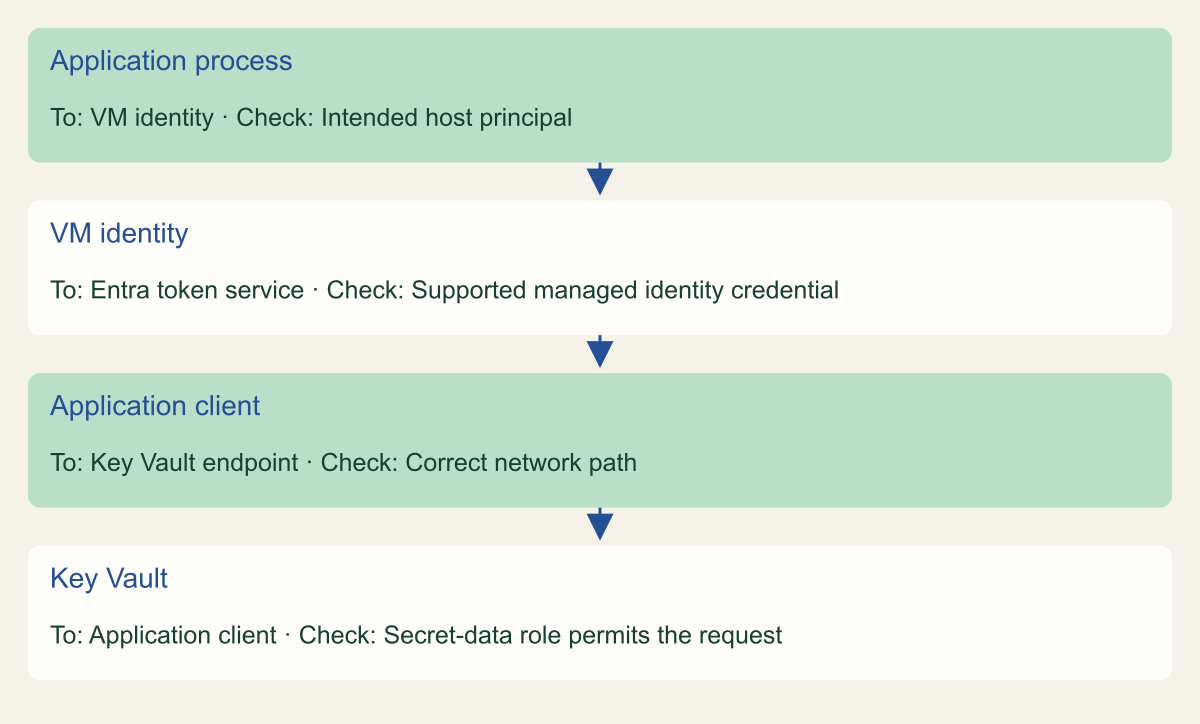
- Conceptual request sequence separates identity selection, network access and Key Vault authorization.
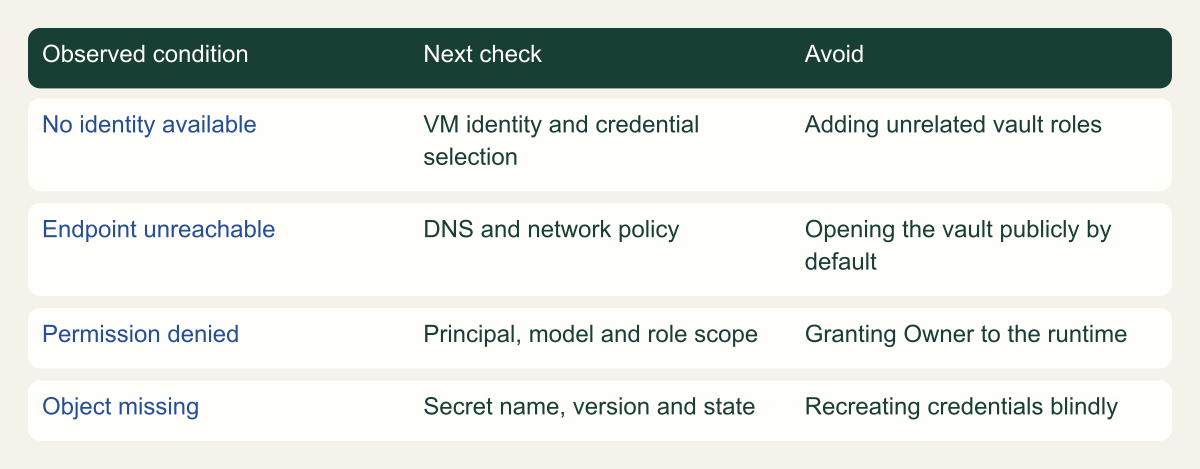
- A conceptual decision tree routes identity, network, authorization and object-state failures to separate checks.
Prove one VM can retrieve one harmless secret
An Azure virtual machine can use a managed identity to read a Key Vault secret without storing a password for Key Vault in the application. Enable an identity on the VM, grant that identity the required secret access and make the request from the VM. The identity replaces a credential you would otherwise distribute. It does not replace the secret being retrieved or the authorization rules of the system that secret accesses. [1]
Start with a harmless test secret in a vault intended for this exercise. The value should have no access to another service. The purpose is to prove the identity, role and network path without introducing a real password into a troubleshooting session. Decide in advance which application process will use the identity and what successful retrieval should look like without printing the secret.
This guide uses a system-assigned identity on one VM and an Azure RBAC permission model for Key Vault. Existing vaults can use an older access-policy model, so inspect the vault's configuration before following a role-based procedure. Do not switch a shared production vault between permission models as an incidental step in a tutorial. Such a change affects existing applications and requires its own review. [3]
Choose the identity and vault arrangement
A system-assigned identity is attached to the lifecycle of its Azure resource. A user-assigned identity is a separate resource that can be attached to supported hosts. The first is straightforward for a single VM; the second can help when identity continuity must survive replacement of the host. Neither option makes two applications sharing the same identity distinguishable to Key Vault. Choose the identity boundary to match the applications that should share permission. [1]
For a small learning exercise, put the harmless secret in a dedicated test vault. For an application, Microsoft's Key Vault RBAC guidance recommends a vault per application per environment, with roles generally assigned at vault scope. Individual-secret role assignments exist, but they should not become a substitute for organizing unrelated applications into appropriate vaults. A vault-scoped secret-reader role can read secrets across that vault. [3]
Write down the expected pairing: this VM identity, this vault and this application. If several unrelated processes can obtain tokens for the same VM identity, a vault cannot infer which process the operator intended. Treat access to run code on the VM as part of the design. This is a practical reason to avoid granting one host identity access to every environment's secrets.
Do not name the test secret after a real production credential if doing so might confuse an operator. A label such as identity-check communicates its purpose. Give the test resources an owner and cleanup plan, but avoid putting sensitive values into tags or descriptions. The exercise should leave a clear result and a small amount of understandable configuration.
Enable the identity and record its object
Open the VM's Identity settings and enable its system-assigned managed identity. Save the change and record the resulting principal or object identifier. That identifier is the security principal to which Key Vault access will be assigned. The VM name helps a person recognize the resource, but the object identifier is the more precise way to distinguish it from another VM with a similar name. [2]
If an identity already exists, use the existing one rather than toggling it off and on as a reset. Identity lifecycle changes can affect role assignments and applications that depend on that principal. The relevant check is whether the intended identity is attached and available to the running workload. Recreating a resource is a much larger action than fixing one secret-read permission.
Keep the VM administrator and the VM identity separate in your notes. The administrator who can configure the VM might also have direct access to the vault. A successful request made with that person's Azure CLI login proves the person's access, not the VM's. The test must deliberately select the managed identity before making the data request.
Follow the request through the host identity, token acquisition and Key Vault authorization. Use the sequence figure to locate the stage that failed, then compare that stage with the application's observed error. If identity acquisition fails, adding a vault role is unlikely to fix it. If a token is obtained but the vault denies the operation, inspect the selected identity, permission, scope and network policy before changing the configuration.
Follow the VM identity to the secret read
Conceptual request sequence separates identity selection, network access and Key Vault authorization.

Source. Microsoft documentation: Managed identities for Azure resources - Managed identities for Azure resources [1]; Grant permission to applications to access an Azure key vault using Azure RBAC [3]; Configure network security for Azure Key Vault [4]; Authenticate Azure-hosted Python apps to Azure resources using a system-assigned managed identity - Python on Azure [7].
Method. Original conceptual synthesis of the cited Microsoft documentation. No deployment measurements or risk scores. Reviewed 2026-09-12.
Accessible table and figure data
| From | To | Check |
|---|---|---|
| Application process | VM identity | Intended host principal |
| VM identity | Entra token service | Supported managed identity credential |
| Application client | Key Vault endpoint | Correct network path |
| Key Vault | Application client | Secret-data role permits the request |
| From | To | Check |
|---|---|---|
| Application process | VM identity | Intended host principal |
| VM identity | Entra token service | Supported managed identity credential |
| Application client | Key Vault endpoint | Correct network path |
| Key Vault | Application client | Secret-data role permits the request |
Grant the secret permission separately
At the test vault, open Access control (IAM) and add the Key Vault Secrets User role for the VM's managed identity. Confirm the identity identifier and vault scope before saving. This role allows reading secret contents under the RBAC model; it does not make the VM an administrator of the vault. Key Vault Reader has a different purpose and does not provide secret-value access. [3]
The person assigning the role must already be authorized to manage role assignments at the relevant scope. Do not give the runtime identity the ability to grant its own access merely because setup requires an administrator. Setup permissions and ongoing application permissions should remain separate. The application needs a secret read, not the right to choose which other principals can read secrets.
After saving, inspect the assignment and record its ID. Allow the documented authorization changes to propagate before diagnosing a denial. If the wrong principal was selected, correct the assignment rather than adding more roles to similarly named identities. A small error in identity selection can produce a surprisingly long troubleshooting session when every step appears to refer to the same VM name.
For a shared vault, verify the scope of everything the role permits before proceeding. If the VM should only read one secret among unrelated secrets, the vault arrangement deserves review. A successful request does not mean the permission is appropriately narrow. The acceptance record should describe the granted scope honestly instead of saying one-secret access when a vault-wide reader was created.
Make the request from the VM
Run the test inside the Azure VM, using a supported Azure CLI installation or the application's chosen Azure SDK. Azure CLI provides az login --identity for a system-assigned identity. A user-assigned identity requires an explicit selector when the environment contains more than one candidate. Do not authenticate with your personal account and assume the VM automatically takes over subsequent commands. [5]
Retrieve only a nonsecret property in the displayed output while exercising the secret-read operation. For example, the CLI can call az keyvault secret show for the harmless test secret and use a query that outputs its identifier. The underlying request still needs authorization to get the secret. Filtering the displayed result avoids placing its value into the terminal transcript, although the process necessarily receives the response. [6]
For application code, use the Azure Identity library and the appropriate Key Vault client library. Microsoft's hosted-application guidance explains managed-identity credentials and credential-chain behavior. An explicit managed-identity credential can make production identity selection easier to understand; a broader default credential chain can be convenient during development but should be configured with the deployment environment in mind. [7]
Record the identity used, vault endpoint, secret name, timestamp and whether the operation succeeded. Do not record the token or secret value as evidence. A useful success record proves that the intended principal retrieved the harmless object through the intended path. It does not need to expose the material that real applications would keep private.
# Run on the intended VM; use a harmless test secret.
az login --identity --allow-no-subscriptions --output none
CSD_AZ_VAULT='example-vault'
CSD_AZ_SECRET='identity-check'
az keyvault secret show --vault-name "$CSD_AZ_VAULT" --name "$CSD_AZ_SECRET" --query id --output tsvSeparate a role failure from a network failure
A Key Vault request depends on both authorization and connectivity. The vault can restrict network access through firewall settings or private endpoints. A VM with the correct role can still be unable to reach the permitted data endpoint. Conversely, reaching the vault does not grant access to a secret. Microsoft's network-security documentation treats these as separate controls. [4]
Begin with the exact endpoint and error returned by the test. Verify the vault name, resource context and the host from which the request ran. If the vault is private, check DNS and routing from that VM. A successful lookup on an administrator's laptop is not evidence about the VM's resolver or network. Avoid making a private vault publicly reachable merely to get a green test result.
If the request reaches the service but permission is denied, inspect the principal and the vault's permission model. Check that the role was assigned to the VM identity rather than the administrator, that it is a secret-data role and that the scope is the intended vault. Allow for propagation. The failure tree separates these checks so that troubleshooting does not become a sequence of speculative privilege increases.
If the secret is missing or disabled, investigate the secret's state rather than changing identity permissions. A wrong name or version can fail even when the identity is correctly authorized. Keep the test object stable while diagnosing the request. Changing the identity, secret and network at the same time makes it difficult to identify which correction mattered.
The read-back command should be reviewed as carefully as the grant. A query that prints only the secret identifier is useful for a harmless test, but enabling shell tracing can still expose command inputs or authentication output from other steps. Keep tracing off for credential operations and avoid copying an entire interactive session into the evidence record. The example's purpose is to validate the request path while minimizing what the operator retains.
For the final application check, identify the process that makes the request. Running the CLI successfully as an administrator on the VM proves that the host identity can be used from that session; it does not prove that the deployed application's configuration selects the same credential. Include one request through the actual application code path before closing that acceptance item.
Investigate the failing layer before adding roles
A conceptual decision tree routes identity, network, authorization and object-state failures to separate checks.

Source. Microsoft documentation: Configure managed identities on Azure virtual machines (VMs) - Managed identities for Azure resources [2]; Grant permission to applications to access an Azure key vault using Azure RBAC [3]; Configure network security for Azure Key Vault [4]; az keyvault secret [6].
Method. Original conceptual synthesis of the cited Microsoft documentation. No deployment measurements or risk scores. Reviewed 2026-09-12.
Accessible table and figure data
| Observed condition | Next check | Avoid |
|---|---|---|
| No identity available | VM identity and credential selection | Adding unrelated vault roles |
| Endpoint unreachable | DNS and network policy | Opening the vault publicly by default |
| Permission denied | Principal, model and role scope | Granting Owner to the runtime |
| Object missing | Secret name, version and state | Recreating credentials blindly |
| Observed condition | Next check | Avoid |
|---|---|---|
| No identity available | VM identity and credential selection | Adding unrelated vault roles |
| Endpoint unreachable | DNS and network policy | Opening the vault publicly by default |
| Permission denied | Principal, model and role scope | Granting Owner to the runtime |
| Object missing | Secret name, version and state | Recreating credentials blindly |
Decide what the application should cache
The SDK should manage token acquisition according to its supported behavior. Avoid building a homemade token store simply because a command-line example shows how a token can be requested. A manually copied token creates another value to protect and another expiry condition to handle. Use the supported credential and service-client interfaces unless the application's requirements justify a different implementation. [7]
The retrieved application secret has a separate lifecycle. Reading it once at startup may be suitable for some programs, while others need a controlled refresh when the upstream credential rotates. Choose the refresh behavior with the application owner: identify what triggers another read, how the replacement reaches the process and whether a failed refresh pauses work or continues using an already loaded value.
Consider a hypothetical worker that retrieves a database password. Managed identity removes the password used to authenticate to Key Vault, but the database password still exists and can still become stale in memory. A successful vault read does not prove that the database accepts it. Test the downstream application action with harmless data and connect that result to the secret version the worker used.
Keep error reporting useful without disclosing values. Log the failing operation, a sanitized resource identifier and an appropriate error category. Do not log the secret response or access token to make troubleshooting easier. If the application needs an incident record, design that record around the dependency and outcome rather than around the credential material.
Keep the dependency understandable
The finished configuration should answer three questions quickly: which identity runs the application, which vault it can read and what consumes the returned secret. Keep the application owner and identity lifecycle in view when the VM is replaced. A replacement host is not automatically the same security principal simply because it uses the old hostname or application configuration.
A useful handoff includes the VM resource ID, identity object ID, vault resource ID, role assignment and the secret name or version strategy. Include network prerequisites and the application's refresh behavior. None of these require storing the secret value. Together they allow a later operator to distinguish an identity replacement, a role change, a network change and a secret rotation.
Use the simple test as a repeatable acceptance check after relevant changes. Replacing a VM, changing a vault firewall or moving an application to a different host can each change the path. The check should run under the intended runtime identity and perform the same harmless operation. A personal administrator test remains useful for diagnosis, but it must be labeled separately.
The practical benefit is a credential dependency that can be explained and maintained. Azure manages the identity's authentication material, while the application owner remains responsible for the secret it retrieves, the permissions it receives and the work it performs afterward. Keeping those responsibilities visible makes the setup easier to operate when the first successful read is no longer the interesting question.
Method and provenance
Microsoft primary documentation was reviewed on September 12, 2026. The guide combines documented service behavior with original implementation guidance, conceptual figures and clearly identified hypothetical examples.
No Azure tenant, production application or customer deployment was executed or measured. Commands were checked against the cited references and locally parsed where applicable; the reader must verify permissions, service support and outcomes in the intended environment.
AI assistance. AI-assisted source research, drafting, original visual planning and consistency review. No firsthand deployment experience or human review is claimed.
Published under the Cloud Security Desk organizational byline. Read the practitioner guide policy.
References
- Managed identities for Azure resources - Managed identities for Azure resources Microsoft. Accessed .
- Grant permission to applications to access an Azure key vault using Azure RBAC Microsoft. Accessed .
- Configure network security for Azure Key Vault Microsoft. Accessed .
- Sign into Azure using a managed identity and Azure CLI Microsoft. Accessed .
- az keyvault secret Microsoft. Accessed .