
Recover a retained Azure Key Vault secret and verify the version used by its application. Distinguish secret recovery from whole-vault repair, understand purge protection and check the downstream credential before closing the incident.
At a glance
Key findings
- Distinguish secret recovery from vault recovery and verify versioned application references.
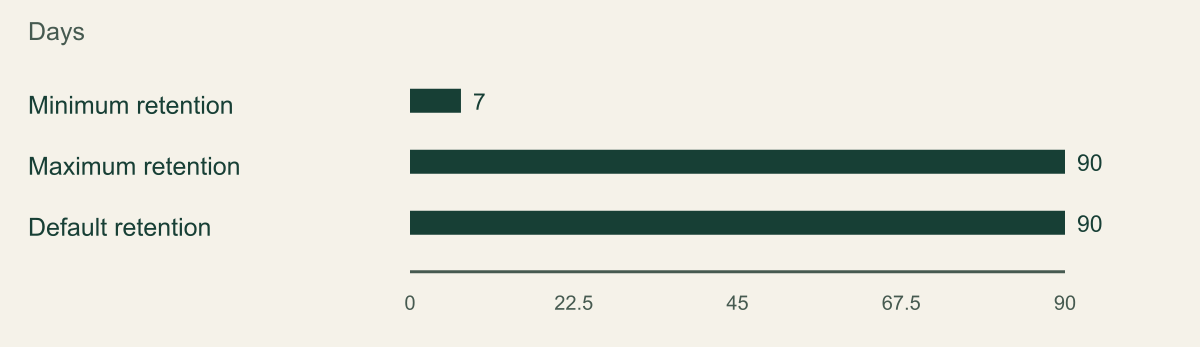
- Documented Key Vault soft-delete minimum, maximum and default retention settings in days. They are not observed recovery times.
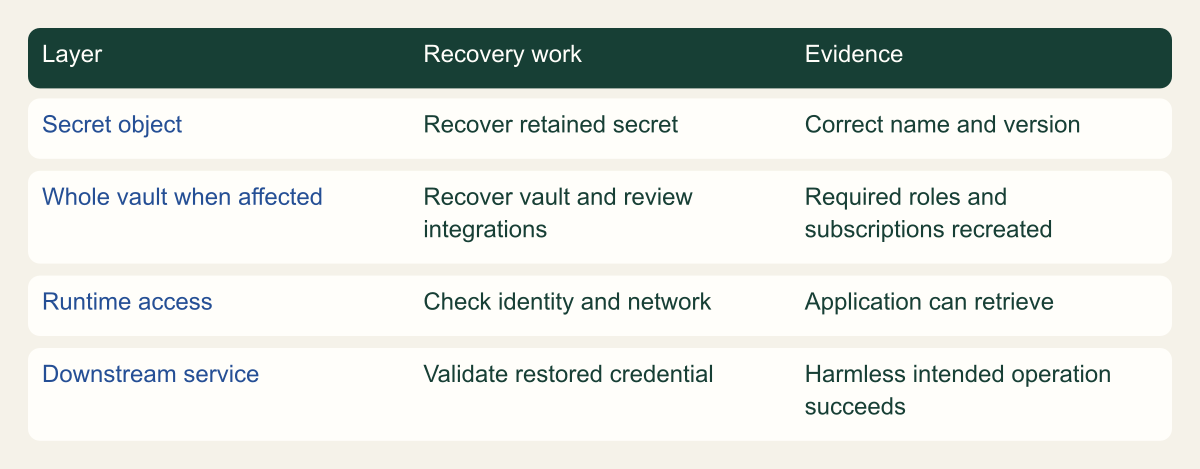
- Conceptual recovery map separates a secret object, whole-vault integrations, runtime retrieval and downstream credential validity.
Confirm that the secret is deleted rather than disabled
To recover a deleted Azure Key Vault secret, locate it in the vault's deleted-secrets view and use the recovery operation before its retention period expires. Then verify the restored versions and the application's access. If the vault itself was deleted, recover the vault first and review its lost integrations separately. A missing secret in an application does not always mean the secret was deleted. [1] [2]
Start with the vault name, secret name and any version identifier used by the application. Check whether the error concerns a missing object, an unauthorized request, a disabled version or an unreachable endpoint. Those conditions require different actions. Recovering an object that was never deleted will not repair an application role or private DNS configuration.
Do not create a new secret under a guessed name as the first response. The application may reference a specific version, and the original name may still be held by a soft-deleted object. Preserve the error and exact reference while an authorized operator inspects the vault. This prevents a simple recovery from becoming an undocumented credential replacement.
Use a harmless test secret when learning the procedure. Its value should have no access to another system. Record its name and version, and keep the expected value in the controlled test setup so retrieval can be checked without printing it. Recover the test secret and read it through the intended consumer identity before using the same procedure for a production credential.
Check the vault and its recovery window
Key Vault soft delete preserves qualifying deleted vaults and objects for a configured interval from 7 through 90 days, with 90 days as the documented default. The retention interval is chosen when the vault is created and cannot later be changed for that vault. Check the actual vault configuration rather than assuming every environment uses the default. [1]
The numeric figure shows the documented minimum, maximum and default retention values. These are configuration values measured in days. They are not observed recovery durations, incident-response targets or guarantees that a particular deleted object remains available today. The object's deletion time and current retained state determine the relevant deadline.
Soft delete and purge protection answer different questions. Soft delete creates a recovery opportunity after deletion. Purge protection prevents an early permanent purge during the applicable retention period. Inspect both settings and record them. A vault with soft delete enabled but without purge protection should not be described as protected against every privileged permanent-deletion action. [1] [8]
If the vault is still active, inspect its deleted secrets. If the whole vault is missing, use the subscription's deleted-vault view and confirm the original location and identity. A secret recovery operation requires the vault context. Trying several vault names until one responds is not an adequate way to establish that the right credential is being restored.
Choose the retention interval when the vault is created
Documented Key Vault soft-delete minimum, maximum and default retention settings in days. They are not observed recovery times.

Source. Microsoft documentation: Azure Key Vault soft-delete [1].
Method. Values transcribed from the Key Vault soft-delete overview. Interval is chosen at vault creation and cannot later be changed for that vault. Reviewed 2026-09-12.
Accessible table and figure data
| Documented setting | Days |
|---|---|
| Minimum retention | 7 |
| Maximum retention | 90 |
| Default retention | 90 |
| Documented setting | Days |
|---|---|
| Minimum retention | 7 |
| Maximum retention | 90 |
| Default retention | 90 |
Recover the secret with the right authority
In the portal, open the active vault, select Secrets and choose the option to manage deleted secrets. Select the correct item and recover it. The CLI provides az keyvault secret list-deleted and az keyvault secret recover for the corresponding workflow. Use the exact vault and secret names and inspect the current command reference before automating the procedure. [2] [6]
Recovery requires the appropriate data-plane authority for the vault's permission model. Under Azure RBAC, Key Vault roles distinguish reading metadata, reading secret values and managing secret objects. A person able to view the vault resource is not necessarily able to recover its secrets. Use the existing authorized recovery role and inspect its scope rather than granting subscription Owner as a troubleshooting shortcut. [3]
Separate the person recovering the secret from the runtime application identity. The application may only need to read the restored value; it should not automatically receive secret-management or purge permissions because recovery was necessary. Keep emergency operator permissions temporary when that is the approved operating model, and record the specific assignment used.
After issuing recovery, read the object state again. A successful command response is evidence that the operation was accepted, while the follow-up check establishes what is now available. If the result is unclear, inspect before retrying. Avoid mixing recovery with a new secret creation or rotation until the original state is understood.
CSD_AZ_VAULT='example-vault'
CSD_AZ_SECRET='recovery-check'
az keyvault secret list-deleted --vault-name "$CSD_AZ_VAULT" --query '[].{id:id,recoveryId:recoveryId}' --output json
az keyvault secret recover --vault-name "$CSD_AZ_VAULT" --name "$CSD_AZ_SECRET" --query id --output tsvVerify versions without exposing the value
List or inspect the restored secret's versions and relevant attributes. Determine which version the application references and whether that version is enabled and appropriate for the current dependency. The CLI can filter displayed output to identifiers and attributes, allowing a retrieval operation to be tested without printing the secret value into a terminal transcript. [6]
A versionless reference and a version-specific reference can behave differently after recovery. A versionless consumer asks for the current applicable secret, while a pinned consumer continues to identify the version in its configuration. Do not assume that recovering the secret name updates every application's reference. Inspect the actual configuration and test the relevant path.
Use a harmless read under the intended runtime identity to verify access. An administrator's successful retrieval does not prove that the application has the required role or can reach the vault. The acceptance record should identify the runtime principal, endpoint and secret reference without recording the returned credential.
Recovery does not prove that the secret remains valid in the downstream service. A database password may have been changed after the deleted version was created, or the application may depend on a different credential now. Coordinate with the system owner before using a restored value. The correct recovery result is the intended working dependency, not simply an available secret object.
Distinguish restoring an object from undoing a security decision. A secret version may have been deliberately disabled because its credential was compromised or retired. If the application references that version, recovery should not automatically re-enable it. Review the incident or change history with the credential owner and decide whether the consumer should move to a valid replacement instead. Availability is not a reason to revive a credential whose use was intentionally ended.
Keep the secret's activation and expiry attributes in the review where the consuming integration uses them. The presence of an object does not establish that it is currently suitable for the application. Record the relevant version and state without copying the value. If the consumer has its own credential-expiry rules, validate those at the downstream system too.
A temporary administrator retrieval should remain a diagnostic, not the application's long-term workaround. Do not paste the recovered value into a configuration file because the managed identity still receives a denial. Fix the authorized runtime path or use the approved emergency procedure with a documented end. Otherwise a successful recovery can quietly reintroduce the manual credential distribution the vault was meant to avoid.
Restore the application connection
Test the application's normal secret-read path after recovery. If it caches a failed lookup or an old value, use the application's documented refresh or restart process. Avoid restarting unrelated services by habit. The application owner should decide how the restored credential reaches running processes and how to verify the downstream operation safely.
For a hypothetical worker using a secret to connect to a database, perform a harmless authorized read or health check. Record the secret version used and the outcome of that dependency check. Do not use a destructive write as proof that the password works. If the database rejects the credential, investigate the credential's current validity rather than granting broader Key Vault access.
Inspect application error logging during the repair. A debug mode that records the entire Key Vault response can expose the recovered value. Preserve error categories, request context and identifiers where appropriate, but avoid turning a recovery incident into a credential-disclosure incident. If a value was exposed, handle that separately through the organization's credential-response process.
When the consumer works, confirm that the temporary recovery permission is no longer needed. A runtime application should return to its approved steady-state access. Record any temporary exception that remains and who owns its removal. The incident is not fully resolved if an emergency secret-management grant is left attached to the application indefinitely.
Treat a deleted vault as a larger repair
Recovering a whole vault is different from recovering one secret in an active vault. Microsoft's soft-delete documentation warns that associated Azure RBAC role assignments and Event Grid subscriptions are not restored automatically with a recovered vault. Those integrations must be recreated as needed. A visible recovered vault therefore does not prove that its applications can resume. [1]
Use the infrastructure definition and authorized configuration records to identify the intended roles and integrations. Recreate only the reviewed configuration. Do not infer the old permissions from whichever administrators happen to be available during the incident. A recovery process should restore the application's intended access, not accumulate broad grants until the errors stop.
Check the vault's network path, diagnostics and dependent services. Key Vault logging can provide operational records when it was configured and retained appropriately, but enabling logging after an incident does not recreate earlier events. Use existing records to understand the deletion and recovery sequence, and state the evidence gaps. [7]
Use the recovery map to assign owners for object recovery, access restoration and application validation. Check the vault's actual integrations when deciding who must participate. A secret-only incident may require fewer steps, while a vault-level event can involve identity, network, monitoring and application teams. Give each affected integration its own restoration check before declaring the application ready.
Object recovery still needs an application check
Conceptual recovery map separates a secret object, whole-vault integrations, runtime retrieval and downstream credential validity.

Source. Microsoft documentation: Azure Key Vault soft-delete [1]; Azure Key Vault recovery overview [2]; Grant permission to applications to access an Azure key vault using Azure RBAC [3]; Reliability in Azure Key Vault [5]; Azure Key Vault logging [7].
Method. Original conceptual synthesis of the cited Microsoft documentation. No deployment measurements or risk scores. Reviewed 2026-09-12.
Accessible table and figure data
| Layer | Recovery work | Evidence |
|---|---|---|
| Secret object | Recover retained secret | Correct name and version |
| Whole vault when affected | Recover vault and review integrations | Required roles and subscriptions recreated |
| Runtime access | Check identity and network | Application can retrieve |
| Downstream service | Validate restored credential | Harmless intended operation succeeds |
| Layer | Recovery work | Evidence |
|---|---|---|
| Secret object | Recover retained secret | Correct name and version |
| Whole vault when affected | Recover vault and review integrations | Required roles and subscriptions recreated |
| Runtime access | Check identity and network | Application can retrieve |
| Downstream service | Validate restored credential | Harmless intended operation succeeds |
Understand what purge protection changes
Purge protection prevents an early permanent purge of protected deleted objects during the retention period. Microsoft's recovery guidance states that it cannot be disabled or overridden once enabled, including by administrators or Microsoft. That property is useful for resisting premature destruction, but it also affects planned deletion and name reuse. Review the commitment before enabling it in a new environment. [2]
Do not attempt to bypass the retention behavior to tidy up a lab. A protected deleted name can remain unavailable for reuse until the policy permits it. Choose disposable resource names and plan the test lifecycle accordingly. The inability to immediately purge a protected object is expected behavior, not a malfunction in the recovery tool.
Purge protection does not replace an application recovery plan or an independent backup strategy. It preserves the opportunity to recover within its supported scope, but an application may still need network access, permissions and the correct secret version. State those remaining dependencies so that the setting is not presented as a complete disaster-recovery solution.
If an object has already been permanently purged or its retention window has expired, the soft-delete recovery path is no longer the answer. Escalate to the approved backup or credential-replacement process. Do not promise that a more privileged account or a support request can necessarily recover data outside the feature's documented recovery scope.
Practice with a harmless secret and retain the result
A useful rehearsal uses a test vault or a clearly isolated harmless secret with known content. Record its identifier and version, delete it through an approved procedure, locate the retained item and recover it. Then read it using the intended consumer identity without printing the value. The rehearsal should establish the actual operator's permissions and the complete application path.
Keep the test small and reversible within the feature's constraints. Do not delete a shared vault to demonstrate a secret-level procedure. If whole-vault recovery is an important scenario, plan a separate isolated rehearsal that includes reconstruction of roles and integrations. Those two tests answer different operational questions and should have separate results.
During the rehearsal, record when recovery begins, when the secret becomes readable and when the application passes its downstream check. Include the environment, date, interruptions and missing permissions so the result can be interpreted later. The retention chart describes how long deleted objects can remain recoverable; it is not a recovery-time target. Use the observed rehearsal to identify steps that need repair.
Retain a concise result showing the object recovered, the identity used, the selected version, the downstream check and cleanup status. Include any remaining deleted test object that will stay until its retention period ends. The evidence should help the next operator reproduce the process without containing a secret value or private token.
Agree on who can declare the application ready before the rehearsal begins. The vault operator can verify object state and access, while the application owner can verify the downstream credential and consumer behavior. Those responsibilities may belong to one person in a small team, but the checks remain distinct. Recording both prevents a handoff in which each participant assumes the other tested the final dependency.
Prepare for the case soft delete cannot solve
Key Vault backup is a separate capability with documented restore constraints, including the Azure subscription and geography relationship. Review those limits before assuming a backup can be restored into any convenient vault. A backup file should be protected and managed through the organization's recovery process, not left beside an application repository as an informal safety copy. [4]
Microsoft's reliability guidance also distinguishes service availability and recovery responsibilities. If the incident is an unavailable vault rather than a deleted object, use the relevant service-status and application-resilience procedures. Repeatedly trying secret recovery against an outage does not address the actual condition. Diagnose the loss type before choosing the recovery mechanism. [5]
Keep an approved credential-replacement route for cases where the original secret is unavailable or no longer valid. That may require the downstream system owner to create a new credential and update consumers. It is a separate operation with its own coordination and verification, not an automatic side effect of restoring a Key Vault object.
The useful end state is a recovered or deliberately replaced application dependency with known permissions and a verified consumer. Soft delete can make that possible when the object is retained, but the final evidence must include more than the vault's green status. Preserve the exact version, access path and application result so that the recovery can be understood after the incident is over.
Method and provenance
Microsoft primary documentation was reviewed on September 12, 2026. The guide combines documented service behavior with original implementation guidance, conceptual figures and clearly identified hypothetical examples.
No Azure tenant, production application or customer deployment was executed or measured. Commands were checked against the cited references and locally parsed where applicable; the reader must verify permissions, service support and outcomes in the intended environment.
AI assistance. AI-assisted source research, drafting, original visual planning and consistency review. No firsthand deployment experience or human review is claimed.
Published under the Cloud Security Desk organizational byline. Read the practitioner guide policy.
References
- Azure Key Vault soft-delete Microsoft. Accessed .
- Azure Key Vault recovery overview Microsoft. Accessed .
- Grant permission to applications to access an Azure key vault using Azure RBAC Microsoft. Accessed .
- Back up a secret, key, or certificate stored in Azure Key Vault Microsoft. Accessed .
- Reliability in Azure Key Vault Microsoft. Accessed .
- az keyvault secret Microsoft. Accessed .
- Azure Key Vault logging Microsoft. Accessed .
- Secure your Azure Key Vault Microsoft. Accessed .