
An operational playbook for cloud security responders handling a leaked long-term IAM user access key, built from the AWS Managed Policy Reference, IAM and STS documentation, GuardDuty, and two published controlled-exposure tests reviewed on October 9, 2026. It reads AWSCompromisedKeyQuarantineV3 as a list of what it denies and leaves open, traces the temporary credentials the key minted, and orders containment, scoping and rotation with explicit stop-and-check points.
At a glance
Key findings
- AWSCompromisedKeyQuarantineV3, policy version v3 edited March 16, 2026, denies 99 action entries across 21 services, but it does not deny
sts:AssumeRole, and IAM documentation states a policy cannot stopsts:GetSessionToken, so the quarantine limits damage without ending access. [1][5] - Deactivating the key does not end the temporary credentials it already minted:
GetSessionTokenandGetFederationTokensessions last up to 36 hours and stop only when a deny on the user covers them, andAssumeRolesessions carry the role's permissions, which no policy on the user reaches. [6][7][8] - In the Unit 42 controlled test on December 19, 2025, AWS attached the quarantine 10 seconds after the public push and opened a support case 54 seconds after it, and the AttachUserPolicy record named the exposed user as the actor with
invokedByset to AWS Internal. [4] - Scope the key by its own
accessKeyIdand by every ASIA key in theresponseElementsof its STS calls, in each Region, before deleting it: a deleted key cannot be recovered and no longer appears on the user, so record the lineage first. [8][12][19] - Deactivate before deleting, deny the user's older temporary credentials from a separate administrator session, and detach the quarantine only after the replacement works; a replacement key on the same user inherits the quarantine. [4][7]
What AWS already did, and what it did not
When an IAM user's access key appears in a public place that AWS watches, AWS attaches the managed policy AWSCompromisedKeyQuarantineV3 to that user, raises an AWS Health event, emails the account and opens a support case. In a controlled test Unit 42 ran on December 19, 2025, the policy was attached 10 seconds after the key was pushed to a public GitHub repository. [4] The policy is a safety net against the fraud-related abuse AWS says it targets, not a fix. [1] It denies 99 action entries, but the key keeps authenticating, sts:AssumeRole is not on the deny list, and AWS's own documentation says a policy cannot stop sts:GetSessionToken. [1][5] It is attached to the user, so it never reaches role sessions the key may already have opened. [4][8]
So the responder's job is the part AWS does not do: cut the key and the user's sessions from a separate administrator identity, trace every credential the key created, contain role sessions and persistence, scope what the key touched, and only then rotate, delete and detach. Each step ends at a check, because several of these actions fail quietly: a deactivation that has not propagated, a session that outlives the key, a replacement key that inherits the same quarantine.
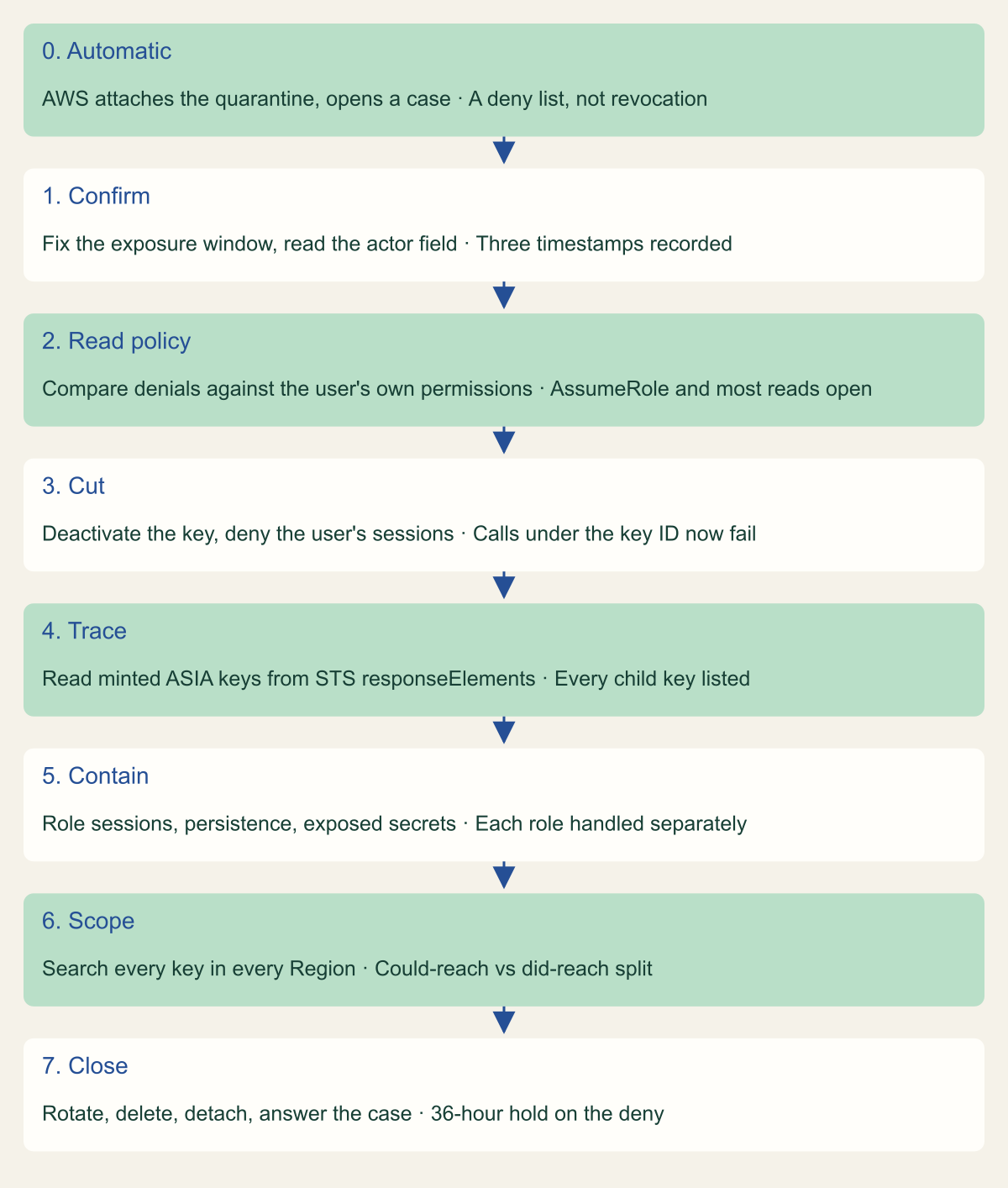
The figure shows the order. Treat the automatic quarantine as step zero that bought you a few minutes, not as containment.
The order of a leaked-key response, with its stop-and-check points
The automatic quarantine is step zero; containment of derived credentials comes before deleting the key. [1][4]

Source. Conceptual ordering of the response built from the cited AWS, Unit 42 and GitHub sources reviewed October 9, 2026. [1][4][7]
Method. Conceptual. Each row is one step of the playbook; the third column is the result to confirm before the next step.
Accessible table and figure data
| Step | Action | Stop and check |
|---|---|---|
| 0. Automatic | AWS attaches the quarantine, opens a case | A deny list, not revocation |
| 1. Confirm | Fix the exposure window, read the actor field | Three timestamps recorded |
| 2. Read policy | Compare denials against the user's own permissions | AssumeRole and most reads open |
| 3. Cut | Deactivate the key, deny the user's sessions | Calls under the key ID now fail |
| 4. Trace | Read minted ASIA keys from STS responseElements | Every child key listed |
| 5. Contain | Role sessions, persistence, exposed secrets | Each role handled separately |
| 6. Scope | Search every key in every Region | Could-reach vs did-reach split |
| 7. Close | Rotate, delete, detach, answer the case | 36-hour hold on the deny |
| Step | Action | Stop and check |
|---|---|---|
| 0. Automatic | AWS attaches the quarantine, opens a case | A deny list, not revocation |
| 1. Confirm | Fix the exposure window, read the actor field | Three timestamps recorded |
| 2. Read policy | Compare denials against the user's own permissions | AssumeRole and most reads open |
| 3. Cut | Deactivate the key, deny the user's sessions | Calls under the key ID now fail |
| 4. Trace | Read minted ASIA keys from STS responseElements | Every child key listed |
| 5. Contain | Role sessions, persistence, exposed secrets | Each role handled separately |
| 6. Scope | Search every key in every Region | Could-reach vs did-reach split |
| 7. Close | Rotate, delete, detach, answer the case | 36-hour hold on the deny |
Confirm the notice and fix the exposure window
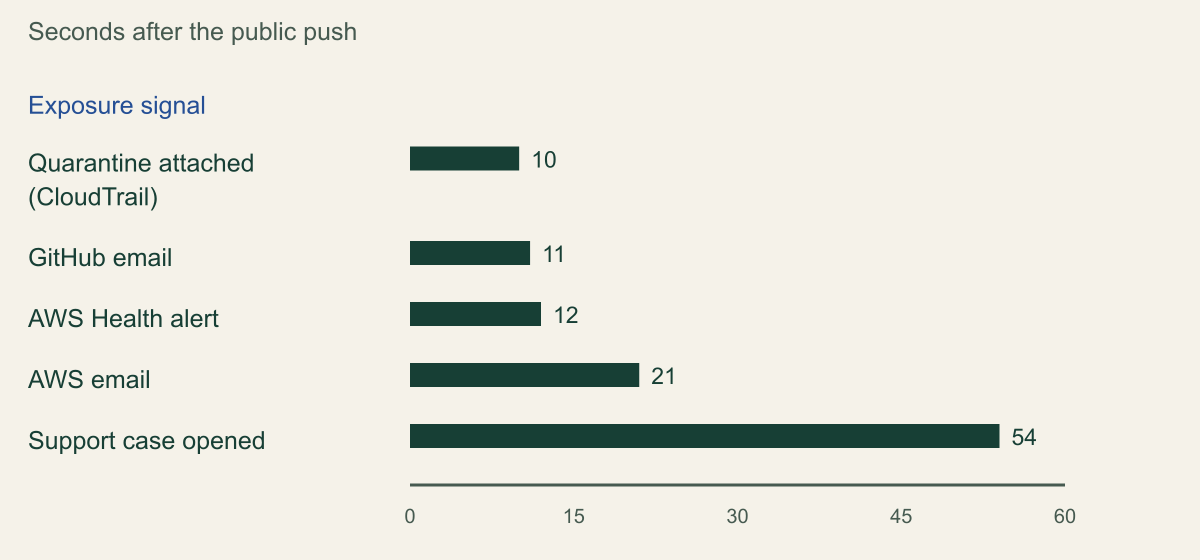
The signals arrive close together. In the Unit 42 test the public push was at 18:50:05 UTC; the quarantine's AttachUserPolicy event appeared in CloudTrail at 18:50:15, a GitHub email at 18:50:16, an AWS Health alert named Risk IAM quarantine at 18:50:17, an AWS email at 18:50:26, and the support case at 18:50:59. [4] GitHub scans public repositories by default and reports AWS key matches to AWS as a partner, which is what starts the chain. [4][14] A GuardDuty finding may also arrive: CredentialAccess:IAMUser/CompromisedCredentials, added March 6, 2026, fires at high severity when a key flagged by Amazon threat intelligence is then used, and lists the API calls, counts, timestamps, access key and source IP. [10][11]
The Health alert and the support case do not appear in CloudTrail, but the quarantine attachment does, and that event is the most reliable trigger to build on. Both the Unit 42 record and an earlier Xebia test show the same shape: eventName is AttachUserPolicy, eventSource is iam.amazonaws.com, awsRegion is us-east-1, and requestParameters.policyArn ends in the quarantine policy name. [4][17] The actor field is the confusing part. The userIdentity names your exposed user with a temporary ASIA key, while invokedBy, sourceIPAddress and userAgent are all AWS Internal. [4][17] Unit 42's prose says the log did not mark this as an AWS action, but its own screenshot shows invokedBy set to AWS Internal, so AWS performed the attach while stamping the record with your user's identity. Read the invokedBy field rather than hunting for a human who ran AttachUserPolicy.
Before touching anything, close the exposure at the source. If the key is in a Git repository, the commit history still holds it after a later commit removes it, so the secret must be rotated regardless of any cleanup, and the repository owner should purge or invalidate the exposed object. Record the first moment the secret was public as the start of the window you will scope later. If the repository owner has GitHub's validity checks turned on, GitHub calls GetCallerIdentity from its own address space to confirm the key is live, so the earliest third-party GetCallerIdentity in CloudTrail is often that check rather than an attacker. [4][14]
Seconds from a public push to each exposure signal
In the Unit 42 test, the quarantine attached 10 seconds after the push and the support case followed at 54 seconds. [4]

Source. Calculated from the Unit 42 controlled test timeline, December 19, 2025, push at 18:50:05 UTC. [4]
Method. Seconds = event time minus the 18:50:05 UTC push time, from the published timeline: 18:50:15, 18:50:16, 18:50:17, 18:50:26, 18:50:59. One controlled test; not the detection time to expect on other exposure paths.
Accessible table and figure data
| Signal | Seconds after push |
|---|---|
| Quarantine attached (CloudTrail) | 10 |
| GitHub email | 11 |
| AWS Health alert | 12 |
| AWS email | 21 |
| Support case opened | 54 |
| Signal | Seconds after push |
|---|---|
| Quarantine attached (CloudTrail) | 10 |
| GitHub email | 11 |
| AWS Health alert | 12 |
| AWS email | 21 |
| Support case opened | 54 |
What the quarantine denies, and what it leaves open
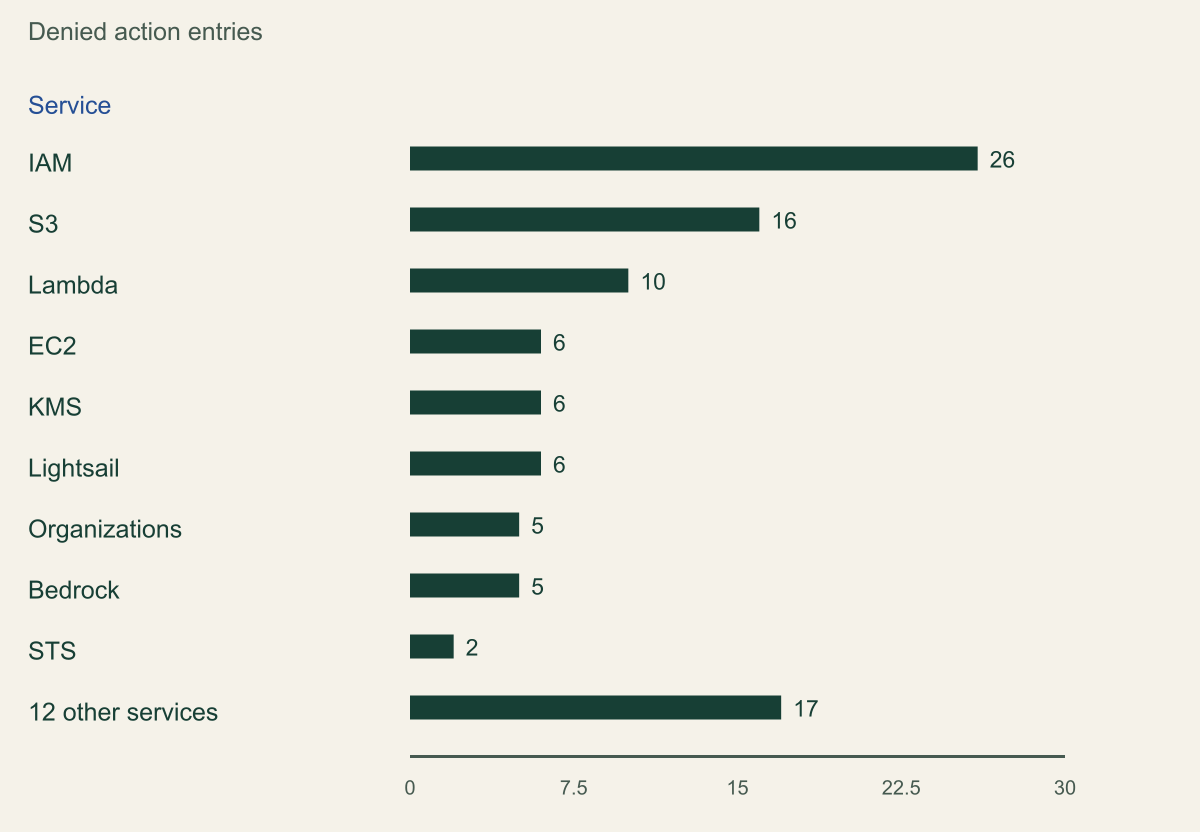
The current document is version v3, edited March 16, 2026, created August 21, 2024. [1] Read it as a list, because the gaps decide your next hour. It holds two Deny statements over 99 action entries in 21 services: a broad statement of 98 actions on all resources, plus kms:CreateGrant denied only when it is not called through another service. The entries cluster where fraud and destruction happen: 26 IAM actions that would let an attacker mint more credentials or escalate, 16 S3 actions including DeleteObject, DeleteBucket and PutBucketPolicy, 10 Lambda, six each in EC2, KMS and Lightsail, five each in Organizations and Bedrock, and a tail of one to three entries in ECS, SageMaker, SES, STS and others. [1] This version adds ten entries over the prior V2 policy, six of them KMS actions covering key deletion, key policy changes and grants. [1][2] The chart breaks the count down by service.
What the list leaves out matters more during response. sts:AssumeRole is absent, so if the exposed user can assume any role, the quarantine does not stop it from doing so and operating with that role's permissions. The 26 denied IAM actions are a fraction of the roughly 190 the service defines, and they cover creation and attachment, not every action. [3] A quarantine is a deny overlay on whatever the user could already do, and most services' data reads sit outside it. A user with no S3 permissions gains nothing from s3:GetObject being denied, while a user with wide data access keeps most of what it had. So the question is not what the quarantine denies in the abstract, but what this user's own policies allow that the quarantine does not subtract.
Two STS entries are on the list, GetSessionToken and GetFederationToken, and the first shows a limit of the approach. IAM's Permissions for GetSessionToken page says no permissions are required to call it and that including the action in a policy has no effect on a user's ability to perform it. [5] Check the errorCode on any GetSessionToken events after the attachment rather than assume the deny worked. The quarantine shrinks what a careless intruder can do; it does not contain a deliberate one, which is why the manual steps below are not optional.
Other providers draw this line differently. Google Cloud, by contrast, disables the credential. Its legacy managed organization policy constraint iam.serviceAccountKeyExposureResponse has defaulted to DISABLE_KEY since June 16, 2024 wherever no value is set, so a detected exposed service account key is turned off, logged, and the project owners and security contacts notified, with WAIT_FOR_ABUSE available for teams that cannot absorb an automatic disable. [15] Google also states that it does not guarantee detection. [15] AWS made the opposite default choice: deny the riskiest actions, keep the key alive, and leave the decision to disable with the customer. Neither default removes the need to respond; they change what the first automatic action is.
Denied action entries in the V3 quarantine policy by service
IAM, S3 and Lambda hold more than half of the 99 denied entries; STS has two, and AssumeRole is not among them. [1]

Source. Counted from the AWSCompromisedKeyQuarantineV3 JSON policy document, version v3 edited March 16, 2026, reviewed October 9, 2026. [1]
Method. Calculated: tally of the 99 Action entries by service prefix in the policy JSON, including four Lightsail wildcards (Create*, Delete*, Start*, Update*) and the conditional kms:CreateGrant. The 12 other services are ECS 3, SageMaker 2, SES 2, Amplify 2, and one each for CloudTrail, savingsplans, ECR, CodeBuild, Glue, SNS, mediapackagev2 and Logs.
Accessible table and figure data
| Service | Denied action entries |
|---|---|
| IAM | 26 |
| S3 | 16 |
| Lambda | 10 |
| EC2 | 6 |
| KMS | 6 |
| Lightsail | 6 |
| Organizations | 5 |
| Bedrock | 5 |
| STS | 2 |
| 12 other services | 17 |
| Service | Denied action entries |
|---|---|
| IAM | 26 |
| S3 | 16 |
| Lambda | 10 |
| EC2 | 6 |
| KMS | 6 |
| Lightsail | 6 |
| Organizations | 5 |
| Bedrock | 5 |
| STS | 2 |
| 12 other services | 17 |
Deactivate the key and deny the user's existing sessions
Deactivate the exposed key; do not delete it yet. Deactivation stops the key from authenticating, keeps the key on the user while you search CloudTrail for its accessKeyId, and, unlike deletion, can be reversed. [4][19] Run it from an administrator identity whose own credentials are independent of the key being retired, or the operation can disable the session you are working in.
Deactivating the long-term key does not touch the temporary credentials it already produced. IAM evaluates the permissions on temporary credentials every time they are used, and AWS says you must change the permissions of the user or role to stop compromised temporary credentials, because they stay valid until they expire. [7] A policy on the user does reach the user's own GetSessionToken and GetFederationToken sessions, because those carry the user's identity, so an explicit deny on the user constrains them on their next call. [7] It does not reach role sessions the key opened through AssumeRole; those are the next section. The AWS managed policy AWSDenyAll denies every action and is the blunt version of this deny; a statement keyed on aws:userid is the narrower one. The code attaches AWSDenyAll to the exposed user as the immediate cut.
One quieter gap: AWS's guidance says that if a resource-based policy, such as a bucket or KMS key policy, allows this principal access, you must also add an explicit deny for that resource, because editing or removing the user's own permissions does not change what a resource policy grants. [7] Note each such resource, and return to resource policies when you scope impact.
# Example fragment, AWS CLI v2. Run from an admin identity that does not
# use the exposed key. Placeholders: user name and key ID.
EXPOSED_USER="example-ci-deployer"
EXPOSED_KEY_ID="AKIA-EXPOSED-KEY-ID"

# 1. Record the key before changing it, then deactivate (do not delete).
aws iam list-access-keys --user-name "$EXPOSED_USER"
aws iam update-access-key --user-name "$EXPOSED_USER" \
  --access-key-id "$EXPOSED_KEY_ID" --status Inactive

# 2. Deny the user's own derived sessions (GetSessionToken / GetFederationToken)
#    by attaching AWSDenyAll to the user. Reversible at recovery.
aws iam attach-user-policy --user-name "$EXPOSED_USER" \
  --policy-arn arn:aws:iam::aws:policy/AWSDenyAll

# 3. Confirm the key is Inactive and the deny is attached.
aws iam list-access-keys --user-name "$EXPOSED_USER"
aws iam list-attached-user-policies --user-name "$EXPOSED_USER"
Find the credentials that outlive the key
A long-term key is a factory for temporary credentials, and those are what survive a deactivation. Three STS calls mint them from an IAM user's key, and CloudTrail records the minted key in responseElements for all three: GetFederationToken and GetSessionToken are logged as not read-only, and AssumeRole is logged as read-only but keeps its response elements, minus the secret access key, by a documented exception. [8] Each minted credential is an ASIA key that can keep working after the parent AKIA key is gone. GetSessionToken and GetFederationToken credentials for an IAM user last up to 36 hours with a 12-hour default; AssumeRole sessions last up to the target role's maximum session duration setting. [6] Community research has shown a federation token continuing to work after its parent access key was deleted, which is why deleting the key is not containment on its own. [13]
Build the lineage before you delete anything. Search CloudTrail for STS calls whose userIdentity.accessKeyId is the exposed AKIA key, read each responseElements.credentials.accessKeyId to collect the child ASIA keys, then search for activity under each of those. The table shows which derived credential a given policy action reaches, so you know what still needs separate containment after the deny-all on the user.
A GetSessionToken session minted after the quarantine attached is still covered: it holds the user's permissions minus the quarantine, and the deny-all from the previous step reaches it on its next request because it carries the user's identity. [5][7] Role sessions do not resolve so neatly, which is the next section.
| Credential | Identity in CloudTrail | Max life | Reached by a deny on the user? |
|---|---|---|---|
| Exposed AKIA key | The IAM user | Until deactivated or deleted | Yes; deactivate the key |
| GetSessionToken (ASIA) | The IAM user | 36 h, 12 h default | Yes; carries the user identity |
| GetFederationToken (ASIA) | The IAM user (federated session) | 36 h, 12 h default | Yes; a deny on the user applies |
| AssumeRole session (ASIA) | The assumed role, no user | The role's maximum setting | No; deny on the role, not the user |
-- Example fragment. Athena over CloudTrail logs for one Region.
-- Step 1: find STS calls the exposed key made, and read the child keys.
SELECT eventtime, eventname,
       json_extract_scalar(responseelements,
         '$.credentials.accessKeyId') AS minted_key,
       sourceipaddress
FROM cloudtrail_logs
WHERE eventsource = 'sts.amazonaws.com'
  AND useridentity.accesskeyid = 'AKIA-EXPOSED-KEY-ID'
  AND eventtime >= '2026-10-09T00:00:00Z'
ORDER BY eventtime;

-- Step 2: for each minted ASIA key returned above, find what it did.
SELECT eventtime, eventsource, eventname, awsregion,
       sourceipaddress, errorcode
FROM cloudtrail_logs
WHERE useridentity.accesskeyid = 'ASIA-MINTED-KEY-ID'
ORDER BY eventtime;
Contain role sessions and persistence
If the exposed user could assume a role, the quarantine did not stop the assumption, and the resulting role session carries the role's identity with no user attached, so a deny on the user does not reach it. [1][8] Containing an active role session has its own mechanics, covered in a dedicated guide; for this playbook the point is that the response is not complete until every role the key assumed in the window has been handled as its own containment, with its own owner and its own evidence that old sessions fail.
Persistence is the other reason deactivation is not the end. The quarantine denies the IAM actions that create users, keys, login profiles and roles, but it may attach after a fast actor has already run, and a key leaked somewhere AWS does not scan gets no quarantine at all. [1][4] AWS's support case asks you to check CloudTrail for unapproved IAM users, login profiles, access keys, policies and roles; add trust policies changed to admit an outside principal and permission boundary changes to that list. [4] Treat each as a new credential and contain it before continuing.
Secrets the key could have read count as exposed too. Treat any secret or stored credential the user's own policies allowed it to read as exposed and rotate it; the scoping step below covers which of those reads the logs can confirm. An instance the key launched or reached is its own problem: open connections and software already running on the host are not ended by IAM changes, so an instance in scope needs host and network containment as well.
Scope what the key did across Regions and services
Scoping answers a narrower question than containment: what did this credential actually touch, so notification, rotation and recovery are sized correctly. The Athena table in AWS's example covers one Region, so a search for one accessKeyId has to run in every Region you use, across the exposed key and each minted ASIA key. Partition-projected Athena tables over the trail's S3 bucket let you query by useridentity.accesskeyid, eventsource and eventname for a Region, as the previous section's example shows. [12] Set aside the GitHub validation calls you identified in step one.
In a hypothetical case, the exposed user is a continuous-integration deployer allowed to read one S3 prefix, read a Secrets Manager secret and assume a deployment role. Under the quarantine, the deny list removes the user's ability to delete objects or create IAM principals, but not its ability to read the secret or call AssumeRole into the deployment role. [1] Scoping that key therefore means: list every object read under its ID, record whether the Secrets Manager secret was fetched, and check every AssumeRole into the deployment role in the window against your own known runs. An assumption with no matching pipeline run, or calls under that role session from an unfamiliar address, is a finding that widens the incident.
Be exact about what the logs cannot show. Object reads are data events, and they reach your records only if a trail was configured to capture S3 data events. [16] The secret fetch in the hypothetical is different: Secrets Manager calls are recorded as CloudTrail events without extra configuration, and event history keeps them for 90 days. [18] If you did not log data events for a resource the key could reach, the honest record says the question cannot be answered from the trail, not that no access occurred. That distinction drives whether a notification obligation is triggered by evidence or by the absence of it.
Rotate, delete, then detach the quarantine in order
Only after the key is deactivated, the derived credentials are contained and the scope is recorded do you issue a replacement and delete the exposed key. If the workload still needs programmatic access, the durable fix is to move it off a long-term key to a role or to IAM Identity Center, because the same leak will recur if the new key is stored the way the old one was. If a replacement long-term key is unavoidable, create it, move the application, confirm it works on the new key, then delete the old one. A new key on the exposed user cannot work while the deny-all from step three is attached, so either put the replacement on a different identity or wait out the 36-hour hold described below. [7] Deletion cannot be undone, so record the accessKeyId and finish scoping first; the CloudTrail records keep the ID, but the key itself is gone from the user. [4][19]
The quarantine detaches last, and there is a subtlety that catches people. The policy is attached to the user, not to the key, so creating a replacement key on the same user leaves that key under the quarantine, and the new key cannot perform the denied actions until the policy is detached. [4] If the replacement workload needs any denied action, either detach the quarantine once you have confirmed the account is clean, or give the workload a fresh identity. Detaching requires iam:DetachUserPolicy, which the quarantine itself denies for the quarantined user, so an administrator with its own permissions must do it. [1] After detaching, respond to the AWS support case to confirm the remediation, which is how the account avoids suspension and becomes eligible for any billing adjustment. [4]
Do not let an automated cleanup lift the deny on the user early. The user's GetSessionToken and GetFederationToken sessions live at most 36 hours from issuance, so holding the deny-all for 36 hours after deactivation covers every session the key could have created before you acted. [6] If you used an aws:TokenIssueTime cutoff on a role, that control has its own removal condition, and that key is present only on requests made with temporary credentials, not on calls made with a long-term key. [9] The example below denies sessions issued before a cutoff. Set the cutoff at the moment of containment, after the key is deactivated, not at the first unauthorized activity: it follows from the condition that only sessions issued before the cutoff are denied, so an earlier time would leave any session the attacker opened after it still working.
aws:TokenIssueTime key is only present for temporary credentials, so this statement does not affect calls made with a long-term key. Set the time to the moment of containment, not to the first unauthorized activity.{
"Version": "2012-10-17",
"Statement": [
{
"Sid": "DenySessionsIssuedBeforeContainment",
"Effect": "Deny",
"Action": "*",
"Resource": "*",
"Condition": {
"DateLessThan": {
"aws:TokenIssueTime": "2026-10-09T00:00:00Z"
}
}
}
]
}Evidence to keep
The record that closes the case should let someone who was not there reconstruct the decision without the secret value.
- The three window timestamps: public exposure, quarantine
AttachUserPolicyevent time, and first unauthorized use, each with the evidence behind it. [4] - The exposed
accessKeyId, every mintedASIAkey read from STSresponseElements, and the search coverage: which Regions and which date range, and which trails did or did not capture data events. [8][12] - The containment actions with times: key deactivation, the deny on the user, any role session cutoff and its
aws:TokenIssueTimevalue, and resource-policy denies added. [7] - What the key could reach versus what it is confirmed to have reached, kept as two separate statements, so a reviewer can see where the trail ran out rather than inferring no access. [16]
- The rotation and detach record: replacement identity, deletion of the old key, quarantine detached, support case answered, and the 36-hour hold on the user deny. [4][6]
Make the next exposure smaller
The gap this incident exposes is usually time and ownership: the engineering team got the AWS email and the security team did not, or nobody was watching for the quarantine attachment. Close it by alerting on the CloudTrail event itself. When any version of the quarantine attaches, CloudTrail records an AttachUserPolicy event in us-east-1 whose requestParameters.policyArn contains the policy name, and both published tests show that Region. [4][17] An EventBridge rule on the default bus matches write management events delivered via CloudTrail in the default enabled state, so a rule keyed on that event source and the policy ARN prefix gives security its own signal independent of who reads the account email. [16]
Upstream, turn on GitHub push protection, which holds a push that contains a supported key until the contributor confirms it is intended, the prompt the Unit 42 tester accepted before the 18:50:05 push. [4] The AWS key ID pattern is a partner pattern with push protection and validity checks, while the AWS session token pattern is detected but is not a partner pattern, so a leaked session token is reported to you but not to AWS. [14] Then scope what each remaining key can do, since the quarantine only subtracts from what the identity could already do.
{
  "detail-type": ["AWS API Call via CloudTrail"],
  "detail": {
    "eventSource": ["iam.amazonaws.com"],
    "eventName": ["AttachUserPolicy"],
    "requestParameters": {
      "policyArn": [{
        "prefix": "arn:aws:iam::aws:policy/AWSCompromisedKeyQuarantine"
      }]
    }
  }
}Three checks before you close it
A leaked-key case is safe to close when three questions each have an evidence-backed yes, not when the quarantine is attached. First: are calls under the exposed key and every minted ASIA key now failing, in every Region, including role sessions the key opened? The quarantine alone does not deliver this. [1][5] Second: is the scope recorded as two separate facts, what the key could reach and what it is confirmed to have reached, with the Regions and data-event coverage named, so a notification decision rests on evidence rather than on an empty log read as a clean one? [16] Third: is the standing exposure smaller than before, meaning the replacement is a role or a scoped key stored correctly, the old key deleted, the quarantine detached by an administrator, and the support case answered? [4]
If any answer is no, the case stays open with a named owner for the gap. The order is the safeguard: contain the derived credentials before you delete the key that names them, scope before you rotate, and detach the quarantine only after the account is clean, because the quarantine is the one control that is still protecting the account while you work.
Method and provenance
Source-led analysis of the AWS Managed Policy Reference, IAM, STS, GuardDuty, Secrets Manager, Athena and EventBridge documentation, the GitHub secret scanning documentation, Google Cloud organization-policy documentation, and two published controlled-exposure tests (Unit 42 and Xebia). The AWSCompromisedKeyQuarantineV3 policy was read and its denied actions counted from the policy JSON on October 9, 2026, when all sources were reviewed. Counts, timings and claims were re-checked against the sources on October 10, 2026, when three reference URLs were updated to their current locations and two AWS pages were added.
No live AWS account, credential or key was inspected, exposed or changed, and no detection timing was measured for this article; the timeline figure reports one published controlled test and does not establish the detection time to expect on other exposure paths. Policy contents, GA status and defaults are bounded to the cited documents on the review date; AWS can edit the managed policy again, so the denied-action count is pinned to policy version v3 edited March 16, 2026.
AI assistance. AI assisted the research synthesis, drafting, figure planning and visual production, with deterministic editorial checks. No personal experience, independent human review or live test is claimed.
Published under the Cloud Security Desk organizational byline. Read the practitioner guide policy.
References
- AWSCompromisedKeyQuarantineV3 (AWS Managed Policy Reference) Amazon Web Services. Published . Accessed .
- AWSCompromisedKeyQuarantineV2 (AWS Managed Policy Reference) Amazon Web Services. Published . Accessed .
- Actions, resources, and condition keys for AWS Identity and Access Management (IAM) Amazon Web Services. Accessed .
- Detecting Exposed AWS IAM Credentials (Unit 42) Palo Alto Networks. Published . Accessed .
- Permissions for GetSessionToken Amazon Web Services. Accessed .
- Compare AWS STS credentials Amazon Web Services. Accessed .
- Disabling permissions for temporary security credentials Amazon Web Services. Accessed .
- Logging IAM and AWS STS API calls with AWS CloudTrail Amazon Web Services. Accessed .
- AWS global condition context keys Amazon Web Services. Accessed .
- CredentialAccess:IAMUser/CompromisedCredentials (GuardDuty IAM finding types) Amazon Web Services. Accessed .
- Document history for Amazon GuardDuty Amazon Web Services. Published . Accessed .
- Create the table for CloudTrail logs in Athena using partition projection Amazon Web Services. Accessed .
- Survive Access Key Deletion with sts:GetFederationToken (Hacking the Cloud) Hacking the Cloud. Published . Accessed .
- Supported secret scanning patterns GitHub. Accessed .
- Restrict IAM service account usage (Google Cloud Organization Policy) Google Cloud. Published . Accessed .
- AWS service events delivered via AWS CloudTrail (Amazon EventBridge) Amazon Web Services. Accessed .
- What happens when you leak AWS credentials and how AWS minimizes the damage (Xebia) Xebia. Published . Accessed .
- Log AWS Secrets Manager events with AWS CloudTrail Amazon Web Services. Accessed .
- How an IAM administrator can manage IAM user access keys Amazon Web Services. Accessed .