
A myth versus reality examination of EC2 network containment for incident responders, built from AWS EC2, VPC, GuardDuty, Systems Manager and Security Incident Response documentation reviewed in October 2026. It classifies tracked, untracked and automatically tracked flows, charts the documented idle timeouts including the Nitro v6 default, and gives a network ACL procedure, a three-view verification method and an order of operations.
At a glance
Key findings
- Changing an instance's security groups does not end tracked connections; the EC2 connection tracking page, GuardDuty's remediation steps and the Security Incident Response description of its own containment runbook all say so. [1][2][3]
- Flows through NAT gateways, Network Load Balancers, interface endpoints, Network Firewall endpoints, egress-only internet gateways, Global Accelerator, Lambda Hyperplane interfaces and DynamoDB gateway endpoints are tracked automatically, so an open-everything-then-close swap cannot untrack them. [1][7]
- The default TCP established idle timeout is 350 seconds on Nitro v6 instance types and 432,000 seconds on other types, but a session that sends keepalives under five minutes apart never reaches either. [1][9]
- A network ACL deny breaks existing connections because NACLs are stateless, but it acts on whole subnets, not inside them, and neither NACLs nor security groups filter DNS to the Route 53 Resolver or traffic to instance metadata. [1][4][23]
- Role credentials already copied from instance metadata outlive every network change; turn off the metadata endpoint, revoke the role's older sessions and trace the copies. [14][16][18]
What a security group swap ends, and what it leaves running
Moving a compromised instance into an isolation security group blocks the new connections that group does not allow. It does not end the connections the security group is already tracking. AWS says so in three places that responders tend to read separately. The EC2 connection tracking page states that tracked connections are not immediately interrupted when a rule changes and that packets keep flowing until those connections time out. GuardDuty's remediation steps for a compromised instance say that changing security groups does not terminate existing tracked connections. The AWS Security Incident Response guide says the same of its own automated EC2 containment, the AWSSupport-ContainEC2Instance runbook. [1][2][3]
The responder's question therefore has a three-part answer. What stays open: every tracked flow, which includes most interactive sessions; every flow through a NAT gateway, a Network Load Balancer, an interface endpoint or one of the other paths EC2 tracks automatically; and every DNS query to the VPC resolver, which neither security groups nor network ACLs filter. [1][4] For how long: until the flow sits idle for its tracking timeout, by default 350 seconds for TCP on Nitro v6 instance types and 432,000 seconds, five days, on other types, a limit an active session never reaches. [1] How to end them and prove it: a stateless network ACL deny is the documented way to break an existing connection [1], and the proof is three views that agree, namely the host's socket table, flow log records written after the change and a fresh connection attempt that fails.
The sections below take the common beliefs about EC2 containment one at a time and answer each from AWS documentation as it read on October 9 and 10, 2026. Credentials already taken from the instance metadata service sit outside every network control, so they come after the network questions.
Myth: the isolation group drops the attacker's session
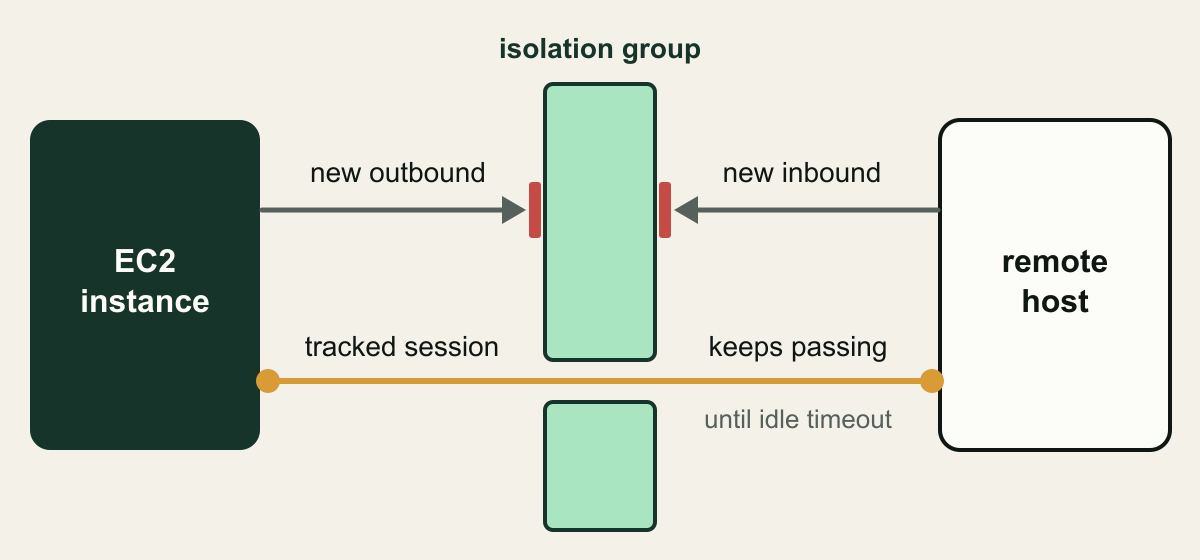
The belief is that a group with no rules works like a wall. It does, for new flows. Security groups are stateful: for each connection it tracks, the group keeps a record and lets the return traffic through on the strength of that record, whatever the rules in the other direction say. Replacing the group or editing a rule leaves the record in place. AWS's own example is a familiar one: an SSH session admitted by a narrow inbound rule stays up after that rule is changed to exclude the client's address, because the connection is tracked. [1]
Two details make a hurried swap weaker still. A new security group is not empty: it starts with one outbound rule that allows all traffic, so an isolation group created mid-incident lets the instance open new outbound connections until that rule is revoked. [5] And groups attach to network interfaces rather than to instances. modify-network-interface-attribute --groups replaces the whole set of groups on the one interface it names, so an instance with a secondary interface keeps its old groups there until that interface is changed as well. [6] The AWS runbook describes moving the instance's network interfaces, plural, through its groups. [7]
The example below builds a group that is actually closed and applies it to every interface, and the illustration after it shows what even that group leaves running. Treat the result as a block on new connections and nothing more.
# Placeholder IDs. Run from an administrator session, never from the instance.
VPC_ID=vpc-0abc1234example
INSTANCE_ID=i-0abc1234example

SG_ID=$(aws ec2 create-security-group \
  --group-name ir-isolation-i-0abc1234example \
  --description "Incident isolation, no rules" \
  --vpc-id "$VPC_ID" --query GroupId --output text)

# A new group starts with an allow-all outbound rule. Revoke every egress rule.
EGRESS_IDS=$(aws ec2 describe-security-group-rules \
  --filters Name=group-id,Values="$SG_ID" \
  --query 'SecurityGroupRules[?IsEgress].SecurityGroupRuleId' --output text)
aws ec2 revoke-security-group-egress --group-id "$SG_ID" \
  --security-group-rule-ids $EGRESS_IDS

# Confirm no rules remain, then replace the groups on every attached interface.
aws ec2 describe-security-group-rules --filters Name=group-id,Values="$SG_ID"
for ENI in $(aws ec2 describe-instances --instance-ids "$INSTANCE_ID" \
    --query 'Reservations[].Instances[].NetworkInterfaces[].NetworkInterfaceId' \
    --output text); do
  aws ec2 modify-network-interface-attribute \
    --network-interface-id "$ENI" --groups "$SG_ID"
doneA new isolation group stops new connections, not the tracked session
Packets of a connection the security group already tracks keep passing after the swap until the flow sits idle for its timeout. [1][2]

Source. Conceptual illustration based on the EC2 connection tracking documentation and GuardDuty remediation guidance. [1][2]
Method. Conceptual hand-authored illustration. It simplifies the path to one instance, one remote host and one security group change, and omits routing, NAT and DNS.
Accessible table and figure data
| Element | What it represents |
|---|---|
| EC2 instance box | The compromised host being contained |
| Isolation group band | The closed security group just applied |
| New outbound and new inbound arrows | Flows the new group does not allow |
| Red bars | Where those new flows stop |
| Tracked session line | A connection admitted before the change |
| Until idle timeout label | When EC2 stops passing that tracked flow |
| Element | What it represents |
|---|---|
| EC2 instance box | The compromised host being contained |
| Isolation group band | The closed security group just applied |
| New outbound and new inbound arrows | Flows the new group does not allow |
| Red bars | Where those new flows stop |
| Tracked session line | A connection admitted before the change |
| Until idle timeout label | When EC2 stops passing that tracked flow |
Myth: opening everything first makes the swap clean
A more careful version of the swap tries to use the untracked case. EC2 does not track a TCP or UDP flow when a rule allows it from 0.0.0.0/0 or ::/0 and a matching rule in the other direction allows all response traffic on every port, and an untracked flow ends the moment the rule that allowed it is removed or changed. [1] The technique follows from that: move the instance into a group that allows everything both ways so that its flows stop being tracked, then replace that group with the closed one and let them drop. A 2022 post from the AWS Community Builders program sets this out in five steps and states that it converts existing tracked connections into untracked ones. [8] AWS's runbook has the same shape. It moves the instance's interfaces from their original groups to a temporary group that allows all ingress traffic, then to a restrictive containment group. [7]
Three facts limit what the technique can promise. First, AWS documents the sequence but not the conversion. The runbook page does not say that the temporary group changes the tracking state of connections that already exist, and the Security Incident Response guide, describing that same runbook, says tracked connections are not shut down and only future traffic is blocked. [7][3] Where the community claim and the AWS statement differ, this guide follows AWS. Second, the untracked case covers TCP and UDP only. ICMP is always tracked, and for protocols other than TCP, UDP and ICMP the group tracks the address and protocol number and accepts matching traffic from the other host for 600 seconds. [1] Third, EC2 tracks some paths automatically even when the rules would otherwise leave a flow untracked; the table lists them. That settles the question for a private workload whose internet path runs through a NAT gateway: its reverse shell is automatically tracked, so no group configuration can untrack it. [1]
The temporary group carries a cost of its own. While it is attached, the instance accepts inbound traffic on every port from any source its routing allows, and on an instance with a public address that is a window, however short, in which anything that can reach the address can open a new connection. Treat the runbook as a procedure to rehearse and own: run it first with DryRun, which defaults to true, read what it reports, and know beforehand which of the instance's flows it cannot affect. [7]
| Flow | Typical case | After the swap |
|---|---|---|
| Tracked TCP or UDP | SSH allowed from one /32 address | Continues until idle timeout |
| Untracked TCP or UDP | Port 80 open to 0.0.0.0/0 both ways | Ends when the allowing rule goes |
| ICMP | Ping or an ICMP tunnel | Always tracked; continues |
| Other IP protocols | GRE or ESP to a peer | Replies accepted for 600 seconds |
| Automatically tracked | NAT gateway, Network Load Balancer, interface endpoint, Network Firewall endpoint | Tracked whatever the rules say |
| Also automatically tracked | Egress-only internet gateway, Global Accelerator, Lambda Hyperplane interface, DynamoDB gateway endpoint | Tracked whatever the rules say |
| DNS to the VPC resolver | Queries to the VPC+2 address | Never filtered by a security group |
Myth: tracked connections age out on their own
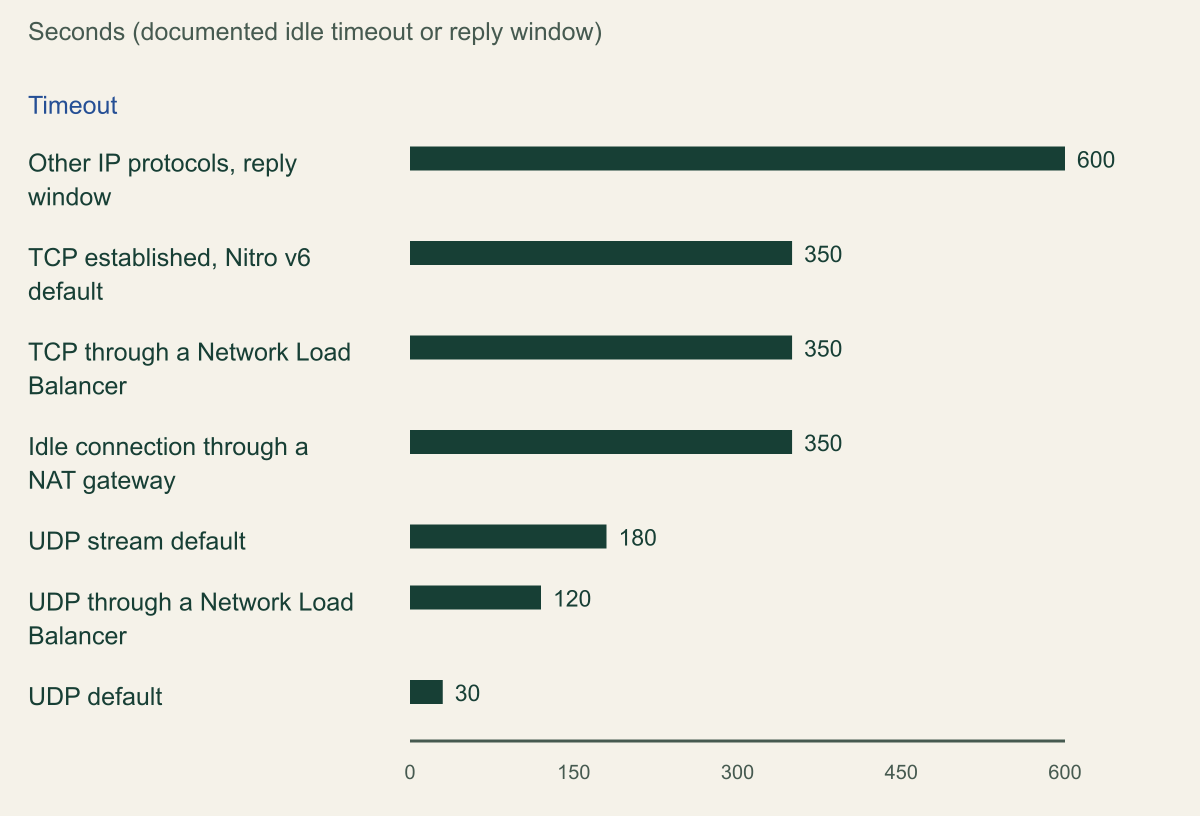
The timeout that eventually ends a tracked connection after a swap is an idle timeout. It counts the time since the flow last carried a packet, not the time since the group changed. EC2 sets three per network interface. TCP established is configurable from 60 to 432,000 seconds. UDP, for flows that have seen traffic in one direction or a single request and response, runs from 30 to 60 seconds with a default of 30. UDP stream, for flows with more than one exchange, runs from 60 to 180 seconds with a default of 180. Flows through a Network Load Balancer are always tracked and use the load balancer's own default idle timeouts, 350 seconds for TCP and 120 for UDP, rather than the interface values. [1]
The TCP default now depends on hardware generation: 350 seconds on Nitro v6 instance types and 432,000 seconds on every other type. The connection tracking page carves P6e-GB200 out of the shorter default, and the instance types guide, which lists that type under Nitro v5, describes the Nitro v6 value as a reduction from 432,000 to 350 seconds. [1][9] Nitro v6 includes families such as M8i, C8i, R8i, M8a, C8a, R8a, M9g, C9g, R9g and T8i, so whether a quiet attacker connection outlives the swap by six minutes or by five days depends on where the attacker landed. [9] Neither page dates the change, so read the current values before relying on either number. A NAT gateway adds its own limit: a connection through it times out after 350 seconds idle, whatever the instance type. [10]
None of these numbers helps against a live session. A command channel that sends a heartbeat every minute is never idle for 350 seconds, and AWS's own advice for long-lived connections is to send TCP keepalives at intervals under five minutes so that they keep their tracked state. [1] An interactive shell, a tunnel or a beaconing implant therefore outlasts the swap on any instance type. The timeout decides only the dormant case. A connection opened and left quiet drops about six minutes after its last packet on Nitro v6 or at a NAT gateway, while on other instance types with a direct internet path it can sit for up to five days and still be used.
Shortening the timeout is not a substitute. TcpEstablishedTimeout can be set on an existing interface with --connection-tracking-specification, down to a floor of 60 seconds, but the documentation does not say whether a new value applies to connections already in the table, and it would shorten only the idle case in any event. [6] A reasonable reading is that the setting belongs in launch templates for workloads that tolerate it, not in a containment runbook.
Documented idle timeouts that bound a tracked flow
Every value charted is ten minutes or less; the TCP default on instance types other than Nitro v6, 432,000 seconds (five days), is left off the axis because it would flatten every bar. [1][10]

Source. AWS EC2 security group connection tracking documentation and the NAT gateway troubleshooting page, read October 9, 2026. Values in seconds as documented. [1][10]
Method. Values copied without transformation. The TCP established default for instance types other than Nitro v6, 432,000 seconds, is excluded from the bars and stated in the takeaway. Configurable minimums and maximums are given in the text.
Accessible table and figure data
| Timeout | Seconds |
|---|---|
| Other IP protocols, reply window | 600 |
| TCP established, Nitro v6 default | 350 |
| TCP through a Network Load Balancer | 350 |
| Idle connection through a NAT gateway | 350 |
| UDP stream default | 180 |
| UDP through a Network Load Balancer | 120 |
| UDP default | 30 |
| Timeout | Seconds |
|---|---|
| Other IP protocols, reply window | 600 |
| TCP established, Nitro v6 default | 350 |
| TCP through a Network Load Balancer | 350 |
| Idle connection through a NAT gateway | 350 |
| UDP stream default | 180 |
| UDP through a Network Load Balancer | 120 |
| UDP default | 30 |
Myth: a network ACL is a precise kill switch for one instance
A network ACL is the documented way to break a connection that already exists. NACLs are stateless, so they keep no record that would let return traffic through, and AWS states that adding one that blocks traffic in either direction breaks existing connections. [1][4] That makes the NACL the immediate cut a security group cannot provide. It is not a precise one, and the imprecision is where containment causes its own outages.
Scope comes first. A NACL belongs to subnets, and AWS evaluates its rules when traffic enters or leaves a subnet, not as it is routed within one. [4] Inbound rules match the source address and outbound rules match the destination. [11] On the compromised instance's own subnet ACL, a rule keyed to the instance's address therefore never matches, because that address is the local side of all its traffic. The choices there are denies for known attacker addresses, which apply to every instance in every subnet sharing the ACL, or a deny for everything, which takes those subnets offline. No NACL stops the instance from reaching a neighbor inside its own subnet.
A rule keyed to the instance does work one hop away. AWS notes that a network ACL controls traffic to and from a NAT gateway's subnet, so a reasonable reading of the rule model is that an inbound deny from the instance's /32 and an outbound deny to it, on the ACL of the NAT gateway's subnet, cut that instance's internet path through the gateway while its neighbors keep theirs. [12][11] Rehearse that placement before relying on it in an incident.
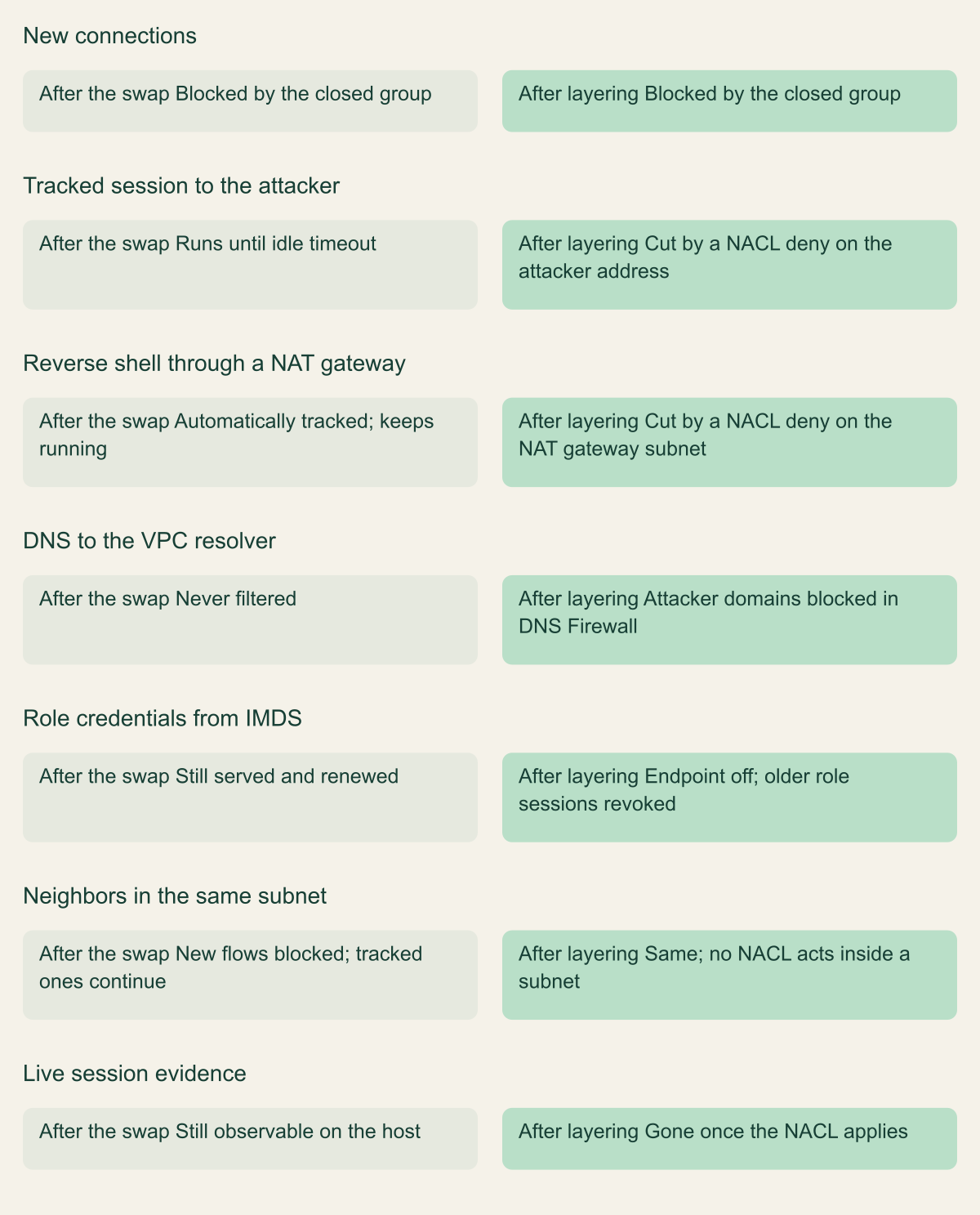
Then the mechanics. Rules are evaluated from the lowest number up and the first match wins, so a deny needs a lower number than every allow it overrides; rule numbers run from 1 to 32766. [4] A change applies to every subnet associated with the ACL and takes effect after a short period rather than at once. [11] NACLs also leave whole classes of traffic alone: DNS to the Route 53 Resolver, instance metadata, DHCP, Amazon Time Sync and the reserved router addresses. [4] For traffic on existing connections, GuardDuty's remediation steps send responders to a playbook section on enforcing NACLs based on network indicators of compromise, which in practice means the attacker's addresses. [2] That is the low-blast-radius choice when the remote addresses are known and few. A deny-all is the choice when they are not, and it needs the same approval as taking every workload in those subnets offline. The comparison figure sets the swap alone against the layered version.
# Placeholder IDs and a documentation address.
SUBNET_ID=subnet-0abc1234example
REMOTE=198.51.100.23/32

NACL_ID=$(aws ec2 describe-network-acls \
  --filters Name=association.subnet-id,Values="$SUBNET_ID" \
  --query 'NetworkAcls[0].NetworkAclId' --output text)

# Rule 10 must be unused and lower than every allow rule it has to override.
aws ec2 create-network-acl-entry --network-acl-id "$NACL_ID" --ingress \
  --rule-number 10 --protocol -1 --cidr-block "$REMOTE" --rule-action deny
aws ec2 create-network-acl-entry --network-acl-id "$NACL_ID" --egress \
  --rule-number 10 --protocol -1 --cidr-block "$REMOTE" --rule-action deny

# Read back the low-numbered entries in both directions.
aws ec2 describe-network-acls --network-acl-ids "$NACL_ID" \
--query 'NetworkAcls[0].Entries[?RuleNumber < `100`]'What a swap leaves open, and what a layered containment closes
The closed group stops new flows; NACL denies, DNS Firewall and metadata controls close the paths it leaves. [1][4][13]

Source. Conceptual comparison based on AWS EC2, VPC, NAT gateway, Route 53 and instance metadata documentation. [1][4][12][13][14]
Method. Conceptual. Each row is a path from a hypothetical compromised instance in a private subnet behind a NAT gateway; the layered column assumes the attacker's addresses and domains are known.
Accessible table and figure data
| Path | After the swap | After layering |
|---|---|---|
| New connections | Blocked by the closed group | Blocked by the closed group |
| Tracked session to the attacker | Runs until idle timeout | Cut by a NACL deny on the attacker address |
| Reverse shell through a NAT gateway | Automatically tracked; keeps running | Cut by a NACL deny on the NAT gateway subnet |
| DNS to the VPC resolver | Never filtered | Attacker domains blocked in DNS Firewall |
| Role credentials from IMDS | Still served and renewed | Endpoint off; older role sessions revoked |
| Neighbors in the same subnet | New flows blocked; tracked ones continue | Same; no NACL acts inside a subnet |
| Live session evidence | Still observable on the host | Gone once the NACL applies |
| Path | After the swap | After layering |
|---|---|---|
| New connections | Blocked by the closed group | Blocked by the closed group |
| Tracked session to the attacker | Runs until idle timeout | Cut by a NACL deny on the attacker address |
| Reverse shell through a NAT gateway | Automatically tracked; keeps running | Cut by a NACL deny on the NAT gateway subnet |
| DNS to the VPC resolver | Never filtered | Attacker domains blocked in DNS Firewall |
| Role credentials from IMDS | Still served and renewed | Endpoint off; older role sessions revoked |
| Neighbors in the same subnet | New flows blocked; tracked ones continue | Same; no NACL acts inside a subnet |
| Live session evidence | Still observable on the host | Gone once the NACL applies |
Myth: with no traffic allowed, the instance is contained
Two paths outlive a closed security group and a deny-all NACL. The first is DNS. Security groups have no effect on DNS traffic to or from the Route 53 Resolver at the VPC+2 address, and network ACLs cannot block it either. [1][4] The resolver looks up external names on the instance's behalf, so an implant that encodes its traffic in DNS queries keeps talking. Route 53 names this as a primary use of DNS Firewall: a compromised instance using DNS lookups to send data to a domain its operator controls. DNS Firewall rule groups are associated with a VPC, so a block applies to every instance in it, and a block list of the attacker's domains is the narrow form. [13]
The second is instance metadata. Neither security groups nor NACLs filter traffic to IMDS, and the role credentials it serves renew themselves: EC2 makes new credentials available at least five minutes before the old ones expire. [23][4][14] A credential copied off the host before containment keeps working from wherever it went, since no change to the instance's network reaches it, and a contained host can keep collecting fresh ones. GuardDuty's UnauthorizedAccess:IAMUser/InstanceCredentialExfiltration.OutsideAWS finding, high severity by default, reports instance credentials used from an address outside AWS. GuardDuty also notes that its model learns a remote host that keeps calling as expected behavior and stops reporting it, so the first finding carries more weight than the silence after it. [15]
Handle the credential side in this order, each step from an administrator session rather than from the instance.
- Turn off the metadata endpoint on the contained instance with
modify-instance-metadata-options --http-endpoint disabled, which AWS documents as reversible, so that the host stops receiving new role credentials. Systems Manager relies on instance metadata to function, so finish any collection that runs through Session Manager or Run Command first. [16][17] - Revoke the role's older sessions. The IAM action denies every session issued before the cutoff for every principal using the role, so a reasonable expectation is that other instances sharing the role fail until EC2 delivers their next credentials; weigh that before revoking a widely shared role. [18]
- Trace what the copied credentials did and what they created, as for any leaked credential, before treating the identity side as closed.
Prove the cut from three places
The console showing the isolation group proves that the configuration changed. It says nothing about traffic. Containment is shown when three independent views agree, and each of them lags in a known way.
The host view comes first because it is the only one that names processes. ss lists sockets with their state and owning process, and -o adds timer information, which for TCP shows whether a socket is on a retransmission timer or a keepalive timer. [19] Record established sockets before any change and again after each one. Expect the host to lag behind the network: when a NACL silently drops packets, it is reasonable to expect the local socket to stay established while TCP retransmits, so the sign of a working cut is a session that has moved onto a retransmission timer with a growing send queue, not one that has vanished. A socket to the attacker that is still exchanging data after the change means the cut did not happen.
The network view comes from VPC Flow Logs on the instance's interfaces. A record with action ACCEPT for the attacker's address after the change time means traffic is still being admitted; REJECT means it was refused, for example by a security group or network ACL. [20] On Nitro-based instances the aggregation interval is one minute or less, but delivery typically takes about five minutes to CloudWatch Logs and about ten to Amazon S3, on a best-effort basis, so an empty query right after the change proves nothing. [20]
The third view is a deliberate test. From an authorized test host, open a new connection that the old groups allowed and confirm that it fails; that tests the new group. If a NACL is doing the cutting, keep a canary as well: a benign, authorized session from the test host opened before the change, which should die when the NACL takes effect, because it is the only direct evidence that existing tracked flows were cut. Take the change times from CloudTrail, where the ModifyNetworkInterfaceAttribute and CreateNetworkAclEntry events give the timestamps every other view is compared against.
# Read-only. Run on the instance before and after each containment change,
# and keep the output with the incident record, not on the instance's own disk.
date -u +%Y-%m-%dT%H:%M:%SZ
ss -tnpo state established
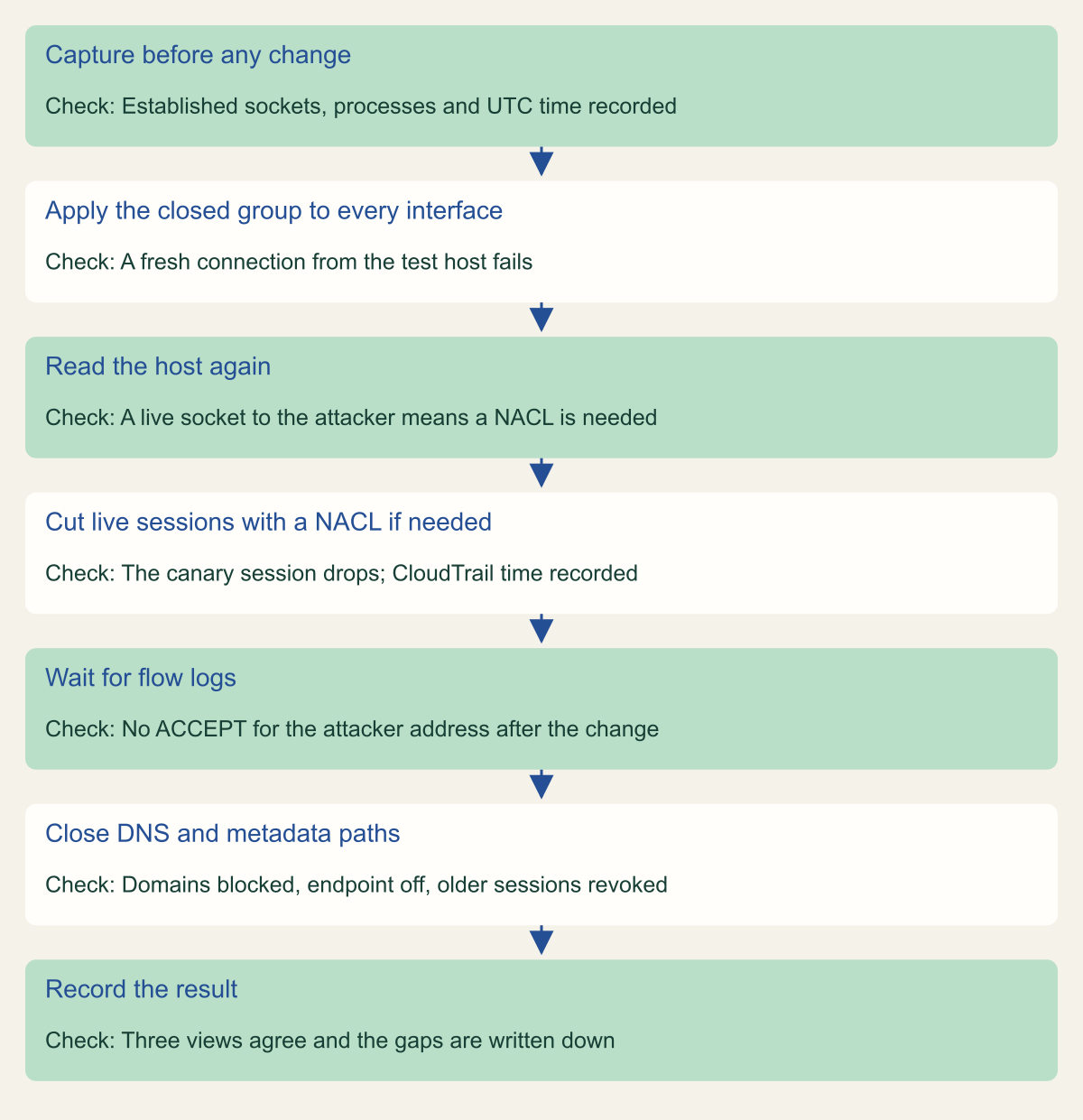
ss -unpo state establishedVerify containment in order, with a check at each step
Containment is shown when the host, the flow logs and a fresh-connection test agree after the change. [19][20]

Source. Conceptual order based on the EC2 connection tracking, VPC Flow Logs, ss(8), Route 53 DNS Firewall and instance metadata documentation. [1][20][19][13][16]
Method. Conceptual ordering of documented checks; no measured timings. Flow log delivery delays are as documented.
Accessible table and figure data
| Step | Check |
|---|---|
| Capture before any change | Established sockets, processes and UTC time recorded |
| Apply the closed group to every interface | A fresh connection from the test host fails |
| Read the host again | A live socket to the attacker means a NACL is needed |
| Cut live sessions with a NACL if needed | The canary session drops; CloudTrail time recorded |
| Wait for flow logs | No ACCEPT for the attacker address after the change |
| Close DNS and metadata paths | Domains blocked, endpoint off, older sessions revoked |
| Record the result | Three views agree and the gaps are written down |
| Step | Check |
|---|---|
| Capture before any change | Established sockets, processes and UTC time recorded |
| Apply the closed group to every interface | A fresh connection from the test host fails |
| Read the host again | A live socket to the attacker means a NACL is needed |
| Cut live sessions with a NACL if needed | The canary session drops; CloudTrail time recorded |
| Wait for flow logs | No ACCEPT for the attacker address after the change |
| Close DNS and metadata paths | Domains blocked, endpoint off, older sessions revoked |
| Record the result | Three views agree and the gaps are written down |
What the cut costs the investigation
Every control that ends the attacker's session also ends the chance to watch it. The general trade between containing fast and preserving volatile state belongs to the incident lead; the costs below are the ones specific to EC2 containment controls.
The NACL is the destructive step for network evidence. Once it breaks the session, the live channel to the attacker's infrastructure, its timing and anything a capture could have shown are gone. VPC Traffic Mirroring, the AWS feature for copying an interface's traffic, is not supported on Nitro v5 or Nitro v6 instance types, so on those types the host is often the only place left to observe the session. [9] If the incident lead accepts the delay, capture socket state, process trees and memory before the NACL rather than after.
Two runbook settings can damage the host. The optional AMI backup takes an image of the instance, and the EC2 CreateImage API reboots the instance first unless NoReboot is set to true, which would end memory and every session at once. The runbook page does not say which setting its image step uses, so read the document before setting CreateAMIBackup on a host whose memory still matters. [7][21] Auto Scaling is the other. An isolated instance fails load balancer health checks, and an Auto Scaling group that acts on them can terminate the host under investigation. Standby keeps the instance in the group, deregisters it from attached load balancers and stops Auto Scaling from terminating it for health checks or scale-in, and the runbook moves group members to standby as part of containment. [22][7]
Sequence the cut, then prove it
EC2 containment holds up when the steps run in this order, each with its own check.
- Capture sockets and processes on the host, and decide with the incident lead whether a live session must end now or can be watched for a while.
- Move an Auto Scaling member to standby so that isolation cannot get the host terminated.
- Apply a closed isolation group, with its default egress rule revoked, to every interface, and confirm that a fresh connection fails.
- If a session must end now, add NACL denies for the attacker's addresses, or for the instance's /32 on the NAT gateway's subnet, and watch the canary drop.
- Close what no network control covers: block the attacker's domains in DNS Firewall, turn off the metadata endpoint and revoke the role's older sessions.
- Declare containment only when the host, the flow logs and the fresh-connection test agree, and write down what each view could not show.
Method and provenance
Source-led analysis of AWS EC2, VPC, GuardDuty, Systems Manager, Security Incident Response, Route 53, IAM and Auto Scaling documentation, the AWS CLI reference, the ss(8) manual and one community post, organized as a myth versus reality examination. Sources were reviewed on October 9 and 10, 2026.
No AWS account, instance or network was configured or tested. Timeout values, automatically tracked paths and runbook behavior are as documented on the review dates; where AWS does not document an effect, such as whether the runbook's temporary group untracks existing connections, the article says so instead of inferring it.
AI assistance. AI assisted research synthesis, drafting, diagram planning and visual production, with deterministic editorial checks. No personal incident response experience, independent human review or live test is claimed.
Published under the Cloud Security Desk organizational byline. Read the practitioner guide policy.
References
- Amazon EC2 security group connection tracking (Amazon EC2 User Guide) Amazon Web Services. Accessed .
- Remediating a potentially compromised Amazon EC2 instance (Amazon GuardDuty User Guide) Amazon Web Services. Accessed .
- Contain (AWS Security Incident Response User Guide) Amazon Web Services. Accessed .
- Control subnet traffic with network access control lists (Amazon VPC User Guide) Amazon Web Services. Accessed .
- Security group rules (Amazon VPC User Guide) Amazon Web Services. Accessed .
- modify-network-interface-attribute (AWS CLI 2.37.12 Command Reference) Amazon Web Services. Accessed .
- AWSSupport-ContainEC2Instance (Systems Manager Automation runbook reference) Amazon Web Services. Accessed .
- AWS Incident Response: How To Contain An EC2 Instance? (AWS Community Builders on DEV Community) DEV Community. Published . Accessed .
- Instances built on the AWS Nitro System (Amazon EC2 Instance Types) Amazon Web Services. Accessed .
- Troubleshoot NAT gateways (Amazon VPC User Guide) Amazon Web Services. Accessed .
- Network ACL rules (Amazon VPC User Guide) Amazon Web Services. Accessed .
- NAT gateway basics (Amazon VPC User Guide) Amazon Web Services. Accessed .
- Using DNS Firewall to filter outbound DNS traffic (Amazon Route 53 Developer Guide) Amazon Web Services. Accessed .
- Retrieve security credentials from instance metadata (Amazon EC2 User Guide) Amazon Web Services. Accessed .
- GuardDuty IAM finding types (Amazon GuardDuty User Guide) Amazon Web Services. Accessed .
- Modify instance metadata options for existing instances (Amazon EC2 User Guide) Amazon Web Services. Accessed .
- Learn technical details about the SSM Agent (AWS Systems Manager User Guide) Amazon Web Services. Accessed .
- Revoke IAM role temporary security credentials (IAM User Guide) Amazon Web Services. Accessed .
- ss(8), Linux manual page (iproute2) man7.org. Accessed .
- Flow log records (Amazon VPC User Guide) Amazon Web Services. Accessed .
- CreateImage (Amazon EC2 API Reference) Amazon Web Services. Accessed .
- Temporarily remove instances from your Auto Scaling group (Amazon EC2 Auto Scaling User Guide) Amazon Web Services. Accessed .
- Control traffic to your AWS resources using security groups (Amazon VPC User Guide) Amazon Web Services. Accessed .