
A comparative evaluation of Entra Privileged Identity Management, Google Cloud Privileged Access Manager and AWS IAM Identity Center with the TEAM sample, based on provider documentation reviewed on October 10, 2026. It compares eligibility, window limits, approval depth, reauthentication, evidence and licensing, and shows which sessions and tokens survive the end of a grant.
At a glance
Key findings
- Documented ceilings differ widely: Entra PIM activations last 1 to 24 hours, Google Cloud PAM grants 30 minutes to 168 hours and Identity Center permission set sessions 1 to 12 hours, while a TEAM request window accepts 1 to 8,000 hours. [1][12][19][25]
- Expiry removes an assignment, not what it issued: AWS role sessions run to the permission set's session duration, up to 12 hours, Azure role changes can take 10 minutes, and Google binding changes typically take 2 minutes and potentially 7 or longer. [8][16][21]
- Only Google documents more than one person deciding a request, and only in preview with Security Command Center Premium or Enterprise; in Entra PIM and TEAM a single approver settles it. [5][12][24]
- Azure resource roles cannot be eligible for applications, service principals or managed identities, while Google Cloud PAM supports every identity type but not the legacy Owner, Editor and Viewer roles. [3][11]
- If Entra ID P2 or ID Governance licenses lapse, active time-bound assignments become permanent and eligible assignments are removed. [6]
Two native services and one gap
Entra Privileged Identity Management and Google Cloud Privileged Access Manager are native services that turn a role assignment into something a person must request, justify and, if configured, get approved before it exists. AWS has no equivalent service. Its IAM Identity Center guide treats temporary access as something delivered by validated partner solutions, and AWS also publishes TEAM, an open-source application that creates and deletes Identity Center account assignments on a schedule. All three approaches end elevation the same way, by removing an assignment or a role binding. None of them ends the credentials, cached authorizations or tokens that the assignment produced while it existed, and most of the real differences sit in that gap. [1][11][18][23][24]
The documented limits are further apart than a shared label suggests. An Entra activation lasts at most 24 hours; a Google grant can run from 30 minutes to 168 hours; a TEAM request window can be set from 1 to 8,000 hours, while the permission set sessions it hands out last 1 to 12 hours. Entra resolves a request on one approver's decision, Google offers two sequential approval levels only in preview and only with a paid Security Command Center tier, and in TEAM one member of the approver group set for the account or organizational unit decides. Entra is the only platform of the three whose documentation describes forcing reauthentication at the moment of activation, and Microsoft listed that capability as generally available in April 2026. [1][5][7][12][19][24][25]
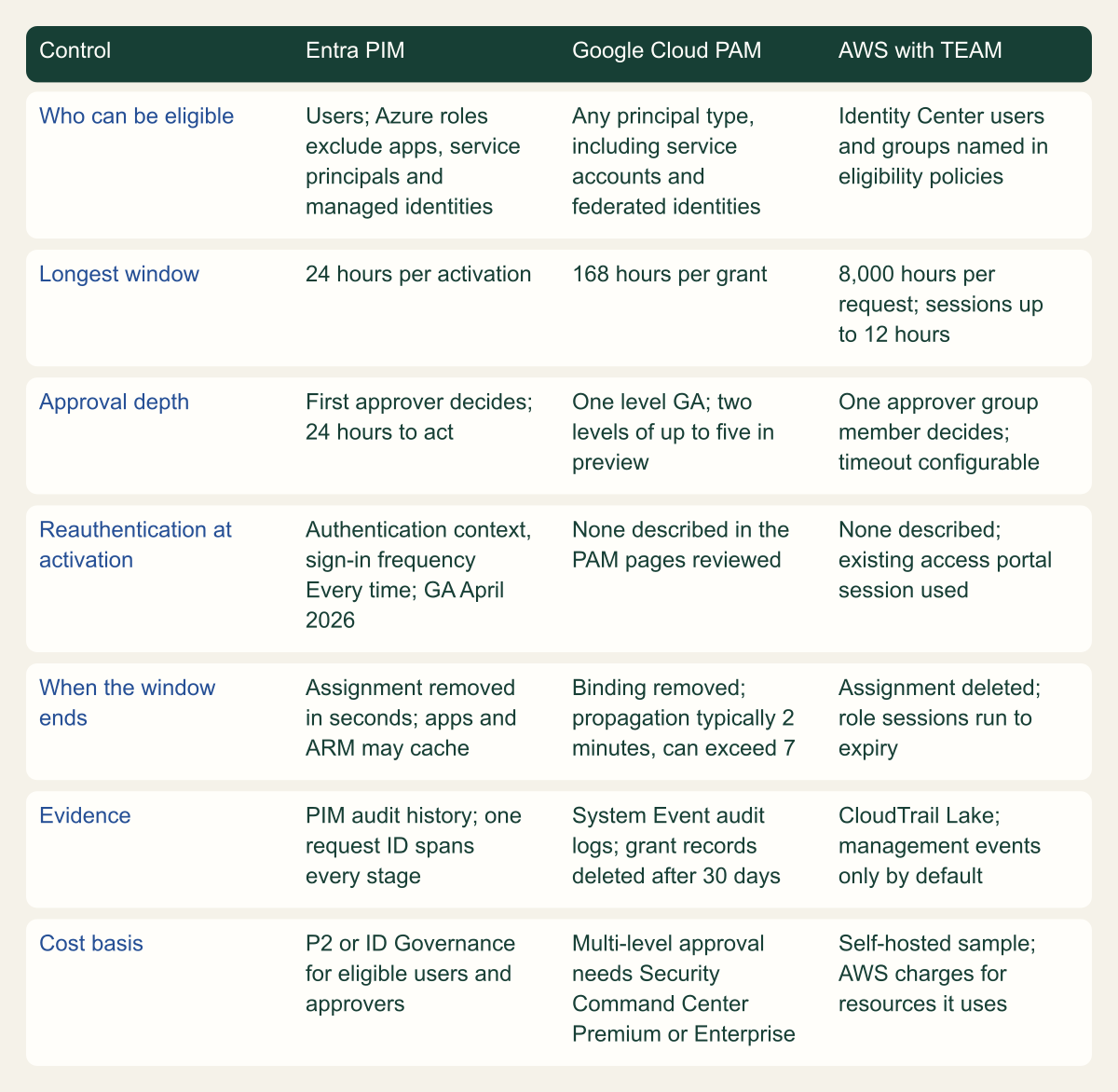
The matrix lines the platforms up on the axes the rest of the comparison follows. Every cell comes from provider documentation reviewed on October 10, 2026, and preview features are marked as preview.
Same goal, different controls
Only Entra documents reauthentication at activation, only Google allows multi-level approval (in preview), and only AWS leaves a fixed session tail of up to 12 hours. [1][12][21]

Source. Microsoft Learn, Google Cloud and AWS documentation and the TEAM documentation, reviewed October 10, 2026. [1][3][5][6][7][9][11][12][14][16][19][21][24][25][26]
Method. Conceptual comparison assembled from documented settings and limits; each cell paraphrases the cited page. Preview features are labeled. Partner tools are excluded. Absence statements cover only the pages reviewed.
Accessible table and figure data
| Control | Entra PIM | Google Cloud PAM | AWS with TEAM |
|---|---|---|---|
| Who can be eligible | Users; Azure roles exclude apps, service principals and managed identities | Any principal type, including service accounts and federated identities | Identity Center users and groups named in eligibility policies |
| Longest window | 24 hours per activation | 168 hours per grant | 8,000 hours per request; sessions up to 12 hours |
| Approval depth | First approver decides; 24 hours to act | One level GA; two levels of up to five in preview | One approver group member decides; timeout configurable |
| Reauthentication at activation | Authentication context, sign-in frequency Every time; GA April 2026 | None described in the PAM pages reviewed | None described; existing access portal session used |
| When the window ends | Assignment removed in seconds; apps and ARM may cache | Binding removed; propagation typically 2 minutes, can exceed 7 | Assignment deleted; role sessions run to expiry |
| Evidence | PIM audit history; one request ID spans every stage | System Event audit logs; grant records deleted after 30 days | CloudTrail Lake; management events only by default |
| Cost basis | P2 or ID Governance for eligible users and approvers | Multi-level approval needs Security Command Center Premium or Enterprise | Self-hosted sample; AWS charges for resources it uses |
| Control | Entra PIM | Google Cloud PAM | AWS with TEAM |
|---|---|---|---|
| Who can be eligible | Users; Azure roles exclude apps, service principals and managed identities | Any principal type, including service accounts and federated identities | Identity Center users and groups named in eligibility policies |
| Longest window | 24 hours per activation | 168 hours per grant | 8,000 hours per request; sessions up to 12 hours |
| Approval depth | First approver decides; 24 hours to act | One level GA; two levels of up to five in preview | One approver group member decides; timeout configurable |
| Reauthentication at activation | Authentication context, sign-in frequency Every time; GA April 2026 | None described in the PAM pages reviewed | None described; existing access portal session used |
| When the window ends | Assignment removed in seconds; apps and ARM may cache | Binding removed; propagation typically 2 minutes, can exceed 7 | Assignment deleted; role sessions run to expiry |
| Evidence | PIM audit history; one request ID spans every stage | System Event audit logs; grant records deleted after 30 days | CloudTrail Lake; management events only by default |
| Cost basis | P2 or ID Governance for eligible users and approvers | Multi-level approval needs Security Command Center Premium or Enterprise | Self-hosted sample; AWS charges for resources it uses |
Entra PIM and the gap between activation and use
PIM applies one settings model to three surfaces: Microsoft Entra roles, Azure resource roles, and membership or ownership of groups through PIM for Groups. For Entra roles and Azure resource roles, the activation maximum duration is set per role (for Azure resource roles, per role and resource) from 1 to 24 hours, and every assignment of that role follows the same settings. Eligibility can itself be permanent or time-bound, so a review has two clocks to read: how long one activation lasts, and how long the right to activate lasts. Which roles should be eligible-only is a tiering decision and is settled separately. [1][2]
Eligibility covers people, not workloads. For Azure resource roles, Microsoft states that applications, service principals and managed identities cannot hold eligible assignments because they cannot perform the activation steps. The Access control (IAM) page creates eligible assignments at management group, subscription and resource group scope only; resource-scope eligibility is managed in PIM itself. A deployment identity that needs Owner during a release therefore cannot use activation at all, and whatever it holds is an active assignment that needs its own review. [3]
Activation can require multifactor authentication, a justification, a ticket number, approval or a Conditional Access authentication context. The authentication context is the strongest of these, because its policy can demand an authentication strength or a compliant device and, with sign-in frequency set to Every time, a fresh authentication on each activation. One reauthentication then covers further activations for 10 minutes across Entra roles, Azure resource roles and PIM for Groups, so a user activating several roles in a row is challenged once. [1]
What the authentication context governs is the act of activating, not use of the role afterward. Microsoft's settings page says so directly: once a role is active, the same user can sign in from another browser session, device or location and use it, for example from a device that is not Intune compliant after activating from one that is. The documented fix for directory roles is a second Conditional Access policy that targets the directory roles themselves, or policies scoped to eligible users so that every sign-in meets the bar. Without one of them, activation is a checkpoint rather than a boundary. [1]
Google Cloud PAM entitlements and grants
Privileged Access Manager entered preview on May 8, 2024 and reached general availability on September 16, 2024. Its unit is the entitlement, created on an organization, folder or project: up to 30 roles, each optionally narrowed with an IAM condition; up to 20 requesting principals entered directly, with groups for more; a justification requirement; an optional approval workflow; and a maximum grant duration. Through the REST API or gcloud that maximum accepts 1800s to 604800s, which is 30 minutes to 168 hours, and the console states the same ceiling as 7 days. [12][15]
Google is the most permissive of the three about who can be eligible. PAM supports every identity type, including Workforce and Workload Identity Federation principals and agent identities, and Google describes service accounts and agent identities requesting temporary roles for their own automated tasks; agent identities as requesters and approvers have been in preview since April 22, 2026. The restriction runs the other way, on roles. PAM supports predefined, custom and the Admin, Writer and Reader basic roles, but not the legacy Owner, Editor and Viewer roles, and Google advises against putting service agent roles in an entitlement because their permissions can change without notice. [11][12][15]
Mechanically, a grant is a conditional role binding. PAM adds a binding with a time-based IAM condition to the resource's allow policy and removes it when the grant ends, so activation and revocation both move at IAM's normal propagation speed. It also makes the allow policy shared state: Google warns that a binding changed by anything other than PAM can break PAM, and that Terraform should manage these policies with non-authoritative resources so a plan does not delete PAM's bindings. [11]
Several of PAM's most useful controls are still in preview: multi-level and multi-party approval, scope customization by the requester, service accounts as approvers, inheritance of folder and organization entitlements into child resources, notification controls and grant withdrawal, all dated September 26, 2025, plus scheduling up to seven days ahead from April 13, 2026. Multi-level approval and scope customization also need the Premium or Enterprise tier of Security Command Center. None of the PAM pages reviewed describes a reauthentication step at request or activation, so the requester's existing Google session carries the request. [11][15]
AWS without a native service
AWS documents temporary elevation in the IAM Identity Center user guide but does not offer it as a feature. The guide says Identity Center integrates with solutions from AWS Security Competency partners, which AWS validates against a common set of requirements, and asks customers to weigh them against their own architecture and budget. Partner products differ in workflow and price and are not compared here. Because AWS describes them as Identity Center integrations, a reasonable reading is that the session limits below apply to whatever access they grant through it. [18]
TEAM is the alternative AWS publishes itself: an open-source application that a customer deploys into its own organization and runs, under the standard AWS warning that sample code must be tested and secured before production use. Administrators write eligibility policies, which say who may request which permission sets in which accounts or organizational units, for how long and whether approval is needed, and approver policies that name the deciding groups. When an approved request reaches its start time, TEAM creates an account assignment linking the requester, the permission set and the account. When the duration elapses, or the requester or an approver revokes it, TEAM deletes that assignment. [23][24][25][26]
The elevation window and the credential lifetime are separate settings in this design, and TEAM's documentation says so. The request duration decides when the assignment exists; the permission set's session duration decides how long each set of role credentials issued under it stays valid. That session duration defaults to 1 hour and can be raised to 12; Identity Center creates the underlying roles with a 12-hour maximum and applies the permission set value to each session. TEAM warns that sessions started just before a window closes can stay valid after it, and recommends keeping permission sets at the 1-hour default. [19][24]
Two operational details follow from working through assignments. When the last assignment of a permission set in an account is removed, Identity Center deletes the role it created there and recreates it with a different suffix on the next assignment, so a KMS key policy, resource policy or EKS aws-auth entry that names the old role ARN stops matching. AWS points readers to that warning before they choose a temporary access tool, and it follows that a permission set used only for elevation should not be referenced by role ARN anywhere. TEAM also has to run in the Identity Center delegated administrator account, which its documentation asks to keep free of other workloads, so whoever controls that account controls elevation everywhere TEAM reaches. [18][22][26]
Elevation windows compared
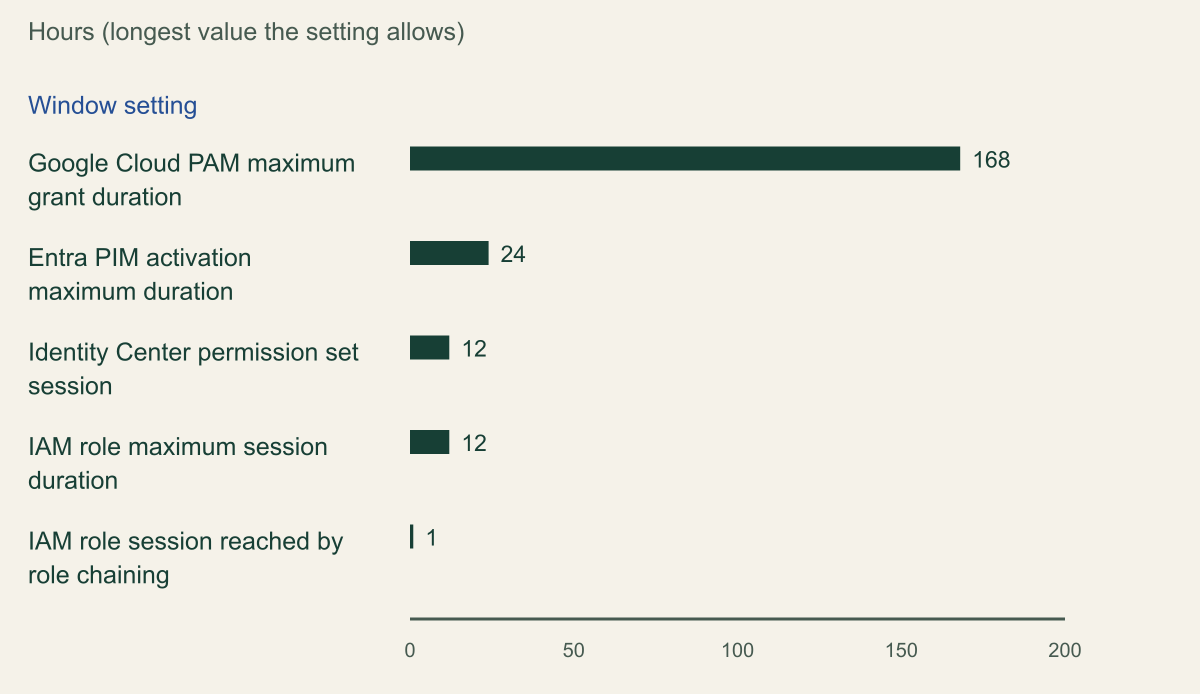
The chart places the longest value each window setting accepts on one axis, in hours. Only settings that bound a credential or an activation are plotted. TEAM's request duration is left out because its 1 to 8,000 hour range bounds how long an assignment may exist, and drawing it would flatten every other bar. [1][12][19][20][25]
Read the floors as well as the ceilings. Of the three elevation settings, only Google's grant maximum can be set below an hour, with a 30-minute minimum; Entra's activation maximum and Identity Center's session duration start at one hour, although an IAM role session requested directly can be as short as 15 minutes. At the top, a single Google grant can last a week, seven times the Entra maximum. Role chaining sets the tightest ceiling of all: a role session obtained by using one role's credentials to assume another is limited to one hour, whatever the second role's maximum session setting says. [1][12][19][20]
On AWS the figure that bounds exposure is the sum of two settings. In a hypothetical two-hour TEAM grant on a permission set with a 12-hour session duration, a console session opened a minute before the grant ends stays valid for 12 more hours, so credentials from that grant remain usable until about 14 hours after it began (2 + 12). With the 1-hour default the same calculation gives about 3 hours. Entra and Google add no fixed tail of that size, but they have shorter and less predictable ones, covered below. [19][21][24]
Before comparing policy documents, read what each tenant, project and organization actually allows. The fragment queries the Entra activation maximum for one role, the maximum grant duration of each PAM entitlement in a project and the session duration of every permission set, using read-only calls. The Entra query filters role management policy assignments by role, as the Graph reference documents; its least-privileged permission is RoleManagementPolicy.Read.Directory, and a signed-in caller also needs a role such as Global Reader or Security Reader. [10]
# Example read-only fragment. Placeholder identifiers; run each part with its own CLI login.

# Entra: activation maximum for Global Administrator (rule Expiration_EndUser_Assignment).
# Least-privileged Graph permission: RoleManagementPolicy.Read.Directory.
cat > entra-params.json <<'EOF'
{"$filter": "scopeId eq '/' and scopeType eq 'DirectoryRole' and roleDefinitionId eq '62e90394-69f5-4237-9190-012177145e10'", "$expand": "policy($expand=rules)"}
EOF
az rest --method get \
  --url https://graph.microsoft.com/v1.0/policies/roleManagementPolicyAssignments \
  --url-parameters @entra-params.json \
  --query "value[].policy.rules[?id=='Expiration_EndUser_Assignment'][].maximumDuration" \
  --output tsv

# Google Cloud: maximum grant duration of each PAM entitlement in a project.
# Needs Privileged Access Manager Viewer (roles/privilegedaccessmanager.viewer).
gcloud pam entitlements list --project=my-project --location=global \
  --format="table(name.basename(), maxRequestDuration)"

# AWS: session duration of every Identity Center permission set.
# Needs sso:ListPermissionSets and sso:DescribePermissionSet.
INSTANCE_ARN="arn:aws:sso:::instance/ssoins-1111222233334444"
for ps in $(aws sso-admin list-permission-sets --instance-arn "$INSTANCE_ARN" \
    --query 'PermissionSets[]' --output text); do
  aws sso-admin describe-permission-set --instance-arn "$INSTANCE_ARN" \
    --permission-set-arn "$ps" --query 'PermissionSet.[Name,SessionDuration]' --output text
doneA Google grant can last seven times longer than an Entra activation
Longest allowed settings range from 168 hours for a PAM grant to 1 hour for a chained AWS role session. [1][12][19][20]

Source. Microsoft Learn PIM role settings, Google Cloud PAM entitlement guide, AWS Identity Center and IAM documentation, reviewed October 10, 2026. [1][12][19][20]
Method. Values copied from documented ranges and converted to hours: PAM 1800s to 604800s divided by 3600; IAM role session minimum 15 minutes is 0.25 hours. Only the longest value is plotted. TEAM's 1 to 8,000 hour request window is excluded because it bounds an assignment, not a credential, and would compress the axis. [25]
Accessible table and figure data
| Window setting | Shortest allowed (hours) | Longest allowed (hours) |
|---|---|---|
| Google Cloud PAM maximum grant duration | 0.5 | 168 |
| Entra PIM activation maximum duration | 1 | 24 |
| Identity Center permission set session | 1 | 12 |
| IAM role maximum session duration | 1 | 12 |
| IAM role session reached by role chaining | 0.25 | 1 |
| Window setting | Shortest allowed (hours) | Longest allowed (hours) |
|---|---|---|
| Google Cloud PAM maximum grant duration | 0.5 | 168 |
| Entra PIM activation maximum duration | 1 | 24 |
| Identity Center permission set session | 1 | 12 |
| IAM role maximum session duration | 1 | 12 |
| IAM role session reached by role chaining | 0.25 | 1 |
Approval, justification and evidence
Approval depth is where policy documents and platform capability most often part ways. In Entra PIM an approver needs no role, a requester cannot approve their own activation, and service principals cannot approve at all. The first approver to approve or deny resolves the request, and approvers have a fixed 24 hours to act before the user must ask again. Naming several approvers spreads the load but never makes two people decide. [1][5]
Google's generally available path is likewise a single approval. With Security Command Center Premium or Enterprise and the preview feature, an entitlement can require two sequential levels with up to five approvals at each, and one denial at any level ends the grant. Google documents two traps: requiring more approvals than an approver group has members leaves grants stuck in the approval awaited state for good, and service accounts or agent identities can approve only after a resource-level setting allows it, itself a preview feature. Nobody can approve their own request, and an unscheduled request with no decision expires after 24 hours. [11][12][13]
TEAM assigns approver groups per account or organizational unit, and one member's decision settles a request; an approver may also request access but cannot decide their own request. A pending request expires after a timeout the administrator sets, three hours by default. Justification and ticket fields can be made mandatory in TEAM and in Entra, where Microsoft notes that the ticket number is stored for information and never checked against a ticketing system. Google lets each entitlement require a justification from the requester and, separately, from approvers. [1][12][24][25]
Each platform records the lifecycle differently, and the identifiers that tie one elevation together are not the obvious ones. In Entra, CorrelationId can change between the request, the approval and a scheduled start, so Microsoft points investigators to roleAssignmentRequestId, which stays constant through those stages and is written into the deactivation events. Google writes grant activation, end and expiry as System Event audit logs named PAMActivateGrant, PAMEndGrant and PAMExpireGrant, and logs PAMReportExternalGrantModification when something outside PAM changes a grant's binding. PAM deletes the grant record 30 days after the grant ends and leaves the audit entries in the _Required log bucket. [9][11][14]
TEAM keeps its own request history and reads activity from a CloudTrail Lake event data store that records management events and no data events by default, so data-plane work done during a grant stays out of TEAM's view unless the store is reconfigured. TEAM also assumes 1-hour sessions and shows activity for the grant duration plus one hour. On a permission set with a 12-hour session, later activity from the same credentials exists in CloudTrail but not on the request record. [24][26]
Access that survives the end of a grant
Expiry removes the assignment; it does not reach back into what the assignment already issued. AWS documents this tail most explicitly. Identity Center's session reference states that when account access is removed from a user, new sessions stop at once but existing IAM role sessions continue until the expiry configured on the permission set, up to 12 hours; signing the user out, disabling the user or deleting the user has the same effect on those sessions. TEAM inherits the behavior because ending a grant is an assignment removal. [21][24]
Azure's tail is shorter and less predictable. PIM adds and removes the assignment within seconds, but Microsoft warns that an application may have cached the user's role and keep honoring it after deactivation, and that Azure Resource Manager caching means role assignment changes can take up to 10 minutes. For built-in roles with data actions assigned at management group scope, the data plane may not reflect the change for several hours. A user also cannot deactivate a role in the first five minutes after activating it. [4][8]
Google's tail has two parts. Removing PAM's binding is an allow policy change, which Google says typically takes 2 minutes and potentially 7 minutes or longer to take effect everywhere. The second part is an inference from two documented behaviors. If an entitlement includes permission to mint service account tokens, an access token created during the grant is valid for up to an hour by default, or up to 12 hours where the constraint constraints/iam.allowServiceAccountCredentialLifetimeExtension covers that service account, and PAM's documented revocation removes bindings without mentioning tokens already issued. [11][16][17]
Some grants can outlive themselves by design. Google's entitlement guide gives the case plainly: a user granted Role Administrator through PAM can add resourcemanager.projects.setIamPolicy to their own custom role and keep the power to grant any project role after the grant expires. The same reasoning holds on every platform even where the provider does not spell it out. A window that includes the right to create credentials, role assignments or policy is a window in which permanent access can be created, and expiry will not remove it, so keep those permissions out of time-bound bundles or alert on the changes they enable. [12]
Two documented behaviors turn temporary assignments into standing ones without anyone choosing it. If a tenant's Entra ID P2 or ID Governance licenses lapse, active time-bound assignments become active permanent and eligible assignments are removed, so whoever happened to be active keeps the role. Google offers movement in the opposite direction: since May 8, 2026, in preview, IAM recommender can propose replacing a Google group's standing role bindings with PAM entitlements. [6][15]
The grant ends before the access does
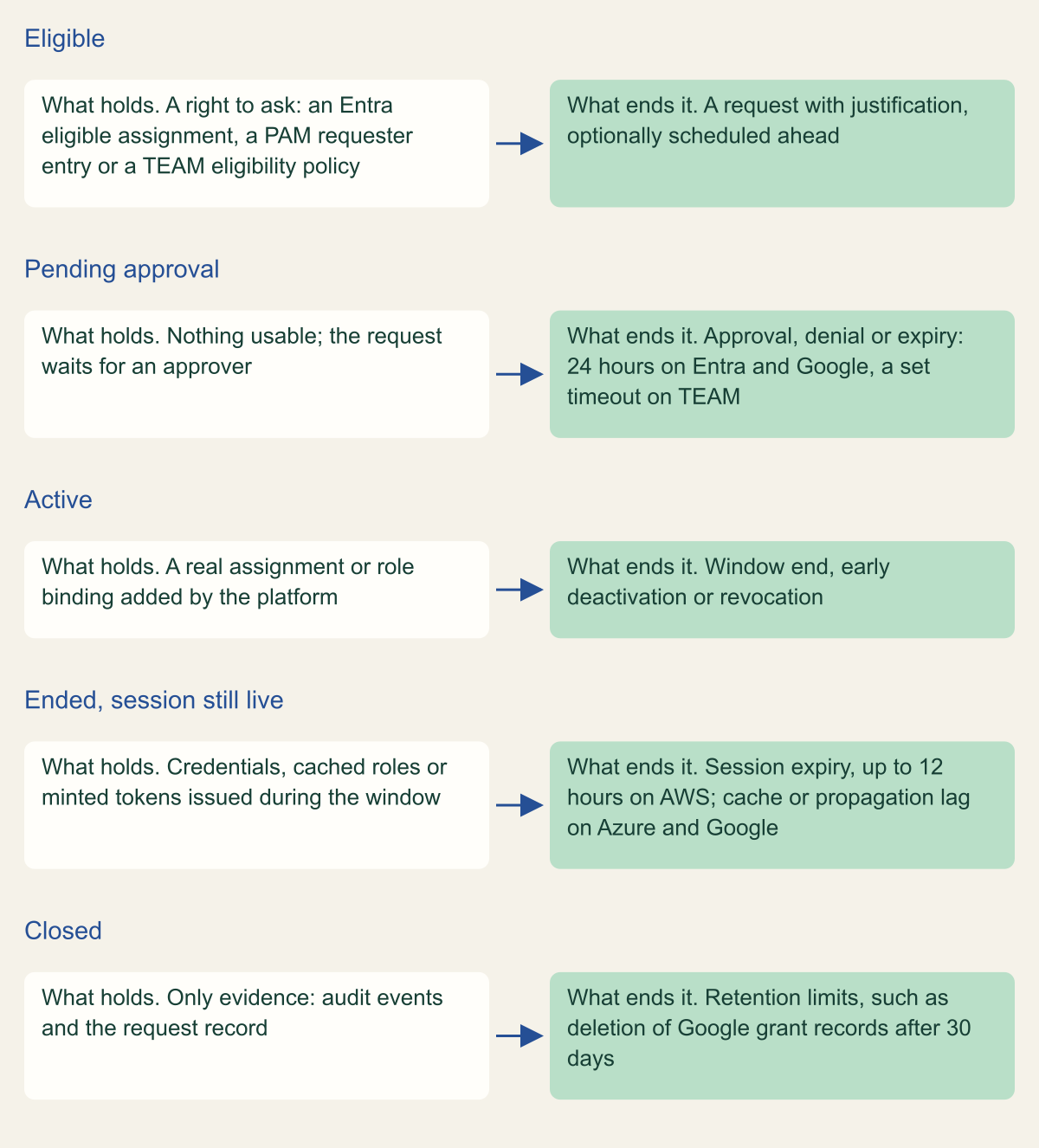
Between an ended grant and a closed record sits a state every platform has: credentials or caches issued during the window that are still valid. [4][16][21]

Source. Conceptual lifecycle based on Microsoft, Google Cloud, AWS and TEAM documentation reviewed October 10, 2026. [1][4][5][8][11][13][16][21][24][25]
Method. Conceptual state model. Each row is a state with its own exit event; durations are documented maximums or defaults, not measurements. [4][21]
Accessible table and figure data
| State | What holds | What ends it |
|---|---|---|
| Eligible | A right to ask: an Entra eligible assignment, a PAM requester entry or a TEAM eligibility policy | A request with justification, optionally scheduled ahead |
| Pending approval | Nothing usable; the request waits for an approver | Approval, denial or expiry: 24 hours on Entra and Google, a set timeout on TEAM |
| Active | A real assignment or role binding added by the platform | Window end, early deactivation or revocation |
| Ended, session still live | Credentials, cached roles or minted tokens issued during the window | Session expiry, up to 12 hours on AWS; cache or propagation lag on Azure and Google |
| Closed | Only evidence: audit events and the request record | Retention limits, such as deletion of Google grant records after 30 days |
| State | What holds | What ends it |
|---|---|---|
| Eligible | A right to ask: an Entra eligible assignment, a PAM requester entry or a TEAM eligibility policy | A request with justification, optionally scheduled ahead |
| Pending approval | Nothing usable; the request waits for an approver | Approval, denial or expiry: 24 hours on Entra and Google, a set timeout on TEAM |
| Active | A real assignment or role binding added by the platform | Window end, early deactivation or revocation |
| Ended, session still live | Credentials, cached roles or minted tokens issued during the window | Session expiry, up to 12 hours on AWS; cache or propagation lag on Azure and Google |
| Closed | Only evidence: audit events and the request record | Retention limits, such as deletion of Google grant records after 30 days |
Choose a design per cloud
Configure in this order, because each step limits how much the next one can get wrong.
- Set the credential ceiling first. On AWS, give every permission set that TEAM or a partner tool assigns a 1-hour session. On Google, keep token-minting and IAM administration permissions out of entitlements. On Entra, add the Conditional Access policy that targets directory roles, so that use of a role, not only its activation, meets the device and strength requirements. [1][12][19]
- Then size each window to the task. Google's 30-minute floor suits short repair work; Entra's 24-hour ceiling and TEAM's 8,000-hour one are limits to lower, not values to accept. [1][12][25]
- Match approval requirements to what is generally available. If policy demands two independent approvers, Entra PIM and TEAM do not provide it as documented, and Google provides it only in preview with a Security Command Center tier, so record the gap rather than assume it is covered. [5][12][24]
- Decide where non-human elevation lives. Azure resource roles keep applications, service principals and managed identities outside activation altogether; Google lets service accounts and agent identities request grants, which helps automation and adds a path to review. [3][11]
- Join evidence on the stable identifiers,
roleAssignmentRequestIdin Entra, the grant resource in PAM and the request record in TEAM, and export it before the 30-day deletions of Google grant records and the Entra portal history. [9][11]
Where the comparison stops applying
Emergencies sit outside all of this. Microsoft warns that requiring approval while every Privileged Role Administrator and Global Administrator is eligible-only and no approver is configured locks the tenant out, and TEAM's documentation advises separate break-glass access because TEAM depends on Regional services that an event in its Region could make unavailable. Keep emergency accounts out of time-bound access on purpose and test them as a separate control. [1][26]
The comparison also assumes the provider's own control plane is the path to privilege. A third-party access broker that holds standing credentials and hands out sessions moves the window, the approval and the evidence into that product, and its own administrators become the accounts to protect. Where that is the design, apply the same two questions to the broker: what ends at the close of the window, and what was issued before it closed.
Method and provenance
Source-led comparative analysis of Microsoft Learn, Google Cloud and AWS documentation, Google's IAM release notes and the TEAM documentation, with converted window limits and original comparison and state figures. Sources were reviewed on October 10, 2026.
No Entra tenant, Google Cloud organization or AWS account was configured or tested. Limits, preview status and behavior are bounded to the cited pages as of the review date; partner products were not evaluated, and statements that a page describes no feature cover only the pages reviewed.
AI assistance. AI assisted research synthesis, drafting, figure planning and visual production, with deterministic editorial checks. No personal deployment experience, independent human review or live test is claimed.
Published under the Cloud Security Desk organizational byline. Read the practitioner guide policy.
References
- Configure Microsoft Entra role settings in Privileged Identity Management Microsoft. Accessed .
- Configure Azure resource role settings in Privileged Identity Management Microsoft. Accessed .
- Eligible and time-bound role assignments in Azure RBAC Microsoft. Accessed .
- Activate a Microsoft Entra role in PIM Microsoft. Accessed .
- Approve or deny requests for Microsoft Entra roles in Privileged Identity Management Microsoft. Accessed .
- Microsoft Entra ID Governance licensing fundamentals Microsoft. Accessed .
- Microsoft Entra releases and announcements Microsoft. Accessed .
- Troubleshoot Azure RBAC Microsoft. Accessed .
- View audit history for Microsoft Entra roles in Privileged Identity Management Microsoft. Accessed .
- List roleManagementPolicyAssignments (Microsoft Graph v1.0) Microsoft. Accessed .
- Privileged Access Manager overview Google Cloud. Accessed .
- Create entitlements in Privileged Access Manager Google Cloud. Accessed .
- Approve or deny grants with Privileged Access Manager Google Cloud. Accessed .
- Privileged Access Manager audit logging Google Cloud. Accessed .
- IAM release notes Google Cloud. Accessed .
- Access change propagation Google Cloud. Accessed .
- Create short-lived credentials for a service account Google Cloud. Accessed .
- Temporary elevated access for AWS accounts (IAM Identity Center User Guide) Amazon Web Services. Accessed .
- Set session duration for AWS accounts (IAM Identity Center User Guide) Amazon Web Services. Accessed .
- Methods to assume a role (IAM User Guide) Amazon Web Services. Accessed .
- Understanding authentication sessions in IAM Identity Center Amazon Web Services. Accessed .
- Referencing permission sets in resource policies, Amazon EKS cluster config maps, and AWS KMS key policies Amazon Web Services. Accessed .
- Temporary elevated access management (TEAM) documentation Amazon Web Services (aws-samples). Accessed .
- TEAM solution workflow Amazon Web Services (aws-samples). Accessed .
- TEAM admin guide Amazon Web Services (aws-samples). Accessed .
- TEAM security and resiliency considerations Amazon Web Services (aws-samples). Accessed .