
An operational playbook for identity engineers rotating SAML signing certificates in Microsoft Entra ID, Okta, Google Workspace and IAM Identity Center, built from vendor documentation and the OASIS metadata interoperability profile reviewed October 10, 2026. It compares lifetimes and warning windows, sorts service providers by how they learn keys, and gives staged activation, rollback and old-key removal steps with four stop-and-check points.
At a glance
Key findings
- Entra creates a three-year SAML signing certificate and emails up to five addresses at 60, 30 and 7 days; Okta warns at 60 days; IAM Identity Center flags certificates yellow at 90 days; Google documents a fixed five-year lifetime, at most two certificates and no advance notice. [1][2][7][10][12]
- Expiry does not end trust: AWS IAM never evaluates certificate expiry in SAML metadata, Entra apps without expiry validation keep working with an expired certificate, and the SAML metadata interoperability profile forbids consumers from applying X.509 path validation or revocation checks. [1][4][5]
- Microsoft asks SaaS vendors to read per-application metadata at least every 24 hours and hold primary and secondary certificates, which makes the identity provider change the whole rollover for those service providers. [1]
- Service providers that hold one certificate cannot overlap; Microsoft, Okta and AWS all pair the upload with activation in a maintenance or off-peak window. [1][2][3]
- In Entra, creating a new certificate after the active one has expired switches signing at once, so for apps that ignore expiry the create step is itself the cutover. [1]
One key that every service provider trusts
A SAML signing certificate rollover replaces the private key your identity provider signs assertions with, and every service provider that trusts the old public key has to learn the new one before it receives an assertion signed with it. So for each service provider, find out how it learns keys and how many it can hold at once. Where it can hold two, put the new certificate beside the old one, activate it at the identity provider and confirm sign-in. Where it can hold only one, activation and upload are the same event, so schedule them together in a maintenance window. Then delete the old certificate from every service provider that still trusts it. [1][2][3]
That last step is easy to skip, because nothing forces it. AWS IAM does not evaluate the expiry of certificates in SAML metadata, and Microsoft warns that an application which does not check expiry keeps accepting assertions signed with an expired Entra certificate. The SAML V2.0 Metadata Interoperability Profile, which AWS cites, goes further: a conforming consumer treats every key in accepted metadata as valid and applies no X.509 path validation or revocation checks. So an expiry date says nothing about whether a key is still trusted; until someone removes it, the old public key keeps verifying assertions at each service provider that holds it. [1][4][5]
The playbook covers the signing certificate of Microsoft Entra ID enterprise applications, Okta custom SAML apps, Google Workspace SAML apps and IAM Identity Center applications, and the service providers that trust it, including IAM SAML providers and Identity Center acting as a service provider. A certificate an application presents to Entra to obtain tokens is a different credential with a different failure. Four stop-and-check points below name what must be true before going further, and one section covers rollback.
Lifetimes and expiry notices by identity provider
The four identity providers differ in how long a signing certificate lasts, how many an application can hold and who hears about expiry. The table records what each vendor documents, as reviewed on October 10, 2026. [1][2][6][7][8][9][10]
Entra's three-year default is also its ceiling in the admin center: a new certificate can expire on any date between today and three years out, and the date cannot be changed after it is saved. Notifications go to up to five addresses, including the administrator who added the app, from azure-noreply@microsoft.com. When notification addresses are set through Microsoft Graph or PowerShell, Microsoft tells administrators to open the app's SAML settings in the admin center and verify them, because without that check expiry emails might not be sent. The Graph property is notificationEmailAddresses on the service principal. [1][11]
Okta raises a task in the Admin Console and sends email 60 days before a custom SAML app's certificate expires, and it does not replace or activate a new certificate on its own. Neither Okta page reviewed states a default lifetime. The key generation call takes the lifetime as a validityYears parameter, and the developer guide suggests 10 years only for organizations with no credential expiry policy. Google's certificates have a fixed five-year lifetime, an account holds at most two, and Google documents no advance notice: the Admin console shows each certificate's expiration date, and a certificate that expires before rotation stops SSO for every app assigned to it. Google's page lists no editions, so confirm the feature for a Cloud Identity account in the console. [2][6][7]
IAM Identity Center appears twice in many estates. As an identity provider for SAML applications, it generates a five-year certificate for each application, holds up to two and turns an application's certificate yellow at 90 days. As the service provider for an external identity provider, it shows the same red, yellow and green states for imported certificates. Both are console indicators; the pages reviewed describe no email. [8][9][10][12]
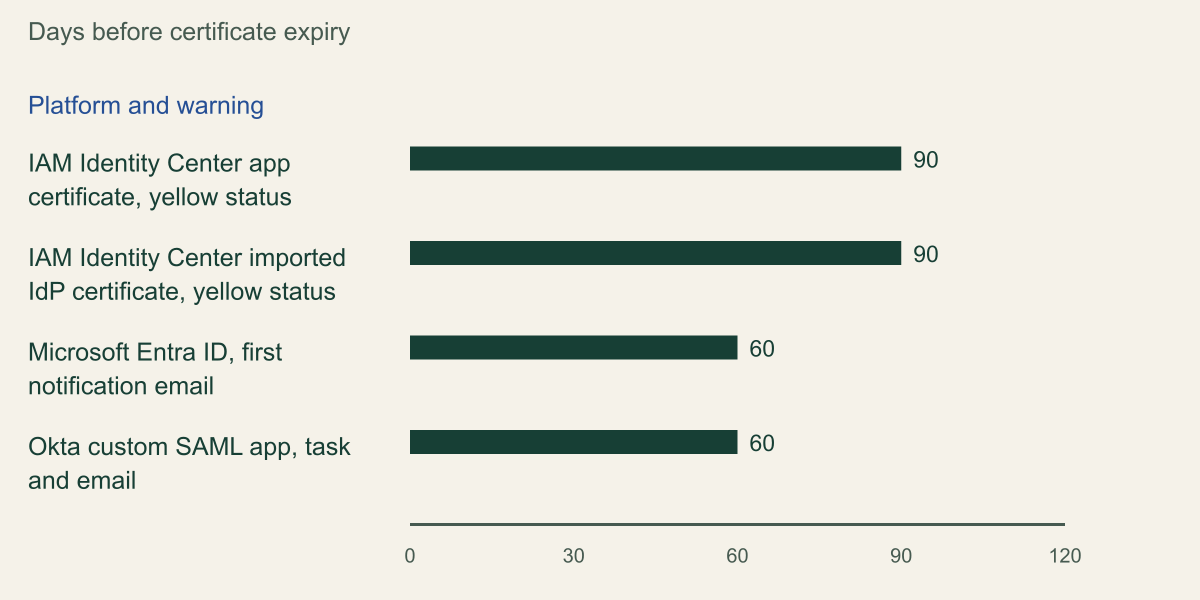
The chart lines up each platform's earliest documented warning. Count back from expiry the time your slowest service provider needs, for example a vendor that accepts certificates only through a support ticket, or a single-certificate application with a quarterly window. If that lead time exceeds the warning, the warning cannot be the trigger; a review scheduled from the inventory has to be. Shorter public TLS lifetimes are a separate schedule for publicly trusted server certificates and do not cap these self-signed certificates, although Microsoft cites the trend as the reason manual rollover will stop scaling. [1][2][10][12]
| Identity provider | Default lifetime | Certificates held | First documented warning | How the new one starts signing |
|---|---|---|---|---|
| Microsoft Entra ID enterprise app | 3 years, also the maximum | Active plus inactive, per app | Email at 60, 30 and 7 days | Make certificate active |
| Okta custom SAML app | Not documented | Active plus inactive, per app | Task and email at 60 days | Actions, then Activate |
| Google Workspace SAML apps | 5 years, fixed | Up to 2 per account | None documented | Assign it to each app |
| IAM Identity Center application | 5 years, set in months | Up to 2 per app | Yellow status at 90 days | Set as active |
The earliest documented warning comes 60 to 90 days before expiry
IAM Identity Center turns certificates yellow at 90 days and Entra and Okta first warn at 60; Google documents no advance warning. [1][2][10][12]

Source. AWS IAM Identity Center certificate expiration status indicators (applications and external identity provider), Microsoft Entra federated SSO certificate tutorial and Okta's custom SAML rotation article, reviewed October 10, 2026. [10][12][1][2]
Method. Values copied from each page; no calculation. Unit is days before certificate expiry. Identity Center's indicators are console states, not notifications. Google Workspace is excluded because its certificate page documents no advance warning.
Accessible table and figure data
| Platform and warning | Days before expiry | Later warnings |
|---|---|---|
| IAM Identity Center app certificate, yellow status | 90 | None documented |
| IAM Identity Center imported IdP certificate, yellow status | 90 | None documented |
| Microsoft Entra ID, first notification email | 60 | Email at 30 and 7 days |
| Okta custom SAML app, task and email | 60 | None documented |
| Platform and warning | Days before expiry | Later warnings |
|---|---|---|
| IAM Identity Center app certificate, yellow status | 90 | None documented |
| IAM Identity Center imported IdP certificate, yellow status | 90 | None documented |
| Microsoft Entra ID, first notification email | 60 | Email at 30 and 7 days |
| Okta custom SAML app, task and email | 60 | None documented |
Find every service provider that trusts the key
Start from the identity provider, which knows every application that signs with a key, then visit each service provider, which alone knows the keys it accepts. The two views rarely match. In Entra each enterprise application has its own signing certificate, so an estate that connects every AWS account through its own AWS Single-Account Access app has one certificate and one expiry date per account; Microsoft presents that as making rollover easier, while its AWS Single Sign-On app uses a single certificate. In Google, an account holds one default certificate that can serve all its SAML apps, so a single certificate can sit behind every service provider in the account. [13][7]
For each trust, record the identity provider application and certificate thumbprint, how the service provider learns keys, how many it can hold, the service provider's owner, a test account and an administrative way into the service provider that does not use this SAML trust. If administrators of a service provider sign in only through the federation you are about to change, a failed cutover locks out the people who would upload the fix. The owner and test account are the same ones an application-side offboarding test needs, so one record can serve both.
In Entra, Microsoft Graph supplies the identity provider side. A SAML app's service principal carries preferredTokenSigningKeyThumbprint, which selects the signing certificate, notificationEmailAddresses and keyCredentials. Graph's description of addTokenSigningCertificate says each signing certificate adds a private key credential with usage Sign and a public one with usage Verify, so counting Verify entries counts certificates. Because preferredSingleSignOnMode can be null on older SAML apps, the example also keeps any app with a signing thumbprint. It flags apps holding more than one certificate (a rollover in progress or an old key never removed), apps whose earliest certificate ends before a cutoff and apps with nobody to notify. [11][14]
Okta lists an app's certificates through GET /api/v1/apps/{appId}/credentials/keys, each with expiresAt and kid, and the app's credentials.signing.kid names the one in use. Google's Admin console shows each certificate's expiration date and SHA-256 fingerprint, and each app's Service provider details page shows which certificate it uses. [6][7]
# Example (read only): list Entra SAML apps with signing certificate end dates.
# Needs an az login session that can read service principals, and jq.
# Set cutoff to today plus your rollover lead time, in UTC.
cutoff='2027-01-08T00:00:00Z'
url='https://graph.microsoft.com/v1.0/servicePrincipals?$select=appId,displayName,preferredSingleSignOnMode,preferredTokenSigningKeyThumbprint,keyCredentials,notificationEmailAddresses&$top=100'
printf 'app\tappId\tcerts\tearliestEnd\tnotify\tflags\n'
while [ -n "$url" ]; do
  page=$(az rest --method get --url "$url")
  printf '%s' "$page" | jq -r --arg cutoff "$cutoff" '
    .value[]
    | select(.preferredSingleSignOnMode == "saml" or .preferredTokenSigningKeyThumbprint != null)
    | [.keyCredentials[] | select(.usage == "Verify") | .endDateTime] as $ends
    | [ .displayName, .appId, ($ends | length), ($ends | min // "none"),
        (.notificationEmailAddresses | length),
        ([ (if ($ends | length) > 1 then "OLD-KEY-PRESENT" else empty end),
           (if ($ends | length) > 0 and ($ends | min) < $cutoff then "ENDS-BEFORE-CUTOFF" else empty end),
           (if (.notificationEmailAddresses | length) == 0 then "NO-NOTIFY" else empty end) ] | join(",")) ]
    | @tsv'
  # Graph pages at 100 service principals; follow nextLink until it is absent.
  url=$(printf '%s' "$page" | jq -r '."@odata.nextLink" // empty')
doneSort service providers by how they learn keys
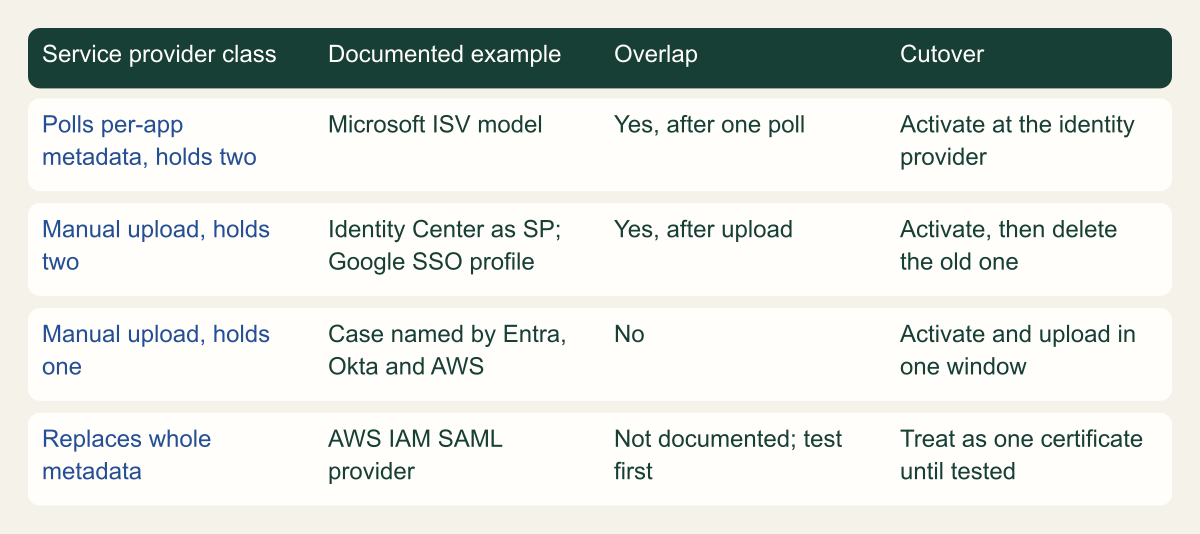
A service provider learns about a new key in one of three ways: it polls the identity provider's metadata, an administrator uploads a certificate, or an administrator replaces a whole metadata document. Combined with whether it can hold one certificate or two, that gives the four classes in the matrix. The class, not the identity provider, decides the procedure. [1][15][3][4]
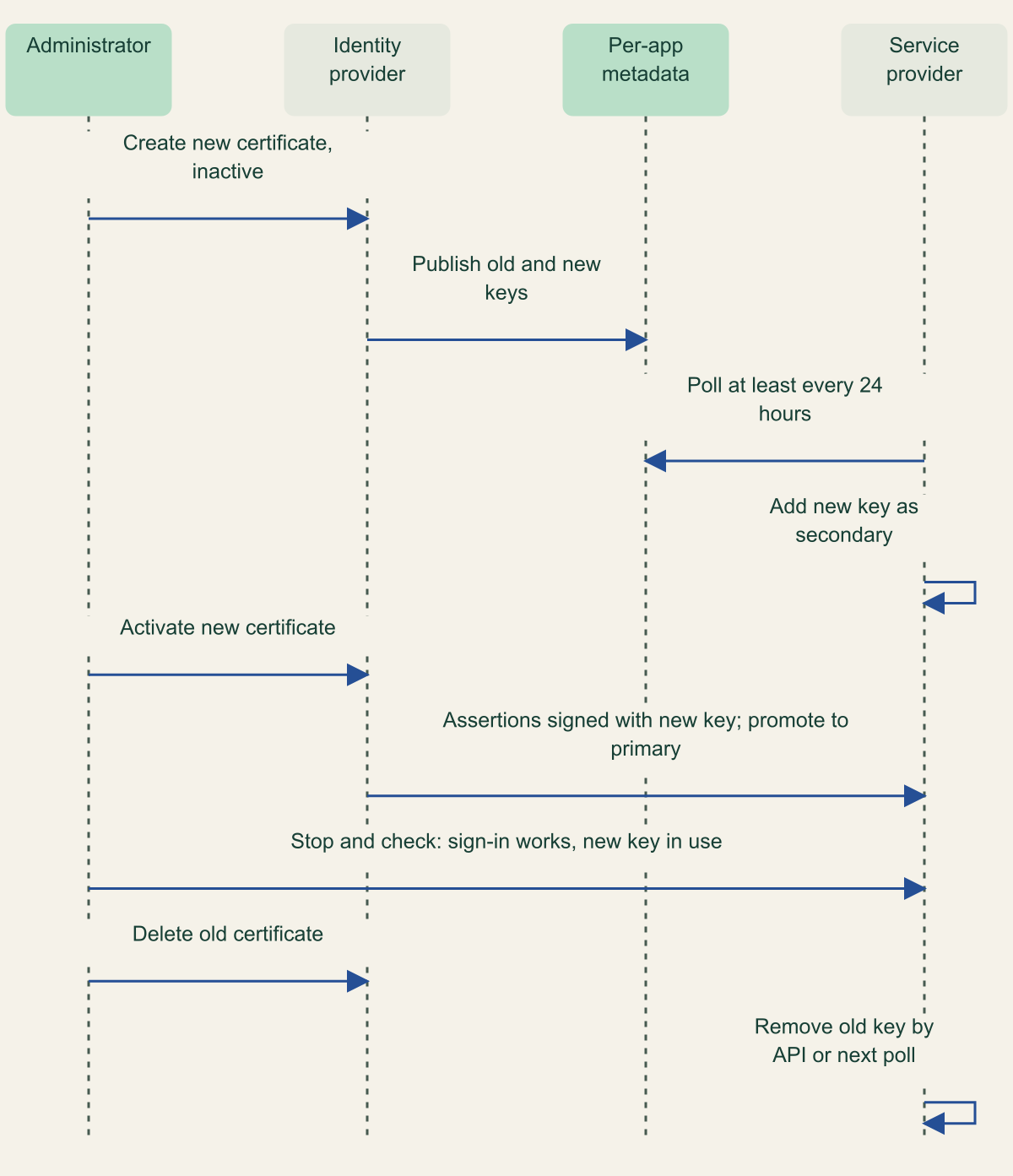
Polling is the class Microsoft asks software vendors to build. Its ISV guidance, in the Entra certificate tutorial, describes an application that downloads the per-tenant, per-application federation metadata on a schedule, adds a newly discovered certificate as a secondary while it is still inactive in Entra, and promotes it to primary once the customer activates it. Vendors are asked to support primary and secondary certificates, check metadata at least every 24 hours and expose APIs to list, add, remove and promote certificates. For this class the identity provider change is the whole rollover, provided at least one polling interval passes before activation. [1]
AWS and Google both document the manual class with room for two. IAM Identity Center, as a service provider, marks every imported certificate active and trusts messages signed with any of them, so importing the new certificate before activation creates the overlap. Google's SAML SSO profiles, where Google is the service provider for an external identity provider, accept up to two identity provider certificates for the same purpose, while the legacy SSO profile instructions describe a single upload. [3][15]
Single-certificate service providers cannot overlap. Microsoft, Okta and AWS describe the case in similar terms: if the application handles one certificate at a time, the upload and the activation belong in the same maintenance window, and sign-in fails between the two steps. Okta's developer guide states the order plainly: once the new certificate is active, users cannot reach the app until the certificate is uploaded to the vendor. [1][2][6][3]
IAM SAML providers form the fourth class. You replace the whole metadata document with aws iam update-saml-provider, and STS rejects assertions with Response signature invalid when the provider's metadata no longer matches the identity provider. IAM's documentation says the metadata carries the keys used to validate assertions, but the pages reviewed do not say whether IAM honors two signing certificates in one document. Until a test in a non-production account shows that it does, treat each IAM provider as a single-certificate service provider and pair the metadata update with the activation for that account's app. [4][16]
The service provider's class decides the procedure
Only service providers that can hold two certificates allow an overlap; the rest need activation and upload in one window. [1][3][4]

Source. Conceptual classification based on the Microsoft Entra certificate tutorial and ISV guidance, Okta's rotation article, Google's SSO profile instructions and AWS IAM and Identity Center documentation, reviewed October 10, 2026. [1][2][15][3][4]
Method. Conceptual. Classes combine how a service provider learns keys with how many it holds; examples are the documented cases only. No service provider was tested.
Accessible table and figure data
| Service provider class | Documented example | Overlap | Cutover |
|---|---|---|---|
| Polls per-app metadata, holds two | Microsoft ISV model | Yes, after one poll | Activate at the identity provider |
| Manual upload, holds two | Identity Center as SP; Google SSO profile | Yes, after upload | Activate, then delete the old one |
| Manual upload, holds one | Case named by Entra, Okta and AWS | No | Activate and upload in one window |
| Replaces whole metadata | AWS IAM SAML provider | Not documented; test first | Treat as one certificate until tested |
| Service provider class | Documented example | Overlap | Cutover |
|---|---|---|---|
| Polls per-app metadata, holds two | Microsoft ISV model | Yes, after one poll | Activate at the identity provider |
| Manual upload, holds two | Identity Center as SP; Google SSO profile | Yes, after upload | Activate, then delete the old one |
| Manual upload, holds one | Case named by Entra, Okta and AWS | No | Activate and upload in one window |
| Replaces whole metadata | AWS IAM SAML provider | Not documented; test first | Treat as one certificate until tested |
Stage the new certificate before anything depends on it
In every identity provider covered here, a new certificate starts out unused. Entra saves it as Inactive, Okta generates it as Inactive while the old one stays Active, Identity Center adds a second application certificate that signs nothing until it is set as active, and Google adds a second account certificate that no app uses until it is assigned. Staging means creating that certificate and getting it into every service provider that can hold two, while the identity provider still signs with the old key. [1][2][9][7]
Choose the new certificate's properties deliberately. Entra fixes the expiry date at save time, Identity Center asks for a validity period in months and Okta's API asks for years. Identity Center offers SHA-1 or SHA-256 and 1024-bit or 2048-bit RSA, recommending SHA-256 unless the service provider requires SHA-1, and Okta treats the SHA-1 to SHA-256 move as its own procedure with its own revert path. Unless changing the algorithm is the purpose, keep it as it is: a failed wave is easier to diagnose when only the key changed. [1][9][6]
One Entra state turns staging into a cutover. If the active certificate has already expired and you create a new one, Entra starts signing with the new certificate even though it is not marked active, and stops using the expired one. Service providers that ignore expiry were still accepting the expired certificate, so they break at that moment. Microsoft's advice for applications that keep expiry validation off is not to create the replacement until the scheduled maintenance window. Check the active certificate's expiry before selecting New Certificate. [1]
Then wait for the key to arrive. Polling service providers need at least one polling interval, which Microsoft's ISV contract puts at 24 hours or less; a vendor that polls less often should say so. Google warns that a replaced certificate may take up to 24 hours to become available to SAML apps, and the conservative reading is to create the second Google certificate at least a day before the first wave. For manual service providers the upload is the arrival: import the certificate into Identity Center, add it as the second certificate on a Google SSO profile, or use the vendor's secondary certificate field. [1][7][15][3]
A polling service provider learns the new key before it is used
The new certificate is published while inactive, so the service provider holds it before the first assertion signed with it arrives. [1]

Source. Conceptual sequence based on Microsoft's ISV guidance for automated SAML certificate rollover in the Entra federated SSO certificate tutorial, reviewed October 10, 2026. [1]
Method. Conceptual. Message order condensed from Microsoft's described model; the 24-hour figure is Microsoft's minimum polling frequency for vendors. Manual and single-certificate service providers follow different steps.
Accessible table and figure data
| From | To | Message |
|---|---|---|
| Administrator | Identity provider | Create new certificate, inactive |
| Identity provider | Per-app metadata | Publish old and new keys |
| Service provider | Per-app metadata | Poll at least every 24 hours |
| Service provider | Service provider | Add new key as secondary |
| Administrator | Identity provider | Activate new certificate |
| Identity provider | Service provider | Assertions signed with new key; promote to primary |
| Administrator | Service provider | Stop and check: sign-in works, new key in use |
| Administrator | Identity provider | Delete old certificate |
| Service provider | Service provider | Remove old key by API or next poll |
| From | To | Message |
|---|---|---|
| Administrator | Identity provider | Create new certificate, inactive |
| Identity provider | Per-app metadata | Publish old and new keys |
| Service provider | Per-app metadata | Poll at least every 24 hours |
| Service provider | Service provider | Add new key as secondary |
| Administrator | Identity provider | Activate new certificate |
| Identity provider | Service provider | Assertions signed with new key; promote to primary |
| Administrator | Service provider | Stop and check: sign-in works, new key in use |
| Administrator | Identity provider | Delete old certificate |
| Service provider | Service provider | Remove old key by API or next poll |
Activate in waves and test each one
Entra, Okta and Identity Center activate certificates per application, and Google assigns them per app, which is what makes waves possible. Order the waves by how easily each class reverses. Begin with one polling or two-certificate service provider whose owner is watching, continue with the rest of those classes, and leave single-certificate applications for their windows. Google's guidance has the same shape: two valid certificates let you move some apps as a test without affecting apps still on the old one. [1][2][9][7]
The action is Make certificate active in Entra, Actions then Activate in Okta, Set as active in Identity Center and a new choice in the app's Certificate menu under Service provider details in Google. Entra marks the previously active certificate Inactive in the same step, and Identity Center signs every assertion with whichever certificate is active. In Google, also update the service provider unless it already holds the new certificate, because SSO fails until both sides match. Through the APIs, the Entra equivalent is setting preferredTokenSigningKeyThumbprint on the service principal, and the Okta equivalent is replacing the app's credentials.signing.kid. [1][6][9][7][11]
Test each wave from the service provider's side. The identity provider has done its part once it issues a signed assertion, and any rejection happens afterwards at the service provider, so it follows that the identity provider's sign-in log can record success for a sign-in that failed. Run a service-provider-initiated and an identity-provider-initiated sign-in with the test account, and read the service provider's own log. In AWS, a key the provider does not trust surfaces as Response signature invalid from STS. To show which key signed, capture the SAMLResponse form value in the browser's developer tools, decode it and compare the certificate in the signature's KeyInfo, where the identity provider includes one, with the new thumbprint. [16]
Roll back a service provider that breaks
Rollback means making the old certificate active again for the affected application. It works only while the old certificate still exists, has not expired where the identity provider refuses expired certificates and is still trusted by the service provider, which is why removal comes last. Okta documents the revert directly: mark the previous certificate active and provide it to the vendor. In Entra and Identity Center, the same Make certificate active and Set as active actions apply to the older certificate, and in Google you choose the old certificate again in the app's Certificate menu. [6][1][9][7]
Each identity provider narrows rollback in its own way. Entra stops signing with an expired certificate once a valid one exists, so an expired old certificate is not a rollback target. Identity Center holds two certificates per application and deletes only inactive ones, so a fresh replacement means giving up the old certificate first. Google renumbers its two certificates when one is deleted, generates a new one if you delete the only certificate, and warns that a replaced certificate may need up to 24 hours to become available, so delete and recreate is a slow rollback rather than a fast one. [1][9][7]
On the service provider side, restore the copy saved at stop-and-check 2. For an IAM SAML provider that means running aws iam update-saml-provider with the previous metadata document; for a single-certificate SaaS application it means uploading the old certificate again. Agree before the first wave what triggers a rollback, such as any signature error for the test account, and who may call it without waiting for the person who started the change. [16]
Remove the old key from every trust
Deleting the old certificate is the security step of the rollover. The interoperability profile says metadata producers should remove expired keys once a rollover is complete and must remove compromised ones, and it requires consumers to treat every listed key as valid without revocation checks. Taken with AWS's statement that IAM never acts on certificate expiry, a service provider that still holds the old public key accepts whatever the old private key signs. Microsoft tells customers to secure private key material such as PFX files, and an exported copy of the old key is what keeps that exposure alive. Removal at the identity provider stops it signing; removal at the service provider stops the service provider believing it. Both are needed. [5][4][1]
For manual service providers, remove the key at the service provider first and at the identity provider second. Identity Center, as a service provider, requires at least one valid certificate to remain and asks you to confirm the identity provider no longer signs with the old one before deleting it. Polling service providers reverse the order: Microsoft's model removes the old certificate from Entra and then from the application, through the vendor's API or its next metadata read, so check that the vendor's console lists a single certificate. Google's delete dialog lists every app still assigned the certificate, a useful last inventory check, and Identity Center as an identity provider deletes only an inactive application certificate. [3][1][7][9]
For IAM SAML providers, check the certificates in the stored metadata, not the console's Valid until date, which IAM sets at creation and which ignores the metadata's validUntil and cacheDuration. The example prints each certificate's fingerprint and end date before and after the update, so the record shows that only the new certificate remains. [4]
A suspected key compromise reverses the priorities. AWS's guidance for Identity Center is to remove and rotate the certificate immediately, and the profile makes removing a compromised key mandatory, so accept an outage at single-certificate service providers rather than leave the key trusted while windows are booked. Removal stops a service provider accepting new assertions signed with the old key; it does not end access already granted. AWS role sessions issued from such assertions keep their temporary credentials until they expire or are revoked. [3][5]
# Example: show which signing certificates an IAM SAML provider trusts,
# keep a rollback copy, then confirm the old one is gone after the update.
arn='arn:aws:iam::111122223333:saml-provider/ExampleIdP'

aws iam get-saml-provider --saml-provider-arn "$arn" \
  --query SAMLMetadataDocument --output text > current-metadata.xml
cp current-metadata.xml "rollback-metadata-$(date -u +%Y%m%dT%H%M%SZ).xml"

# One line per certificate in the document (signing and any encryption keys).
# Entra shows SHA-1 thumbprints; use -sha1 instead of -sha256 to compare with them.
list_certs() {
  tr -d '\r\n\t ' < "$1" | grep -o '<[^/>]*X509Certificate>[^<]*' | sed 's/^<[^>]*>//' |
    while read -r b64; do
      printf '%s' "$b64" | openssl base64 -d -A |
        openssl x509 -inform DER -noout -fingerprint -sha256 -enddate
    done
}
list_certs current-metadata.xml

# After every wave has passed its checks: upload metadata that lists only the
# new certificate. WARNING: if the identity provider still signs with the old
# key, sign-in through this provider fails until you restore the rollback copy.
aws iam update-saml-provider --saml-provider-arn "$arn" \
  --saml-metadata-document file://new-certificate-only-metadata.xml
aws iam get-saml-provider --saml-provider-arn "$arn" \
  --query SAMLMetadataDocument --output text > after-metadata.xml
list_certs after-metadata.xmlRollover sequence and stopping points
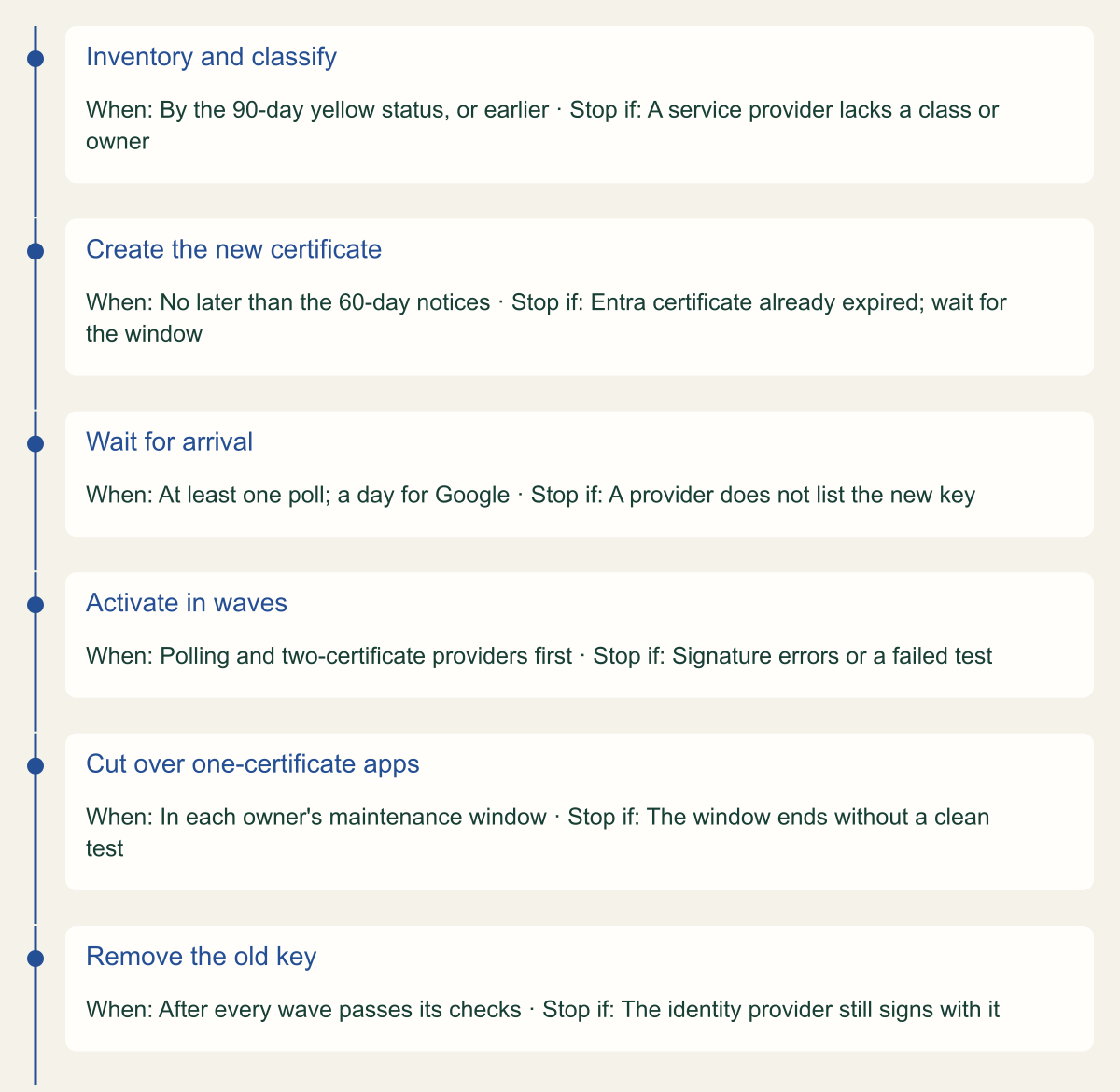
Across all four identity providers the sequence is the same: inventory and classify, stage, wait for arrival, activate in waves, hold, remove the old key from every trust, then record. The timeline places those steps against the earliest warnings the vendors document; the warnings mark a latest start, not a recommended one. [1][2][10][3]
Three rules settle most decisions. If a service provider can hold two certificates, never activate before it holds the new one. If it can hold only one, let its owner choose the moment, and keep the old certificate in the identity provider until that window has closed cleanly. And treat the rollover as finished only when the old key is gone from the last service provider that trusted it, not when the new key starts signing.
Feed the results back into the inventory. The service providers that turned out to need a window, the vendors that polled less often than daily and the owners who were hard to reach are the facts that set the next cycle's lead time. Where a vendor offers metadata polling and you have not turned it on, or does not offer it at all, Microsoft's ISV guidance gives a concrete contract to ask for: per-application metadata read at least every 24 hours, two certificates and an API to promote and remove them. [1]
From first warning to a retired key
Each stage has a condition that stops the rollover; removal at the service providers comes before removal at the identity provider. [1][3]

Source. Conceptual sequence based on Microsoft Entra, Okta, Google and AWS IAM Identity Center rotation guidance reviewed October 10, 2026. Day markers are documented warnings, not required timings. [1][2][7][3][10]
Method. Conceptual. Stage order follows the procedure described in the article; the 90-day and 60-day markers are the vendors' documented warnings and the arrival waits come from Microsoft's 24-hour polling guidance and Google's 24-hour availability note.
Accessible table and figure data
| Stage | When | Stop if |
|---|---|---|
| Inventory and classify | By the 90-day yellow status, or earlier | A service provider lacks a class or owner |
| Create the new certificate | No later than the 60-day notices | Entra certificate already expired; wait for the window |
| Wait for arrival | At least one poll; a day for Google | A provider does not list the new key |
| Activate in waves | Polling and two-certificate providers first | Signature errors or a failed test |
| Cut over one-certificate apps | In each owner's maintenance window | The window ends without a clean test |
| Remove the old key | After every wave passes its checks | The identity provider still signs with it |
| Stage | When | Stop if |
|---|---|---|
| Inventory and classify | By the 90-day yellow status, or earlier | A service provider lacks a class or owner |
| Create the new certificate | No later than the 60-day notices | Entra certificate already expired; wait for the window |
| Wait for arrival | At least one poll; a day for Google | A provider does not list the new key |
| Activate in waves | Polling and two-certificate providers first | Signature errors or a failed test |
| Cut over one-certificate apps | In each owner's maintenance window | The window ends without a clean test |
| Remove the old key | After every wave passes its checks | The identity provider still signs with it |
Method and provenance
Source-led operational analysis of Microsoft Entra, Microsoft Graph, Okta, Google Workspace and AWS IAM and IAM Identity Center documentation and the OASIS SAML V2.0 Metadata Interoperability Profile, with original procedures and conceptual figures. Sources were reviewed on October 10, 2026.
No identity provider tenant, service provider or AWS account was configured or tested. Service provider behavior is limited to the documented examples; behavior of individual SaaS applications varies and must be confirmed with each owner. The code examples were exercised only against sample data.
AI assistance. AI assisted research synthesis, drafting, figure planning and visual production, with deterministic editorial checks. No personal operating experience, independent human review or live test is claimed.
Published under the Cloud Security Desk organizational byline. Read the practitioner guide policy.
References
- Tutorial: Manage certificates for federated single sign-on Microsoft. Accessed .
- Rotate a Signing Certificate for Custom SAML Applications in Okta Okta. Accessed .
- Rotate a SAML 2.0 certificate (IAM Identity Center external identity provider) Amazon Web Services. Accessed .
- Create a SAML identity provider in IAM Amazon Web Services. Accessed .
- SAML V2.0 Metadata Interoperability Profile Version 1.0 (OASIS Standard) OASIS. Published . Accessed .
- Upgrade SAML apps to SHA256 (Okta Developer) Okta. Accessed .
- Maintain SAML certificates (Google Workspace Admin Help) Google. Accessed .
- Rotate IAM Identity Center certificates Amazon Web Services. Accessed .
- Rotate an IAM Identity Center certificate Amazon Web Services. Accessed .
- Certificate expiration status indicators (IAM Identity Center applications) Amazon Web Services. Accessed .
- servicePrincipal resource type (Microsoft Graph v1.0) Microsoft. Accessed .
- Certificate expiration status indicators (IAM Identity Center external identity provider) Amazon Web Services. Accessed .
- Configure AWS Single-Account Access for single sign-on with Microsoft Entra ID Microsoft. Accessed .
- servicePrincipal: addTokenSigningCertificate (Microsoft Graph v1.0) Microsoft. Accessed .
- Setting up SSO (Google Workspace Admin Help) Google. Accessed .
- Troubleshoot SAML federation with IAM Amazon Web Services. Accessed .