
A cost and risk analysis for AWS engineers restoring databases and instance fleets from EBS snapshots, based on Amazon EBS documentation and pricing reviewed October 10, 2026. It turns the documented initialization formula, the 5,000 MiB/s Regional quota and fast snapshot restore credit buckets into calculated restore times and costs, with a decision tree and drill checks.
At a glance
Key findings
- With a provisioned rate, initialization time is the snapshot's full data size (
FullSnapshotSizeInBytes) divided by a rate of 100 to 300 MiB/s; calculated from that formula, 1 TiB of data takes about 58 minutes at 300 MiB/s and 175 minutes at 100 MiB/s. [1] - Provisioned rates across concurrent volume creations in a Region are capped at 5,000 MiB/s by default, so a fleet cannot finish initializing faster than its total snapshot data divided by that quota, whichever per-volume rate it uses. [1][13]
- Any snapshot of 1 TiB or more gets a fast snapshot restore bucket of one credit per Availability Zone; by AWS's formula a 4 TiB snapshot earns its next fast-restored volume after 4 hours and a 16 TiB snapshot after 16. [2][3]
- Fast snapshot restore follows the snapshot ID: new snapshots and copies are not enabled, optimizing takes 60 minutes per TiB, and a specified initialization rate overrides it, so an FSR plan must name the snapshot it will restore. [1][2][11]
- AWS's examples price fast snapshot restore at $0.75 per snapshot per zone per hour, $540 for one zone over 30 days, against a one-time $0.0036 per GB for the 300 MB/s initialization tier in an example Region. [2][10]
Available is not the same as fast
A volume created from an EBS snapshot can be attached and mounted as soon as it is available, but it is not yet the volume you provisioned. Its blocks still sit in Amazon S3 and have to be downloaded and written to the volume, a process AWS calls volume initialization. Until that finishes, I/O can see higher latency and lower performance, and full performance arrives only when every block is in place. Empty volumes skip the step entirely. The difficulty for recovery planning is the default path: AWS says the default initialization rate fluctuates, so completion times are unpredictable. [1]
So, by default, the documentation cannot say how long it takes. Two options replace the guess with a number. A Provisioned Rate for Volume Initialization of 100 to 300 MiB/s makes initialization time the snapshot's written data divided by that rate, and the same arithmetic holds for many volumes at once up to a Regional cap of 5,000 MiB/s. Fast snapshot restore (FSR) creates the volume fully initialized, but only from a snapshot you enabled beforehand, in the Availability Zones you named, and for as many volumes as its credit bucket allows. Reading every block yourself with fio or dd after attachment is the third route; AWS ties its duration to instance bandwidth, provisioned IOPS and volume size and publishes no rate for it, so it can be measured but not forecast. [1][2][3]
What follows prices each option in minutes and dollars from AWS's formulas and example prices and works two hypothetical restores, one large database volume and a fleet of 120 instances; every derived figure is a labeled calculation. Whether a slow restored database is still initializing or is hitting an ordinary IOPS, throughput or instance limit is a diagnostic question covered elsewhere. Amazon RDS lazy loads restored instances too and reports progress through StorageOperationStatus and StorageOperationPercentProgress, but the controls below apply to EBS volumes you create yourself. [4]
Initialization time from the documented formula
AWS's worked example fixes the method. A 20 GiB volume created from a snapshot holding 10 GiB of data, at a rate of 300 MiB/s, is fully initialized in about 34.1 seconds: 10 GiB is 10,240 MiB, divided by 300 MiB/s. Ten such volumes created together from the same snapshot also finish in 34.1 seconds, because the rate applies to each volume separately. The size that drives the time is the snapshot's data, not the size of the volume you create from it. [1]
That size is the FullSnapshotSizeInBytes field in describe-snapshots output, shown as Full snapshot size in the console. The EC2 API reference stresses that it is not the incremental size: it represents every block written to the source volume when the snapshot was taken. A nightly snapshot that captured 20 GiB of changes on a database volume holding 3 TiB still restores 3 TiB of data. Read the field for the snapshot the plan will restore. [1][5]
Volume size still matters, just elsewhere. FSR sizes its credit bucket from the snapshot's volume size rather than its data, so one snapshot can be quick to initialize at a provisioned rate and slow to refill under FSR. [3]
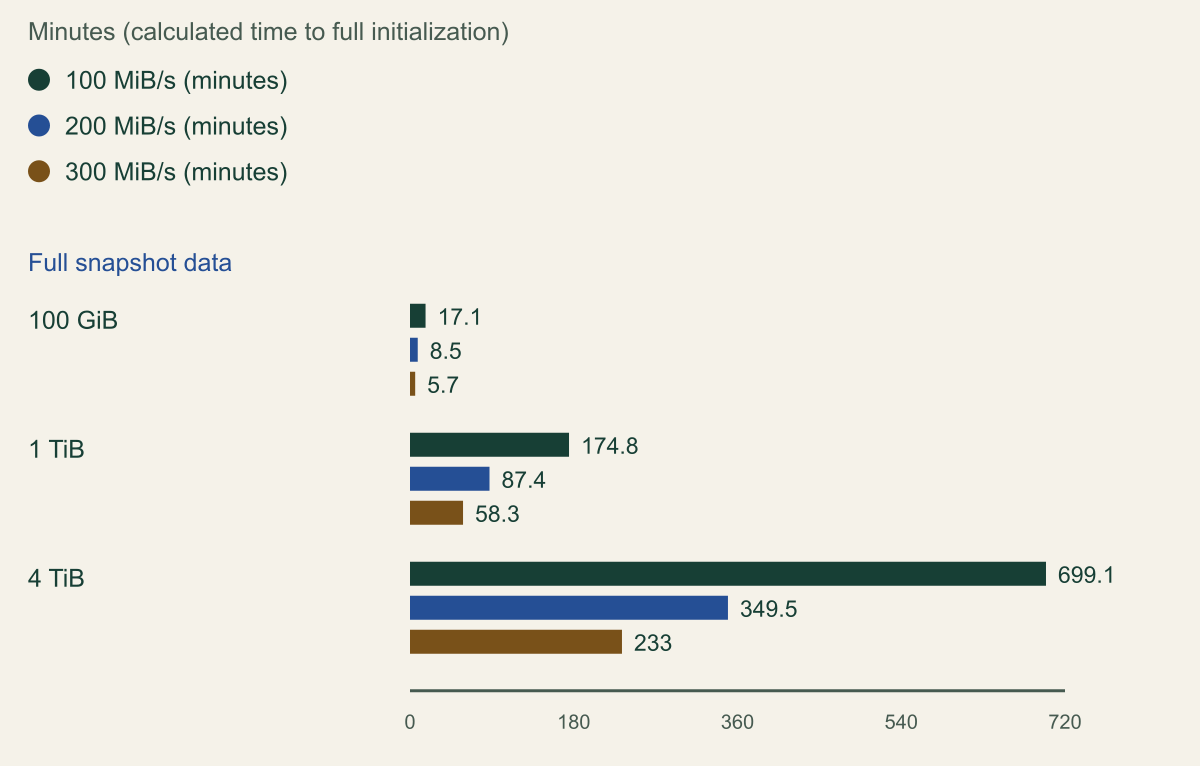
The chart applies the formula at the bottom, middle and top of the documented range. At 300 MiB/s, 1 TiB of snapshot data takes about 58 minutes; at 100 MiB/s it takes close to three hours. A 4 TiB data set runs from about 3.9 hours to 11.7 hours. [1]
Two documented tolerances belong in any recovery time built on these numbers. AWS says the delivered average rate stays within 10 percent of the requested rate 99 percent of the time; a reasonable planning reading is to compute at 90 percent of the rate, which turns 58.3 minutes for 1 TiB at 300 MiB/s into about 64.7. And initialization status can take up to five minutes to update, so the signal that a volume is ready can trail the fact by that long. [1][6]
# Example fragment: read a snapshot's volume size and full data size, then
# print the calculated minutes to initialize at each documented rate.
# Read-only call; the snapshot ID is a placeholder.
SNAP=snap-0abcdef1234567890
read -r VOL_GIB DATA_BYTES < <(aws ec2 describe-snapshots \
  --snapshot-ids "$SNAP" \
  --query "Snapshots[0].[VolumeSize,FullSnapshotSizeInBytes]" \
  --output text)
for RATE in 100 200 300; do
  awk -v b="$DATA_BYTES" -v r="$RATE" \
    'BEGIN { printf "%s MiB/s: %.1f minutes\n", r, b / 1048576 / r / 60 }'
done
echo "Volume size that sets FSR credits: ${VOL_GIB} GiB"One tebibyte of snapshot data takes one to three hours
Calculated from AWS's formula, 1 TiB of full snapshot data initializes in about 58 minutes at 300 MiB/s and 175 minutes at 100 MiB/s. [1]

Source. Calculated from the formula and the 100 to 300 MiB/s range on AWS's Initialize Amazon EBS volumes page, reviewed October 10, 2026. [1]
Method. Minutes = full snapshot data in GiB x 1,024 / rate in MiB/s / 60, the method of AWS's worked example (10 GiB at 300 MiB/s is about 34.1 seconds). Uses full snapshot data, not volume size. Excludes the documented 10 percent rate tolerance, the up to five minute status lag and the default path, for which AWS publishes no rate.
Accessible table and figure data
| Full snapshot data | 100 MiB/s (minutes) | 200 MiB/s (minutes) | 300 MiB/s (minutes) |
|---|---|---|---|
| 100 GiB | 17.1 | 8.5 | 5.7 |
| 1 TiB | 174.8 | 87.4 | 58.3 |
| 4 TiB | 699.1 | 349.5 | 233 |
| Full snapshot data | 100 MiB/s (minutes) | 200 MiB/s (minutes) | 300 MiB/s (minutes) |
|---|---|---|---|
| 100 GiB | 17.1 | 8.5 | 5.7 |
| 1 TiB | 174.8 | 87.4 | 58.3 |
| 4 TiB | 699.1 | 349.5 | 233 |
What the provisioned rate buys and what it costs
Provisioned Rate for Volume Initialization became generally available on May 6, 2025, in all commercial Regions and AWS GovCloud (US), for every EBS volume type and instance type. It can be set on a create-volume request, in the block device mappings of a launch request or launch template, on root volume replacement tasks, and for volumes created by the EBS CSI driver on Amazon EKS or by Amazon ECS, but not on AWS Outposts or in Local Zones or Wavelength Zones. [1][7]
One gap matters for recovery built on AMIs. CreateImage and DescribeImages do not support the VolumeInitializationRate field, so the rate cannot be baked into an image; it travels with the launch, in the launch template version an Auto Scaling group uses or the RunInstances call a recovery script makes. A template version without the field restores at the default rate, or through fast snapshot restore if the snapshot is enabled for it. When adding the field to a new version based on an older one, include the snapshot ID explicitly, because the CLI reference says snapshots in the source version's block device mapping are otherwise ignored. [8][9]
The rate changes how a restore fails. If EBS cannot deliver the requested rate because of capacity constraints, or because the request would exceed the Regional quota, the volume creation request fails rather than falling back to the default rate. A runbook that specifies a rate needs a branch for that case: wait for running initializations to finish, retry at a lower rate, or create the volume without a rate and accept unpredictable initialization. Failed requests are not billed. [1]
Billing is a one-time charge per GiB of full snapshot data, at a price set by the rate tier and the Region. The whole amount is billed when the volume becomes active, and deleting the volume before initialization finishes does not reduce it. AWS's pricing example assumes a Region that charges $0.0036 per GB for the 300 MB/s tier, with GB defined as 1,024 cubed bytes: 100 volumes from a snapshot with 10 GB of full data cost $3.60. The charge sits on top of the volume's own storage and performance pricing. [1][10]
Then there is precedence. When a request specifies a rate and the snapshot is enabled for fast snapshot restore, EBS initializes at the rate and ignores FSR. A launch template that adds a rate as a safety margin therefore discards the benefit of an FSR enablement that is billed by the hour. To use FSR, leave the field out. [1][8]
aws ec2 create-launch-template-version --launch-template-data. Placeholder snapshot ID and device name; omit VolumeInitializationRate if the snapshot is enabled for fast snapshot restore.{
"BlockDeviceMappings": [
{
"DeviceName": "/dev/sdf",
"Ebs": {
"SnapshotId": "snap-0abcdef1234567890",
"VolumeType": "gp3",
"VolumeInitializationRate": 200,
"DeleteOnTermination": true
}
}
]
}Fast snapshot restore runs on a credit bucket
Fast snapshot restore removes initialization instead of speeding it up: a volume created from an enabled snapshot is fully initialized at creation and delivers its provisioned performance at once. It is enabled per snapshot and per Availability Zone, and each snapshot and zone pair is billed by the minute with a one-hour minimum. AWS's own example is one snapshot enabled in one zone for 30 days at $540, which is 720 hours at $0.75 an hour; the pricing page gives the same $0.75 per DSU-hour for US East (N. Virginia). [2][10]
How many volumes get that benefit is set by volume creation credits. There is one bucket per snapshot per zone, each fast-restored volume spends one credit, and a volume created while the bucket holds less than one credit is created without the benefit and initializes like any other. The bucket refills at MIN(10, 1024 / snapshot size in GiB) credits per hour and holds at most MAX(1, MIN(10, 1024 / snapshot size in GiB)). Snapshot size here is the source volume's size, not the data in it. AWS's 128 GiB example refills at 8 credits an hour and holds 8. [3]
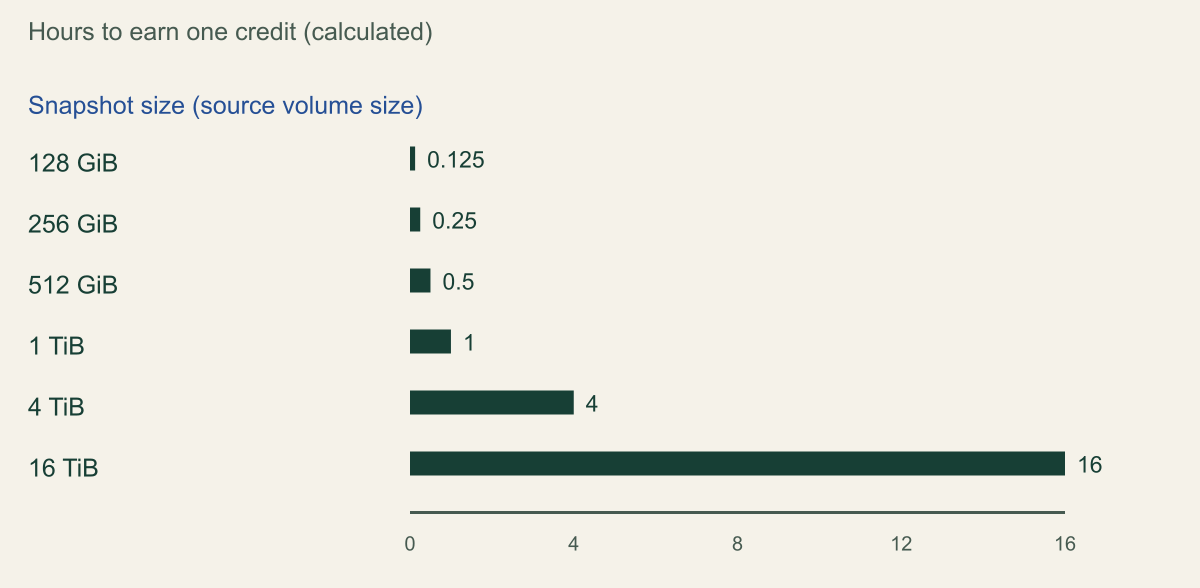
The formula is generous to small snapshots and stingy with large ones. Anything 1 TiB or larger holds a single credit. A 4 TiB snapshot earns its next credit four hours after the last one was spent, and a 16 TiB snapshot, the largest FSR accepts, earns one every 16 hours per zone. The chart shows the refill time by size. [2][3]
The bucket also starts empty. When FSR is enabled, credits begin at zero, and the snapshot passes through an optimizing state, which AWS puts at 60 minutes per TiB and which gives only partial benefit until the state reaches enabled. AWS does not say whether the per-TiB figure uses volume size or data size, or how optimizing and credit accumulation overlap. The consequence for planning does not depend on those details: FSR switched on during an incident does little for the first restores from a large snapshot, so it has to be in place beforehand. [3][11]
Which snapshot it is in place on is the harder question. FSR follows the snapshot ID. A new snapshot of a volume that was itself fast-restored is not enabled, and neither is a copy of an enabled snapshot, which includes copies made into a recovery Region or account. For a database snapshotted every hour, the newest restore point is almost never the FSR-enabled one. Restoring the enabled snapshot buys instant performance with older data; restoring the newest buys current data at the default or provisioned rate. That is a recovery point decision presented as a performance setting, and it should be written down as one. [2]
Amazon Data Lifecycle Manager can move FSR along automatically: a custom snapshot policy schedule can enable it on the snapshots it creates, in named zones, for a count of snapshots or a period. Its documented edges matter. If enabling would exceed the FSR quota, the policy still creates the snapshot but leaves FSR off. A policy that targets instances enables FSR on each snapshot of a multi-volume set, so one four-volume instance uses four of the default five slots in a Region. Snapshots stay enabled, and billed, after the policy is deleted or its FSR setting is removed. AWS recommends schedules that let each snapshot finish optimizing before the next is created; a count of two would keep the previous snapshot enabled while the newest optimizes, at twice the hourly charge, but the page does not say whether a count of one leaves a gap, so test it. [12]
Two ceilings close the list. FSR accepts snapshots of 16 TiB or less, and only volumes provisioned at or below 64,000 IOPS and 1,000 MiB/s receive its full benefit; above either figure, AWS recommends initializing the volume. Current gp3 volumes go to 80,000 IOPS, 2,000 MiB/s and 64 TiB, so a generously provisioned gp3 database volume can fall outside FSR on more than one count. The default quota of five FSR-enabled snapshots per Region is adjustable, and enabling FSR on a snapshot shared from another account counts against, and is billed to, the account that enables it. [2][13][14]
Large snapshots earn a fast-restored volume every few hours
Calculated from AWS's credit formulas, a 1 TiB snapshot earns one fast-restored volume per hour per zone and a 16 TiB snapshot one every 16 hours. [3]

Source. Calculated from the fill rate and bucket size formulas on AWS's fast snapshot restore volume creation credits page and the 16 TiB maximum on the fast snapshot restore page, reviewed October 10, 2026. [2][3]
Method. Refill per hour = MIN(10, 1024 / size in GiB); bucket maximum = MAX(1, MIN(10, 1024 / size in GiB)); hours per credit = 1 / refill. Size is the snapshot's source volume size, not its data. The bucket starts at zero when FSR is enabled; optimizing time of 60 minutes per TiB is not included.
Accessible table and figure data
| Snapshot size | Refill (credits per hour) | Bucket maximum (credits) | Hours per credit |
|---|---|---|---|
| 128 GiB | 8 | 8 | 0.125 |
| 256 GiB | 4 | 4 | 0.25 |
| 512 GiB | 2 | 2 | 0.5 |
| 1 TiB | 1 | 1 | 1 |
| 4 TiB | 0.25 | 1 | 4 |
| 16 TiB | 0.0625 | 1 | 16 |
| Snapshot size | Refill (credits per hour) | Bucket maximum (credits) | Hours per credit |
|---|---|---|---|
| 128 GiB | 8 | 8 | 0.125 |
| 256 GiB | 4 | 4 | 0.25 |
| 512 GiB | 2 | 2 | 0.5 |
| 1 TiB | 1 | 1 | 1 |
| 4 TiB | 0.25 | 1 | 4 |
| 16 TiB | 0.0625 | 1 | 16 |
Regional limits for parallel restores
The provisioned rate carries one Regional quota: the rates of all concurrent volume creation requests in a Region may add up to 5,000 MiB/s, and a request that would exceed it fails. AWS's examples are 50 concurrent volumes at 100 MiB/s or 25 at 200 MiB/s; the same arithmetic allows 16 at 300 MiB/s, using 4,800 MiB/s. Service Quotas lists the limit as adjustable, under the name Provisioned Rate for Volume Initialization across concurrent volume creation requests per Region. [1][13]
For a fleet, the cap turns per-volume speed into a scheduling choice. Total fleet time can be no shorter than total snapshot data divided by 5,000 MiB/s, whatever rate each volume gets. A higher rate brings the first instances up sooner but lets fewer initialize at once; a lower rate runs more in parallel and finishes each one later. In a hypothetical recovery of 120 instances, each with a data volume restored from one snapshot holding 128 GiB of data, the 15,360 GiB total needs at least 52.4 minutes at the cap. The table works through the three documented rates, launching in waves that each fill the quota. [1]
The wave model is a simplification. A launch controller that starts the next volume as each one finishes, instead of in lockstep, moves the 100 and 300 MiB/s rows closer to the 52.4-minute floor. The conclusion holds either way: past a few dozen volumes, the Regional quota sets fleet recovery time, and the per-volume rate mostly decides how many instances join early. An Auto Scaling group that asks for all 120 instances at 300 MiB/s at once requests 36,000 MiB/s; by AWS's rule, everything past the first 16 volumes fails, and how the launch path retries those becomes part of the recovery time. [1]
Recovery in another Region doubles the checks. The quota is per Region, so the recovery Region needs its own increase, requested while nothing is on fire. The FSR quota is per Region too, and enabling FSR on a snapshot copied there is a separate action on a separate snapshot ID whose bucket starts at zero. [3][13]
| Rate | Volumes at once | Minutes per volume | Waves | Fleet minutes |
|---|---|---|---|---|
| 100 MiB/s | 50 | 21.8 | 3 | 65.5 |
| 200 MiB/s | 25 | 10.9 | 5 | 54.6 |
| 300 MiB/s | 16 | 7.3 | 8 | 58.3 |
Price each option against the recovery tier
Storage initialization is one term in a recovery time objective, alongside detection, decisions, instance launch and application checks. The two hypothetical restores below price only that term, using AWS's example rates of $0.0036 per GiB for the 300 MiB/s tier and $0.75 per snapshot-zone hour for FSR. Both match the US East (N. Virginia) prices on the pricing page on October 10, 2026, where initialization has two tiers: $0.0024 per GB for 100 to 200 MB/s and $0.0036 per GB for 201 to 300 MB/s. Prices vary by Region, so read the dollar figures as arithmetic on AWS's examples rather than quotes. [10]
The first restore is a single database volume: gp3, 4 TiB, provisioned at 16,000 IOPS and 1,000 MiB/s, with 3 TiB of data in its latest snapshot. At 300 MiB/s it initializes in about 174.8 minutes, or 194.2 if the rate runs 10 percent low, for about $11.06 per restore. FSR would make it fully performant at creation, completely so because both settings are within FSR's ceiling, and a 4 TiB snapshot's single credit, refilled every four hours, covers one database volume per zone. Two zones cost $1,080 per 30 days, and the instant option restores only the snapshot FSR is on, which by AWS's per-TiB figure needs three to four hours of optimizing each time FSR moves to a newer one. A full fio read of the 4 TiB device cannot, by simple division, finish in under about 70 minutes at the volume's 1,000 MiB/s, and AWS publishes nothing on how much the default fetch adds. [1][2][3][11]
The second restore is the fleet from the previous section: 120 instances, 40 in each of three zones, each with a data volume from a 256 GiB snapshot holding 128 GiB. A provisioned rate brings the fleet's storage up in roughly 52 to 66 minutes for about $55.30 at the 300 MiB/s example price. Under FSR the snapshot's bucket holds four credits per zone and refills at four an hour, so four instances per zone start fully initialized and the other 36 are created at the default rate; the bucket would need nine more hours to have covered all 40. Three zones cost $1,620 per 30 days. For a fleet, FSR makes the first few instances fast, not the group. [3][2]
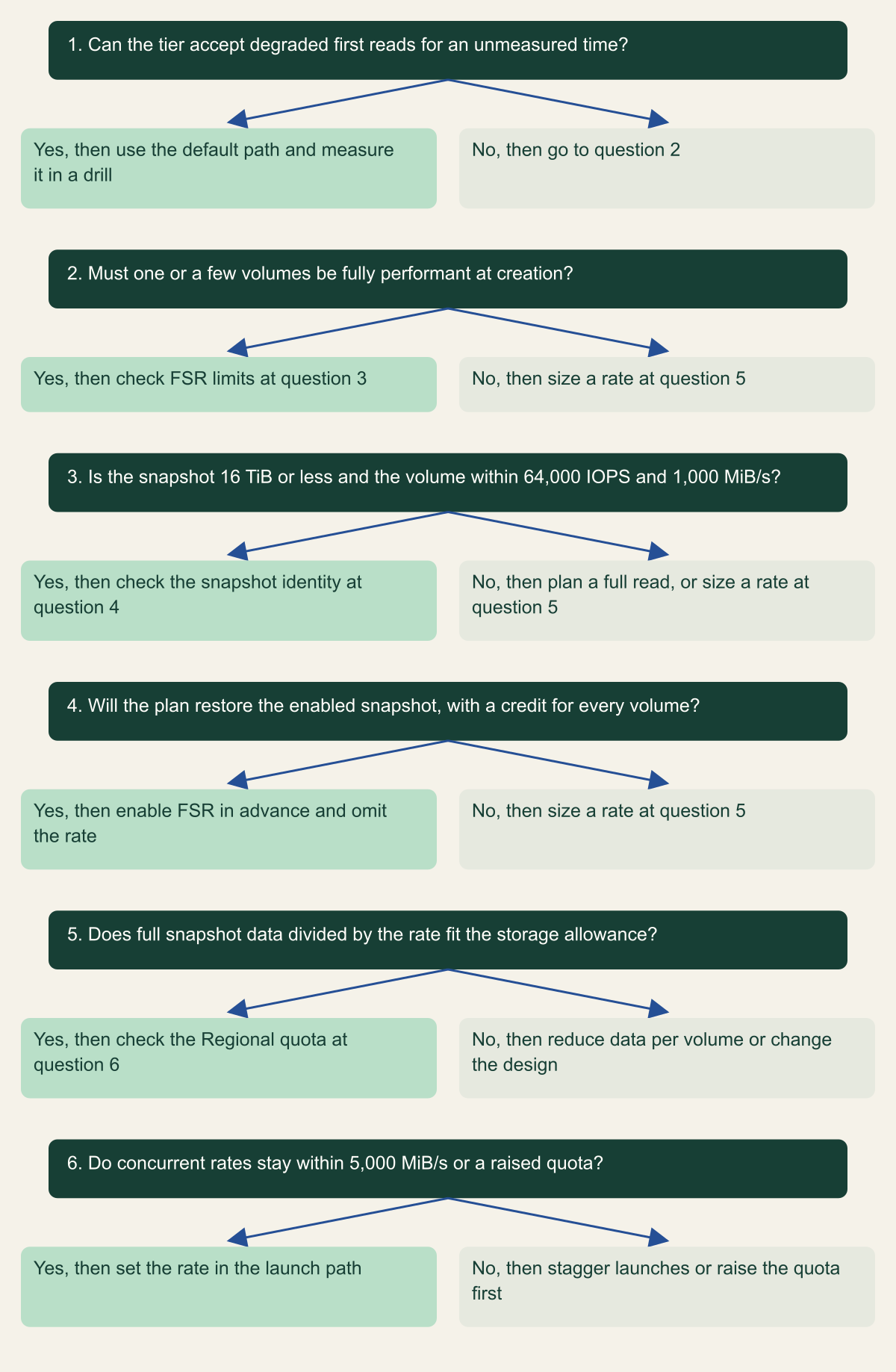
Read across, the options sort by tier. A tier whose objective tolerates degraded first reads, and whose application warms its own data, can stay on the default path at no extra charge, provided a drill has measured how long the degraded period lasts. A tier that needs a predictable time for a known amount of data, or many volumes at once, fits the provisioned rate. A tier that needs one or a few volumes at full performance immediately, from a snapshot of 16 TiB or less and inside FSR's performance ceiling, justifies the hourly cost of FSR, on the condition that the plan restores the snapshot FSR is enabled on. The decision tree puts those tests in order. [1][2][3]
| Option | Database volume, 3 TiB data | Fleet, 120 x 128 GiB data |
|---|---|---|
| Default initialization | No published rate; no extra charge | No published rate; no extra charge |
| Provisioned rate, 300 MiB/s | 174.8 minutes; $11.06 per restore | 58.3 minutes in 8 waves; $55.30 |
| Fast snapshot restore | Instant for 1 volume per zone; $1,080 per 30 days in 2 zones | 4 instant per zone, the rest default; $1,620 per 30 days in 3 zones |
| Manual full read | At least 69.9 minutes; default fetch unpublished | Not calculable; varies by instance and volume |
Choose a restore option from the documented limits
Fast snapshot restore fits only when the plan restores the enabled snapshot within its size, performance and credit limits; otherwise size a provisioned rate against the Regional quota. [1][2][3]

Source. Conceptual decision aid ordering AWS's documented limits for default initialization, Provisioned Rate for Volume Initialization and fast snapshot restore. [1][2][3][13]
Method. Conceptual. Each row phrases a documented constraint as a question, with thresholds as reviewed on October 10, 2026. The recovery tier and its storage allowance come from the reader's own objectives, not from AWS.
Accessible table and figure data
| Question | Yes, then | No, then |
|---|---|---|
| 1. Can the tier accept degraded first reads for an unmeasured time? | use the default path and measure it in a drill | go to question 2 |
| 2. Must one or a few volumes be fully performant at creation? | check FSR limits at question 3 | size a rate at question 5 |
| 3. Is the snapshot 16 TiB or less and the volume within 64,000 IOPS and 1,000 MiB/s? | check the snapshot identity at question 4 | plan a full read, or size a rate at question 5 |
| 4. Will the plan restore the enabled snapshot, with a credit for every volume? | enable FSR in advance and omit the rate | size a rate at question 5 |
| 5. Does full snapshot data divided by the rate fit the storage allowance? | check the Regional quota at question 6 | reduce data per volume or change the design |
| 6. Do concurrent rates stay within 5,000 MiB/s or a raised quota? | set the rate in the launch path | stagger launches or raise the quota first |
| Question | Yes, then | No, then |
|---|---|---|
| 1. Can the tier accept degraded first reads for an unmeasured time? | use the default path and measure it in a drill | go to question 2 |
| 2. Must one or a few volumes be fully performant at creation? | check FSR limits at question 3 | size a rate at question 5 |
| 3. Is the snapshot 16 TiB or less and the volume within 64,000 IOPS and 1,000 MiB/s? | check the snapshot identity at question 4 | plan a full read, or size a rate at question 5 |
| 4. Will the plan restore the enabled snapshot, with a credit for every volume? | enable FSR in advance and omit the rate | size a rate at question 5 |
| 5. Does full snapshot data divided by the rate fit the storage allowance? | check the Regional quota at question 6 | reduce data per volume or change the design |
| 6. Do concurrent rates stay within 5,000 MiB/s or a raised quota? | set the rate in the launch path | stagger launches or raise the quota first |
Measure a restore in your own account
The calculations are expectations for storage alone, and a drill should test them against the snapshot the plan names. Record the snapshot ID, its VolumeSize and FullSnapshotSizeInBytes, the zone and the initialization method you intend, then timestamp five points: the create or launch request, the volume reaching available, attachment, initialization completed, and application acceptance. The gap between the calculated and the measured time is the result worth keeping.
describe-volume-status returns InitializationStatusDetails for any volume created from a snapshot. InitializationType reads provisioned-rate for a requested rate and default for both the default path and FSR, Progress is a percentage, and EstimatedTimeToCompleteInSeconds appears only for provisioned-rate volumes. An FSR volume jumps to 100 percent and completed at creation. Because default covers two very different outcomes, confirm FSR separately with the FastRestored field of describe-volumes, which shows whether the volume was created as an initialized volume. [6][3]
For event-driven runbooks, EBS sends an initializeVolume event with the detail type EBS Volume Notification within five minutes after a default or provisioned-rate volume finishes. It is best effort, it is never sent for FSR volumes, and its completionTime records when the event was generated, which can be up to five minutes after initialization actually ended. The example event on AWS's events page shows a space before initializeVolume in the event value, while the rule pattern on the monitoring page has none, so prove the rule against an event from your own drill before automation waits on it. [6][15]
Track FSR credits with FastSnapshotRestoreCreditsBalance and FastSnapshotRestoreCreditsBucketSize in the AWS/EBS namespace, reported per snapshot and zone. An alarm when the balance drops below the number of volumes a tier expects to restore turns the bucket arithmetic into a watched condition. FSR state changes also arrive as EBS Fast Snapshot Restore State-change Notification events, including failed enablements such as Server.InsufficientCapacity. [16][15]
On Provisioned IOPS SSD volumes, AWS notes that performance can drop below half of the expected level during initialization and put the I/O performance status check into warning. In a drill, that warning is expected evidence of initialization, not a fault to chase. And a completed initialization is not a recovered service: the database still has to open, recover and pass the checks its owner defined. [1]
# Example fragment for a restore drill. Read-only calls; placeholder IDs.
VOL=vol-0abcdef1234567890
SNAP=snap-0abcdef1234567890

# Initialization method, progress and, for a provisioned rate, seconds left.
aws ec2 describe-volume-status --volume-ids "$VOL" \
  --query "VolumeStatuses[0].InitializationStatusDetails"

# Whether the volume was fast-restored, and any rate it was created with.
aws ec2 describe-volumes --volume-ids "$VOL" \
  --query "Volumes[0].[FastRestored,VolumeInitializationRate,SnapshotId]"

# FSR state in each zone for the snapshot the plan names.
aws ec2 describe-fast-snapshot-restores \
  --filters "Name=snapshot-id,Values=$SNAP" \
  --query "FastSnapshotRestores[].[AvailabilityZone,State]" \
--output tableThree checks before an RTO depends on a restore
A recovery plan that assumes restored EBS volumes perform normally should pass three checks, in this order, before anyone signs the recovery time.
- The number has a formula behind it. Storage time for each tier is full snapshot data divided by the requested rate, discounted for the documented 10 percent band, and for a fleet no less than total data divided by the Regional quota. A plan that uses volume size, or gives the default path a speed, needs redoing. [1]
- FSR covers the snapshot you will restore. That snapshot ID is
enabled, notoptimizing, in every zone the plan uses, its credit balance covers the volumes the tier needs, and no launch template sets a rate that would override it. [1][3][11] - A drill measured it. The drill used the same snapshot size class and the same launch path, recorded
InitializationTypeandFastRestoredfor every volume, and reported the measured time beside the calculated one. [6]
Method and provenance
Source-led cost and risk analysis of Amazon EBS, Amazon EC2, Amazon RDS and AWS CLI documentation and the Amazon EBS pricing page, with restore times, credit refills and costs calculated from the documented formulas and AWS example prices. Sources were reviewed on October 10, 2026.
No AWS account, snapshot, volume or instance was created or measured. Times and costs are calculations from documented formulas and AWS's example prices, which vary by Region; the default initialization rate is undocumented and is not estimated. The database and fleet scenarios are hypothetical.
AI assistance. AI assisted research synthesis, calculation, drafting, diagram planning and visual production, with deterministic editorial checks. No personal deployment experience, independent human review or live test is claimed.
Published under the Cloud Security Desk organizational byline. Read the practitioner guide policy.
References
- Initialize Amazon EBS volumes Amazon Web Services. Accessed .
- Amazon EBS fast snapshot restore Amazon Web Services. Accessed .
- Amazon EBS fast snapshot restore volume creation credits Amazon Web Services. Accessed .
- Restoring to a DB instance (Amazon RDS User Guide) Amazon Web Services. Accessed .
- Snapshot data type (Amazon EC2 API Reference) Amazon Web Services. Accessed .
- Monitor the status of Amazon EBS volume initialization Amazon Web Services. Accessed .
- Amazon EBS announces Provisioned Rate for Volume Initialization Amazon Web Services. Published . Accessed .
- EbsBlockDevice data type (Amazon EC2 API Reference) Amazon Web Services. Accessed .
- create-launch-template-version (AWS CLI Command Reference) Amazon Web Services. Accessed .
- Amazon EBS pricing Amazon Web Services. Accessed .
- Check the fast snapshot restore state for an Amazon EBS snapshot Amazon Web Services. Accessed .
- Create Amazon Data Lifecycle Manager custom policy for EBS snapshots Amazon Web Services. Accessed .
- Quotas for Amazon EBS Amazon Web Services. Accessed .
- Amazon EBS General Purpose SSD volumes Amazon Web Services. Accessed .
- Amazon EventBridge events for Amazon EBS Amazon Web Services. Accessed .
- Amazon CloudWatch metrics for Amazon EBS Amazon Web Services. Accessed .