
An AWS EBS diagnostic guide using current gp3 limits and metric definitions. It preserves I/O size, units, attachment scope and application acceptance without presenting specifications as benchmark results.
At a glance
Key findings
Follow the I O path before changing the volume
A slow database is not automatically an underprovisioned EBS volume. Trace the I/O path from application work through operating-system queues, the EC2 instance's EBS channel and the volume's operation and byte-rate limits. Identify which boundary the evidence supports before changing provisioned IOPS.
AWS explains that EBS behavior depends on I/O characteristics, including operation size and queueing. Its EC2 guidance also bounds performance by the instance's EBS capability and the aggregate attached-volume capability. A large volume setting cannot independently establish what the application will receive. [2][4]
Start with a specific symptom: which database operation became slow, when it changed and what workload was running. Preserve the instance, volume and attachment identities involved. A service-level latency chart and an unrelated volume dashboard are not enough to attribute the delay.
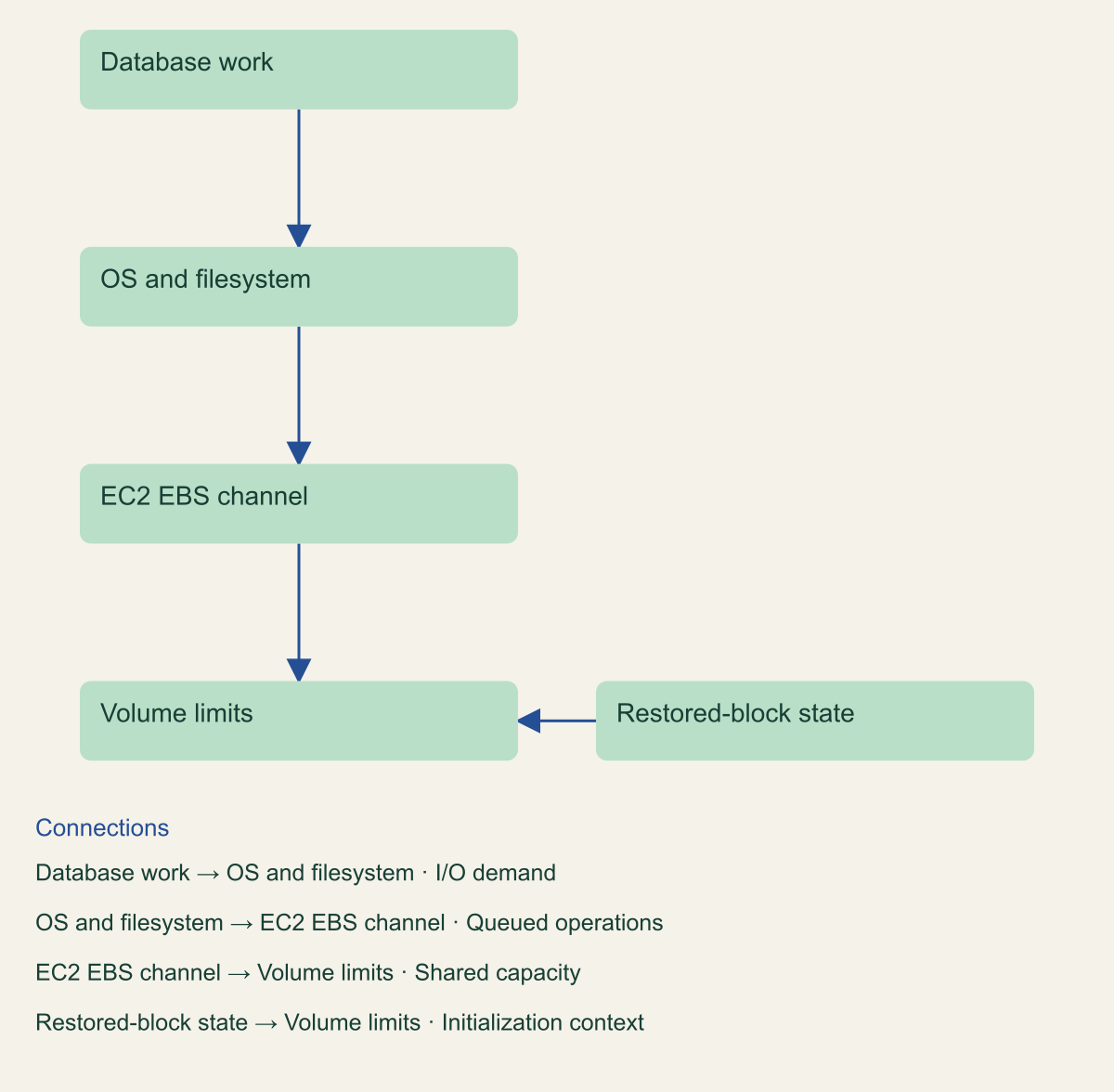
The layered figure separates application work, the operating-system path, instance bandwidth, volume limits and initialization. It is a conceptual diagnostic map, not a model that predicts transaction latency. Each layer needs its own observations and can remain an unresolved hypothesis until the relevant evidence is available.
No database, volume or workload was tested for this guide. The numeric chart shows current documented gp3 settings, not a performance benchmark. Any real provisioning change needs the reader's authorization, comparable workload observations and a service-level acceptance criterion.
The practical goal is to avoid paying for a different number while leaving the actual bottleneck unchanged. A useful diagnosis should say which limit appears relevant, what evidence supports it, what alternative explanation remains and what bounded change could distinguish those possibilities.
Each I O boundary needs its own evidence
Volume provisioning is one layer in an application latency investigation.

Source. Original diagnostic model informed by AWS documentation. [2][3][4][5]
Method. Conceptual relationship, not a predictive performance model.
Accessible table and figure data
| Layer | Observation | Not established alone |
|---|---|---|
| Application | Transaction latency and correctness | Storage cause |
| Operating system | Queue and I/O pattern | Provider limit |
| EC2 channel | Shared instance envelope | Per-volume application success |
| Volume | IOPS and byte-rate evidence | Whole transaction latency |
| Initialization | Restored-block context | Complete restore acceptance |
| Layer | Observation | Not established alone |
|---|---|---|
| Application | Transaction latency and correctness | Storage cause |
| Operating system | Queue and I/O pattern | Provider limit |
| EC2 channel | Shared instance envelope | Per-volume application success |
| Volume | IOPS and byte-rate evidence | Whole transaction latency |
| Initialization | Restored-block context | Complete restore acceptance |
Read the current gp3 contract
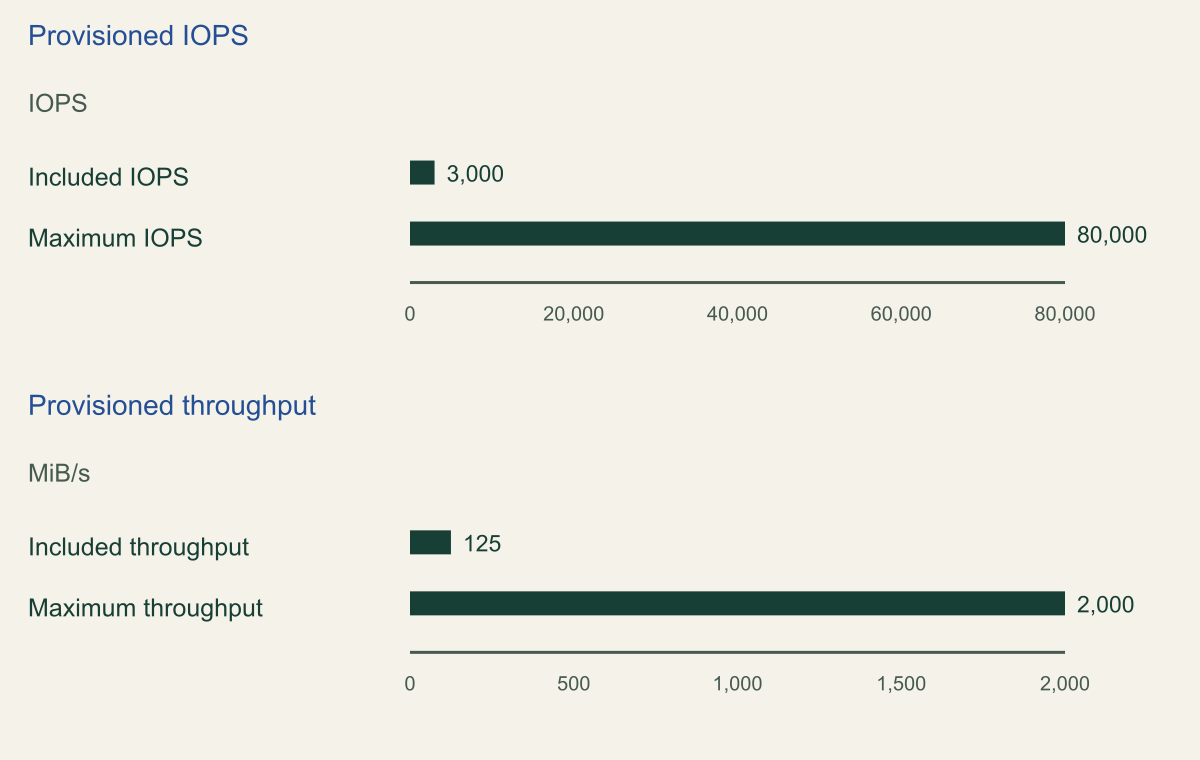
As reviewed on September 2, 2026, AWS documents a gp3 baseline of 3,000 IOPS and 125 MiB/s, with configurable maxima of 80,000 IOPS and 2,000 MiB/s for the regional offering. AWS Outposts has separate documented limits. Older 16,000-IOPS and 1,000-MiB/s descriptions must not be generalized to current regional gp3. [1]
The maxima have prerequisites. The documented 500-IOPS-per-GiB relationship requires at least 160 GiB for 80,000 IOPS. Reaching 2,000 MiB/s requires at least 8,000 IOPS and 16 GiB under the stated ratios. The instance still needs sufficient capability to drive the intended workload. [1]
The chart keeps operation rate and byte rate in separate panels. They are different units and different constraints, not two series that can share an unlabeled scale. Its baseline and maximum values are specifications. They do not imply that a database with a particular configuration achieved those values.
Review what the workload needs before selecting a maximum. A latency-sensitive transaction path may have a different I/O pattern from a large sequential scan or backup operation. The right question is not whether the biggest number is available, but whether the observed demand is constrained by the corresponding resource.
Preserve the chosen size, IOPS and throughput relationship in the change record. A review that approves only the IOPS value can miss a size prerequisite or a throughput dependency. Include the instance envelope and attachment context so the approval describes a feasible configuration rather than an isolated product setting.
Do not interpret the included baseline as a universal application guarantee. Provisioned settings describe a storage contract under documented conditions, while application latency reflects more of the system. The acceptance test must still observe the database operation and the surrounding path.
Current regional gp3 settings use separate units
Maximum IOPS and throughput require qualifying size and configuration, plus a capable instance. [1]

Source. AWS gp3 documentation, reviewed September 2, 2026. [1]
Method. Direct specification values, not measured performance. 80,000 IOPS requires at least 160 GiB; 2,000 MiB/s requires at least 8,000 IOPS and 16 GiB. Outposts is separate.
Accessible table and figure data
| Setting | IOPS | MiB/s |
|---|---|---|
| Included IOPS | 3000 | Not applicable |
| Maximum IOPS | 80000 | Not applicable |
| Included throughput | Not applicable | 125 |
| Maximum throughput | Not applicable | 2000 |
| Setting | IOPS | MiB/s |
|---|---|---|
| Included IOPS | 3000 | Not applicable |
| Maximum IOPS | 80000 | Not applicable |
| Included throughput | Not applicable | 125 |
| Maximum throughput | Not applicable | 2000 |
Keep operation size and units visible
For SSD-backed EBS volumes, AWS documents a maximum single I/O size of 256 KiB and explains splitting and merging behavior. An application's read or write call therefore need not correspond one-for-one with the operations counted at the EBS boundary. Retain the layer at which each counter is measured. [2]
IOPS measures operations per second; throughput measures bytes per second. The relationship depends on operation size and the relevant counting boundary. Dividing compatible byte and operation totals can describe an average for that population, but it should not be applied to unrelated intervals or mixed counters as if it revealed every request's size.
Units also need explicit conversion. The VolumeAvgThroughput metric is documented in KiB/s, while gp3 specifications use MiB/s. EC2 tables can use different throughput units. Preserve the original unit and show any conversion before comparing values. A number that appears lower may simply be expressed differently. [3][4]
A hypothetical review might compare an application request count with EBS operations and conclude that storage is duplicating work. Splitting, merging and other layers can make that conclusion too strong. First establish which operations each counter represents, then decide whether the difference actually indicates unexpected behavior.
Separate reads and writes where the question requires it. A combined average can hide a changed workload mix. Preserve the metric definitions and time boundaries so a later reviewer can reproduce the comparison rather than relying on a screenshot with an unexplained utilization percentage.
The guide deliberately avoids a synthetic I/O-size performance chart. Without a measured workload, such a chart would create an appearance of benchmark evidence that does not exist. Use the documented size boundary to interpret real observations, and reserve performance claims for a separately described test.
Look beyond minute averages
A minute average can hide short periods of saturation. AWS's I/O guidance discusses burst behavior and the need to interpret queueing with the workload. Do not conclude that a limit was never reached solely because the averaged demand appears below the provisioned value. [2]
Current EBS metrics include VolumeIOPSExceededCheck and VolumeThroughputExceededCheck, which report whether the documented limit condition occurred during the minute. Their support is conditional: the documented Nitro, volume-type, Multi-Attach and ECS/Fargate restrictions matter. Missing support is not the same as a metric value of zero. [3]
Latency, queue and stalled-I/O observations answer additional questions. A stalled-I/O check is not a database transaction-success check, and a latency average summarizes only the metric's defined population. Read the exact definition before treating one signal as a substitute for another. [3]
Preserve the statistic and dimensions used in every comparison. A volume-wide view may differ from an attachment-specific view, and a maximum has a different meaning from an average. If the dashboard changes these settings between screenshots, the comparison should not be presented as evidence of a provisioning improvement.
A recommended diagnostic sequence starts with the application symptom, checks whether the relevant volume or instance limit signal aligns with it, and then examines queueing and workload changes. This is not an automated causal proof. Several signals can coincide because demand changed, without establishing that a single resource adjustment will resolve the problem.
Keep unobserved intervals explicit. If the incident occurred before the needed metric was collected or the attachment does not publish it, record the limitation and choose another supported observation. Avoid replacing missing evidence with a fabricated utilization estimate merely to complete the analysis.
Check whether the workload itself changed during the affected period. A new query plan, maintenance task, data-growth pattern or application release can change I/O demand without any change to the volume settings. These are hypotheses for the database owner to investigate, not conclusions supplied by EBS metrics. Correlating them with storage observations helps distinguish a newly exposed capacity limit from a different source of latency.
Record empty and missing observations separately. A metric that reports no completed operations in its defined period cannot by itself prove that the database had no work waiting elsewhere. A metric that is unavailable for an attachment says something different again. Preserve those distinctions in the worksheet before computing averages or marking a path healthy. This prevents a low-looking chart from ending the investigation while the application still reports a concrete failure.
Check the instance side of the limit
EC2 EBS-optimized guidance makes the instance boundary essential: usable performance is limited by the instance's capability or the combined attached volumes, whichever is smaller. Review the exact instance type and documented conditions. A volume can have provisioned headroom while the shared instance path is constrained. [4]
Inventory all relevant attached-volume demand rather than focusing only on the database's main data volume. Logs, temporary work or another workload can share the instance-side resource. The review should identify which demand is included and which remains outside the observation, without assuming a sum of unrelated peaks occurred simultaneously.
Check the workload assumptions behind the instance specifications. A published bandwidth or IOPS value can be tied to conditions that differ from the application's I/O pattern. Preserve those conditions when comparing the instance with the volume settings. Do not silently translate a table entry into a transaction-rate promise.
For a hypothetical diagnosis, increasing volume IOPS while leaving an instance bottleneck unchanged may produce little useful improvement. That is a reason to inspect the path before the change, not a claim about measured results. The proposed test should make the competing explanations distinguishable under an authorized workload.
An instance change can have consequences beyond storage performance. Review application placement, maintenance and recovery requirements with the service owner. This guide does not prescribe a particular instance purchase or claim that changing instance size is always safer than adjusting a volume.
Close the instance review with a bounded conclusion: the documented envelope, observed shared demand and remaining uncertainty. If the evidence points elsewhere, retain that result. Eliminating a plausible limit is useful progress even when it does not immediately identify the database's true cause of slowness.
Separate initialization from steady state
A volume restored from a snapshot introduces an initialization question. AWS documents that restored blocks need initialization for full performance, while newly created empty volumes do not require that process. Distinguish a recent restore or copy from a long-running steady-state volume before attributing its behavior to ordinary gp3 provisioning. [5]
Record the volume's origin and relevant initialization method. A benchmark or incident comparison that treats a newly restored volume as identical to an already initialized one can mix different conditions. The reader needs that context before interpreting a latency change after recovery.
Do not run a destructive disk-writing tool merely to generate load or initialize a production database volume. Follow the supported method for the actual environment and obtain authorization for any operation that can affect service. This article supplies no disk command and makes no claim of an executed initialization test.
Separate initialization progress from application acceptance. A supported initialization process can address one storage condition without proving that database recovery, configuration or external dependencies are correct. Keep the restore-validation procedure connected to the storage diagnosis rather than allowing one completion signal to stand for both.
A hypothetical recovery rehearsal should preserve the snapshot identity, created volume, initialization choice, instance attachment and application check. If the result is slow, those facts help determine whether the issue is expected first-read behavior, a capacity constraint or another part of recovery.
Do not promise a universal initialization duration. The relevant data and environment were not measured here. If the organization later compares initialization options, report the actual scope, dataset and timing separately from this specification-based guide.
Choose and observe a bounded change
Choose a bounded change whose expected effect follows from the diagnosis, but do not call every EBS modification reversible. AWS documents that volume-modification requests cannot be canceled, that support depends on the configuration and that a previous modification must complete before another is made. Volume size also cannot simply be reduced afterward. [6]
The approval record should identify the current setting, proposed setting, expected observation and recovery approach if the application remains unhealthy. An intended rollback may involve a different supported operation or a restored copy, not an instantaneous return to the old volume state. Keep that distinction explicit.
Avoid changing several independent resource limits at once unless the approved design requires it. A simultaneous instance, IOPS and application-pool change may be operationally necessary, but it weakens attribution. If the purpose is diagnosis, prefer a scope that allows the expected result to be interpreted clearly.
Observe the actual modification state and service behavior. A request being accepted is not the same as the modification completing, and completion is not the same as the database meeting its latency and correctness requirements. Preserve those milestones separately with their timestamps and responsible owners.
Use comparable workload windows for a before-and-after review. Record demand, query mix, background jobs and relevant configuration changes. A lower latency during a quieter period does not establish that a storage change caused the improvement. This guide proposes that method but presents no invented comparison data.
Retain unexpected effects and costs as part of the decision record. A modification that improves one symptom while creating an unacceptable operational or financial condition may not be an acceptable final state. The service owner should evaluate the whole change, not only the metric that motivated it.
Close on the database outcome
The final diagnosis should connect the observed database symptom to the supported storage or instance evidence and the authorized change. If the evidence remains ambiguous, say so. A provisioned limit can be documented precisely while the cause of an application's latency remains uncertain.
A useful acceptance record includes workload context, instance and volume identities, metric units and statistics, modification state, database latency and errors, and the service's correctness checks. Keep raw observations distinct from the explanation derived from them. That makes later review possible without overstating causality.
Do not report the chart's maximum as achieved throughput. It remains a vendor specification with prerequisites. A real performance claim needs an actual measured workload, a described method and limitations that this article does not supply.
The outcome worth preserving is a specific answer: which limit mattered, what was changed, what application behavior was observed and what remains to investigate. Following the I/O path makes that answer more useful than a general recommendation to add IOPS whenever a database slows down.
Method and provenance
Source-led technical analysis of directly reviewed project and vendor documentation, with original decision frameworks and explicitly hypothetical examples. Sources were reviewed on September 2, 2026.
No customer environment, live configuration, workload measurement or production test was inspected. Product behavior and limits are bounded to the cited documentation and stated review date.
AI assistance. AI assisted research synthesis, drafting, diagram planning and deterministic editorial checks. No personal deployment experience, independent human review or live test is claimed.
Published under the Cloud Security Desk organizational byline. Read the practitioner guide policy.
References
- General purpose SSD volumes AWS. Accessed .
- Amazon EBS I O characteristics AWS. Accessed .
- CloudWatch metrics for EBS AWS. Accessed .
- EBS optimized instance types AWS. Accessed .
- Initialize EBS volumes AWS. Accessed .
- Modify an EBS volume AWS. Accessed .